About the Project
💡 What Inspired Me Taking on this solo hackathon as a first-year engineering student, I wanted to tackle a real-world problem that affects everyday people: the bottleneck at clinic reception desks. Patients often wait in distress while staff struggle to manually prioritize cases. At the same time, I am deeply concerned about medical data privacy. Cloud-based AI solutions are powerful, but sending sensitive health data to external servers is a massive privacy risk.
I wanted to see if I could bring state-of-the-art triage capabilities entirely to the edge. The release of highly capable local models like llama3.1 inspired me to build Pyrexia—a tool that democratizes healthcare access through multilingual voice support while keeping 100% of the data on the local machine.
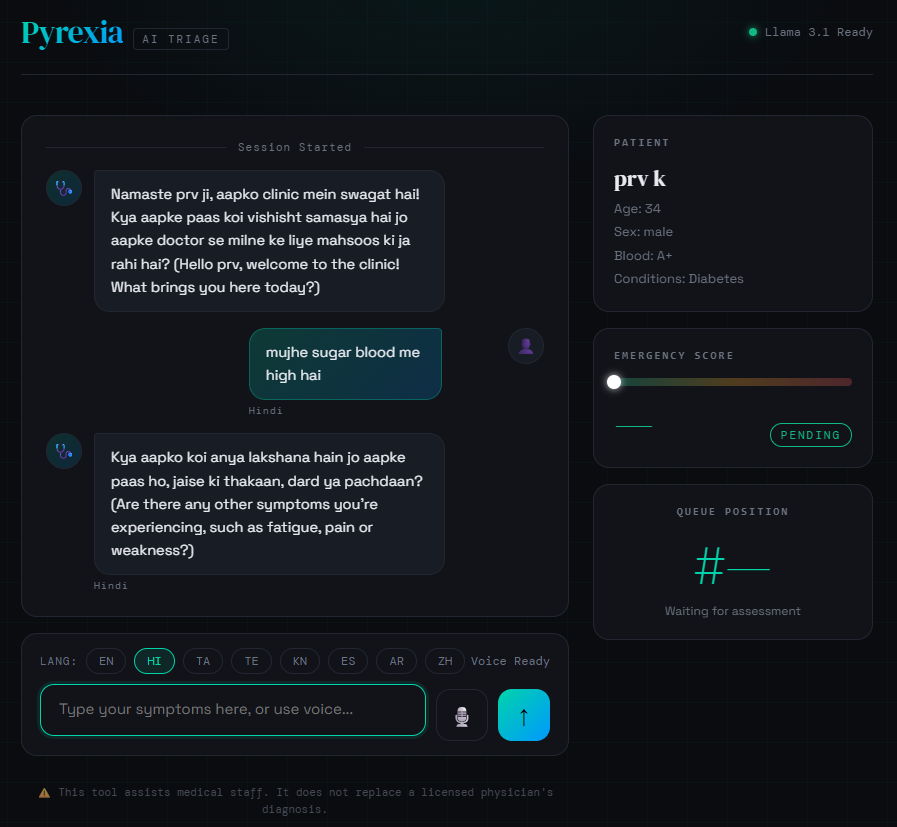
🛠️ How I Built It I designed Pyrexia as a zero-dependency, single-file web application (HTML/CSS/Vanilla JS) to ensure it is incredibly lightweight and deployable anywhere with a browser. The foundational logic I recently learned in CS50 was crucial for structuring the state management cleanly without relying on heavy frameworks.
The architecture is split into two main communication streams with the local Ollama instance:
- Conversational Stream: Uses the
http://localhost:11434/api/generateendpoint to chat with the patient in their native language, asking one clarifying question at a time. - Scoring Stream: A secondary, hidden prompt evaluates the chat history to extract structured JSON.
To formalize the triage logic, the system relies on an emergency score $E$, where $0 \le E \le 100$. The triage category function determines the UI response and queue placement:
T(E) = \begin{cases} \text{Standard}, & 0 \le E < 40 \ \text{Priority}, & 40 \le E < 80 \ \text{Critical}, & 80 \le E \le 100 \end{cases}$$
When 80 is detected, the DOM instantly triggers the "Critical Mode" overlay and auditory alerts. For accessibility, I integrated the browser's native Web Speech API for voice-to-text with a custom 2200ms silence timeout, and the SpeechSynthesis API to read the AI's responses aloud.
⚠️ Challenges I Faced
Prompt Engineering for JSON:** Forcing an LLM to consistently output only valid JSON for the emergency score without conversational filler (like "Here is the JSON you requested") was surprisingly difficult. I had to heavily engineer the system prompt and implement robust JSON.parse() error handling in vanilla JS to recover from hallucinations.
Asynchronous Voice APIs:** Managing the state between the microphone recording, the interim transcription, the silence timeout, and the subsequent API call to Ollama required careful orchestration of JavaScript Promises to prevent race conditions.
Zero-Dependency Constraint:** Building a reactive UI (like a live-updating queue and dynamically color-coded badges) without React or Vue meant I had to manually manage DOM updates and bind state changes efficiently to avoid memory leaks.
🧠 What I Learned
This project was a massive leap forward in my understanding of browser APIs and local AI integrations. I learned how to interface directly with local REST APIs using native fetch(), manage complex asynchronous state in vanilla JavaScript, and design a CSS-variable-driven dark theme from scratch. Most importantly, it proved to me that highly capable, privacy-first AI applications don't need complex cloud infrastructure—they can run right on the user's desk.

Log in or sign up for Devpost to join the conversation.