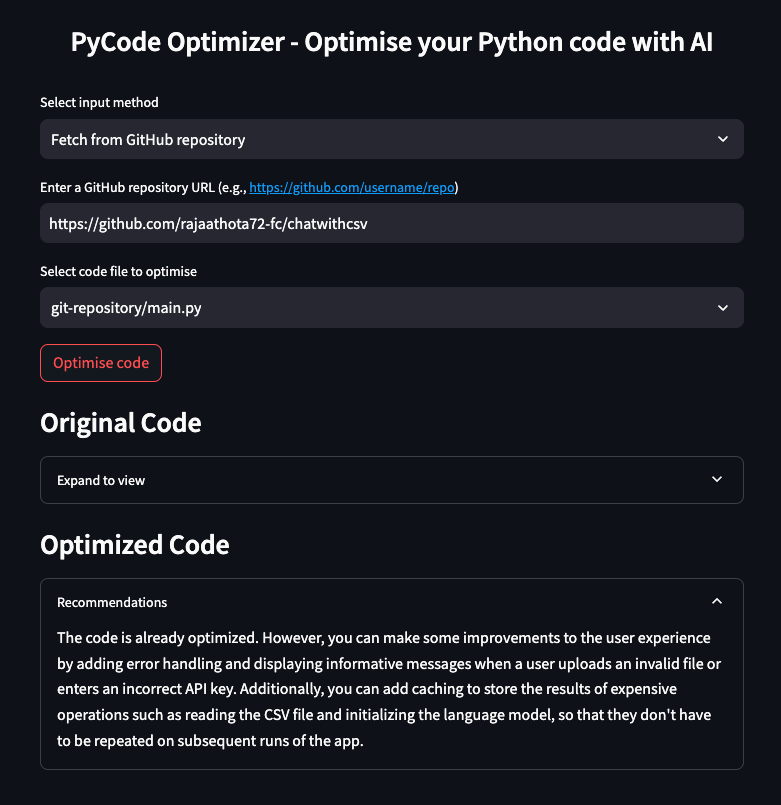
PyCode Optimiser is a Streamlit-based application designed to help developers optimise their Python code using the power of AI. The app offers a convenient and user-friendly interface where users can either enter their code directly, upload a Python file, or fetch code from a GitHub repository. Once the code is provided, PyCode Optimiser uses the Snowflake-Arctic model with Replicate API to analyze and optimise it, providing a more efficient version along with recommendations for improvement.
Inspiration
The idea for PyCode Optimiser is based on a common challenge faced by many developers - writing efficient and clean code. Often, even experienced developers write code that needs to be optimised for better performance and readability. I wanted to create a tool that leverages AI to assist developers in identifying potential optimisations quickly and easily, reducing the time and effort spent on manual code reviews.
How does it work?
PyCode Optimiser is available as an online streamlit app where users can choose between three input methods:
- Entering code directly into a text area,
- Uploading a Python file from their local machine,
- Fetching code from a GitHub repository.
The app then processes the provided code using the Snowflake-Arctic model with Replicate API , which analyses the code and generates an optimised version. This optimised code is displayed alongside the original code, allowing users to see the improvements and understand the changes made by the AI.
How the tool is built?
Building PyCode Optimizer involved several key technologies. The application is built using Streamlit, a powerful framework for creating interactive web applications in Python. I have integrated the Replicate API to perform the AI-driven code optimisation using Snowflake-Arctic model. The backend logic is written in Python, and used Git for cloning repositories and managing file operations. Environment variables are managed using the dotenv library, ensuring secure handling of sensitive information such as API keys.
Challenges
Developing PyCode Optimiser was not without its challenges. Integration with the Replicate API required careful handling of API requests and responses. I also had to manage different input methods efficiently, ensuring that the application could handle direct code input, file uploads, and GitHub repository fetching with equal ease.
Accomplishments
First and foremost,I successfully created a tool that leverages AI to provide real-time code optimisations. The user interface is intuitive and user-friendly, making it easy for developers to use the tool without a steep learning curve. I also implemented robust error handling and feedback mechanisms to enhance the user experience. Overall, I built a tool that can significantly aid developers in writing better Python code.
Learnings
Throughout the development, I gained valuable insights into several areas. I learned how to effectively use Streamlit to build interactive web applications and the power of the Replicate API and Snowflake Arctic for AI tasks. I also improved my understanding of handling file operations and integrating with GitHub repositories in Python and Streamlit.
What's next?
Looking ahead, I have several exciting plans for PyCode Optimiser. I aim to enhance the optimisation capabilities by integrating more advanced AI models. I also plan to add support for other programming languages, expanding the tool's utility beyond Python. Additionally, I am considering implementing user authentication and code history tracking, allowing users to save and revisit their optimisation sessions. Finally, I want to improve the user interface with more interactive features and visualizations, making the optimisation process even more engaging and informative.
Built With
- python
- replicate
- snowflake-arctic
- streamlit
- streamlit-cloud


Log in or sign up for Devpost to join the conversation.