-
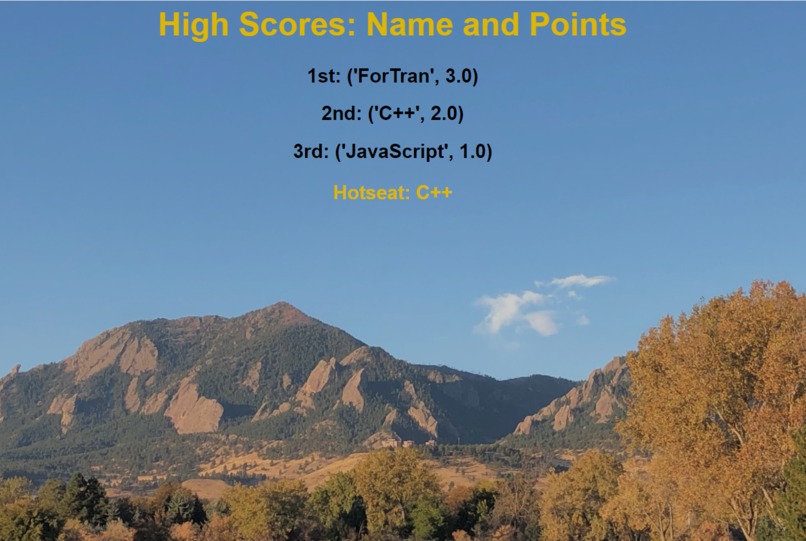
Web page that gets displayed after running the batch script.

Inspiration
I'm taking an elective this semester that has mandatory clicker questions. Clicker questions can be boring, but I had one class where this wasn't the case. General Biology 1 had a system where they had a random number generator choose a student to answer each question. The student could pass if they wanted, so it made class participation more genuine. I wanted to take this style of participation and go even further with it. Everyone loved Kahoot in high school, so lets see if we can make something similar to it!
What it does
When the professor is done with a clicker session, the files from pyClicker++ will take the scores, and display the top three along with the names of those students on a web page. Don't worry, the name is optional if the professor wants to keep student confidentiality. Names are fetched from the .csv file Canvas provides to the professors. Additionally there is a feature called "Hotseat". It displays a random student that answered last clicker session. This feature can be used for many participation activities; however, it was also built in to prevent one person using multiple clickers. If Bob's name appears on the screen, and Bob isn't in class, things look a little suspicious!
How I built it
pyClicker++ consists of 4 files not included with the iClicker Base Station software. There is a batch script that allows pyClicker++ to be lightweight and fast. This batch script runs the python script that is the main brain of the operation. This python script starts off by reading in names from a given .csv file, and then stores them for later use. The script then reads in the latest .xml file in the iClicker directory. This is how iClicker stores scores for each session.
After parsing this file for clicker ID and score, these values are sorted from highest to lowest. Clicker ID is then replaced with appropriate names (This step can be skipped by the professor by commenting out 2 lines of code). The python script then writes a basic web page using html.
The web page will open automatically, and show the top three students along with their scores for last session. The css and jpg file that accompanies the html file is included in the pyClicker++ package.
Hotseat was a little bit of a challenge being truly random. I decided to seed the random number generator using time. A random integer is generated between 0 and 10000, and is modulo'd by number of students +1, so everyone has as equal of a chance of answering as possible!
Challenges I ran into
I have been notoriously bad in the past at using file I/O in python, and this project depended heavily on file I/O. A major bump in the road was reading in the .csv file. The csv library has quite a few nuances such as not keeping the rows in order when writing to a dictionary. This wasn't too big of an issue when I realized I could just search by dictionary key value.
Another challenge was sorting the scores by highest value. This was a challenge because there was a name attached to each score, and they were pairs in a dictionary. Sorting the dictionary was a challenge that easily took about an hour! I eventually made the sorted scores a tuple, and it was easier to use from then on.
The biggest challenge of pyClicker++ was finding the scores of each clicker. iClicker has some intentionally vague xml files. The scores were 2 sub nodes deep! This required a lot of iteration, but it was able to be done with the help of the ElementTree library.
Accomplishments that I'm proud of
pyClicker++ reads files, writes files, parses files, and automatically opens your browser. At first this seemed like too big of a task for one person, but in the end, I am proud that it could do all I wanted it to.
This hack is non intrusive either, making this an easily usable program that could be used in classes tomorrow if any professor wanted. This was a big deal to me because I really didn't want to step on iClicker's toes with this hack.
What I learned
I learned how truly powerful Python is. One file is the brain of this whole operation, and there is still room for growth and improvement! I also learned how modular Python is as well. I imported from 8 libraries in order to accomplish what I wanted, and along the way I learned about each library.
What's next for pyClicker++
I would say the next step is total leader boards. I didn't implement it into this version because if you miss a class, your chances of being in the top three are really slim, and this would become an attendance checker. Going off of this thought, I would say make multiple pyClicker++ packages depending on what class environment the professor wants. A stretch goal for this would be to actually implement this into a class.


Log in or sign up for Devpost to join the conversation.