The Problem That Kept Me Up at Night
Somewhere right now, a Pharmacovigilance case manager is tracking a legally mandated 7-day reporting deadline in a shared Excel spreadsheet.
The clock started when the adverse event was first received. The regulator does not care that the email was buried. The regulator does not care that the safety database was slow. The regulator issues a warning letter, and that warning letter costs an average of $300,000.
This is not a rare edge case. This is Tuesday morning for PV teams at pharmaceutical companies and contract research organizations worldwide. The tools they use to manage life-critical regulatory deadlines were built for scheduling meetings.
I built something specifically designed for this problem.
What Inspired This
I wanted to solve a problem where the stakes are genuinely high — not productivity gains measured in minutes, but compliance failures measured in patient safety consequences and federal enforcement actions.
Pharmacovigilance sits at the intersection of clinical medicine, regulatory law, and operational workflow. A missed SUSAR (Suspected Unexpected Serious Adverse Reaction) submission does not just generate paperwork. It can delay regulatory action on a drug that is harming patients right now.
The existing enterprise solutions - Veeva Vault Safety, Oracle Argus - cost hundreds of thousands of dollars annually and are so complex that mid-size CROs and smaller pharma companies cannot afford them. The gap between "too expensive" and "Excel spreadsheet" is where cases get missed.
That gap is what I built into.
What I Built
The PV Case Orchestrator is a full-stack compliance management application with four core capabilities:
1. Intelligent Case Intake with
Confidence-Scored Triage
Every new case passes through a multi-step intake form. The system analyzes raw case text using keyword detection across SUSAR triggers (life-threatening, unexpected, not listed in labeling) and serious event markers (hospitalized, ICU, disability) and returns a structured recommendation with a confidence percentage.
- ≥85% confidence: Green prompt, one-click confirmation available
- 60–84% confidence: Amber warning, secondary review recommended
- <60% confidence: No recommendation shown, case held at CRITICAL priority until manual classification
The AI never auto-confirms. Every classification requires explicit human sign-off. This is EU AI Act Article 14 human oversight compliance by design.
2. Safe-by-Design Architecture with
Four Human-in-the-Loop Gates
Before writing a single line of logic, I performed a full Failure Mode and Effects Analysis (FMEA) on the three highest-probability failure modes:
| Risk | Severity | Probability |
|---|---|---|
| Keyword triage misclassification | 9/10 | 8/10 |
| Audio alert suppression | 8/10 | 9/10 |
| Clock integrity failure | 10/10 | 7/10 |
Every mitigation became an architectural requirement:
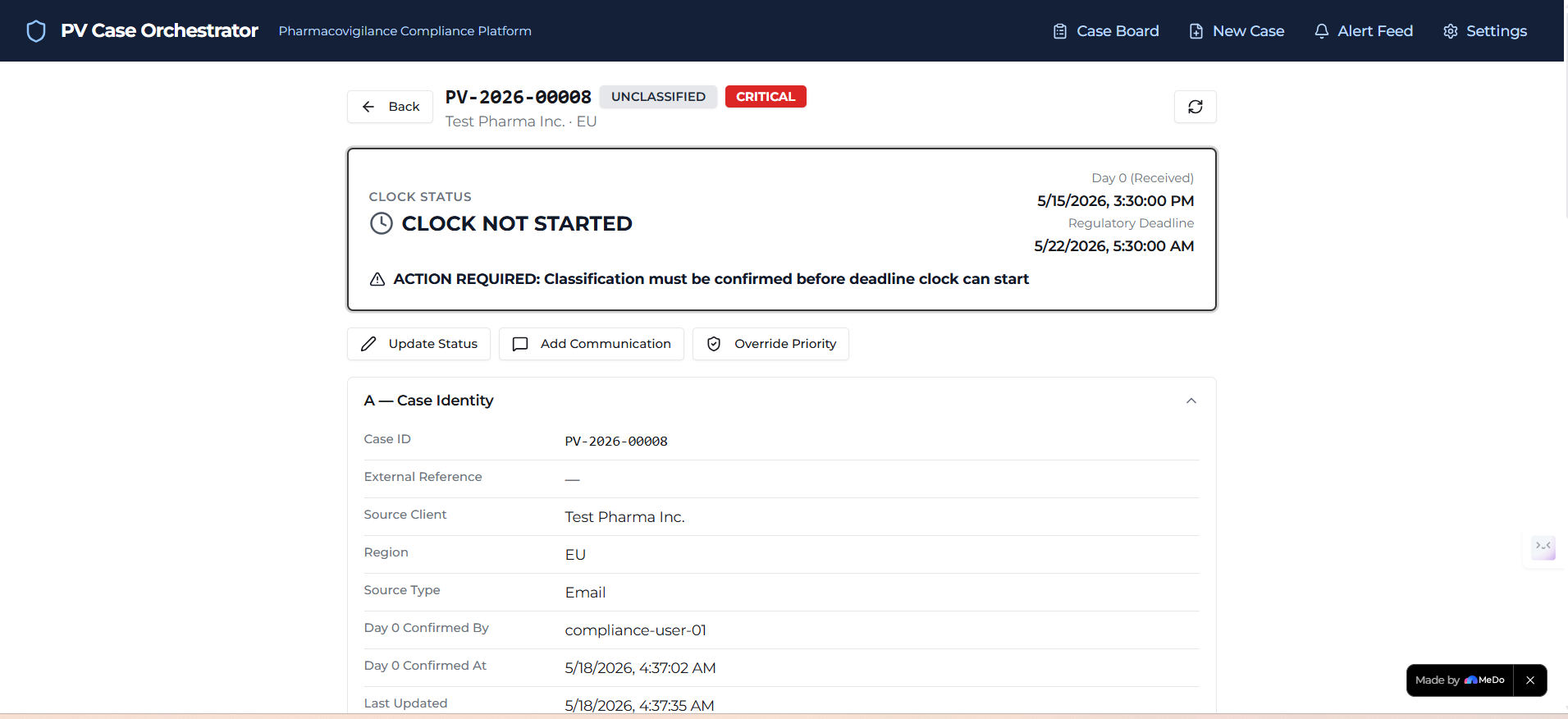
Gate 1 - Day 0 Clock Confirmation The regulatory clock does not start until a human explicitly confirms the receipt date with a mandatory checkbox. The timestamp is immutable after confirmation — locked at the data layer, not just the UI.
Gate 2 - Classification Sign-Off No deadline is calculated until a human actively confirms or overrides the AI recommendation. Override reason is required and permanently logged.
Gate 3 - Alert Acknowledgement Critical alerts trigger a full-screen interrupt that cannot be dismissed by clicking outside it or pressing Escape. Only an explicit acknowledgement button closes it, capturing user ID and UTC timestamp to the permanent audit trail.
Gate 4 - Submission Checklist Hard Gate Status cannot advance to READY FOR SUBMISSION unless all four checklist items are confirmed. This block is enforced at the data layer — it cannot be bypassed from the UI.
3. Three-Tier Auditory Alert System
Most compliance tools make alarm fatigue worse by adding more visual notifications to an already overwhelmed screen. I applied the principle of Calm Technology — information should live in the periphery of attention until it genuinely needs the center of it.
I engineered three distinct sonic tiers using the browser-native Web Audio API:
Tier 1 — Routine (>5 days remaining) Single 440Hz sine wave chime, 0.8s decay, 30% volume. Fires once. Lives entirely in the periphery.
Tier 2 — Warning (2–5 days remaining) Ascending two-note interval: C5 (523Hz) rising to E5 (659Hz). Creates psychoacoustic incompleteness — the brain registers something unresolved. Maximum 3 plays per case per 24 hours to prevent habituation. After 3 plays, switches to visual-only automatically.
Tier 3 — Critical / SUSAR (<2 days or SUSAR classification) Descending three-note minor phrase: G5 (784Hz) → E5 (659Hz) → C5 (523Hz). Plays three times with 3-second gaps. Fires simultaneously with a full-screen red interrupt. The visual interrupt fires whether audio is available or muted — zero silent failures.
An audio health check runs silently on every page load. If audio fails, a persistent amber banner activates across all screens.
4. Immutable Audit Trail
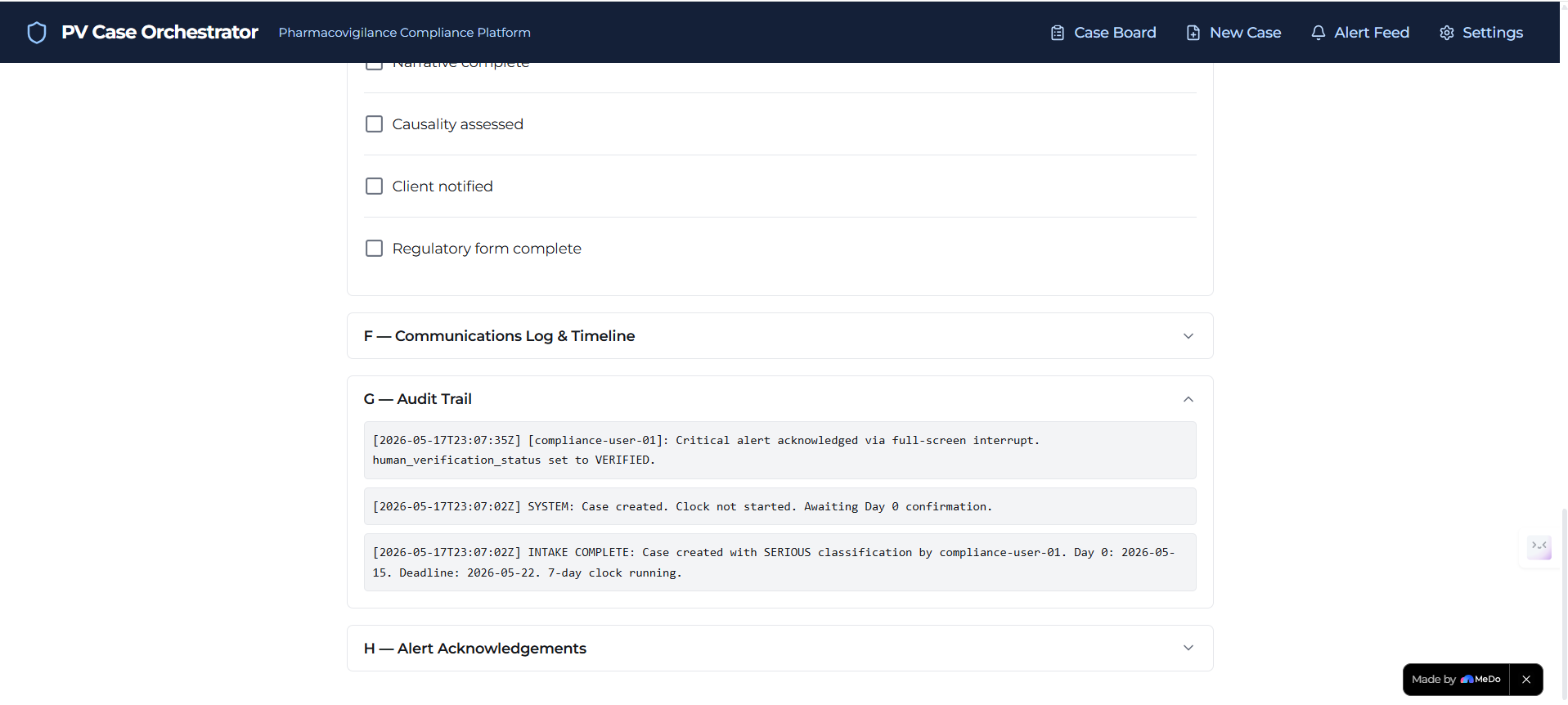
Every action - classification, status change, alert acknowledgement, checklist completion, priority override - is written to an append-only log with UTC timestamps and user attribution. If a regulatory inspector asks what happened with a case and when, the answer is already documented and cannot be altered.
How I Built It
The application was built entirely on MeDo using an iterative prompt-driven development approach across seven build versions.
Phase 1 - Architecture and Risk Analysis Before touching the platform, I designed the complete state machine, data schema, and FMEA risk analysis. The Cases table was specified with 40+ fields across identity, clock, triage, priority, workflow, checklist, and audit categories. Thirteen business rules were documented as explicit logic requirements.
Phase 2 - Database and Backend Generation The complete schema was generated via MeDo's seed prompt, including both calculated_priority and actual_priority as independent fields - a critical FMEA requirement ensuring the system's automated assessment and the human's manual override are always tracked separately.
Phase 3 - State Machine Configuration Six core automation rules were configured in MeDo's logic layer governing: new case initialization, Day 0 clock start, classification-triggered deadline calculation, live 15-minute priority recalculation, critical alert generation, and the submission hard gate.
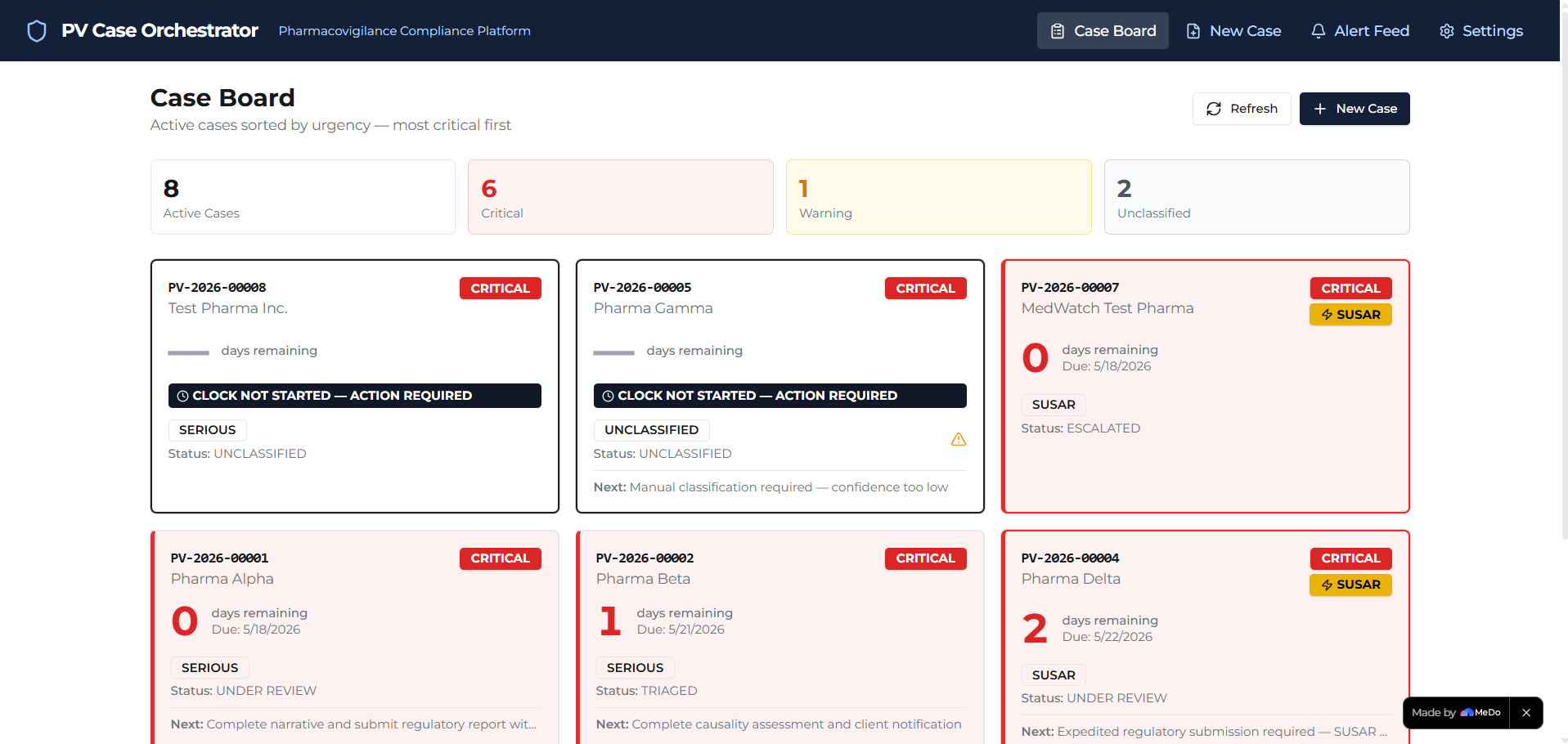
Phase 4 - Frontend and UX Three primary screens were built: the Case Board with color-coded urgency cards and a real-time summary counter, the multi-step intake form with human verification gates, and the Case Detail screen with vertical timeline, submission checklist, and audit trail.
Phase 5 - Auditory Interface The three-tier audio system was implemented using custom JavaScript and the Web Audio API, including the audio health check, tier-specific frequency engineering, habituation prevention logic, and the full-screen critical interrupt.
Challenges I Faced
The Clock Sequencing Problem The biggest technical challenge was ensuring the Day 0 clock started at the exact right moment - when a human confirmed receipt - not when the case was created or when classification was confirmed. Getting the automation sequencing correct so that deadline calculation only fired after both Day 0 confirmation AND classification confirmation required several iterations.
Audio in Real Browser Environments Browser autoplay policies prevent AudioContext from initializing without user interaction. Building the silent health check system that accurately detects whether audio will actually play - not just whether the API exists - required careful engineering of the initialization flow.
Keeping the Human in the Loop Without Creating Friction Every safety gate had to be designed so that it genuinely blocked unsafe actions without becoming an obstacle to legitimate workflow. The balance between protection and usability is the hardest design problem in safety-critical software.
What I Learned
I learned that the most important architectural decisions in safety-critical software are not about features — they are about what the system refuses to do without human confirmation.
I learned that Calm Technology is not a UX philosophy reserved for consumer apps. Applied to compliance tooling, it is a patient safety intervention.
And I learned that MeDo's generative full-stack environment is capable of producing production-quality compliance logic when given sufficiently precise requirements - the quality of the output was directly proportional to the quality of the specification.
North Star Metric
Zero late submissions per 1,000 active cases.
Not faster workflows. Not prettier dashboards. Zero. Late. Submissions.
Built With
- api
- backend
- engine
- es6+
- html5
- ich
- javascript
- medo
- rules
- sqlite

Log in or sign up for Devpost to join the conversation.