-
-
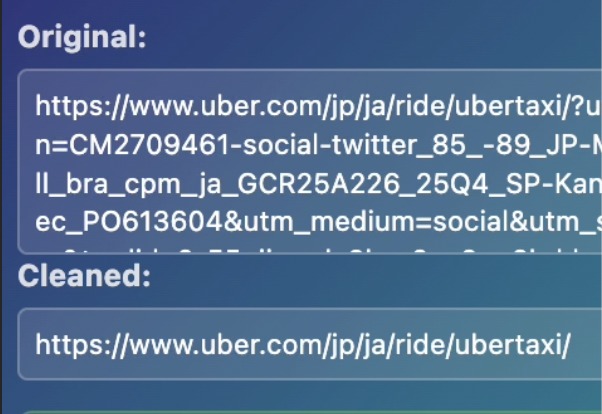
Intelligent URL cleaner to strip trackers and unnecessary params
-
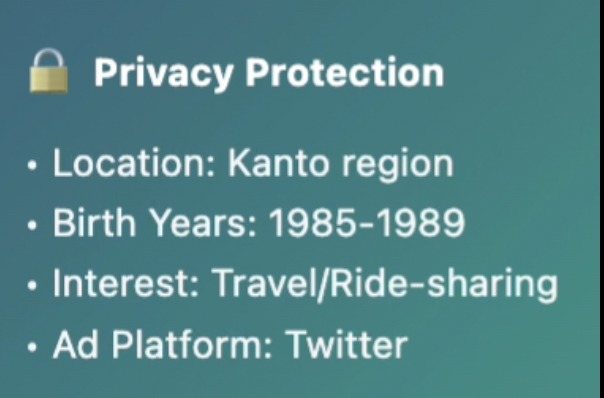
Tracking params occasionally include your personal data, which you might not intend to share
Inspiration
Every time we share a URL, we unknowingly share pieces of ourselves—our location, age, browsing history, and more—embedded in tracking parameters. Existing URL cleaners just strip these silently, but users deserve transparency. What if an extension could not only clean URLs but also show you exactly what personal information you just protected? With Chrome's built-in AI becoming available, we saw an opportunity to create the first privacy tool that educates users about tracking while protecting them—all without sending data to any server.
What it does
PureURL is a Chrome extension that transforms privacy protection from a black box into a transparent learning experience:
- One-Click Cleaning — Instantly removes tracking parameters and copies the clean URL
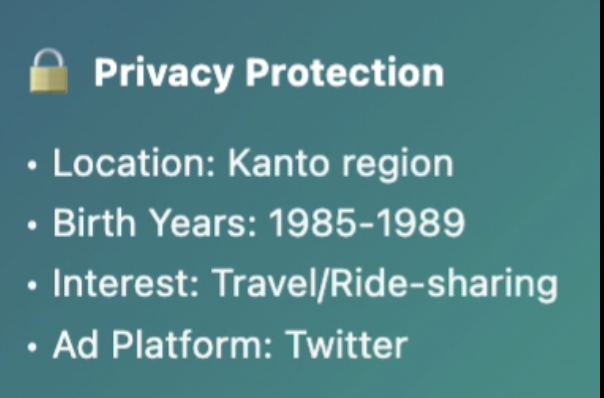
- AI Privacy Analysis — Uses Gemini Nano to analyze what personal data was embedded (location, demographics, ad targeting, browsing history)
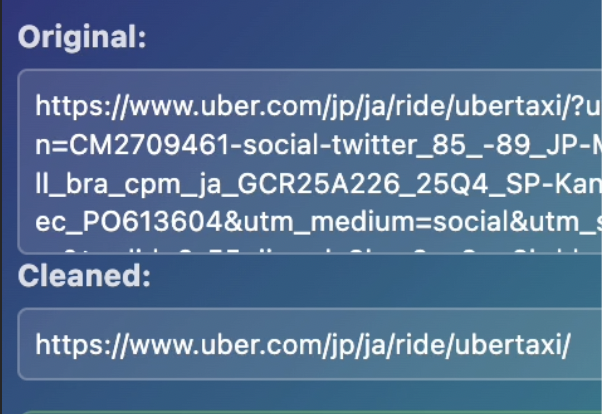
- Visual Comparison — Shows before/after URLs side-by-side with character count
- Privacy Dashboard — Tracks cumulative impact: URLs cleaned, characters saved, and privacy items protected
- 100% Local — Everything runs on-device; no servers, no data collection, no irony
Example: A 300-character Uber URL reveals it was tracking your Kanto region location, birth year range (1985-89), and Twitter campaign targeting—all stripped in one click.
How we built it
Tech Stack:
- Chrome Extension (Manifest V3)
- Gemini Nano via Chrome Prompt API
- JavaScript, HTML5, CSS3
Architecture:
Dual-Prompt System — Two specialized AI sessions:
- Session 1: Cleans URL using examples of essential vs. tracking parameters
- Session 2: Analyzes removed parameters to extract privacy implications
Progressive AI Loading — First-time users see real-time download progress for Gemini Nano
Smart Response Processing:
- Parses AI-generated privacy insights
- Filters and prioritizes top 4 most significant items
- Cleans markdown formatting automatically
Graceful Degradation — Works even if AI is unavailable, with clear user messaging
Statistics Engine — Persists cumulative metrics using
chrome.storage.local
Challenges we ran into
Prompt Engineering — Getting consistent, parseable privacy analysis from an LLM required extensive iteration. We developed a structured prompt format with examples that produces "Category: Value" outputs.
Performance Balance — Running two AI sessions per click could feel slow. We optimized with parallel processing where possible and clear progress feedback.
Privacy Categorization — Teaching the AI to distinguish "significant" privacy data (location, demographics) from generic info (campaign names) required careful prompt crafting and example selection.
Accomplishments that we're proud of
First-of-its-Kind Privacy Transparency — We're the first tool to not just clean URLs but explain what you're being protected from using AI.
True Privacy — Unlike other privacy tools, PureURL practices what it preaches—100% on-device processing with Chrome's built-in AI means zero data leaves your machine.
Educational Impact — Users learn about tracking mechanisms organically while using the tool, increasing privacy awareness.
Robust UX — Beautiful interface with smooth animations, progress indicators, and graceful error handling makes AI feel magical, not mysterious.
Novel Metric — "Privacies Protected" is a new way to quantify privacy tools' impact beyond technical stats like "parameters removed."
Production-Ready — Not just a proof-of-concept; handles edge cases, persists statistics, and works reliably across diverse URLs.
What we learned
AI Prompt Design is an Art — Small wording changes dramatically affected output quality. We learned to provide clear formats, examples, and constraints.
Progressive Enhancement Matters — By making AI analysis optional (core cleaning works without it), we ensured the tool remains useful even when AI isn't available.
User Education Through Interaction — Showing what was tracked is more powerful than just that it was tracked. Users naturally learn about privacy risks by using the tool.
On-Device AI is a Game-Changer — Chrome's built-in AI enables entirely new categories of privacy-preserving tools that would be impossible with cloud APIs.
Performance Perception — Users tolerate AI processing time when you show progress. Our loading indicators and animations made ~2-second analysis feel fast.
Privacy is Personal — Different users care about different tracking types. Showing multiple privacy categories lets each user identify what matters to them.
What's next for PureURL
Immediate Roadmap:
- 🎓 Learning Mode — Add explanations of each tracking parameter type with examples
- ⚙️ Custom Rules — Let users define site-specific cleaning preferences or whitelist trusted parameters
- 📊 Enhanced Analytics — Visualize tracking trends over time (which sites track most, common tracker types)
- 🌐 Multi-Language Support — Translate privacy insights into user's preferred language
Long-Term Vision:
- 🔗 Real-Time Protection — Automatically clean URLs as you browse, not just on click
- 🤝 Sharing Integration — One-click share to social media with pre-cleaned URLs
- 📈 Privacy Score — Rate websites based on tracking intensity
- 🏢 Enterprise Edition — Help companies ensure GDPR/CCPA compliance in shared links
- 🌍 Browser Integration — Propose as native Chrome feature to protect all users by default
Ultimate Goal: Make privacy tracking so transparent and easy to understand that users naturally develop better privacy habits—turning PureURL from a tool into an educational movement.

Log in or sign up for Devpost to join the conversation.