

Inspiration
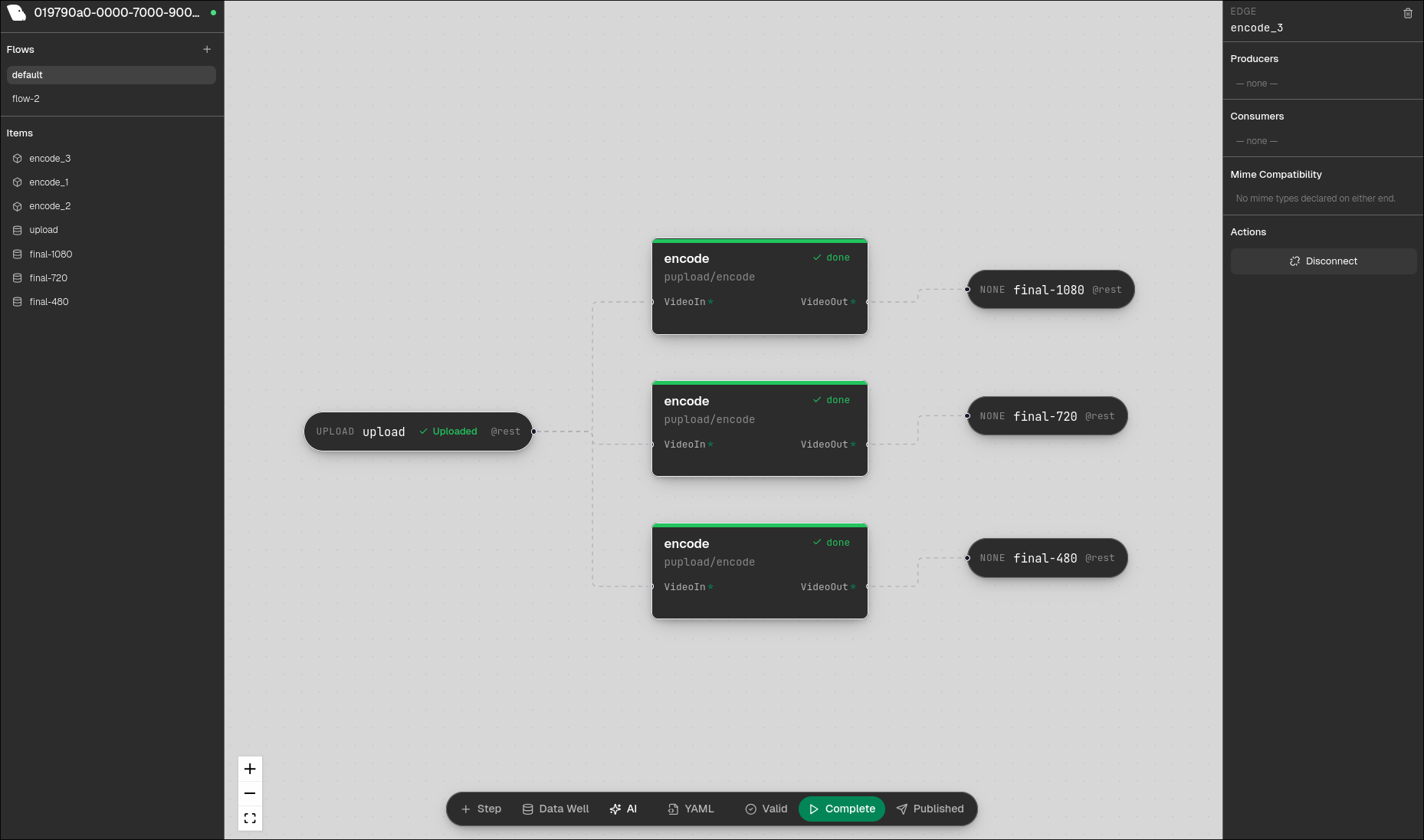
I've been building Pupload, an open source upload orchestrator and processing engine for file pipelines. Think: user uploads a video, it gets transcoded to multiple resolutions, watermarked, thumbnailed, and stored to S3, all defined as a YAML pipeline with Docker containers doing the actual work. The problem: building these pipelines means writing YAML by hand, remembering edge names, matching port types between steps, and debugging why a flow won't validate by staring at config files. I wanted a visual editor where you can drag and drop processing steps, draw connections between them, and have AI generate entire pipelines from a description. Something that turns "upload a video, encode it to 720p and 480p, concat them, and generate a thumbnail" into a working pipeline in seconds. What it does Pup-ee is a visual flow editor for Pupload pipelines. It has a Figma-like canvas where you drag processing steps around, draw edges between inputs and outputs, and configure everything through a side panel. The core features:
Drag-and-drop canvas - step nodes with input/output ports, bezier edge connections, pan and zoom. Click a node to configure its flags, inputs, outputs, and resource tier. AI flow generation - describe what you want in plain English, and Claude generates a complete pipeline: steps, edges, datawells, task definitions, all wired up and laid out on the canvas. YAML/JSON preview - a toggle panel that shows the live flow definition as you build. Every drag, every connection, every flag change is reflected in real time. Copy it out and use it anywhere. Validation - hit validate and see exactly which steps have issues, which edges are missing producers, which stores are misconfigured. Error codes map to specific nodes on the canvas with inline indicators. Run/test from the UI - start a flow run, upload files through presigned URLs, and watch step statuses go from IDLE → READY → RUNNING → COMPLETE with live polling. Project push - publish your project to a Pupload controller in one click. Track whether your local state matches what's deployed with a publish status indicator.
How we built it
The Pupload engine (controller, workers, CLI, validation, sync plane) already existed. It's a Go project using chi for HTTP, Redis for state, Docker for container execution, and asynq for distributed task queues. For the hackathon, I built Pup-ee as a React frontend with a BFF (backend-for-frontend) middle layer. The BFF handles canvas layout persistence, task indexing, validation orchestration, and AI generation post-processing. The frontend talks exclusively to the BFF, which proxies to the existing controller API. The AI generation uses the Anthropic API. The system prompt includes the full Flow and Task schemas, all available task definitions in the project, and available stores. Claude generates both the flow definition and any new task definitions needed. The BFF validates the output, auto-layouts the nodes using topological sort, and returns a hydrated result that populates the canvas. I started by writing comprehensive planning docs (UI layout spec, abstraction layer design, API reference, exact JSON field reference) before writing any code. That upfront planning is what made it possible to get everything working solo in 19 hours.
Challenges we ran into
Getting AI generation to produce valid flows was the hardest part by far. The Pupload data model is strict: edges need producers and consumers, step ports must match task definitions, store params use PascalCase field names with strict unknown-field rejection, datawells need valid source types and key templates, and the step graph must be a DAG. Early on, the AI would generate flows that looked right but failed validation in subtle ways: duplicate output port names that silently overwrote each other in Go's map, empty-string edge names that created phantom self-loops in cycle detection, snake_case field names that got rejected by the store decoder. Each of these required understanding the exact runtime behavior, not just the schema, and encoding that knowledge into the system prompt and post-processing. The fix was iterative: run the AI output through the real validation pipeline, map the error codes back to specific problems, and add constraints to the prompt. By the end, the AI reliably generates valid, runnable pipelines.
Accomplishments that we're proud of
Getting the full loop working solo: describe a pipeline in English → AI generates it → nodes appear on canvas → validate green → click run → watch it execute → push to production. That end-to-end flow is what I set out to build, and it works. The YAML preview panel is one of those features that's simple to build but transforms the experience. Watching the YAML update live as you drag nodes and draw edges makes the tool feel alive. Developers trust it more because they can always see exactly what's being generated. I'm also proud of the planning docs. Writing the API reference, field reference, and abstraction layer design before coding meant I never got lost in integration issues. The one afternoon I spent on docs saved me from what would have been hours of debugging field name mismatches and missing edge cases.
What we learned
Schema strictness and AI generation are fundamentally in tension. The more rigid your data model (strict field names, DAG constraints, type-safe edge connections), the harder it is for an LLM to generate valid output on the first try. The solution isn't loosening the schema. It's building a validation-feedback loop where the AI's output gets checked by the same validation the engine uses, and errors get mapped back into actionable corrections. Also: writing planning docs before a hackathon feels counterintuitive, but it's a force multiplier when you're solo. You can't hold an entire system's architecture in your head while also writing React components and debugging Go runtime behavior. The docs become your second brain.
What's next
Real-time collaboration - multiple people editing the same flow canvas, similar to Figma's multiplayer. Task registry - a browsable marketplace of community-contributed task definitions. Right now tasks are project-scoped; eventually you should be able to search for "video transcoding" and pull in a ready-made task. WebSocket-based run monitoring - replace polling with push-based status updates from the controller. The sync plane already knows when steps finish; broadcasting that to the frontend is straightforward. Flow templates - pre-built pipelines for common use cases (image processing, video transcoding, document OCR) that you can drop in and customize. Undo/redo and version history - track every change to a flow and roll back to any previous state. Embedding Pup-ee in the controller itself - serve the React build as static files from the Go server, so every Pupload deployment ships with its own visual editor out of the box.

Log in or sign up for Devpost to join the conversation.