-
-
community health assistant
Inspiration
Community health workers across Africa often work in areas with unreliable or no internet access, yet they're expected to make fast, accurate decisions about when a patient needs urgent care. Most AI health tools assume a live internet connection — which makes them useless in exactly the settings where decision support is needed most. We wanted to build something that works with zero connectivity, on hardware people already have, not specialized equipment they don't.
What it does
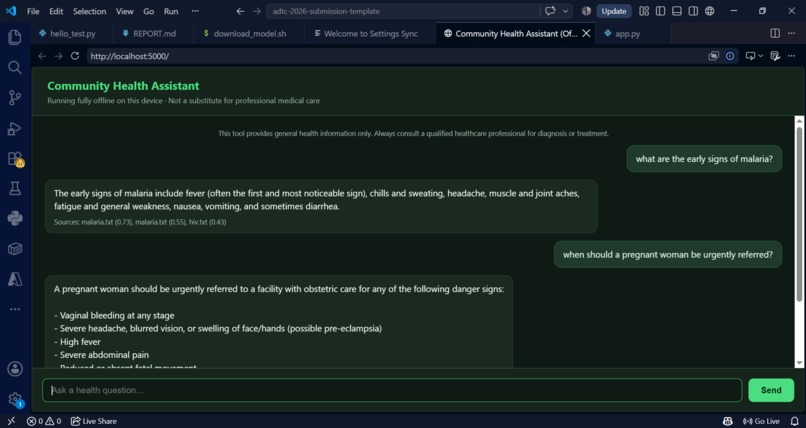
Community Health Assistant is an offline AI tool that helps community health workers and patients check symptoms against trusted reference material for seven high-burden conditions — malaria, tuberculosis, maternal health, HIV, diarrheal disease, childhood pneumonia, and child malnutrition — and get clear guidance on recognized danger signs and whether a patient needs urgent referral. It runs entirely on a standard laptop with no GPU and no internet connection required after setup, through a simple chat interface in the browser.
How we built it
We run Qwen2.5-1.5B-Instruct, a quantized (GGUF) language model, through llama.cpp for fast CPU-only inference. Rather than trusting the model's memorized training data for medical facts, we built a retrieval-augmented generation (RAG) layer: every question is matched against a small local knowledge base of reference documents using sentence-transformers for embeddings and cosine similarity search, and the model is instructed to answer only from the retrieved reference material. The whole thing is wrapped in a lightweight Flask web app with a simple chat UI.
Challenges we ran into
The biggest challenge wasn't the AI — it was the environment. Getting a working Python setup on Windows involved untangling a Microsoft Store Python install that silently sandboxed native libraries, a code editor that wasn't actually saving files to disk, and a model file that got corrupted while working under tight disk space on a USB drive.
The most important challenge, though, was a real accuracy bug we found during testing: early on, the assistant confidently told a user that chest pain and shortness of breath in an elderly person were "not typically" signs of a heart attack — a dangerously wrong answer pulled from a weakly-related, wrong-topic document. We fixed this by adding a minimum relevance threshold (below which the assistant admits it doesn't have information) and strengthening the system prompt to never issue confident reassurance about serious symptoms unless the source material explicitly supports it.
Accomplishments that we're proud of
Catching and fixing that heart-attack hallucination before submission, not after. Most AI demos only show the happy path — we deliberately stress-tested with paraphrased and out-of-scope questions and found a real safety issue, then fixed it and verified the fix didn't break legitimate answers. We're also proud that the whole thing runs in about 1.7GB of RAM, well under the 8GB budget, with no thermal throttling, on genuinely low-spec hardware (a 2-core laptop, not the reference-class machine).
What we learned
That "getting the AI to answer" is the easy part, and "getting the AI to know when not to answer" is where the real engineering — and the real responsibility — lives, especially in a healthcare context. We also learned a lot about the practical realities of offline CPU inference: thread tuning alone took our generation speed from 8.3 to 12.8 tokens/sec.
What's next for community health assistant
Expanding the reference knowledge base with more real clinical guideline content (WHO, national protocols) and more conditions, adding local-language support beyond English, and testing with actual community health workers to refine the questions the assistant handles well versus where it still needs to say "I don't know."

Log in or sign up for Devpost to join the conversation.