Inspiration
Millions of parents in the United States speak Spanish at home, but their children's schools write to them in English: picture day, field trips, permission slips, lunch balances, vaccination deadlines. When a parent can't read the notice, the child pays for it: no signed slip, no field trip. Family members and neighbors translate when they can, but notices arrive every week.
We wanted the kitchen device to be the bridge ("puente" in Spanish): ask Alexa+ in your own language, understand what the school needs, and act on it.
What it does
Puente is an MCP server that gives Alexa+ three abilities for school notices:
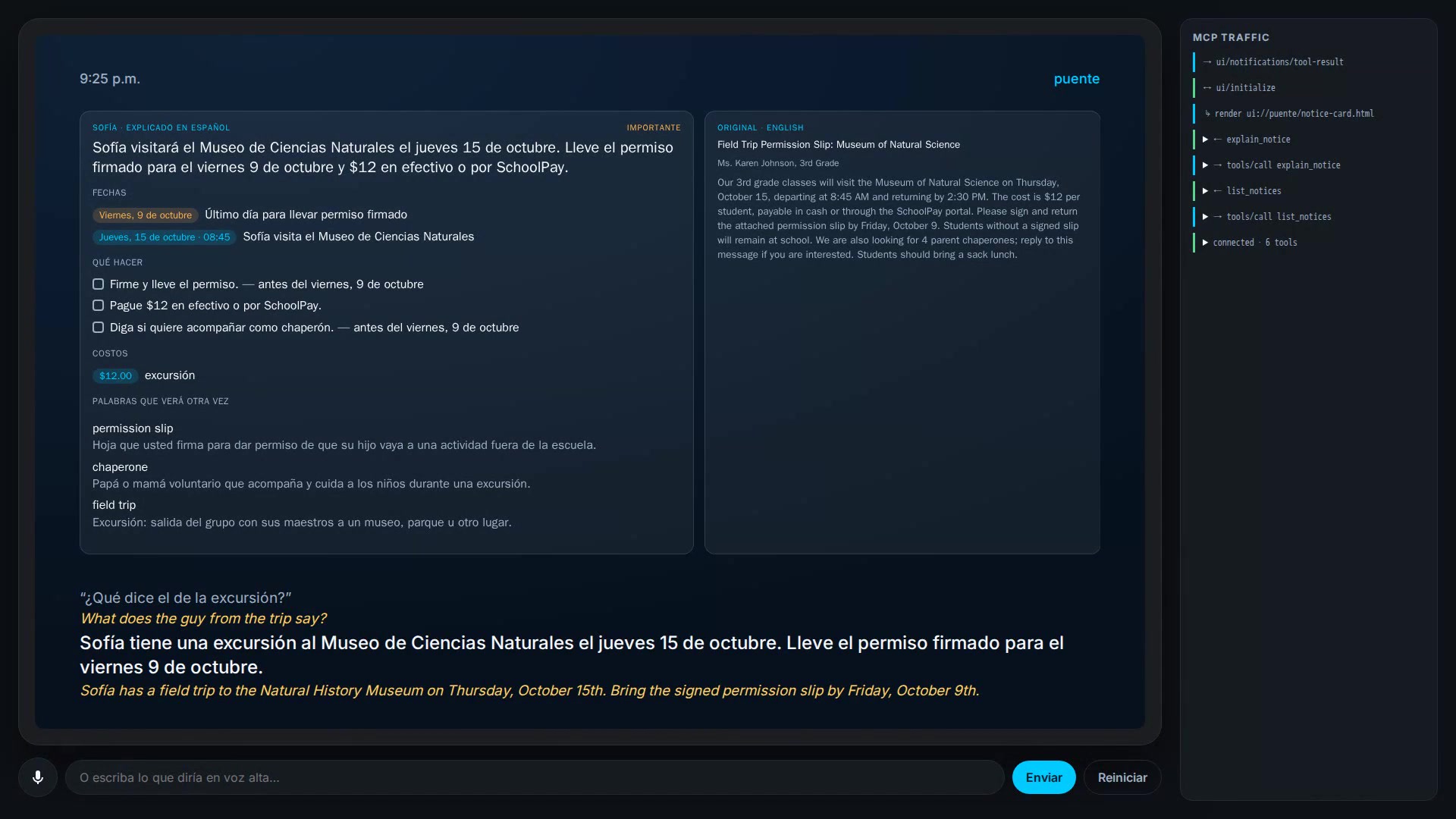
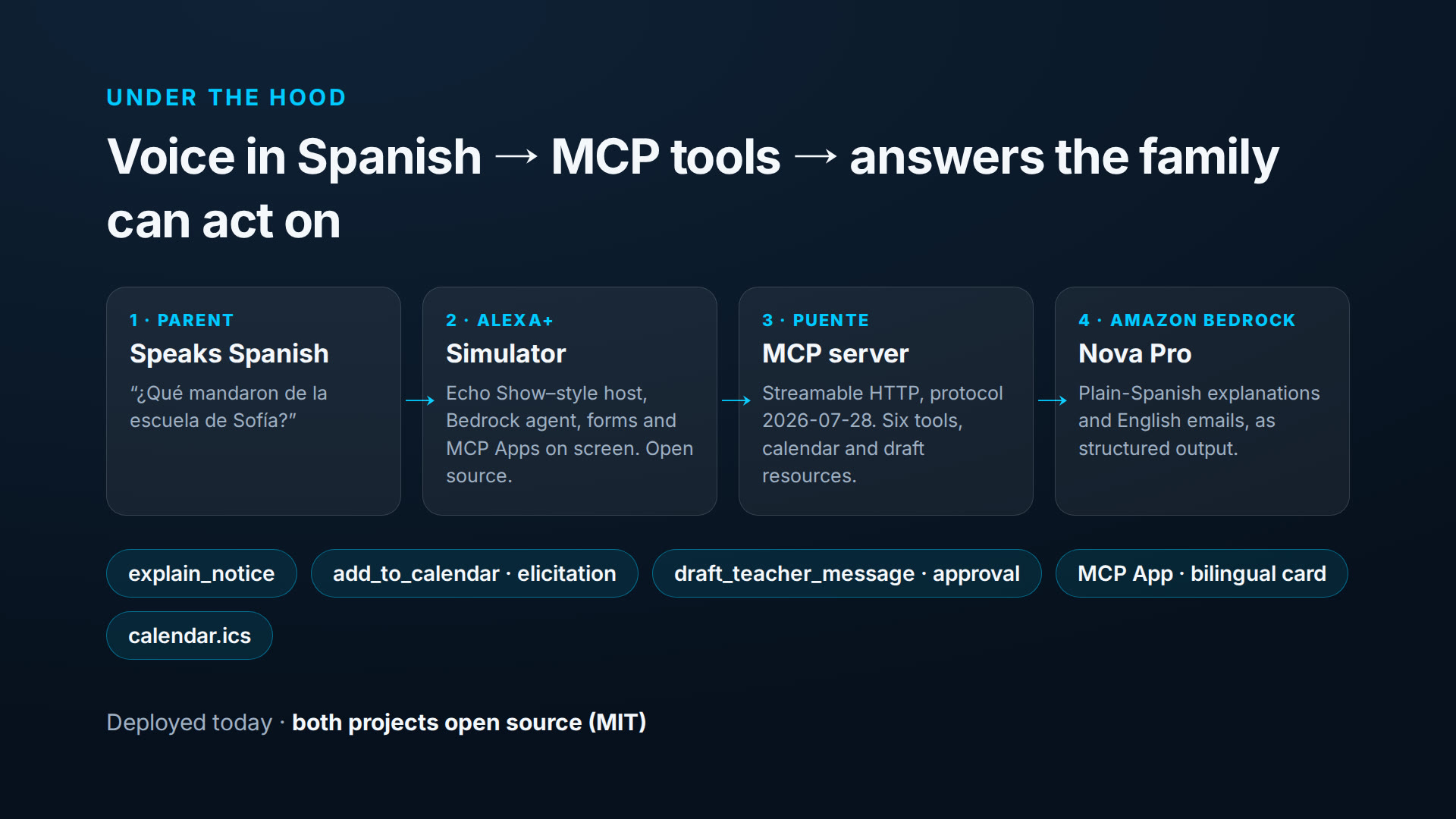
- Explain a notice in plain Mexican Spanish: what happens, the dates with their weekdays, the costs and what the parent must do by when. Alexa+ says it in two sentences; on an Echo Show it appears as a bilingual card (an MCP App) with the Spanish explanation next to the original English.
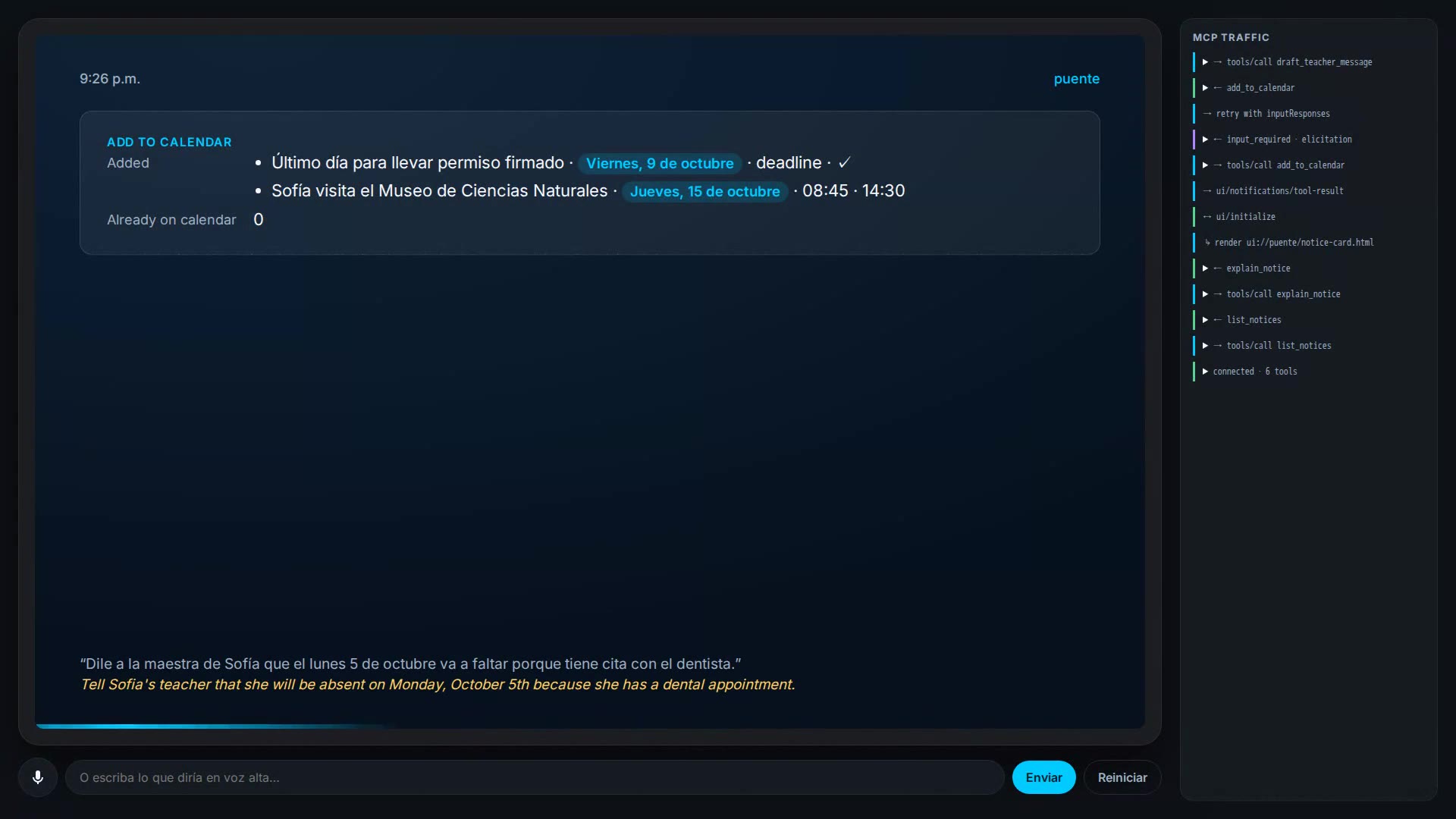
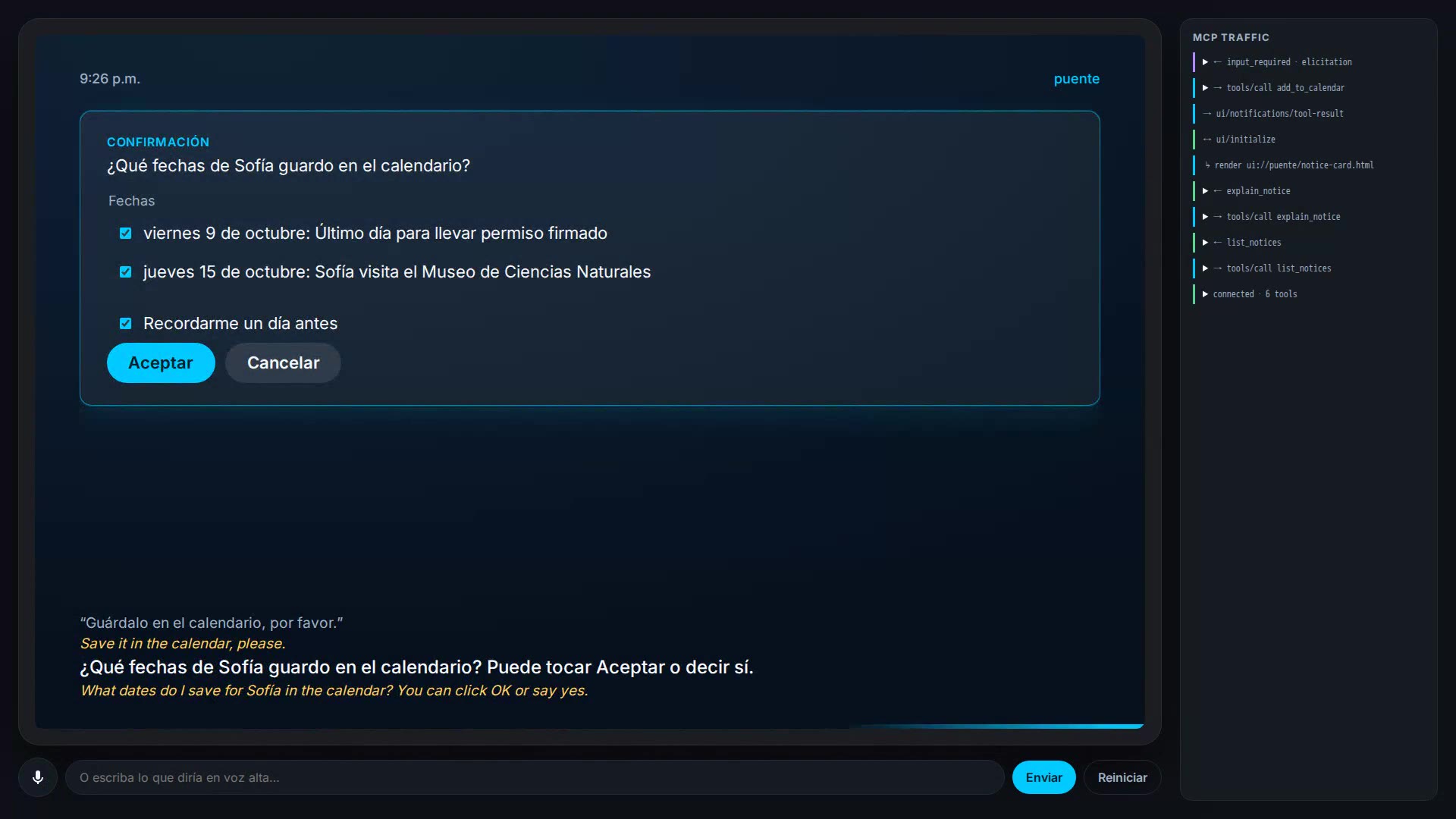
- Put the dates on the family calendar, after the parent picks which ones in a confirmation form, or simply says "sí". The calendar is also served as an iCalendar file any phone can import.
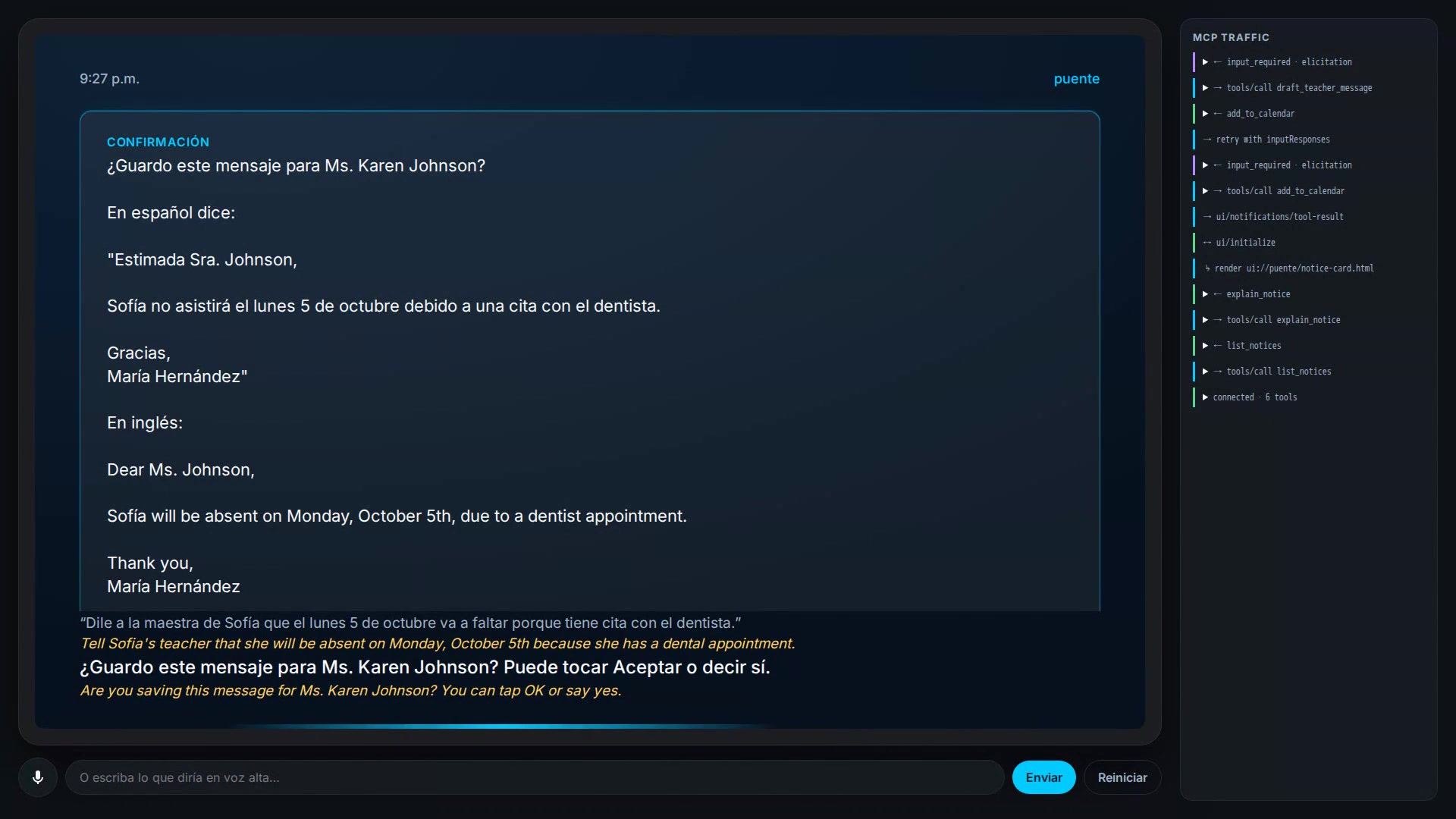
- Write a note to the teacher in English from what the parent says in Spanish ("Dile a la maestra que el lunes va a faltar porque tiene cita con el dentista"). The parent sees a Spanish back-translation and approves it before the draft is saved. Puente never sends email by itself: the result includes a mailto link.
Nothing is saved without the parent's confirmation, and a speaker without a screen still works: Alexa reads the dates and asks before saving them.
How we built it
- Puente MCP server (TypeScript, MCP TypeScript SDK v2, protocol 2026-07-28, Streamable HTTP, stateless). Six tools (
list_notices,get_notice,explain_notice,add_to_calendar,list_upcoming,draft_teacher_message), resources (family profile,calendar.ics, saved drafts) and the MCP Appui://puente/notice-card.html. - Confirmations with the new
input_requiredflow: the calendar tool asks which dates to save; the email tool asks for approval of the exact draft, carried between rounds in an HMAC-signedrequestState. Clients that cannot show forms get a spoken confirmation path instead. - Amazon Bedrock with Amazon Nova Pro (Converse API) writes the explanations and the emails as structured output: we force a tool whose input schema is generated from our zod schema, so every answer validates.
- Getting the facts right, because parents act on them: the model writes dates as
{YYYY-MM-DD}tokens and the server renders the weekday; school words ("permission slip", "early release") come from a hand-written glossary; deadlines found only in tasks are added to the calendar in code; every date the model mentions must be on its list of calendar dates, or it is asked again with the problem named. - alexa-plus-sim, a second open-source project: an Echo Show–style Alexa+ simulator for any MCP server, with its own Bedrock agent (Nova Pro tool loop), voice in and out, English subtitles for the demo, on-screen forms, an MCP Apps host and a panel that shows every MCP message.
- Deployed with Docker behind HTTPS: a public MCP endpoint and a password-protected simulator for the judges. The demo video is a real session with the deployed simulator build, recorded with Playwright and edited with ffmpeg.
Challenges we ran into
- Elicitation changed in protocol 2026-07-28. Calling
elicitInputfrom a tool handler now throws; the answer is aninput_requiredresult and a retry withinputResponses. And a client left on the default "legacy" negotiation silently loses forms with a stateless server. - Nova Pro went silent after confirmations. When one tool result mixed text and JSON blocks, Nova Pro ended the turn with empty content; later it even wrote tool calls as plain text and claimed a message had been sent. Replaying the saved requests showed the cause; tool results now reach the model as a single JSON block.
- Wrong weekdays. A smaller model added invented health facts and wrong weekdays to Spanish explanations. We moved to Nova Pro and took weekdays away from the model entirely.
- A deadline said but not saved. In one run the model mentioned the permission-slip deadline but left it off the calendar list. The consistency check now catches it.
All of these are written up in our friction log (8 entries).
Accomplishments that we're proud of
- A parent who reads no English goes from a school notice to the right dates on the calendar and an approved note to the teacher, by voice, in six short sentences.
- The dates are always right: weekdays are computed, and deadlines are checked in code.
- An Alexa+ simulator that any MCP developer can run in one command, and a live deployment judges can try.
What we learned
- The
input_requiredmodel makes confirmation flows stateless and safe to retry, but hosts have to opt in. - For facts people act on, put guard rails in code, not in the prompt.
- How a host formats tool results changes how the model behaves; test the host with the exact model you ship.
What's next for Puente
- Real notices: forward school emails to the family's Puente address (a mail filter sends only mail from the school, and Puente accepts only registered school senders), and read photos of paper notices.
- Spoken approval for teacher notes on speakers without a screen.
- More languages (Vietnamese, Haitian Creole, Arabic, Portuguese) and reminders the evening before a deadline.
- Try it on a real Alexa+ device as soon as custom MCP servers can be connected.
Built With
- amazon-bedrock
- amazon-nova
- aws-sdk
- docker
- ffmpeg
- mcp-apps
- model-context-protocol
- node.js
- playwright
- traefik
- typescript
- web-speech-api
- zod

Log in or sign up for Devpost to join the conversation.