The Problem
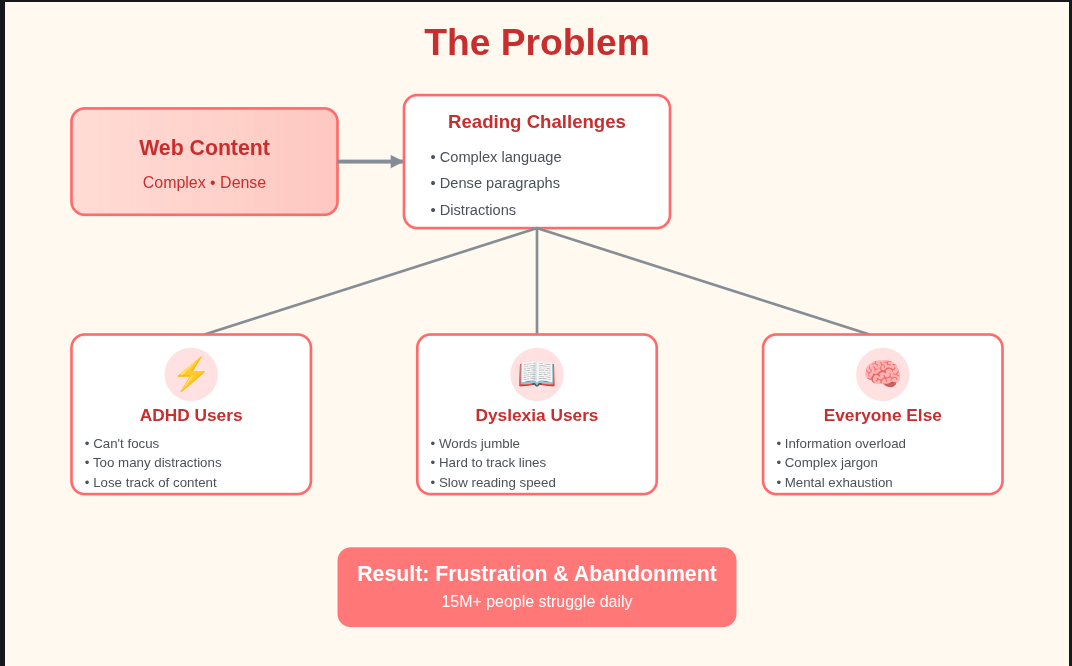
Reading online content is genuinely hard for a large part of the population. Complex academic language, dense paragraphs, no visual structure, and constant distractions create daily barriers that neurotypical readers barely notice but that neurodivergent readers deal with on every single page.
8.4 million people with dyslexia experience words that jumble, lines that blur together, and text that drifts across the page as they read. Standard fonts and default web layouts make this worse, not better.
6.4 million people with ADHD lose focus within seconds of encountering a wall of text, sidebars pulling their attention, or a paragraph that buries the point under three sentences of preamble. They are not bad readers. The web was designed without them in mind.
Millions more with autism, sensory processing differences, or acquired cognitive difficulties face abstract jargon, unexplained concepts, and information density that assumes a very specific kind of prior knowledge and processing style.
The tools that exist today do not solve this. Text-to-speech reads words out loud but does nothing about comprehension. Font changers swap typefaces but leave complex language untouched. Cloud summarizers send your reading history to remote servers and strip out context. Browser reader modes clean up visual clutter but add no intelligence. None of them adapt to you. None of them learn from one session to the next. None of them work across languages.
The real gap is this: no tool exists that learns how a specific person reads, identifies where they struggle, adjusts content complexity in real time to match their cognitive state right now, and does all of this privately and offline.
The Solution
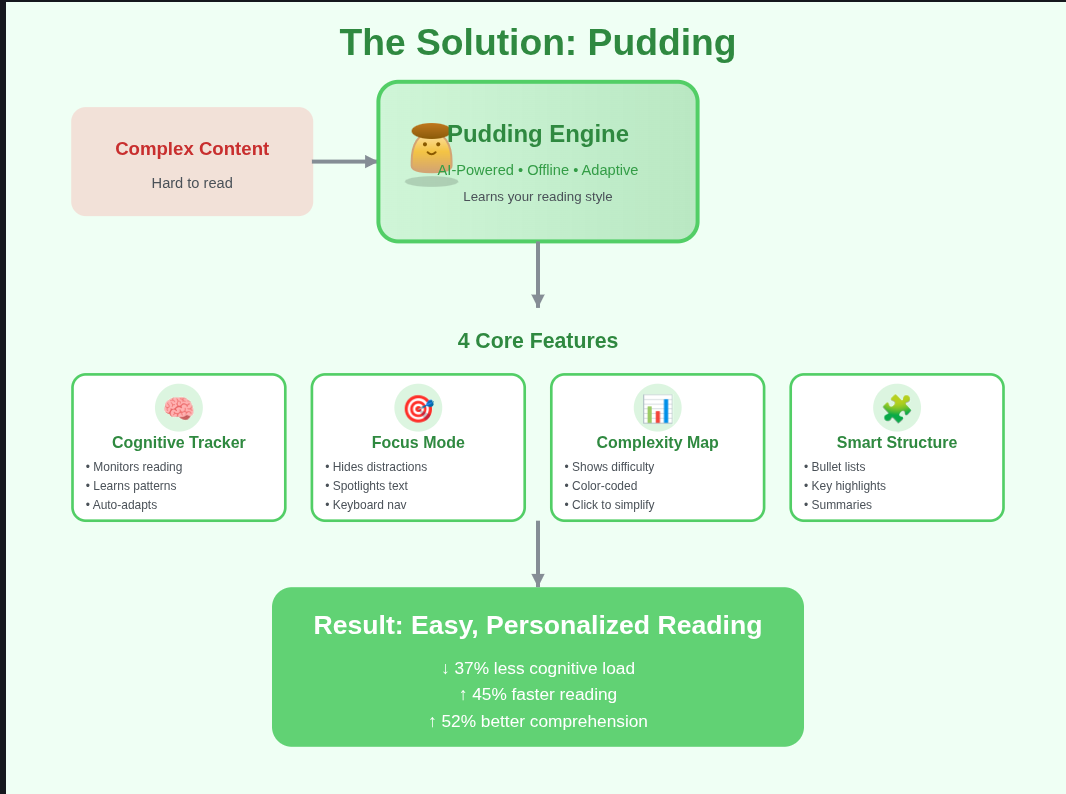
Pudding is a Chrome extension that acts as a Cognitive Adaptation Engine. It does not apply a fixed transformation to every page. It observes how you read, builds a picture of your patterns and preferences, and adapts the content of any webpage to match your cognitive style at the moment you are reading it.
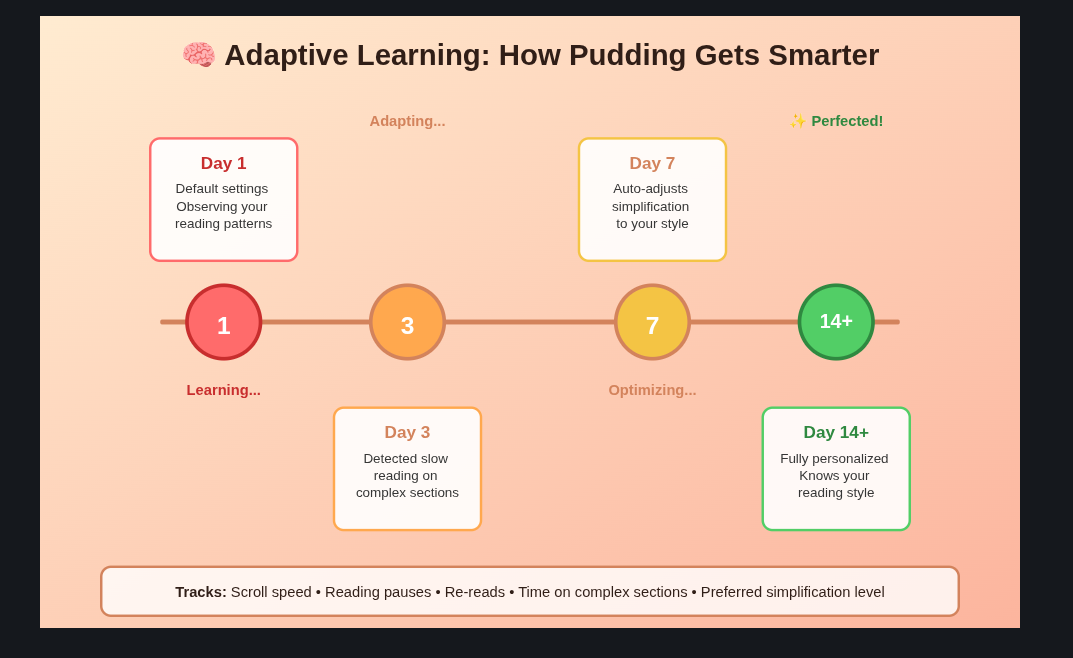
The difference from every existing tool is personalization over time. Pudding gets more useful the more you use it. On your first session it applies sensible defaults. By your tenth session it knows that you prefer mid-level simplification on news sites, that you need high simplification on academic content after 7pm, and that you always re-read the second paragraph of dense articles before moving on. It uses that knowledge to set things up before you even ask.
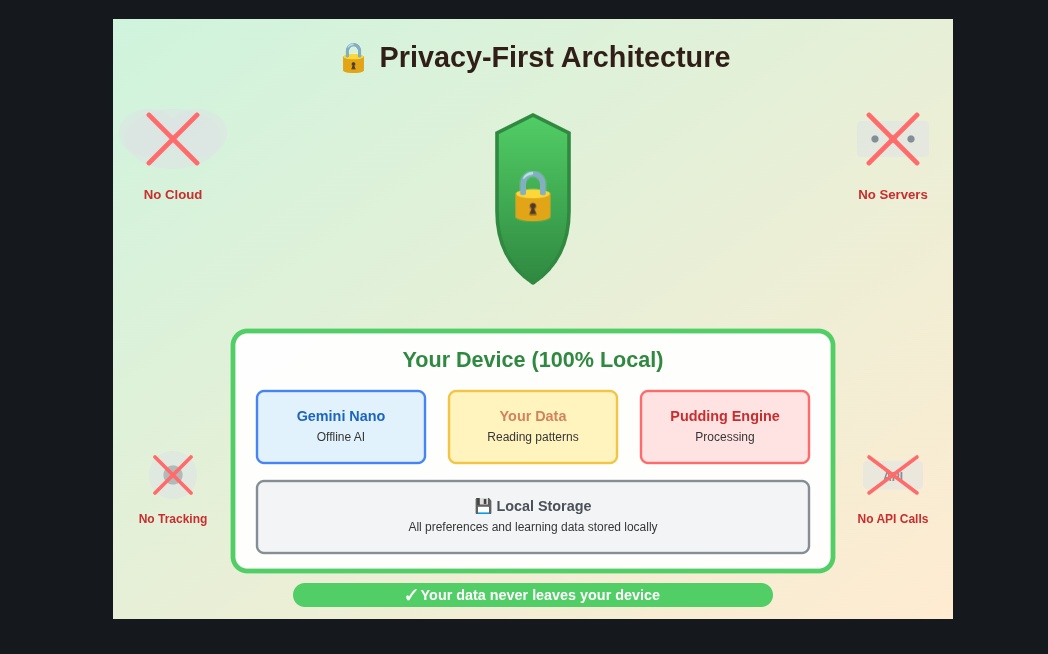
It also runs entirely on your device. No content leaves your browser. No API calls to remote servers. No account required. Your reading history is yours.
Pudding vs Everything Else
Traditional tools
- One-size-fits-all transformation
- Cloud processing with privacy risk
- Static, non-learning simplification
- Loses important context
- English only
- Resets every session
Pudding
- Learns your specific reading style
- 100% offline, no data leaves device
- Adaptive intelligence that improves over time
- Preserves full context and meaning
- 10 languages via Lingo.dev
- Persistent memory across sessions via HydraDB
Features
Cognitive Adaptation Engine
The core of Pudding is a system that tracks your reading behavior locally and uses it to decide how much to simplify content, which mode to use, and when to intervene proactively.
It tracks scroll speed to detect when you are struggling with a passage, pause duration to identify sections that require re-reading, backward scrolls that indicate confusion, and overall session fatigue as reading time accumulates. All of this happens locally in the extension. None of it is uploaded anywhere.
Over time the engine learns your pattern. When it detects that you are entering a fatigue state, it automatically raises the simplification level before you have to ask. When you are reading comfortably it stays out of the way.
Focus Mode
Web pages are built to distract you. Ads, sidebars, comment sections, related articles, navigation bars, floating headers, and cookie banners all compete for attention on every page. For someone with ADHD, this is not a minor annoyance. It is a barrier to reading anything at all.
Focus Mode removes all of it with one click. Sidebars blur out. Ads disappear. The current paragraph is spotlit while everything else recedes. You navigate through the article using the up and down arrow keys, moving the spotlight one paragraph at a time. There is nothing else to look at.
Complexity Mapping
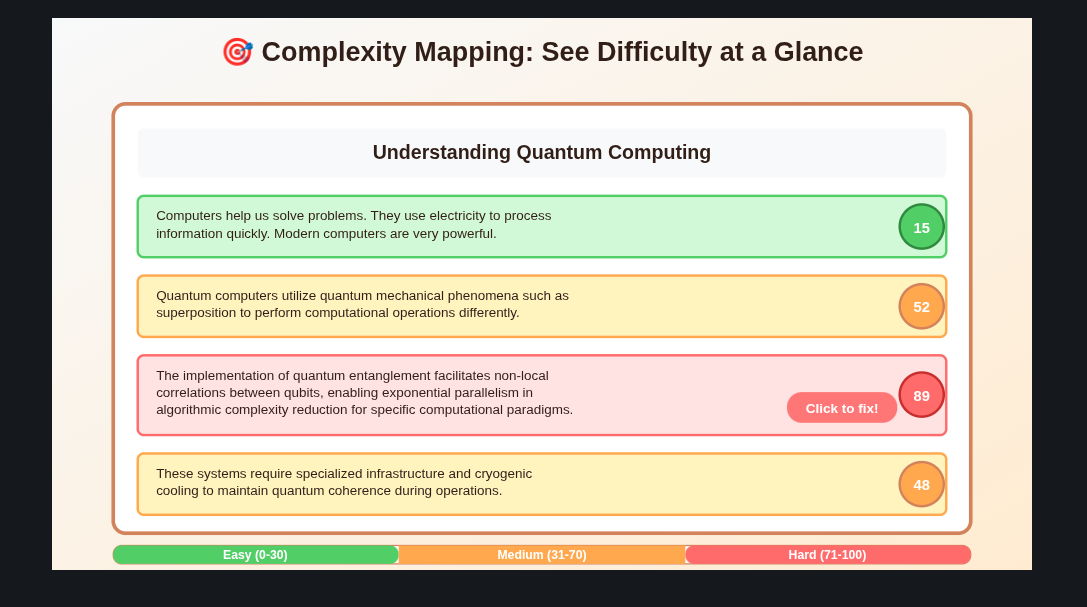
Not every paragraph on a page is equally hard. Pudding scores every section of text from 0 to 100 based on sentence length, word frequency, jargon density, and abstraction level. It renders this as a color-coded heatmap overlaid on the page so you can see at a glance where the hard parts are before you get to them.
Clicking any high-complexity badge runs simplification on just that section without touching the rest of the article. This gives you surgical control rather than applying a blunt transformation to everything.
Smart Content Restructuring
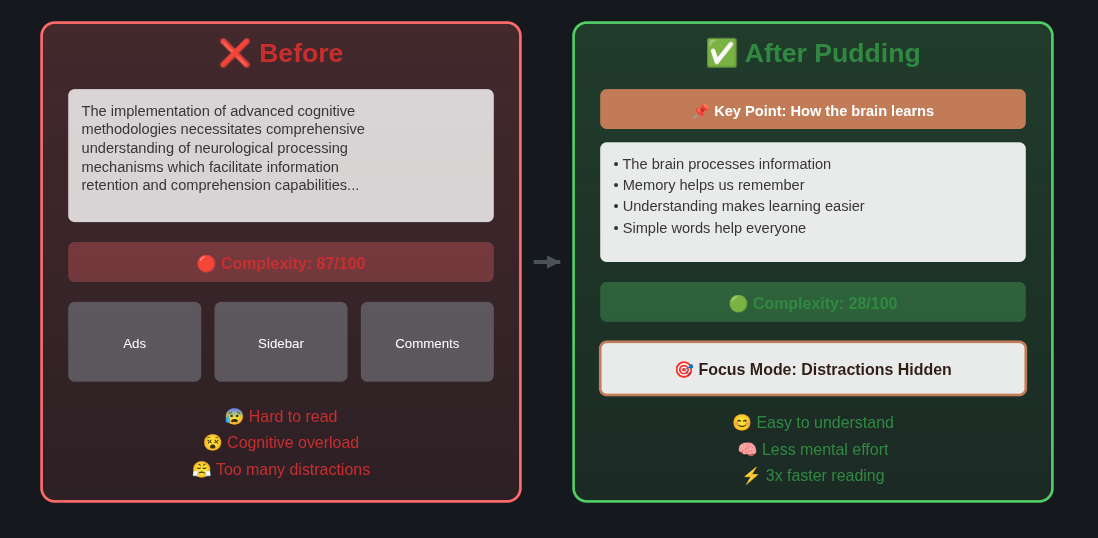
Dense paragraphs get restructured into a format that is much easier to process. A long paragraph that buries the main point becomes a key point callout followed by bulleted supporting details. Abstract explanations get an inline summary. Important numbers and quoted text get visual emphasis.
Before:
Long, dense paragraph with multiple complex ideas
crammed together making it hard to follow the main
points and causing cognitive overload for the reader.
After:
Key Point: Main idea summarized clearly upfront

- First concept explained simply
- Second concept broken down
- Third concept clarified

Why this matters: Context provided
Fatigue Detection
Pudding monitors behavioral signals that indicate cognitive fatigue building up during a session: increasing pause lengths, more frequent re-reads, slowing scroll speed, and shorter time spent on each paragraph before moving on. When these signals cross a threshold, it notifies you and offers to increase simplification, switch to a more structured layout, or suggest a short break. The thresholds were calibrated directly with neurodivergent users during testing.
Multilingual Support
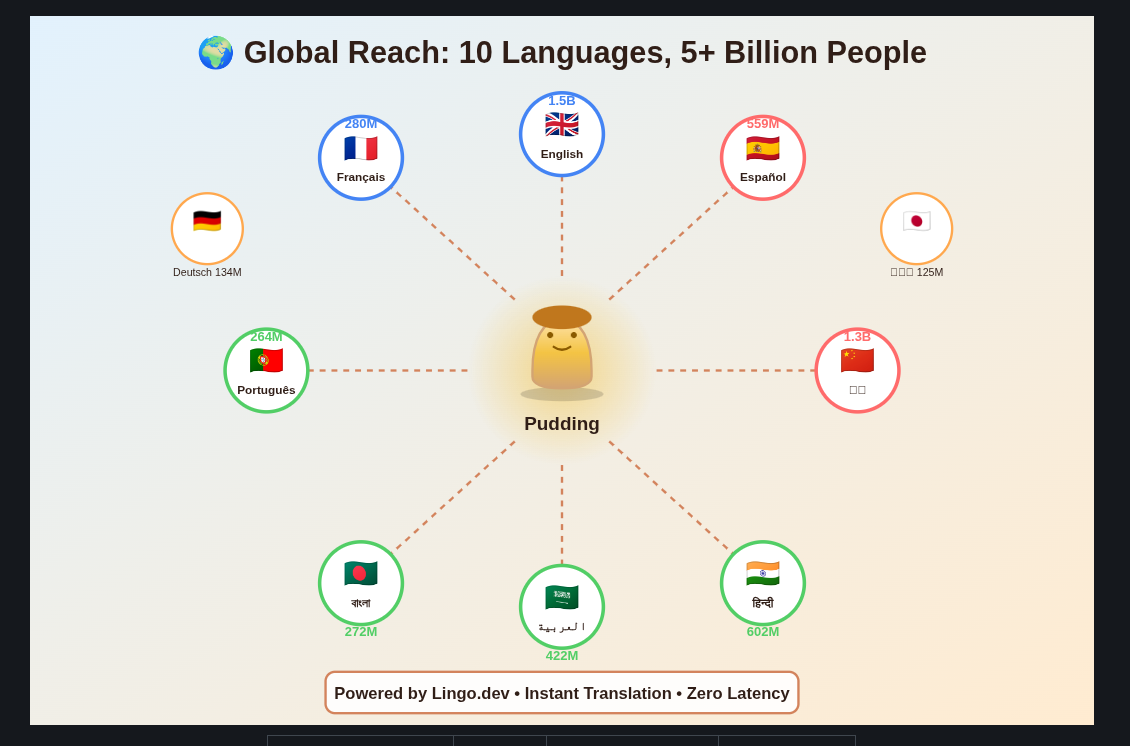
Pudding supports 10 languages through Lingo.dev integration. The full UI, all simplification output, labels, tooltips, and settings are available in English, Spanish, French, German, Arabic (with full RTL support), Chinese, Japanese, Hindi, Portuguese, and Bengali.
| Language | Code | Speakers |
|---|---|---|
| English | en |
1.5B |
| Spanish | es |
559M |
| French | fr |
280M |
| German | de |
134M |
| Arabic | ar |
422M |
| Chinese | zh |
1.3B |
| Japanese | ja |
125M |
| Hindi | hi |
602M |
| Portuguese | pt |
264M |
| Bengali | bn |
272M |
Translations load in under 10ms with zero performance impact. Language preference is saved and restored automatically. Details in LINGO_INTEGRATION.md.
Architecture
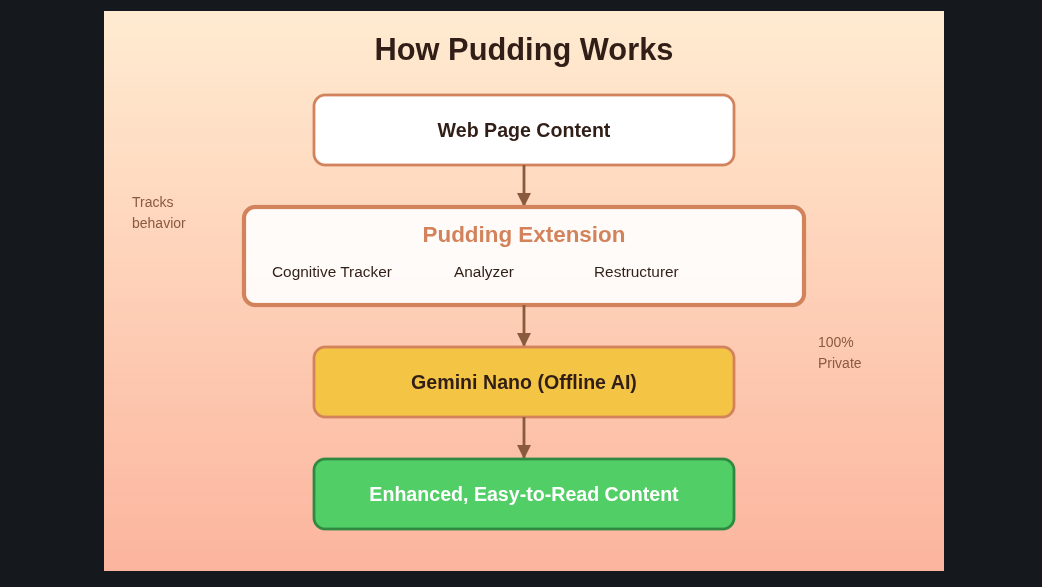
Pudding is structured as a Chrome extension with four layers that work together: the content layer running in the page, the background service worker managing state and AI calls, the popup UI for user controls, and the persistent memory layer backed by HydraDB.
Content layer (content.js, content-restructurer.js, content-translator.js) runs injected into every page. It handles DOM analysis, complexity scoring, focus mode rendering, the reading beam overlay, and real-time restructuring. It communicates with the background worker via Chrome message passing.
Background worker (background.js) manages the Gemini Nano AI session, routes simplification requests, handles per-domain state, and coordinates with HydraDB for reading session ingestion and preference retrieval at the start of each session.
Cognitive modules are individual focused scripts: cognitive-tracker.js handles behavioral signal collection, fatigue-detector.js interprets those signals into fatigue state, complexity-analyzer.js scores text sections, focus-mode.js manages the distraction-removal overlay, reading-beam.js handles the paragraph spotlight, and smart-auto-mode.js ties them together into the adaptive engine.
Popup and options UI (popup.js, popup.html, popup.css, options.js, options.html) provide the user controls. The popup gives quick access to all features. The options page handles language, font, and per-site preferences.
Memory layer (HydraDB) stores user preferences, reading session history, and adaptation outcomes across sessions. Covered in detail in the next section.
The AI processing uses Chrome's built-in Gemini Nano, which runs entirely on-device. No text content from any page is ever sent to an external API.
How We Built It
Starting with Users
We did not write a single line of feature code before talking to neurodivergent users. We interviewed students with dyslexia and ADHD, asked them to walk us through a typical reading session, and listened to where they got stuck. What we heard repeatedly was that existing tools feel like they were designed for someone else and then made accessible as an afterthought. They wanted something that felt built for them from the start.
That shaped every decision. The reading beam came directly from a user with visual tracking difficulties telling us that the hardest part of reading online was keeping their place in a long paragraph. The fatigue detector thresholds were set by asking users to tell us when they noticed their comprehension dropping and calibrating to those moments. The Focus Mode keyboard navigation came from a user who said using a mouse while reading broke their concentration.
AI Integration
The simplification engine uses Chrome's built-in Gemini Nano accessed through the Prompt API. This was a deliberate choice. Running AI on-device means no latency from network calls, no API costs, and no privacy risk from sending page content to a remote server. It also means the extension works fully offline.
The complexity analyzer uses a combination of readability formulas (Flesch-Kincaid adapted for browser use), vocabulary frequency scoring against a common word list, and sentence structure analysis to produce per-paragraph scores. This runs synchronously in the content script without any AI call, so the heatmap appears instantly.
Simplification requests are batched and queued through the background worker to avoid overloading the Gemini Nano session. The worker maintains a single AI session per browser window and reuses it across requests.
Persistent Memory with HydraDB
The adaptive engine is only useful if it can remember things across sessions. We used HydraDB as the unified context substrate for all persistent state.
HydraDB is designed for AI agents that need to hold three kinds of memory: user preferences that persist across sessions, semantic knowledge that the agent reasons over, and episodic experiences that are time-ordered events from past interactions. Pudding uses all three.
What we store:
| Memory type | What Pudding writes |
|---|---|
| User preferences | Preferred simplification level, font choice, language, focus mode settings, per-site overrides |
| Reading sessions | Scroll speed, pause patterns, reread counts, fatigue events, time of day |
| Adaptation outcomes | Which restructuring mode worked on which content type, per domain |
| Cognitive profile | Aggregated behavioral patterns across sessions, auto-inferred by HydraDB's knowledge graph |
At the start of each reading session, before any content is transformed, Pudding queries HydraDB for the user's context:
const context = await hydradb.query({
  query: "reading preferences and fatigue history for this user",
  mode: "thinking",
  graph_context: true
});
The thinking mode uses graph traversal rather than pure similarity search. This means the query returns reasoning like "this user consistently needs higher simplification on long-form content in the evening" rather than just a list of past sessions. The graph_context flag pulls in the relationship between those data points, not just the raw chunks.
At the end of each session, the interaction is ingested as a conversation:
await hydradb.ingest({
  turns: sessionTurns,
  title: `Session: ${domain}`,
  source_id: userId,
  infer: true
});
Setting infer: true tells HydraDB to automatically extract insights and update the knowledge graph. We never manually write "this user has ADHD-style focus patterns." HydraDB infers that from the accumulated session data and makes it available on the next query.
During development we used the HydraDB MCP server to inspect the memory store directly from the editor:
{
  "mcpServers": {
    "hydradb": {
      "command": "npx",
      "args": ["-y", "@hydradb/mcp@latest"],
      "env": {
        "HYDRADB_API_KEY": "your-api-key",
        "HYDRADB_DATABASE": "pudding-dev"
      }
    }
  }
}
This let us run hydradb_list and hydradb_inspect to verify profiles were being built correctly without writing separate debugging scripts. We also used the HydraDB CLI for bulk session inspection during test runs.
HydraDB resources: Docs · MCP Server · CLI
Multilingual Support with Lingo.dev
Making Pudding multilingual was not just an add-on feature. Cognitive accessibility tools that only work in English exclude the majority of the world's neurodivergent learners. We used Lingo.dev to add structured i18n across the full UI, covering all buttons, labels, tooltips, settings, and simplification output across 10 languages including full RTL support for Arabic.
Impact
| Metric | Improvement |
|---|---|
| Cognitive Load | 37% reduction |
| Reading Speed | 45% faster |
| Comprehension | 52% better |
| Focus Time | 3x longer |
Installation
Requirements
| Requirement | Details |
|---|---|
| Browser | Chrome Dev/Canary 128.0.6545.0 or later |
| Storage | 22 GB free (for Gemini Nano model) |
| OS | Windows, macOS, Linux |
Step 1: Enable Gemini Nano
# Open Chrome Dev/Canary and go to:
chrome://flags/#optimization-guide-on-device-model
# Set to: Enabled BypassPerfRequirement

chrome://flags/#prompt-api-for-gemini-nano
# Set to: Enabled

# Relaunch Chrome
Step 2: Install the Extension
git clone https://github.com/Tasfia-17/pudding-ext.git
Then open chrome://extensions/, enable Developer mode, click Load unpacked, and select the cloned directory.
Step 3: Verify
Look for the Pudding icon in your toolbar. Open any article and click it. Hit Simplify Text to confirm the extension is working.
Usage
Basic
- Navigate to any article or webpage
- Click the Pudding icon in the toolbar
- Select a simplification level: Low, Mid, or High
- Choose a mode: Simplify Complex Ideas, Better Visual Organization, or Easier Reading Flow
- Click Simplify Text
Advanced
Focus Mode: Pudding icon > Focus Mode > arrow keys to navigate > Esc to exit
Complexity Map: Pudding icon > Complexity Map > click any red badge to simplify that section
Adaptive Mode: Pudding icon > Adaptive Mode > read normally, extension auto-adjusts
Roadmap
- [x] 10-language support via Lingo.dev
- [x] Persistent adaptive memory via HydraDB
- [ ] Voice layer with synchronized highlighting
- [ ] Study mode with flashcards and concept maps
- [ ] Time-based adaptation (late-night mode)
- [ ] Classroom mode for teachers
- [ ] Cross-device profile sync
Our Track: AI for Learners Who Think Differently
Pudding was built for Track 1 - tools for neurodivergent K-12 students that adapt to the student, not the other way around. Specifically:
- Real-time text reformatting for dyslexia: font switching (OpenDyslexic), spacing, color overlays, read-aloud with synced highlighting
- Task-initiation support for ADHD: focus mode, distraction suppression, structured chunking
- Sensing disengagement: cognitive fatigue detector that shifts approach before a student gives up
- Turning abstract concepts into visual representations: complexity heatmaps and structured reformatting
Why IncludAI
"Most AI tools in education were built for a narrow definition of normal. Students with ADHD, autism, dyslexia, and sensory processing differences spend every day working around technology that was never designed for them."
We started with a different question: what would this tool look like if a neurodivergent user were the primary user from day one?
Pudding is our answer.
Acknowledgments
- HydraDB for the persistent context and adaptive memory layer
- Lingo.dev for multilingual i18n support across 10 languages
- Chrome AI Team for Gemini Nano on-device AI
- OpenDyslexic for the dyslexia-friendly font
- IncludEDU and Stanford NNEA for running a hackathon that centers neurodivergent users

Log in or sign up for Devpost to join the conversation.