-
-
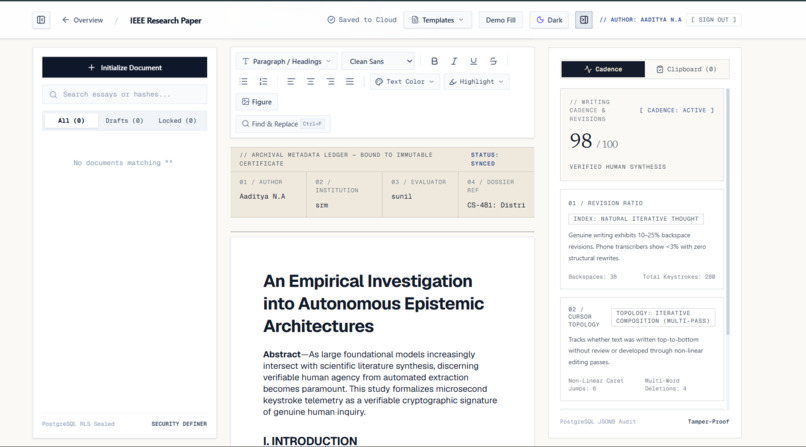
Provenna tracks typing cadence, backspaces, and pauses to prove human authorship with SHA-256.
Inspiration
Right now, every student knows the anxiety of submitting an essay you spent hours writing yourself, only to wonder if a random AI detector is going to accuse you of cheating. Tools like Turnitin and GPTZero just look at a finished piece of text and guess. They get it wrong constantly—flagging honest students who happen to write cleanly or aren't native English speakers, while completely missing people who actually use AI and just run it through a paraphraser.
We realized the whole approach is backwards. You can't reliably prove how something was written just by staring at the final paragraph. Instead of hoping a black-box algorithm believes you, we wanted to give writers a way to bring actual receipts.
What it does
Provenna flips the problem from AI detection to authorship verification. Instead of judging a finished document after the fact, Provenna captures the writing process while it actually happens.
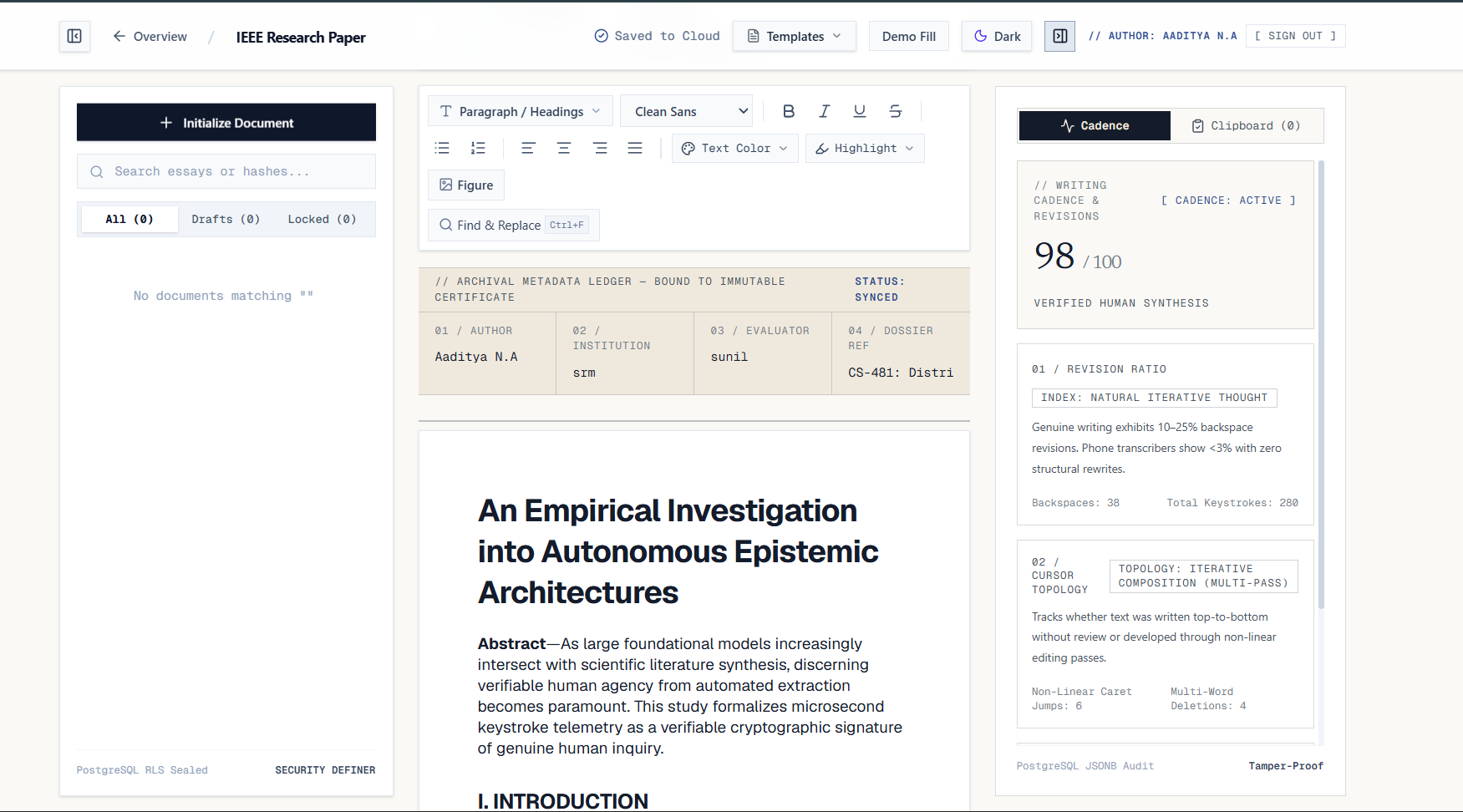
- Live Telemetry Editor: You write inside a distraction-free workspace that quietly logs the natural rhythm of human thought—your typing cadence, pauses to think, backspaces, and structural edits.
- Instant Paste Tracking: If external text is pasted in—whether it's a legitimate quote or a block of text from somewhere else—Provenna flags and logs that exact event immediately.
- The Writing Certificate: When you finish, Provenna generates a shareable verification certificate. It breaks down your session metrics (active time, edit history, paste events) and pairs the final text with a SHA-256 cryptographic hash. If someone changes even a single comma after export, the hash won't match. Instead of an AI detector saying "trust our guess," a student can hand their professor verifiable proof.
How we built it
We built Provenna as a lightweight, fast web application using Next.js (App Router), React, and TypeScript, styled with Tailwind CSS.
Everything runs client-side in the browser so there’s zero lag while typing. We hooked into native DOM keyboard and clipboard events to track keystrokes, calculate pause intervals, and catch onPaste payloads in real time. For the cryptographic verification, we used the browser's native Web Crypto API (crypto.subtle.digest) to compute SHA-256 hashes of the document state on the fly. Finally, we deployed the production build on Vercel for instant link sharing.
Challenges we ran into
- Capturing telemetry without killing typing speed: Logging every single keystroke, backspace, and pause in React state can easily cause input lag on longer essays. We had to carefully separate our event tracking from the main UI re-render loop so the editor still feels like a snappy, normal word processor.
- Drawing the line on "human" writing: Real writing is messy. Sometimes you copy-paste your own paragraph to move it around, or paste a citation. We had to make sure our certificate didn't act like a "pass/fail" cop, but instead showed transparent context—how much was typed organically versus pasted—so a reviewer can see the actual story behind the draft.
- Last-minute deployment headaches: Getting our local Next.js build structure and Git branches cleanly synced with Vercel right before submission took way more debugging than we expected, teaching us the hard way how strict production build pipelines are about root directories and build caches.
Accomplishments that we're proud of
- Taking an idea from a blank folder to a working, live prototype that solves a problem we and our classmates actually deal with every week.
- Making cryptographic hashing (SHA-256) feel dead simple and visual for normal users who don't care about the math behind it—they just want a tamper-proof stamp on their work.
- Building a tool that protects students rather than policing them, shifting the conversation from suspicion to verifiable trust.
What we learned
We learned a ton about how browsers handle low-level input and clipboard events under the hood, and how to use the native Web Crypto API without relying on heavy external libraries. More importantly, we learned how to scope a product around evidence rather than assumptions—designing a UI that presents raw session data clearly in a few seconds.
What's next for Provenna
- Google Docs & Word Extensions: Letting students stay inside the editors they already use every day while Provenna quietly builds their certificate in the background.
- Visual Playback Scrubber: A timeline slider on the Writing Certificate so a teacher or editor can scrub through a 10-second timelapse of the essay being built from scratch.
- One-Click LMS Links: Generating verify-links that can be pasted straight into Canvas, Blackboard, or Google Classroom submissions alongside a PDF.
Built With
- css3
- git
- html5
- javascript
- markdown
- next.js
- react
- sha-256
- tailwind-css
- typescript
- vercel
- web-crypto-api

Log in or sign up for Devpost to join the conversation.