-
-
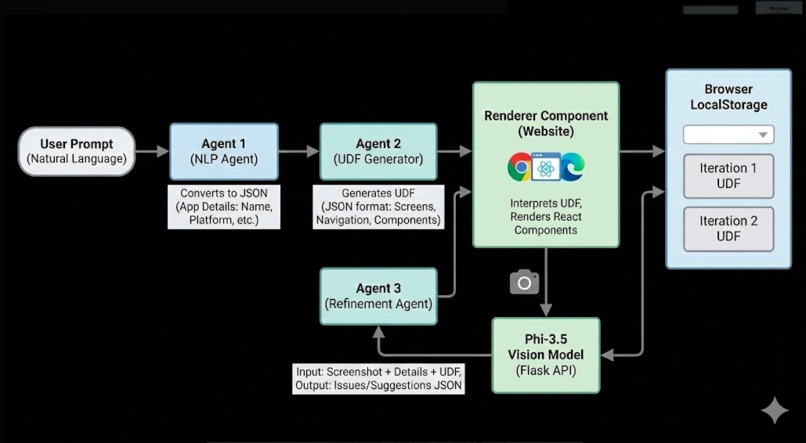
ProtoX Execution Flow
Inspiration
We’ve all sat through long design meetings, drawn wireframes on whiteboards, waited days for mockups… only to end up with something that doesn’t match the original idea. We wanted to bridge that gap between vision and working UI. What if you could just say “Instagram feed” and instantly see an interactive prototype? That’s the experience we’re building with ProtoX.
What it does
ProtoX turns plain English descriptions into ready-to-test UI prototypes—instantly.
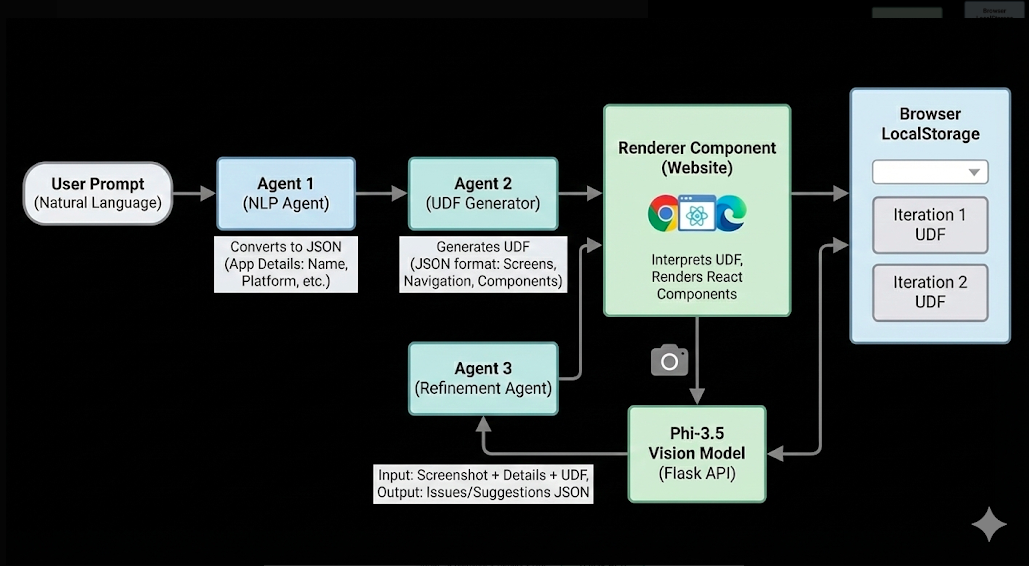
Describe any screen you want, like: “WhatsApp chat page” “Instagram feed with story bar” “A simple login page with OTP” And ProtoX will: Convert your text into a structured Universal Design Format (UDF) Validate the design using the Phi-3.5 Vision AI model Auto-refine the UI up to 2 times based on feedback Generate interactive prototypes you can try and share Score each version and automatically pick the best one No design experience. No coding. Just describe—and ProtoX builds.
How we built it
Core Tech Stack Frontend: React + TypeScript + TailwindCSS
Build: Vite AI Pipeline: A 3-agent system running on DigitalOcean AI Agents Normalizer Agent: Understands user intent UDF Generator: Produces validated design JSON Refinement Agent: Improves UI based on feedback Vision Validation: Phi-3.5 Vision Model checks screenshot quality Screenshot Engine: html2canvas Storage: LocalStorage-based iteration and scoring system
Architecture: We built a pipeline that runs from: User prompt → Intent normalization → UDF generation → Vision-based validation → Automated refinement → Best-iteration selection → Instant prototype rendering.
Challenges we ran into
Vision Model Reliability: Getting Phi-3.5 to consistently judge UI screenshots required a lot of prompt tuning Iteration Tracking: Managing and comparing multiple UDF versions while staying fast Screenshot Timing: Ensuring html2canvas captures the UI only after everything is fully rendered Agent Orchestration: Coordinating retries, error handling, and fallback logic across three AI agents Performance Issues: Our initial Halloween-themed UI had mouse-tracking effects that needed major optimization
Accomplishments that we're proud of
A Self-Improving AI Loop: The system validates and refines its own output—like having an automated design reviewer Quality Scoring: Each iteration is ranked, and the best version is auto-selected A Fun, Polished UI: Our Halloween theme is spooky, smooth, and surprisingly delightful Resilient Pipeline: Handles errors gracefully and provides real-time logs Speed: A process that used to take hours now takes minutes
What we learned
Multi-agent orchestration requires robust state management Real-time feedback builds trust with users Minor UI animations can significantly affect performance Using a structured format like UDF makes the system scalable and maintainable
What's next for ProtoX
Export to Code (React, Vue, Flutter) Design System Integration Real-time Collaboration More Advanced Validation Metrics Template Library for common app screens Version Control for prototypes Multi-screen flows & navigation support Customizable AI agents for different design rules A mobile app for quick prototyping
Built With
- agentplatforms
- css3
- digitalocean
- flask
- knowledgebases
- phi-3.5
- react
- tailwindcss
- typescript


Log in or sign up for Devpost to join the conversation.