-
-
-
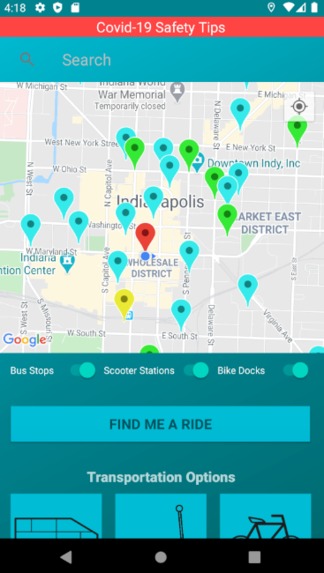
Home Screen
-
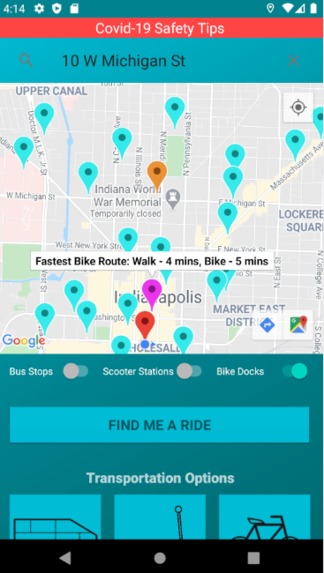
Bike Locations
-
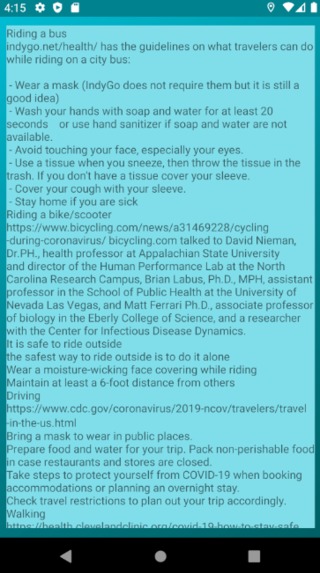
Covid-19 Tips
-
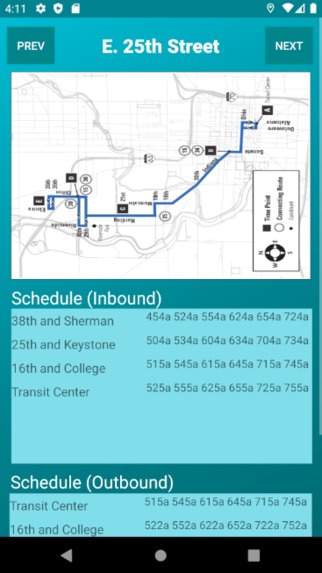
Bus Routes
-
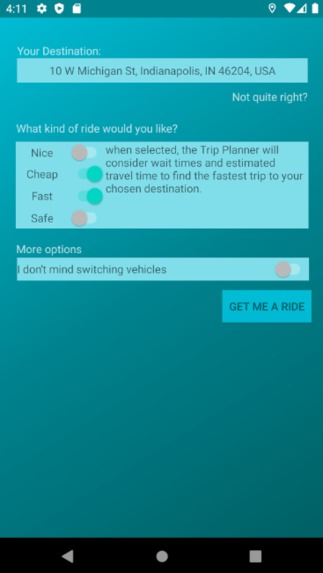
Find a Ride
-
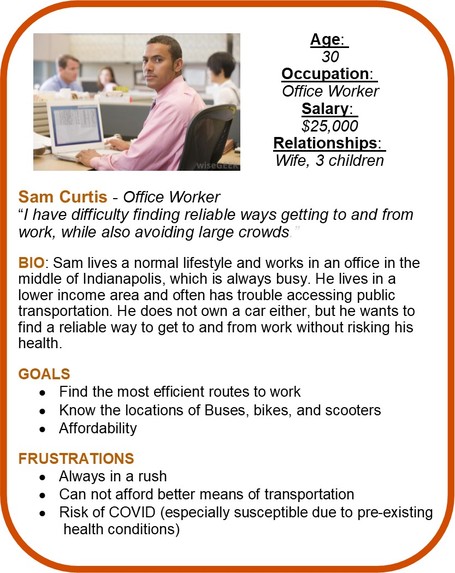
Customer Persona
-
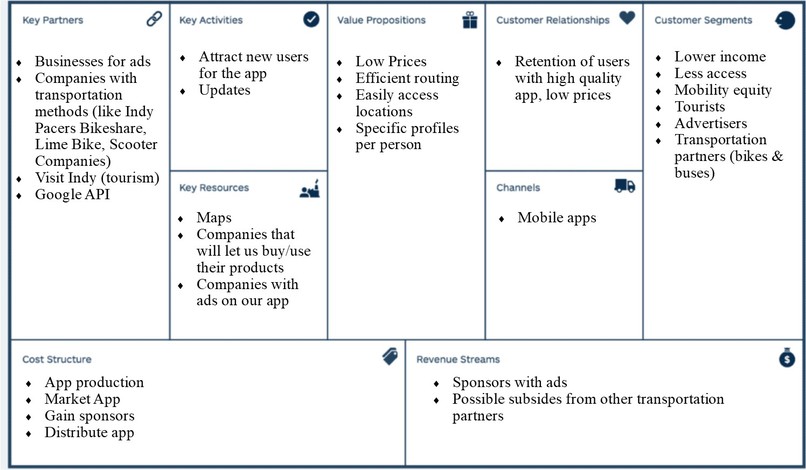
Business Model Canvas


CommuteIndy Transportation Challenge Team #8
Overview & Inspiration
The corona-virus pandemic has affected all of us in almost every aspect of our lives. One of the industries that has suffered the most is transportation. Ridership is down and consumers are wary of using public transportation. We found that while there are plenty of safe public transportation options in Indianapolis, many residents and visitors do not know how they can use them. In order to alleviate this issue, we decided to create an application that can give people the options that already exist to make sure that they make the right decision for them. We made sure that our application includes updated health safety information and a variety of options to suit each users needs, whether it's making their daily commute to work or a weekend getaway. We hope that the CommuteIndy app will allow users to create a community while using public transit.
Team Members
Nolan Christian (Project Manager, Senior in Computer Information Technology @ Purdue) Nolan was responsible for updating TechPoint staff and our team's coaches about our progress. He worked as a member of the Pro-Squad with a specific focus on providing safety protocols for the various transportation options in the app. Nolan also narrated our video presentation, including the demo of the application.
Abby Myers (Designer, Junior in Chemical Engineering & Communications @ Purdue) As a member of the Go-Squad, Abby put together several of the business documents such as the environmental assessment and empathy map. She created the initial design of our app, the functionality mock-ups, and put together our final presentation in Prezi.
Zach Deutsch (Business Development, Junior in Mechanical & Aerospace Engineering @ Trine) Zach focused on the business and financial strategy for our app, including the Business Model Canvas and go-to-market strategy. He also created the customer persona and aided in the design and flow of the app.
Nate Craane (Developer, Senior, Cyber Security @ Purdue) Nathan was the developer for the project, and primarily focused on programming the functionality of the app. His contributions include implementing device location services into the app, and programming the Map view on the main screen.
Nick Pisciotta (Software Developer, Junior in Computer Science @ Rose-Hulman) Nick worked to construct the back-end of the app, as well as bring the front-end to life.
How did you decide on this customer segment, problem, and solution?
While researching different articles about issues with transportation in Indianapolis, our team found a recurring problem that low-income communities often have less access to public transportation. We realized that this was something we could work on, while also incorporating solutions to prevent the spread and exposure to COVID-19.
After brainstorming multiple solutions and ideas for this project, we concluded that the most effective product that would work towards solving our problem was to create a free app for people in and around Indy. This app is designed to create routes for people by linking different methods of transportation, including bikes, scooters, and buses. Another function of the app will be to alert users when they are entering high populated areas, such as a crowded.
How did your team build and iterate on the solution?
Our first steps comprised of researching all the tools already available to the public, including what they offered and how they were made available. We looked at all available means of transportation in Indy we could find such as bus stations, bike share docks, and scooter stations. Seeing how disjointed these platforms were from each other was where our primary inspiration came from.
Our first step was an obvious one: decide what platform we were going to use ourselves. We eventually decided on an android app for a couple of reasons. Not only are android devices highly common and widespread, but an app as a platform, we felt, would be a lot more convenient for use on-the-go than, for example, a website.
We began work in the program Android Studio, something none of us had much experience with going in. Once familiarizing ourselves with the program by making a simple home page, our first objective was to create an interactive map within the app. After surveying a few options, we decided on utilizing the Google Maps API, notably due to its ease of implementation, reliance, and familiarity. From there, we worked on building on from the default map to align it with our vision for what the app should be able to accomplish. We started by adding markers for different modes of transportation, be it bike share dock, bus stop, etc. Our work continued with more features steadily added on, including a places search bar to set a destination; a best route finder based on user input; and a COVID-19 travel safety tips section, the former two utilizing different Google APIs to get the job done.
While the back-end work was getting completed, we began to focus more on the front-end to create a more intuitive interface that most users would be able to pick up on quickly. This started with low-fidelity prototypes that we used in preliminary user testing. We then continually edited and improved upon this design until we came to one we felt would best be able to serve our users.
Key Metrics
Marketing: 4 interviews (used to better understand consumers needs)
Product Development: 3 user tests (gained feedback about app functionality)
Technical Details and Diagrams
Original App Mock-Ups: [link] https://docs.google.com/presentation/d/1yWlyvqDpVQg0h2fDe5mxLiTrQlI5KCcb6rSviYGnmHg/edit#slide=id.p
Database Schematic

Key Tools & Technical Resources
Android Studio - We used Android Studio as the emulator to create the app. This was a good tool for the team to view and collaborate on the app.
GitHub - We decided to use GitHub as our main code repository. Members of the pro-team were able to share collaborate on the code (written in Java) for our application before running it in Android Studio.
Google API - Using Google APIs was vital for our app. The API keys gave us access to location information and allowed us to create the "select a destination" feature within the app.
If you had another 5 weeks to work on this, what would you do next?
- Create additional Customer Personas to further target tourists
- Connect with businesses around Indy to inquire about promoting them through ads on our app
- Contact companies to seek partnership between them and their products, including bikes and buses, with our app
- Creating a compatible app in iOS (increase possible consumer base)
- Conduct further user testing, getting for opinions about app functions
- Adding live-tracking capabilities for buses, bikes & scooters
Checklist of Completed Items
✓ Video Presentation
✓ Completed Slide Deck - you can find our presentation here: https://prezi.com/r4uzcto21v9t/?utm_campaign=share&utm_medium=copy
✓ Environmental Analysis
✓ Business Model Canvas
✓ Value Proposition Canvas
✓ Customer Persona
Project Sources
https://www.indygo.net/plan-your-trip/track-my-bus/
https://www.pacersbikeshare.org/station-map
https://www.investopedia.com/terms/s/switchingcosts.asp
https://www.bicycling.com/news/a31469228/cycling-during-coronavirus/bicycling.com
https://www.cdc.gov/coronavirus/2019-ncov/travelers/travel-in-the-us.html
https://health.clevelandclinic.org/covid-19-how-to-stay-safe-during-outdoor-activities/
https://simplicable.com/new/swot-analysis-examples
https://expertprogrammanagement.com/2018/10/business-model-canvas-explained/
https://mlsdev.com/blog/how-do-free-apps-make-money
https://www.wordstream.com/blog/ws/2017/07/05/online-advertising-costs


Log in or sign up for Devpost to join the conversation.