Properly: AI Phonics Tutor Built with Codex and OpenAI
Properly is an AI-powered phonics tutor for children aged 4–7. It helps early readers practise DfE Letters and Sounds aligned phonics through personalised stories, guided reading, read-aloud assessment, friendly coaching, progress tracking, rewards, and printable storybooks. It listens as they read aloud, analyses pronunciation at the phoneme level, and coaches them in real time through Mrs Owl — a warm virtual tutor.
Private phonics coaching often costs £40–£80 per hour. Properly is built to make personalised, DfE Letters and Sounds-aligned practice available to every family, including a mock demo path that can run with no OpenAI API spend when no API key is configured.
The project is designed around a simple principle: use AI only where it genuinely improves the learning experience, and use deterministic code where correctness, safety, repeatability, and child-appropriate control matter most.
Problem
Early phonics support is expensive, inconsistent, and often difficult for parents to provide at home. Private phonics tutoring can cost a significant amount per hour, while children still need frequent, low-pressure practice between school sessions.
For children aged 4-7, the challenge is not only reading words. They need:
- phase-appropriate vocabulary
- repeated exposure to grapheme and phoneme patterns
- encouragement rather than harsh correction
- simple reading missions that feel achievable
- feedback that helps parents and children understand progress
Properly makes this practice available as an accessible web application.
Solution
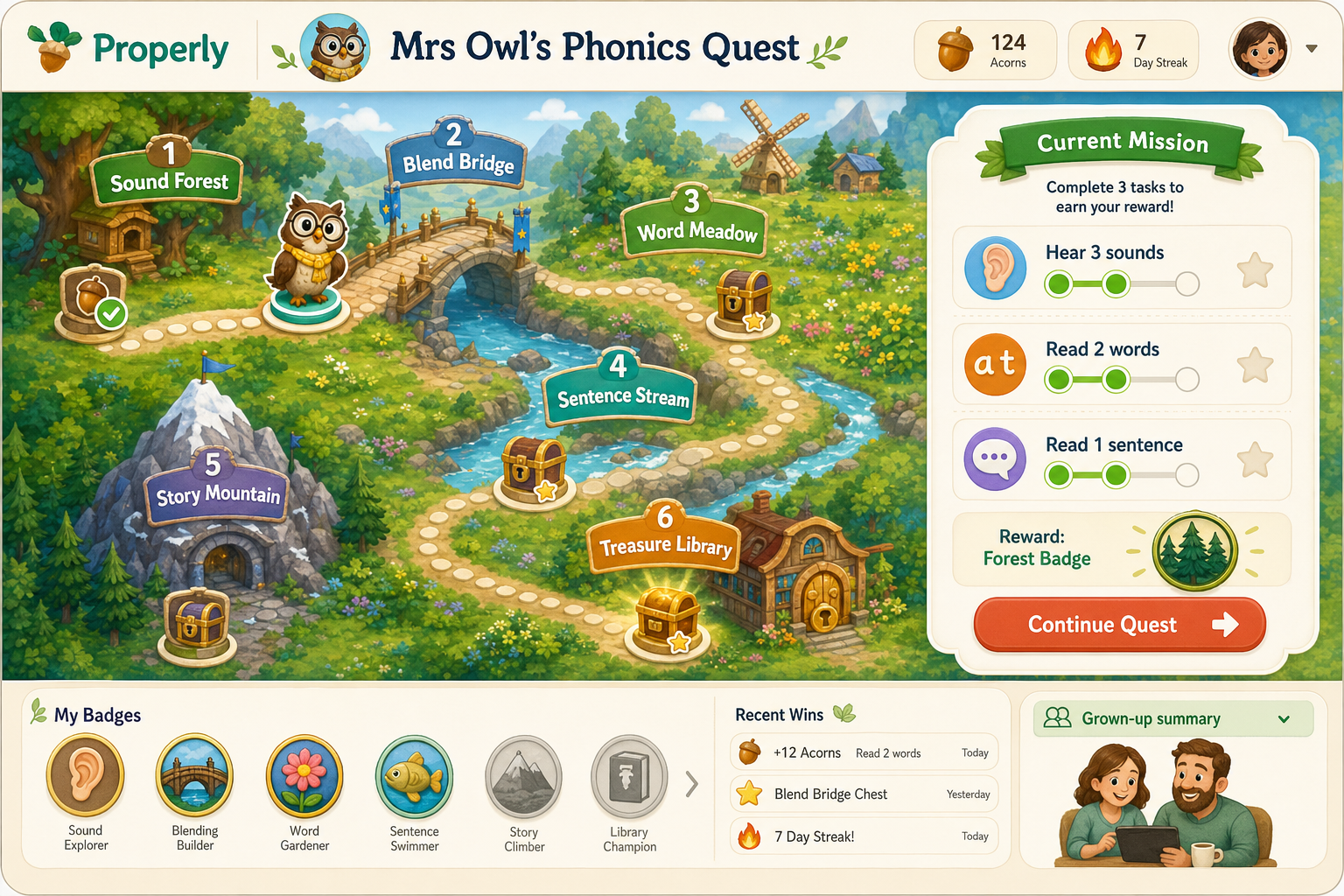
Properly acts as a friendly AI phonics tutor. A child or parent creates a profile, chooses the child's phonics phase and interests, then Properly generates or selects suitable reading material. The child listens, practises, reads aloud, receives scoring and feedback, earns rewards, and can download a PDF storybook.
The product experience is centred around "Mrs Owl", a warm virtual tutor who guides the child through the reading flow.
Core features include:
- child profile setup with phase and interests
- phase-safe story generation
- interactive grapheme and phoneme highlighting
- real phoneme audio support for the 44 IPA phonemes
- read-aloud recording and assessment
- Mrs Owl coaching and feedback
- progress dashboard
- acorns, badges, streaks, and reward milestones
- printable A4 PDF storybooks
- cache-aware image, PDF, and content reuse
Functional Flow
- A child profile is created with name, age/phase, and interests.
- Properly generates or selects phase-safe reading content.
- The child practises with phoneme tiles, grapheme highlights, and spoken guidance.
- The child reads aloud into the microphone.
- Audio is assessed through speech transcription and deterministic phonics validation.
- Mrs Owl gives encouraging feedback.
- Progress, rewards, and storybook assets are saved.
Technology Stack
Properly is a full-stack web application:
| Layer | Technology |
|---|---|
| Frontend | React 18, Vite |
| Backend | Node.js, Express |
| Real-time audio | WebSockets |
| Data storage | SQLite with WAL mode |
| Shared phonics logic | shared/phonicsEngine.js |
| PDF generation | PDFKit |
| AI services | OpenAI chat, Whisper, TTS, image generation |
| Deployment | Docker, Render |
| Source control | GitHub |
OpenAI Usage
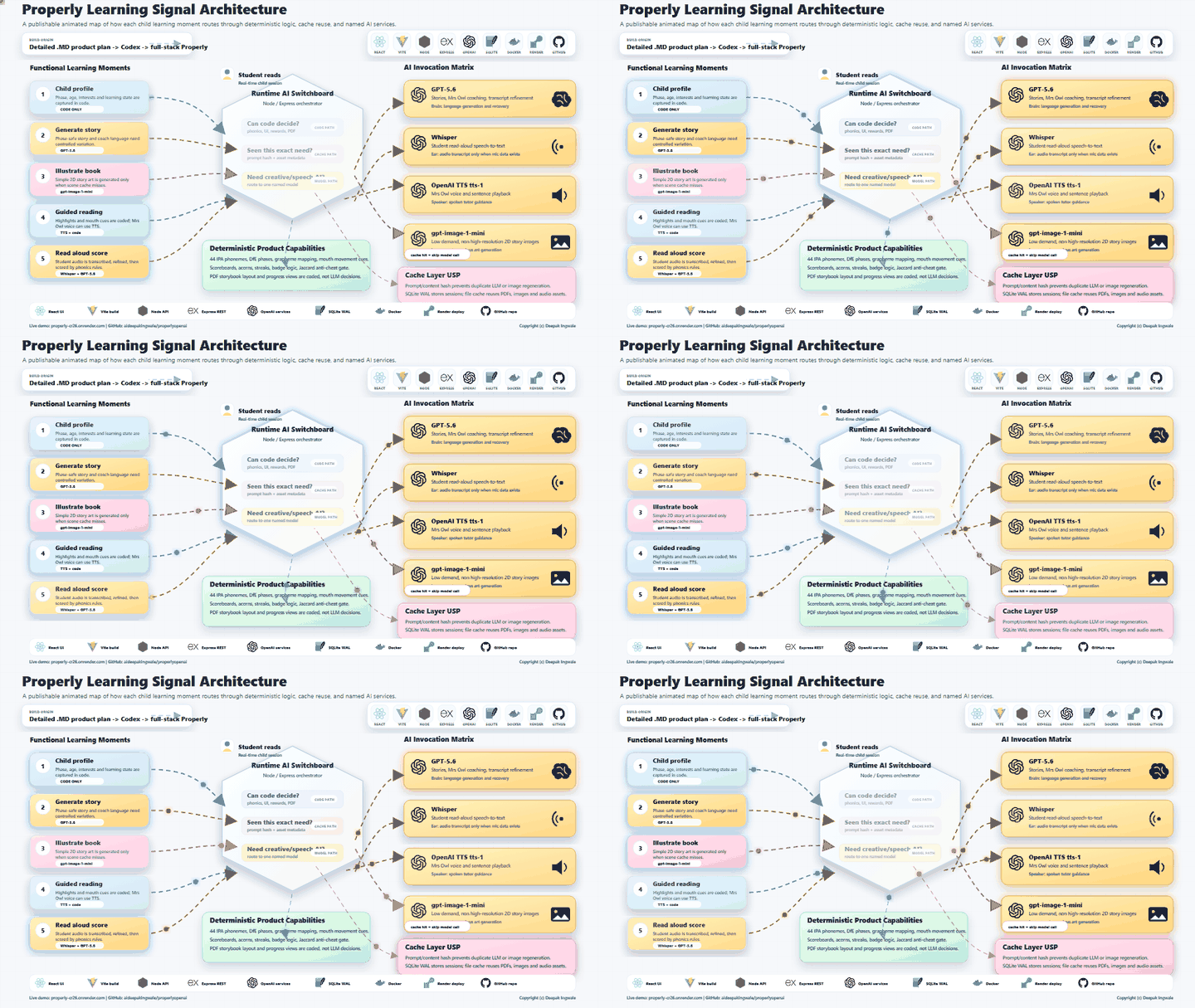
Properly uses OpenAI for non-deterministic or media-based tasks where AI provides clear value.
| Feature | OpenAI model/service | Why it is used |
|---|---|---|
| Story generation | GPT-5.6 |
Creates varied, child-friendly stories constrained to the child's phonics phase |
| Mrs Owl coaching | GPT-5.6 |
Produces short, encouraging, context-aware tutor feedback |
| Transcript refinement | GPT-5.6 |
Helps recover plausible child reading from Whisper output without blindly forcing a pass |
| Speech transcription | Whisper / whisper-1 |
Converts recorded child audio into text for scoring |
| Tutor voice | OpenAI TTS tts-1 |
Gives Mrs Owl a spoken voice for coaching and sentence playback |
| Story illustrations | gpt-image-1-mini |
Generates low-cost, basic 2D storybook images suitable for the current demo need |
The image generation path intentionally uses gpt-image-1-mini because the product currently needs simple, low-resolution, child-friendly 2D illustrations rather than high-resolution artwork. This keeps the experience lightweight and cost-conscious.
Deterministic Logic
Not every feature should use an LLM. Properly deliberately keeps several core learning and product behaviours deterministic.
Deterministic capabilities include:
- DfE Letters and Sounds phase mapping
- 44 IPA phoneme metadata
- grapheme to phoneme mapping
- vocabulary allowlists
- phoneme tile rendering
- mouth cue and pronunciation UI logic
- scoreboard and reward rules
- acorn, badge, and streak logic
- PDF layout and storybook rendering
- Jaccard-style word and phoneme similarity validation
- anti-cheat completion gate
- fallback mock/demo modes
This separation is important because a child learning product needs predictable boundaries. The LLM helps create language and feedback, while coded rules keep the learning path controlled.
Cache and Cost-Aware AI Design
Properly includes a cache layer to avoid unnecessary duplicate AI calls.
The cache strategy includes:
- checking prompt/content hashes before regeneration
- reusing story image metadata when the phase, theme, and visible story subjects match
- saving generated image files to local storage
- saving generated PDF metadata and cache keys
- storing profile, story, session, reward, and assessment data in SQLite WAL mode
- supporting mock mode when no OpenAI API key is configured
This means the app does not blindly regenerate the same story image, PDF, or AI-created content again and again. It reduces cost, improves response time, and makes the demo safer to run during judging.
How Codex Helped
Codex was used as the main engineering collaborator for the project.
The original product idea and feature requirements were provided as Markdown planning documents. Codex followed those instructions to help design, implement, refine, debug, and document the full-stack application.
Codex helped with:
- turning the product plan into a working React + Node architecture
- creating the phonics-focused user experience
- implementing child profiles, reading flows, rewards, and progress views
- building Express APIs and WebSocket audio flow
- integrating OpenAI services in a controlled and optional way
- adding mock mode so the product works without API spend
- building the cache-aware illustration and PDF generation flow
- improving the read-aloud scoring pipeline
- creating Devpost submission material
- generating captions, scripts, architecture visuals, and demo assets
- producing the animated architecture diagram for publication
Codex was especially useful because the project required constant movement between product thinking, UI implementation, backend design, AI integration, deployment concerns, and judging material. Instead of treating these as separate tasks, Codex helped keep them connected.
How OpenAI Helped
OpenAI services provide the flexible intelligence layer of Properly.
GPT-5.6 helps create personalised reading content and child-friendly coaching. Whisper helps listen to children reading aloud. OpenAI TTS helps Mrs Owl speak. The image model helps create storybook illustrations. Together, these services make the product feel adaptive and interactive.
At the same time, Properly does not outsource the whole learning system to the LLM. The app uses OpenAI where creativity, speech, and language interpretation are needed, then brings the result back into deterministic phonics validation and product rules.
Architecture Summary
React + Vite UI
   |
   | REST + WebSocket audio
   v
Node / Express API
   |
   |-- shared phonics engine
   |-- deterministic scoring and rewards
   |-- SQLite WAL database
   |-- PDF/image/audio file storage
   |-- cache lookup before regeneration
   |
   v
OpenAI services when needed
   |-- GPT-5.6 for stories, coaching, transcript refinement
   |-- Whisper for read-aloud transcription
   |-- tts-1 for Mrs Owl speech
   |-- gpt-image-1-mini for basic 2D storybook images
Demo Walkthrough
- Open the live demo.
- Create or use a child profile.
- Generate practice sentences or a personalised story.
- Show the reading screen with phoneme and grapheme support.
- Use the student read-aloud area for a real voice recording demo.
- Show scoring, Mrs Owl feedback, and retry guidance.
- Open progress and rewards.
- Download or show the generated PDF storybook.
- Explain that Codex built the full-stack product from the Markdown plan and that OpenAI models are invoked only for the right AI-specific moments.
Safety and Product Design Choices
Properly is designed for young children, so the implementation favours:
- short and encouraging feedback
- phase-safe vocabulary
- no harsh failure language
- deterministic validation before rewards
- mock mode for safe demos
- low-cost image generation
- cache reuse to avoid repeated model calls
- human-reviewable architecture and code
Current Status
Properly is a working demo/prototype suitable for hackathon judging and product demonstration. It includes the core learning journey, OpenAI integration points, deterministic phonics logic, deployment setup, documentation, and publishable architecture visuals.
Future Improvements
Planned future enhancements include:
- stronger persistent storage for production pupil records
- teacher/parent dashboards
- richer reporting by phoneme and phase
- expanded story library
- classroom mode
- more robust browser audio support across devices
- accessibility review for early readers and parents
- production-grade privacy and consent flows
What it does
| Feature | Detail |
|---|---|
| Listening & assessment | Mic capture over WebSockets; local heuristic scoring in mock mode, Whisper transcription when live AI is configured |
| Mrs Owl coaching | Short, encouraging feedback (configurable OpenAI chat model + OpenAI TTS tts-1) |
| Personalised stories | Themes (dragons, space, animals…) constrained to the child’s phonics phase |
| Phonics UI | Colour grapheme tiles, IPA strips, interactive phase guides |
| Rewards | Acorns, streaks, trophies |
| Storybooks | A4 PDF with text, low-cost generated illustration, grapheme tiles, IPA strip |
| Anti-cheat | Jaccard similarity on words + phonemes before a session can complete |
| Progress | Tracking aligned with Letters and Sounds phases 2–5 |
How it works
React 18 (Vite) ──REST──► Node / Express API ──► SQLite (WAL)
       │                         │
       └──── WebSocket audio ────┤
                                 ├── shared/phonicsEngine.js
                                 └── OpenAI (optional): GPT-5.6 chat · Whisper · tts-1 · GPT Image
shared/phonicsEngine.js is the single source of truth for:
- all 44 IPA phonemes
- DfE Letters and Sounds phases 1–5
- grapheme → phoneme maps, vocabulary allowlists, highlighting, Jaccard helpers
Both the API and the React client import this module so assessment and UI never drift apart.
Repository layout
ProperlyOpenAI/
  client/          React 18 + Vite SPA
  server/          Express API, WebSocket hub, SQLite, OpenAI services
  shared/          phonicsEngine.js
  Dockerfile       Single-image production build
  render.yaml      Render free-tier blueprint
  .env.example     Environment template
Prerequisites
- Node.js 20+ (22 recommended)
- npm 10+
- Optional: Docker (for cloud / container deploys)
- Optional: OpenAI API key (only if you want live AI; not required for mock demos)
Local deployment
1. Install
git clone <your-repo-url> ProperlyOpenAI
cd ProperlyOpenAI
npm run install:all
2. Configure environment
# Windows (PowerShell)
Copy-Item .env.example server\.env

# macOS / Linux
cp .env.example server/.env
No OpenAI API spend (default / recommended for first run):
OPENAI_API_KEY=
MOCK_MODE=true
PORT=3001
CLIENT_ORIGIN=http://localhost:5173
SERVE_CLIENT=true
JACCARD_THRESHOLD=0.55
TTS_VOICE=nova
ILLUSTRATIONS_ENABLED=false
Leave OPENAI_API_KEY empty for a fully local/mock demo. If you keep an API key in server/.env, set MOCK_MODE=true and ILLUSTRATIONS_ENABLED=false to avoid story/chat/TTS/image API calls. The app still generates phase-safe stories, local coach lines, SVG illustrations, PDFs, and assessment stubs.
If OPENAI_API_KEY is present, story illustrations use OpenAI image generation so each new story gets a picture that matches the selected topic and story scene. Defaults are tuned for small, kid-friendly artwork:
ILLUSTRATIONS_ENABLED=true
ILLUSTRATION_MODEL=gpt-image-1-mini
ILLUSTRATION_QUALITY=low
ILLUSTRATION_FORMAT=webp
ILLUSTRATION_COMPRESSION=70
ILLUSTRATION_CACHE_SCOPE=scene
OpenAI image generation is metered API usage, not a free API feature. The app keeps usage light by using the mini image model, low quality, compressed WebP output, and cache reuse. The server always caches exact story scenes and, by default, reuses generated images only when the phonics phase, selected theme, and visible story subjects match. This avoids paying for repeated dog-and-mud scenes while preventing one broad “animals” or “space” image from being reused for unrelated stories.
Live AI / hackathon judging mode (uses metered OpenAI API calls):
OPENAI_API_KEY=sk-...
MOCK_MODE=false
OPENAI_CHAT_MODEL=gpt-5.6
For OpenAI Build Week judging, set OPENAI_CHAT_MODEL=gpt-5.6 so story generation, Mrs Owl coaching, and transcript refinement use the required chat model. The app keeps a mock/demo mode so judges can still exercise the full product flow when no API key is available.
3. Seed sample data (optional)
npm run seed
Creates a sample child (Amelia, Phase 2) and a starter story for offline demos.
4. Run in development (two processes)
npm run dev
| Service | URL |
|---|---|
| App | http://localhost:5173 |
| API health | http://localhost:3001/api/health |
| WebSocket | ws://localhost:3001/ws/audio (proxied via Vite) |
5. Run in production mode on your machine
Build the SPA and serve it from the API (one port):
npm run start:prod
Then open http://localhost:3001
6. Local Docker (optional)
docker build -t properly .
docker run --rm -p 3001:3001 ^
  -e MOCK_MODE=true ^
  -e CLIENT_ORIGIN=* ^
  -e SERVE_CLIENT=true ^
  properly
On macOS/Linux use \ instead of ^ for line continuations.
Low-cost cloud deployment
Goal: a public demo URL that can run as a no-API-spend mock demo, and can be switched to live OpenAI API mode for the hackathon video or judge testing if you provide a key.
Use mock mode (MOCK_MODE=true, no API key, or ILLUSTRATIONS_ENABLED=false when a key is present) for no OpenAI API spend. You still get the full UX for demos, teaching, and portfolio screenshots.
Why one service?
Properly needs:
- a long-lived Node process
- WebSockets for audio
- a writable disk for SQLite + PDFs/images
That rules out pure serverless hosts (Vercel/Netlify functions) for the API. The simplest path is: one Docker web service that serves both the API and the built React app.
Option A — Render (simple single-service path)
- Push this repo to GitHub / GitLab.
- In Render, create a new Blueprint from the repo (uses
render.yaml), or create a Web Service:- Runtime: Docker
- Dockerfile path:
./Dockerfile - Plan: Free
- Health check path:
/api/health
- Set environment variables:
| Key | Value |
|---|---|
MOCK_MODE |
true |
SERVE_CLIENT |
true |
CLIENT_ORIGIN |
* |
JACCARD_THRESHOLD |
0.55 |
ILLUSTRATIONS_ENABLED |
false for no OpenAI image spend; true for live generated story art when an API key is configured |
- Deploy. Open
https://<your-service>.onrender.com.
The included render.yaml defaults ILLUSTRATIONS_ENABLED=false so adding a Render service does not accidentally trigger image API usage. Turn it on only for the live judged demo or recorded walkthrough.
Free-tier notes
- The service spins down after idle time; the first request after sleep can take ~30–60s.
- The free filesystem is ephemeral — SQLite data, PDFs, and images reset on redeploy/restart. Fine for demos; not for production pupil records.
- Do not set
OPENAI_API_KEY, or setILLUSTRATIONS_ENABLED=false, if you want to avoid OpenAI API spend.
Option B — Fly.io free allowance
# Install flyctl, then:
fly launch --no-deploy   # accept Docker, set app name
fly secrets set MOCK_MODE=true CLIENT_ORIGIN=* SERVE_CLIENT=true
fly deploy
Attach a small volume later if you want SQLite to survive restarts:
fly volumes create properly_data --size 1
Then point DB_PATH / STORAGE_DIR at the mounted path (see Fly volume docs).
Option C — Railway trial credits
- New project → Deploy from GitHub → Dockerfile.
- Variables:
MOCK_MODE=true,SERVE_CLIENT=true,CLIENT_ORIGIN=*. - Expose the web service port (Railway injects
PORTautomatically).
Railway’s “free” tier is usually trial credits, not forever-free — use Render/Fly if you need ongoing $0 hosting.
Option D — Split free static + free API (advanced)
| Piece | Host | Notes |
|---|---|---|
| Frontend | Cloudflare Pages / Netlify / Vercel | Build command: npm install --prefix client && npm run build --prefix client; output client/dist |
| Backend | Render / Fly Docker | Same API image; SERVE_CLIENT=false |
You must then:
- Set
CLIENT_ORIGINto your exact frontend origin (e.g.https://properly.pages.dev). - Point the SPA at the API (today the client uses same-origin
/apiand/ws— for a split host you would add a ViteVITE_API_URL/ proxy config). Prefer Option A unless you need a separate CDN.
Controlling cloud and API cost
| Lever | How |
|---|---|
| No OpenAI API spend | Leave OPENAI_API_KEY empty. If a key is present, use MOCK_MODE=true and ILLUSTRATIONS_ENABLED=false. |
| Lower hosting spend | Render free web service or Fly free allowance, subject to each provider's current limits |
| No extra DB bill | SQLite on local disk (accept ephemeral data on free tiers) |
| Optional live AI later | Set OPENAI_API_KEY + MOCK_MODE=false — then OpenAI API usage is billed to your OpenAI account |
| Low-cost story art | Keep ILLUSTRATION_MODEL=gpt-image-1-mini, ILLUSTRATION_QUALITY=low, ILLUSTRATION_FORMAT=webp, and ILLUSTRATION_CACHE_SCOPE=scene |
Demo walkthrough
- Open the app and create a child (name, phase, interests).
- Tap Read a new story.
- On the reading screen:
- use the mic, or
- paste the story into the practice transcript box (reliable for demos / noisy rooms).
- Tap Finish & collect acorns (Jaccard must pass, or use Complete anyway for demos).
- Download the PDF; check Progress and Rewards.
OpenAI Build Week notes
Properly targets the Education track for OpenAI Build Week. The Devpost page asks for a working project built with Codex using GPT-5.6, a category, a project description, a public demo video under 3 minutes, a code repository URL, setup instructions, and the /feedback Codex Session ID used for the main build work.
The live AI path uses OpenAI for:
- GPT-5.6 story generation constrained to DfE Letters and Sounds phases
- GPT-5.6 Mrs Owl coaching and transcript refinement
- Whisper transcription fallback for child reading audio
- OpenAI TTS for spoken tutor feedback
gpt-image-1-minilow-quality compressed illustrations for generated storybooks
Submission checklist:
- Public demo URL for the deployed app
- Code repository URL for judging/testing
- Public YouTube/Vimeo demo video under 3 minutes, with audio explaining how Codex and GPT-5.6 were used
- Project description: problem, solution, OpenAI usage, technical architecture, and impact
/feedbackCodex Session ID from the main build session- Any sample data or credentials needed for judge testing
Reference links:
- OpenAI Build Week overview
- OpenAI Build Week rules
- OpenAI Build Week resources
- OpenAI image generation guide
API reference (scaffold)
| Method | Path | Purpose |
|---|---|---|
GET |
/api/health |
Health + mock flag |
POST |
/api/children |
Create profile |
GET |
/api/children/:id/progress |
Progress + sessions |
POST |
/api/stories/generate |
Story + illustration + PDF |
GET |
/api/stories/:id/pdf |
Download A4 PDF |
POST |
/api/sessions/start |
Begin reading session |
POST |
/api/sessions/:id/complete |
Jaccard gate + rewards |
POST |
/api/coach |
Mrs Owl message (+ TTS when live) |
GET |
/api/phonics/phases/:n |
Phase guide tiles |
WS |
/ws/audio |
Audio stream + assessment events |
Environment variables
| Variable | Default | Description |
|---|---|---|
OPENAI_API_KEY |
(empty) | Enables metered OpenAI API calls for live chat, Whisper, TTS, and GPT Image |
MOCK_MODE |
false* |
Force local/mock story and coach responses; auto-on when key is missing |
PORT |
3001 |
HTTP + WebSocket port |
CLIENT_ORIGIN |
http://localhost:5173 |
CORS allow-list (* or comma-separated) |
SERVE_CLIENT |
true |
Serve client/dist from the API |
JACCARD_THRESHOLD |
0.55 |
Configured similarity gate; the current scorer enforces a minimum internal pass threshold of 0.72 |
TTS_VOICE |
nova |
OpenAI TTS voice |
ILLUSTRATIONS_ENABLED |
true |
Generate story art with OpenAI image models when a key is configured; otherwise use SVG placeholders |
ILLUSTRATION_MODEL |
gpt-image-1-mini |
Cost-efficient image model for story illustrations |
ILLUSTRATION_QUALITY |
low |
Low/medium/high quality for GPT Image models |
ILLUSTRATION_FORMAT |
webp |
Output format for GPT Image models (webp, jpeg, or png) |
ILLUSTRATION_COMPRESSION |
70 |
Compression level for WebP/JPEG story images |
ILLUSTRATION_CACHE_SCOPE |
scene |
scene reuses images when phase, theme, and visible story subjects match; topic is broader and cheaper but less precise; story / exact only reuses exact story-scene matches |
DB_PATH |
data/properly.db |
SQLite file (relative to server/) |
STORAGE_DIR |
storage |
PDFs, images, audio |
*Effective mock is MOCK_MODE=true or missing API key.
Design challenges (and how the scaffold handles them)
| Challenge | Approach |
|---|---|
| Real-time audio on home Wi‑Fi | Level meter, silence hints, WS heartbeats, degrade to Whisper-at-end |
| False “completed” readings | Jaccard on word + phoneme sets; retry when below threshold |
| LLM inventing hard words | Low temperature, few-shot Phase examples, vocabulary post-filter |
Phoneme sound bank
All 44 IPA phonemes use real British English isolation recordings (not synthetic Web Audio tones), cached in the browser via usePhonemePlayer / phonemeCache.
- Files:
client/public/phonemes/*.mp3 - Re-download:
npm run phonemes:download - Attribution:
client/public/phonemes/ATTRIBUTION.txt
Scripts
| Command | Purpose |
|---|---|
npm run install:all |
Install root + server + client deps |
npm run phonemes:download |
Download real 44 IPA phoneme MP3s |
npm run dev |
Dev API + Vite client |
npm run build |
Production SPA build |
npm run start |
Start API (serves SPA if client/dist exists) |
npm run start:prod |
Build SPA then start API |
npm run seed |
Seed sample child + story |
Links
- Live demo: https://properly-cr26.onrender.com/
- GitHub repository: https://github.com/aideepakingwale/properlyopenai
- Codex
/feedbacksession ID:019f771d-0bdd-7862-8dc7-967e49578487 - Architecture poster:
artifacts/architecture/properly-learning-orchestra-poster.png - Animated architecture GIF:
artifacts/architecture/properly-learning-orchestra-animation-under-5mb.gif - Animated architecture WebM:
artifacts/architecture/properly-learning-orchestra-animation.webm

Licence
Private / educational prototype.
Credits
Built by Deepak Ingwale with Codex and OpenAI.
Built With
- codex
- docker
- express.js
- gpt-5.6
- gpt-image-1
- node.js
- openai-api
- openai-tts
- pdfkit
- react
- render
- sqlite
- vite
- websockets
- whisper

