-
-
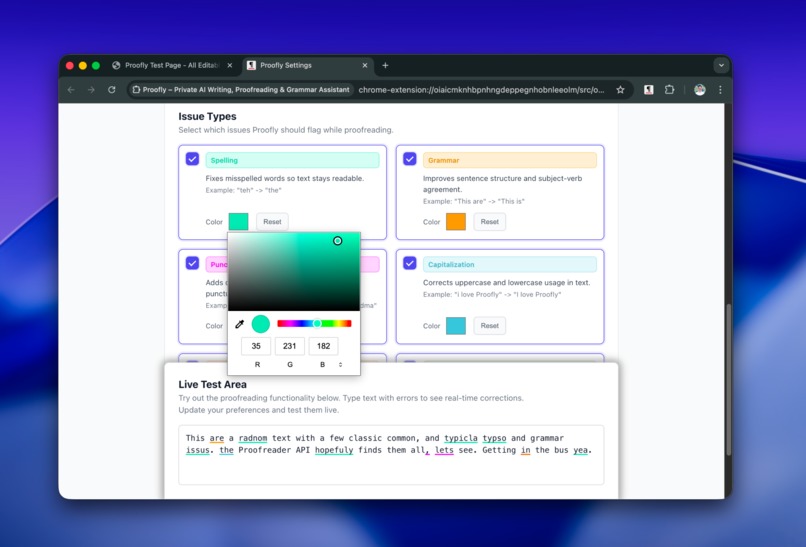
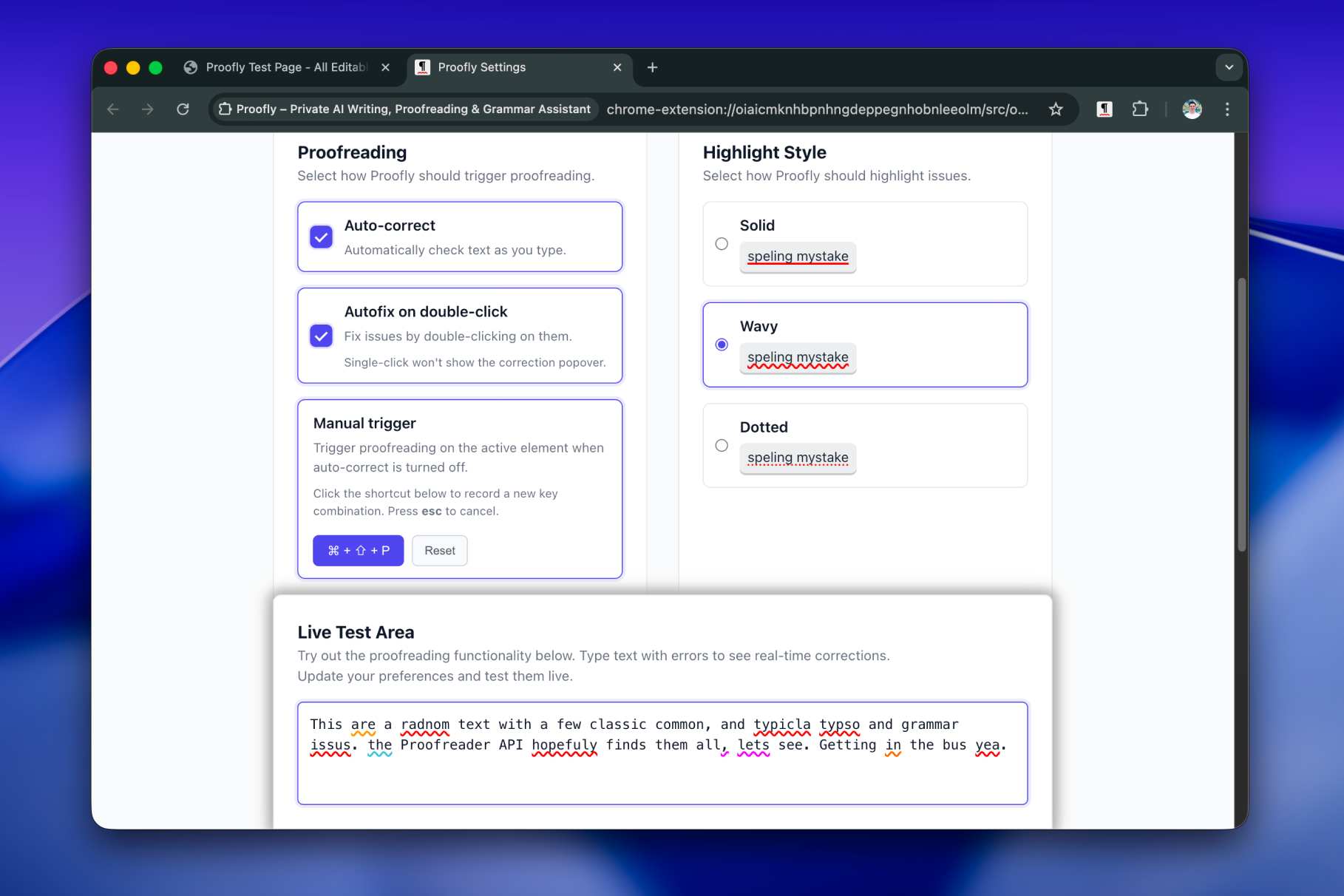
Issue type toggling and color code customization
-
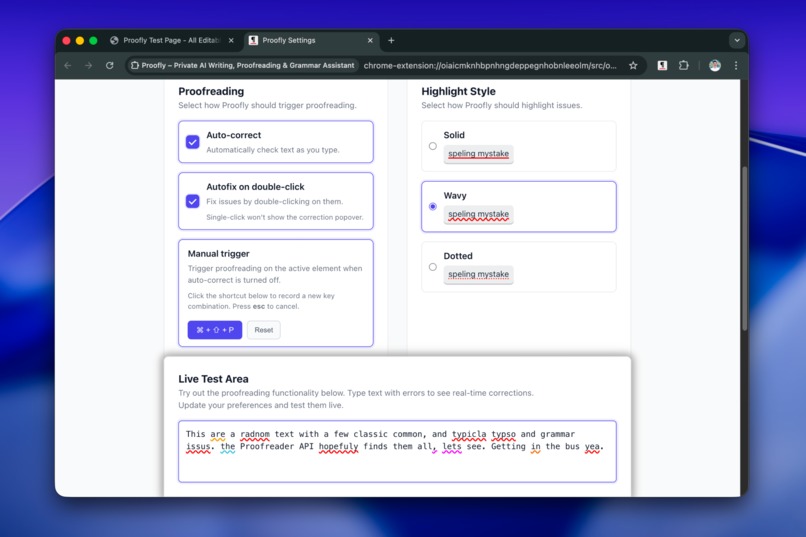
Workflow and hihglight customization options
-
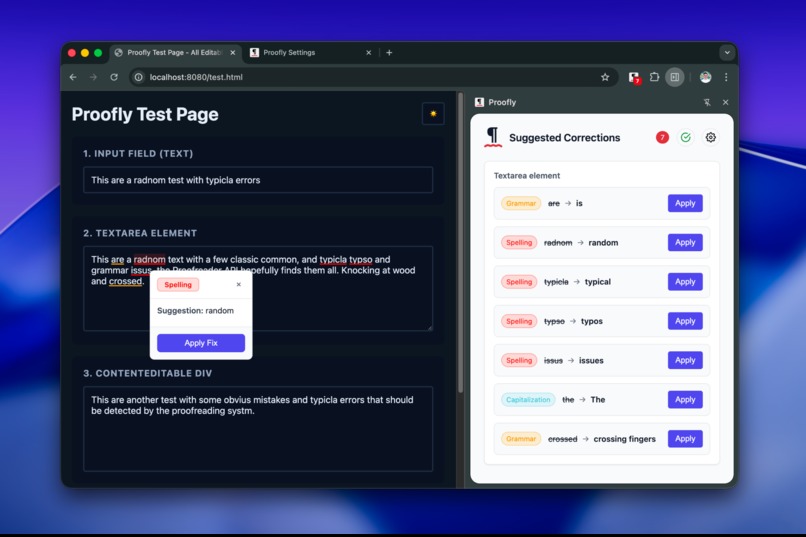
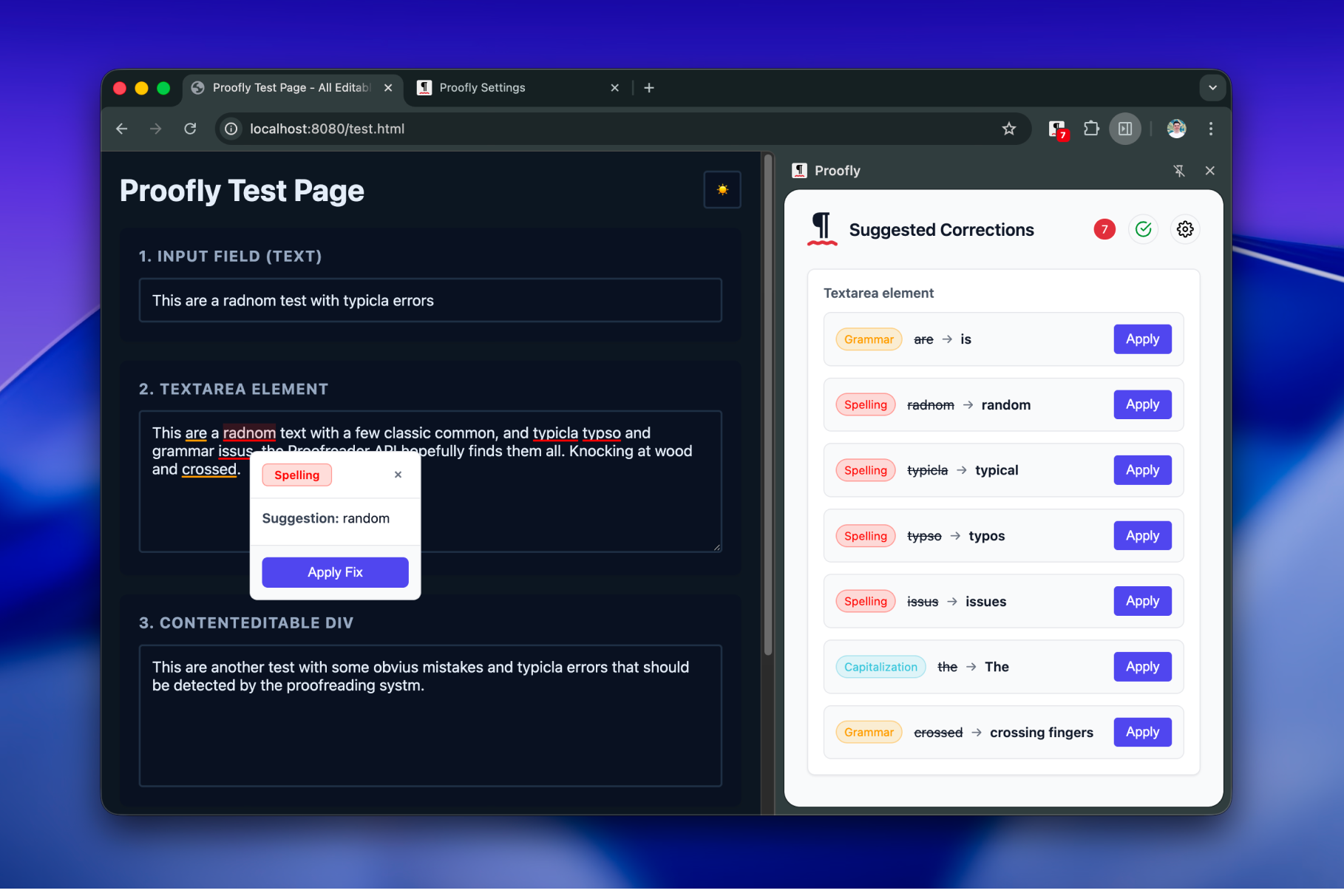
Sidepanel, popover and issue highlights
Inspiration
Proofly is inspired by new AI capabilities on the web and increasing use cases and availability of on-device AI. There are great writing assistants out there but none of them provides a local, privacy-first writing assistance to general public. Proofly's goal is to be the 100% private, free and open-source alternative that's accessible to anyone.
What it does
- Proofly is a Chrome extension that proofreads your writing entirely on-device while you browse the web using Chrome’s Built-in AI - no text ever leaves your machine.
- It highlights issues (spelling, grammar, punctuation, capitalization, prepositions, missing words), offers inline fixes, and works across inputs, textareas, and contenteditable fields with a lightweight, non-invasive and non-obtrusive UI.
- It gives you many customization options for proofreading specific issue types at a time you want with the way you'd like to experience.
How we built it
- We used TypeScript + Web Components with Shadow DOM isolation, and the Chrome Built-in AI Proofreader API for local inference, and Language Detection API for multilingual inference.
- The highlighting UI relies on CSS Highlights for
contenteditableelements, a mirror & anchor system for the highlight painting fallback to support input and textarea. And, the Popover API for fast, anchored highlights and popovers. - Extension pieces include content scripts, a service worker, Side Panel, Sync/Local Storage, and Context Menus. They all communicate with each other using an event-driven messaging system.
- We use guidelines and best practices published by the Chrome Built-in AI team to interact with the Built-in AI APIs, such as
@types/dom-chromium-ai, https://developer.chrome.com/docs/ai/inform-users-of-model-download, https://developer.chrome.com/docs/ai/proofreader-api and https://developer.chrome.com/docs/ai/language-detection. - The build pipeline uses the TypeScript compiler and Vite ecosystem.
Challenges we ran into
- Painting highlights with minimal script injection that is accurate, reliable and performant was the biggest challenge. We started the journey with the CSS Highlights, but quickly got blocked by the lack of support on input and textarea elements. We had to create a solution to paint highlights in unsupported text input elements. We first tried painting highlights using canvas and noticed there are drifts on scroll and repaints are expensive. In the end, we built a shadow-root overlay that is clipped to the field's content box, and mirrored the field's text and computed typography into a hidden element. For each issue from the Proofreader API, we build a
Rangeon the mirror and readgetClientRects()to get per-line rectangles. We render tiny absolutely positioned underline bars inside the overlay and scroll-sync them with the fieldtranslate(-scrollLeft, -scrollTop), so they stay glued to the text during internal scrolling. The overlay uses pointer-events:none (highlights opt-in withpointer-events:auto), so the page keeps full control of the input. We also used batched read/writes viarAF. - We could use the abovementioned approach on all fields, however, we want the project to be future-proof and web standards compliant so we kept CSS Highlights approach nevertheless for
contenteditablefields. - Platform readiness: Proofreader API requires Chrome 141+ and is currently in origin trial, plus an initial model download footprint creates friction for onboarding and makes testing hard.
- Lack of
customElementsavailability on content script context while injecting Web Components. Had to import a polyfill, and deal with a race condition. - Lack of
proofreadStreaming()on Proofreader API (yet).
Accomplishments that we're proud of
- Running fully offline and private while keeping performance snappy — balanced via on-device models, minimal footprint and zero telemetry.
- We never mutate site DOM or styles. Highlights live in a Shadow DOM overlay.
- Using a mirror +
Range.getClientRects()to place underlines exactly under the correct characters, even while you type or scroll inside textareas. - Shipping an impactful and valuable UI to enable testing the quality of the models.
- Multiple entrypoints for reviewing issues and applying fixes - highlights, context menu and sidebar.
- Zero dependency mindset to keep the project away from the framework bloat and npm dependency hell.
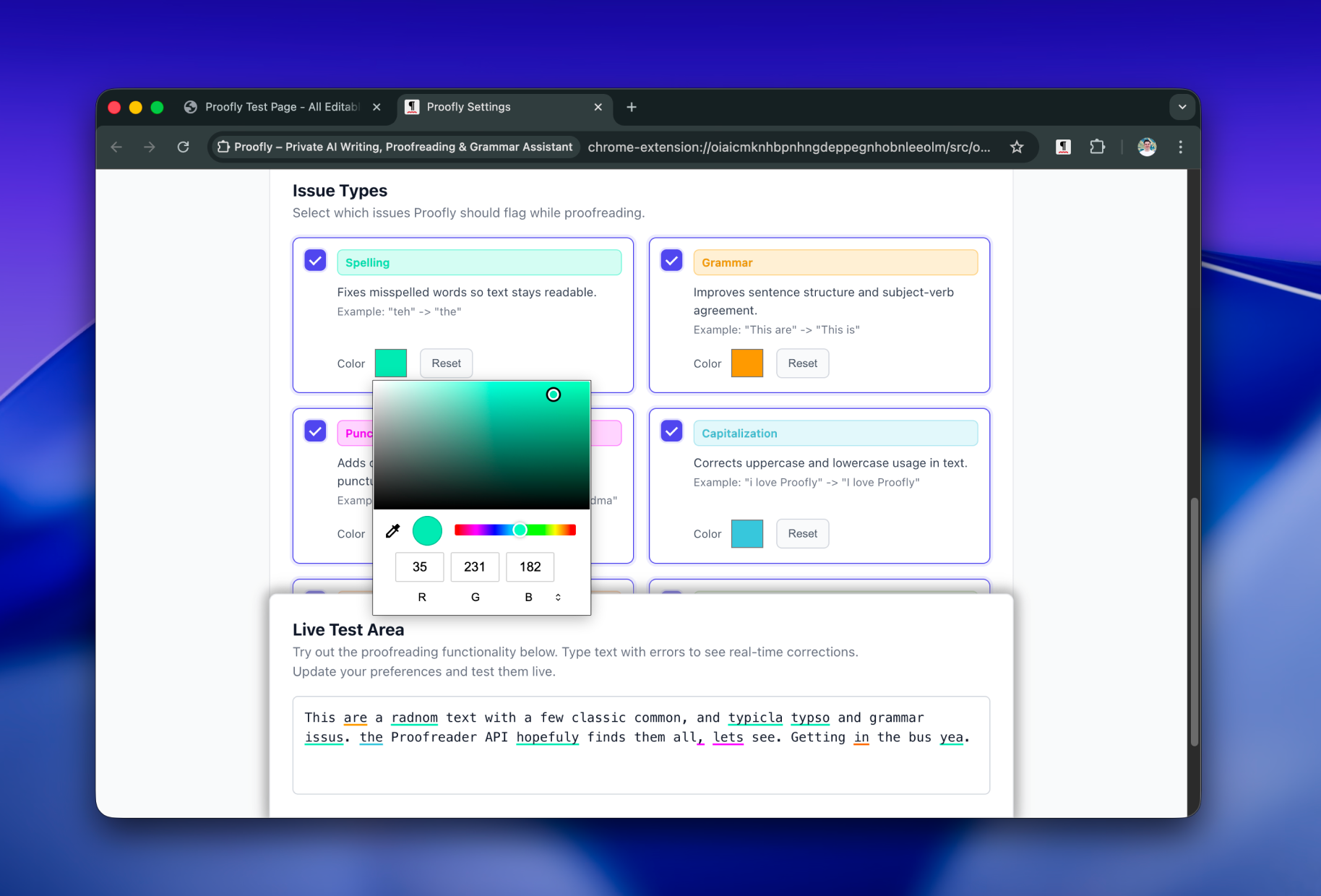
- Many customization options to make users happy:
- Configurable Correction Types: Enable/disable specific issue types
- Custom Colors: Personalize highlight colors for each issue type
- Underline Styles: Choose solid, wavy, or dotted underlines
- Keyboard Shortcuts: Customize your workflow with auto-fix or manual-fix options
- Autofix on Double-Click: Quick correction with double-click
What we learned
- Modern web standards (Web Components, CSS Custom Variables, CSS Highlights, Popover) are enough to build a Grammarly-class UX without framework bloat.
- Running AI inference on larger texts takes more time even on latest laptop hardware.
- Strict permissions, CSP, and zero external resources are key to user trust in a writing assistant.
What's next for Proofly - Private AI Writing, Proofreading, Grammar Assistant
- Fix bugs :) It's a last minute project and in alpha state. It's not battle tested on the web, and need to adjust workflows after extensive use.
- Publish to the Chrome Web Store and track the Proofreader API’s move from origin trial to stable.
- Add streaming with
proofreadStreaming()for earlier feedback. - Add further AI capabilities, such as completion, or rewrite.
- Add new trigger workflows to help people get used to local AI inference dynamics. For example, select a paragraph and only proofread that.
- Expand customization and accessibility polish.
- Set-up foundations (testing, refactors, pipelines, communication) to grow community contributions while keeping privacy-first, minimal-dependency principles.
Built With
- chromesyncstorage
- contentscripts
- contextmenusapi
- csscustomproperties
- csshighlightsapi
- javascript
- languagedetectionapi
- popoverapi
- proofreaderapi
- serviceworkers
- shadowdom
- sidepanelapi
- typescript
- webcomponents


Log in or sign up for Devpost to join the conversation.