🌿 Inspiration
Every time you send a prompt to an AI model, a server somewhere consumes energy. With AI usage exploding globally, the collective carbon cost of inference is becoming a real environmental problem — yet no tool existed to make that cost visible in real-time, right where you're actually using AI.
We wanted to build the thing that should already exist: a live carbon meter for AI prompts.
⚡ What It Does
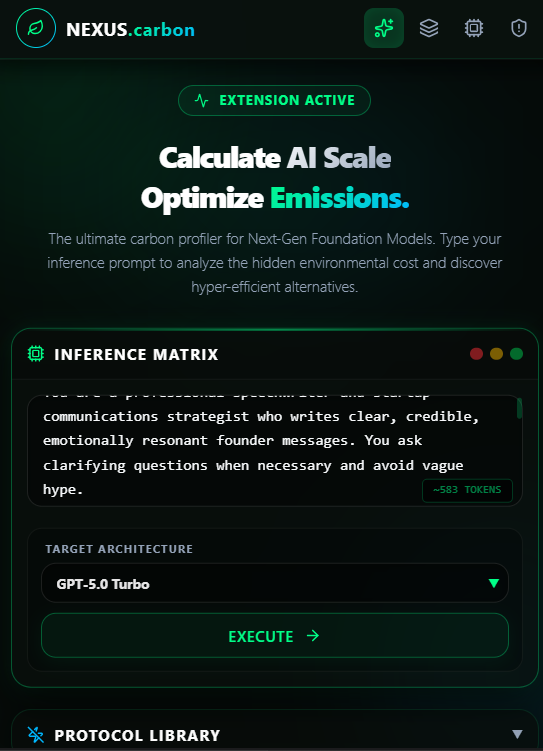
PromptPrint (NEXUS.carbon) is a Chrome Extension + Web App that tracks the hidden environmental cost of your AI usage in real-time.
- 🔴 Live Token Tracking — the extension reads your prompt as you type in ChatGPT, Claude, or Gemini and instantly calculates token count, energy draw (Wh), and carbon emitted (gCO₂)
- 📊 Inference Matrix — compare the carbon cost of your exact prompt across 10+ models from OpenAI, Anthropic, Google, Meta, and DeepSeek side by side
- 🌱 Optimization Engine — suggests a greener model that handles the same task with significantly lower emissions
- 🚗 Physical World Equivalents — translates abstract CO₂ numbers into relatable comparisons like miles driven or smartphones charged
- 📈 Session Dashboard — tracks your cumulative AI carbon footprint across your entire browsing session
- 📋 Protocol Library — pre-loaded prompt templates to quickly test and compare models
🛠️ How We Built It
The frontend is built with React 18 + Vite, styled with Tailwind CSS v4 and custom glassmorphism CSS. Data visualization uses Recharts, routing via React Router DOM.
The Chrome Extension runs on Manifest V3 — Content Scripts
read live textarea input on chatgpt.com, claude.ai, and
gemini.google.com, with a Service Worker managing background
state and Chrome's local storage API for session persistence.
Carbon calculations use the formula:
$$CO_2 \text{ (g)} = \text{Tokens} \times E_{\text{model}} \times 0.386$$
Where \( E_{\text{model}} \) is the energy per 1000 tokens (Wh) for each model architecture, and 0.386 is the US average grid carbon intensity (386 gCO₂/kWh).
Everything runs client-side — no backend, no data leaving your browser.
🚧 Challenges We Ran Into
- Each AI platform structures its input DOM differently — getting the content script to reliably detect live input across ChatGPT, Claude, and Gemini required careful per-site selector handling
- Keeping the floating badge UI non-intrusive yet always visible required several iterations of positioning and z-index logic
- Sourcing credible, comparable energy-per-token figures across model families required digging through ML infrastructure research papers and synthesizing numbers that didn't always exist in the same format
🏆 Accomplishments We're Proud Of
- A fully working Chrome extension that injects a live carbon counter directly into ChatGPT, Claude, and Gemini with zero lag
- A clean, immersive UI that makes environmental data feel urgent and tangible rather than dry
- Building and shipping both a web app + browser extension solo in 36 hours
📚 What We Learned
- Chrome Extension Manifest V3 has significantly stricter rules around service workers and content script injection than V2
- Making invisible infrastructure costs feel real to users is mostly a design problem, not a data problem
- Scope ruthlessly when going solo — the Protocol Library was a last-hour addition that almost didn't make it
🚀 What's Next for PromptPrint
- Real API telemetry — hook into OpenAI/Anthropic usage APIs for exact token counts
- Monthly carbon reports — exportable PDF of your AI footprint
- Team dashboards — org-wide AI emissions tracking for companies
- Firefox support — extend beyond Chrome
- Carbon offset integration — let users offset usage through verified programs ```
Built With
- chrome
- css
- dom
- extension
- javascript
- lucide
- react
- recharts
- router
- tailwind
- vite


Log in or sign up for Devpost to join the conversation.