-
-
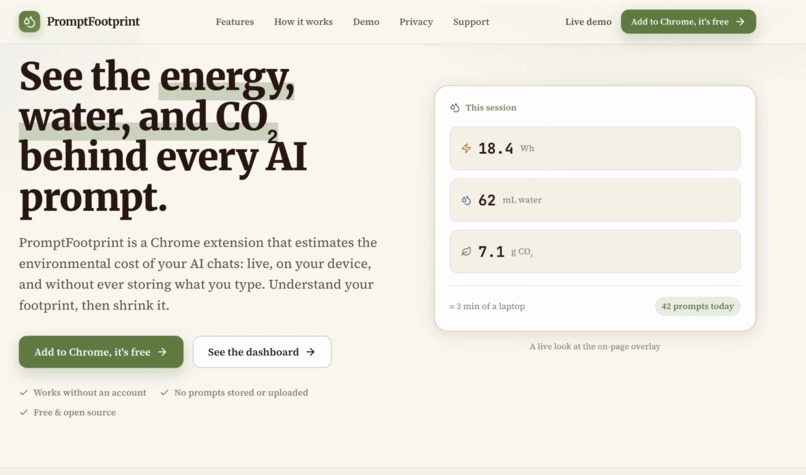
Landing Page
Inspiration# PromptFootprint
Inspiration
Artificial intelligence feels almost invisible. I type a prompt, receive an answer, and move on. However, every AI interaction requires data centers, electricity, cooling water, and computing resources.
As AI tools become part of school, work, coding, and everyday life, most users have no idea how much environmental impact their prompts may create. I did not want to tell people to stop using AI. Instead, I wanted to help people use AI more intentionally.
That inspired me to create PromptFootprint, a tool that makes the hidden environmental cost of AI visible and encourages users to write clearer, more efficient prompts.
What it does
PromptFootprint is a Chrome extension that tracks the estimated environmental footprint of an AI conversation in real time.
For each session, it displays estimates for:
- Token usage
- Energy consumption
- Water consumption
- Carbon emissions
- Prompt efficiency
The extension also gives users suggestions for improving their prompts. For example, instead of sending several short and unclear messages, a user can combine their instructions into one detailed prompt.
I designed PromptFootprint to help people use AI more responsibly without discouraging them from using it. The goal is to help users get better results while reducing unnecessary tokens and computational resources.
Because exact data-center information is not publicly available for every AI request, I clearly present the environmental numbers as estimates rather than exact measurements.
How I built it
I built PromptFootprint as a full-stack application consisting of a Chrome extension, a backend server, and a web dashboard.
The Chrome extension detects AI interactions, estimates the number of tokens used, and sends the session information to the backend. The interface then updates the user’s environmental estimates while they continue their conversation.
I built the backend using Node.js. It processes session data, calculates estimated energy, water, and carbon usage, and stores the information used by the dashboard.
The dashboard gives users a larger view of their activity, including weekly trends, total resource estimates, and prompt-efficiency improvements. I also created a global data-center visualization to help users understand that AI responses are powered by real physical infrastructure around the world.
I focused heavily on making the interface simple. I wanted users to understand their impact within a few seconds without needing to understand machine-learning infrastructure or environmental science.
Challenges I faced
One of the biggest challenges I faced was estimating environmental impact accurately. AI companies generally do not publish the exact model, hardware, data center, electricity source, or cooling system used for every request.
Because of this, I had to research available estimates and create a transparent calculation system. I designed PromptFootprint to show approximate impact while avoiding the impression that the numbers are perfectly exact.
Another challenge was estimating token usage across different AI platforms. Each model may tokenize text differently, so one sentence may not produce the same number of tokens everywhere. I created a consistent estimation method that gives users a useful comparison even when exact model information is unavailable.
I also faced challenges while connecting the Chrome extension, backend, and dashboard. Data needed to move between each component quickly without interrupting the user’s AI experience.
Finally, I had to balance detail with usability. Showing too much technical information could overwhelm users, while showing too little would make the tool feel meaningless. I solved this by displaying simple session statistics first and placing more detailed trends and explanations inside the dashboard.
What I learned
I learned that the environmental impact of AI is much more complicated than a single carbon number. Energy usage depends on the model, hardware, prompt length, response length, data-center location, and electricity source. Water usage can also vary depending on how the facility is cooled.
I also learned that prompt engineering is not only about getting better answers. Writing a clear prompt can reduce repeated messages, unnecessary output, and wasted computation.
From a technical perspective, I learned how to build and connect multiple parts of a full-stack product, including:
- Creating a Chrome extension
- Detecting and processing AI interactions
- Estimating token usage
- Building backend APIs
- Designing environmental calculations
- Creating an interactive analytics dashboard
- Deploying a complete application
Most importantly, I learned that sustainability tools are more effective when they help users improve their behavior instead of making them feel guilty.
Accomplishments I am proud of
I am proud that PromptFootprint is fully deployed and works as more than just a concept or prototype.
I successfully created a product that translates complicated infrastructure data into information an everyday AI user can understand. I am also proud that the project connects environmental awareness with practical prompt improvement.
During testing, I found that users could reduce unnecessary token usage by writing more complete and intentional prompts. This showed me that even small changes in how people communicate with AI can create meaningful improvements over time.
What is next for PromptFootprint
In the future, I would like to improve PromptFootprint by supporting more AI platforms and creating more accurate model-specific estimates.
I also want to add:
- Organization and classroom dashboards
- Personalized prompt-efficiency coaching
- Comparisons between different AI models
- Environmental goals and achievements
- More detailed data-center and electricity-grid estimates
- Reports for schools and businesses
My long-term goal is to make PromptFootprint a standard sustainability layer for AI tools.
AI is not going away. PromptFootprint helps ensure that as AI becomes more powerful, people also become more aware of the resources behind every prompt.
What it does
How we built it
Challenges we ran into
Accomplishments that we're proud of
What we learned
What's next for PromptFootprint
Built With
- chrome
- css
- javascript
- next.js
- react
- vercel


Log in or sign up for Devpost to join the conversation.