At a glance
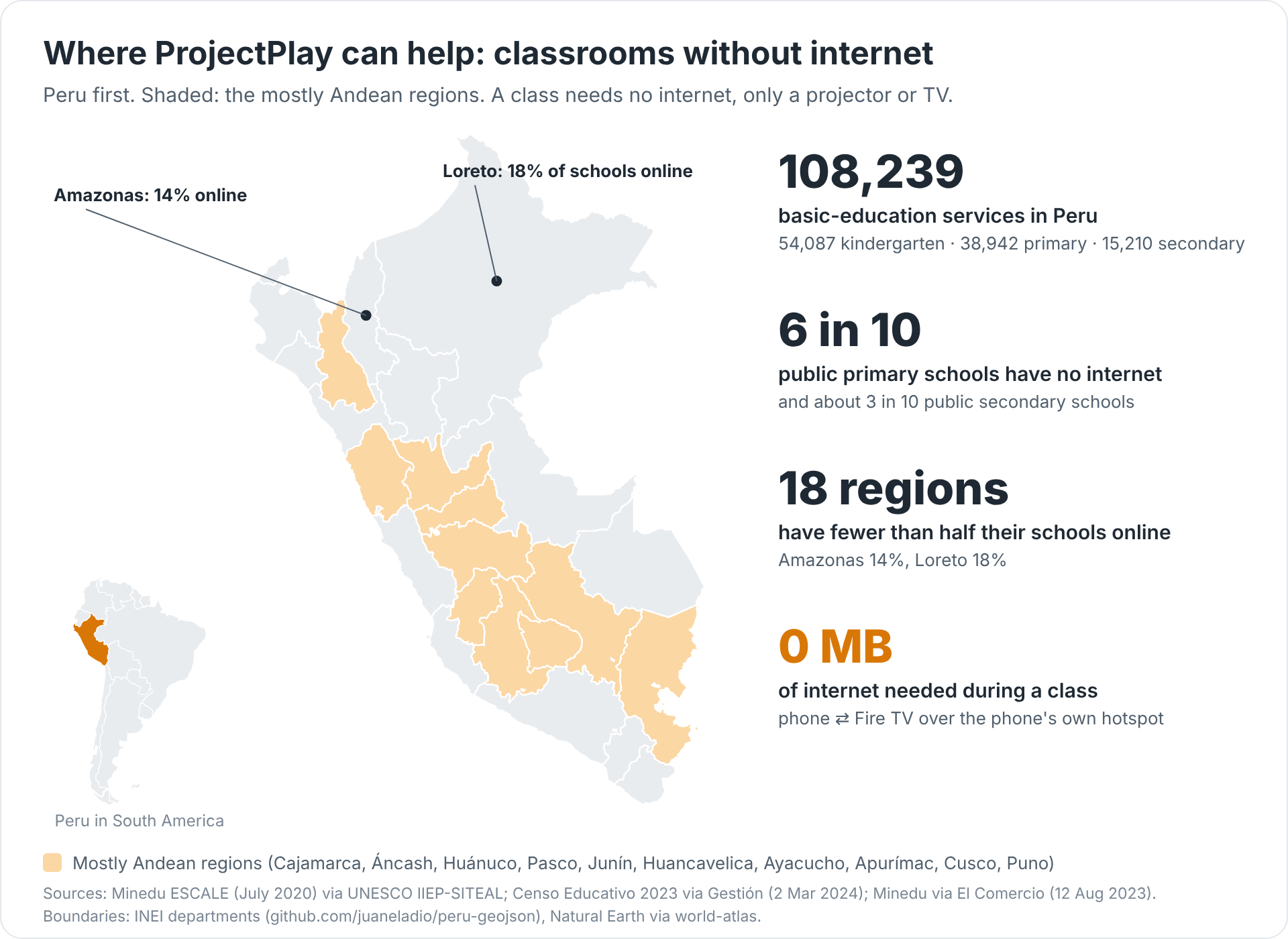
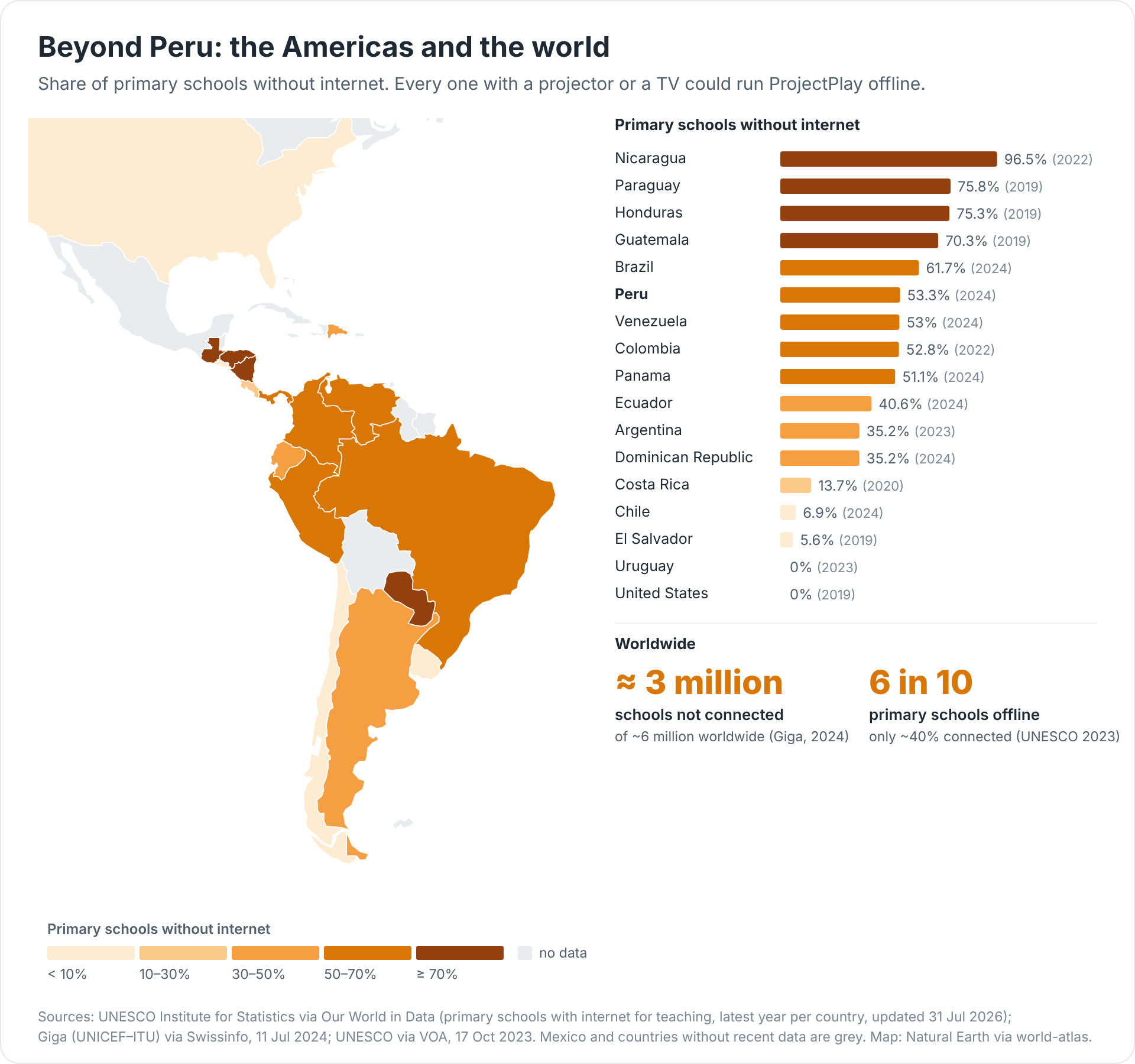
- 100% offline in class: No school Wi-Fi, no mobile data, no server, no account. The phone opens its own hotspot and the Fire TV joins it. Built for the schools UNESCO counts as unconnected: only ~40% of primary schools worldwide are online, and about 6 in 10 public primary schools in Peru are not.
- Nothing extra to download: One install per device and you're done: the teacher APK is 52.5 MB and the Fire TV APK 55.3 MB, with the pose model (3 MB), all 11 starter lessons (121 exercises, ~104 KB) and every picture inside. No content packs, no updates needed to teach. The only optional online feature is creating a new lesson with AI: 10–20 KB per lesson.
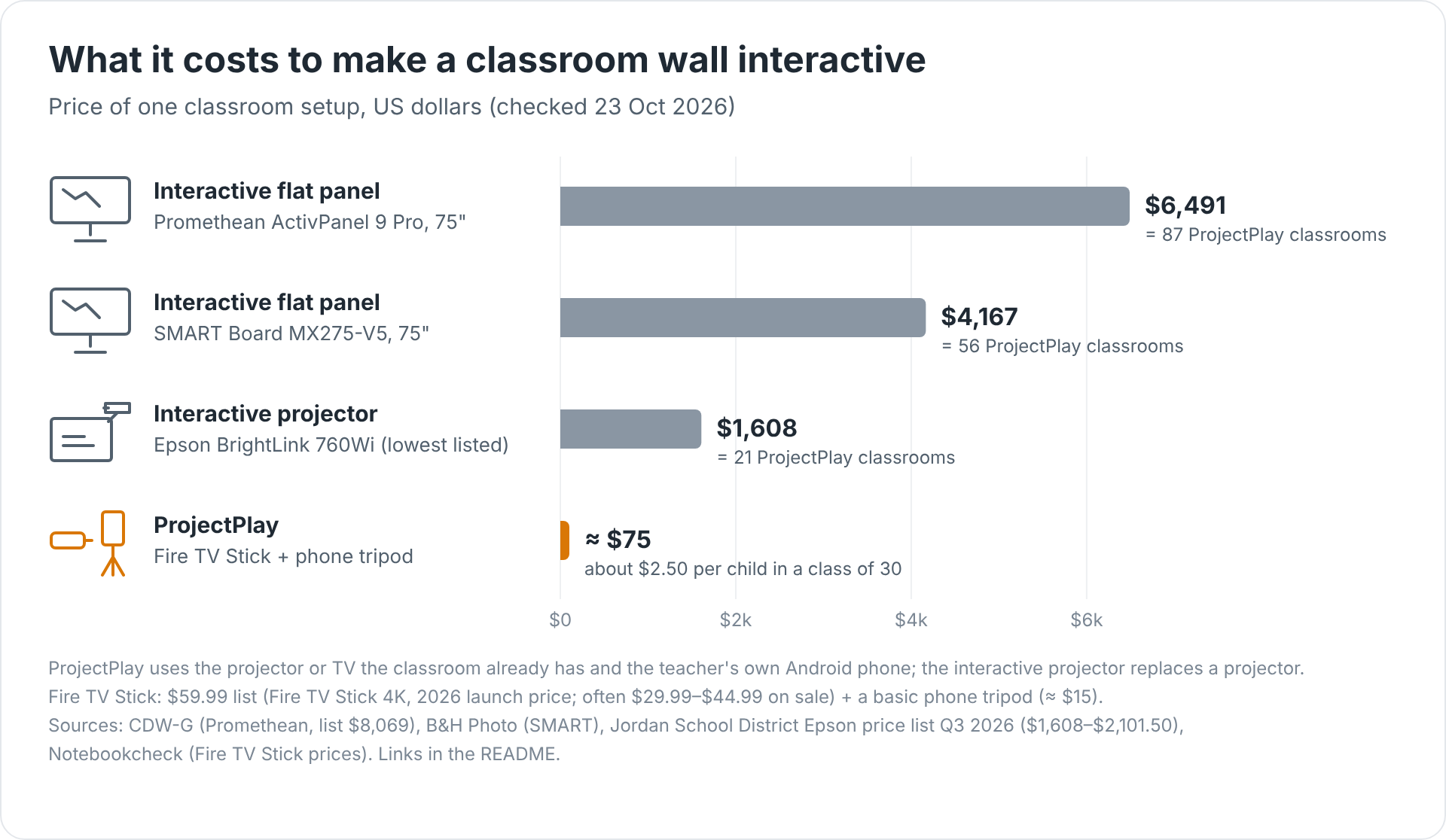
- ≈ $75 per classroom: A Fire TV Stick plus a phone tripod, on the projector or TV the school already has, and the teacher's own Android phone. Interactive boards cost $1,608–$6,491 per classroom: one SMART Board pays for 56 ProjectPlay classrooms (about $2.50 per child in a class of 30).
- Works on any projector: Fire TV in the projector's HDMI port; the projection becomes a touch wall for a whole class, two teams at once or one child alone.
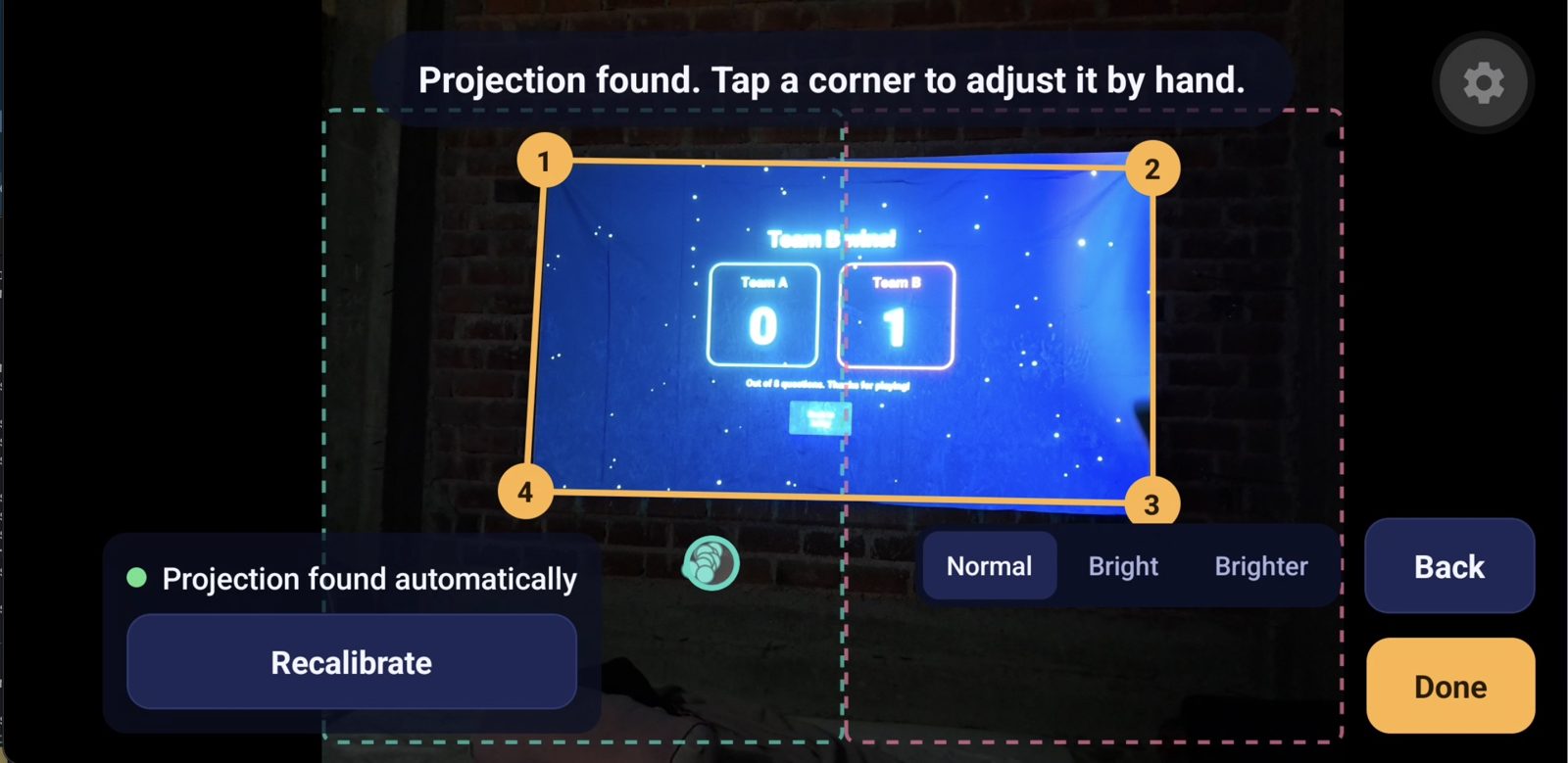
- Setup in 4 steps, about a minute: 1. Turn on the phone's hotspot. 2. Connect the Fire TV to it and open both apps: the TV finds the phone by itself. 3. Put the phone on a tripod facing the wall: the TV flashes four squares and the phone calibrates automatically. 4. Pick a lesson and tap Jugar en la TV.
- Learning that feels like a game: Children answer by pointing. Levels rise as the class gets answers right, fast answers and streaks score more, mistakes never cost points, teams compete and solo players chase three stars and a record. Lessons from kindergarten (ages 4–6) to secondary (fractions, equations).
- Private by design: Camera images never leave the phone; only ~60-byte pointer events reach the TV. No child accounts.
Inspiration
Picture a public classroom high in the Andes of Peru: thirty five-year-olds, one projector, and no internet. The projector shows slides, and the children sit still and watch. Young children learn better when they move: they point, they run to the board, they argue about the answer.
Making that wall interactive is out of reach. An interactive projector costs $1,608–$2,101 (Epson BrightLink 760Wi), a 75" SMART Board MX $4,167 and a Promethean ActivPanel 9 Pro $6,491, per classroom. And the schools that need it most are offline: in Peru about 6 in 10 public primary schools and 3 in 10 public secondary schools have no internet (Censo Educativo 2023), 18 regions have fewer than half their schools online (Amazonas 14%, Loreto 18%), and worldwide only about 40% of primary schools are connected (UNESCO GEM Report 2023).
The gap is not only Peru's. In Latin America the share of primary schools without internet is 96.5% in Nicaragua, about 75% in Paraguay and Honduras, 70% in Guatemala, 62% in Brazil and 53% in Peru (UNESCO Institute for Statistics, via Our World in Data). Worldwide, nearly half of the roughly 6 million schools, about 3 million, are not connected (Giga, UNICEF–ITU).
We asked: what is the cheapest way to make the wall itself answer back, using only things a teacher already has, with no internet at all?
The answer was a Fire TV Stick in the projector and the teacher's own phone on a tripod: about $75 per classroom, $2.50 per child, and one SMART Board's price equips 56 classrooms. Peru alone has 108,239 kindergarten, primary and secondary services (54,087 · 38,942 · 15,210; Minedu ESCALE 2020); every one with a projector or a TV could play.
Sources: UNESCO via Our World in Data, Giga via Swissinfo, CDW-G, B&H Photo, Jordan School District Epson price list Q3 2026, Notebookcheck (Fire TV Stick), Gestión, El Comercio, UNESCO IIEP-SITEAL. Charts and map: docs/images/ in the repository.
What it does
ProjectPlay turns the projected image into a touch wall for a whole class.
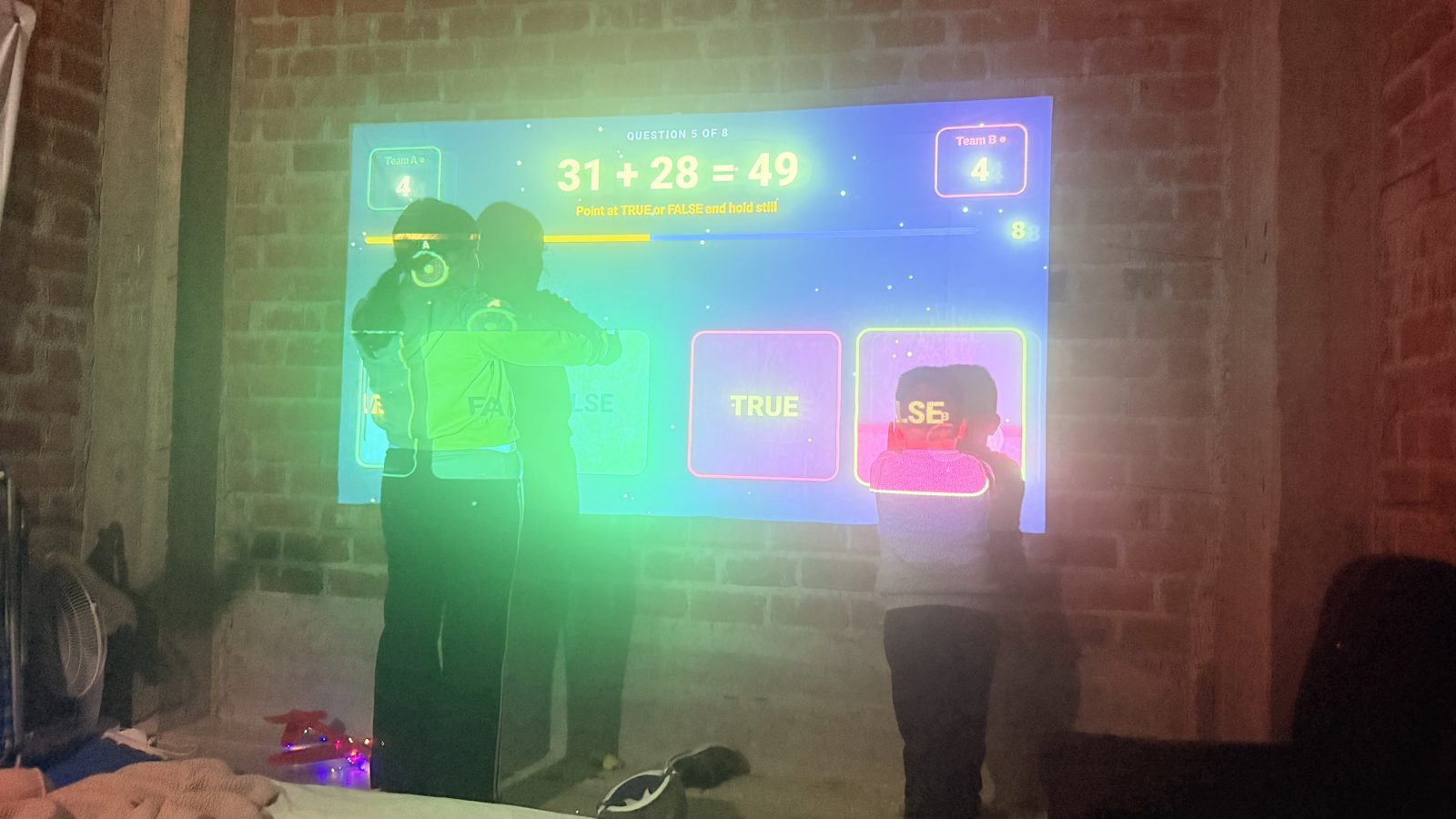
- The Fire TV plays the lesson on the projector: pictures, words, numbers or groups to count, with two to four tiles per team, or VERDADERO / FALSO.
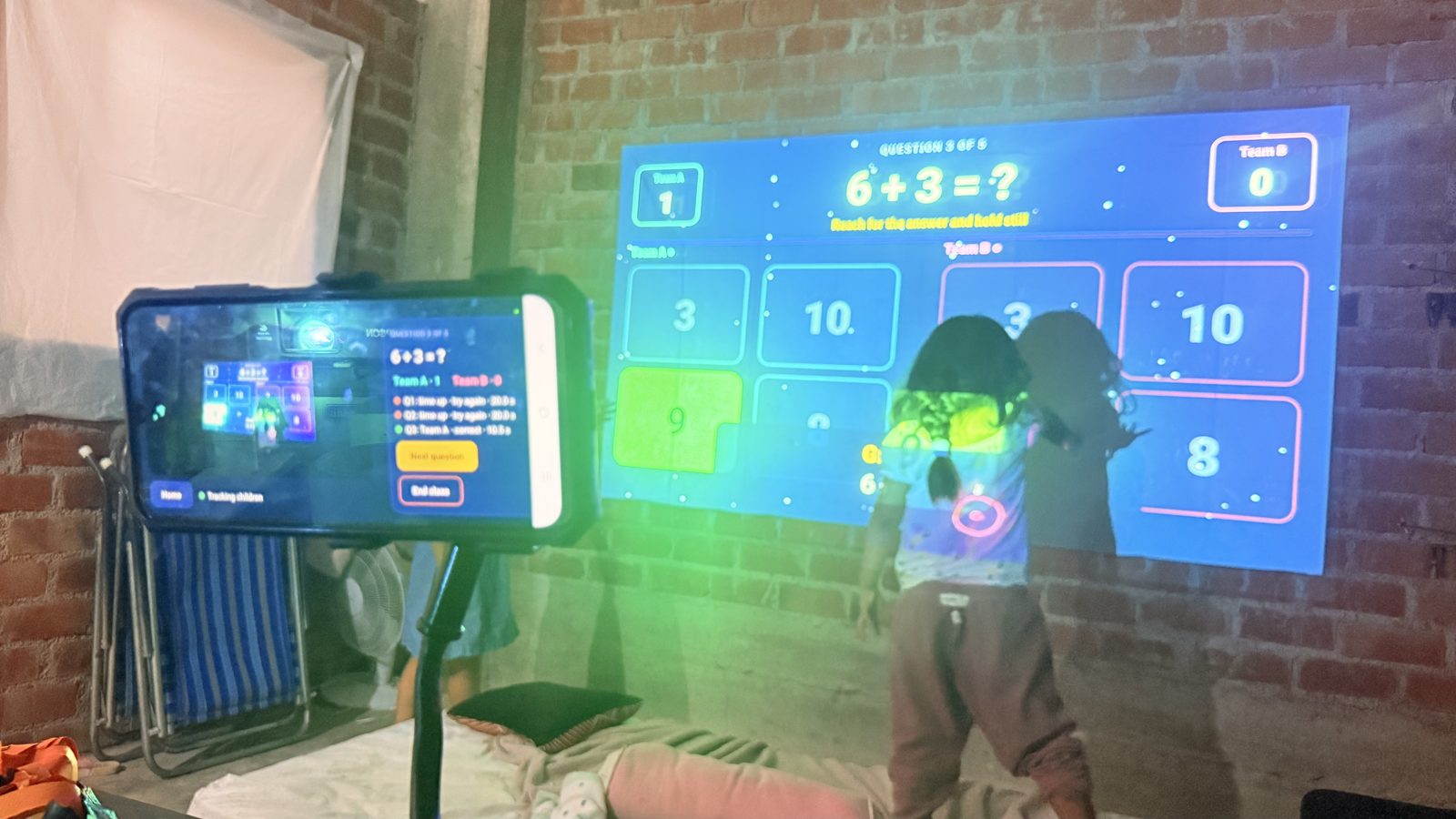
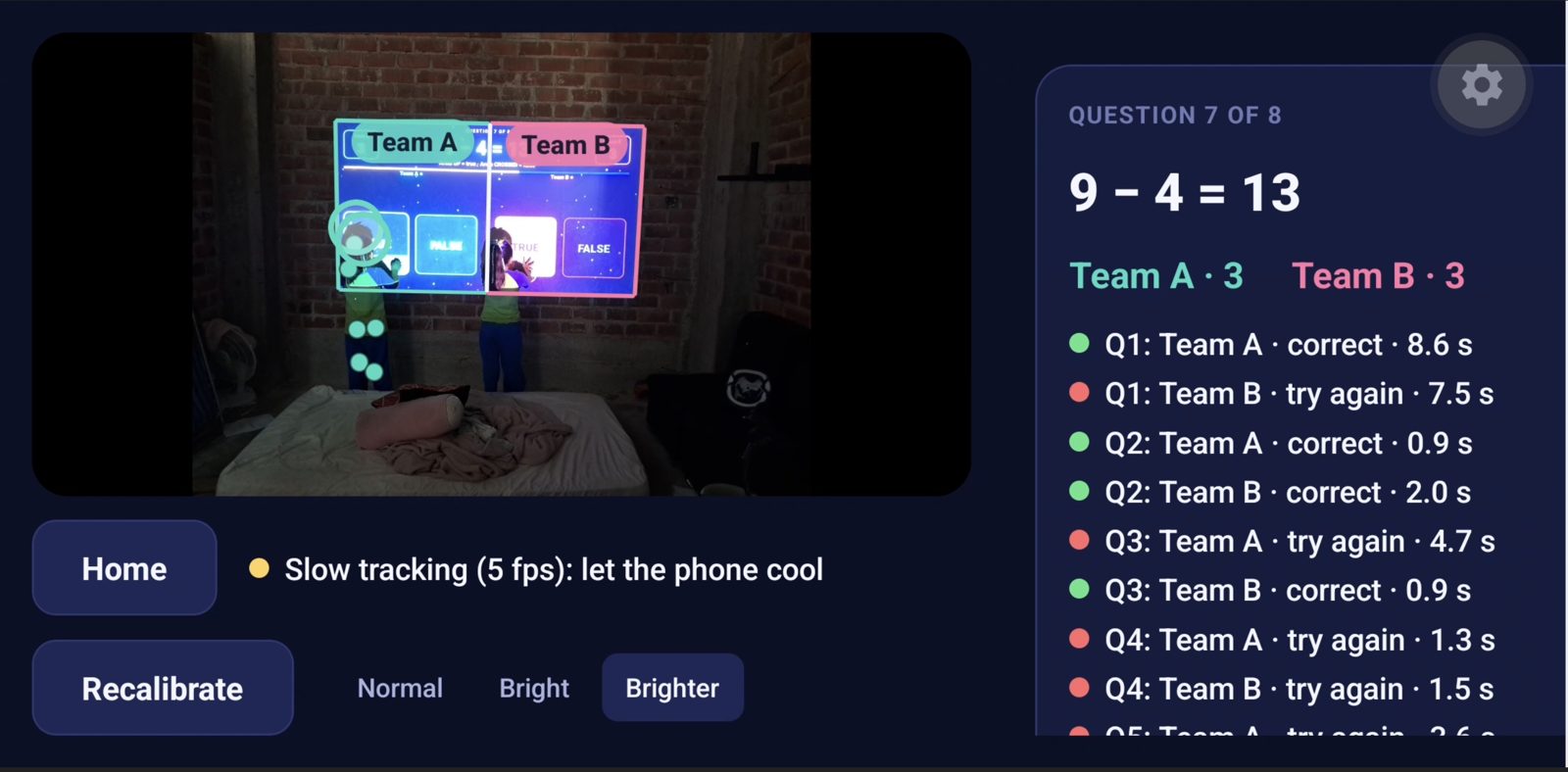
- The teacher's phone stands on a tripod behind the children. It tracks their bodies with an on-device pose model and turns a raised, pointing hand into a cursor on the wall.
- Children answer by pointing. A child reaches for a tile and holds it for about half a second. The tile fills up and turns their team's colour.
- They can change their mind until the countdown ends.
- Team A plays on the left half of the wall, team B on the right.
- In one-player mode a single child uses the whole wall.
- Setup takes seconds. The phone opens a hotspot and the TV finds it by itself. Then the TV flashes four white squares for about two seconds, and the phone finds the projection on the wall automatically. Nobody taps corners and nobody types an IP address.
- A library of lessons on the teacher's phone. It ships with 11 lessons (121 cards) written from a real teacher's requests: numbers 1–9 for 6-year-olds, letters for 5-year-olds, letters a–m with animals, the sounds of syllables with farm animals, the syllables MA, PA, RO, a lesson for girls who struggle to say the strong R in perro, fractions with big numbers and equations with traps for teenagers, English words from pictures, complete the sentence, and more-or-less.
- New lessons by chatting with the AI. With internet, the teacher types what the class needs in their own words ("créame 6 ejercicios de la tabla del 7 para niños de 8 años") and can ask for changes ("más fácil", "para 5 años"). DeepSeek picks the exercise; the phone's engine computes every answer, and the teacher sees the cards, right answers in green, before saving. Creating costs 10–20 KB of data; classes never need the internet.
- Made for each age. Inicial (4–6) gets pictures, two or three big tiles, longer timers, and a line on the phone for the teacher to read aloud ("Repitan conmigo: pe-RRO"). Primaria and secundaria get more tiles and more time for harder maths.
- Levels, points and streaks keep kids playing. Each lesson has easy, medium and hard cards. The class starts easy and climbs a level after two strong rounds ("¡Subimos al nivel 2!"). Right answers score more on harder cards and when answered fast, a fire streak grows on the team's score, and wrong answers never cost points. Two teams compete for the win; one player earns one to three stars and chases the lesson's record, kept on the phone.
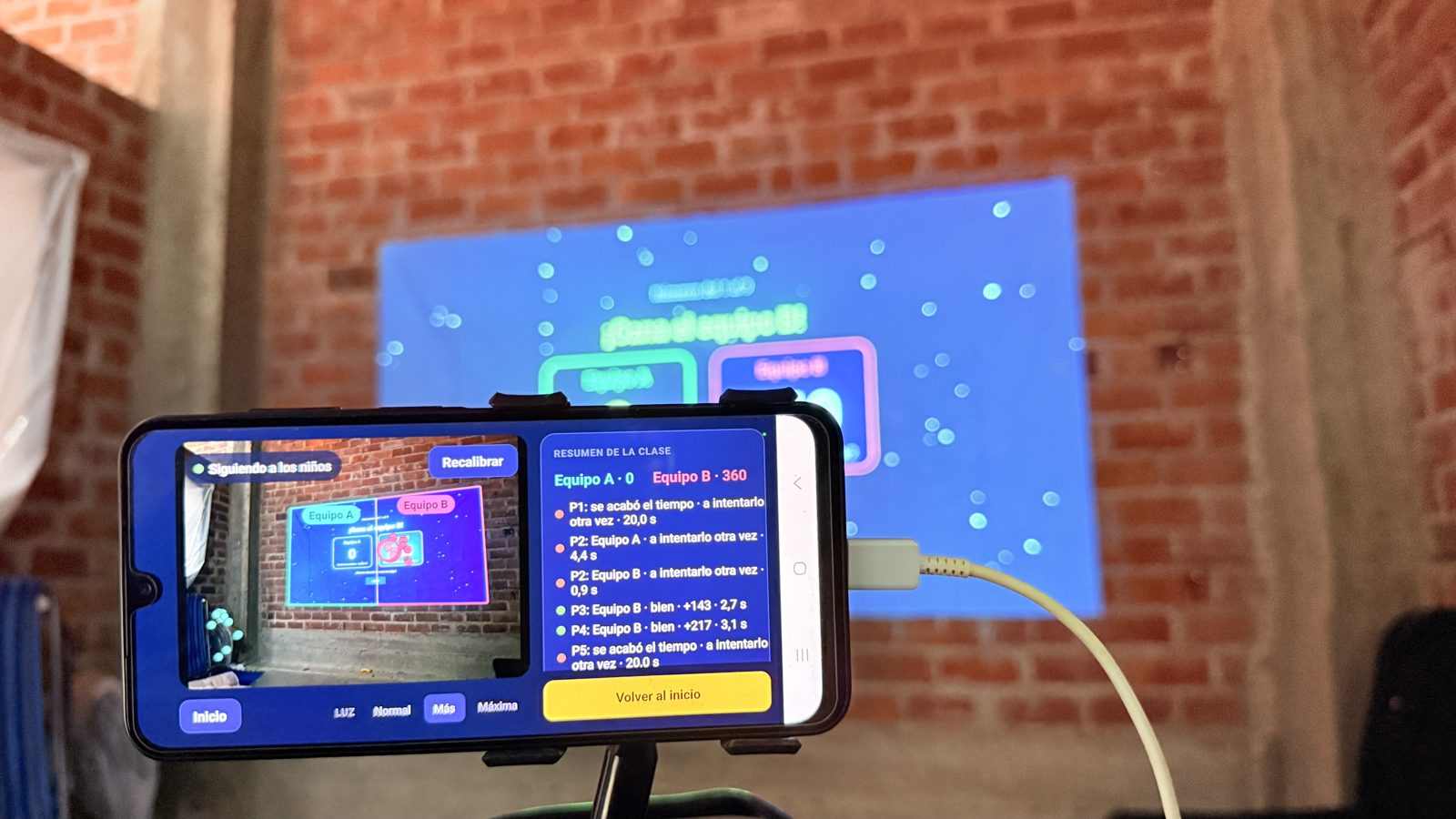
- The teacher runs the class from the phone: pick a lesson, start, skip to the next card, and see each round's result and points.
- There is no backend and no account. Camera frames never leave the phone; the lesson travels to the TV once, and then only tiny pointer events (~60 bytes each) cross the local hotspot. The TV keeps nothing: lesson and pictures live in memory for one class.
How we built it
Three apps in one repository, all TypeScript:
Teacher phone app. Expo SDK 56, React Native 0.85 new architecture, Expo Router, Jotai.
- The camera pipeline:
- VisionCamera v5 delivers 960×720 frames from the main back camera.
- A GPU resizer scales each frame so every camera lane (one per team) is exactly 192 pixels.
- MoveNet SinglePose Lightning (TFLite, INT8, 3 MB) runs through react-native-fast-tflite, all inside a camera-thread worklet.
- Lessons: each lesson is a small JSON file (3–14 KB) with a strict, never-throwing checker shared by both apps. Pictures are Twemoji code points; the phone sends the TV only the SVGs a lesson shows.
- Exercise engine (on the phone): a rule-based Spanish syllable splitter (tested on 52 words, so manzana never starts with "MA"), a 125-word picture lexicon, and generators for numbers, comparing, letters, syllable sounds, a hard sound, sentences, English, arithmetic, fractions and equations. Wrong options are real mistakes: a look-alike letter, a near count, adding tops and bottoms of fractions, a minus sign not distributed. Same request and seed, same cards.
- AI chat, domain-driven and functional: the AI answers in JSON mode with an exercise request (or cards for topics the engine doesn't cover); the domain decodes and clamps it, the engine builds the cards, and an invalid answer goes back to the model once with the reason. The provider is a strategy (a
ChatModelfunction per provider), so DeepSeek can be swapped without touching the domain. Lint rules forbid classes andthrowin these features' domain and application code. - Speed: one lane runs per frame. Lanes with a child take turns, and empty lanes are checked every fourth frame. A pose waits for one inference, not two.
- From hand to cursor:
- The hand is estimated as wrist + 30% of the forearm, falling back to a lifted elbow when the wrist is lost against the bright wall.
- A homography maps it onto the projection, and a One Euro filter smooths it.
- A body check rejects the "people" MoveNet always finds in an empty lane.
- Automatic calibration:
- The TV shows four white squares, then a black frame. Subtracting the two leaves only the markers, whatever else is in the room.
- The phone finds the marker centres to a fraction of a pixel and solves the projection's corners.
- The phone is the server: a hand-written RFC 6455 WebSocket server on raw TCP, so the TV needs nothing beyond React Native's built-in WebSocket.
Fire TV app. Built on Amazon's react-native-multi-tv-app-sample.
- Fire OS: Expo SDK 54 + react-native-tvos with Expo Router.
- Vega OS: the Vega SDK (React Native 0.72), sharing the same screens.
- Shared TV package: the lesson player (a pure reducer with adaptive levels, points and streaks), dwell selection (progress fills while a hand holds a tile and drains slowly when it slips), discovery of the phone, the calibration pattern layer, and the remote-control cursor.
- Pictures: react-native-svg draws the Twemoji SVGs on Fire OS; Vega shows the same pictures as system emoji.
- Fast updates: cursors and tile fills update through
Animatedvalues, never React state, so 15 updates per second per hand cost nothing.
Shared contracts. A zero-dependency wire protocol and lesson format. Their decoders never throw, so a bad packet or a bad lesson file can never crash a class. It compiles under all three toolchains.
Quality.
- 396 unit tests, including synthetic camera images of the calibration pattern, every exercise generator × age group × 25 seeds through the lesson checker, and the AI adapter against recorded responses.
- An end-to-end test that runs the real phone server against the real TV client over a WebSocket: calibration, then a starter lesson streamed to the TV, played and scored back to the phone.
- Strict TypeScript, and lint rules that enforce the domain → application → infrastructure layering.
- A device script (
scripts/devices.sh doctor | tv | teacher | verify | crash) that checks both devices, the link and the calibration in one command.
Challenges we ran into
- Children don't do what you design for. We first built body gestures: arms up for TRUE, arms crossed for FALSE, and jumping to count. In the first test, children simply pointed at the TRUE tile. We removed every gesture and kept pointing as the only way to answer. The product got simpler, and the phone does less work per frame.
- A mid-range phone is not a laptop.
- On a Galaxy A26, cropping the camera image for each team in JavaScript cost as much as the model itself, and the phone throttled within minutes.
- We moved the cropping into the GPU resizer, ran one lane per frame, and kept MoveNet on a single CPU thread. NNAPI, the GPU delegate and extra threads were all slower on this phone (friction log F13, F14).
- A dark room with a bright wall. Auto-exposure turns children into silhouettes against the projection. Lane crops around the projection, brightness control and the elbow fallback recovered most of the lost poses.
- Calibration that works without a technician. Four taps on a phone was too fiddly in a noisy classroom. We designed the marker pattern, a differencing detector and a self-check. Then we debugged the camera stream from the phone itself, live, with a status line on screen.
- Answer keys a child can trust. Asking an AI for "syllable exercises" gave plausible cards with wrong keys (a MAN-zana counted as MA, a silent h). So the AI only picks the exercise and the engine computes the answers, with rules for Spanish syllables, the strong R and fair distractors.
- Low-bandwidth schools. An on-device model was 1 GB to download, unrealistic in the Andes. We moved generation online (10–20 KB per lesson) and kept every class offline.
- Build tooling. An Expo prebuild that generated a Gradle 9 wrapper for an Android Gradle Plugin that only supports Gradle 8 shipped an APK silently missing its resource classes. The TV sample's config plugin crashed prebuild, and Corepack disappeared from Node 26. All of these are documented with workarounds in our friction log (19 entries).
Accomplishments that we're proud of
- The whole class answers by pointing at a plain wall, with hardware that costs less than one textbook per class.
- Automatic calibration in about two seconds. On synthetic test images it is accurate to under a pixel.
- Fully offline and private by design. Camera frames never leave the phone, there is no server to run or pay for, and no child accounts.
- One codebase for Fire OS and Vega OS, plus a phone app, with one tested contract between them.
- An exercise engine that can't give a wrong answer key: correct by construction, deterministic per seed, able to name the misconception behind a wrong pick, and free to reuse (MIT).
- A teacher's own words become a lesson in seconds, from a 5-year-old's syllables to a 15-year-old's equations, and the eleven requests of a real teacher became the starter collection.
What we learned
- Watch children before designing gestures. Their instinct (point at the thing) beats any clever interaction.
- On mid-range phones, everything around the model costs as much as the model. Measure on the device, at the temperature it will actually run at.
- "Offline first" is a feature for schools, not a limitation. It removed the backend, the costs, the accounts and the privacy questions in one decision. The AI fits that by creating online once and playing offline forever.
- An LLM is a great interface for what to practise and a poor source of answer keys. Splitting the two made the AI both useful and safe in front of a class.
- Amazon's multi-TV sample made a single TV codebase for Fire OS and Vega OS realistic. The friction log lists what would make it smoother.
What's next
- Already in real classrooms. ProjectPlay is running at my own kids' schools, and my kids love it: they ask to play the syllable and number lessons again.
- Share lessons teacher to teacher, still offline. A lesson is one small JSON file (3–14 KB), so a teacher can pass it to a colleague over the phone's hotspot (the same local link the Fire TV uses), WhatsApp, Bluetooth or a USB stick. The receiving app checks it with the same validator before saving, so a shared file can never break a class.
- A lesson marketplace on Amazon S3. Teachers publish and download lessons from Amazon S3 behind CloudFront, with a small JSON catalog to browse by subject and age. Downloads stay tiny enough for rural mobile data, and every class keeps running offline.
- Same principles at any scale: no subscription, zero friction (no account needed to play), and privacy first (camera images never leave the phone, no child data stored anywhere).
- Scales at almost no cost. Each classroom needs one ≈ $75 setup; lessons are static files, so there are no servers to run per school, and a lesson made once can reach thousands of classrooms. The need is there: 108,239 kindergartens and schools in Peru alone, and about 3 million unconnected schools worldwide.
- More reach: lessons in English, Portuguese and Quechua, a third camera lane for small groups, and distribution on the Amazon Appstore for Fire TV.
How we'll reach many schools
ProjectPlay already works in class; the next step is more teachers, students and schools.
- Pilot (next 3 months): 10 schools, starting with my kids' schools and nearby public schools in Peru. Measure how often each class plays and the right-answer rate per lesson, and publish the results.
- Teacher to teacher: each teacher who uses it shares lessons over the hotspot or WhatsApp and helps a colleague set up; a one-page setup guide and a 2-minute video in Spanish make that easy.
- Partners that already reach schools: regional education offices (UGEL/DRE in Peru), Ministry of Education device programs, NGOs and teacher networks; a Fire TV Stick added to projector kits schools already receive.
- Easy installs: the Amazon Appstore for Fire TV and Google Play for the teacher app, so no sideloading is needed.
- Across Latin America: Spanish lessons already cover most of the region; then Portuguese for Brazil and Quechua for the Andes.
- Free for teachers, sustainable: grants and sponsors cover hardware ("adopt a classroom for $75"); the S3 marketplace costs cents per thousand downloads, so there is never a subscription.
Built during the hackathon (pre-existing code)
Everything in this repository was written during the submission window except the TV app's starting point.
- What we started from: Amazon's
react-native-multi-tv-app-sample(MIT-0). From it we kept the monorepo layout, the remote-control managers, spatial navigation, the theme andFocusablePressable. - What we changed in the sample: aligned its Expo packages to SDK 54, fixed its strict-TypeScript errors, upgraded the TV config plugin that crashed prebuild, fixed button centring, and removed the media-player features this app doesn't use.
- What is new: everything else. The teacher app, all perception and calibration code, the wire protocol and lesson format, the lesson player (session, levels, scoring, dwell, screens), the exercise engine and starter lessons, the AI chat, the Vega app wiring, the tests and the device tooling.
Links
- Demo video: https://www.youtube.com/watch?v=wkKDgb5G7V0
- Code (MIT): https://github.com/binnicordova/projectplay-ai-amazon-hackathon
- APKs: https://github.com/binnicordova/projectplay-ai-amazon-hackathon/releases/tag/v1.0.0
- Friction log (19 entries): https://github.com/binnicordova/projectplay-ai-amazon-hackathon/blob/main/docs/friction-log.md
- Author: Binni Cordova (Peru) · LinkedIn: https://www.linkedin.com/in/binnicordova/ · Portfolio: https://binnicordova.com/
Built With
- amazon-fire-tv
- deepseek
- expo.io
- github-actions
- jotai
- movenet
- node.js
- react-native
- react-native-svg
- react-native-vision-camera
- tensorflow-lite
- typescript
- vega-os
- websocket

Log in or sign up for Devpost to join the conversation.