-
-
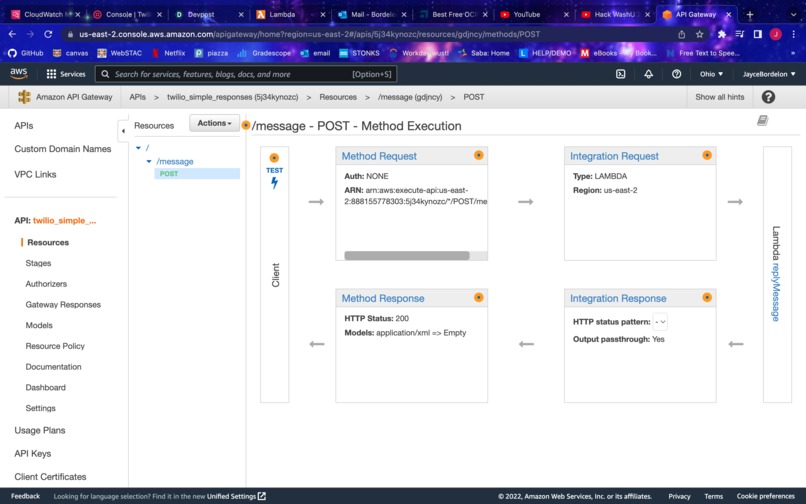
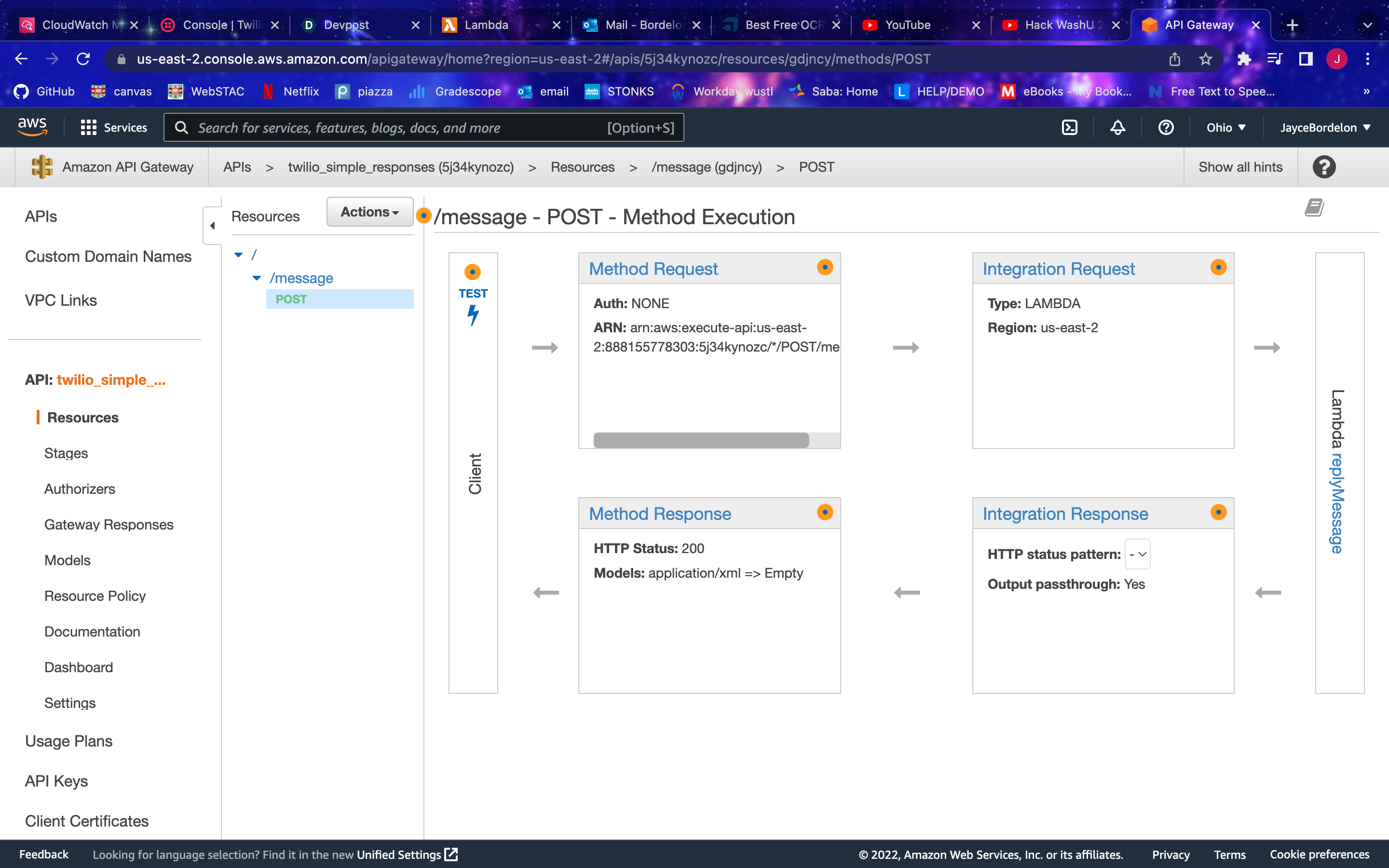
This Is the Api Gateway configuration for communications between AWS and Twilio's API calls. It is all configured through AWS.
Inspiration
Friday, our team walked by a man staring at a flower. It left us thinking that we should find a way to allow images to be texted to a number, and have that number return either an Optical Character Recognition read of the image sent (if it is an image of text) or the name of the object shown in the picture (in the case of sending a picture of an object.
What it does
Our project does just what we hoped! Just send a picture of text or an object to the Twilio Account, and it will return the text in or the name of the object found in the image to your phone! (SMS)
How we built it
We built this from configuring a series of API integrations with an no application AWS server. The Twilio SMS API receives an image sent from your phone. This image is then sent to, and processed by the AWS server with both a call to link and a call to Amazons image recognition API within the AWS services: "Amazonrekognition". The processing of these functions was done in a Python Lambda function who receives, processes, and returns information from the image. Our Lambda Function:
from __future__ import print_function
from urllib.parse import unquote
from io import BytesIO
import requests
import boto3
import json
import base64

def lambda_handler(event, context):
    print("Received event: " + str(event))
    print("Received context: " + str(context))
    url = event["MediaUrl0"]
    url_plain = unquote(url)
    client = boto3.client("rekognition")
    base64_image=base64.b64encode(requests.get(url_plain).content)
    base_64_binary = base64.decodebytes(base64_image)
    rek_response = client.detect_labels(Image = {"Bytes": base_64_binary}, MaxLabels=3, MinConfidence=70)
#AMAZON REKOGNITION CALL^^^
    found_object = rek_response["Labels"][0]["Name"]

    if found_object == "Text":
        ocr_url = "https://api.ocr.space/parse/imageurl?apikey=K88115501288957&url="+url_plain
#OCR SPACE CALL^^^
        response = requests.get(ocr_url)
        responseObject = response.json()
        found_object = responseObject["ParsedResults"][0]["ParsedText"]


    return "<?xml version=\"1.0\" encoding=\"UTF-8\"?><Response><Message><Body>"+found_object+"</Body></Message></Response>"
Challenges we ran into
The biggest challenges we ran into were that of mapping "event" variables to the correct type for both processing and returning image information. Converting from JSON to usable image information before extracting values proved to be a challenge in that we had to trace and decipher how we could use python to return the ability to reference data from our image type. Since the Lambda Function Naturally runs in UTF-8, we had to find a way to manipulate this data so that it was returned into Rekognition's base-64 parameter:
base64_image=base64.b64encode(requests.get(url_plain).content)
base_64_binary = base64.decodebytes(base64_image)
rek_response = client.detect_labels(Image = {"Bytes": base_64_binary}, MaxLabels=3, MinConfidence=70)
Accomplishments that we're proud of
We are incredibly proud of how we came together to overcome the sharp learning curve of "Serverless" lambda functions. Our team had never worked with API gateways, let alone AWS, but we were able to establish an amazing workspace through careful collaboration that ultimately resulted in a successful and functional feature.
What's next for Project WHAT IS THAT?
Next would be a web scraping implementation to extract specific data about the object you uploaded beyond just its name. This will be a project that allows us to extract familiar data about the object uploaded from various websites based on user request!
Note: To use this feature, simply text an image to +1 351 213 6236
Built With
- amazon-web-services
- amazonrekognition
- ocr
- python
- twilio


Log in or sign up for Devpost to join the conversation.