-
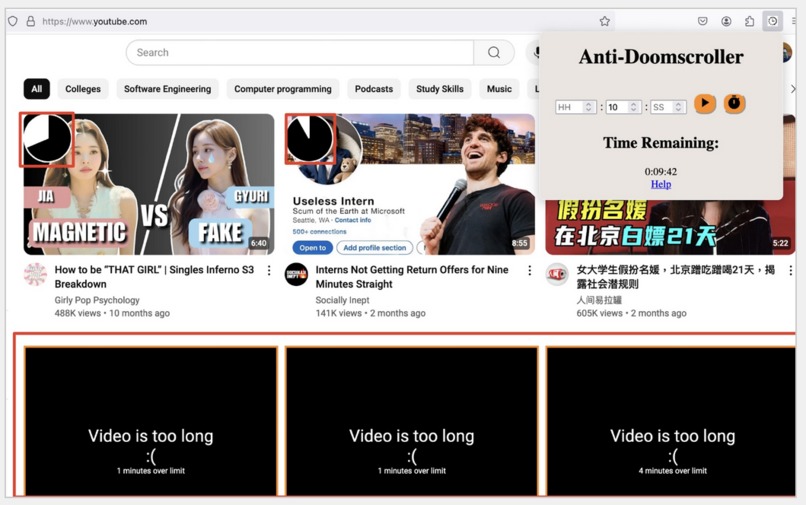
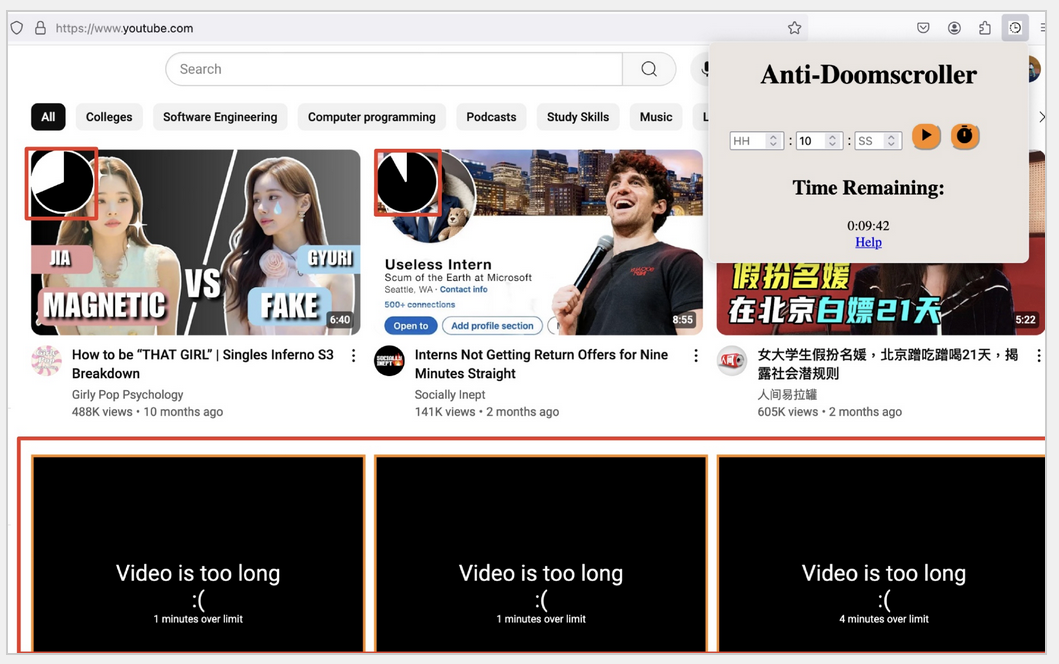
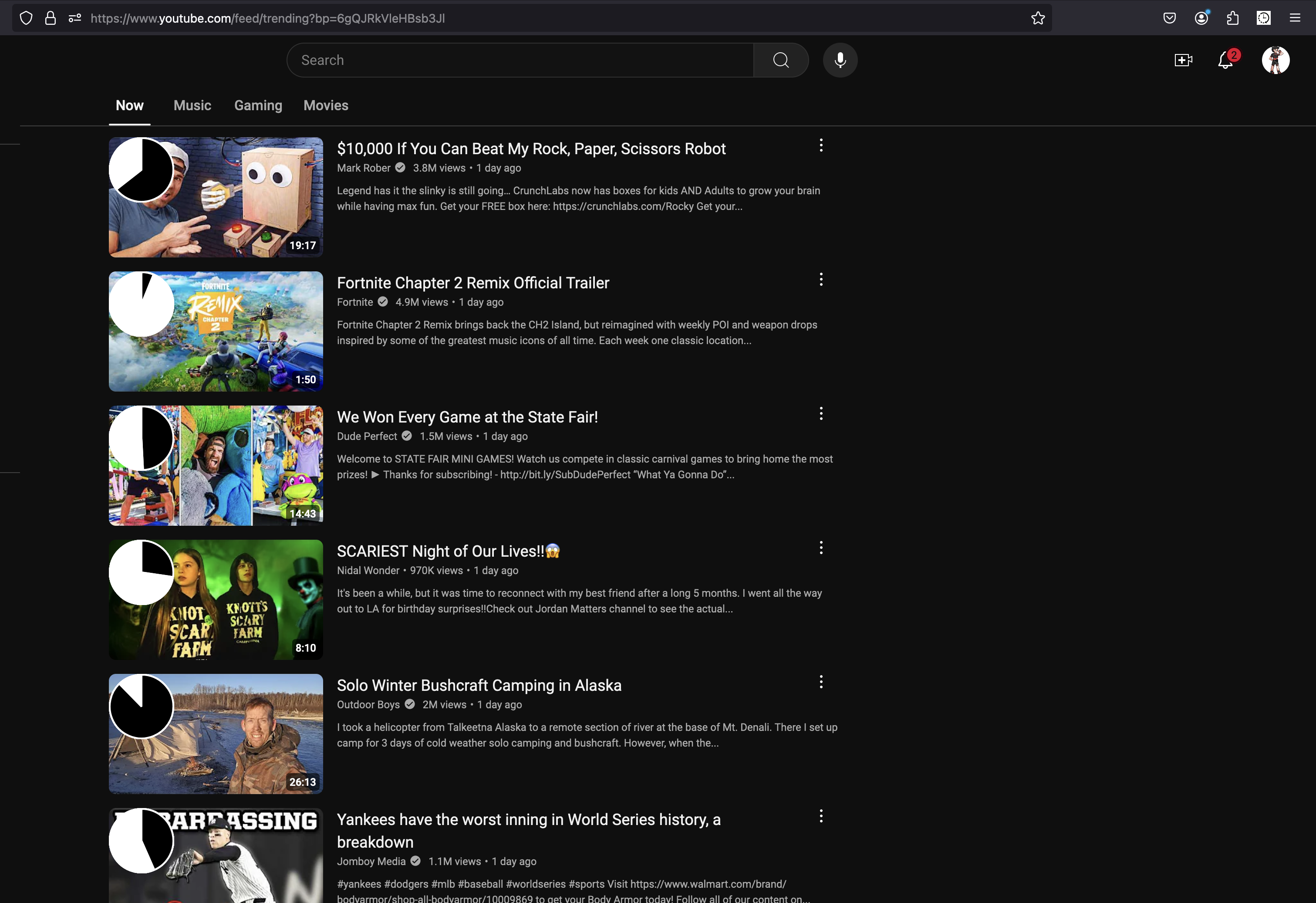
Our browser extension changes the appearance of YouTube thumbnails.
-
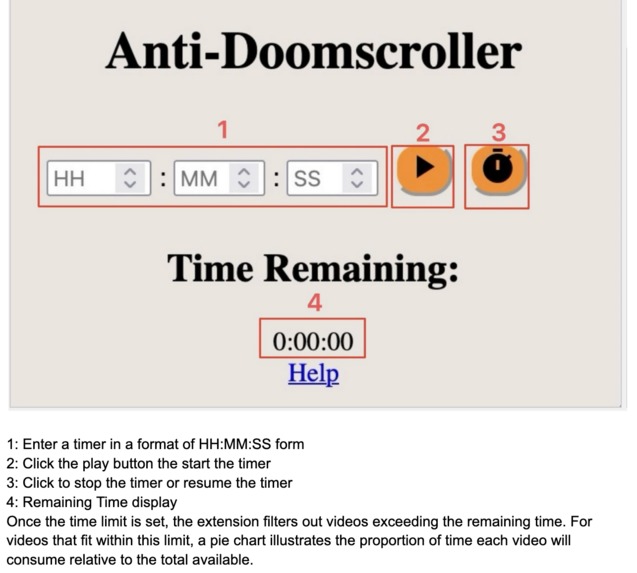
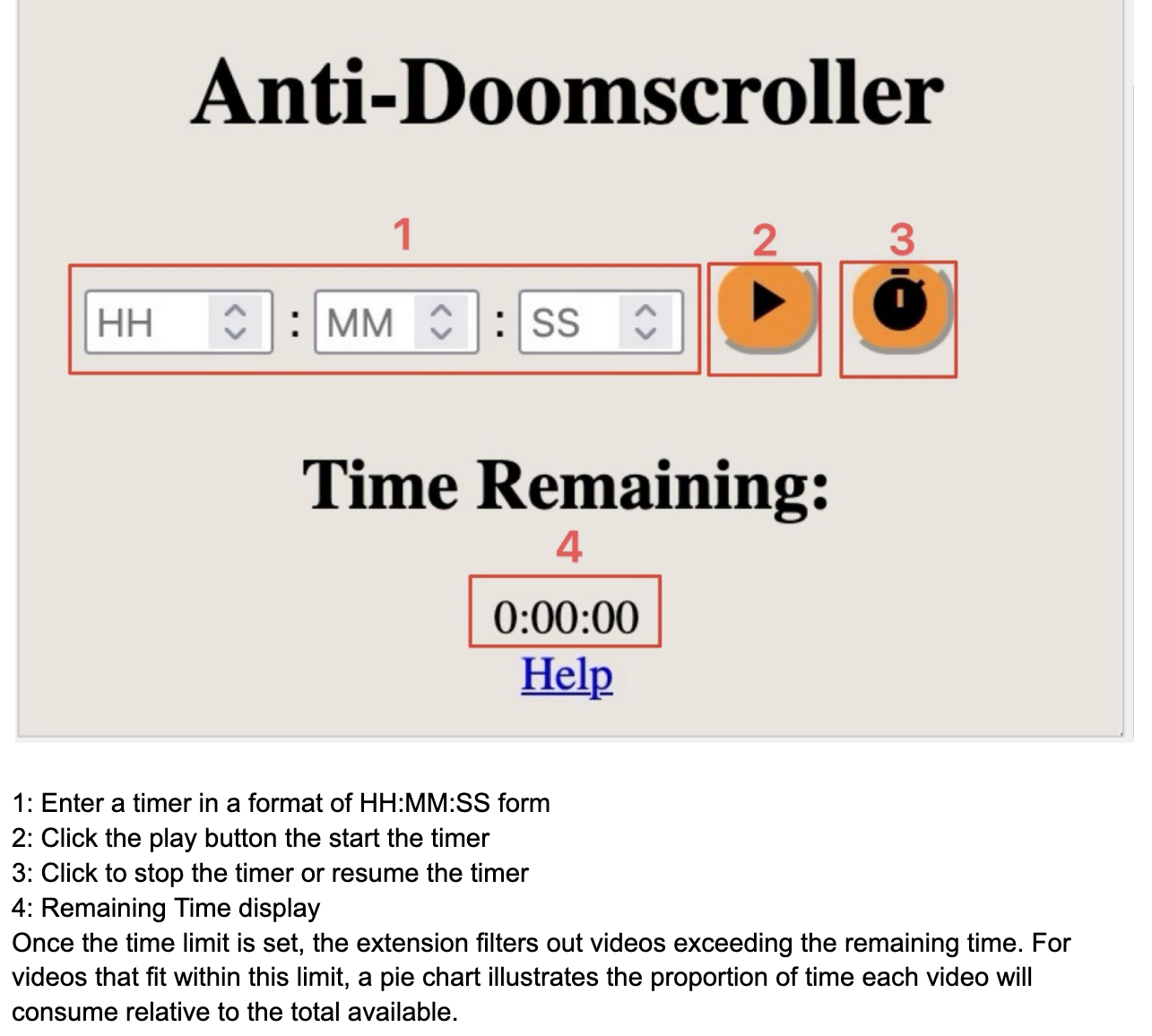
The help screen displayed by our extension explains each component of our design.
-
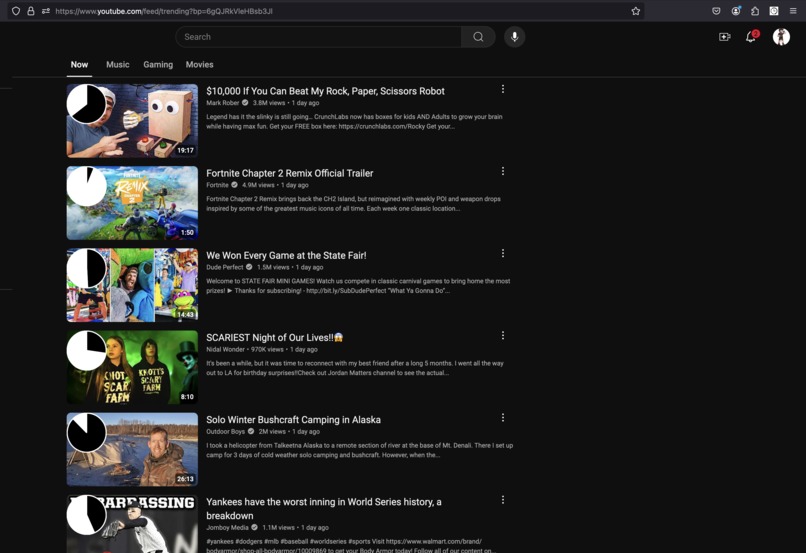
Videos within the user's time limit will display their length relative to the time limit.
-
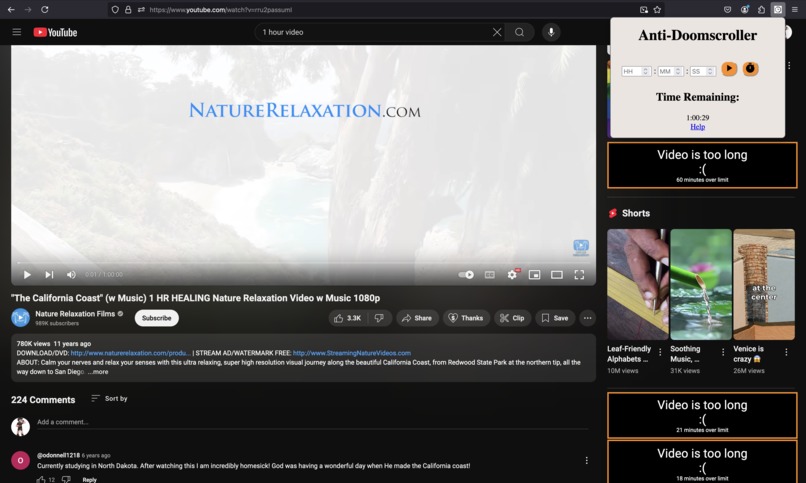
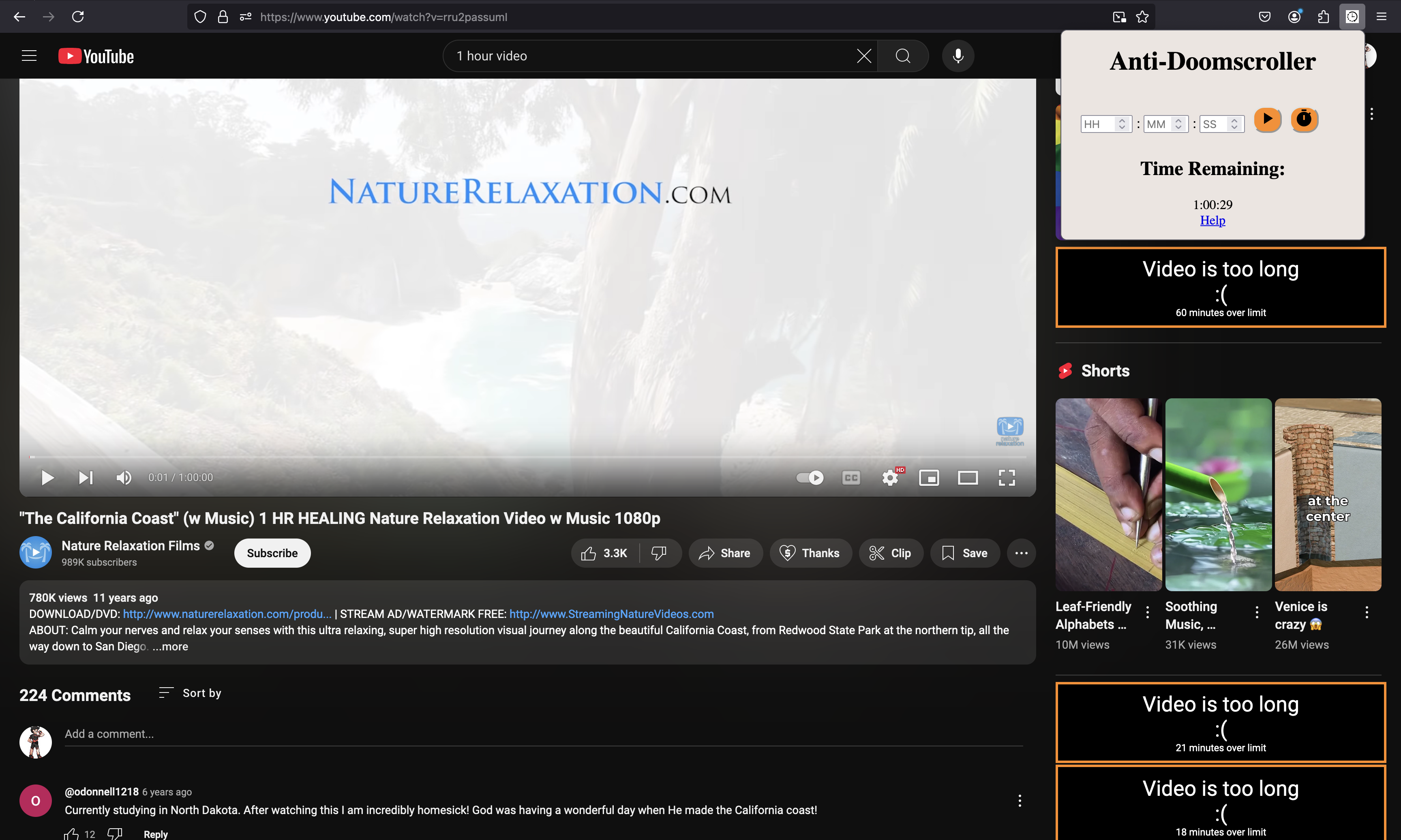
When viewing a video, our extension analyzes the recommended videos in the sidebar.
Inspiration
Our generation faces a constant battle against social media hijacking our time and attention. Many of us set screen time limits on apps, but when a simple alarm comes on in the middle of a video, it's all too easy to ignore the alarm and keep watching - especially for neurodivergent minds. We wanted to create a project that constantly acknowledges the time passed while helping users determine how to best allocate their remaining screen time to help people of all kinds get back on track.
What it does
The Anti-Doomscroller extension allows you to set a time limit on how long you want to be on social media and stick to it. Once a timeframe is given, YouTube will only reveal videos within the time limit and visualize how much of the limit each video would consume. For the people who watch halfway through, you can click on multiple videos and watch as many videos as you want within the limit. However, the further along in your break, the fewer videos become available. When that time runs out, we've created a highly sophisticated alert to break you from the trance - redirecting you to a procrastination help page.
How we built it
This extension utilizes JavaScript, HTML, and CSS to interact with websites and log information in local storage. Messages are passed from the tabs where content is modified, the background tasks at the heart of the extension logic, the extension tab, and the interface with the logic.
Everyone collaborated on a single GitHub Repository, making pull requests and merging our code as we completed our revisions. We looked to balance our pulls and merges to help everyone contribute to the project. We used Visual Studio Code to develop our extension in JavaScript, HTML, and CSS. We obtained useful information using web scraping, designed a pop-up page that retrieves users' information, and designed front-end components to interact with users.
Challenges we ran into
This was our first hackathon (except for Andrew :) ), and we ran into some trouble working in parallel. There were many git conflicts, much frustration, and unfulfilling success. There were scary times and hard times, but Andrew's experience coupled with our team's determination to learn left no conflict unresolved.
We also faced many challenges in uncovering YouTube's structure and getting the correct information. Large companies do not always appreciate users scraping their websites so we had to navigate a challenging puzzle to identify the content we needed. We also ran into issues in building the timer feature, one of our latest additions. Both stopping the timer and resuming the timer with the remaining time getting saved have given us trouble.
None of us had made a browser extension before, it was very surprising to see just how complicated it was! We needed at least three services running in parallel to communicate between tab, extension, and popup and passing messages in between was both challenging and frustrating, especially since different browsers have deprecated different features. We optimized our extension for Firefox, but we've worked to maintain support with chromium-based browsers.
Accomplishments that we're proud of
We are really proud of everyone in this group because this is one of the first group projects we have done that looks professional. With some minor tweaks, this could be put on the extension store for everyone across the world to see!
I (Andrew) also want to say that my team went into this only with basic javascript skills and came out triumphant over a complex system, both in browser and in website. Not to mention, this is the first hackathon for my teammates, their resiliency in facing these new challenges should absolutely be commended. The success of this project masks just how much the team had to learn and it wouldn't have been possible with everyone's great contributions.
What we learned
Most of us went from barely knowing what inspect does on a website to finding and scraping info from one of the most complex and dynamic websites out there. Tom wants to run the code he wrote in the console and see live updates to his website. It was a very satisfying experience for us and this feeling was the main reason why we went into computer science. Overall, we learned how to create Google extensions and gained a lot of front-end experience as a group while working on CSS, JavaScript, and HTML using a sophisticated visualization package.
Before this project, I (Sébastien) had never used GitHub or worked with web scraping. Now, I know how to clone and push/pull from a git repository and basic HTML skills like margins, padding, and alignment. This was my first hackathon in college and my second ever. As the only non-CS major and 1st-year, this project taught me a lot. I owe a large part of my learning to the patience and support of my teammates - huge thanks to everyone for supporting me. —Sébastien
What's next for Anti-Doomscroller
We will definitely be using this extension so we can prioritize more important things with more time-efficient consideration. With some touch-ups, we may put the project on the extension store! After that we'll be looking to scrape more websites, namely Instagram and Facebook, to extend the scope of the project beyond just Youtube.


Log in or sign up for Devpost to join the conversation.