-
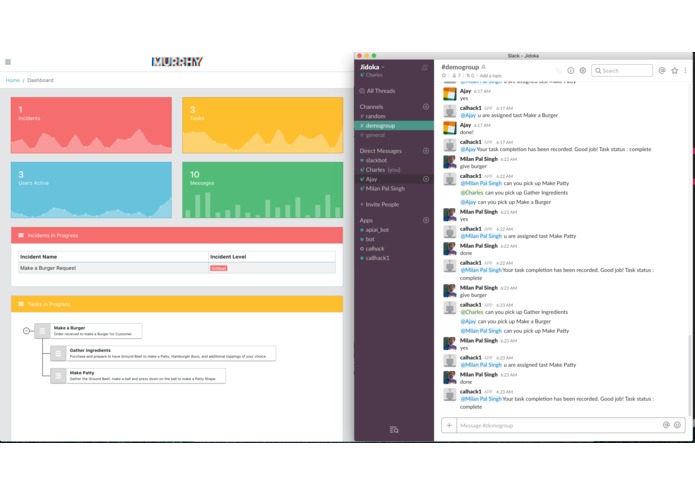
API.AI Chatbot on Slack Assigning Tasks to Users in Channel and Dashboard shows progress
-
Team Thumbnail Image
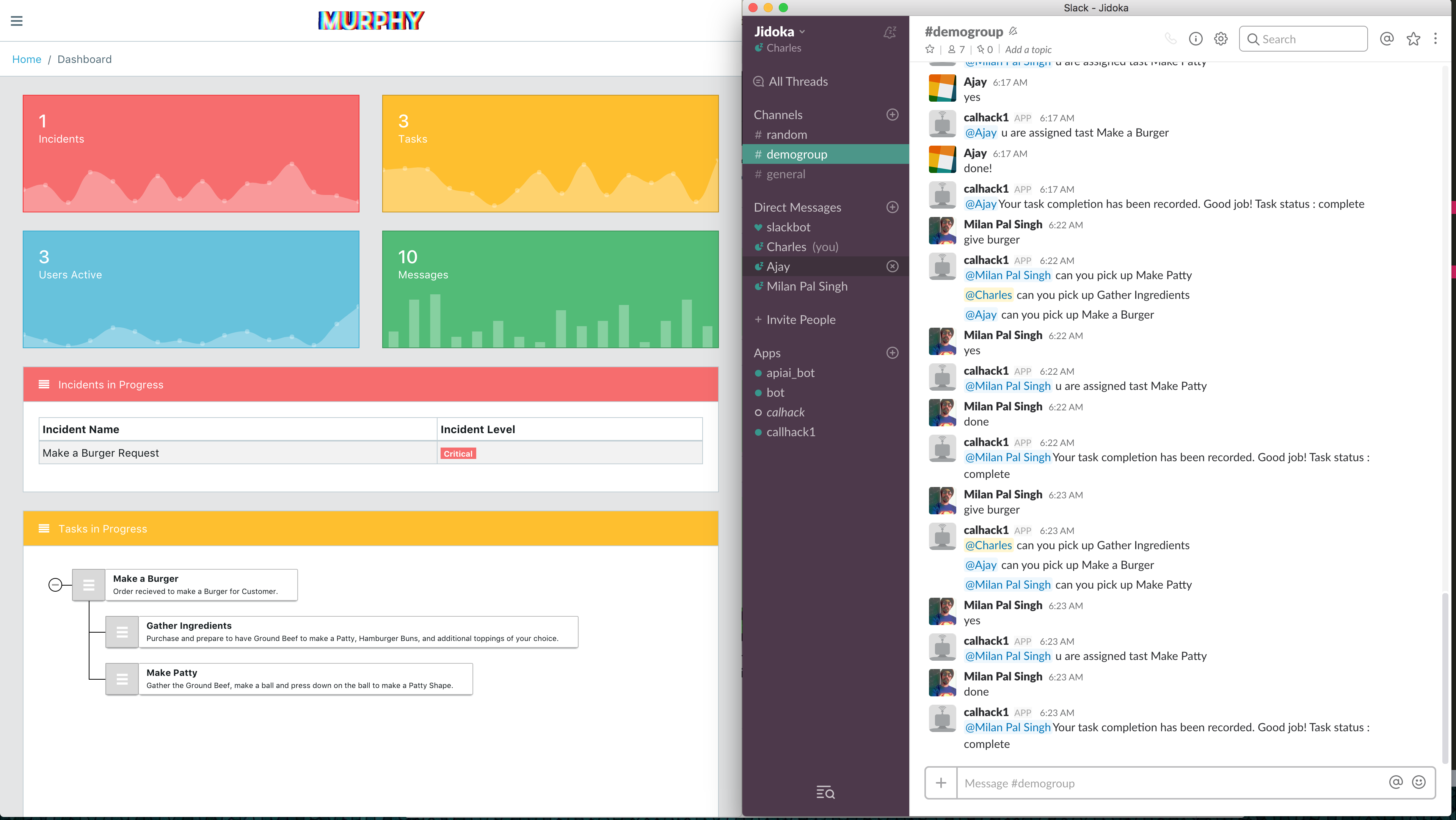
Table of Contents
Requirements
- Install NodeJS: https://nodejs.org/en/download/
- Install Git (Optional): https://desktop.github.com/
- You will need 2 Apps for our project:
- ProjectMurphy - FrontEnd: https://github.com/ncmd/ProjectMurphy
- APIBot - BackEnd: https://github.com/MilanPalSingh/app
- Firebase App & Token from Google Developers Account
- API.AI Token from Google Developers Account
Installation
Requirements:
For Setting up the FrontEnd - Project Murphy:
cd ProjectMurphyFoldernpm installSetup a Firebase App with Google Developers AccountCreate "fire.js" file in /src folder
Follow this format for your fire.js file:
import firebase from 'firebase'
var config = {
apiKey: "API-KEY-STRING",

authDomain: "name-of-app.firebaseapp.com",

databaseURL: "https://name-of-app.firebaseio.com",

projectId: "name-of-app",

storageBucket: "name-of-app.appspot.com",

messagingSenderId: "MessageSenderID"
};
var fire = firebase.initializeApp(config);
export default fire;
Start-App:
npm start
For Setting up the BackEnd - SlackBot + API.AI:
cd AppFoldernpm install- `Setup a Slack instance and generate a private token that can be used for the application.
Inspiration
Coordination during an Emergency is difficult. It takes too much time to educate everyone in the situation. People are not in the right mindset to properly do tasks and require a guide. The Incident Commander is overwhelmed with having to keep track of every user's task and plans it on the spot.
Instead of scaling to attack the big problem, we minimized our scope to "Making a Burger" when ordered by a user. A lot of coordination goes into Making a Burger (Check out In-n-Out)
We wanted to not have minimal interaction with users for them to be assigned a task to do. We decided on using a Bot because this tool will be able to scale.
What it does
Our solution to this problem is to automate the process of assigning tasks and centralizing the Incident Commander role.
We used Slack as an example if implementing a Chat bot that is able to recognized when a User creates an "Incident". In our case, its "Making a Burger".
Making a Burger takes several steps and can be coordinated to be worked on by multiple people by splitting up all the task to "Make a Burger".
The Chatbot then messages users in the channel if they would like to take on a task involved in Making a Burger. Users are able to confirm by messaging an "intent" to accept the task.
Task is then assigned to the user and is updated to the Dashboard of the Task's Progress
The Incident Commander is able to have a centralized dashboard of all tasks and events happening and instructions on how to do them.
How we built it
Front-End Dashboard programmed in ReactJS, Based most of components from CoreUI Bootstrap 4 Admin Template. Front-End would connect directly to Firebase where all our data is stored for users, tasks, etc. Back-End in NodeJS used to connect to Slack. Used our back-end app to forward all messages to API.AI. We then created all the Intents possible for our Scope of "Making a Burger" We get then information back from API.AI real-time about after the messages has been analyzed. We now are able to create an "Incident" based off of what users say. Our bot then messages users if they want to take on the task by saying "yes" "sure", etc. All this information is then passed to our centralized Dashboard containing all the information of Incidents occurring, tasks in-progress, etc.
Challenges we ran into
How to parse data from Firebase Learning ReactJS Learning API.AI Machine Learning takes a lot of data to comprehend an "intent" that we ideally want.
Accomplishments that we're proud of
Finished an Minimal Viable Product Got a whole workflow happening. Combined a Front-End, Back-End, and API.AI while working separately. Worked together to solve bugs.
What we learned
How to use ReactJS, Firebase, Slack's API, API.AI's API
What's next for Project Murphy
Making it ready to crush Asana, Confluence/Jira, PagerDuty, and the classic "Spreadsheet"

Log in or sign up for Devpost to join the conversation.