Inspiration
I was not trying to build an eye tracker.
Since Class 6 I have wanted to build PAOS, a personal assistant that actually understands the person using it. While writing its feature list, I remembered a YouTube Short I had seen in Class 8: someone running a computer with hand gestures, touching nothing. If hands can do it, I thought, eyes should be able to do it too.
It did not look like a big thing. I tried it on my phone first and hit limits I did not understand. My laptop arrived in mid-June 2026, and after my school test on 8 July I sat down with it properly.
That is when I learned the truth: moving a cursor with your eyes, using nothing but an ordinary webcam, is not a feature. It is the entire problem.
And it is a problem worth solving. A mouse needs a hand. A touchscreen needs a hand. For anyone who cannot rely on their hands, every button, every menu and every close box sits behind that one assumption. Dedicated eye trackers exist, but they are specialised extra hardware. The webcam is already built into almost every laptop.
So I gave myself one hard, measurable question:
Can an ordinary 30 Hz laptop webcam, with no GPU, put a pointer on a 32-pixel close button on the first try?
I am a 16-year-old Class 11 student in Jamshedpur, India, building this alone, alongside school and exams. An earlier version won first position and a gold medal at Expo Nova, a school science exhibition, on 24 August 2026. Almost everything you see here came after that.
Most of those months did not go into clever code. They went into measuring. I built a tool that quietly recorded my own eyes while I worked, until it had 129 of my natural blinks on file, just to learn how long a blink must last before a computer should call it a click. The answer was 250 milliseconds and a squeeze depth of 0.44. I could not have guessed those numbers, and I did not want to.
That is the part I am proudest of. Not that it works, but that I can show you why every number in it is the number it is.
What it does
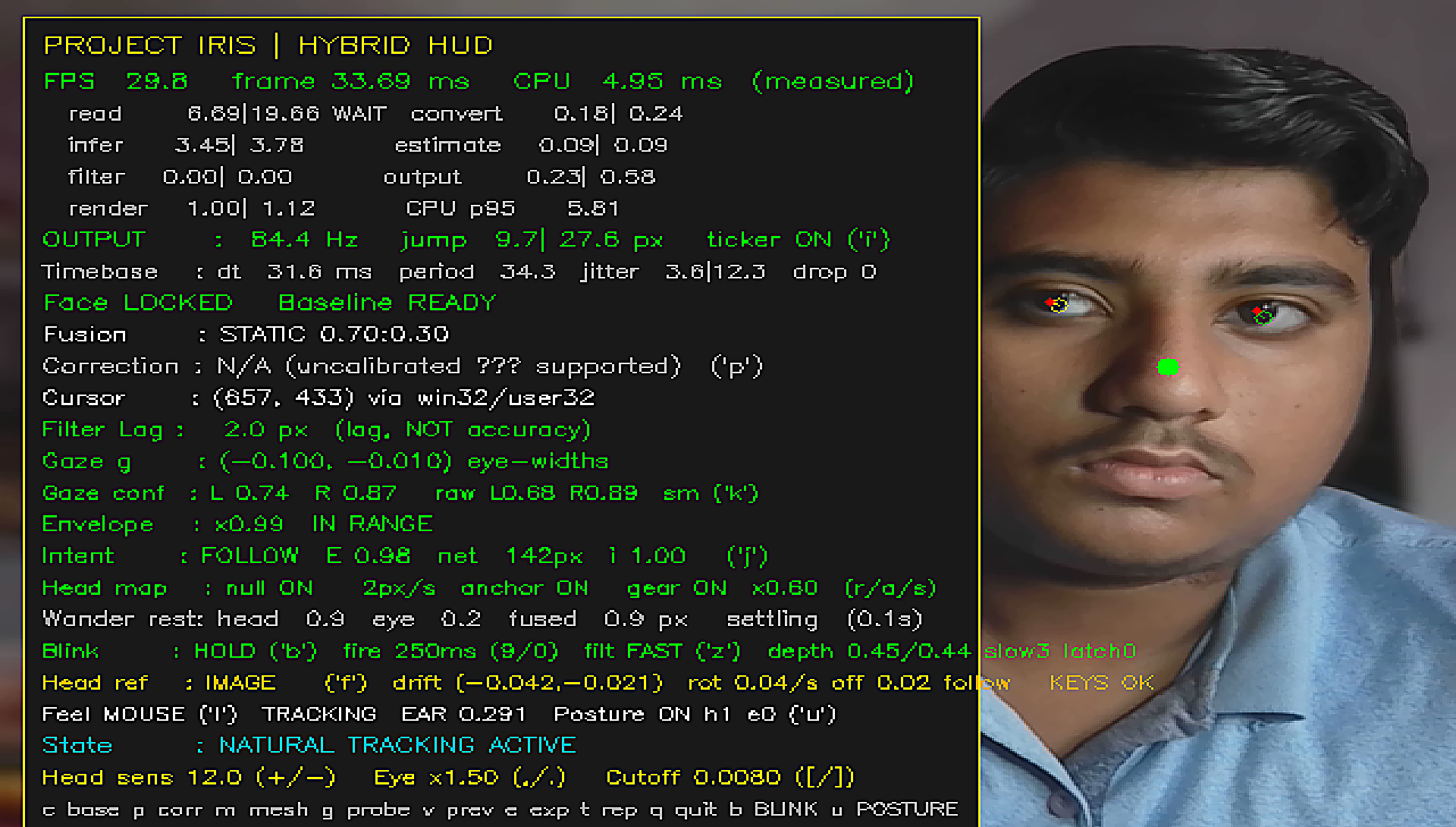
Iris turns your face into a mouse. Nothing to wear and nothing to buy: just the webcam already in your laptop.
- Your head moves the pointer. Head movement is large and steady, so it carries the pointer across the whole screen.
- Your eyes fine-tune it. Close to the target, your gaze makes the last small correction.
- A deliberate blink clicks. Hold a light blink for a quarter of a second. Ordinary blinking is ignored.
- Setup is one key. Sit the way you normally sit, look at the centre of the screen, press
c. Done.
Everything runs on the laptop's own CPU. No GPU, no internet, and not a single camera frame ever leaves the machine.
Measured, not claimed
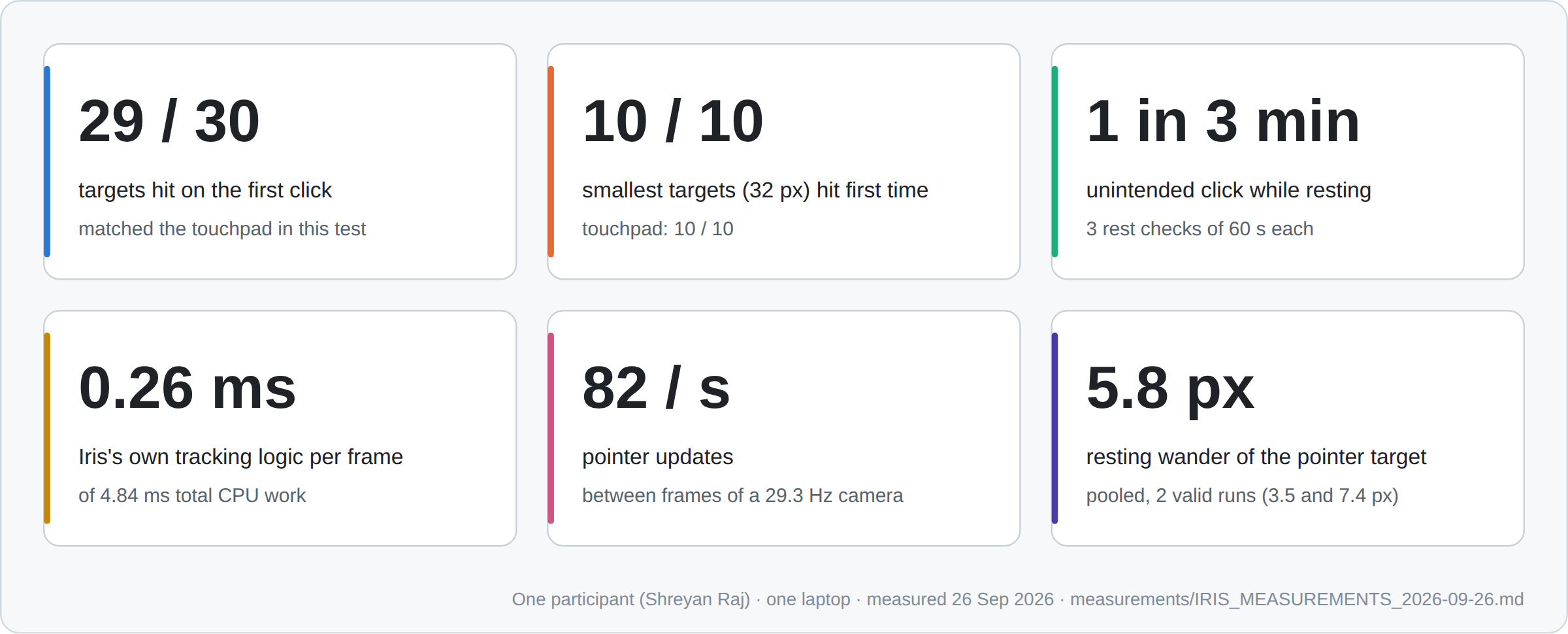
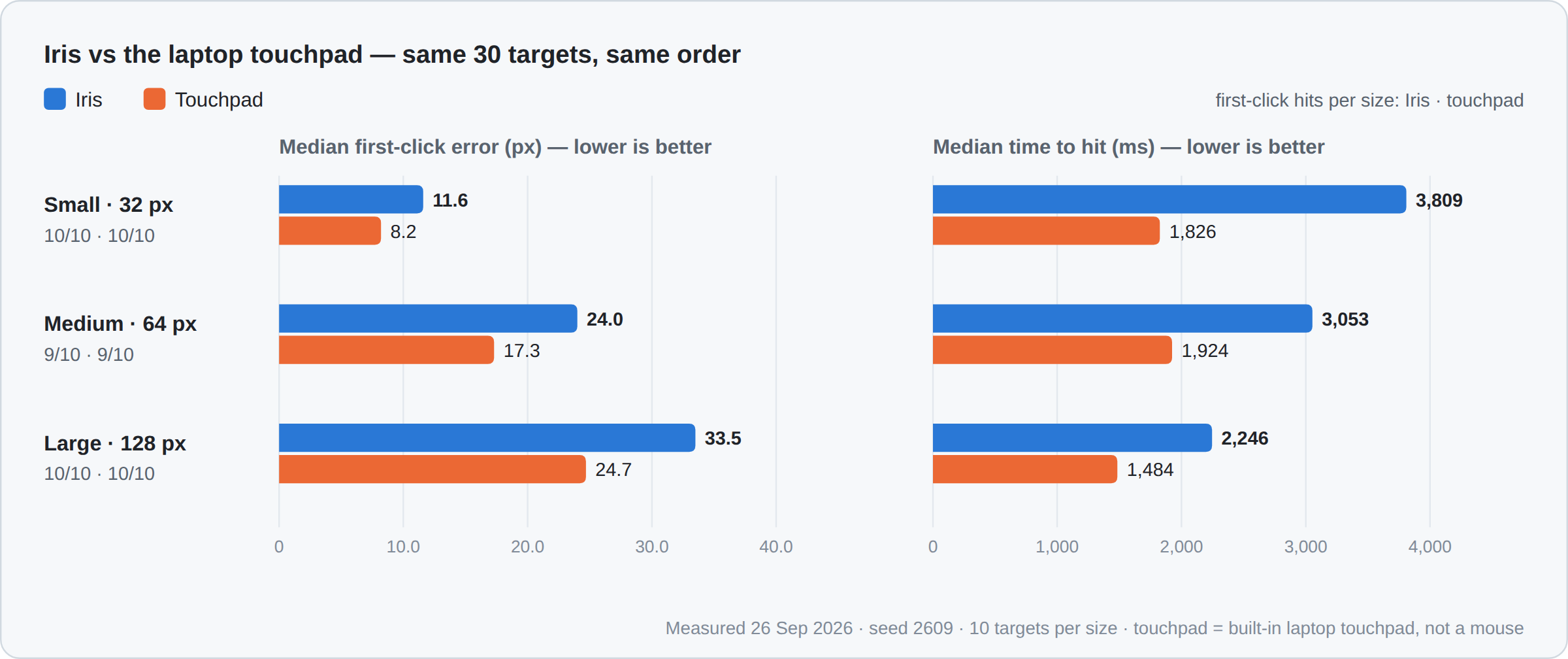
Every number below was recorded by the engine or its own test tools on one laptop on 26 September 2026. Iris was put head-to-head against the laptop's own touchpad in the same 30-target test:
| Iris | Laptop touchpad | |
|---|---|---|
| Targets hit on the first click | 29 / 30 | 29 / 30 |
| Smallest 32 px targets (a close button) | 10 / 10 | 10 / 10 |
| Time per target (median) | 3,080 ms | 1,739 ms |
| Unintended clicks in 3 minutes, sitting still | 1 | — |
Iris matched the touchpad on accuracy, using only a face. It is still 1.8× slower, and I put that in the same table instead of hiding it in a footnote.
Under the hood, on the same machine:
- 0.26 ms of Iris's own logic per frame, inside 4.84 ms of total CPU work
- 82 pointer updates per second from a camera running at 29.3 Hz
- 5.8 px of resting wander when you sit still
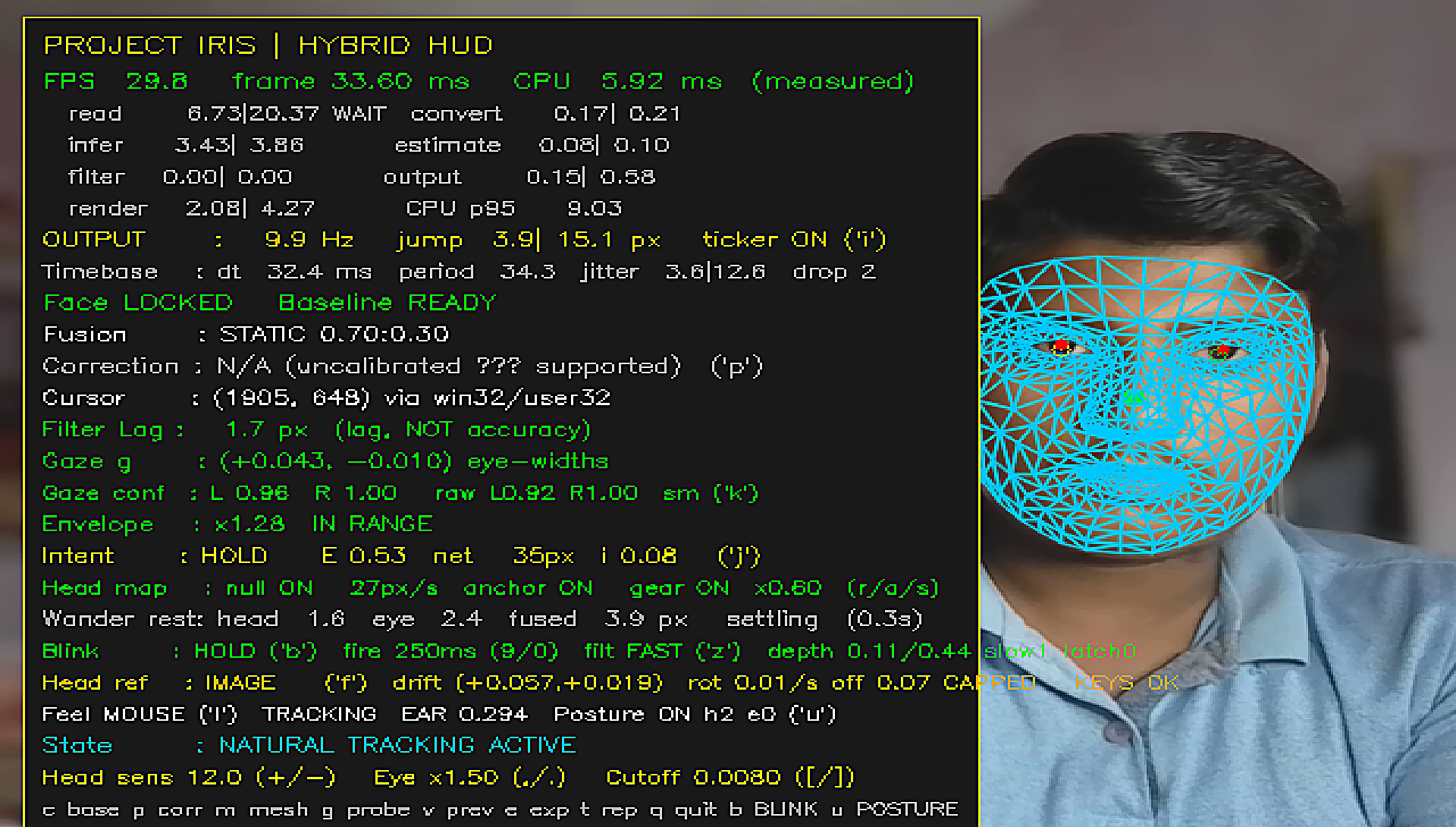
- 478 face landmarks tracked every frame
How I built it
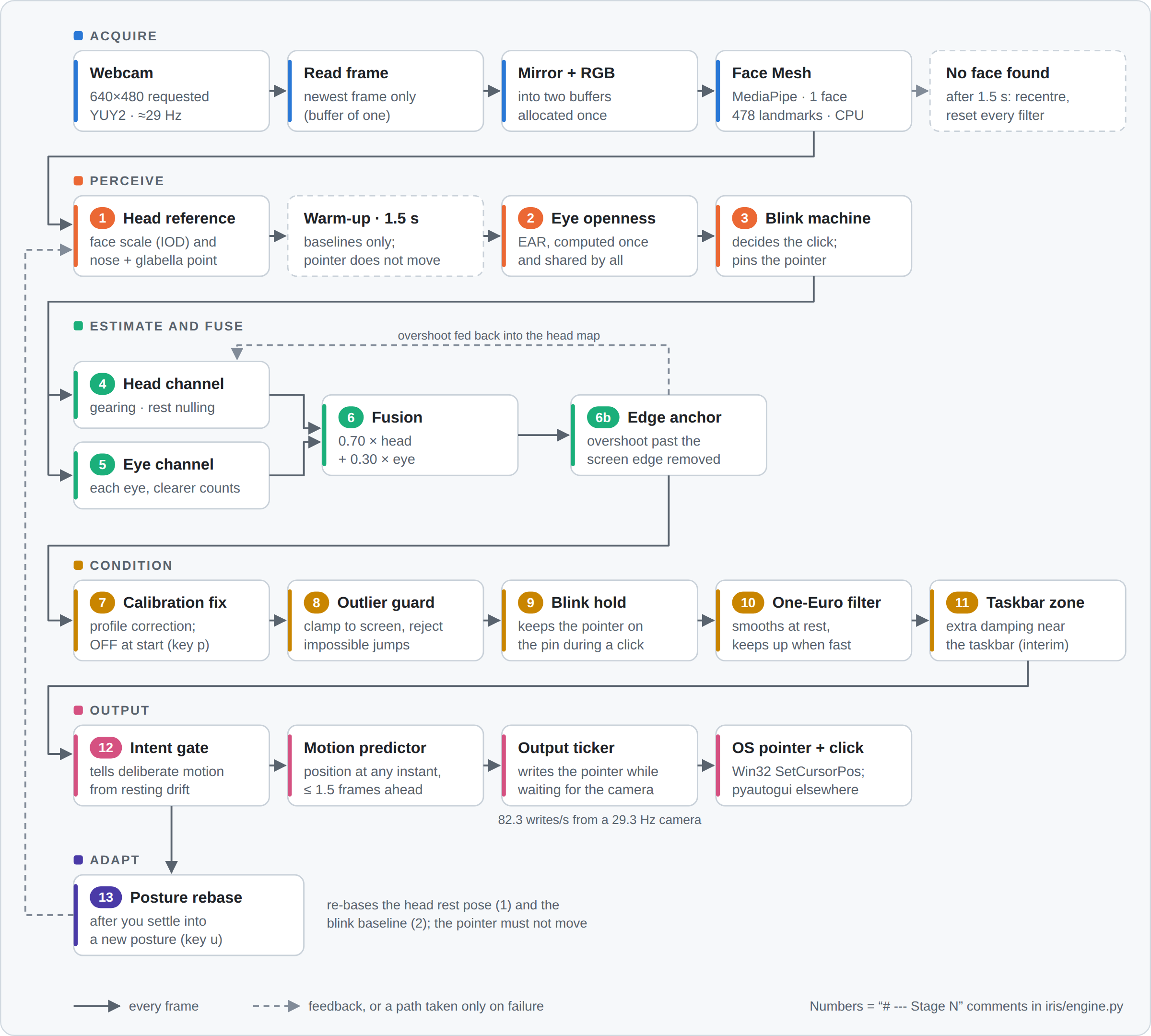
Iris is a real-time pipeline in Python, built on MediaPipe's face mesh, OpenCV and NumPy, and split into 20 modules in six layers, where imports only point downward and nothing depends on itself in a circle.
The interesting parts are the problems the pipeline had to solve:
- Two signals, one pointer. The head is steady but coarse; the eyes are precise but noisy. Iris fuses them at a fixed 0.70 : 0.30 weight, with each eye scored for how clearly it is seen, so a half-hidden eye cannot drag the pointer.
- The blink problem. Google's Project Gameface team described the iris moving during a blink as a reason to leave the eyes out. Iris keeps the eyes, and freezes the pointer at the position it had just before the lids began to move, so the click lands where you were looking.
- Smooth when still, fast when moving. A One-Euro adaptive filter smooths heavily when your head is nearly still and steps aside when you move, so the pointer is calm without feeling slow.
- Time, not frames. In dim light the camera drops from about 29 to about 19 frames per second. Every filter in Iris measures time in seconds, never in frames, so its behaviour does not change when the light does.
- Calibration, kept honest. The live engine needs one keypress. A separate 49-point calibration tool (weighted ridge regression, cross-validated by grid point so neighbouring frames cannot leak between folds) is in the repository too, but it is not wired into the engine and not validated yet, so every number above was measured without it.
Challenges I ran into
A blink is not a click. People blink all day. Using duration alone, 37 of my 129 recorded natural blinks would have fired as clicks. Adding a depth check (the eye must close to 0.44 of its resting openness) cut that to 10, and 9 of those 10 came from dim light, with the camera starved below 21 Hz. That is why the README asks you to sit facing a lamp.
A pointer that drifts cannot hit a close button. Breathing moves your head, and your head moves the pointer. Resting wander is the number that decides whether this is usable, and it is the one people rarely report. So I measured it: 5.8 px.
24 defects, each one found the hard way. The pointer sticking at the centre. Clinging to the taskbar. A late blink click. Slow drift as I shifted in my chair. Every one began as something I noticed while using Iris, and I reproduced it, traced it and tested the fix before keeping it. 24 defects named, 19 engine changes, each tested against the version before it. And yes, one entire evening was lost because the engine looked dead and the cause was Caps Lock. Keys are now case-insensitive.
Accomplishments that I'm proud of
- Matching a laptop touchpad's first-click accuracy, 29 out of 30, with nothing but a face and a webcam.
- Hitting 10 out of 10 of the smallest targets, the size of a window's close button.
- A pointer that moves 82 times a second from a camera that only sees 29 frames a second: almost three times faster than the camera itself, because Iris glides the pointer smoothly between frames.
- Running the whole pipeline in 4.84 ms of CPU per frame, face mesh included. For 86 % of every frame the processor is simply idle, waiting for the camera. Iris's own logic takes just 0.26 ms of that.
- Setting every threshold from my own recorded data, not from guesses.
- Publishing the comparison where Iris loses, not only where it wins.
What I learned
That the hard part of a tracking system is not making it track. It is proving that it works. I learned mathematics beyond my school syllabus from research papers as I went, and the most important habit I picked up was simple: when a fix fails, measure why before trying again.
What's next for Project I.R.I.S.
A mouse behaves the same in a bright room and a dim one, for a tall person and a short one, at 9 a.m. and at midnight. That is the bar: a pointer as dependable as a mouse, in every light, every posture, for every person. Iris is not there yet. The road there has three horizons, and each one is labelled honestly in the README as implemented, designed or still a research direction.
Horizon 1: Complete the pointer. Accuracy already matches the touchpad; speed does not yet. A ten-second range calibration (follow a dot to the screen edges once), confidence-adaptive fusion that lets the head:eye weight follow how clearly each is seen, and blink thresholds that know when the light has dropped.
Horizon 2: The adaptive engine. An engine that fits each new person within seconds and remembers them. The blink gate already proves the idea: its 250 ms and 0.44 were derived from 139 of my own recorded blinks, not chosen by hand. Horizon 2 makes that loop run by itself, for every setting and every user.
Horizon 3: The self-evolving engine. An engine that notices when something is unfamiliar, stays safe, records it, and grows to handle it. It watches only its own user's behaviour, proposes one small change at a time, and keeps a change only if the measured result improved, with every change logged and reversible. A research direction: designed on paper, not built yet.
That engine is what Imperium, the venture I founded, exists to build.
What it cannot do yet
Stated plainly, because a judge will find it anyway and it is better coming from me:
- Everything here was measured by one person, on one laptop, in one room.
- In dim light the blink gate weakens: 9 of the 10 potential false clicks happened with the camera starved below 21 Hz.
- It is 1.8× slower than the touchpad it matched on accuracy.
- Windows only, and a research-grade prototype, not a finished product.
Watch it run: https://youtu.be/rYvwBkUTbFc Code and full documentation: https://gitlab.com/shreyanraj18/project-iris


Log in or sign up for Devpost to join the conversation.