-
-
Zero Trust
-
Project Access Review
-
Project Access Summary
Inspiration
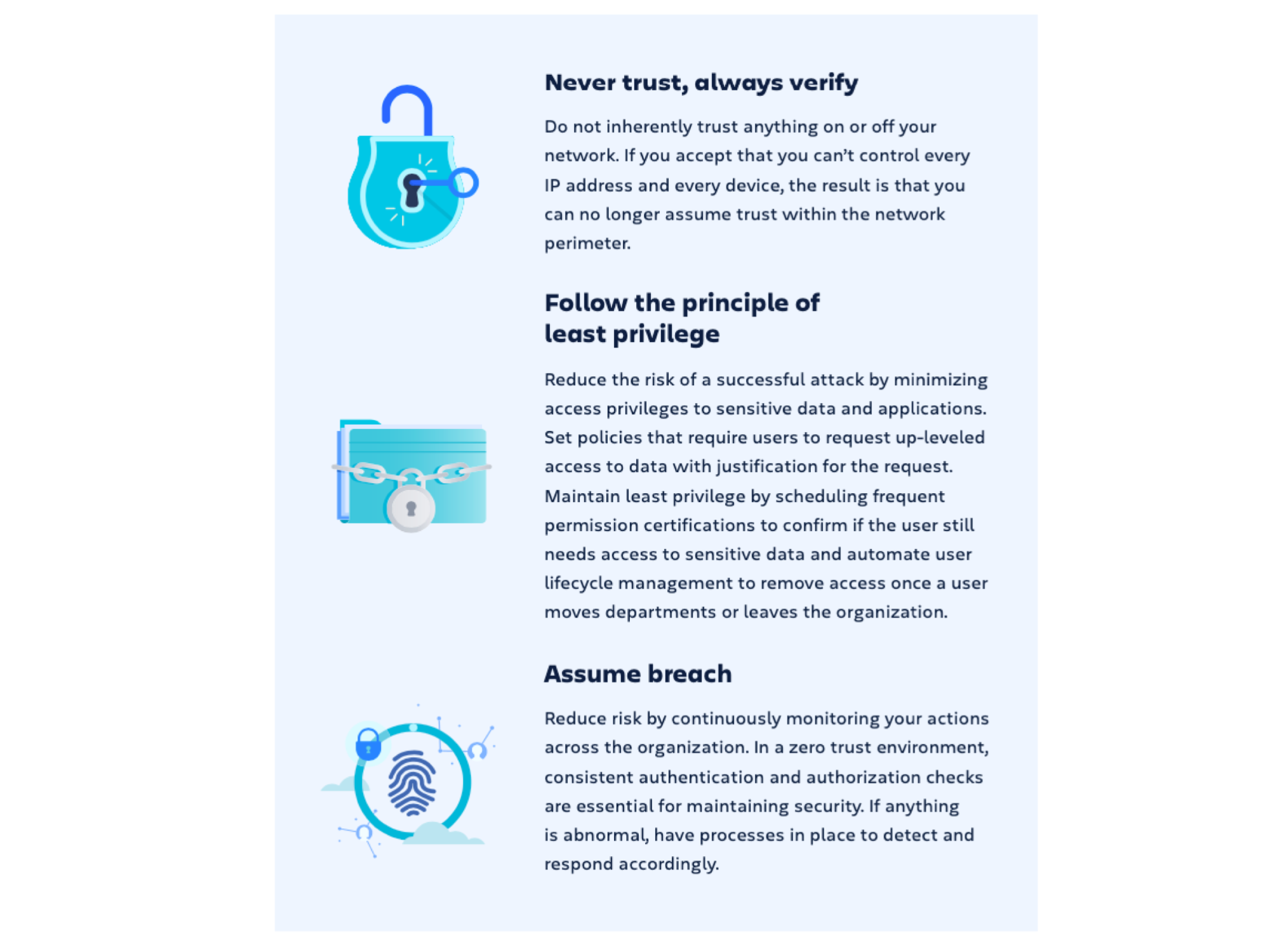
One of the key tenets of Zero Trust Security is the Principle of Least Privilege where users should be given the minimum levels of access/permissions – needed to perform his/her job functions.

Source: Understanding Zero Trust Security by Atlassian
However, "privilege creep" can happen when permissions granted temporarily are never revoked subsequently.
Many risk management teams have been reiterating the importance of regular access reviews especially for SaaS solutions on the Cloud.
By doing regular access reviews, the benefits are
- Reduced cyber attack surface
- Meet compliance requirements
- Minimise unnecessary information leaks/data breaches
- Safeguard on human errors
- Reducing license wastage
While there are 3rd party access review solutions in the market, those generic solutions are not tailored to Jira Cloud. An app that incorporates Jira's permission access model and integrates seamlessly within Jira will be a more sustainable solution.
After reviewing the Atlassian Marketplace, I found that no existing apps address this specific challenge. I believe that an app designed to solve this issue would be highly valuable for all Jira users, especially considering that security is a top priority for organizations of every size.
What it does
Project Access Review for Jira Cloud helps to enforce Minimum Access Policy by facilitating reviews on access permissions for projects on Jira Cloud.
Project Access Review
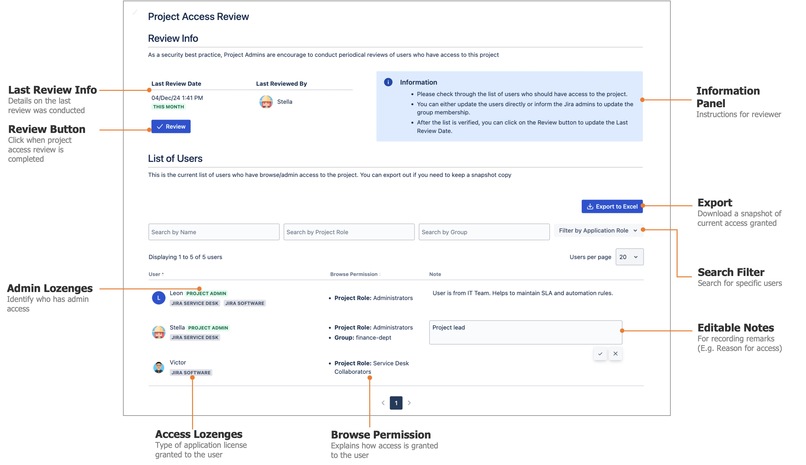
Project admins can review all the users who has Browse/Admin access to the project and update the review status
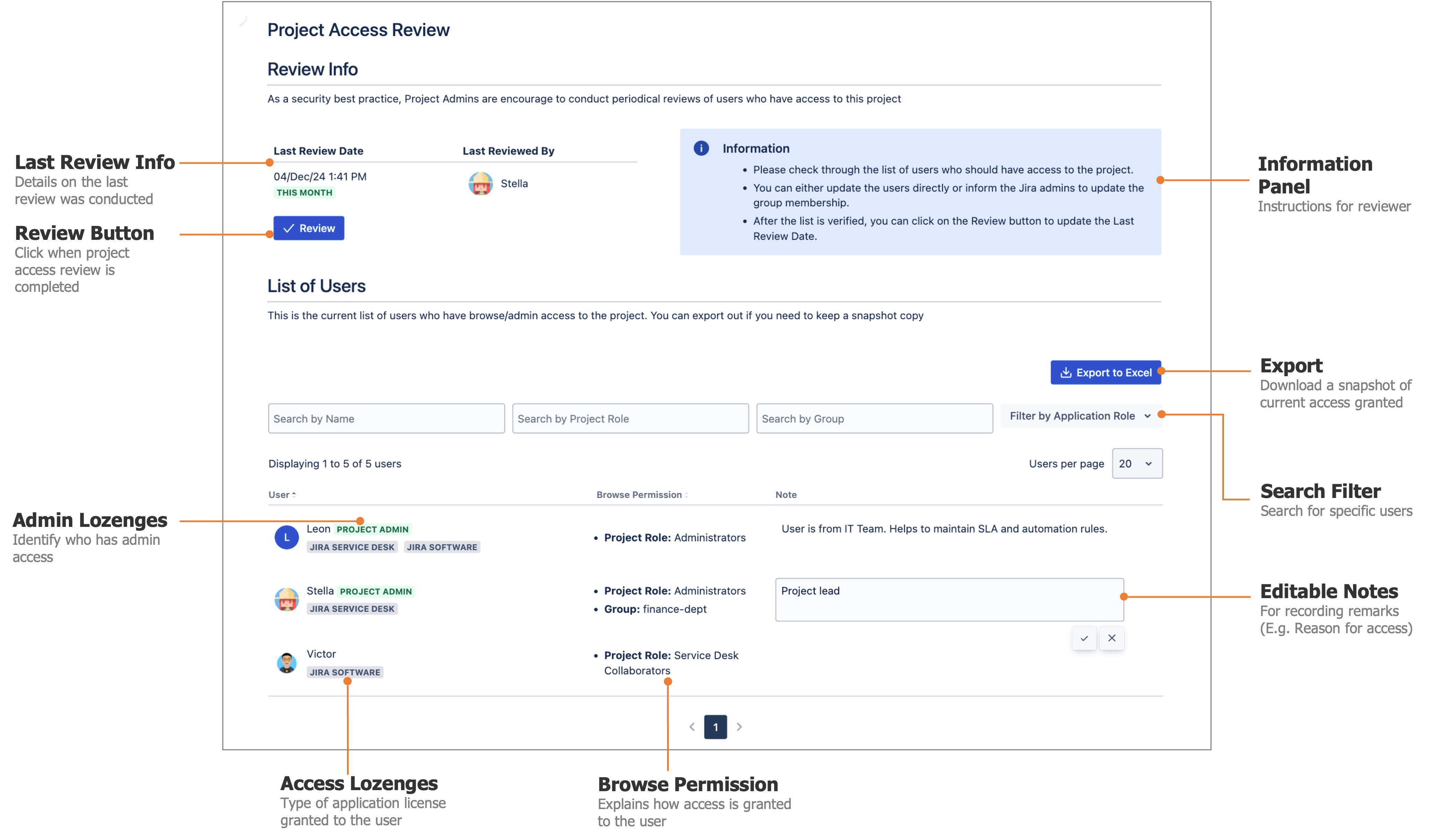
| S/N | Feature | Description | Challenge Addressed |
|---|---|---|---|
| 1 | Display the list of users with browse access | Show who has browse permission to the project and explain how the access was granted | Difficult and tedious to correlate between project role and associated permission scheme |
| 2 | Project Admin Lozenges | Highlight users who have admin access | Project Admin access is higher risk because they can modify the permissions |
| 3 | Enumerating the members of groups in role | List down who are the members of that group instead of showing the group names | Only Jira admins can see who is in the group |
| 4 | Assigned product license lozenges | Facilitate troubleshooting by showing the licenses assigned to the user | Users with browse permission cannot access if they do not have an assigned license |
| 5 | Editable notes on user | Can add notes on why a user was granted access to the project and facilitate collaboration among multiple project admins | It is tough for a project admin to know everyone in a large project |
| 6 | Searching by user/project roles | Save time on searching for a very long list | Facilitates transfer to role to another |
| 7 | User List Export | Take a current snapshot of access granted | Export user list is not available by default |
| 8 | Last Review Date | When is the project due for another review? | Project admin needs to remember when the next review date is |
| 9 | Last Reviewed By | Has the review been done by another project admin? | The info is captured directly in the Jira project (with context and easily accessible) |
Access Review Summary
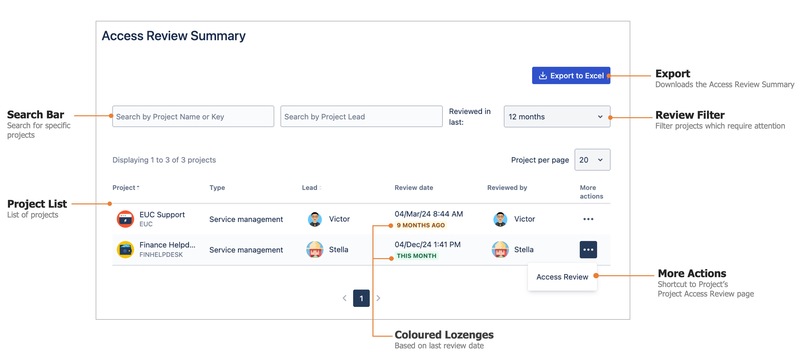
Jira admins can get a summary of the review statuses for all the Jira projects
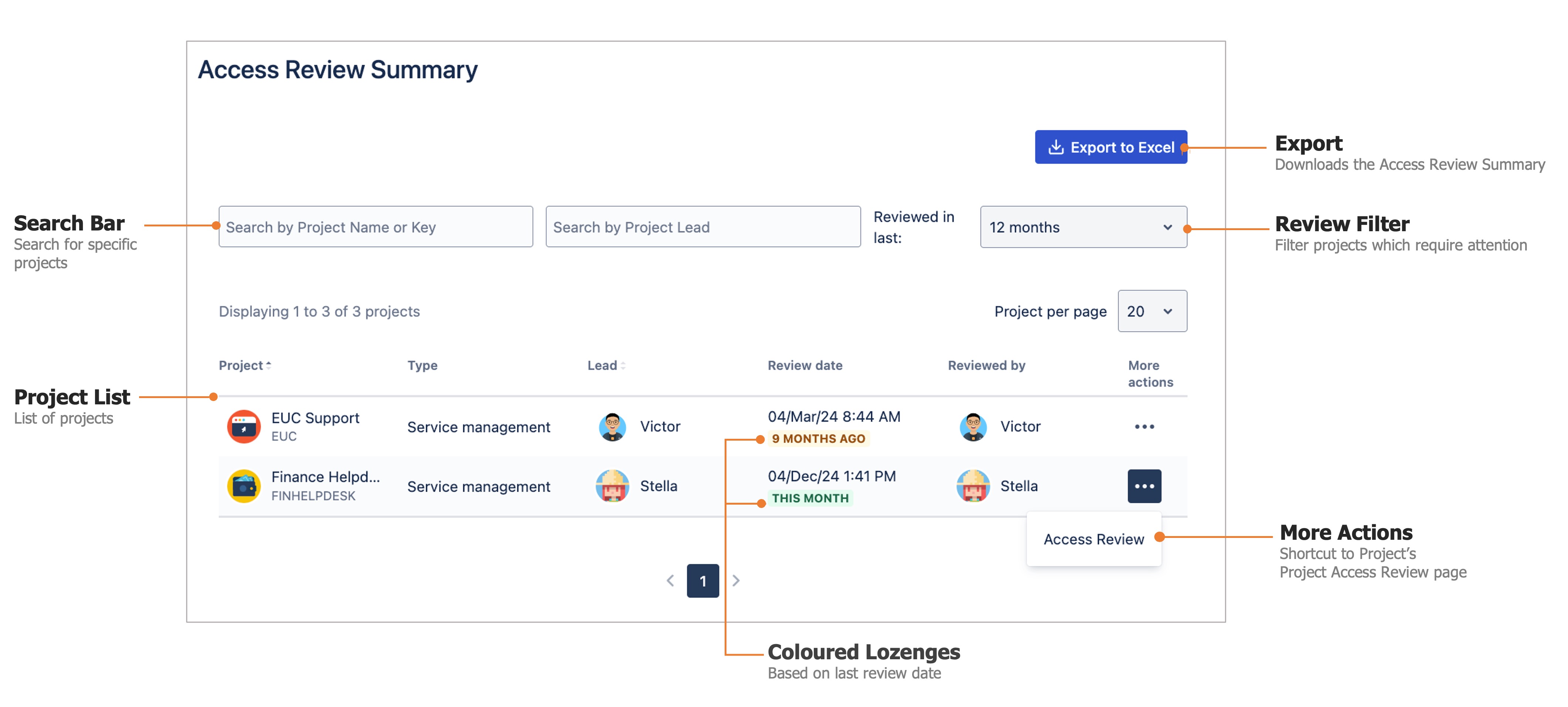
| S/N | Feature | Description |
|---|---|---|
| 1 | List of Projects | Display the list of all Jira projects to present all the essential information available on the page. |
| 2 | More Actions Button | Quick shortcut to jump into the project's Access Review page. |
| 3 | Colored Lozenges Based on Last Review Date | A quick way to eyeball the project health status using the traffic light colour scheme so that user need not count the date mentally. |
| 4 | Last Reviewed Filter | A quick way to filter those projects which need attention. |
| 5 | Search Bars | Support lookups for big Jira instances. |
| 6 | Export to Excel | Jira admins can download a CSV file with more details. The info can also be circulated without granting admin access to Jira. |
Possible use cases
- Jira admins to decide which projects are inactive and can be archived
- Project admins to on-board/off-board new users to the project
- Troubleshooting access issues since it explains how the user is granted access
- Reminding Project admins to revoke temporary access given (e.g. auditors)
- Preventing users who have left the project from getting notification updates on project issues
How we built it
I built this app using Forge, leveraging its secure storage module to ensure data integrity and prevent any unauthorized manipulation.
This "Runs on Atlassian" app is fully compliant on Data Residency and Zero data egress since it is built on the Atlassian Forge framework.
Challenges we ran into
It is not easy to perform scalability testing since we do not have a lot of licensed users on our development site.
Accomplishments that we're proud of
The coding was done singlehandedly by 1 person. The Atlassian Forge framework makes it easy for developers to build apps for Jira Cloud.
I am also very pleased with the look and feel and the usability of the app. The initial look and feel was very plain. Atlassian Design System gave it a professional looks, made it more user friendly and intuitive to use.
After sharing this with my colleagues, they told me that the app will be useful for 2 of our Cloud customers.
What we learned
As a Solution and Marketplace Partner, we are uniquely positioned to address the challenges customers face. The opportunity to utilize Atlassian Forge has allowed us to fill the gaps in the solutions they are seeking. Forge provides a powerful framework for building secure, scalable applications that directly address critical concerns around data security and residency. This has enabled us to help them meet their needs and achieve their goals effectively
What's next for Project Access Review for Jira Cloud
From an engineering point of view, the priority is to have a robust and performant core engine. It will be good to validate the app with larger Jira Cloud instances (e.g. 1,000 → 5,000 → 10,000 users) gradually. There may be a need to add caching to reduce the response time for very large sites.
The current state is focusing on providing visibility and empowering users to collaborate in this important security process. From a functional point of view, the next logical step would be on tackling "enforcement" in an easy and flexible manner.
A journey of a thousand miles begins with a single step!


Log in or sign up for Devpost to join the conversation.