-
-
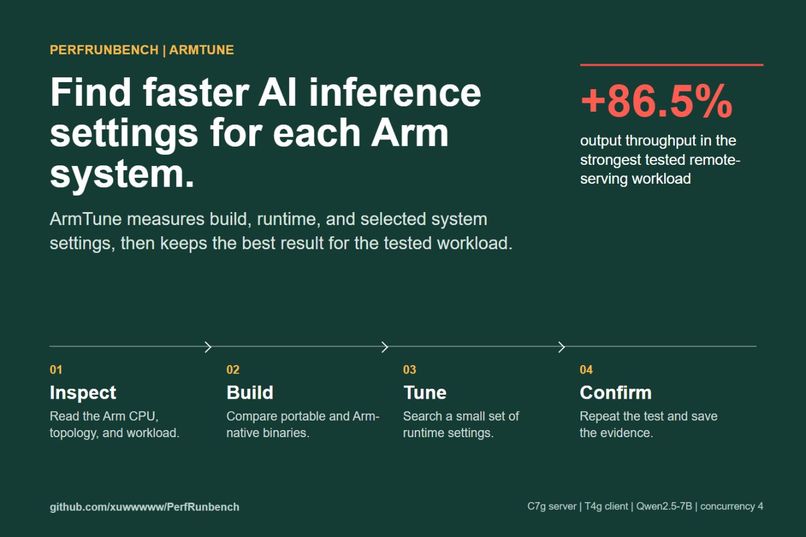
What ArmTune does: inspect, build, tune, and confirm on the tested Arm system.
-
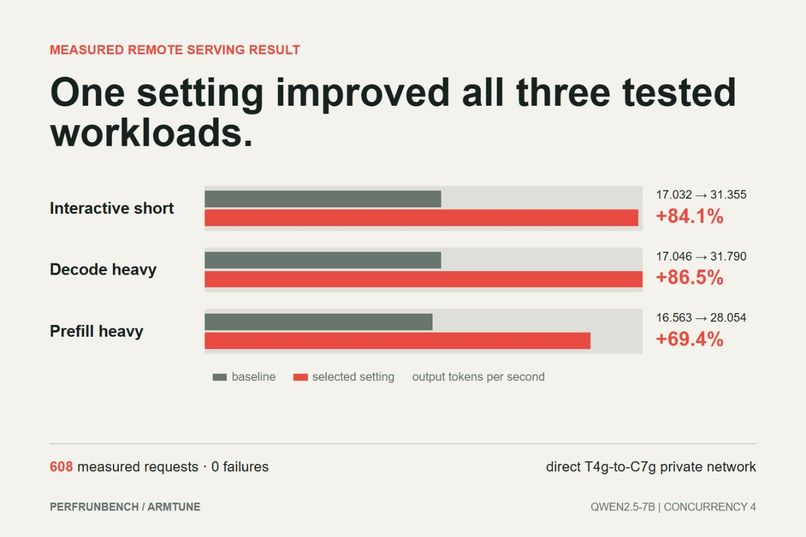
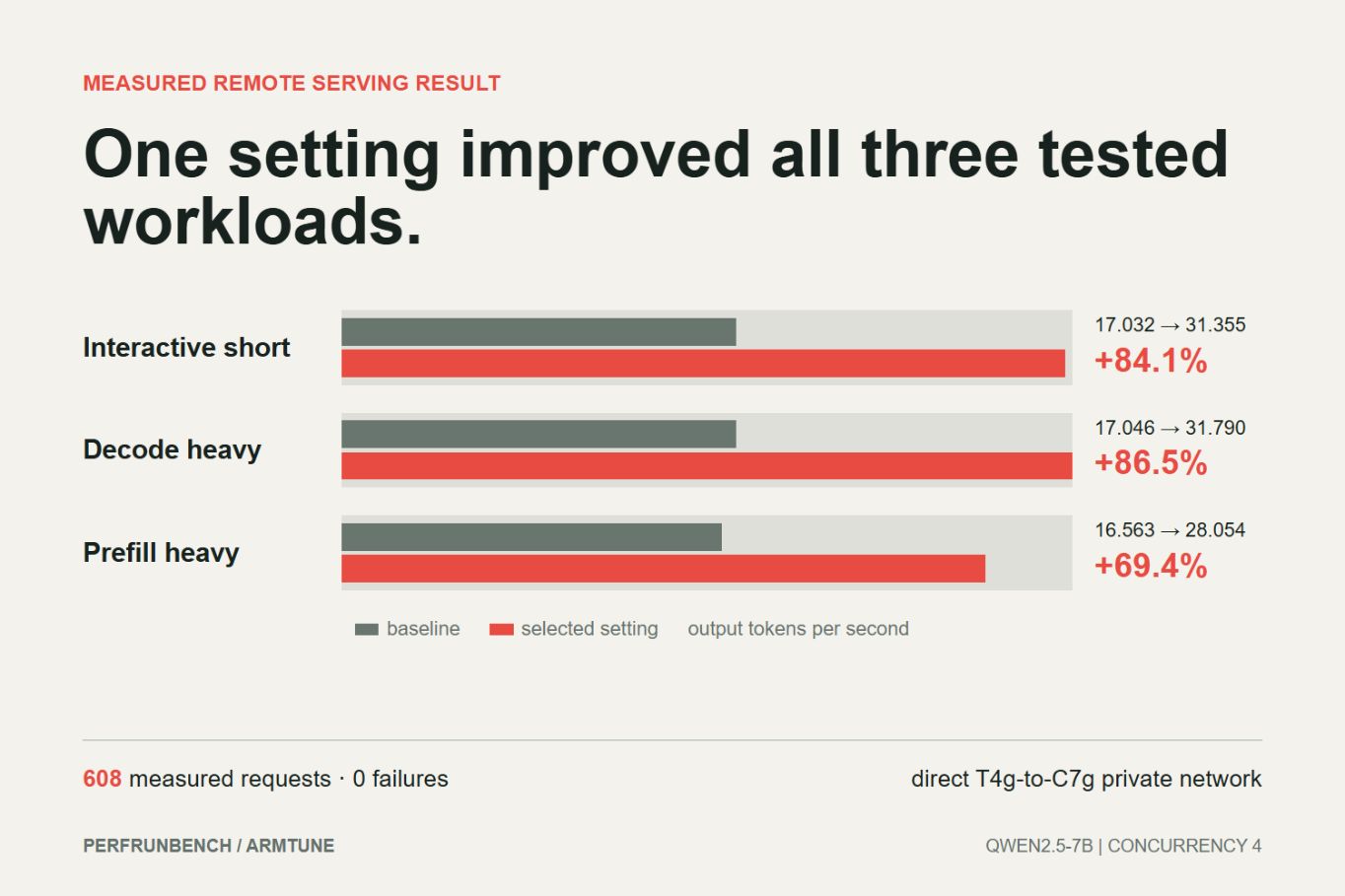
Remote C7g result: 69.4% to 86.5% more output throughput across three tested workloads.
-
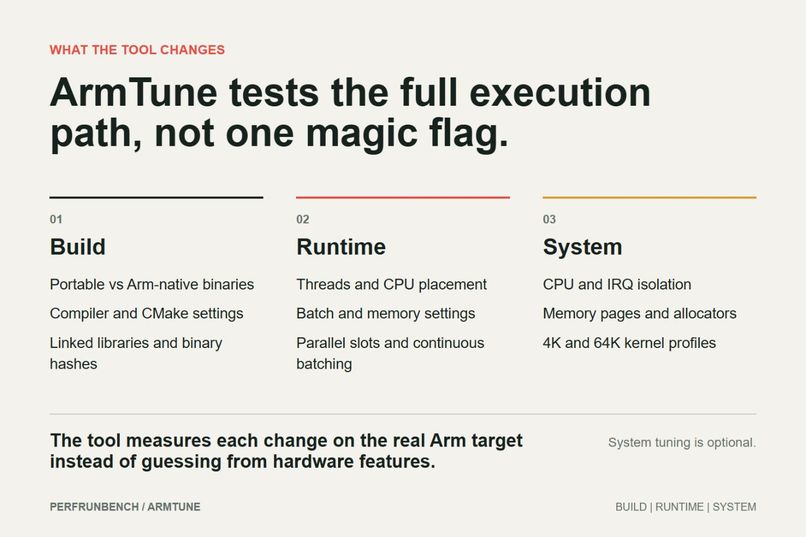
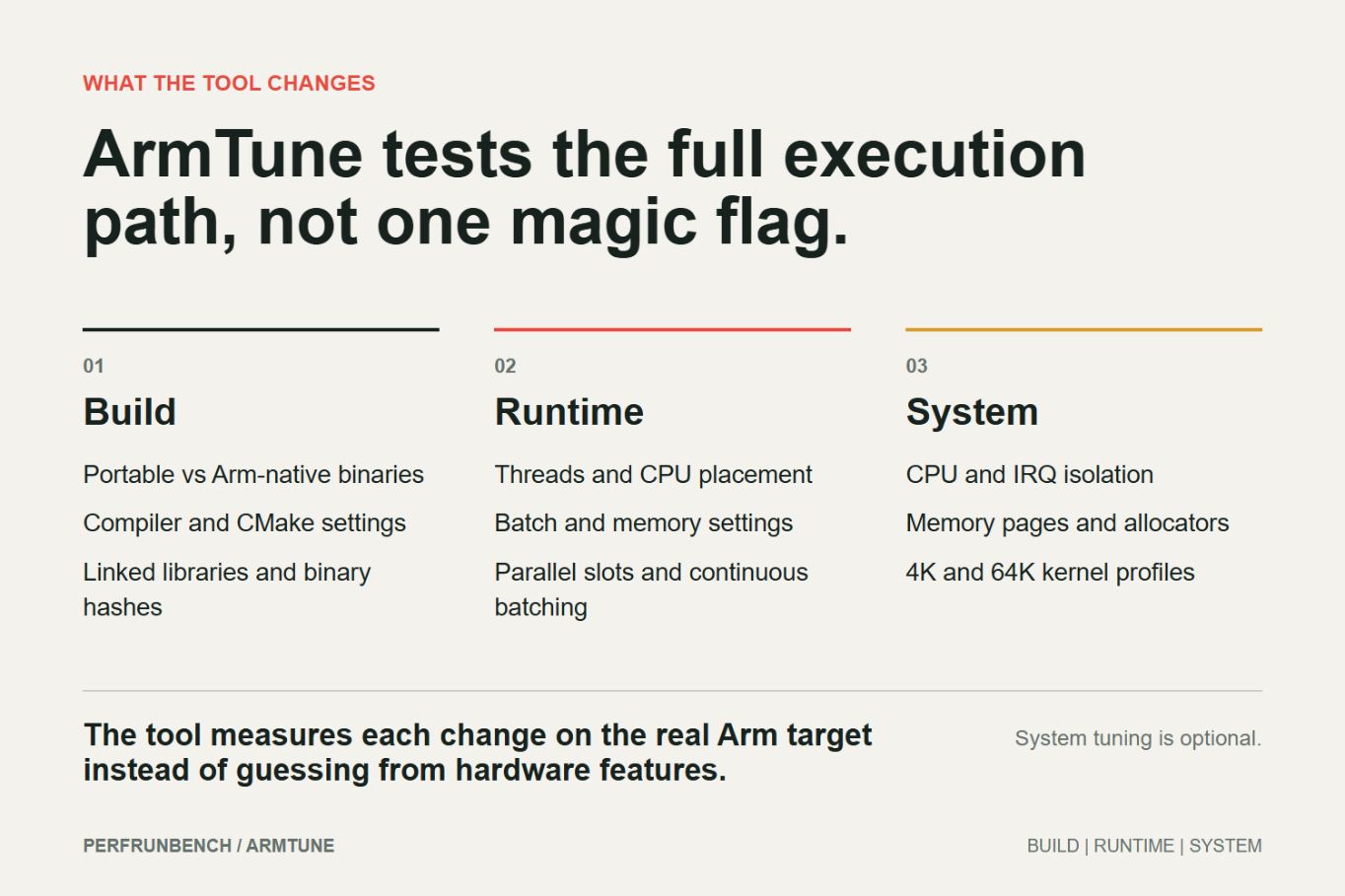
ArmTune compares build, runtime, and optional system settings on the real target.
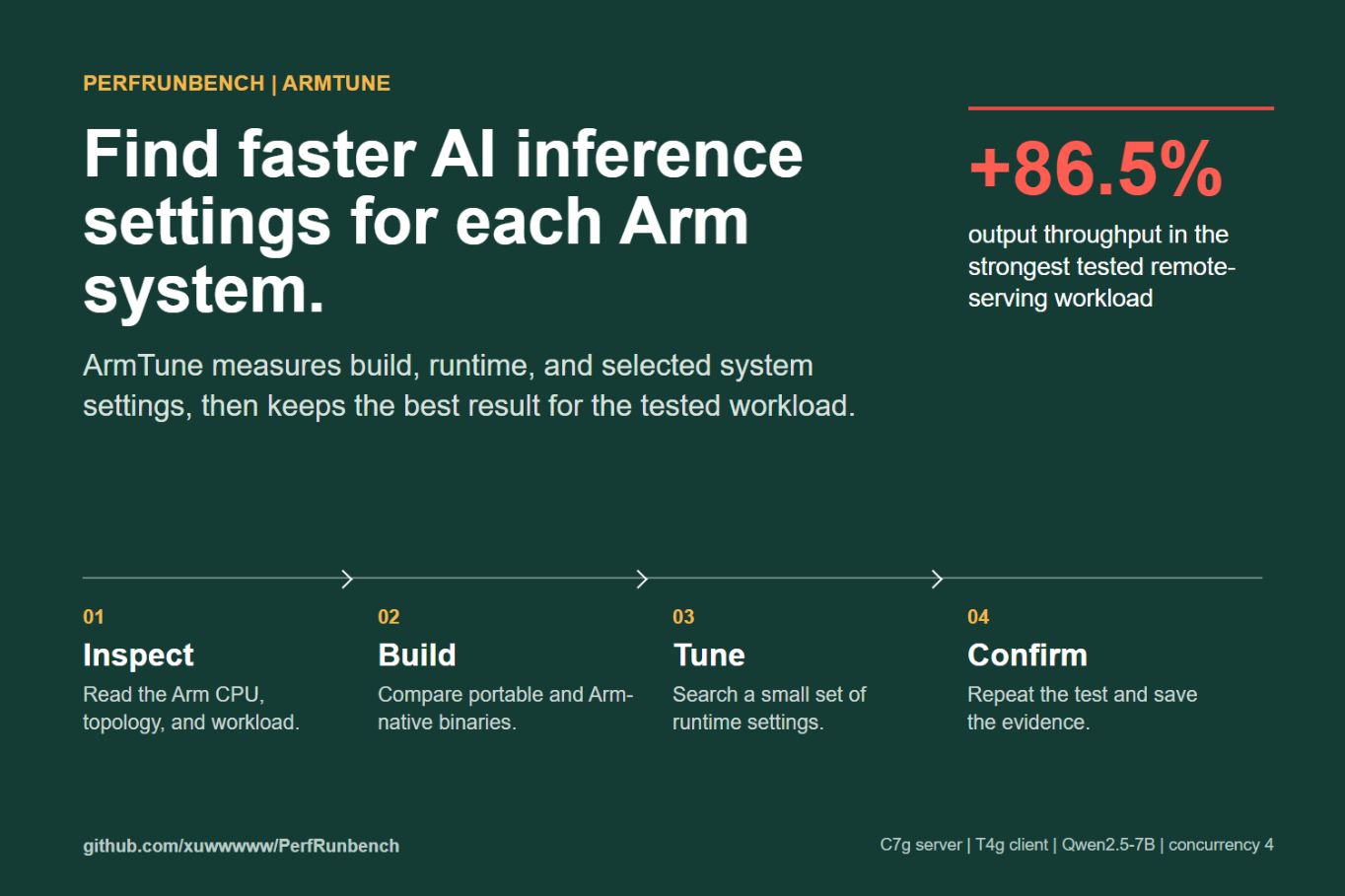
Cloud AI Track
What I built
PerfRunbench is a tool for repeatable AI performance testing. ArmTune is the part made for Arm AI inference.
Running a model on an Arm server is not difficult. Finding the right settings is. Performance changes with the CPU, binary, thread count, CPU placement, batch size, request pattern, and concurrency. Testing these choices by hand takes time, and the fastest setting on one system may not work on another.
ArmTune automates that work. It inspects the target, tests a small set of useful settings, repeats the measurements, and saves the result with the logs and hashes needed to check it later.
How it works
- Inspect the target. Read the Arm CPU, core layout, memory, operating system, and workload binary.
- Compare builds. Test a portable binary against Arm-native builds and record compiler, CMake, library, and binary evidence.
- Search runtime settings. Try thread counts, CPU placement, batch settings, parallel slots, and continuous batching without running a full Cartesian product.
- Test optional system settings. When enabled, test CPU and IRQ isolation, memory pages, allocators, and 4K or 64K kernel profiles. These changes are not part of the default flow.
- Confirm the result. Run fresh paired tests, compare the distributions, and save a Performance Passport.
- Reuse it. Use the saved setting again when the target and workload still match.
For a normal command workload, the simple entry point is:
autotuneai run --auto --preset quick -- python app.py
The quick, standard, and deep presets use fixed limits of 5, 20, and 60 minutes. If time runs out, PerfRunbench still writes a valid partial report and cleans up its processes.
Real Arm result
The main result used a C7g Arm64 server, a T4g Arm64 client, Qwen2.5-7B Instruct Q4_K_M, a pinned llama-server build, a private network path, and four concurrent requests.
ArmTune selected four parallel server slots with continuous batching. In simple terms, the server can work on several requests together instead of waiting for one request to finish before using the next open CPU time slice.
| Workload | What it tests | Baseline output tokens/s | ArmTune output tokens/s | Change |
|---|---|---|---|---|
| Interactive short | Short prompts and short answers | 17.032 | 31.355 | +84.1% |
| Decode heavy | More time generating new tokens | 17.046 | 31.790 | +86.5% |
| Prefill heavy | More time reading the input prompt | 16.563 | 28.054 | +69.4% |
Output tokens per second measures how quickly the server produces text across the active requests. Prefill is the work needed to read the prompt before generation starts. Decode is the repeated work used to produce each new token.
The test completed 608 measured requests with zero retries and zero request failures. The 95th-percentile time to first token (p95 TTFT) also fell by 91.1% to 98.0% across the three workloads. TTFT is the delay before the user sees the first generated token; p95 means 95% of requests finished this step within that time.
These results belong to this exact server, client, model, concurrency, and test method. They are not a claim that every Arm workload will improve by the same amount.
Other validation
A separate llama.cpp build test on C7g measured 10.825 tokens/s for the portable build and 17.530 tokens/s for the Arm-native build. A separate runtime search measured 13.630 to 17.480 tokens/s, a 28.25% observed gain. These tests use different methods, so their gains are not added together.
The released package was also installed and tested on Windows x86-64, Ubuntu x86-64, and Ubuntu Arm64. Those jobs prove that the tool runs correctly; they are not Arm performance results.
Why the result improved
The selected setting matched the request pattern to the eight available server CPUs. Four slots let independent requests overlap. Continuous batching kept useful work ready when one request reached a different stage. This raised CPU use without copying the model to the T4g client or changing the model itself.
The tool also tested compiler, kernel, memory, and network ideas. None became a performance claim unless the measured result supported it. This matters because an Arm feature flag alone does not prove that the workload used the faster path.
Recommendation reuse and cleanup
A saved result is tied to the CPU, workload, model, binary, and test settings. PerfRunbench will not reuse a C7g result on a T4g system. If a measured difference stays inside the noise range, the result is reported as inconclusive instead of a speedup.
Optional system changes are temporary and reversible. PerfRunbench checks process cleanup, open ports, leases, and rollback after each run.
How to run it
- Download the latest release from GitHub.
- Install the wheel in a Python 3.10 or newer environment.
- Run
autotuneai --helporautotuneai guide. - Use
run --autofor a local command workload, or follow the ArmTune README for Linux Arm64 and SSH serving tests. - Open the generated Markdown, JSON, and HTML reports and verify the Performance Passport before reusing a result.
Public examples use placeholder paths. Model files, SSH keys, private host details, and private run logs are not included in the repository.
How I built it
PerfRunbench is written in Python 3.10+. It uses local processes and system OpenSSH for target control. Important results use versioned JSON files and atomic writes. The repository includes unit tests, fake end-to-end tests, installed-wheel tests, and CI on Windows, Linux x86-64, and Linux Arm64.
The real serving tests used AWS Graviton C7g and T4g systems, llama.cpp and llama-server, and a fixed model digest. Raw output, build details, request results, cleanup records, and SHA-256 manifests were saved for review.
Challenges and lessons
The hardest part was separating a real performance result from a result that only looked promising. A fast run can be noise, a client can hide a server bottleneck, and a requested compiler flag may not be active at runtime.
The project showed that a small, well-chosen search can be more useful than a very large sweep. It also showed that workload shape matters: short interactive requests, long generation, and long prompts stress the server in different ways.
What was completed during the challenge
- Linux Arm64 local and SSH inspection
- llama.cpp build and runtime tuning
- llama-server serving tests and remote load generation
- optional CPU, memory, allocator, and kernel experiments
- repeated paired measurements and before/after reports
- Performance Passport generation and verification
- recommendation reuse, dry run, canary, lease, and rollback
- simple time-limited presets and valid partial reports
- cross-platform installed-wheel testing
Built with
Python, Linux Arm64, AWS Graviton C7g and T4g, llama.cpp, llama-server, OpenSSH, GitHub Actions, JSON, Markdown, HTML, and SVG reports.
Links
- Repository: https://github.com/xuwwwww/PerfRunbench
- Release: https://github.com/xuwwwww/PerfRunbench/releases/tag/v0.3.1
- Demo video: https://youtu.be/lMMDuUv5h0o
- Remote-serving evidence: https://github.com/xuwwwww/PerfRunbench/blob/main/docs/results/PHASE_21D2B_C7G_T4G_REMOTE_SERVING_VALIDATION.md
Limits
- The main serving result covers one C7g server, one T4g client, one model, concurrency 4, and three workloads.
- More Arm CPUs, models, and concurrency levels still need testing.
- Synthetic PyTorch tests check tool behavior, not production training speed.
- PerfRunbench is available through GitHub Releases, not PyPI.
- BootTrace remains an optional experiment and is not part of the normal tuning flow.
Built With
- amazon-web-services
- github
- linux
- performance
- python

Log in or sign up for Devpost to join the conversation.