Closer
Helping people find their place in the conversation.
Inspiration
Getting added to a group chat doesn't mean you feel part of the group. You might have just moved to a new country or joined a new school. Everyone else already knows the stories behind the jokes. You understand the words, but you're still not sure what to say.
Asking once is easy enough. Asking every time can feel uncomfortable, especially when you're still getting to know people. So you let a message pass. Then another. We wanted to work on that moment when someone wants to join in but doesn't have the context to do it comfortably.
For grandparents, a grandchild's meme can be an invitation to share a laugh, but only if they understand the joke. We wanted to make those everyday exchanges easier.
We built Closer to make those conversations easier to take part in. Our goal is to use AI to deepen real human connections by helping people understand each other and feel more comfortable responding in their own words.
What it does
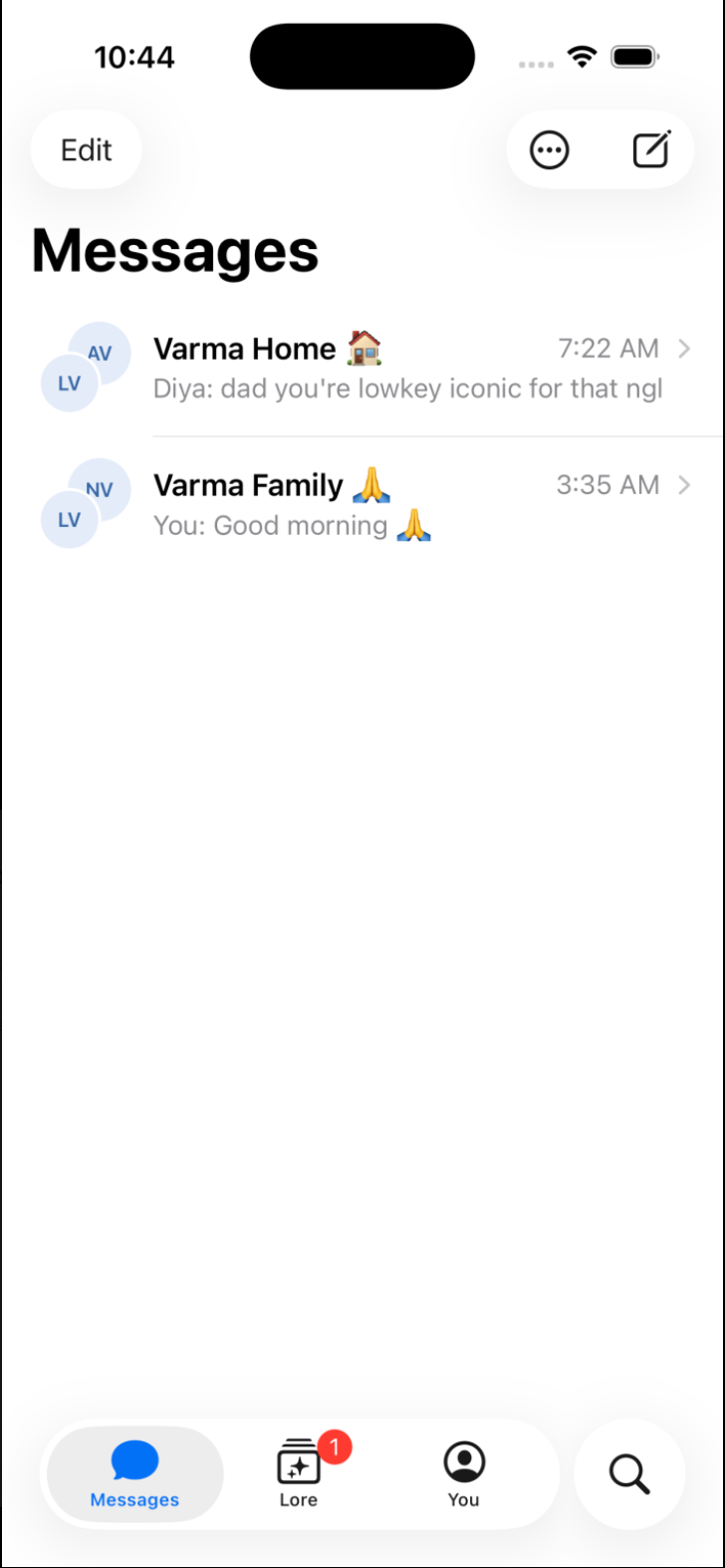
Closer brings group messaging and video calls together with private, contextual explanations.
Hold to explain: get a short explanation in a bubble above a message, without interrupting the group.
Tap to ask more: open a private follow-up view to ask questions about that message. Questions and answers stay out of the shared chat.
Understand the group's history: retrieve context for nicknames and references to earlier events. Common slang can receive a general explanation; a group-specific story needs evidence.
Ask a person when context is missing: if Closer can't find an explanation, it says so and offers a way to ask a member privately.
Make sense of memes: the model explains familiar memes in plain language, using surrounding messages for context. Grandparents can understand what a grandchild is sharing and choose how to respond.
Get help during a call: the question-mark control requests a brief explanation of something recently said. Live captions supply context, attributed to the participant sending the audio.
Catch up after being away: summaries help returning members understand what they missed in a busy chat.
How we built it
We built Closer as a React Native app using TypeScript, Expo, and Expo Router. Group chats, private explanations, catch-up summaries, calls, and shared memories live in the same app. Holding a message opens its actions; choosing Explain opens a private explanation sheet with supporting context and follow-up questions. Questions and answers stay out of the shared conversation.
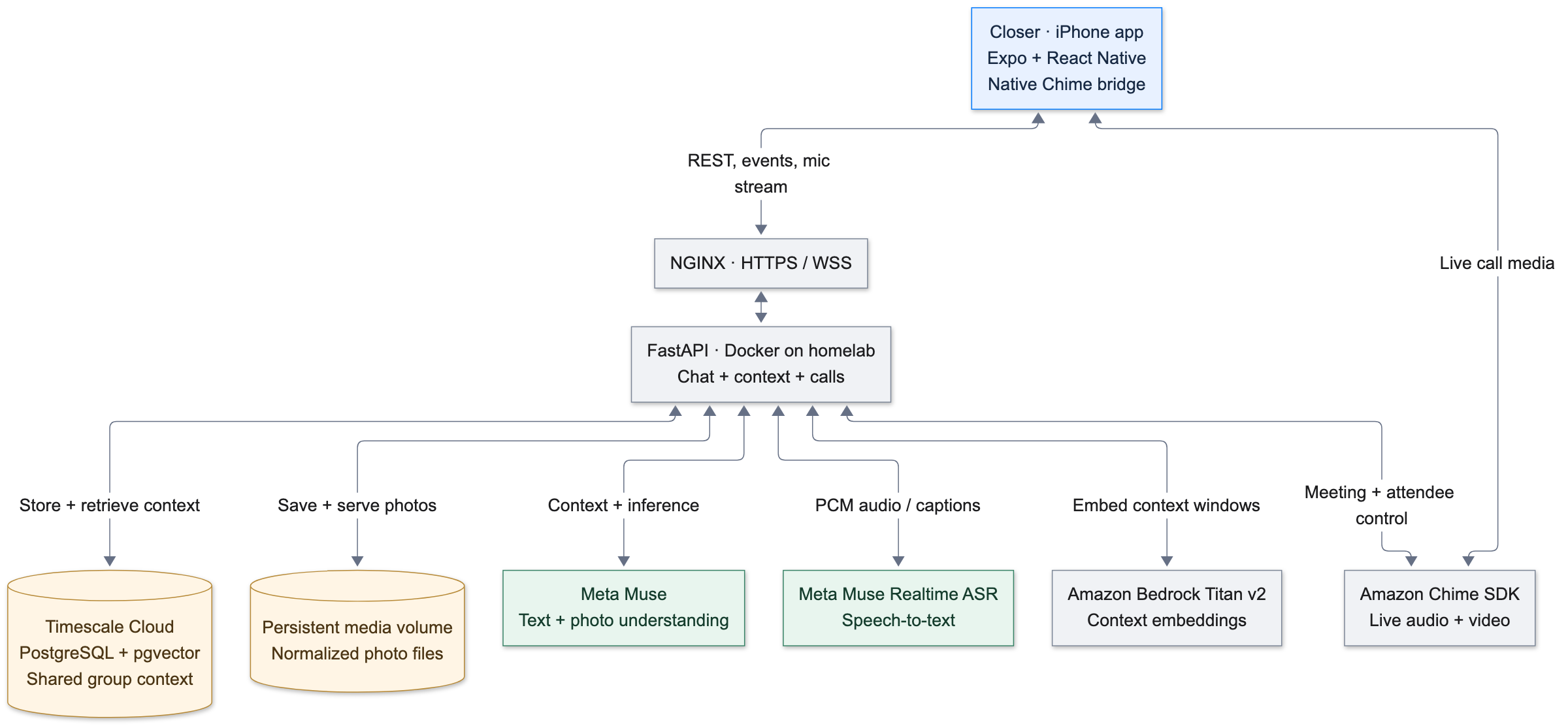
The Python backend uses FastAPI, Pydantic request and response contracts, and async SQLAlchemy for database access. WebSockets deliver chat updates, live captions, game updates, and Lore events. Catch-up summaries stream through Server-Sent Events so the app can display each completed bullet as it arrives.
Our shared database runs on Tiger Cloud, from Tiger Data, referred to as Timescale Cloud in the project's setup documentation. PostgreSQL stores conversation history, group glossary entries, saved explanation contexts, transcripts, and shared memories. The pgvector extension stores embeddings and performs semantic similarity search alongside PostgreSQL's full-text search.
Technology stack
| Layer | Technology | Role |
|---|---|---|
| Mobile app | React Native, Expo, TypeScript, Expo Router | Messaging, private explanations, calls, catch-up, Lore, and games |
| Backend | Python, FastAPI, Pydantic | API contracts, membership checks, AI orchestration, and response validation |
| Database | Tiger Cloud, PostgreSQL, pgvector, async SQLAlchemy | Persistent conversation context, full-text and vector search, saved answers, transcripts, and memories |
| Embeddings | Amazon Bedrock Titan Text Embeddings v2 | Embeds message windows and queries for semantic retrieval; also supports matching related Lore |
| Generation and vision | Meta Muse Spark 1.3 through the Meta Model API | Explanations, photo descriptions, rewrites, summaries, Lore detection and titles, and game prompts |
| Model client | OpenAI-compatible Python SDK | Calls Meta's API; the generation model is Muse |
| Speech recognition | Muse Voice Transcribe 1.0 | Streaming partial captions and completed participant turns |
| Live media | Amazon Chime SDK, custom Expo native module | Group audio and video calls |
| Media storage | Backend filesystem, Docker volume | Uploaded photos and generated call-replay WAV files |
| Event delivery | WebSockets and Server-Sent Events | Live updates and streamed catch-up responses |
| Deployment | Docker, NGINX, Let's Encrypt | Containerized backend and HTTPS |
| Testing | pytest, HTTPX, scripted service fakes, Jest | API, streaming, retrieval, failure handling, and frontend logic checks |
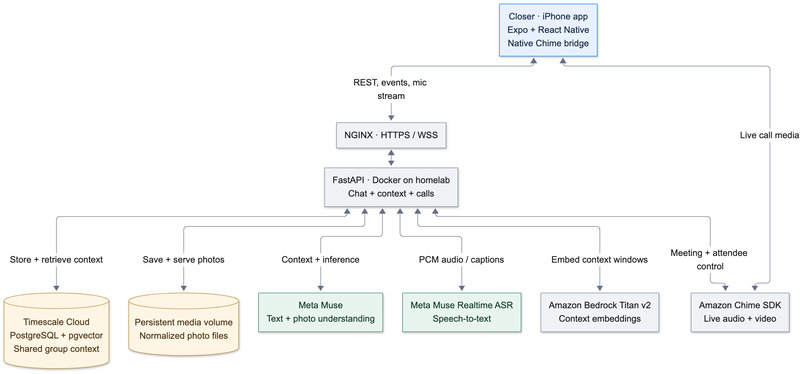
Bedrock supplies embeddings; Muse generates the answers. We use retrieval-augmented generation (RAG) to supply relevant evidence with a request, rather than training a separate model on each group's messages.
System architecture
Finding the right context
A message such as “same place as last time” needs more than a dictionary definition. The backend checks the requesting user's group membership, collects nearby messages, and looks for evidence in the group's history.
Titan embeds windows of ten messages into 1,024-dimensional vectors, preserving the relationship between a phrase and the messages around it. At explanation time, the backend embeds the query and searches those windows using pgvector. In parallel, PostgreSQL full-text search finds matching terms and messages, while the group glossary supplies known definitions and their original sources.
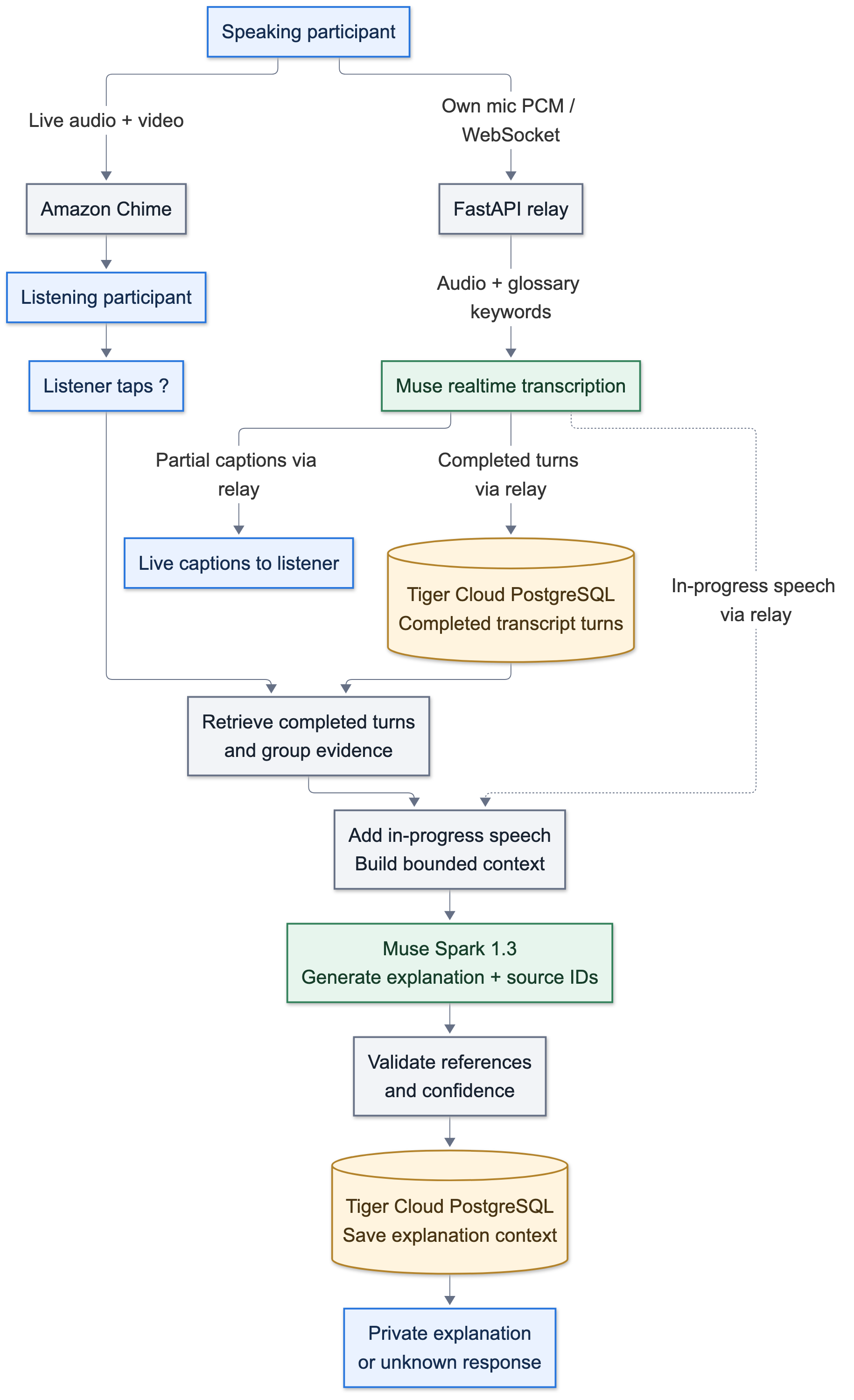
We combine the ranked retrieval results using reciprocal rank fusion. Glossary sources receive extra weight, and term retrieval favors messages that define a phrase. The backend selects up to eight ranked history windows and applies a context budget before generation. Full-text retrieval remains available when Bedrock embeddings are unavailable.
The prompt includes the selected message or recent speech, nearby conversation, reader and member context, glossary evidence, retrieved history, and relevant answers previously given privately to that user. Muse returns a structured explanation with its category, confidence, and supporting source IDs.
For group-specific explanations, the backend filters source IDs against the supplied context and requires supporting evidence and sufficient confidence. An unsupported answer becomes an unknown response with an option to ask a member privately. General meanings and plain readings have separate acceptance rules. Reference validation checks the supplied citations; it does not guarantee that every model interpretation is correct.
How AI supports the other features
The explanation pipeline is one part of the application. Other features use Muse with task-specific context and validation rather than all passing through the explanation citation checker.
| Feature | AI process | What the person receives |
|---|---|---|
| Photos and memes | Muse describes uploaded images, including visible text. Those descriptions become searchable conversation content. An explanation can also include the selected image directly. | A plain-language explanation of the image and how it fits the conversation |
| Clarity nudges | Glossary matching identifies known references a newcomer may miss. Muse generates optional rewrites and can incorporate a human-supplied aside; a separate model check handles potentially unknown references. | A draft the sender can review, edit, or decline |
| Catch-up | Muse generates background chunk digests, then combines relevant digests with uncovered messages in the requested unread range. Completed summary bullets stream over SSE. | What happened, decisions made, and questions still open |
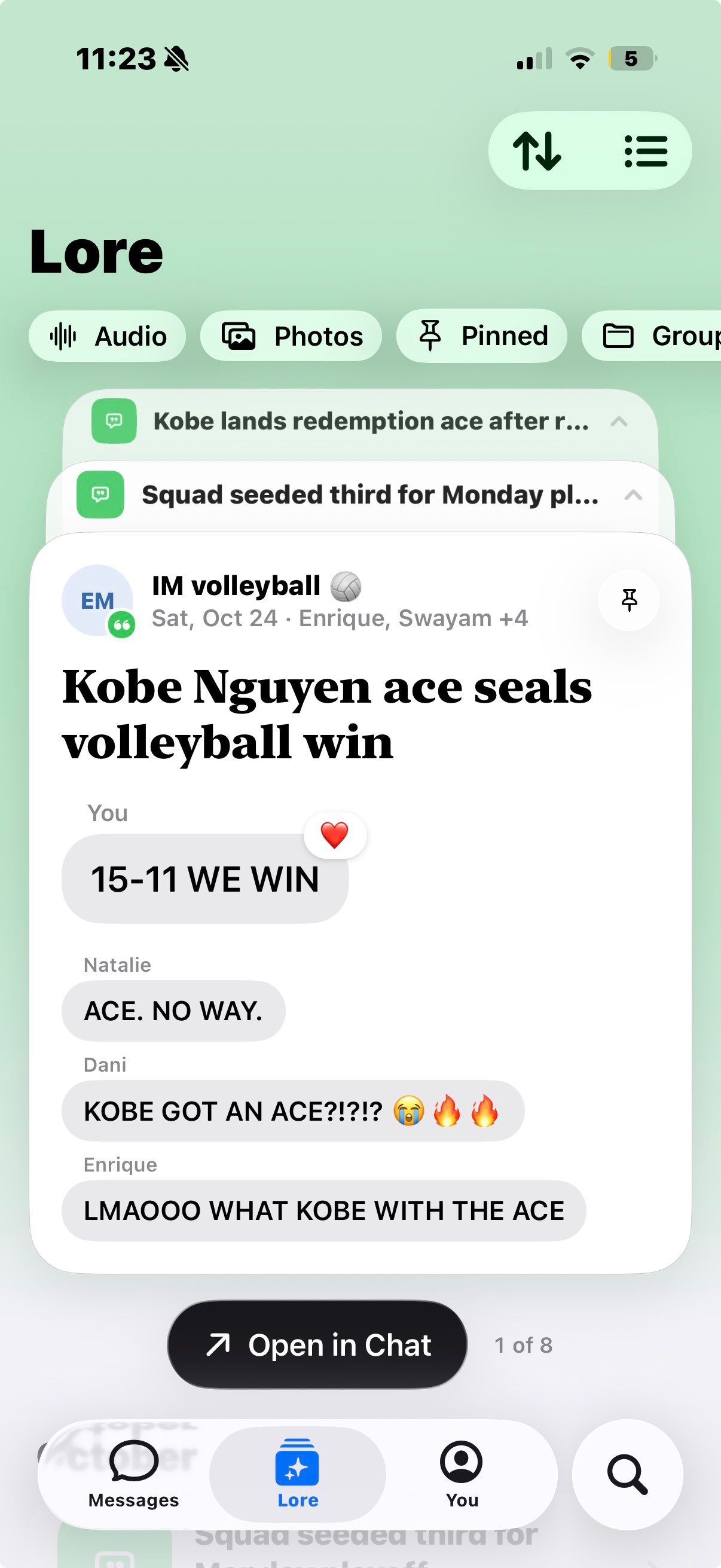
| Lore | Muse identifies and titles moments from chat evidence or replay captions. Titan embeddings help merge matching moments and find related memories. | Original photos, quotes, and replay snippets grouped under an AI-generated title |
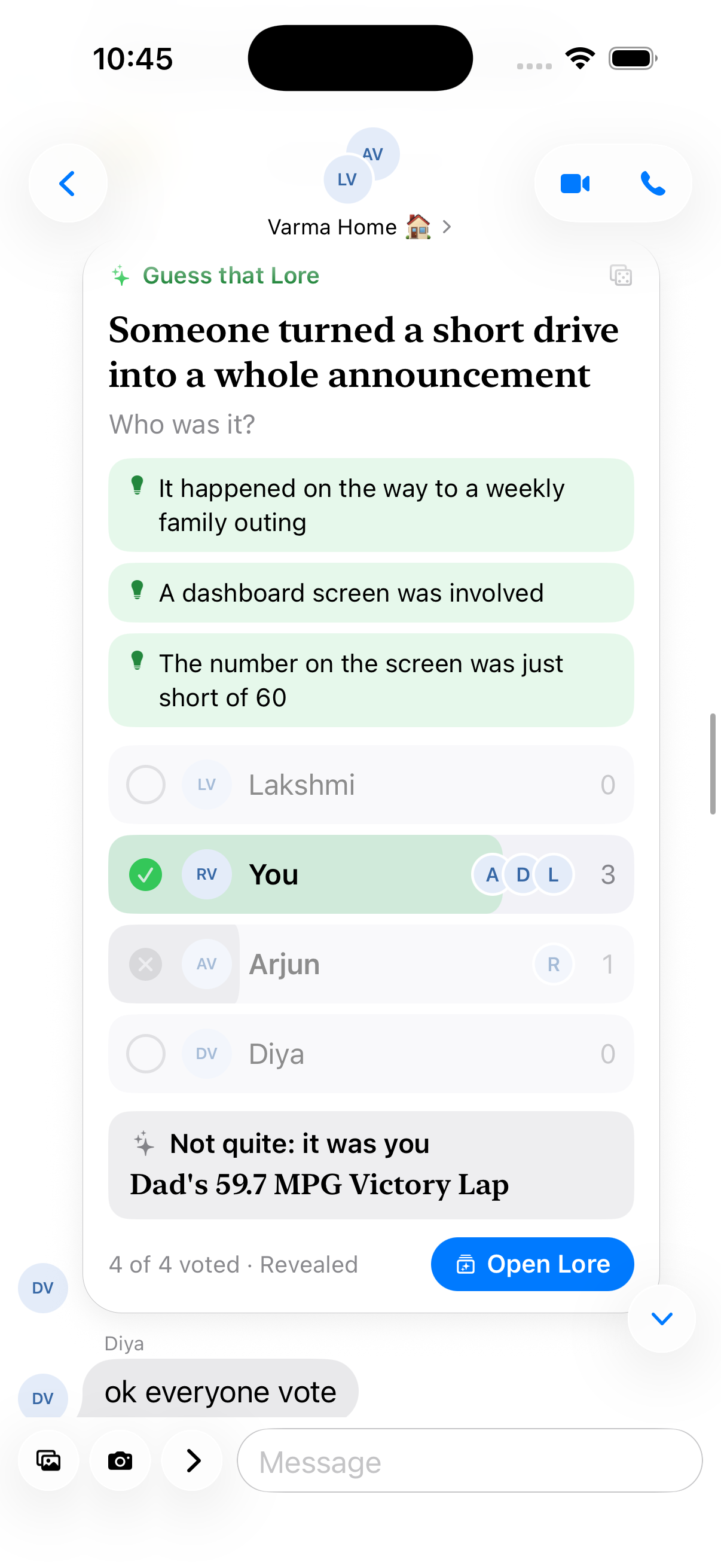
| Guess that Lore | Muse turns a saved moment into a name-masked prompt, identifies its subject, and generates three hints. Backend checks detect name leakage, with retry and deterministic fallback paths. | A shared guessing round with votes, hints, and a reveal |
Bringing call audio into the same system
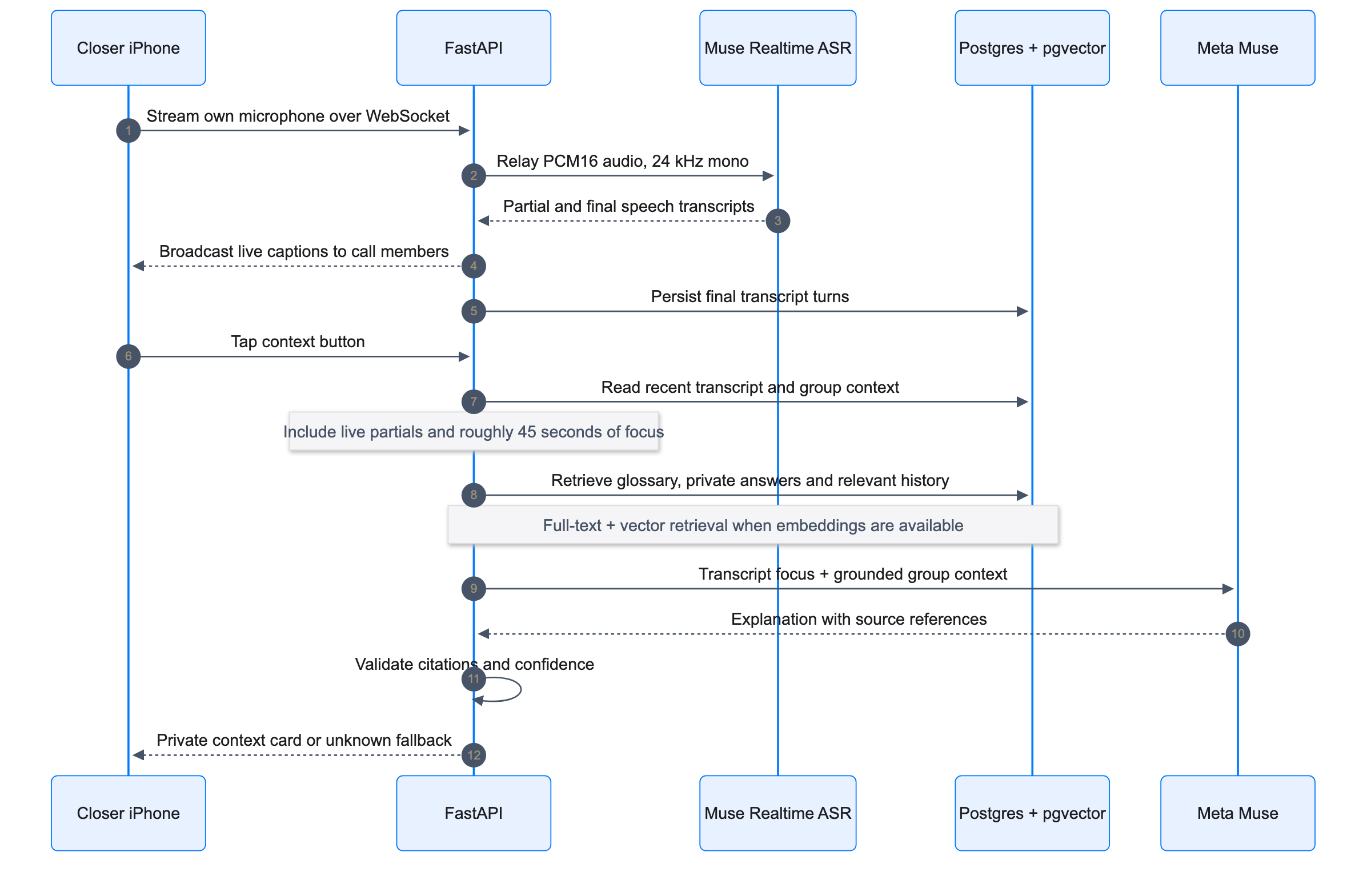
Amazon Chime carries live audio and video. Separately, each participant's device sends its own microphone audio to the FastAPI transcription relay as 24 kHz mono PCM. The relay connects to Muse Voice Transcribe 1.0, supplying glossary terms as spelling hints.
Muse returns partial captions while a person speaks and completed turns afterward. The backend broadcasts captions over WebSockets, keeps in-progress speech available for immediate context, and stores completed turns in Tiger Cloud. Speaker attribution comes from the participant's connection, rather than guessing identity from their voice.
When someone taps the question mark, the backend selects a 45-second focus window and up to two minutes of earlier background speech. It combines that transcript with relevant group history and runs the explanation pipeline. The resulting card appears only for the person who asked.
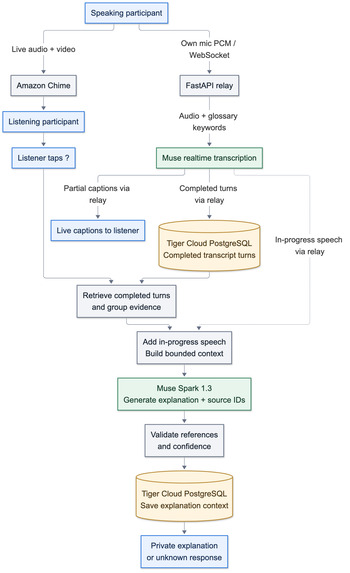
Live calling requires an iOS development build containing the custom Chime native module. Browser and mock calls are interface previews, separate from live device calling.
Turning conversations into shared memories
Lore preserves the original evidence around a moment. Live chat activity can trigger a Muse scan that suggests memorable moments for a member to keep or dismiss. A member can also choose Save to Lore directly. Historical backfill can automatically keep selected moments from older conversations.
For calls, the backend maintains a short audio buffer. Heuristics such as overlapping speakers, volume spikes, selected phrases, glossary terms, or a question-mark tap can trigger a replay candidate. Muse evaluates the caption context and titles candidates worth suggesting. These signals do not constitute emotion recognition.
The Lore interface displays original photos, messages, and replay captions with an AI-generated title. Event snippets are selected by backend logic, rather than rewritten as a generated account of what happened.
Building and testing the AI workflows
Our pytest harness replaces the LLM, embedder, Chime client, and transcription service with scripted fakes. This lets us exercise API behavior, invalid citations, missing context, streaming responses, timeouts, and service failures without depending on paid inference or live meetings. Backend tests use a separate local PostgreSQL database. Jest covers frontend logic, while TypeScript and lint checks help catch interface and navigation issues during development.
Docker packages the backend, with NGINX and Let's Encrypt providing HTTPS in front of it. Tiger Cloud supplies the shared PostgreSQL database; uploaded images and replay audio live in the backend's media volume.
Challenges we ran into
Latency was one of the hardest problems. A correct answer that arrives after the conversation has moved on is much less useful. The request has to retrieve history and wait for model generation before it can show a trustworthy explanation. Calls add transcription delay to that path.
Reducing the wait: we bounded retrieved context and requested concise responses. Asynchronous requests and cached explanations avoid unnecessary waiting. Partial captions make current speech available before a turn ends.
Balancing speed and cost: when an explanation takes too long, the backend races a second model request against it, with an overall timeout. This can reduce waiting but also use extra inference credits.
Getting help had to feel like part of the conversation. Initially, opening a full explanation page interrupted the chat. We changed the first interaction to an inline bubble, leaving the detailed view for someone who chooses to ask more. Long presses also had to coexist with scrolling and ordinary message actions. Improving the animations meant handling those gestures carefully, preserving the reading position, and supporting reduced motion.
A plausible answer could still be the wrong answer. A model may know the usual meaning of slang without knowing what a particular group means by it. We separated general explanations from claims about the group's history and required supporting references for the latter. An honest “I couldn't find that” is useful when the alternative would misrepresent someone's friends.
Native calls and browser previews behave differently. Camera and microphone access depend on the runtime, while the Chime integration needs native code. We had to keep those requirements clear so a working preview wasn't mistaken for proof of a working device call.
Accomplishments that we're proud of
We made private explanations part of the chat itself. Someone can get enough context to respond without turning a small misunderstanding into a public conversation about what they don't know.
We connected historical chat retrieval to both message explanations and live-call context. The same underlying system can help with an old group reference or a phrase someone just said. Photo understanding extends that idea to the memes people actually share with friends and family.
We also tested with real conversation data. That gave the project a basis beyond deliberately simple demo sentences. We aren't claiming that this establishes long-term improvements in relationships; it let us exercise the product with actual conversational context.
What we learned
Understanding every word isn't the same as understanding a conversation. Sometimes the missing information is who a person is, or what happened before someone joined the group. Useful explanations need that history.
We learned to think about speed from the person's perspective. Time spent opening another screen and finding their place again matters alongside backend response time. Moving the first answer into the chat changed the interaction as much as work on the request pipeline did.
Keeping answers short took care. The response still needs to explain the unfamiliar part and admit when evidence is missing. More text can mean more reading while the conversation continues without you.
Finally, we learned to leave room for people to speak for themselves. Closer can explain a reference, but the person decides what they want to say next. That is the part of the interaction we want to make easier.
What's next for Closer
Existing messaging apps: build permission-based integrations using supported APIs. Access will depend on each platform's capabilities and rules.
Share-sheet and browser access: let people send a selected message or image to Closer without moving their entire group to a new app. These integrations are planned.
Multilingual explanations: explain references in a person's preferred language, including the cultural context that literal translation can miss.
Accessible voice interactions: add a simpler spoken question flow and spoken explanations, alongside adjustable text size. Let people choose how much assistance they receive.
History and retention controls: give people clearer choices about which history supplies context and how long call transcripts are retained.
Research behind the idea
A qualitative study of immigrants' experiences identified community belonging and social acceptance as dimensions of social connection, alongside experiences such as language barriers and adapting to an unfamiliar culture (Immigrant Perspectives of Social Connection in a Nontraditional Migration Area, 2024). Research on grandparent-grandchild communication also found that richer technology, including video conferencing, doesn't automatically produce a better communication experience (Digital media in intergenerational communication, 2022). Together, these findings support paying attention to barriers to participation and the quality of communication. They don't establish that confusing group chats cause friendships to fade or that Closer improves relationships.
Built With
- amazon-bedrock
- amazon-chime-sdk
- amazon-titan-text-embeddings-v2
- docker
- expo-router
- expo.io
- fastapi
- meta-muse
- nginx
- pgvector
- postgresql
- pydantic
- python
- react-native
- server-sent-events
- sqlalchemy
- timescale-cloud
- typescript
- websockets


