-
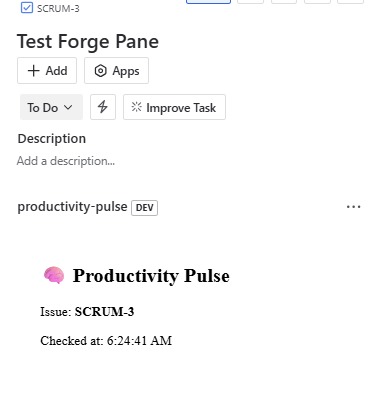
ScreenShot
Inspiration: Managing productivity inside Jira often feels reactive — switching tabs, hunting down issue context, or manually checking task freshness. We wanted to embed a subtle but powerful nudge right where work happens — inside each issue itself. That’s how Productivity Pulse was born: a minimalist custom UI Forge app that surfaces contextual information directly inside the Jira issue panel.
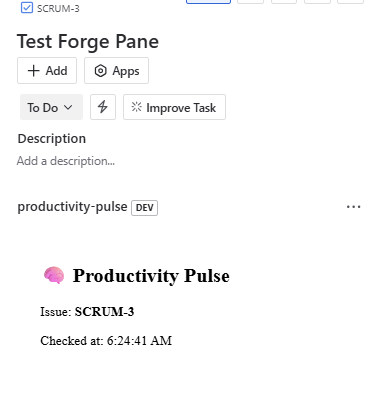
What it does 🧠 Productivity Pulse is a Forge-powered Jira Issue Panel app that shows real-time issue metadata like the issue key and the time it was accessed. It's a lightweight visual cue to help teams stay aware of when a task was last checked, encouraging faster resolution cycles and better context retention.
How we built it We used:
- Atlassian Forge to scaffold and deploy the app
- Custom UI with React for rendering dynamic content
@forge/bridgeto access issue context (e.g., key)- A clean UI rendered directly inside the issue panel
- Static asset bundling using
react-scriptsandnpm run build
The app was developed using the Forge CLI, tested on the Jira cloud instance (samyaali.atlassian.net), and deployed through the development environment.
Challenges we ran into
- Resolving issues with local Forge CLI permissions on Windows PowerShell
- Fixing missing static build directory errors during deployment
- Understanding the precise Jira context in which the panel appears
- Getting the app to display within the issue view using the Apps dropdown
Accomplishments that we're proud of
- Successfully created and deployed a working Forge app to Jira Cloud
- Got the panel to dynamically pull issue data using Forge bridge
- Designed a clean, accessible UI embedded within the workflow
- Understood and debugged real-world problems faced in cloud app dev
What we learned
- How to set up and deploy a Forge app using custom UI
- The structure of
manifest.ymland how to map modules to views - How
@forge/bridgeworks for getting context inside Jira - The importance of proper static bundling and build steps
What's next for Productivity Pulse
- Add visual indicators of time since last activity or update
- Show assignee, priority, and time tracking stats
- Add a productivity health meter based on time-to-resolution
- Send daily or weekly reports to users showing issue engagement patterns
- Publish the app on the Atlassian Marketplace

Log in or sign up for Devpost to join the conversation.