-
-
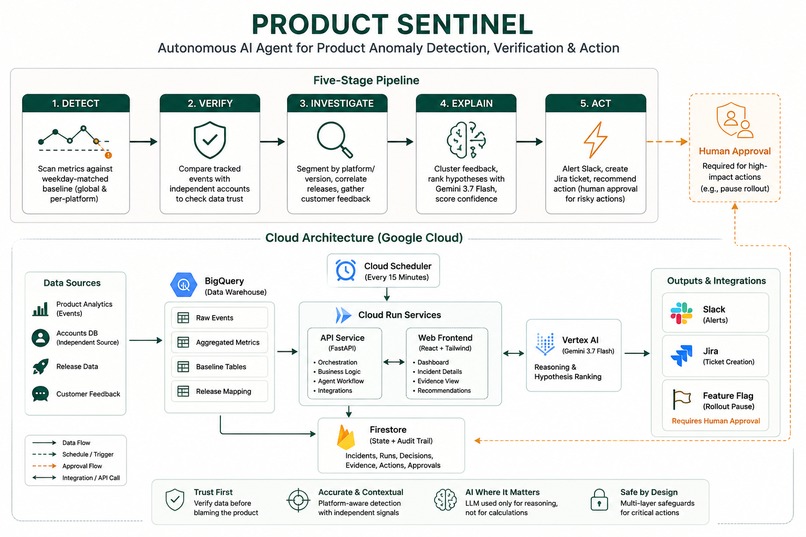
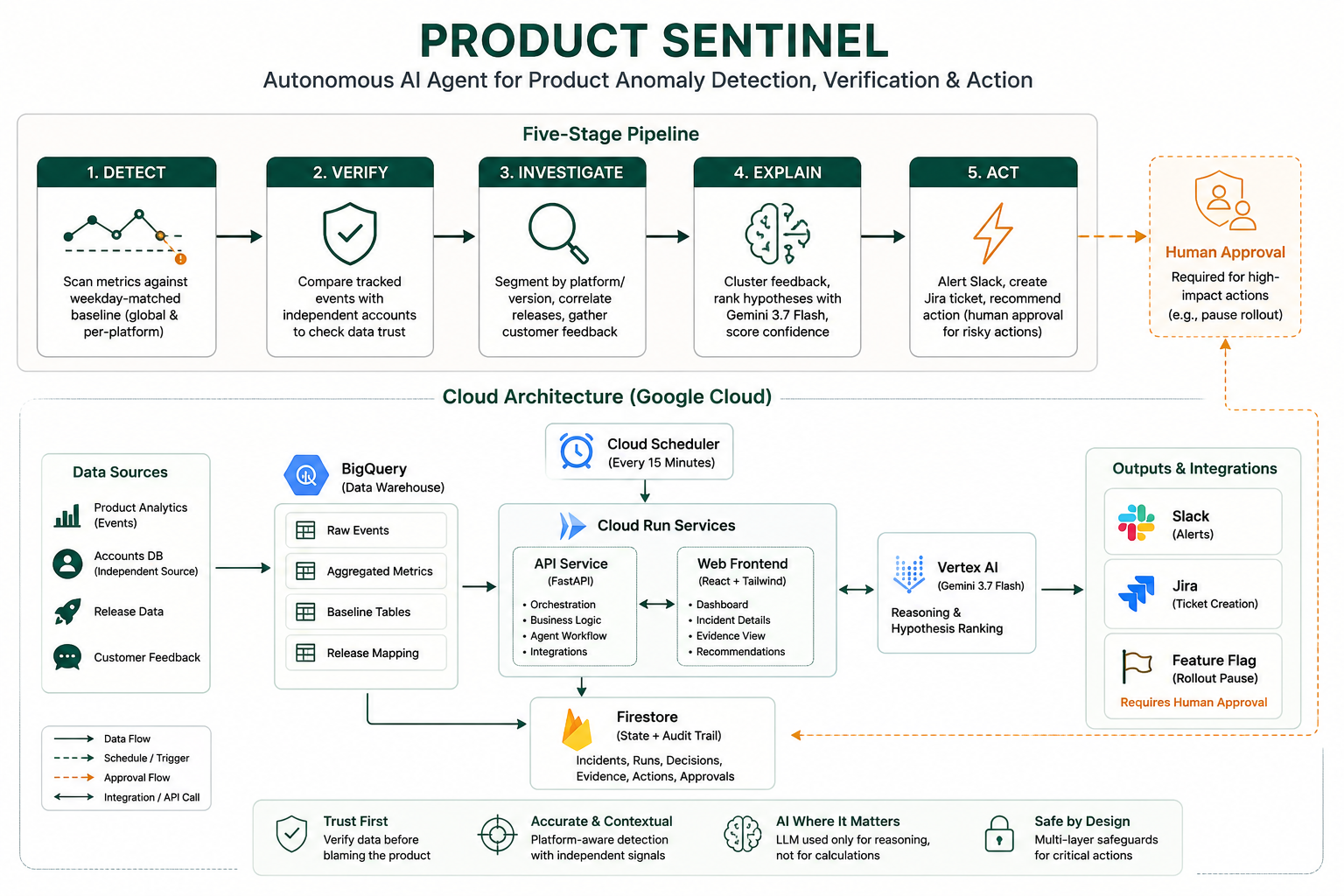
Product Sentinal Pipeline and Cloud Architecture workflow diagram
-
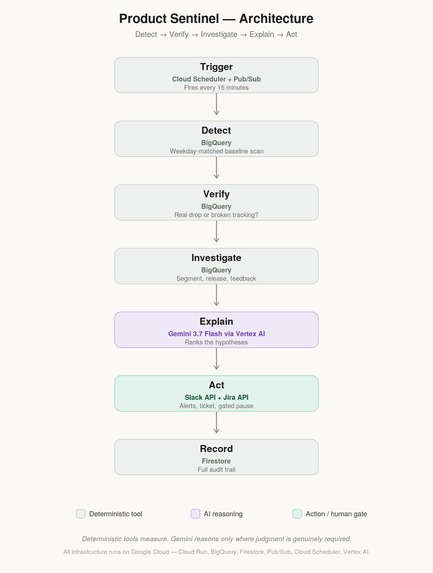
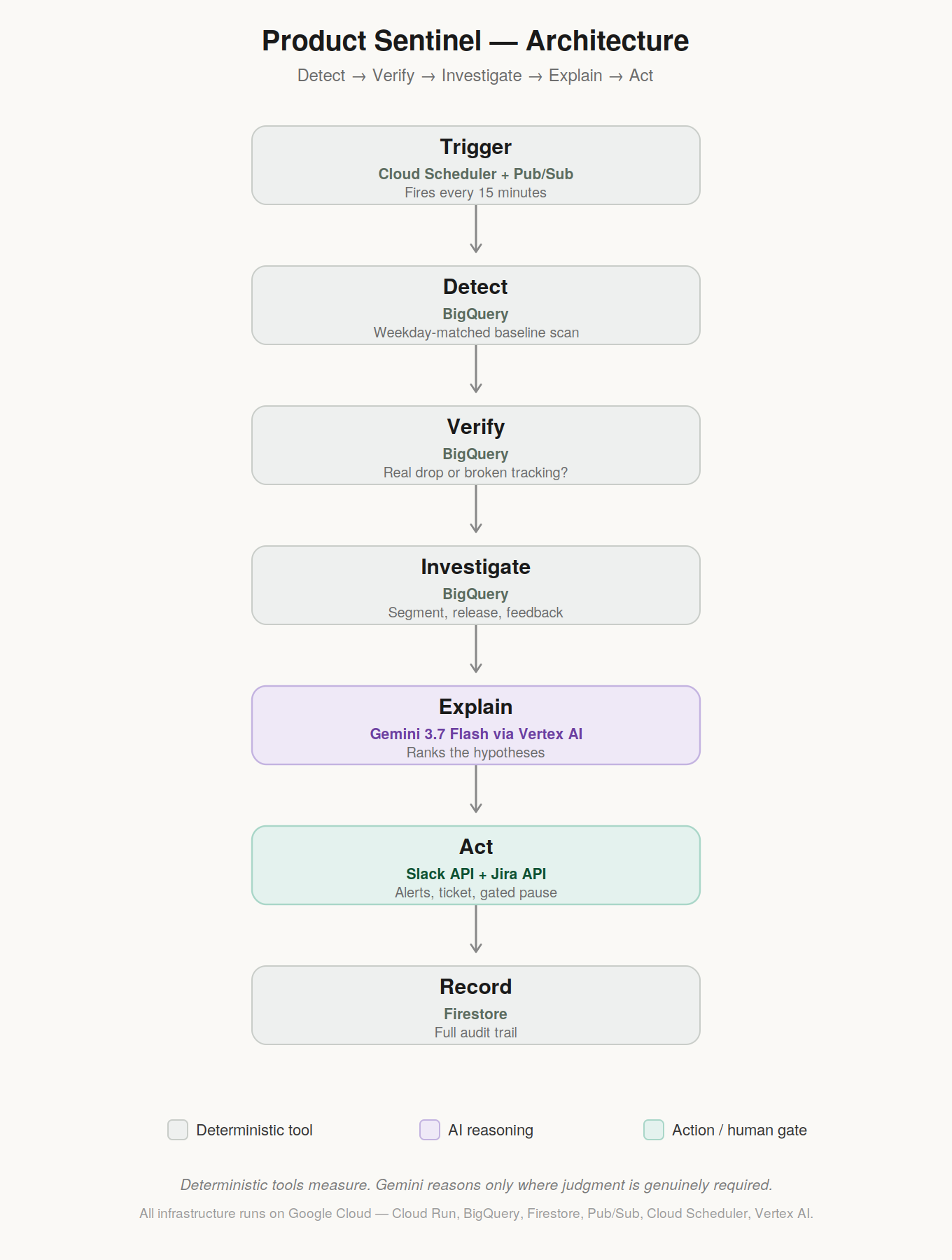
Seven-stage pipeline: deterministic tools measure, Gemini reasons only where needed, risky actions wait for human approval.
-
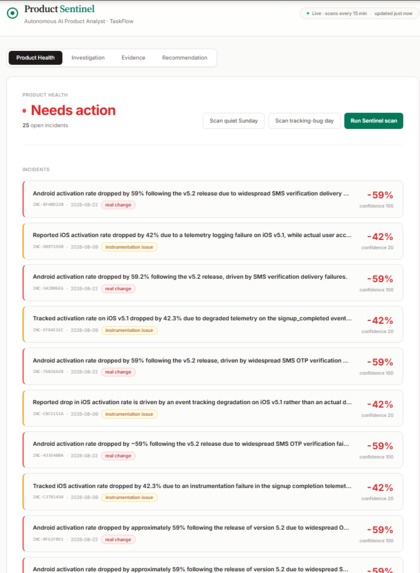
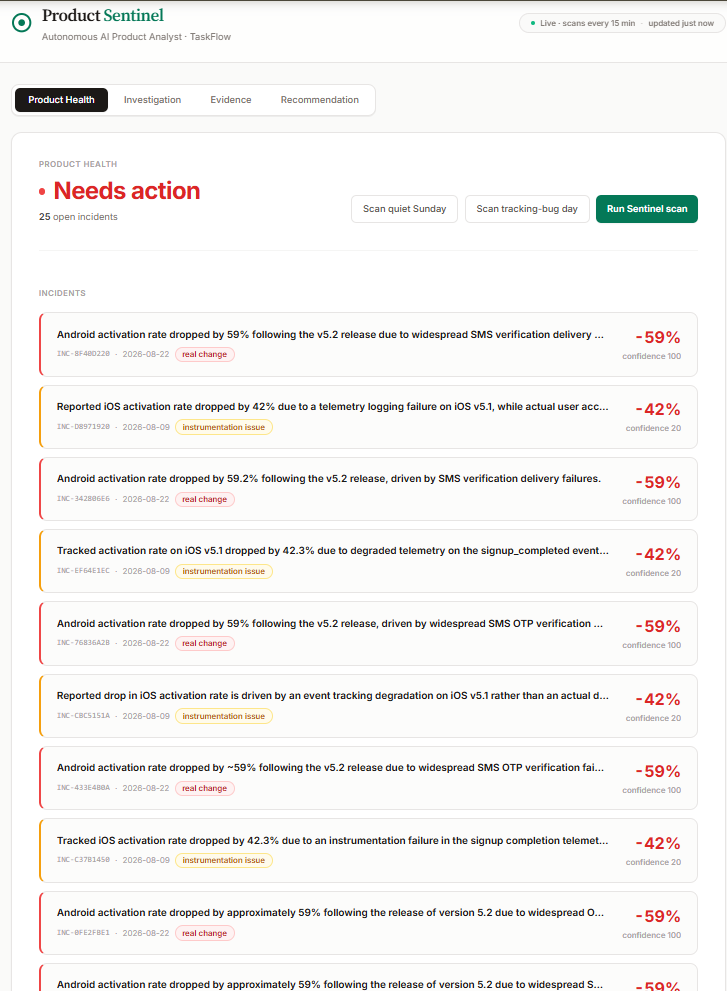
Every incident is color-coded by severity the moment it's detected, before you even open it.
-
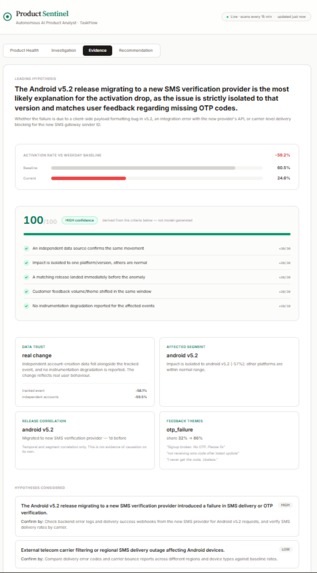
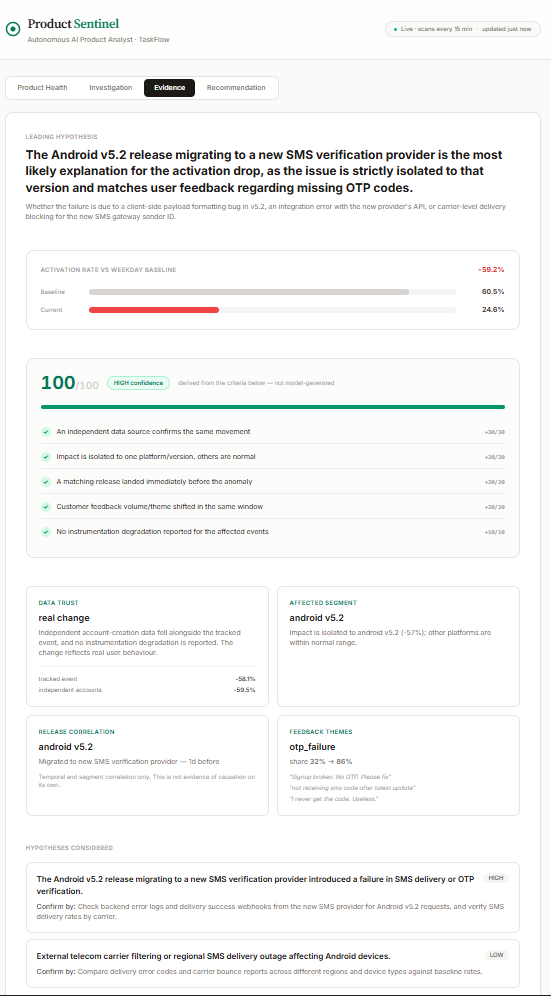
100/100 confidence, broken into five independently checkable criteria — not a number the model invented.
-
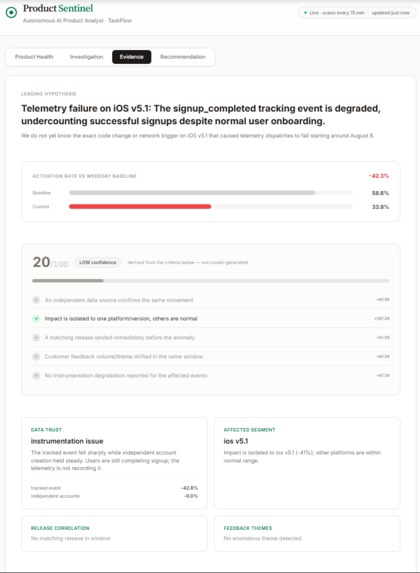
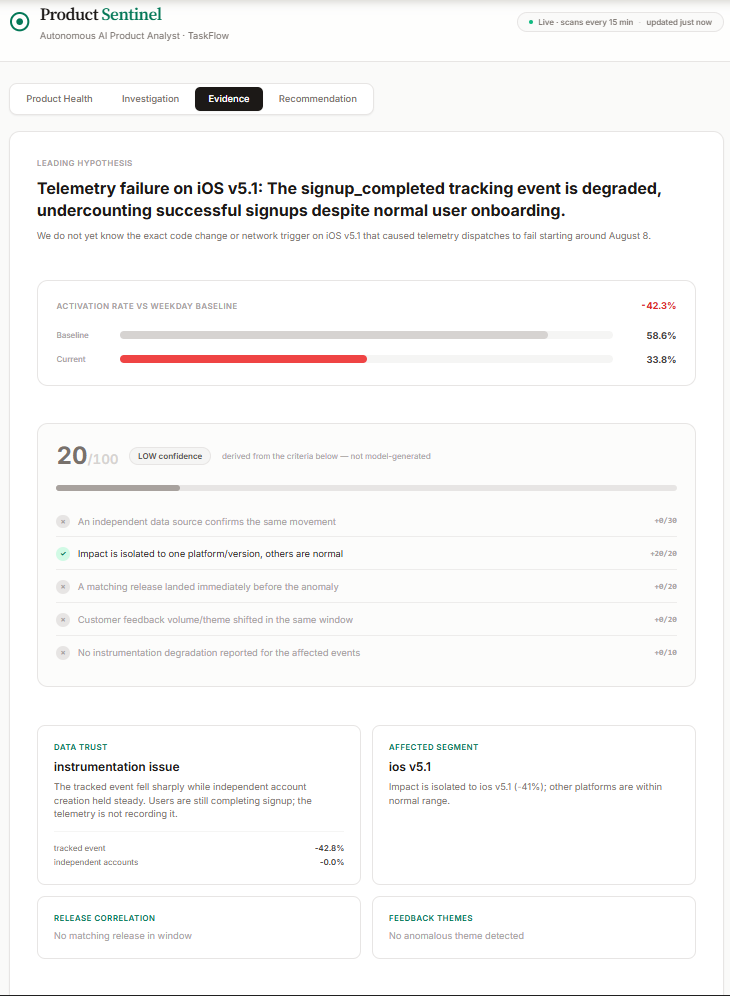
Same shape of drop, opposite verdict: 20/100 confidence, "instrumentation issue" — the evidence really is thinner here.
-
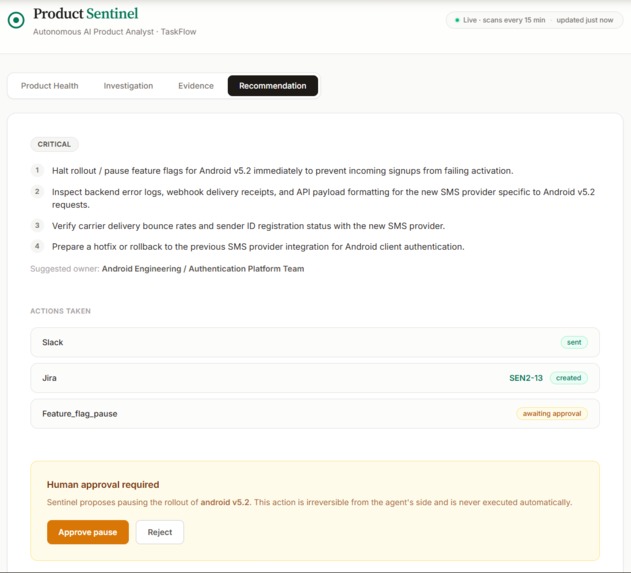
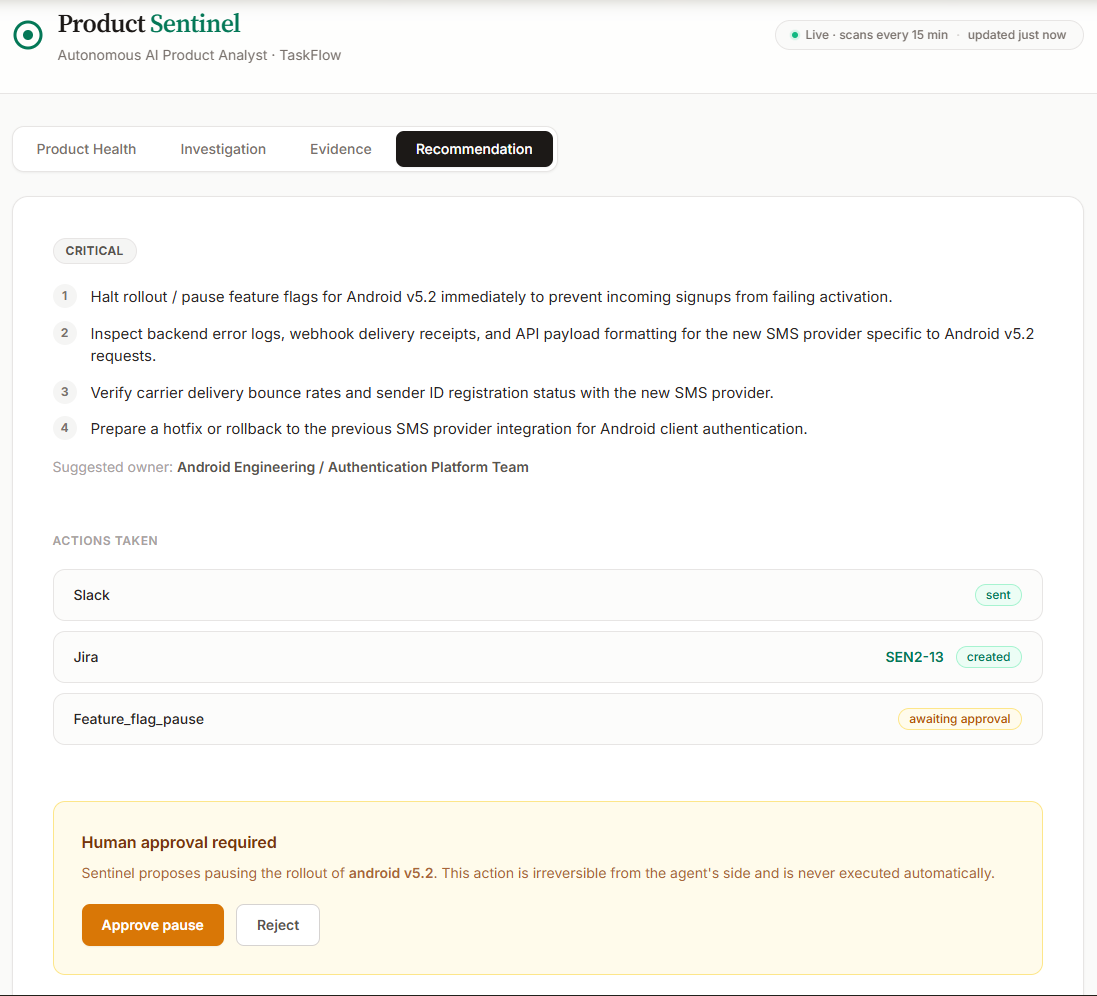
The one action Sentinel proposes but never takes alone: pausing a rollout waits for human approval.
-
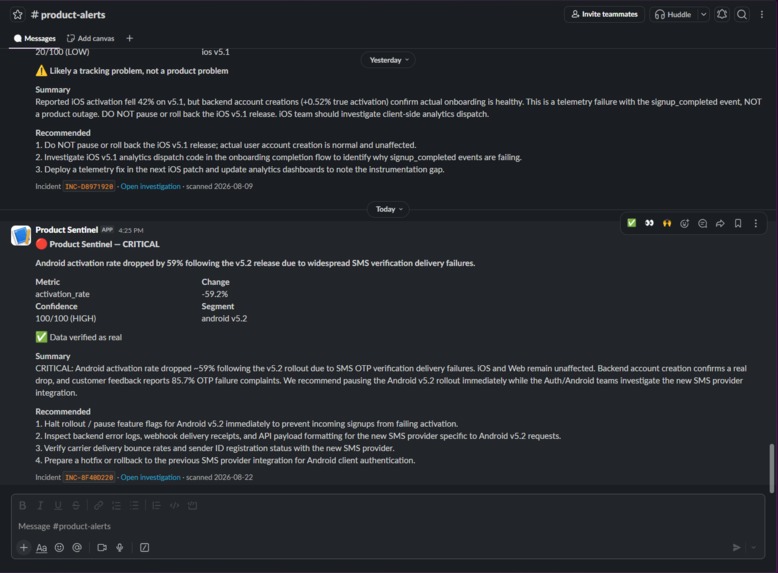
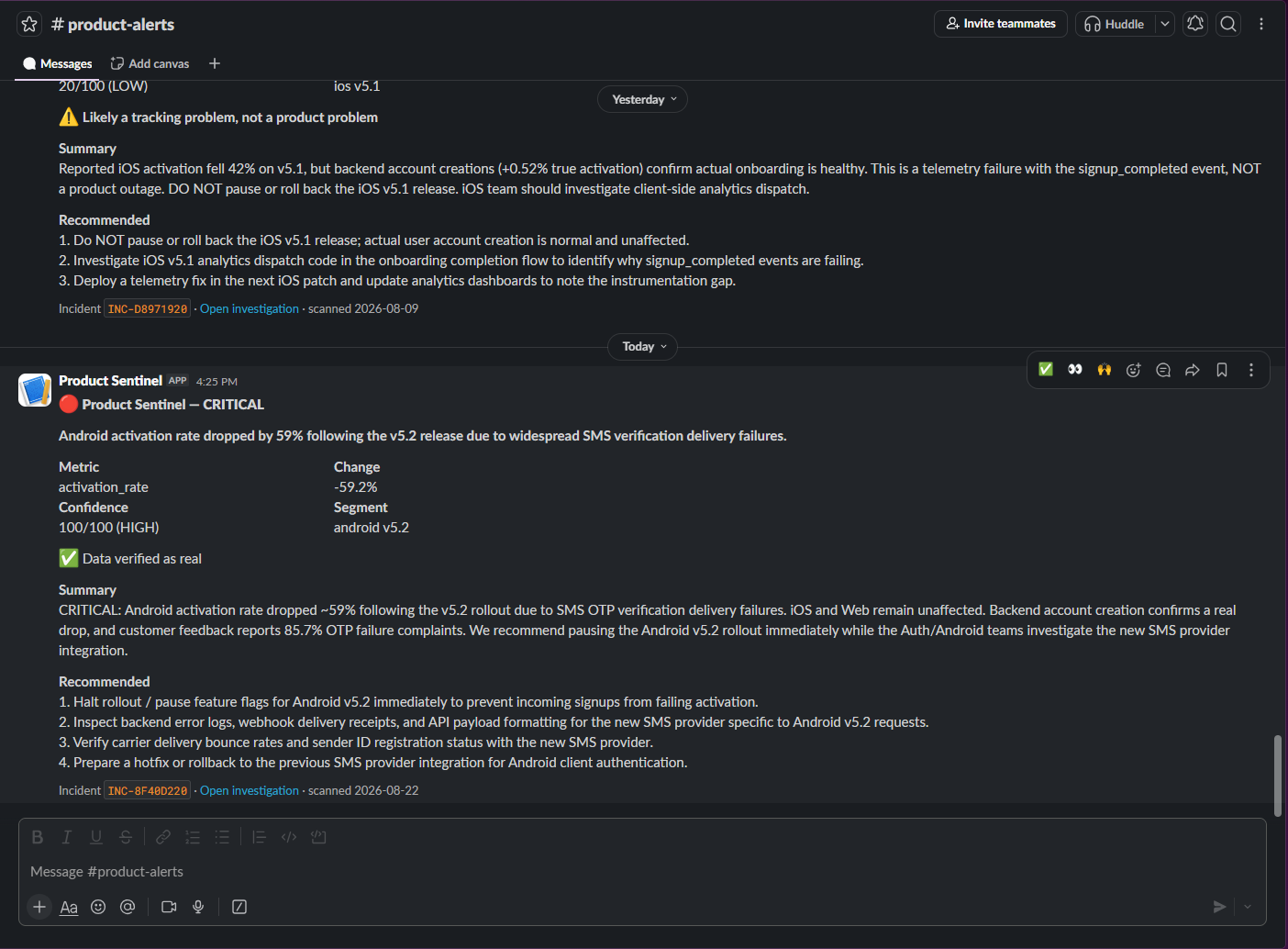
A real message in a real Slack workspace, posted automatically the moment the investigation finishes.
-
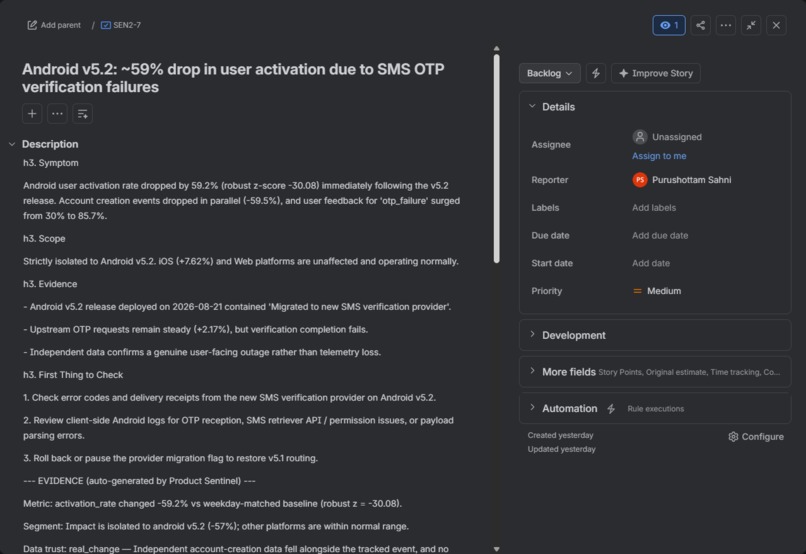
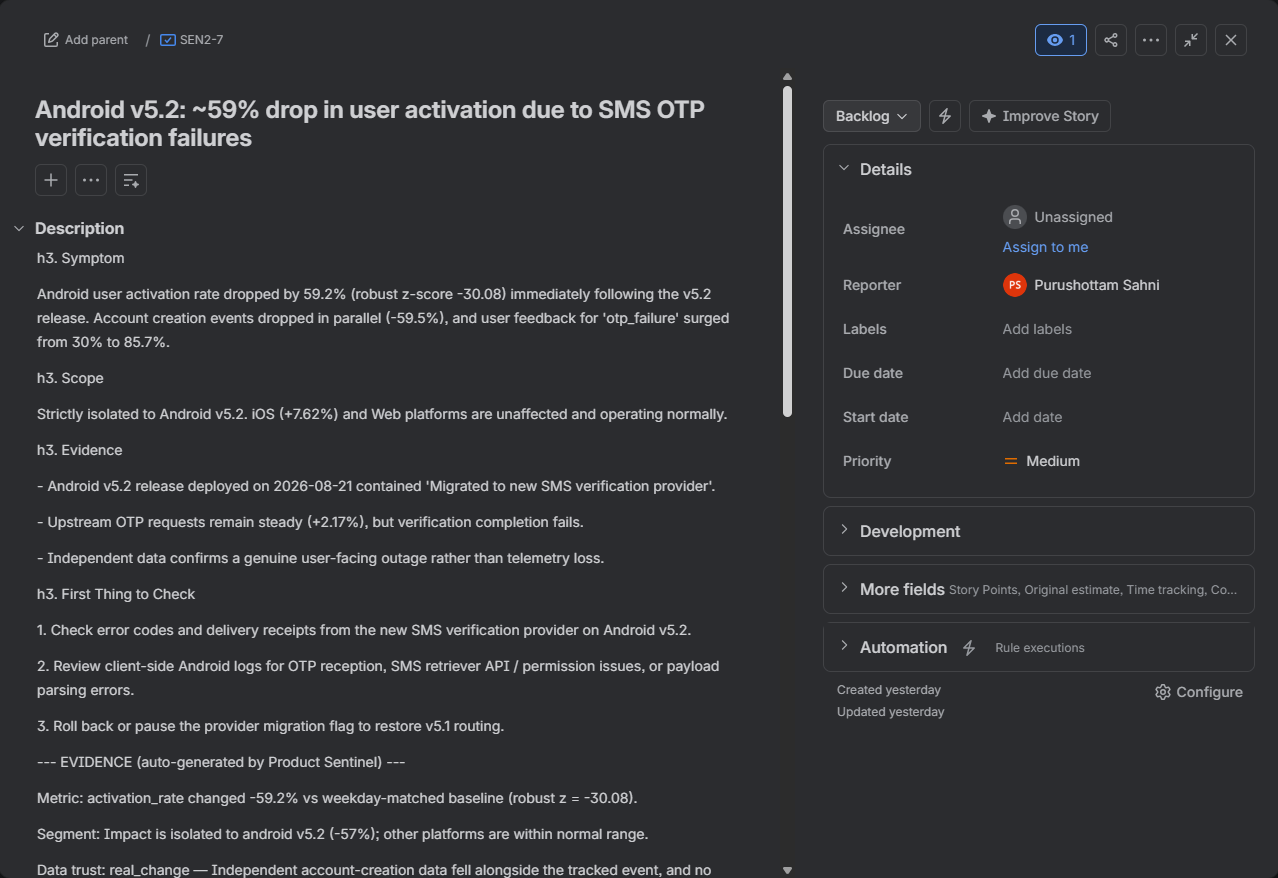
The full evidence chain written into the ticket — an engineer can start work without re-investigating.
-
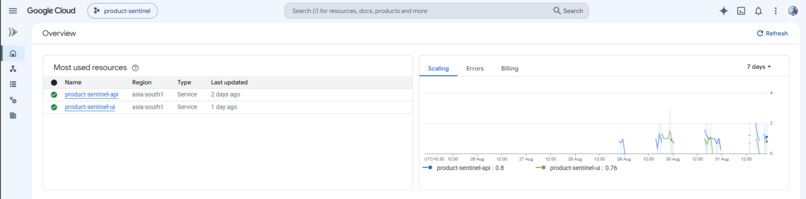
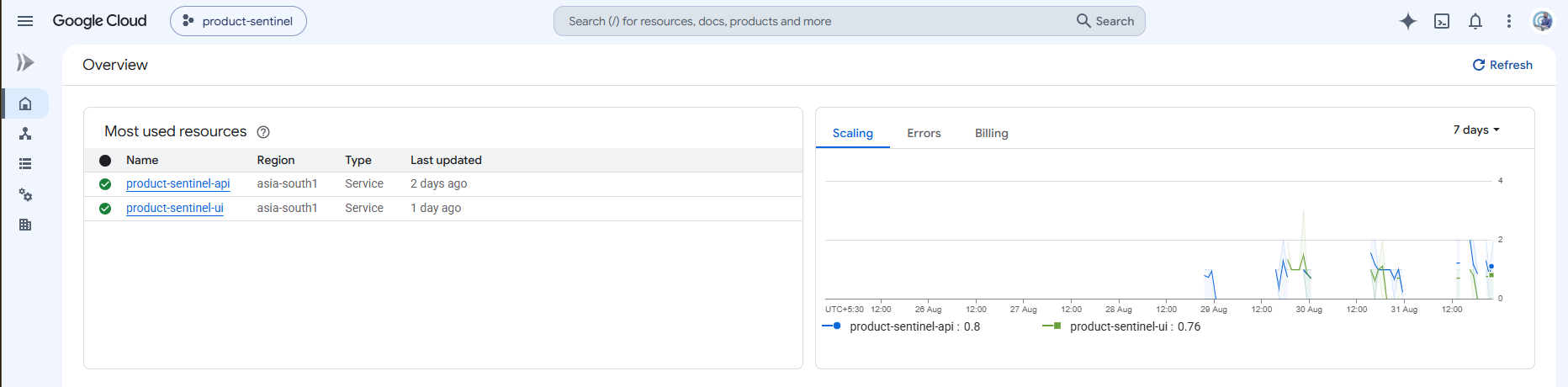
Backend and dashboard, both deployed and running live on Google Cloud Run.
Inspiration
Every Product Analyst knows this moment: a dashboard shows an important metric dropping, and the next few hours disappear into checking analytics, release notes, support tickets, and instrumentation health — only to sometimes discover that the metric itself was broken, not the product.
The idea behind Product Sentinel was to automate that entire investigation.
But the interesting problem wasn't simply "Can AI detect an anomaly and explain it?" That is already a common pattern.
The real question was:
Can the system determine whether the number can be trusted before it starts blaming the product?
A system that treats a broken tracking event as a real product outage can be worse than having no alert at all. It can send engineers in the wrong direction, create unnecessary work, and potentially lead to harmful decisions such as rolling back a healthy release.
That became the core idea behind Product Sentinel:
Don't just detect that something changed. First determine whether the signal itself is trustworthy.
What it does
Product Sentinel is an autonomous AI agent that runs unattended every 15 minutes and follows a five-stage pipeline:
Detect → Verify → Investigate → Explain → Act
1. Detect
Product Sentinel continuously scans product metrics against a weekday-matched baseline.
It checks both product-wide performance and individual platforms, so a normal Sunday traffic dip doesn't automatically become an incident, while a platform-specific failure isn't hidden by healthy traffic from other platforms.
2. Verify
This is the core differentiator.
Before investigating the cause of an anomaly, Product Sentinel checks whether the tracked metric can actually be trusted.
It compares the tracked analytics event against an independent source of truth — an accounts database.
If both sources move together, the drop is likely real.
If the tracked event collapses while independent account activity remains stable, the system identifies the problem as a tracking/instrumentation issue rather than a product outage.
3. Investigate
Once the signal is verified, Product Sentinel investigates what may have caused the change.
It isolates the affected platform and version, correlates the timing with recent releases, and retrieves customer feedback from the anomaly window.
4. Explain
Gemini 3.7 Flash, through Vertex AI, is used where reasoning is actually required.
It clusters customer feedback into themes and ranks competing hypotheses against the evidence collected during the investigation.
The system also produces a transparent, rubric-based confidence score. The score is derived from defined evidence checks rather than simply being a number generated by the model.
5. Act
Product Sentinel turns the investigation into action.
It automatically posts findings to Slack and creates a Jira ticket containing the evidence chain.
For potentially high-impact actions, there is an additional safety boundary: if it recommends pausing a rollout, a human must explicitly approve it. The agent never executes that action autonomously.
The clearest proof
The system was tested with two incidents that look almost identical on the surface: both show a sharp drop in activation.
In the first case, Android activation drops after a release and independent account data drops as well. Product Sentinel identifies it as a real product bug and recommends considering a rollout pause.
In the second case, iOS activation drops, but independent account creation remains stable. Product Sentinel identifies the problem as a broken tracking event and explicitly recommends not pausing the release because real users are not being affected.
That distinction is the reason Product Sentinel exists.
How we built it
The architecture deliberately separates deterministic analysis from AI reasoning.
BigQuery SQL handles the parts that should be deterministic:
- Anomaly detection
- Trust verification
- Platform/version segmentation
- Release correlation
- Evidence collection
Gemini is used only where judgment is genuinely required:
- Clustering free-text customer feedback
- Ranking competing hypotheses
- Generating the investigation and recommendation
This boundary is an important part of the architecture.
There is no reason to ask an LLM to perform calculations or comparisons that SQL can do deterministically. LLMs are slower, more expensive, and non-deterministic, so Product Sentinel uses AI where reasoning adds value and deterministic tools everywhere else.
Because no public dataset connects real product events, an independent accounts source, releases, and customer feedback for the same product, a synthetic dataset was created for a fictional task-management application called TaskFlow.
The dataset contains three known, injected scenarios:
- A real product bug
- A broken tracking event
- A normal weekend fluctuation
This made it possible to test the system against known ground truth rather than simply looking at plausible AI-generated output.
Stack
- Gemini 3.7 Flash via Vertex AI
- Google ADK
- BigQuery — product and analytical data
- Firestore — state and full audit trail
- Cloud Run — API and frontend
- Pub/Sub + Cloud Scheduler — background execution
- FastAPI — backend
- React + Tailwind — frontend
- Slack Incoming Webhooks — notifications
- Jira Cloud REST API — issue creation
Challenges we ran into
The core agent logic came together relatively cleanly once the architecture was established.
Most of the difficult problems appeared during deployment. Instead of treating them as isolated bugs, the project used each one to understand how the underlying platforms actually behaved.
Cloud Run build configuration
gcloud run deploy --source silently ignored --set-build-env-vars when a Dockerfile was present because that flag applies to Buildpacks builds.
This was confirmed by checking the actual Cloud Build API record and inspecting the real Docker build invocation rather than assuming the command-line configuration had worked.
The solution was to move configuration injection to runtime. An entrypoint script now generates env.js from the actual Cloud Run environment variables when the container starts, allowing configuration to change without rebuilding the application.
Tailwind deployment issue
A missing postcss.config.js caused Tailwind classes to disappear from the production build.
The problem was identified by inspecting the compiled CSS bundle, which had dropped to only 0.06 kB.
Secret Manager behavior
Secret Manager's :latest reference resolves when the revision is deployed.
Updating the secret itself does not automatically update an already-running Cloud Run revision, so a new revision has to be deployed when the secret changes.
Jira API behavior
Jira Cloud's REST API returned empty results from createmeta and mypermissions even though Administrator access had been confirmed.
The issue was isolated step by step by checking token validity, permissions, and project type before concluding that the behavior was caused by platform-side propagation rather than an application configuration problem.
Node/Vite permissions
node:20-alpine installed Vite with a permission-broken binary.
The issue was resolved by invoking Vite directly through Node rather than relying on the shell executable.
These challenges reinforced an important lesson:
When working with cloud infrastructure, the configuration you think you deployed and the configuration the platform actually received are not always the same thing.
Accomplishments that we're proud of
The biggest accomplishment is that Product Sentinel correctly separates a real product outage from a broken sensor, even when both incidents look almost identical at the metric level.
The system successfully demonstrates:
- A real Android activation incident being identified as a genuine product problem.
- An iOS activation drop being identified as an instrumentation issue.
- A normal weekend traffic fluctuation being ignored rather than generating a false alarm.
- Evidence being verified against an independent source of truth before the system blames the product.
- Confidence being calculated from a transparent evidence rubric rather than invented by the LLM.
- Findings being automatically sent to Slack and Jira.
- High-impact actions remaining behind a human approval boundary.
I am particularly proud of the three-layer safety design around rollout pauses.
First, the agent is instructed not to recommend a rollout pause when the evidence indicates a tracking issue.
Second, the dispatcher independently blocks the action as a hard-coded rule regardless of what the model says.
Third, even when a rollout pause is legitimately recommended, a human must explicitly approve it before the action can happen.
The principle is simple:
A prompt is a request. A code path is a control.
That distinction is important when building agents that can take real-world actions.
What we learned
The biggest lesson was that the most interesting engineering problem in an AI agent is often not the AI itself.
The hardest problems in this project were mostly caused by cloud platform behavior, deployment configuration, permissions, and build systems — not Gemini's reasoning.
I learned to investigate these problems systematically instead of immediately blaming the application code.
That meant:
- Checking actual deployment records instead of trusting CLI output.
- Inspecting compiled bundles instead of guessing why the UI was broken.
- Verifying permissions before assuming the code was wrong.
- Separating deterministic logic from LLM-based reasoning.
- Designing safety controls outside the model rather than relying only on prompts.
Most importantly, I learned that an effective AI agent needs more than intelligence.
It needs evidence, boundaries, observability, and a clear definition of when it should trust its own conclusions.
What's next for Product Sentinel
The next major step is replacing the synthetic TaskFlow dataset with a real product analytics pipeline.
Importantly, this does not require redesigning the core architecture. The detection, trust-verification, and reasoning layers already read from a BigQuery view so that the view can point to real product tables instead of generated data.
The rollout-pause capability is currently mocked through Firestore by design.
An autonomous agent should not be connected directly to a production system capable of halting real traffic without additional safeguards, approval workflows, and operational trust.
Once those safeguards are established, the mocked action can be replaced with a real feature-flag service.
Beyond that, Product Sentinel could evolve to:
- Monitor more product metrics and signals.
- Connect to additional sources of customer feedback.
- Support more sophisticated root-cause analysis.
- Learn from whether Product and Engineering teams accept or reject its recommendations.
- Build a longer-term feedback loop between incidents, decisions, and outcomes.
The long-term goal is simple:
A Product Analyst shouldn't have to spend hours figuring out why a metric changed. Product Sentinel should investigate it, verify the evidence, explain what happened, and bring the right action to the team.
Built With
- claude
- cloud-run
- cloud-scheduler
- docker
- fastapi
- firestore
- gemini
- google-adk
- google-bigquery
- google-cloud
- javascript
- jira-api
- nginx
- pytest
- python
- react
- secret-manager
- slack-api
- tailwindcss
- vertex-ai
- vite
- vs-code

Log in or sign up for Devpost to join the conversation.