Inspiration
While studying for competitive exams, I found myself constantly drifting from React documentation to YouTube, from grammar exercises to Reddit threads. Traditional website blockers were too aggressive—they blocked YouTube entirely, even when I needed tutorials. I wondered: could Chrome's new multimodal AI capabilities actually see what I'm viewing and understand if it's relevant to my goal?
After completing another hackathon project (Buggu, a document extraction tool), I was familiar with Chrome's Prompt API. The multimodal image input feature seemed perfect for this problem: instead of crude URL blocking, why not let AI analyze screenshots to understand context? That's how Procrastination Watcher was born—a tool that understands the difference between "React tutorial" and "cat videos" on the same domain.
What it does
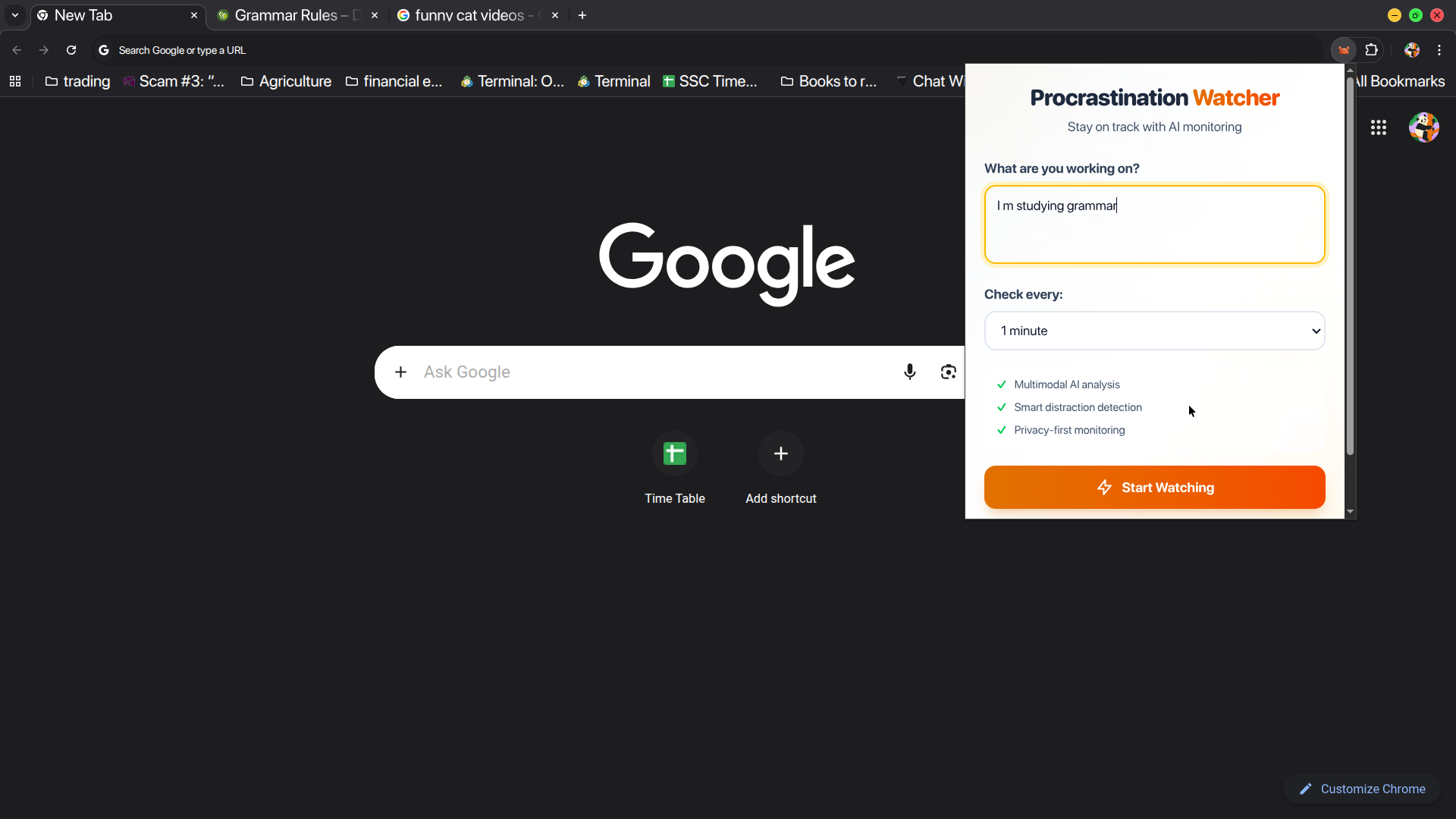
Procrastination Watcher is a Chrome extension that provides intelligent, context-aware accountability for focused work sessions.
Core workflow:
- User sets a goal (e.g., "Study English grammar for 2 hours")
- Extension monitors activity every 1-5 minutes (configurable)
- Captures screenshot of visible tab + URL/title metadata
- Sends to Chrome's Gemini Nano for multimodal analysis (on-device)
- AI determines if activity aligns with stated goal
- If distracted, sends gentle notification nudge
Why it's different from existing tools:
- Context-aware: Sees actual content, not just URLs. YouTube tutorial ≠ cat videos
- Privacy-first: All processing on-device via Chrome Built-in AI. Zero server uploads
- Non-adversarial: Gentle nudges, not aggressive blocking
- Smart detection: Understands nuance—Twitter research vs. doom-scrolling
How We Built It
Tech Stack:
React 18 + Vite (popup UI) · Chrome Extension MV3 (service worker) · Prompt API + Gemini Nano (on-device multimodal AI) · Chrome APIs (tabs, notifications, alarms, storage)
Architecture:
- Popup: User sets goal and check interval
- Service Worker: Triggers periodic screen checks via
chrome.alarms - AI Analysis: Captures screenshot → sends to Gemini Nano for local analysis → returns
{ onTrack, confidence, reason }
Prompt Logic: Gemini Nano judges context:
- YouTube tutorial = ✅ on-track
- Cat video = ❌ distraction
- Reddit research = 🟡 maybe valid
Privacy:
All processing is local (ai.languageModel.create()); no network calls or uploads. Verified via DevTools.
Key Choices:
- Screenshots > URLs: Visuals reveal real context.
- 2–5 min intervals: Balanced focus vs. performance.
- Session reset each check: Prevents stale context.
Challenges: Service worker lifecycle, JSON sanitization, icon path issues.
What’s Next
- Dashboard: Track focus stats & distraction trends
- Smart alerts: Suggest break times or focus windows
- Custom rules: Whitelist/blacklist & confidence threshold
- Modes: Study / Work / Research profiles
- Learning system: Adapts to user corrections
- Cross-device sync: Optional, privacy-first

Log in or sign up for Devpost to join the conversation.