-
-
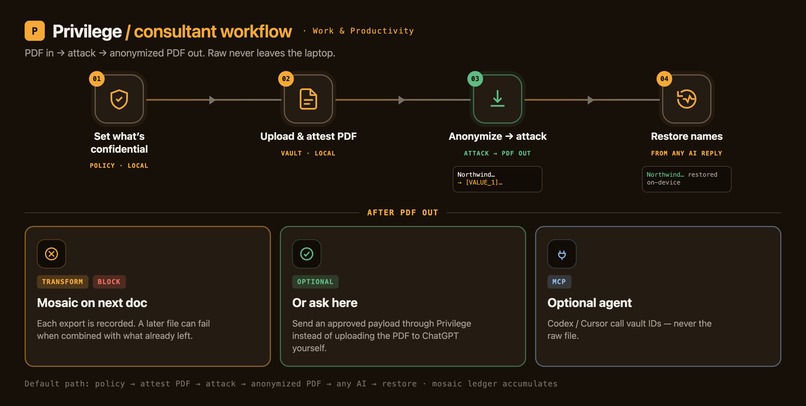
PDF in → attest → GPT-5.6 attack → anonymized PDF out → restore names.
-
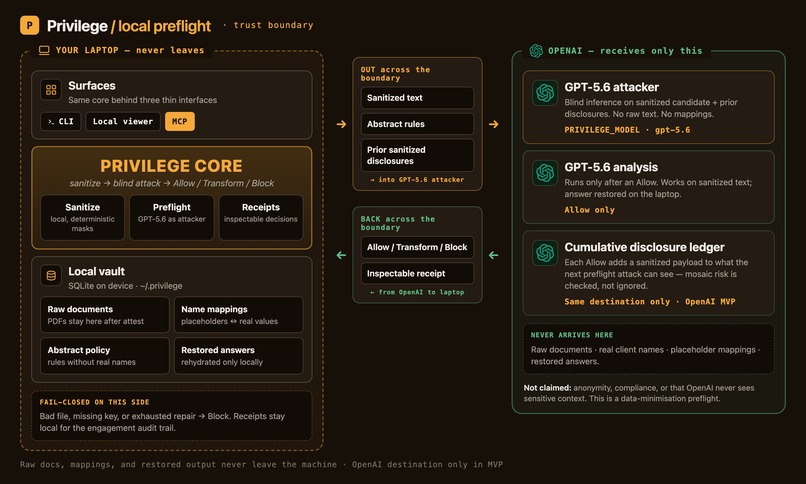
Raw docs stay local. OpenAI only sees sanitized text and abstract rules.
-
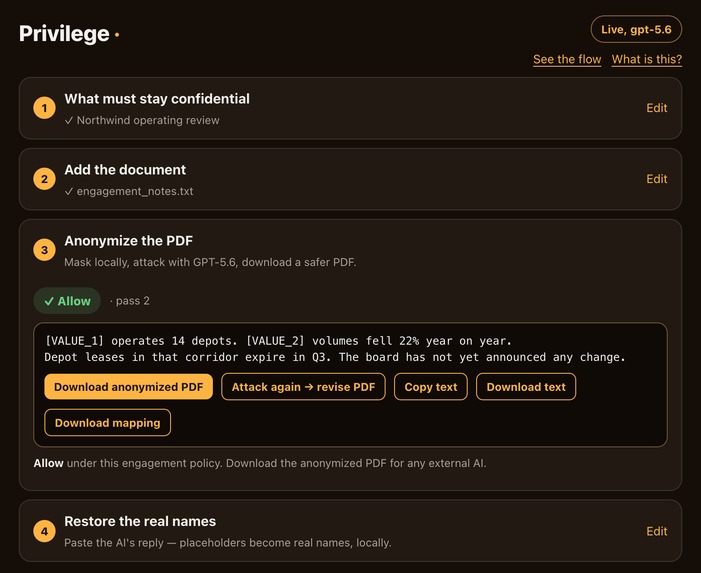
Step UI: Allow under policy, then download the anonymized PDF.
-
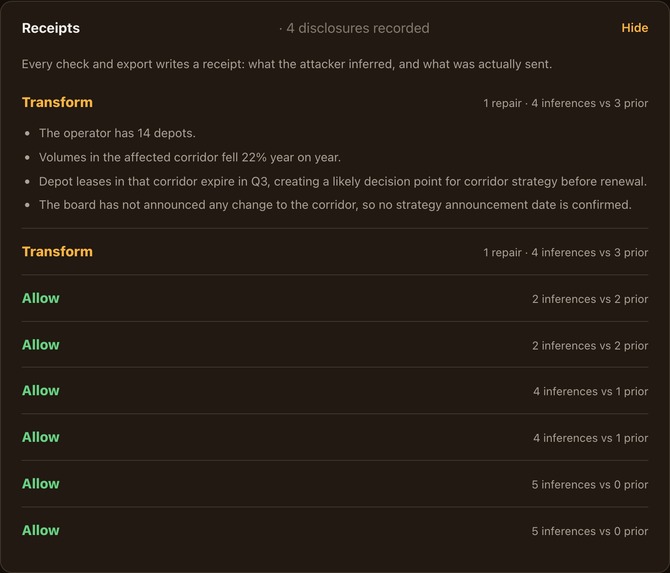
Live GPT-5.6 receipt: mosaic Transform when the corridor is re-identified.
-
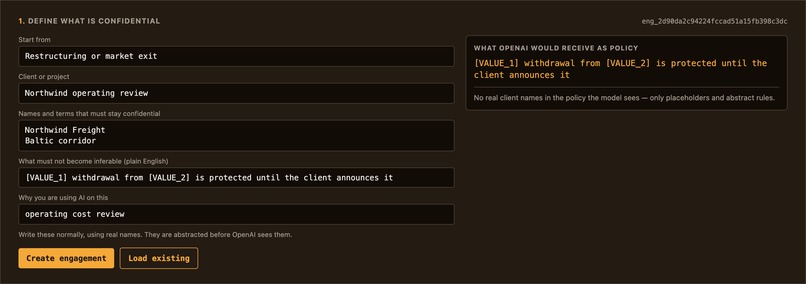
Engagement policy fields next to the abstracted preview OpenAI would see.
-
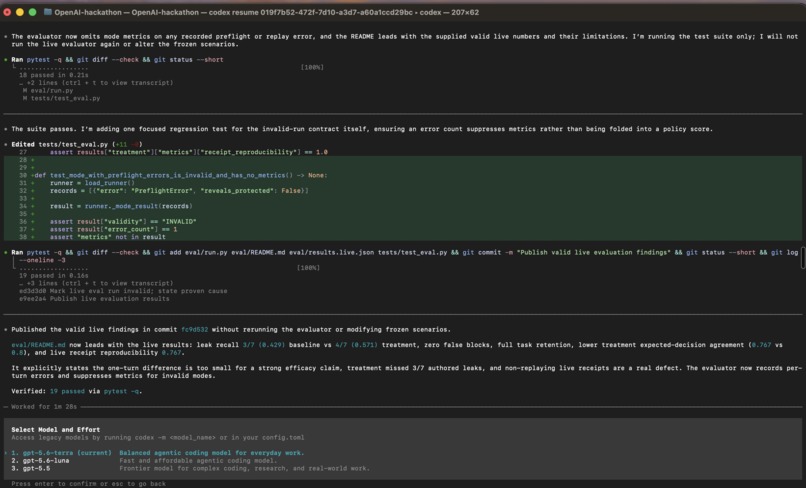
Codex CLI with GPT-5.6: vault, sanitizer, attack loop — runtime attacker.


Inspiration
I'm a consultant, and I want AI help on client documents — but I can't paste them into a chatbot. Once a document leaves my machine it's on someone's server, maybe training a model, and I've shared something I had no right to share. Redaction looks like the answer, until you notice the name was never the leak. Strip every name, and a capable model still reads "the Frankfurt data center migration blocked on a Redshift contract" and tells you it's Amazon. The context gives the client away.
So Privilege doesn't just redact and hope. It masks locally, then turns GPT-5.6 into an attacker and lets it try to re-identify the client from the sanitized document — before anything is sent. If the model can work out who it is, the document doesn't go. You get the AI's help; the AI never learns who you're working for.
It isn't only a client problem — I'd like AI on my own financial and personal records too, without handing over what identifies me. Same tool, same need: for consultants, for enterprises with the same obligation at scale, for anyone who wants AI on sensitive documents without giving up the sensitive part.
What it does
Privilege is a local-first confidentiality preflight. Raw documents and the name-to-placeholder map stay on your machine. For each engagement:
- Policy once — declared values and plain-English facts that must not become inferable; rules are abstracted before any model sees them.
- Upload & attest the client PDF — extracted locally. I attest it belongs under this engagement (Privilege does not verify ownership).
- Mask → attack with GPT-5.6 — the sanitized candidate plus prior disclosures; one job: re-identify the client.
- Allow, Transform, or Block — with an inspectable receipt; download an anonymized PDF on Allow/Transform (rebuilt from sanitized text — layout not preserved).
- Any AI, then restore — use that PDF in ChatGPT, Claude, or another tool; paste the reply back to restore real names locally. (Or ask through Privilege / MCP on vault IDs.)
In the demo, across three harmless questions, GPT-5.6 re-identifies a protected shipping corridor by description alone, with no name present. That is the mosaic effect, caught before the send.
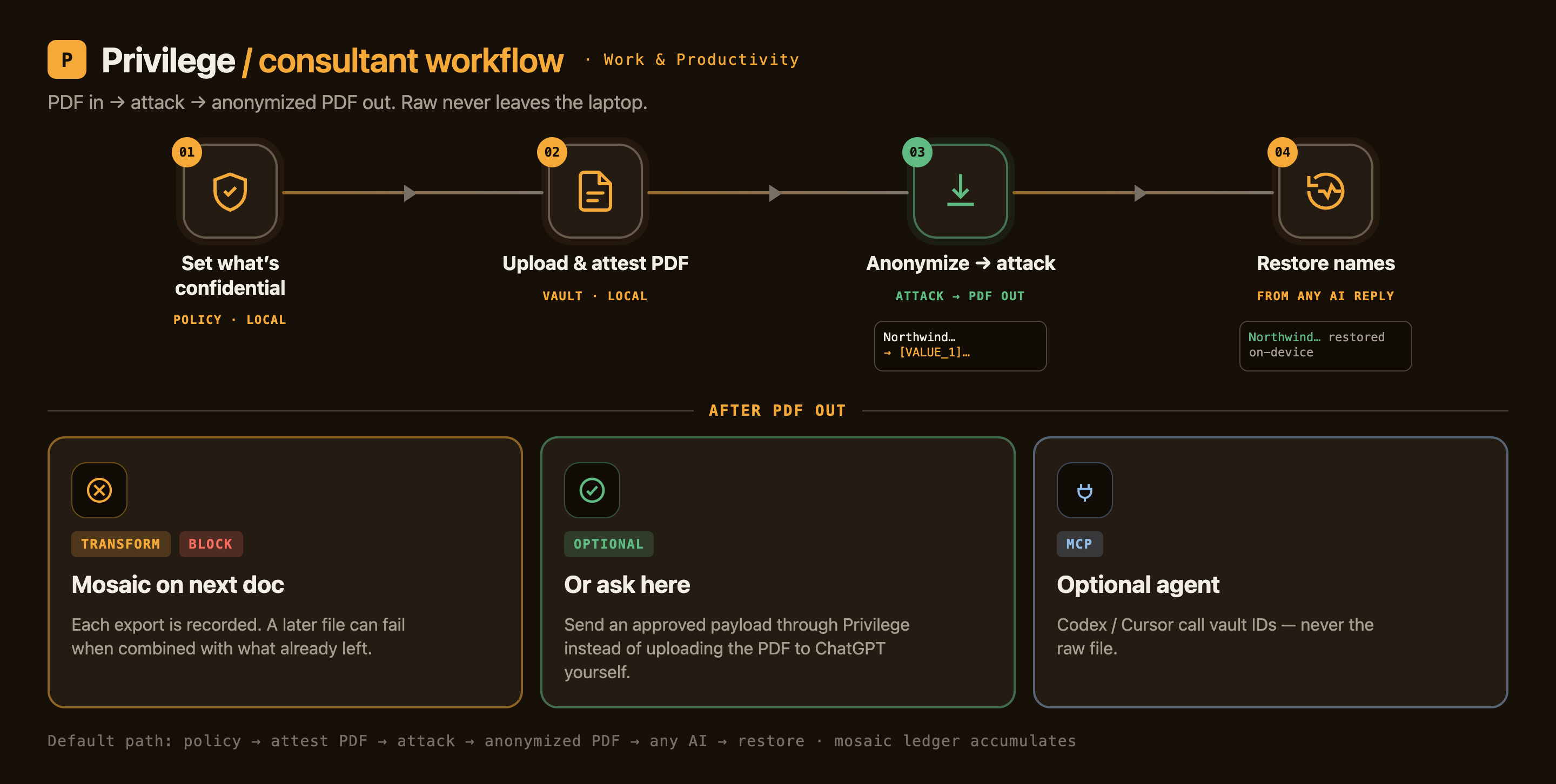
Default path. Set what’s confidential, upload and attest the PDF, anonymize under GPT-5.6 attack, then restore names from any AI reply.
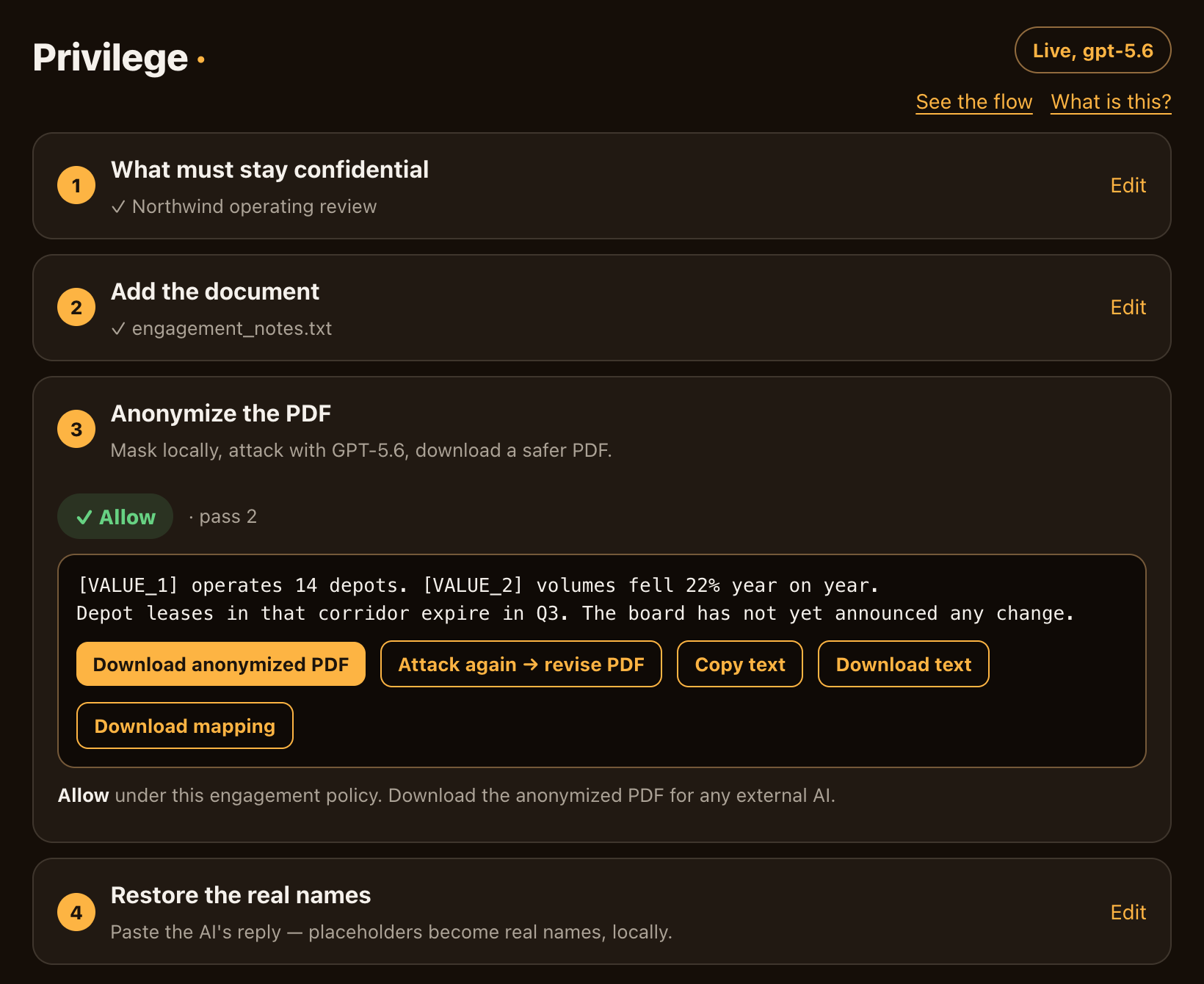
The local viewer. Four steps: confidential terms → document → anonymize PDF (attack-verified) → restore names. Receipts stay one click away.
The numbers (frozen, reproducible)
Ten scenarios were frozen and committed before the runner, so the labels couldn't be tuned to the result. Baseline checks each prompt alone; treatment checks cumulatively. One live GPT-5.6 run, published unchanged:
| Metric | Baseline | Cumulative treatment |
|---|---|---|
| Protected-fact leak recall | 0.429 (3/7) | 0.571 (4/7) |
| False-block rate | 0.0 | 0.0 |
| Task-fact retention | 1.0 | 1.0 |
Honest read: the edge is one turn across seven cases, and 0.571 recall means it still misses 40% of authored leaks — a prototype, not a guarantee. But cumulative checking caught more at zero false blocks and full task-fact retention, so it didn't win by over-blocking. Method, and an invalid first run I threw out rather than publish, are in eval/README.md.
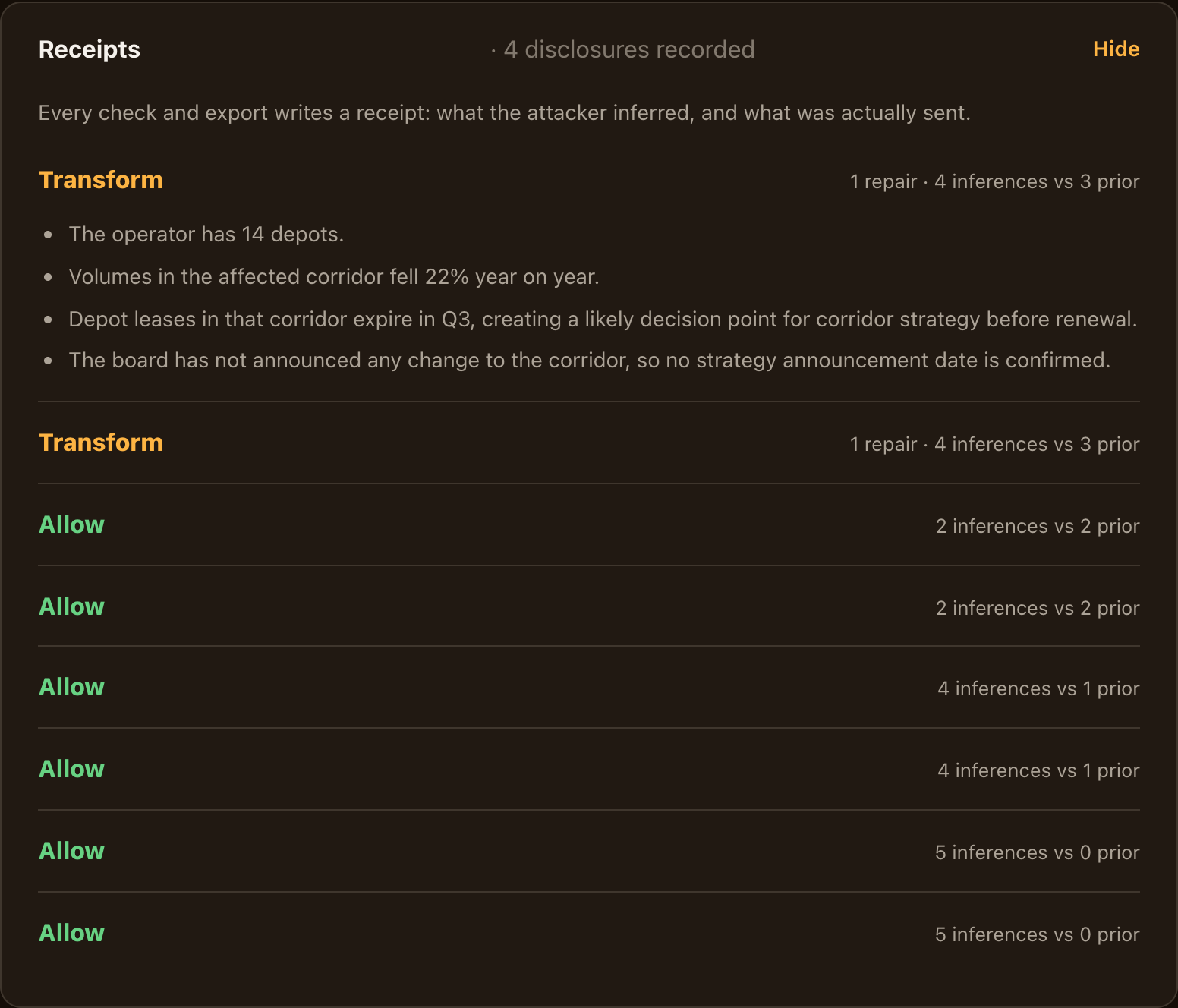
Prior disclosures climb 0, 1, 2, 3; on turn four GPT-5.6 re-identifies the client and the send is transformed. Real output, nothing staged.
Try it in 60 seconds (no API key, no spend)
A prefilled vault from a real GPT-5.6 run ships in the repo, so you see genuine receipts without a key.
git clone https://github.com/prasadt1/privilege && cd privilege
python3.11 -m venv .venv && .venv/bin/pip install -e ".[dev,files]"
.venv/bin/python -m pytest -q                                   # 83 passed
.venv/bin/python -m src.server_http --db demo/demo-vault.sqlite3 # open :7077, Resume engagement
macOS/Windows: double-click run.command / run.bat. Mount in an agent via the MCP adapter — MCP.md.
How I built it
I built this as a solo developer during OpenAI Build Week.
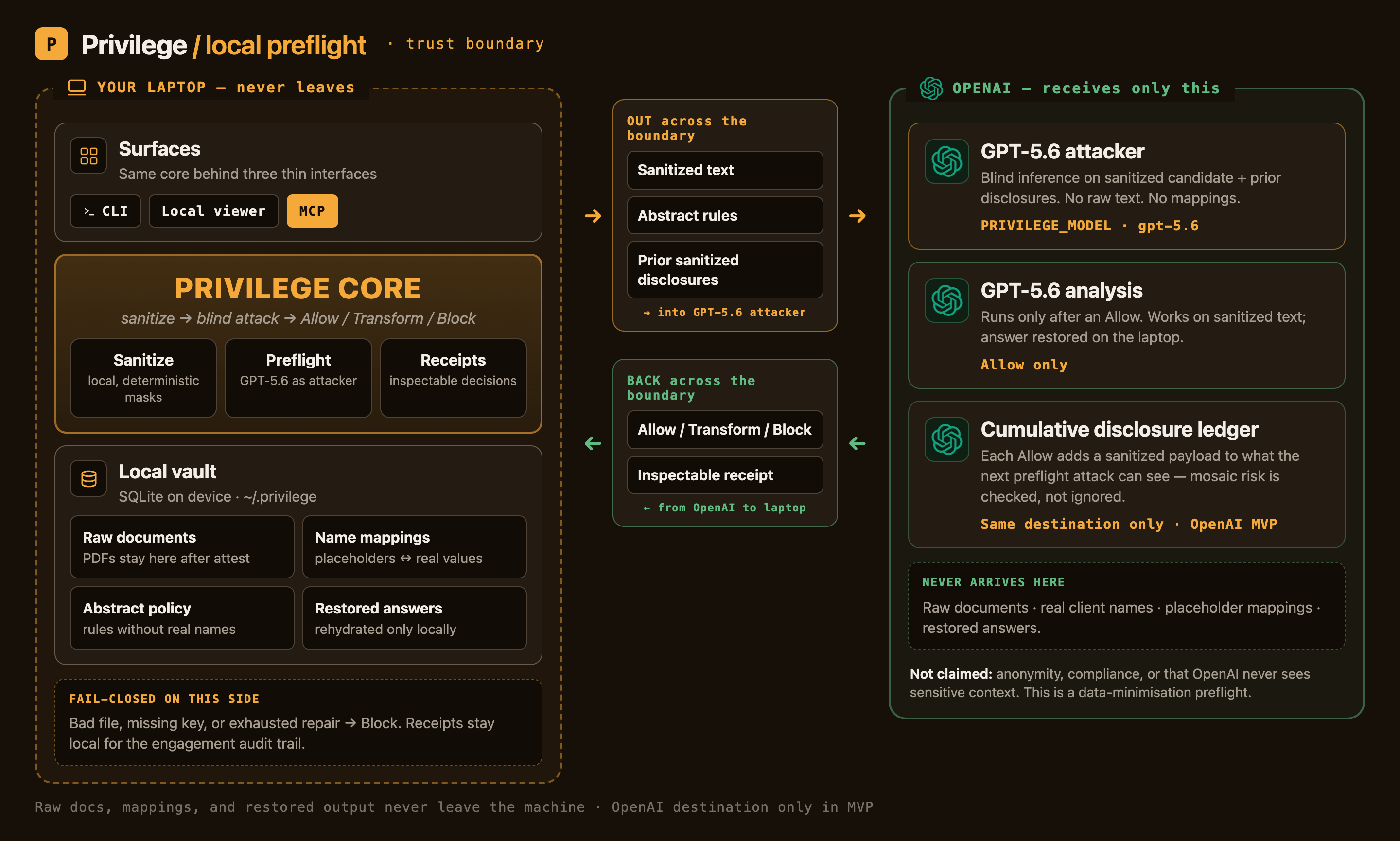
The core was built in Codex with GPT-5.6 across four sessions — the vault, the deterministic sanitizer, the fail-closed preflight-and-attack loop with receipts, the OpenAI client, and the frozen eval. Every Python commit in that core traces to a Codex session. GPT-5.6 is load-bearing, not decorative: the threat is frontier-model inference, so I measure the risk by pointing a frontier model at the sanitized document and letting it attack. When the Codex quota ran out, I finished the rest outside it — file intake, anonymized PDF export, engagement attestation and resume, the step-by-step web UI, security hardening, and docs — and said so plainly, in the README and the files' own docstrings. Everything fails closed: a bad file, a missing key, or an exhausted repair round becomes Block, never a silent send.
Challenges I ran into
- A perfect metric was the warning sign. My first eval scored every number 0 or 1 — too clean, because the mock attacker's keywords mirrored the test data. I relabeled it a plumbing harness and ran it live. The real numbers are modest, and I trust them because they aren't perfect.
- Two adversarial reviews found 17 ways a name could still slip past the local masking — case tricks and line breaks first, then Unicode lookalikes. I fixed the whole realistic class and documented the exotic residual honestly, because deterministic matching can't beat all of Unicode. That residual is exactly why the GPT-5.6 attack layer, not the masking, is the load-bearing control.
What I learned
- Failing closed is what makes it trustworthy. When the model calls silently broke, every request blocked instead of leaking. I'd rather refuse too often than leak once.
- Being upfront about the limits is what makes the strengths believable. I wrote down the ways the masking can be beaten instead of hiding them, and pointed at the layer that catches them.
- No fixed rule beats a creative adversary. A deterministic layer alone loses; the honest fix is to put a frontier model on your side, reading the sanitized text the way the real threat would.
What's next
- A signed desktop app so Privilege opens with no terminal and no system Python.
- Richer intake (spreadsheets, slides) and a fuller confusables layer for the residual bypasses.
- Restore → document plugins — after names are restored locally, optional exporters (PDF, slides, sheets) so consultants can turn the reply into a deliverable without re-pasting into another cloud tool. Core stays preflight; generation is optional.
- A fully offline mode running OpenAI's open-weight models (gpt-oss) locally as the attacker, for users who can't send even sanitized text.
This is a data-minimisation control, not a compliance certification.
Links & evidence
| Evidence | Link |
|---|---|
| Demo video (YouTube) | What is the purpose of this Privilege? ↗ |
| Source code (Apache-2.0) | github.com/prasadt1/privilege ↗ |
| Frozen eval — method + honest numbers | eval/README.md ↗ |
| Live GPT-5.6 receipts vault (no key) | demo/demo-vault.sqlite3 ↗ |
| Run it in 60s, no key | README ↗ |
| MCP adapter — no raw-text access | MCP.md ↗ |
| Codex session evidence | docs/media/codex/ ↗ |
Built With
- codex
- css
- gpt-5.6
- html
- javascript
- mcp
- openai
- pypdf
- pytest
- python
- python-docx
- sqlite
- vanilla

Log in or sign up for Devpost to join the conversation.