-
-
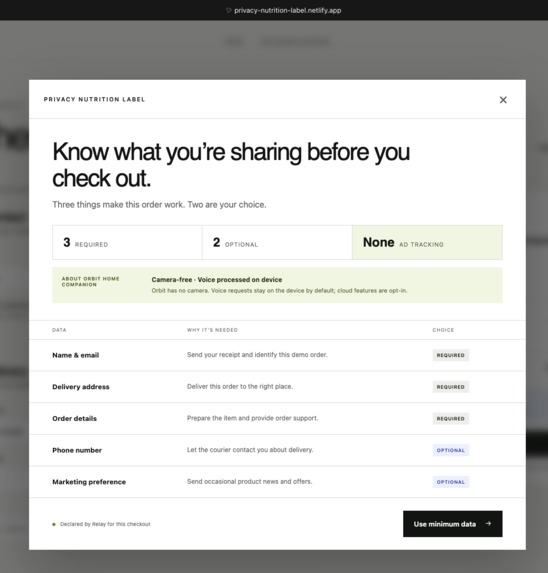
The human-facing Privacy Nutrition Label explains what checkout data is required, what is optional, and why—before the user acts.
-
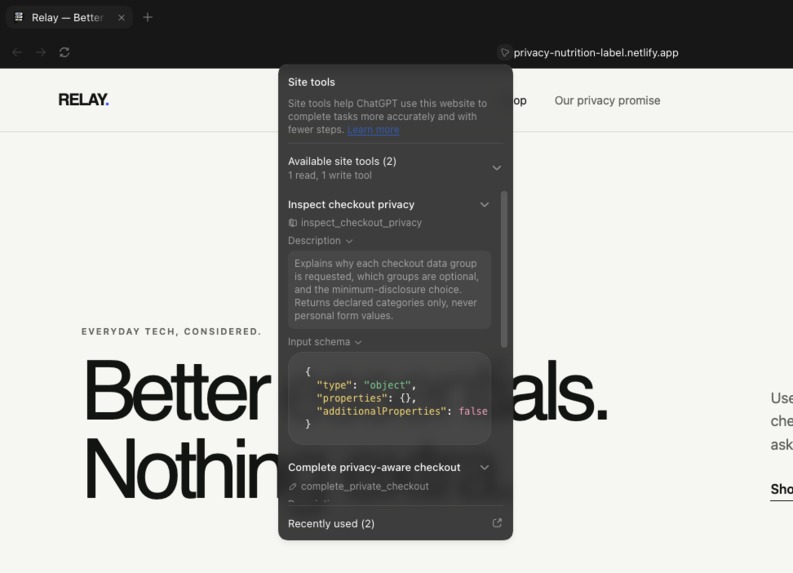
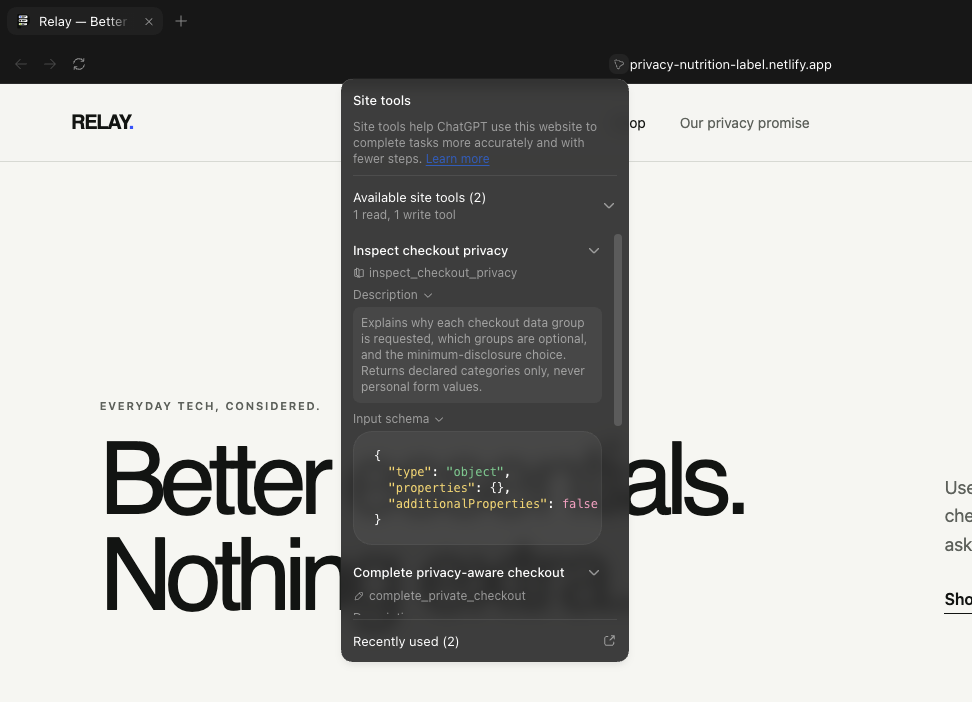
The read-only WebMCP tool gives the agent structured checkout privacy facts without returning personal form values.
-
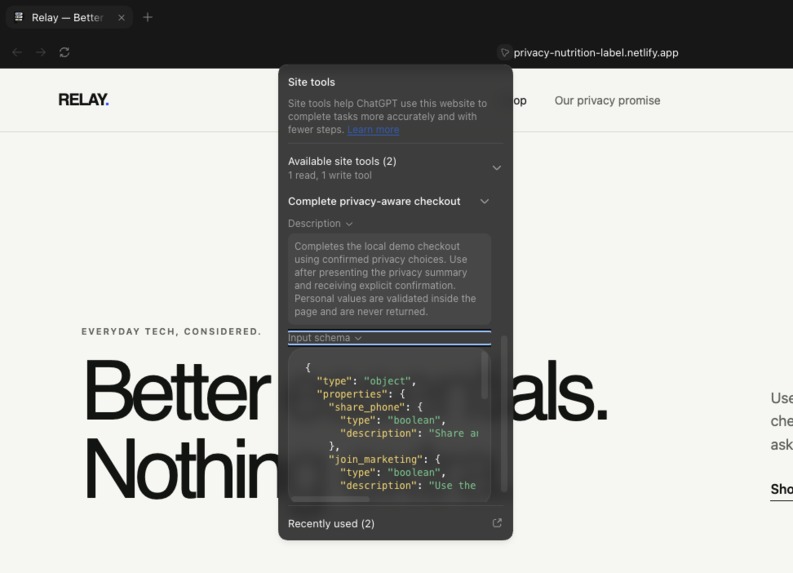
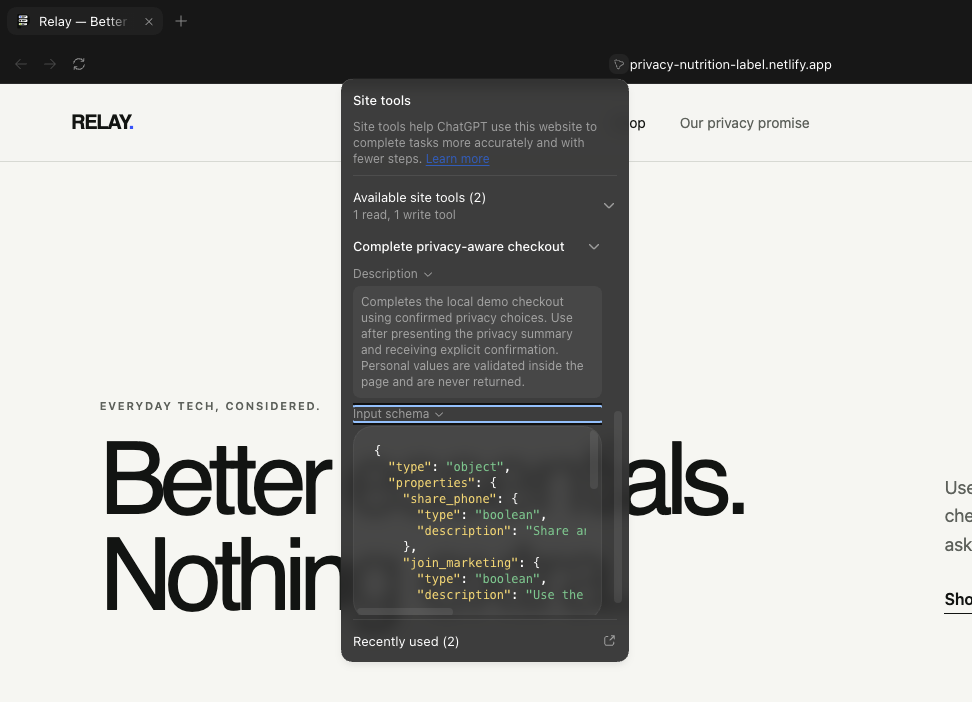
The WebMCP write tool completes checkout only after explicit confirmation and keeps personal form values inside the page.
Inspiration
I kept coming back to a simple problem that privacy policies contain a lot of information, but they rarely help with the decision someone is making right now.
At checkout, a website might ask for a name, email, address, phone number, account creation and marketing consent all on the same page. It is often unclear which of these are genuinely required, why they are being requested, and what can be left out. A privacy policy may contain the answer somewhere, but most people are not going to stop halfway through checkout and search through a long legal document.
I was also thinking about what happens after checkout. If a service later suffers a data breach, information it never collected cannot be exposed. Helping someone share less at the beginning can therefore reduce the amount of personal data placed at risk.
Privacy labels make data practices easier to see, but I wanted to go one step further. I did not want an AI agent to generate another summary by scraping a policy or guessing from the interface. I wanted the website itself to explain what the current action requires in a structured form that both a person and an agent can understand.
That became the idea behind Privacy Nutrition Label which is a small, action-specific privacy contract that appears when the decision actually matters.
What it does
I built the project around Relay, a fictional electronics retailer with a realistic guest checkout flow. Before completing an order, the customer can open a Privacy Nutrition Label showing:
- which data groups are required
- which data groups are optional
- why each group is requested
- who receives it
- what the minimum-data choice is
- whether advertising tracking is involved
The same declaration is available to an AI agent through WebMCP. The agent can inspect the checkout, explain the required and optional information, and recommend the minimum-disclosure path: continue as a guest, leave out the phone number and decline marketing.
I also wanted the final decision to remain with the person. Inspecting the label does not place the order. The state-changing checkout tool can only run after the person explicitly confirms their choices.
Once the demo order is completed, Relay produces a Privacy Receipt showing which data categories were used and which optional categories were left out.
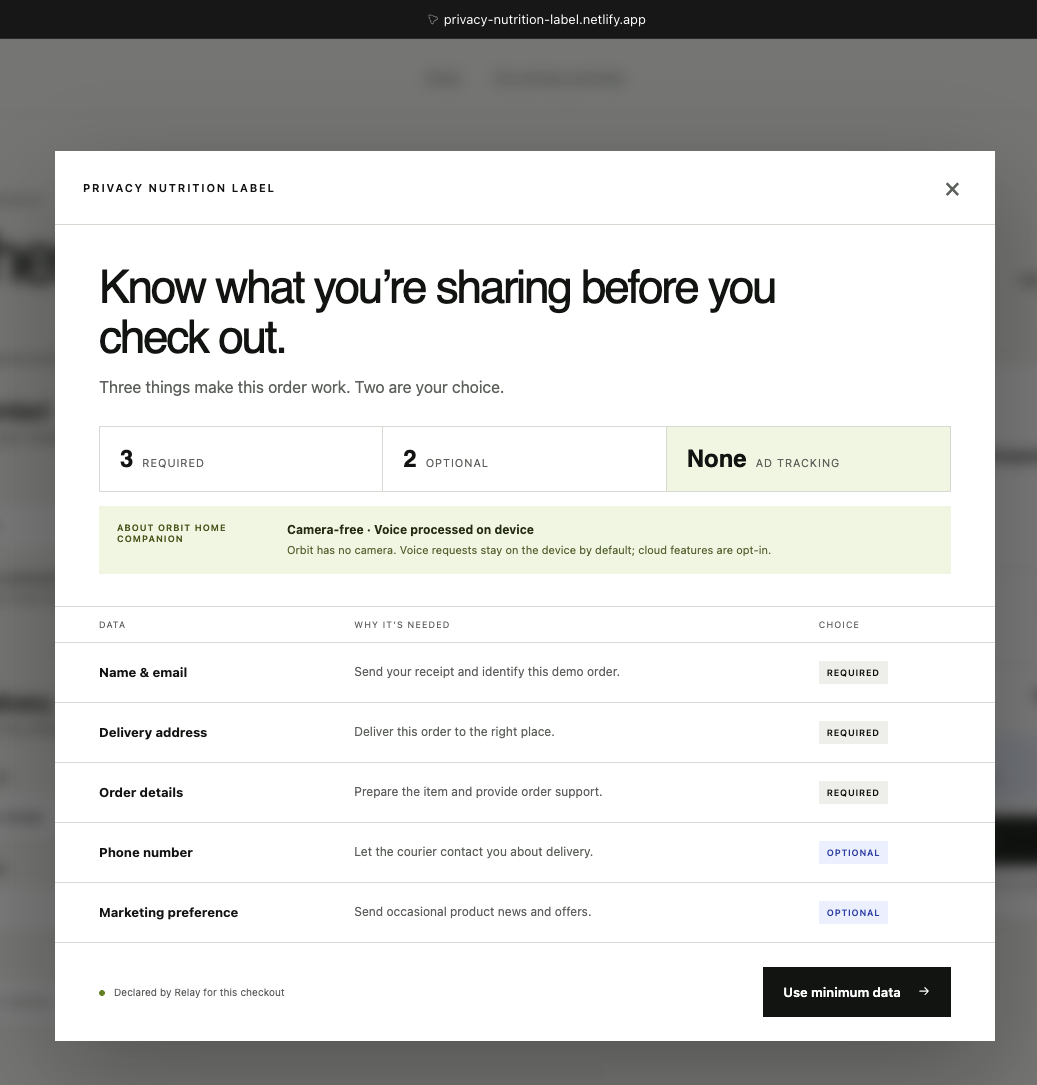
The Orbit Home Companion adds a second privacy layer to the demo. Its device declaration explains that it has no camera, processes voice on-device by default and makes cloud features opt-in. This is kept separate from the checkout label so that product privacy and transaction privacy are not mixed together.
Why WebMCP is a strong fit
Without WebMCP, an agent would have to inspect form labels, scrape a privacy policy or infer how the checkout behaves. That might work sometimes, but it also leaves room for outdated information and incorrect assumptions.
WebMCP allows Relay to declare its own checkout behaviour directly. The agent receives a predictable structure containing data categories, purposes, required and optional status, sharing information and a minimum-data recommendation.
This matters because the agent is not only reading information. After explaining the privacy choices and receiving confirmation, it can help the person act on those choices through a separate write tool.
I did not want WebMCP to be an extra feature added to an otherwise normal checkout. It is what makes the privacy information understandable and actionable at the moment of decision.
How it creates a better user experience
People should not need privacy or legal expertise just to understand a checkout form.
The human-facing label is designed to be scanned quickly. Someone can see that three data groups are required, two are optional and no advertising tracking is involved before deciding what to share.
If they are using an agent, the agent can inspect the same declaration and explain it in plain language. This avoids having one explanation in the interface and a different interpretation from the agent.
The person still stays in control. The agent can inspect and recommend, but it cannot complete the checkout until the person confirms the exact choices.
What people and agents can do together
In this flow, the website provides the facts, the agent helps interpret them and the person makes the final decision.
The agent can compare the required and optional categories, explain why they are requested and recommend the minimum-data option. The person can accept or change that recommendation. Only then can the agent complete the local demo checkout using the confirmed choices.
Without this structure, the person would need to inspect the form and policy themselves while trusting the agent to infer what the website means. With WebMCP, the website, agent and person are working from the same declared information.
How I built it
I built Privacy Nutrition Label as a solo project using React, TypeScript and Vite, then deployed it as a static site on Netlify.
The page registers two tools through document.modelContext:
inspect_checkout_privacyis read-only. It opens the visible Privacy Nutrition Label and returns the declared categories, purposes, sharing information, required or optional status and minimum-data recommendationcomplete_private_checkoutis state-changing. It accepts privacy choices rather than personal form values, requiresconfirmedto be explicitly true, validates the completed form inside the page and returns a category-level receipt
I deliberately kept personal values out of the tool interface. A name, email, address or phone number stays inside the webpage. The agent receives the privacy declaration and the person’s choices, but not those values.
The demo has no backend, database, authentication service, analytics, payment provider or external font request. Refreshing the page clears the order. The human checkout also remains usable when WebMCP is unavailable.
I added eleven automated tests covering privacy defaults, malformed inputs, missing fields, confirmation requirements, repeated execution and category-only outputs.
Challenges I ran into
The hardest design decision was not the interface. It was deciding what the agent should not receive.
Passing the whole checkout form to the tool would have been easier, but it would have contradicted the data-minimisation idea behind the project. The agent needs to understand the privacy contract and the person’s choices; it does not need their identity or delivery details in its response.
I therefore separated the flow into clear boundaries:
- the webpage keeps the personal form values
- the agent receives the privacy declaration and confirmed choices
- the write tool performs the local action only after explicit confirmation
Another challenge was deciding how much information belonged in the label. I wanted it to include purpose, optionality and sharing without turning it into another document that people would ignore.
Keeping product privacy separate from checkout privacy was also important. Orbit’s camera and voice-processing declaration belongs to the device, while the Privacy Nutrition Label describes the current purchase.
Accomplishments that I am proud of
- WebMCP changes the interaction instead of simply duplicating a webpage button
- The read tool opens the same label that the person sees
- The write tool enforces explicit confirmation before completing the demo
- Personal form values never appear in either tool response
- The minimum-data path is a realistic guest checkout rather than a promise that no customer information is ever needed
- The Privacy Receipt makes the result of data minimisation visible after the action
- Orbit demonstrates how product privacy and checkout privacy can be declared separately
- All eleven automated tests pass, and the production build completes successfully
What I learned
Building this project made me think differently about what makes an agent tool useful.
A good tool does not only expose an action. It also needs to expose the intent, constraints and boundaries around that action. For privacy-sensitive tasks, deciding what the tool must not return is just as important as deciding what it can do.
I also learned that a privacy explanation becomes more useful when a person can act on it immediately. Required and optional labels are helpful, but the minimum-data recommendation, explicit confirmation step and final receipt make the information part of the interaction rather than something passive.
Most importantly, I learned that an agent does not need access to every piece of information on a page to be helpful. In this project, the agent can support a privacy-aware decision without becoming another recipient of the person’s private details.
What’s next
I deliberately kept the MVP focused on one checkout action so I could build and test the entire flow properly.
A future version could define a reusable privacy declaration schema for other websites, support actions such as account deletion and data export, and help people compare privacy choices across services.
I have also been thinking about a broader Digital Footprint or Account Manager that helps people remember and manage the accounts they have created for tracking what personal details different app holds. I kept that outside this MVP because identity, access and account management introduce a much larger security and trust problem that deserves its own architecture.
For now, Privacy Nutrition Label demonstrates the smaller idea clearly: websites can explain what they need at the moment they ask for it, agents can help people understand the choice, and the person can still decide what happens next.
Built With
- css3
- html5
- javascript
- netlify
- react
- typescript
- vite
- vitest
- webmcp

Log in or sign up for Devpost to join the conversation.