-
-
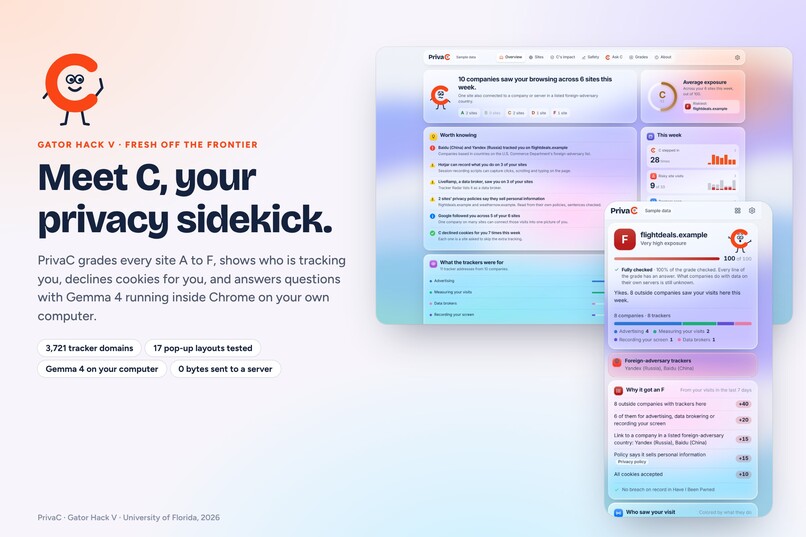
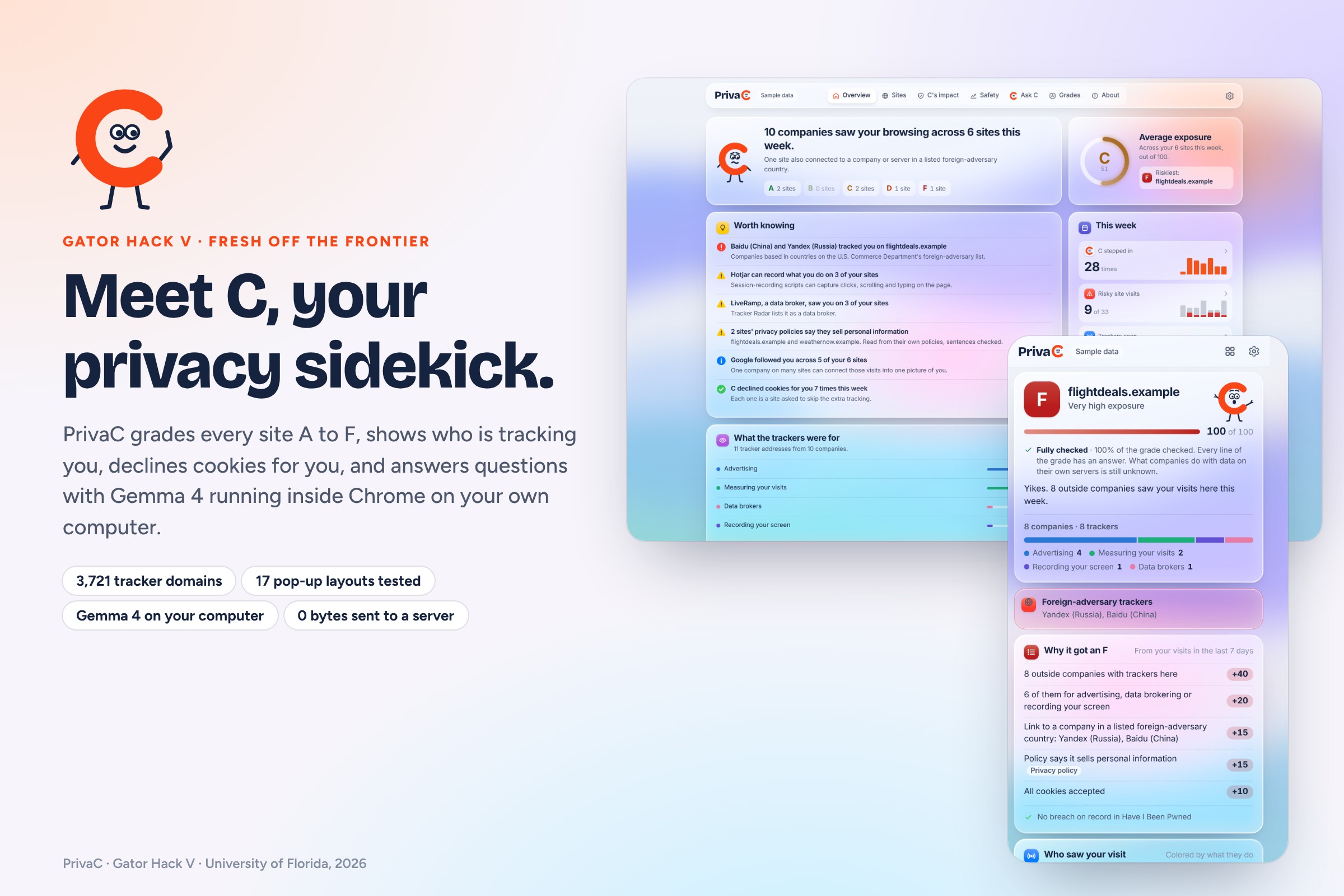
Meet C, PrivaC's mascot: grades every site, shows who tracks you, declines cookies, and runs Gemma 4 right on your computer.
-
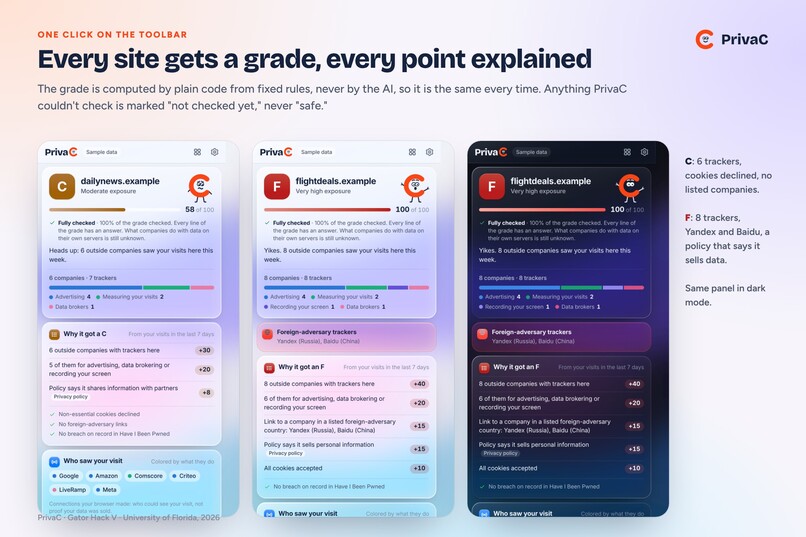
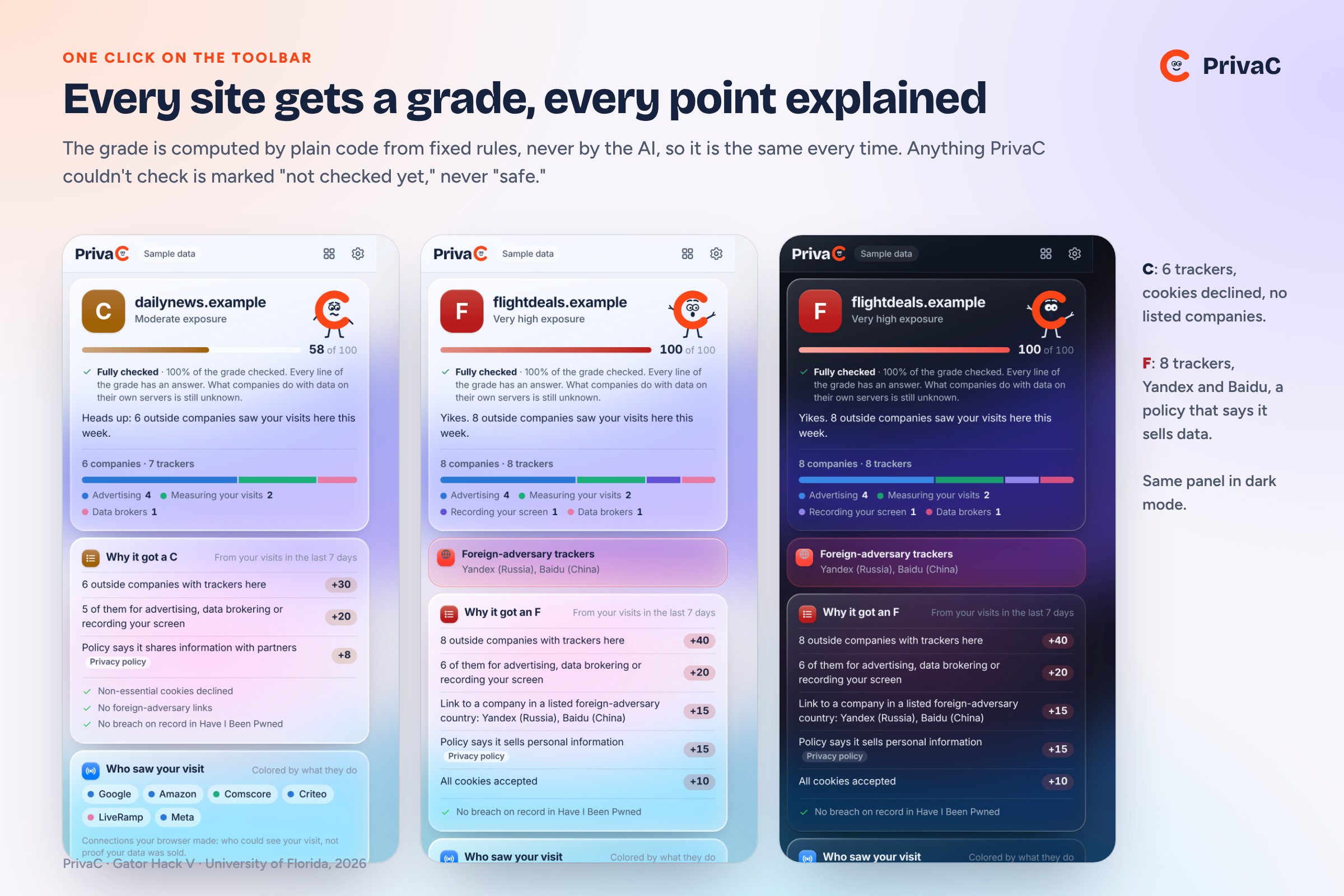
The toolbar panel: an A-F grade where every point has a reason. Computed by code, not AI, so it's the same every time.
-
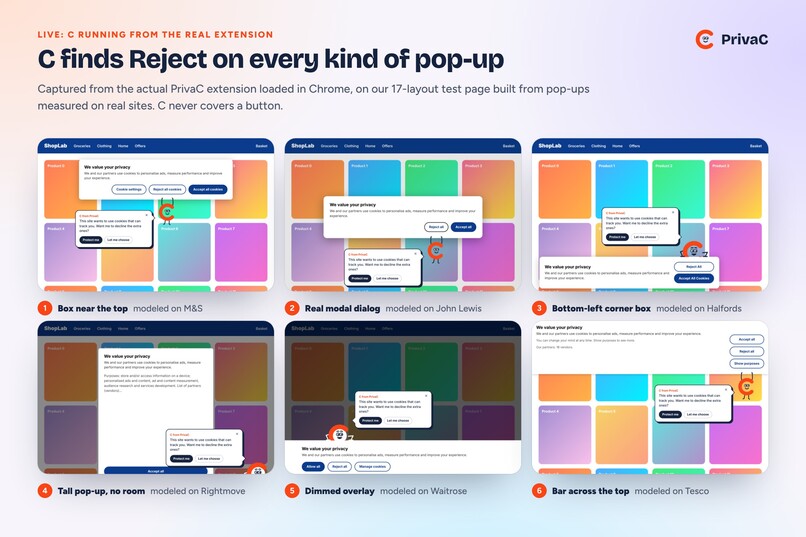
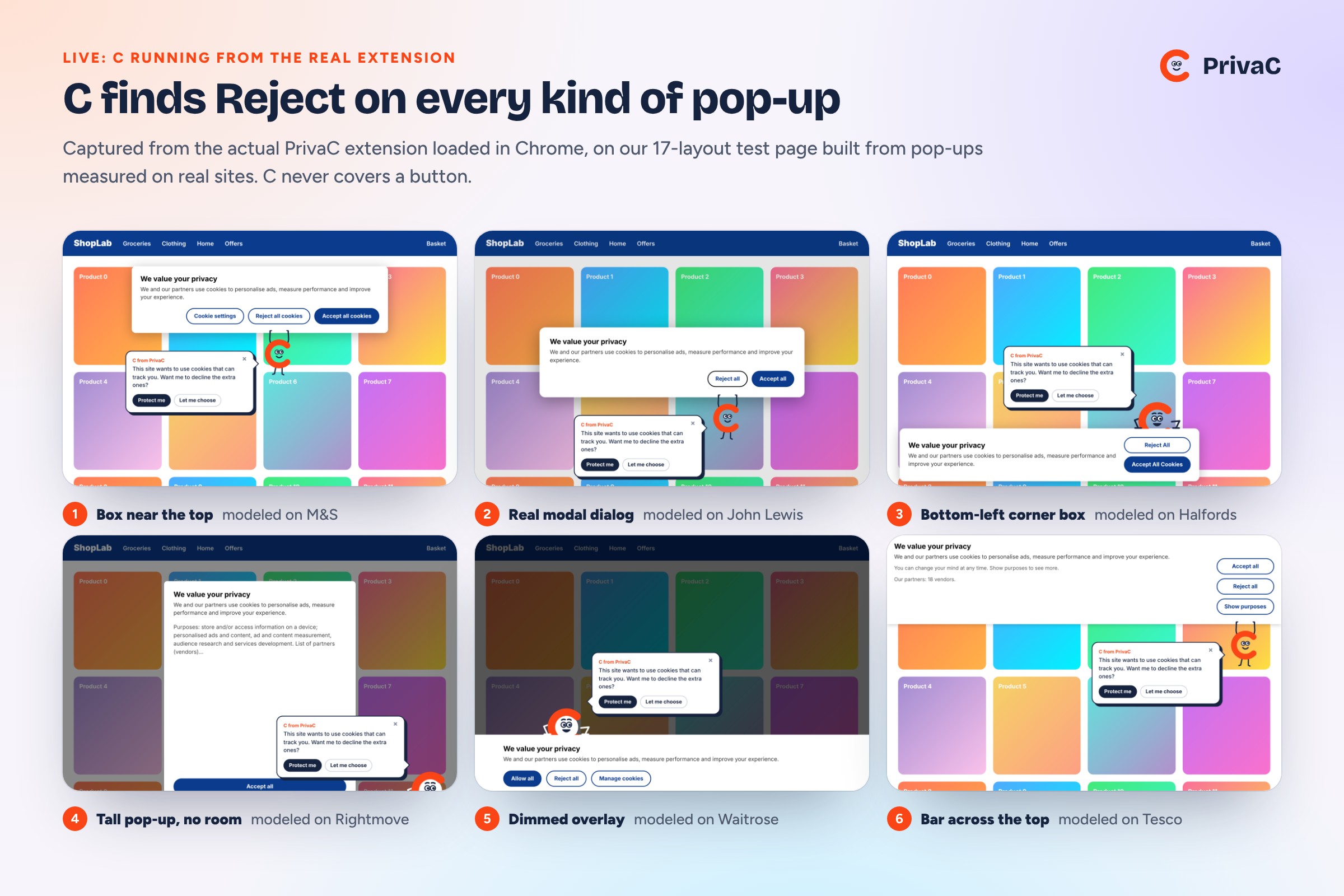
Live from the real extension: C finds the Reject button on six kinds of cookie pop-ups, modeled on real UK sites.
-
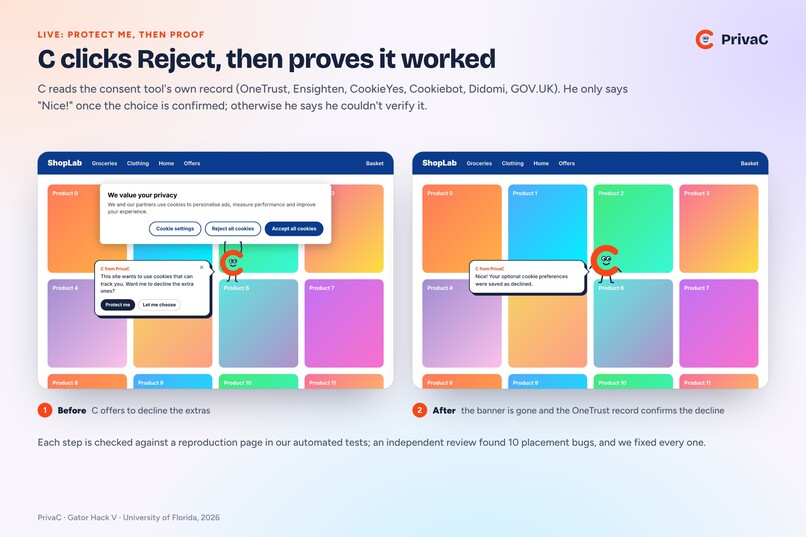
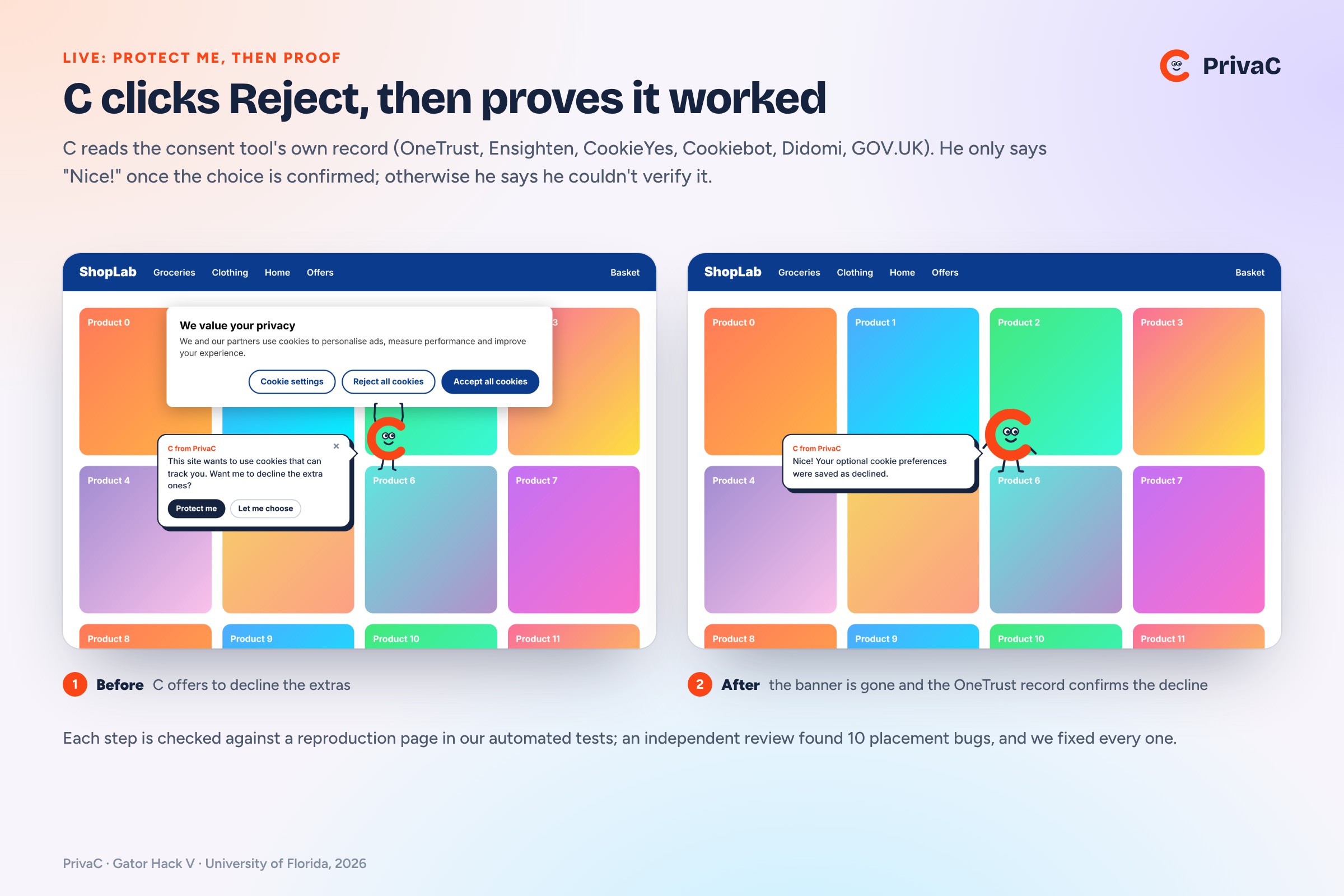
C clicks Reject for you, then reads the consent tool's own record to confirm the site saved your choice.
-
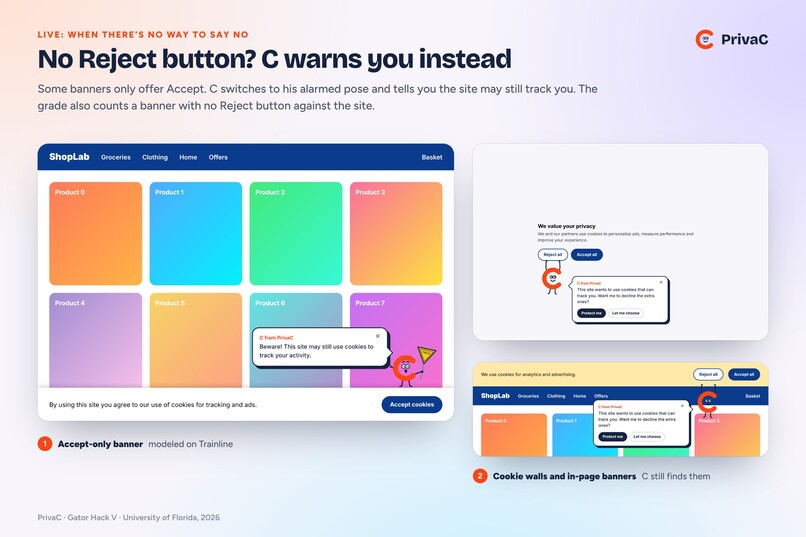
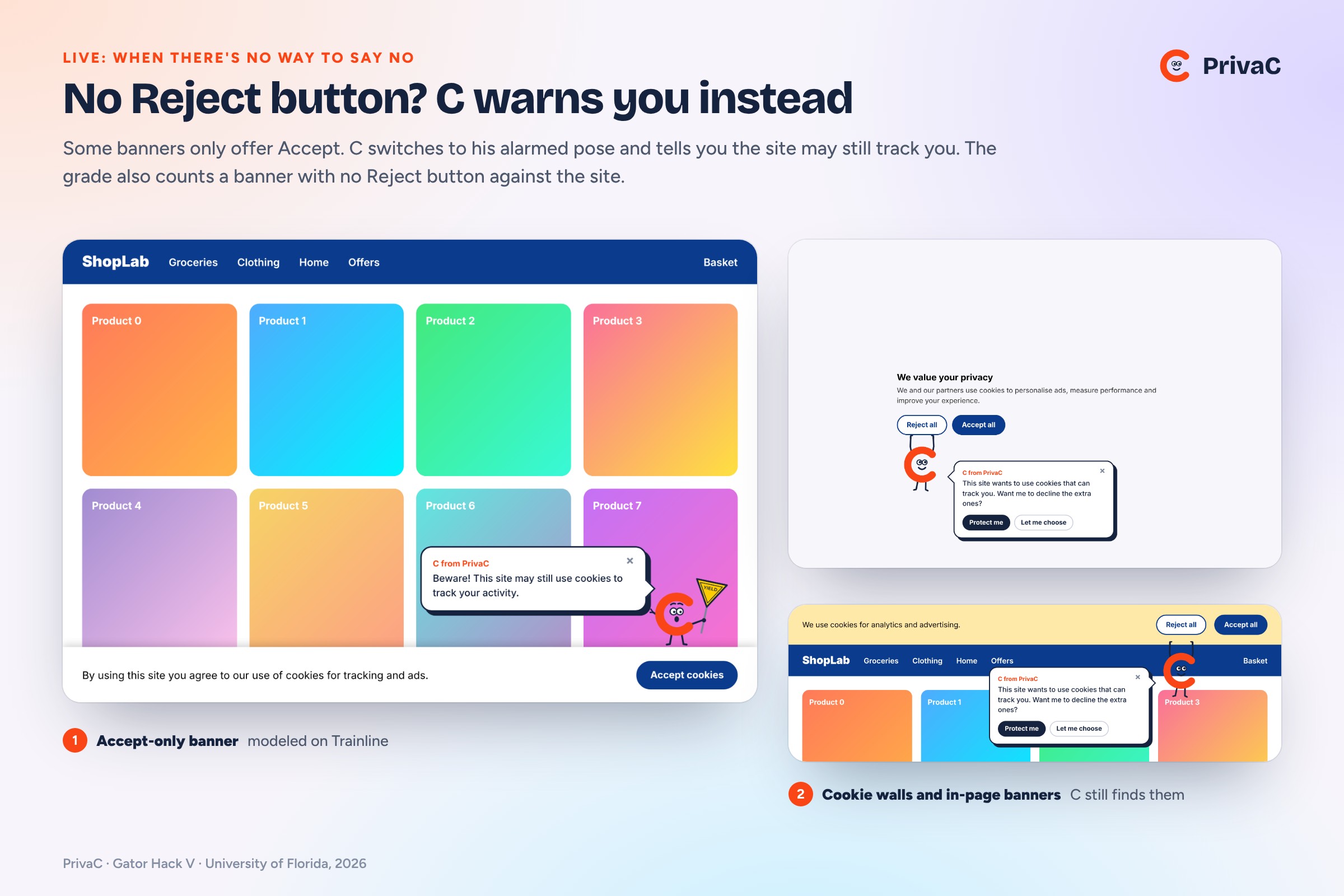
No Reject button? C warns you instead. He also finds cookie walls and banners inside the page.
-
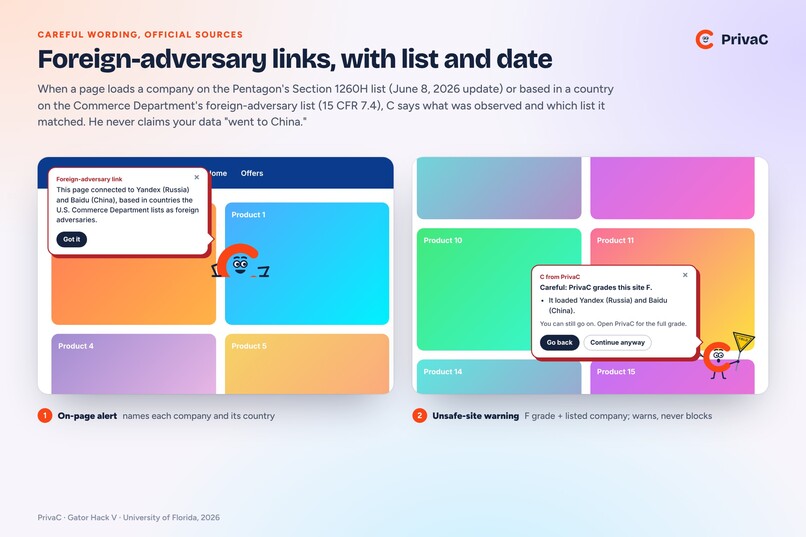
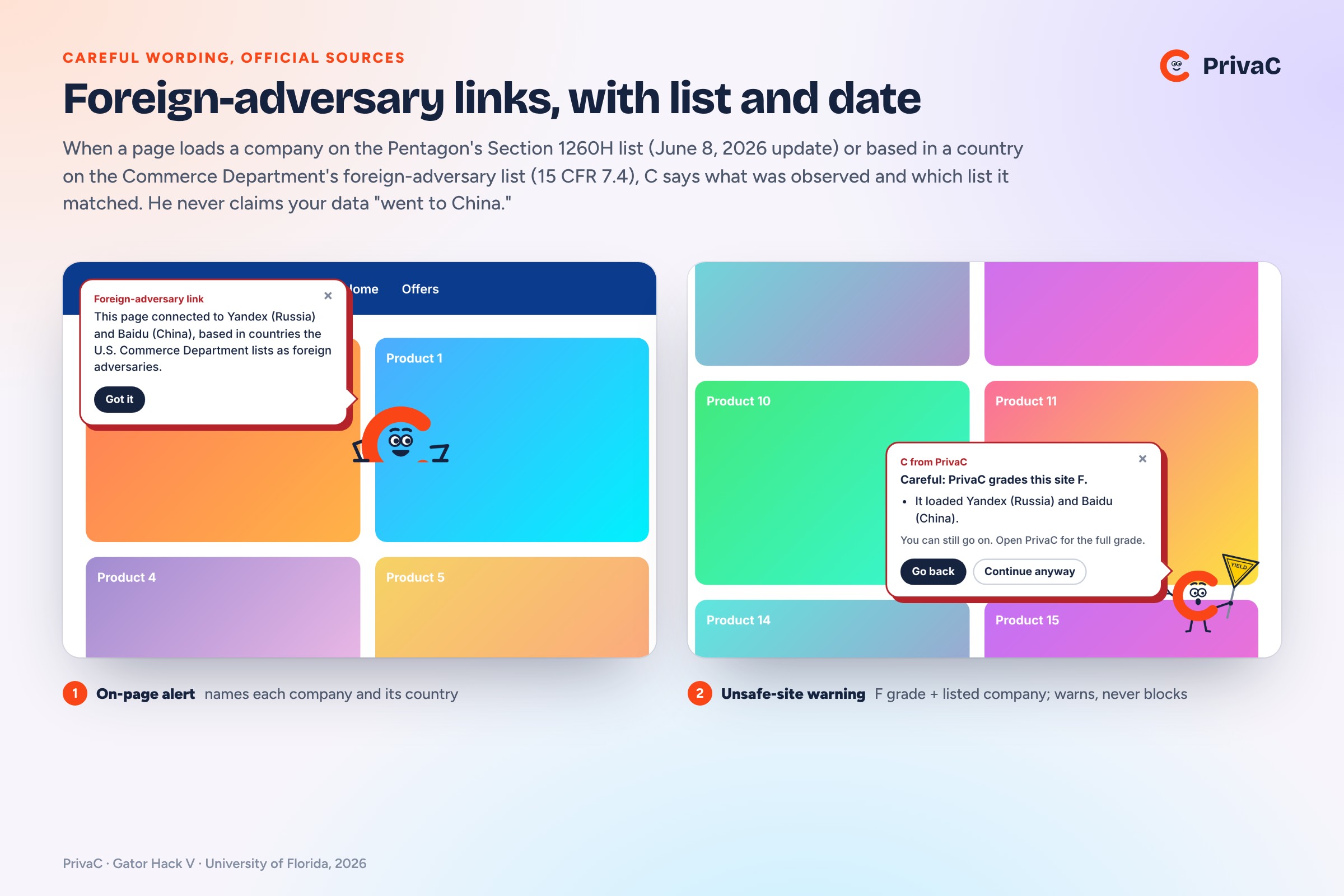
Foreign-adversary alerts name the company, the official list and its date, and never claim where data went.
-
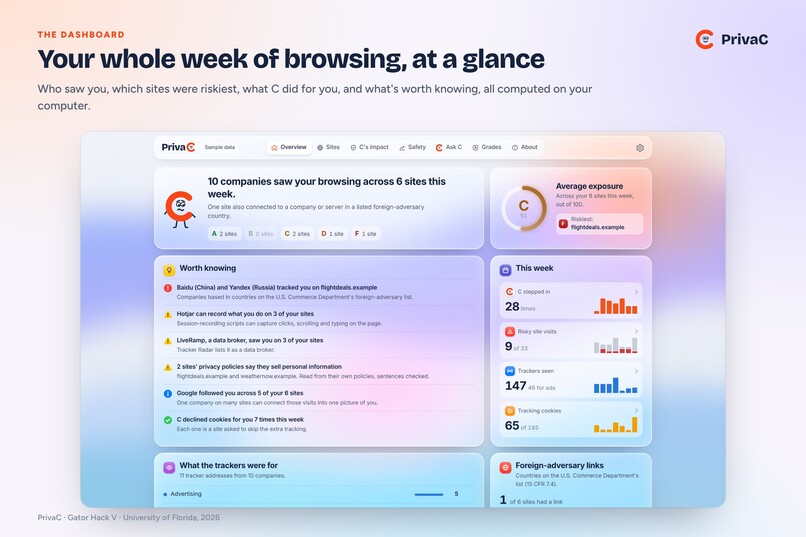
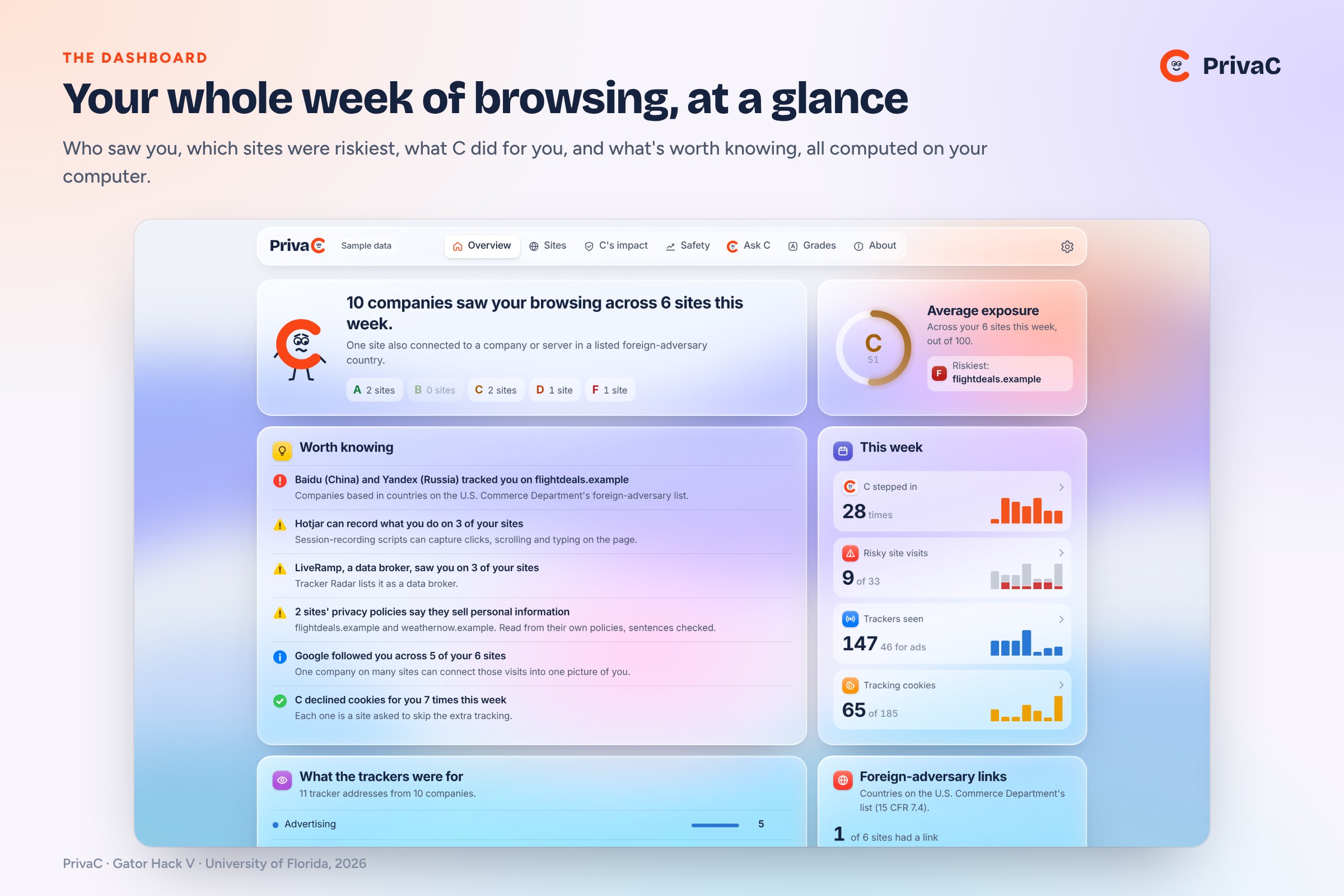
The dashboard: your week of browsing at a glance, with what's worth knowing and what C did for you.
-
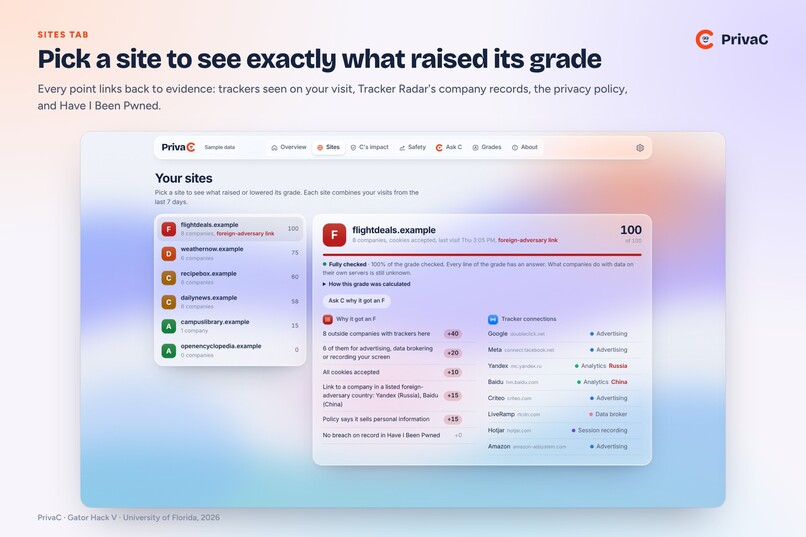
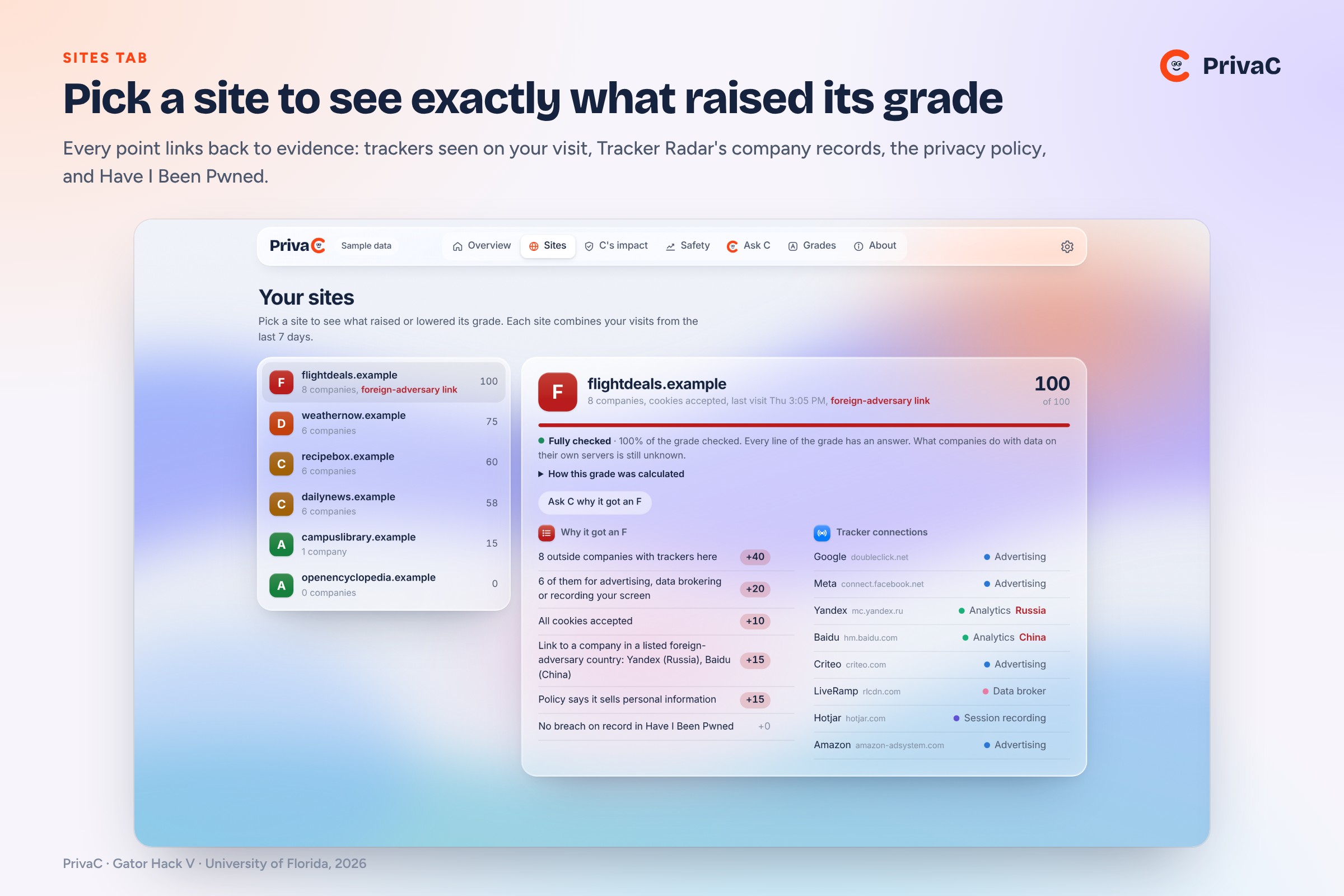
Sites tab: pick any site to see exactly what raised its grade, with a source for every point.
-
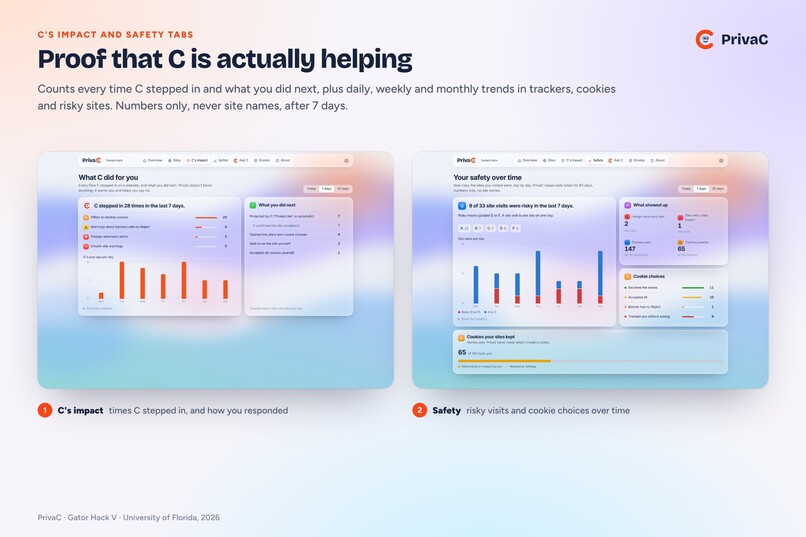
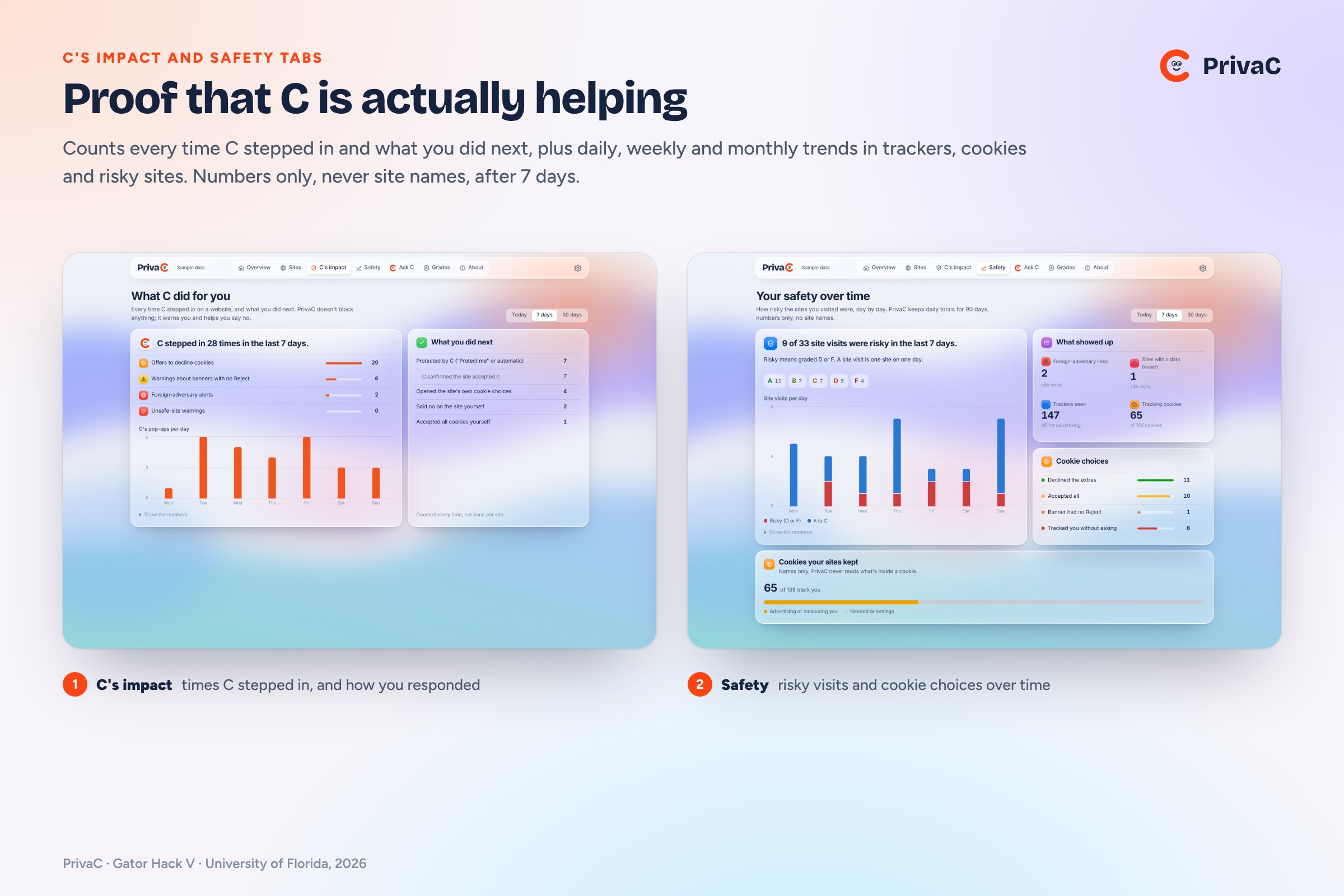
C's impact and Safety tabs: every time C stepped in and your trends in trackers, cookies and risky sites.
-
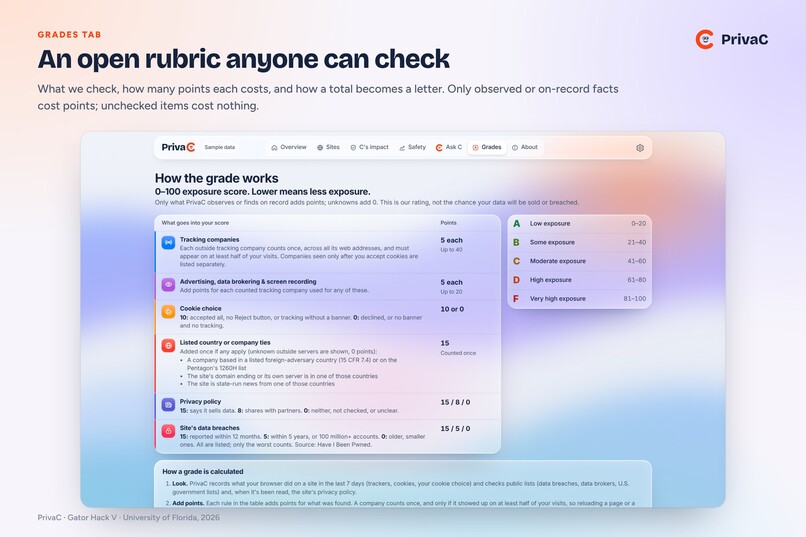
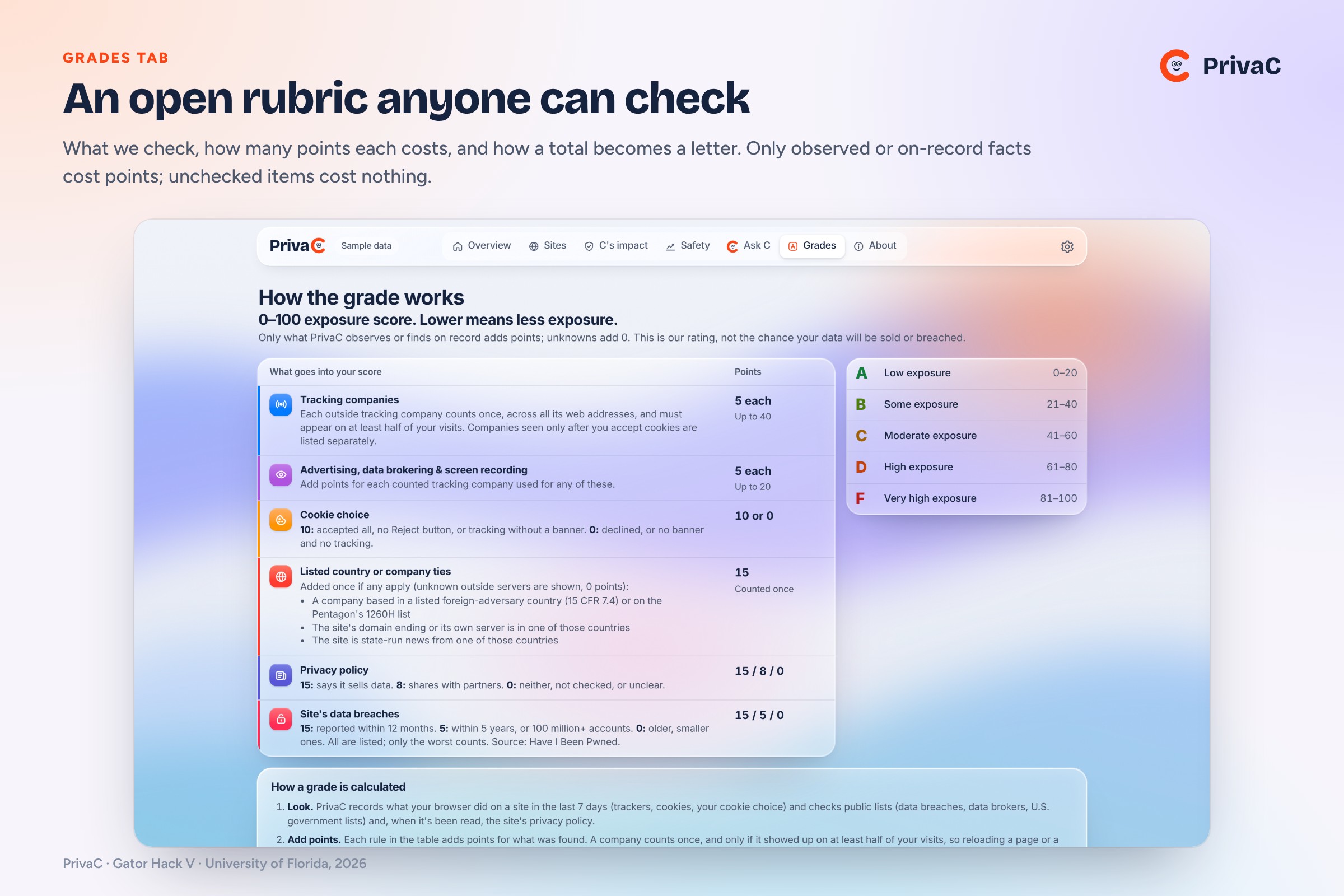
Grades tab: an open rubric. Only observed or on-record facts cost points; unchecked items cost nothing.
-
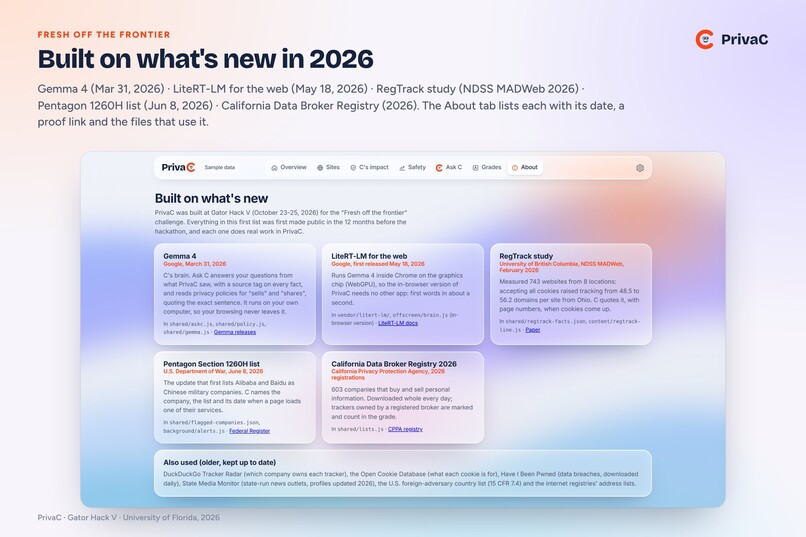
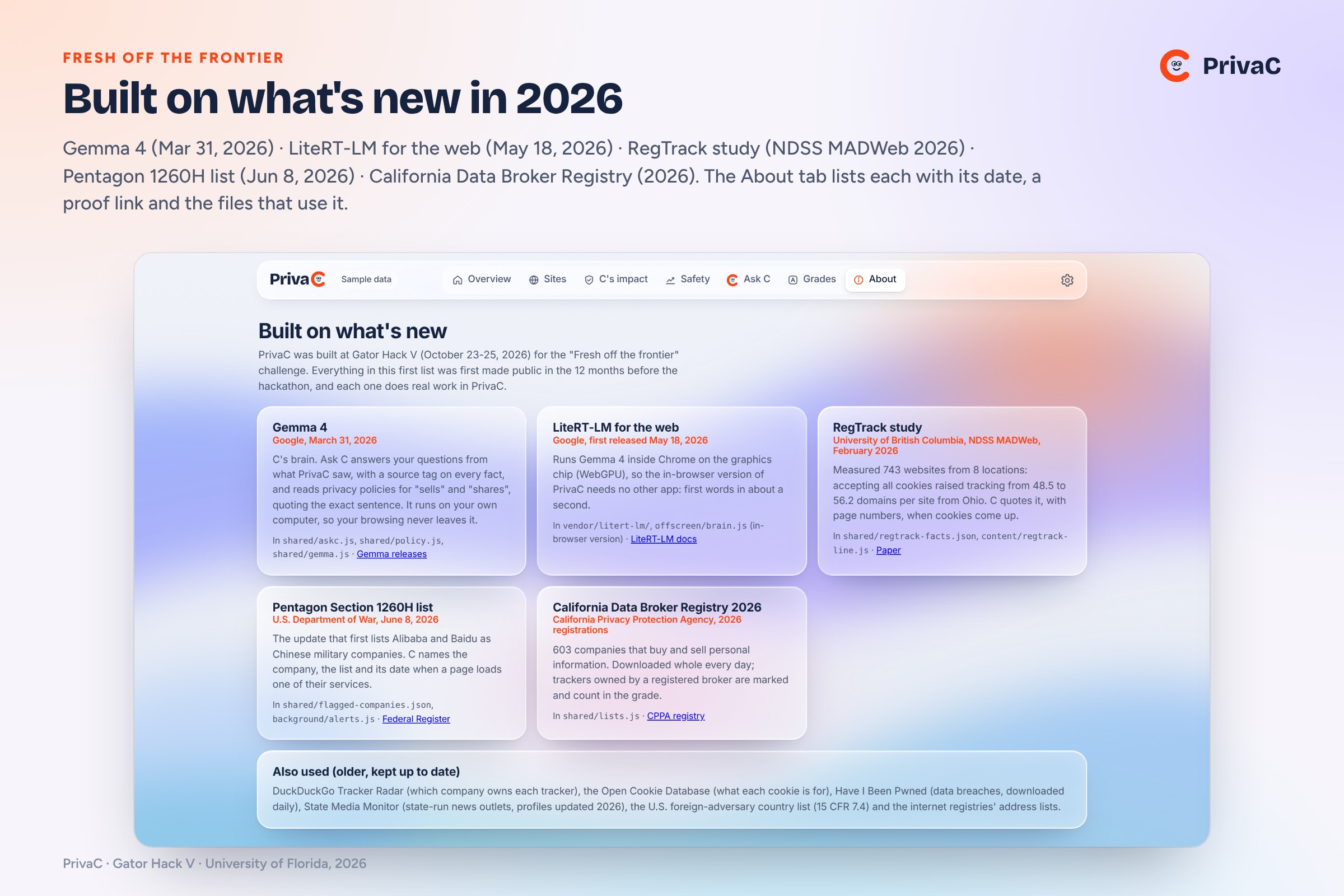
Fresh off the frontier: Gemma 4, LiteRT-LM, the RegTrack study, the June 2026 Section 1260H list and the 2026 CA broker registry.
-
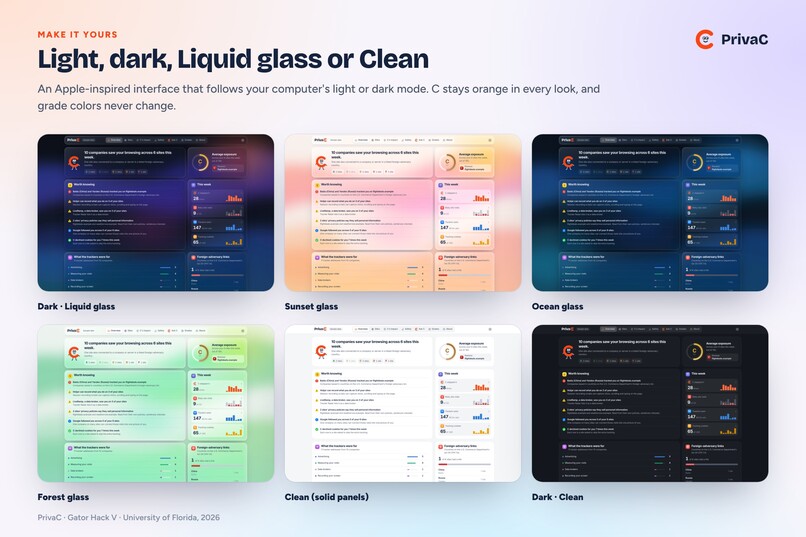
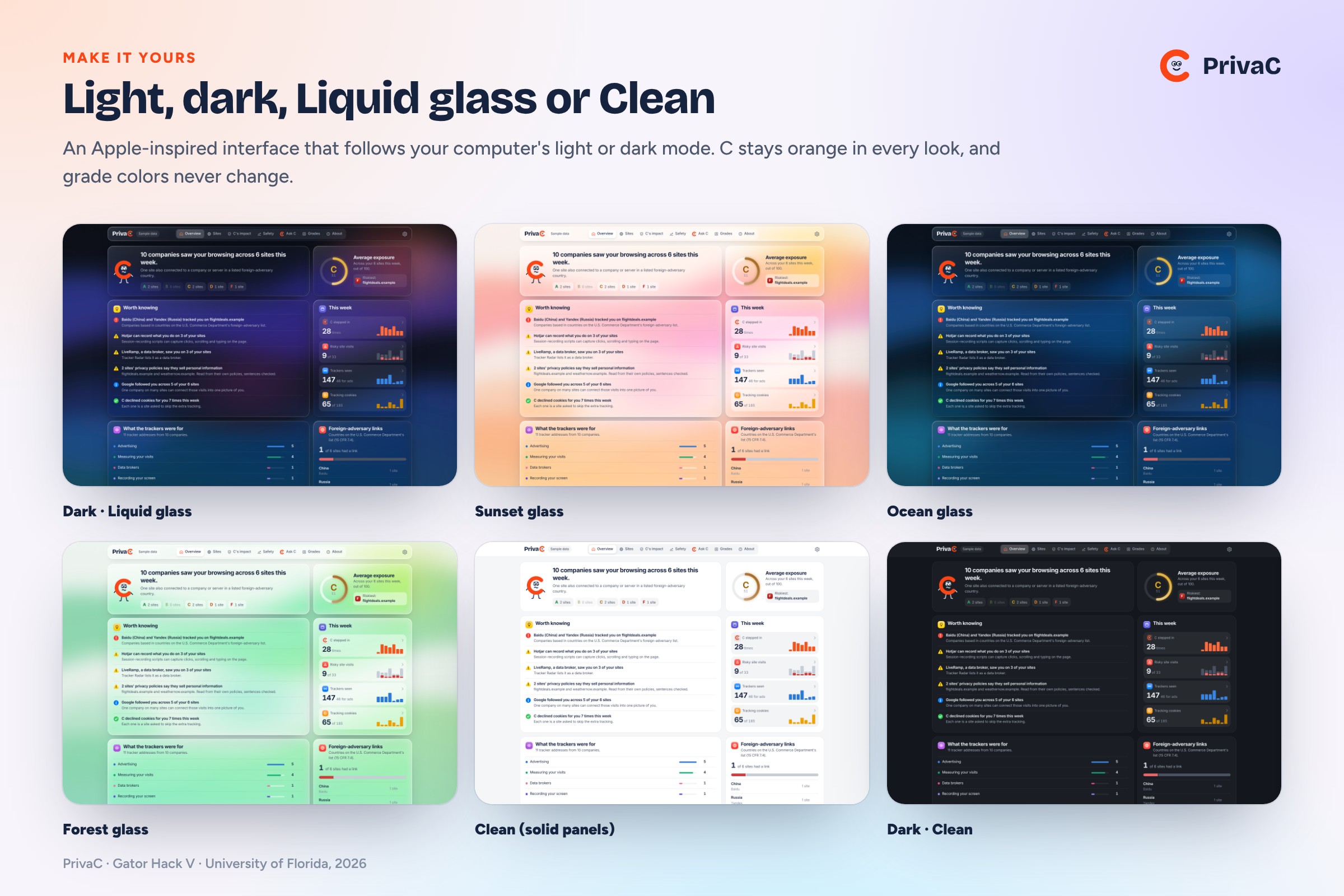
Light or dark, Liquid glass or Clean, six glass colors. C stays orange in every look.
-
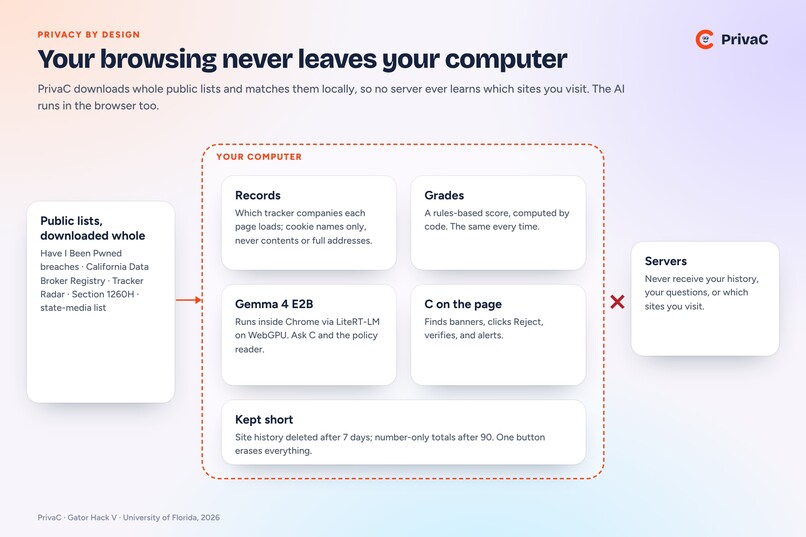
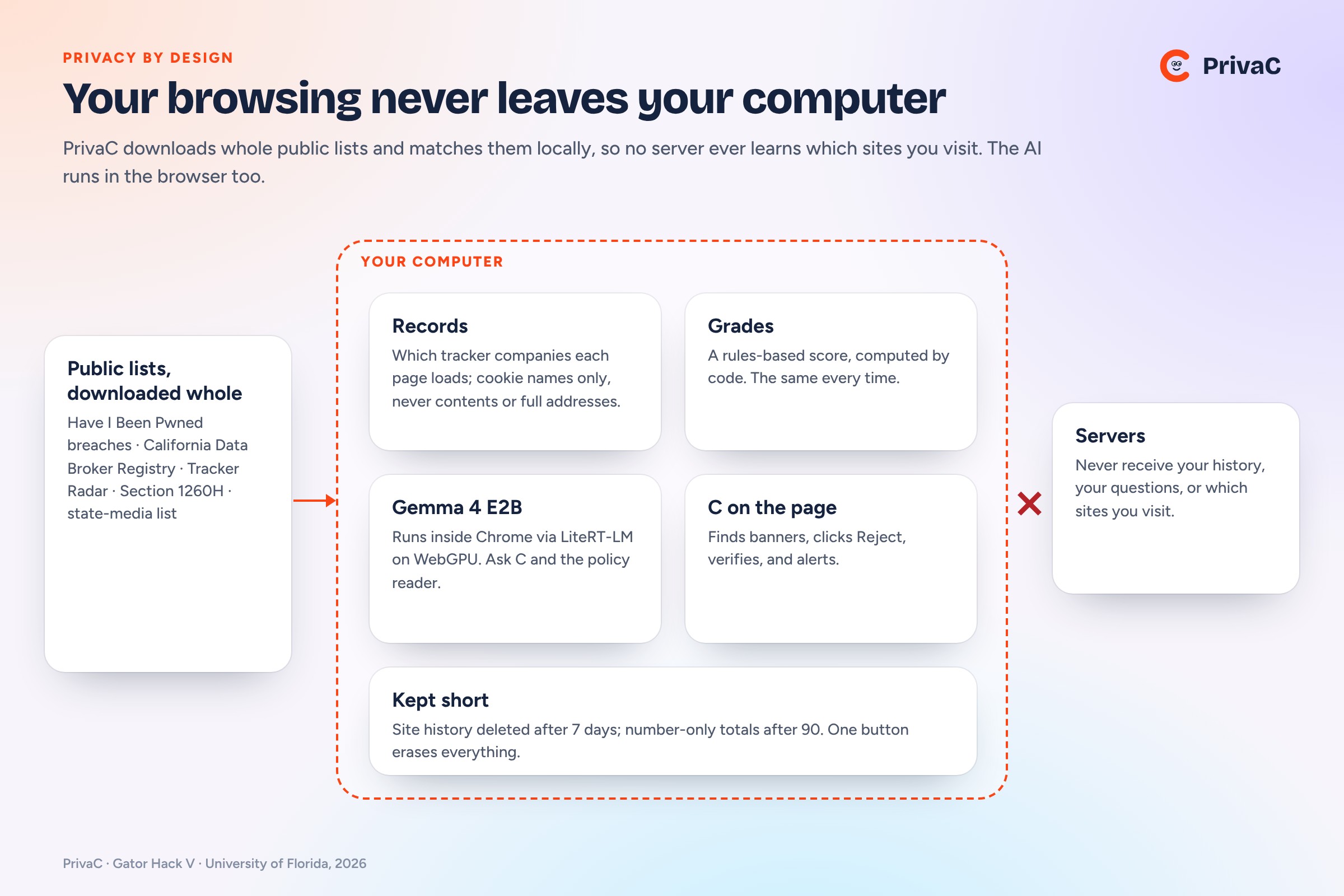
Privacy by design: public lists are downloaded whole and matched locally, so no server learns what you visit.
Inspiration
One website visit can quietly hand you to dozens of companies. Cookie banners are confusing, often have no Reject button, and many U.S. visitors never see one at all. Almost nobody reads privacy policies. Our team of five, mostly first-time hackers, wanted something an ordinary person could understand at a glance: built on public data and 2026 research, and without sending anyone's browsing to a server.
That became PrivaC, a Chrome extension with a letter-C mascot, C, who watches the sites you visit, steps in on cookie banners, grades every site, flags links to foreign-adversary companies, and answers your questions with an AI that runs entirely on your own computer.
What it does
- Shows who is watching. PrivaC records which tracking companies each page loads (3,721 known tracker domains from DuckDuckGo Tracker Radar) and which cookies it sets, labeled by purpose with the Open Cookie Database. It stores names only, never cookie contents or full web addresses.
- Grades every site A to F, with every point explained. A rules-based score covers trackers, data brokers, breaches, cookie banners with no Reject button, and links to companies in countries on the U.S. foreign-adversary list.
- Acts on cookie banners. C appears beside the pop-up and offers "Protect me," clicks Reject for you, and checks that the site really saved your choice by reading the consent tool's own record (OneTrust, Ensighten, CookieYes, Cookiebot, Didomi and GOV.UK). When a banner only lets you accept, C says "Beware!" It also finds pop-ups drawn inside frames or shadow roots (Consentmo on Shopify stores).
- Flags foreign-adversary links, carefully. When a page loads a service from a company on the Pentagon's Section 1260H list (updated June 8, 2026), C names the company, the list and its date. C never claims your data "went to China"; he says what was observed and which official list it matched.
- Warns on unsafe sites. A site graded F that also loads a listed company or had a data breach reported in the last year gets C's warning with "Go back" or "Continue anyway." It never blocks you.
- Checks public records privately. The Have I Been Pwned breach list and the 2026 California Data Broker Registry (603 companies) are downloaded whole every day and matched on your computer, so nobody learns which sites you visit.
- Ask C. Ask a question and C answers from what PrivaC actually saw, with a source tag on every fact. C also reads privacy policies for "sells" and "shares" and only shows a quote if it appears word for word in the policy. C says where every dashboard item came from ("Which sites recorded my screen?" names the company, its address and the site), and answers questions about himself ("Are you tracking me?") from PrivaC's own privacy policy.
- Clears one site. "Clear this site's data" in the pop-up makes Chrome forget that site's cookies and saved data, and says how many cookies it removed.
Try it yourself
- Download the code from github.com/gormandyp/PrivaC (Code → Download ZIP) and unzip it.
- In Chrome, open
chrome://extensions, turn on Developer mode, click Load unpacked, and pick the folder. - Visit a few sites, then click PrivaC in the toolbar for each site's grade, or open the dashboard.
- For Ask C, click Download C's brain once (about 2 GB); Gemma 4 then runs on your computer.
How we built it
- A plain-JavaScript Chrome extension (Manifest V3) with no build step, so all five of us could read and change it.
- Gemma 4 E2B runs inside Chrome on the computer's graphics chip through Google's LiteRT-LM web runtime (WebGPU). On our MacBook Pro the first words of an answer appear in about 0.8 seconds (about 1.7 seconds on a Windows gaming laptop). Ollama with Gemma 4 E4B is the fallback. Nothing leaves the computer.
- Code computes the grade, not the AI, so it is the same every time and every point traces back to evidence. Gemma explains and reads; it never sets the score.
- Factual questions get answered by code. Grades, "Is this site safe?", breaches and "Does this site sell my data?" come straight from PrivaC's own records in about a tenth of a second. Gemma explains everything else from the same evidence.
- 815 automated tests (Node's built-in test runner), plus real-browser checks on a MacBook Pro and a Windows gaming laptop with the in-browser Gemma.
How the grade works. Every site gets an exposure score, computed the same way every time:
$$E = \min\big(100,\; T + A + K + F + P + B\big)$$
$$T = 5 \cdot \min(8,\, n) \qquad A = 5 \cdot \min(4,\, a)$$
$$K \in \lbrace 0, 10 \rbrace \qquad F \in \lbrace 0, 15 \rbrace \qquad P \in \lbrace 0, 8, 15 \rbrace \qquad B \in \lbrace 0, 5, 15 \rbrace$$
- T: 5 points for each of the n outside tracking companies, up to 40.
- A: 5 more for each of those used for advertising, data brokering or screen recording, up to 20.
- K: 10 if you accepted all cookies, there was no Reject button, or the site tracked you without a banner.
- F: 15 for any tie to a listed foreign-adversary country or the Pentagon's 1260H list.
- P: 15 if the privacy policy says it sells data, 8 if it shares it.
- B: 15 for a breach reported in the last year, 5 within 5 years or 100 million+ accounts.
A is 0–20, B 21–40, C 41–60, D 61–80, F 81–100. An unread policy is never counted as safe: the grade shows how high it could go.
Fresh off the frontier
Each of these was first made public in the 12 months before the hackathon and does real work in PrivaC. The dashboard's About tab lists each one with its date, a proof link and the files that use it.
| Resource | First public | How PrivaC uses it |
|---|---|---|
| Gemma 4 (Google) | March 31, 2026 | C's brain: Ask C and the privacy-policy reader |
| LiteRT-LM for the web (Google) | May 18, 2026 | Runs Gemma 4 inside Chrome, nothing to install |
| RegTrack study (NDSS MADWeb 2026, 743 websites from 8 locations) | February 2026 | Accepting all cookies raised tracking from 48.5 to 56.2 domains per site for Ohio visitors; C quotes it with section numbers |
| Pentagon Section 1260H list | June 8, 2026 update (first listing Alibaba and Baidu) | Drives the foreign-adversary alert |
| California Data Broker Registry | 2026 registrations | Marks trackers owned by registered data brokers |
Challenges we ran into
- Running Gemma in the browser. Loading the model froze Chrome for 15 to 20 seconds while it built about 150 graphics programs. We now build them the non-blocking way first.
- Every consent tool is different. Each one saves your choice its own way, and some pop-ups live inside frames or shadow roots where a normal content script can't see them.
- U.S. visitors rarely see cookie banners, so we tested on U.K. sites and on our own demo page.
- A small model makes things up. Gemma sometimes invented facts and source labels (once claiming a site's policy said it sells data before PrivaC had even read it). Code now cleans every answer, and factual questions are answered from the records instead.
- Keeping a small model honest in conversation. Gemma read its own instructions back ("You are a privacy guide…"), answered follow-ups about the wrong site, and blamed the user for things PrivaC hadn't done yet. Now follow-ups like "what about puffco?" carry the topic of the last few questions and go through the same database lookups, and questions about C himself get fixed answers.
- Reading policies honestly. "We sell premium advertising space" was first read as selling your data. A "sells" answer now needs a sentence that really says so, and saved answers are checked again.
- Five beginners, one Git repo. Zip uploads and a scary "Force push" button taught us to pull first and push small.
Accomplishments that we're proud of
- An AI assistant that runs fully on your own computer, inside the browser, with no app to install.
- A grade where every point has a reason and a source.
- C actually clicks Reject and checks that it worked, instead of just telling you to.
What we learned
- Detecting a tracker is easy; explaining it honestly is hard. A tracker loading means a company could collect data. It doesn't prove your data was sold, and PrivaC says so.
- Plain code beats an AI model for clicking buttons and scoring; the AI is best at explaining.
- Showing the evidence and the uncertainty earns more trust than a single colored badge.
- Building the policy reader on the CCPA's own definitions of "sell" and "share" showed us how much a single legal word decides what a company has to tell you.
Limitations
- The grading rubric is our team's proposal, not a validated measure.
- The owner country is known for only some tracker companies.
- The AI needs a one-time 2 GB download and a computer whose graphics chip Chrome can use (any Apple-silicon Mac, most recent Windows laptops). Grades and C's pop-ups work without it.
- English-language sites only.
What's next for PrivaC
- A Chrome Web Store release, with tracker data we're licensed to use commercially (Tracker Radar is non-commercial).
- An optional mode that blocks third-party trackers and tracking cookies automatically, for people who want PrivaC to act instead of advise.
- More consent tools and button wordings, collected from real sites.
- Reading terms of service the same way C reads privacy policies.
- Brainstorming new features and additional privacy blockers to expand PrivaC to a full-scale web browser.
Open source and data
PrivaC's code is MIT licensed. Data: DuckDuckGo Tracker Radar (CC BY-NC-SA 4.0), Have I Been Pwned (CC BY 4.0), Open Cookie Database (Apache 2.0), California Data Broker Registry, the Pentagon's Section 1260H list, State Media Monitor, and the RegTrack study. AI: Gemma 4 with LiteRT-LM (Apache 2.0).
Built With
- california-data-broker-registry
- chrome
- duckduckgo-tracker-radar
- gemma
- have-i-been-pwned
- javascript
- litert-lm
- manifest-v3
- node.js
- ollama
- open-cookie-database
- regtrack
- webgpu


