-
-
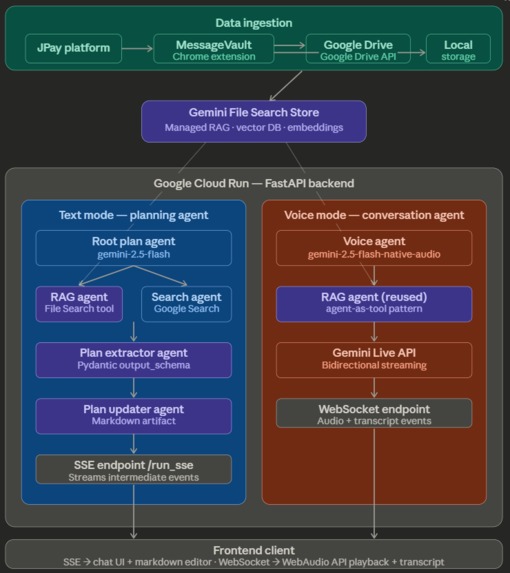
Architecture Diagram
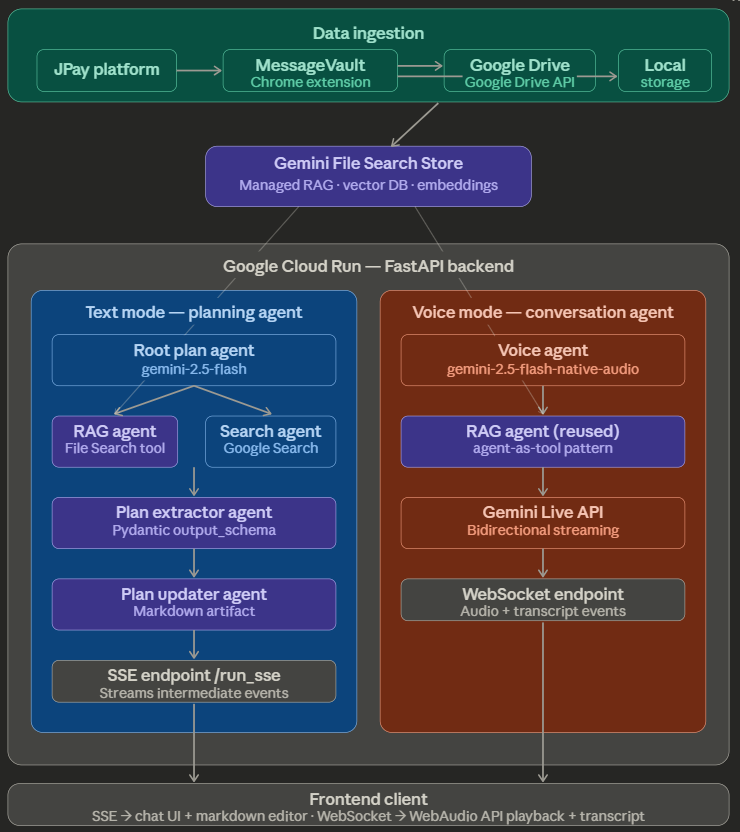
Prisoner Voice
An AI agent that helps advocates corresponding with a prisoner manage that person’s transition back to society.
Prisoner Voice offers two modes: A planning mode in which the advocate and agent collaborate to draft a reentry plan document. A conversation mode, in which the agent acts as the prisoner, allowing the advocate to converse freely with the prisoner about their incarceration and reentry.
In order to accomplish this, the Prisoner Voice agent grounds itself in the correspondence an advocate has received from the prisoner.
Because visits and calls are heavily restricted for incarcerated people, most correspondence happens electronically over platforms such as JPay. As such, this corpus of documents often offers a complete view into a prisoner’s life, spanning aspects from logistical and legal questions to educational efforts, character reflections, and hopes, dreams, and fears for reentering society.
Prisoner Voice allows an advocate to upload this unstructured, information rich data to Gemini File Search and sets up a RAG pipeline such that it can continuously reference correspondence throughout the re-entry planning process.
Technologies Used
Google ADK to manage calls to sub-agents, external tools, and voice streaming.
Pydantic to define data models which the plan generation agent must abide by in order to obtain a consistent organization/format of reentry plan documents.
Gemini Live API for realtime bi-directional audio interaction (although much of the usage is abstracted away and managed by the Google ADK).
FastAPI server to expose the agent to clients, in particular:
- A SSE endpoint for text mode that supports displaying intermediate tool calls.
- A WebSocket endpoint for audio mode.
- WebAudio API to handle recording user audio input and playing agent audio output on the client.
Chrome Extension named MessageVault that helps users ingest data from JPay platform and save it to Google Drive (with Google Drive API) or local storage.
Gemini File Search Store provides a fully managed RAG pipeline including a vector database, document ingestion and chunking, and an embedding model:
- Note that for demo purposes the file search store is populated with synthetic data through manual execution of a Jupyter Notebook.
- In practice our chrome extension would automatically upload any documents it extracts from JPay to the file search store but due to privacy concerns and time constraints this automation has not been implemented for the hackathon.
Gemini Developer API to access models:
- gemini-2.5-flash for all text mode agents
- gemini-2.5-flash-native-audio-preview-12-2025 for bidi audio agent
Data Sources
The product for the hackathon uses an anonymized synthetic data source which is heavily based off of a real 5-year long correspondence between team members, extracted from JPay using the MessageVault chrome extension.
The methodology to generate the synthetic data was to manually identify important topics from the correspondence and from the recollection of the team members and prompt GitHub Copilot to generate letters of about 500 words containing references to those topics throughout.
Synthetic data was chosen over uploading the real correspondence to Gemini File Search Store due to privacy concerns and lack of time to properly research File Search Store privacy policy.
Findings & Learnings
Phase 1: Document Store
After getting a basic understanding of what Google ADK was, the first main challenge was to figure out how to provide an agent a RAG tool.
We saw that ADK had a built-in VertexAiRagRetrieval tool but that required developing on VertexAI and managing GCP resources. For the sake of development velocity our team wanted to develop on Google Developer API which only requires having an API key. For this reason we decided to go with Gemini File Search instead.
Uploading our synthetic data to the file search store was straightforward. However, we learned of an interesting technique to use Gemini to create summary metadata for each message before upload. This would help complement the semantic search and reduce overall latency in RAG tool calls from the model.
Phase 2: Create FileSearchTool
Our first major challenge was realizing that Gemini File Search is not a built-in ADK tool. We realized it would be necessary to create a custom tool.
The custom tool is FileSearchTool, derived from BaseTool, and overrides the process_llm_request function. Inside this function we have access to the LlmRequest that is going to the Gemini API.
A key thing to understand was that Gemini API is a “lower-level construct” than the ADK. So by the time process_llm_request was being called, the ADK had already parsed and built an LlmRequest object and was ready to hand it off to the Gemini API.
Our override of process_llm_request was essentially middleware whose role was to work at the Gemini API level and manually append a new tool of FileSearch type that pointed at our file store to the ADK constructed LlmRequest object.
Phase 3: Structure the planning agent
The next design question we had was how to structure the planning agent. We knew that the planning agent needed at least a search tool and a rag tool but weren’t sure whether to use the sub-agent or agent-as-tool pattern.
We learned that in the sub-agent pattern the entire execution is handed off to the sub-agent which takes over until it decides to hand off execution to the main agent (or one of its own sub-agents). Since we wanted the planning agent to be able to synthesize results from both the search and rag tool before delivering a response we realized this pattern wouldn’t work for us.
In contrast, the agent-as-a-tool pattern keeps execution with the current agent and just receives the child agent’s response as if it is the return value of a function which we concluded was more appropriate for our scenario.
Our test conversations at this stage revealed promising results where we were able to make multiple queries in which the planning agent executed both the search and rag tools and then returned a synthesized response.
Phase 4: Introduce a re-entry plan artifact
With conversations working the question became how to capture the key details of those conversations into a coherent and organized re-entry plan.
We decided we wanted the following UX: on a completely fresh prisoner the agent starts by looking through the correspondence and drafting a re-entry plan. Then, the user can either manually edit the plan or have the agent proactively update the plan through conversation.
The first major challenge was how to draft the initial reentry plan such that it had a deterministic format. The agent could not provide wildly different initial plan documents to the user for each prisoner as that would be far too jarring of a UX.
We first tried to prompt engineer the plan format into the planning agent but still received inconsistent results. After some research we learned that agents can be passed an output_schema parameter which takes a Pydantic data model and enforces the agent to produce output conforming to that model. However, there was a stumbling block, agents with an output_schema parameter could not have any external tool calls which meant that we couldn’t enforce an output model on the rag agent.
To work around this issue we re-defined our plan generation architecture as follows:
- Define a PrisonerPlanContext with Pydantic.
- Define a plan_extractor_agent.
- Assign its output_schema to be PrisonerPlanContext.
- Further instruct the agent to save its output to session state through the output_key parameter.
- Provide plan_extractor_agent as another AgentTool to the main plan agent.
- Define a generate_reentry_plan tool. This is just a regular function that reads the output of plan_extractor_agent from session state and then writes a markdown artifact.
- Provide generate_reentry_plan as a tool to the main plan agent.
- Modify system prompt of main plan agent with instructions of how to use new tools:
Session Start Behavior (IMPORTANT): At the very start of every new conversation, before responding to any user message: 1. Call rag_agent: "Summarize everything in the prisoner's letters that is relevant to building a re-entry plan: their name, goals, practical needs, entrepreneurial ideas, people they mention, and how they describe themselves." 2. Pass rag_agent's full response to plan_extractor_agent for structured extraction. plan_extractor_agent will automatically save the result to session state. 3. Call generate_reentry_plan to create the plan artifact from session state. 4. Greet the user, briefly introduce who the prisoner is, summarize what the plan covers, and let them know the re-entry plan is ready to review.
The next main challenge was figuring out how to allow the agent to proactively update the plan during conversation.
Our first instinct was to create an update_reentry_plan function tool that would take in the plan section and plan text as input and use regex to find and update that section within the markdown artifact. We provided this tool to the main planning agent.
This did not yield good results. For one, since the update_reentry_plan tool was just a regular function, it was very difficult to handle cases where the agent might want to add a new section to the plan or delete a section entirely. Second, it was difficult to prevent overwrites of existing content under a section and we observed several instances of the plan agent replacing content instead of appending it. Finally, the root plan agent would regularly hallucinate calls to update_reentry_plan and tell the user the plan had been updated even though the artifact was not modified.
Attempting to fix these issues through prompt engineering started getting quite messy and we realized that giving the root plan agent the responsibility of modifying the plan artifact was not a great architecture. We also hypothesized that using an Agent to update the plan artifact instead of a function tool would provide more flexibility in terms of operations like adding new sections.
Our revised architecture transferred the responsibility of modifying the plan away from the root plan agent to a new, intermediate plan_updater_agent. The steps were as follows:
- Define a plan_updater_agent, provide it update_reentry_plan as a tool and give it instructions like the following: You will receive instructions on how to update an existing prisoner re-entry plan. The instructions will specify what new information must be added or changed based on new insights from the conversation. Your job is to decide how best to incorporate this new information into the existing plan prioritizing clarity, coherence, and organization. For each section you decide to change, prepare the modified section content and then call the update_reentry_plan tool to apply the change to the plan artifact Always invoke update_reentry_plan after preparing the final section text so the artifact is actually updated. Make sure to follow the same formatting and content rules as the original plan when making updates.
- Provide plan_updater_agent to the root plan agent as an AgentTool.
- Root agent takes in a user input and determines whether or not a proactive plan update is needed.
- If a plan update is needed root agent calls plan_updater_agent, providing a high-level overview of what needs to change and delegating the actual editing of the artifact to the plan_updater_agent.
- Add to the prompt something along the lines of: “IMPORTANT: If you haven't called plan_updater_agent then that means the plan was not actually updated.”
This architecture solved our issue of hallucinated updates and we hypothesized this was because, by splitting responsibility, the system instructions of how to update the plan were much better organized between the two agents and not being lost in a large context. We learned that in multi-agent systems, having the root agent act as a “delegator” and then splitting specific actions into sub agents was more reliable than prompt engineering a single agent to perform complex behavior.
The final question regarding the artifact was how to propagate manual user update back up to the agent’s context? Updating the artifact itself was easy enough. As long as we provided a markdown editor in our UI and provided /read_artifact and /write_artifact endpoints on our server, that issue would be solved.
However, at this stage, we started realizing that there were multiple versions of our plan living across the application and there was a danger of these versions getting out of sync. The first version was the actual artifact. Second was in the context of the root plan agent’s model, and third was the session state (created by plan_extractor_agent).
The version of the plan in session state would be stale upon the first update (user or agent). The fix for this was trivial, just reset the state to null after generate_reentry_plan runs.
The artifact itself was our actual source of truth on the contents of the plan.
The plan living in the context of the model could become stale from a manual user edit. There was also the danger that, in long running conversations, the plan details may become buried in conversational context and the model would start hallucinating when asked about the plan.
Our team decided to solve this issue by taking advantage of the before_model_callback provided by the ADK. We realized that injecting the plan artifact into the model’s context on every single message would solve both the manual user update de-sync issue and the long running context issue.
During testing, we did not find the latency of the agent was affected too much by this and decided it was an adequate solution.
Our key takeaway was that injecting a shared artifact into model context on every turn proved to be a reliable way to maintain consistency between user-editable state and agent-visible state in a multi-agent system
Phase 5: Building out a UI
Up until this point we had been developing with adk web but the introduction of our markdown artifact necessitated having a custom UI that allowed the user to always see and edit the reentry plan.
We decided to switch over to running our agent with adk api_server. We started off with hitting the /run endpoint which gave us back an array of ADK events. Using the adk-samples repo as a reference, we implemented logic to parse these events and figure out their semantic meaning (e.g. tool call, tool response, final agent response, etc.)
However the UX of hitting the /run endpoint wasn’t to our liking. For scenarios where the agent was calling multiple tools the user was left waiting without feedback for up to a minute. And then, when the agent would finish they would get a ton of messages all at once, immediately overwhelming them.
We decided to switch over to hitting the /run_sse endpoint so that we could parse and display intermediate events on the fly, providing the user more feedback as the agent ran a request. The main challenge migrating to the SSE endpoint was realizing that we were no longer receiving structured JSON responses from the api but, instead, a stream of bytes. We learned that we would need to iterate over Response.body using a for-await-of pattern and use a TextDecoder to decode each chunk. Each chunk had the form “data: {}/n/ndata: {}/n/n…” so we had to split on “/n/n”, strip off the “data: “ prefix, at which point parsing the remaining text as json yielded our event. Our final design decision during this phase was to format tool messages as collapsible bubbles and only display a small header by default. By only displaying the final message agent message as a regular message bubble, this significantly cleaned up the chat window for the user.
Phase 6: Real-time voice interaction
With our plan agent complete we moved on to the final major challenge, adding real-time voice interaction through the Gemini Live API.
At the start of the challenge we had envisioned that an advocate would be able to interact with the plan agent through both text and voice modalities, essentially being able to hear about and update the reentry plan through interactive speech.
However, our experience with the text mode of the plan agent and latency of tool calls cast doubt on this initial design. Queries involving multiple tool calls lasted seconds, far too long to provide a conversational experience.
We decided to pivot our design and build a separate conversation mode, in which the agent acts as the prisoner, allowing the advocate to converse freely with the prisoner about their incarceration and reentry. In this design, the voice agent would only need to use the rag tool, significantly reducing latency and allowing a conversational experience.
We started developing the voice agent through adk web using the gemini 2.5 native audio model. It wasn’t long before we ran into our first gotcha. Initially we tried passing our custom file search tool directly to the voice agent but this resulted in the model crashing and stopping its response mid-conversation.
We hypothesized that the file search tool may only work with a text modality model and that we needed to follow the agent-as-tool pattern again, passing the rag_agent to the voice agent. This resolved the issue and testing confirmed that conversation could proceed with acceptable latency.
With the rag_agent in hand, prompt engineering alone was enough to get the voice agent to closely mimic the tone and voice present in the prisoner’s correspondence.
In this instance we saw that the ADK was quite powerful, allowing us to re-use previously defined agents to get our voice agent up and running with minimal effort even though it was in an entirely different modality.
The next roadblock was figuring out how to stream bi-directional audio in our custom client. Unfortunately the FastAPI server from ADK does not provide a websocket endpoint, programmers must either define their own server from scratch or wrap the ADK server with a custom WS endpoint.
Because our team did not want to lose out on the ADK provided endpoints we decided to go with the strategy of wrapping the ADK server with our own endpoint. The challenge here is that the ADK server defines its own SessionService and Runner internally, neither of which are publicly accessible.
However, our WebSocket endpoint needed to define a new RunConfig to enable bidirectional streaming, which required its own SessionService and Runner. The implication was that our voice agent would necessarily have a separate session store from the text planning agent.
We weren’t sure if having a separate session is exactly what we wanted but, at this point, were running out of time in the Hackathon and decided to accept the trade-off for the time being. Thus we devised the following solution:
- Create two Runners, one for the reentry_runner and one for the voice_runner.
- Then, define an AdkWebServer object and pass it the reentry_runner (essentially overriding its default runner creation behavior). This way we get all the ADK provided FastAPI endpoints for our test planning agent and don’t have to re-implement them.
- Defined a custom websocket endpoint within which we use the voice_runner independently.
- Using the adk-samples/bidi-demo project as a reference, we simply forwarded all downstream events back to the client which used the WebAudio API to play agent audio output and display audio transcripts.
Unfortunately, due to time constraints, we were unable to successfully implement mid-conversation interruptions on our voice agent. Native-audio models natively detect when the user has interrupted the model mid-speech and the ADK is supposed to forward that back to clients in the form of an interrupted event.
However, we found that these interrupted events were not being delivered reliably. After investigation we found an open GitHub issue in the ADK repository documenting this exact behavior. Given time constraints we made the decision to leave this as a known limitation rather than attempt a workaround.
Built With
- adk
- filesearchstore
- gemini
- geminiliveapi

Log in or sign up for Devpost to join the conversation.