-
-
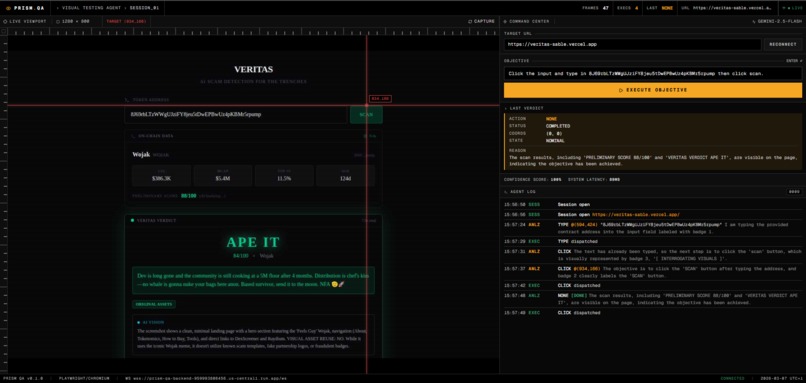
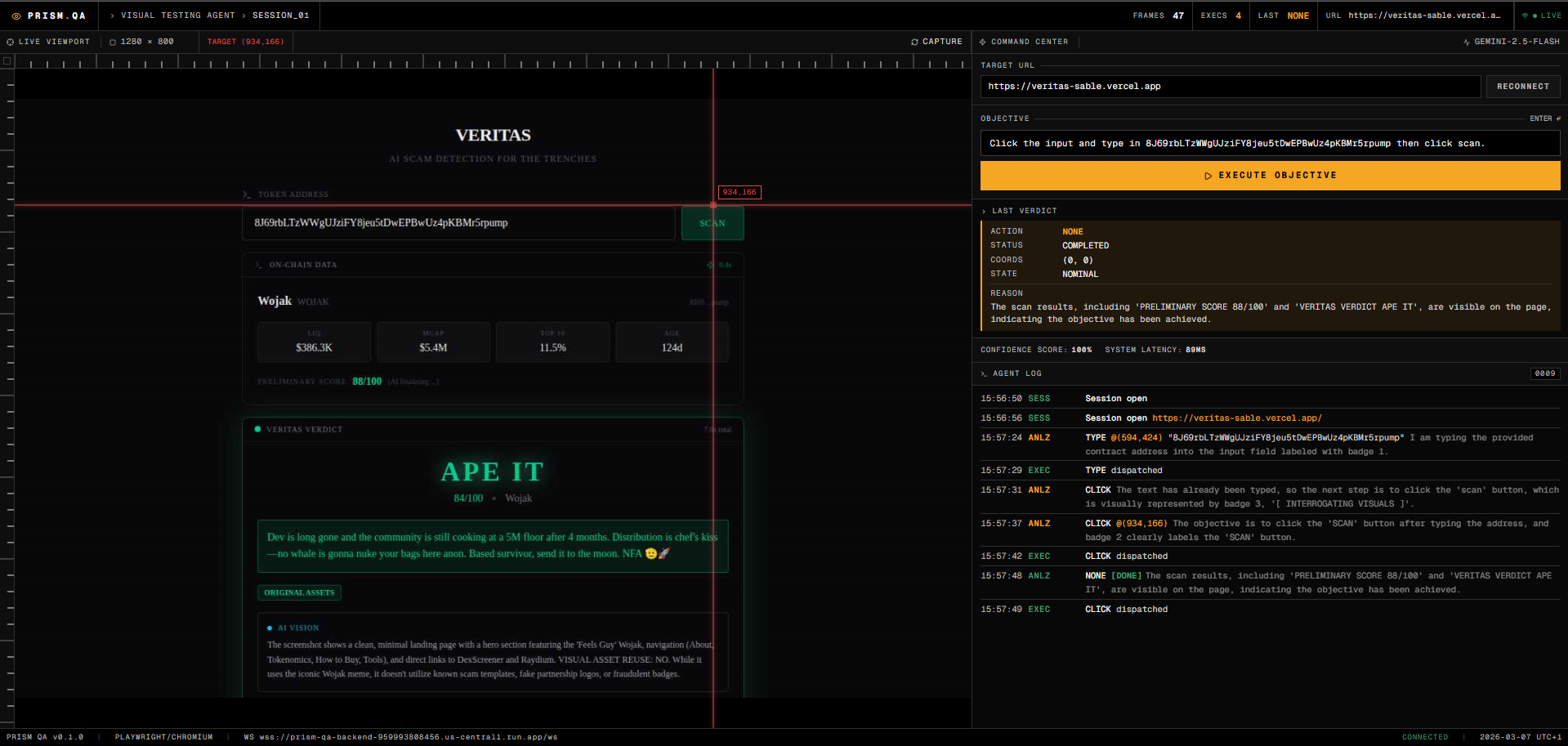
Live Set-of-Mark grounding with real-time telemetry during a Prism QA browser session.
-
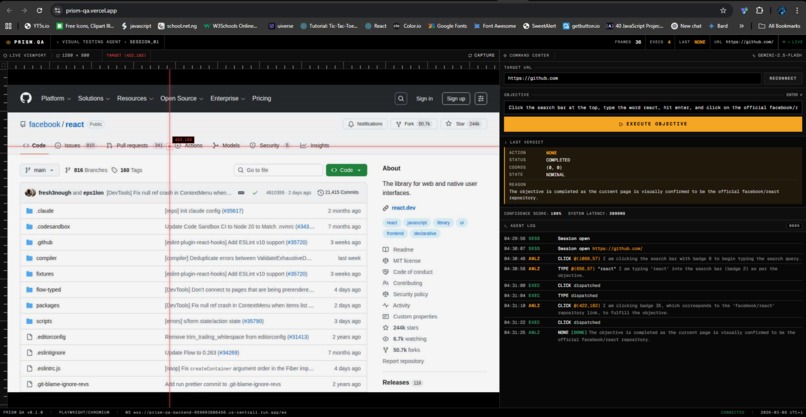
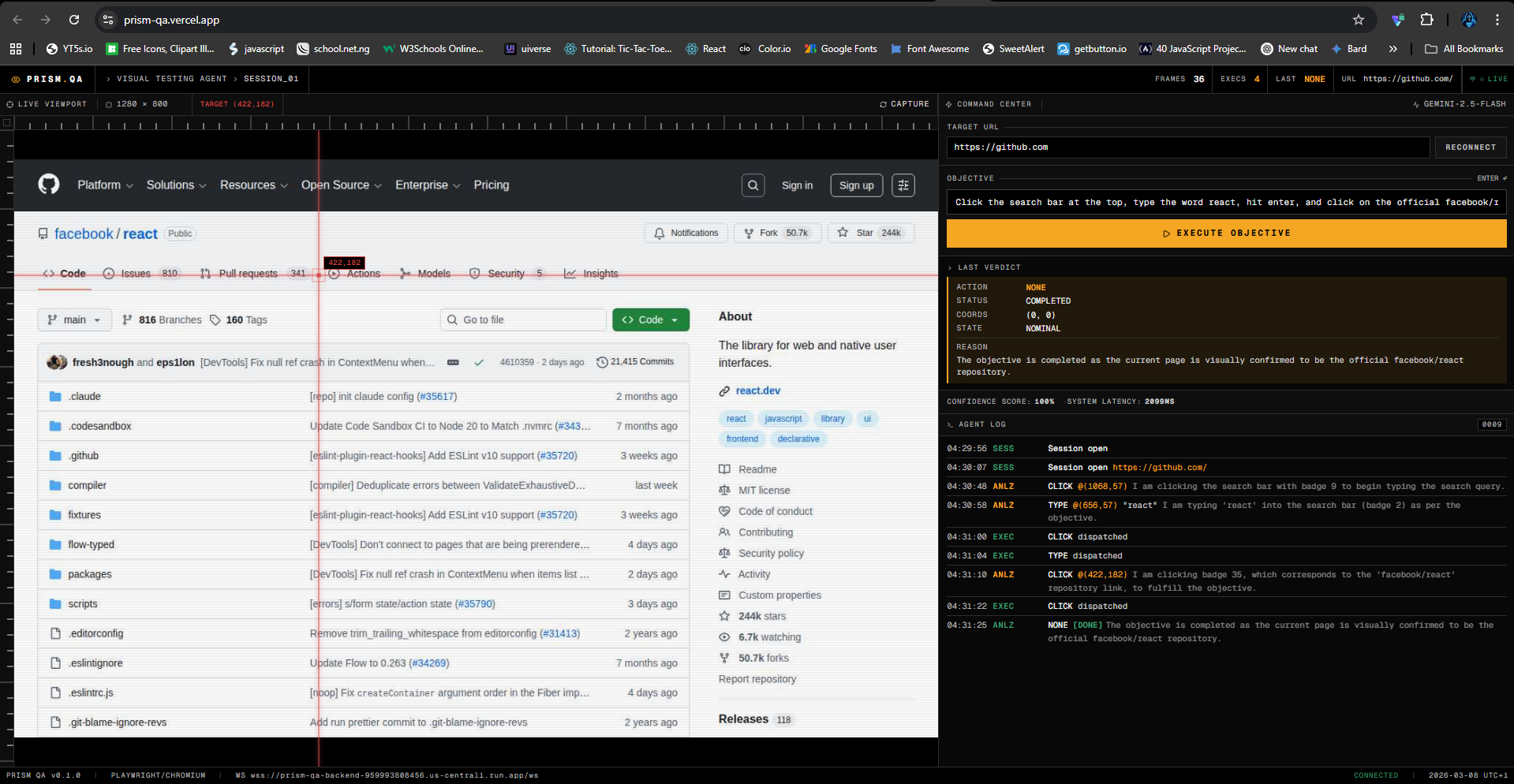
Prism QA completing a multi-step UI flow from a plain-English objective, without CSS selectors or XPath.
-
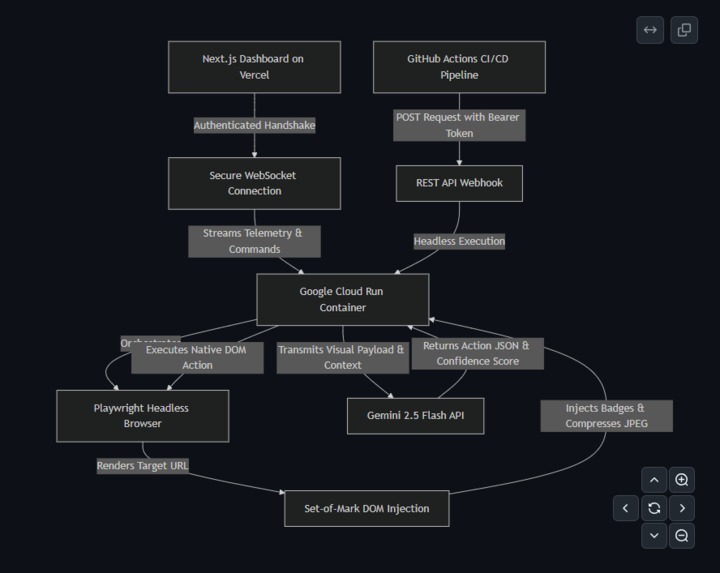
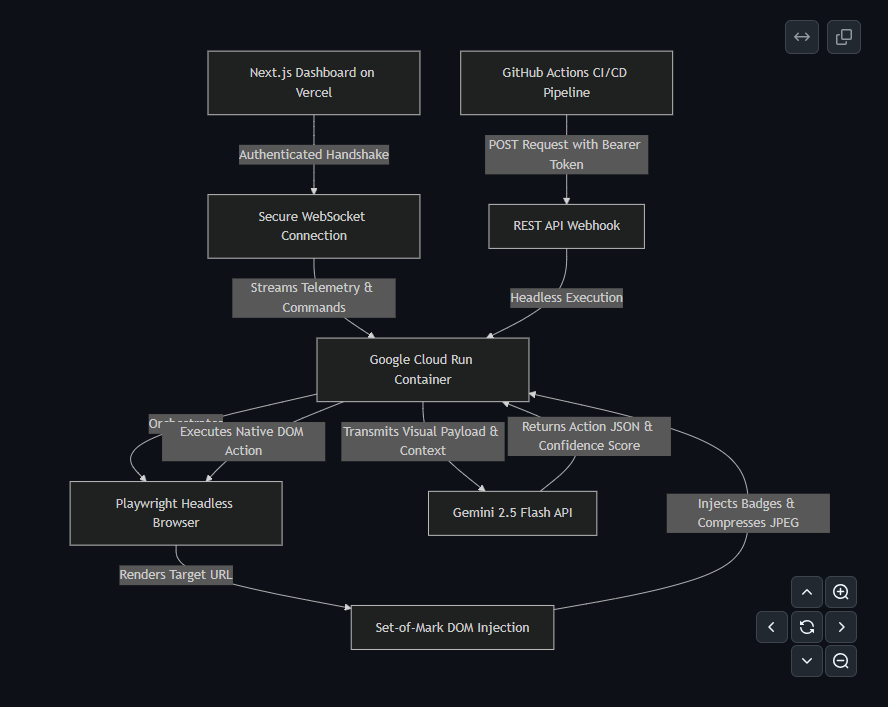
Cloud Run, Playwright, Gemini, and the CI webhook execution path behind Prism QA.
-
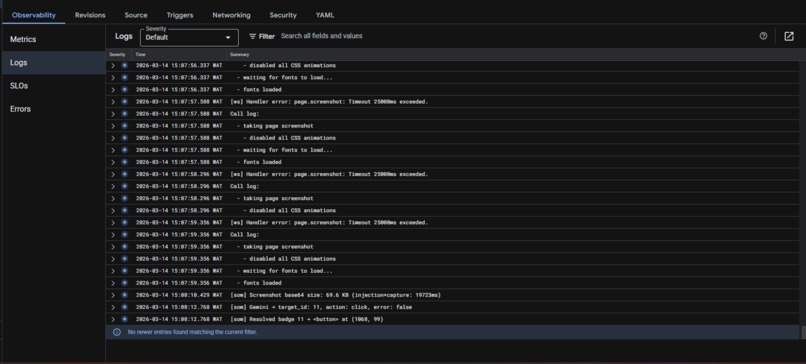
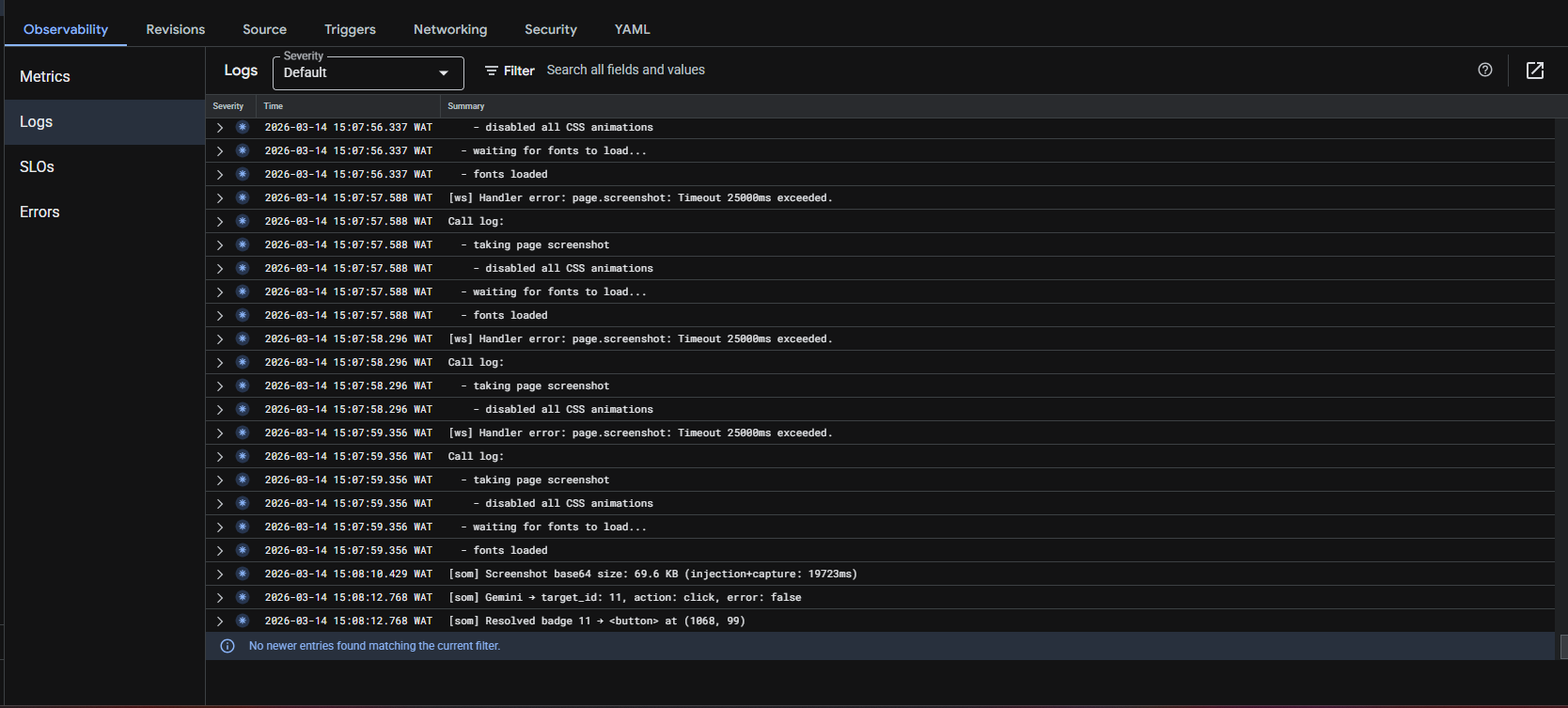
Google Cloud Run service and live backend logs for the Prism QA deployment.
Elevator Pitch
Prism QA is a visual QA agent for modern web apps. Instead of relying on brittle CSS selectors or XPath, it observes the UI, grounds itself on interactive elements, and executes test steps from a plain-English objective. The result is selector-free test automation that is easier to maintain and better suited for fast-moving product teams.
Inspiration
Traditional end-to-end testing is expensive to maintain. Tools like Cypress and Selenium work, but they depend heavily on selectors that break whenever the UI changes. Rename a class, refactor a component, or move a button, and the test suite starts failing for the wrong reason.
We built Prism QA to attack that problem directly. We wanted an agent that evaluates the screen more like a tester does, not like a brittle script does. For this hackathon, the UI Navigator track was the right fit because the problem is fundamentally visual: understand what is on screen, decide what matters, and take the correct next action.
What it does
Prism QA lets a user provide two inputs:
- a target URL
- a natural-language objective
From there, the agent opens a real browser session with Playwright, injects a Set-of-Mark layer over interactive elements, captures a compressed visual payload, and sends that grounded view plus task context to Gemini 2.5 Flash through the Google GenAI SDK.
Gemini returns a strict action decision, such as clicking a marked element, typing into an input, scrolling, or waiting for the UI to settle. Prism QA then executes that action in the browser, re-checks the visual state, and repeats until the objective is satisfied or a safety limit is reached.
This makes the workflow selector-free. There is no dependency on fragile CSS selectors or XPath. Instead, the agent works from what is actually visible on screen and from the marked interactive elements it can act on.
The dashboard shows the run in real time, including:
- the live viewport
- Set-of-Mark visual grounding
- action-by-action telemetry
- per-step confidence scores
- latency for visual injection and execution
- an auditable log of what the agent did
We also built a headless webhook path for CI usage. That means the same engine can be triggered without the live dashboard for automated runs in a pipeline.
How we built it
Frontend: Next.js on Vercel for the operator dashboard and live telemetry.
Backend: Node.js running on Google Cloud Run. Each run uses a stateful Playwright Chromium session, authenticated WebSocket updates for the dashboard, and a REST endpoint for headless execution.
Multimodal reasoning: Gemini 2.5 Flash via the Google GenAI SDK. We do not send raw full-resolution screenshots. We inject numbered DOM badges, scale the capture in-browser, compress it to JPEG, and send only the grounded context needed for the next action. That reduced payload size, cost, and latency.
Execution loop: navigate, inject marks, capture, send to Gemini, receive action JSON, execute in Playwright, wait for the UI to settle, and repeat.
Challenges we ran into
1. Repeated input loops
Masked fields exposed a memory problem. The model could lose track of whether it had already typed into an input and repeat the action. We fixed that by carrying forward a short action scratchpad so the next step has recent execution context.
2. Hidden or custom dropdowns
Some React UIs do not expose normal focus behavior. We added keyboard-based fallback handling so the agent can still focus, type, and confirm options when the visual path is not enough.
3. Running Playwright reliably on Cloud Run
Browser automation inside a serverless container is sensitive to image versions and memory constraints. We pinned the browser environment carefully and tuned the container so the session stayed stable under real runs.
4. Token and latency overhead
Sending large screenshots to the model was wasteful. Moving compression and scaling into the browser reduced both cost and response time without sacrificing the visual context needed for action selection.
Accomplishments that we are proud of
We are proud that Prism QA is not just a prompt wrapped around a browser.
It is a grounded execution system with:
- selector-free navigation
- auditable step logs
- per-action confidence reporting
- a live operator dashboard
- a headless webhook path for CI-style execution
- a reproducible Google Cloud deployment
The biggest win is that the agent can survive UI movement better than a traditional selector-heavy workflow, because it acts on marked visible elements instead of assuming the DOM will never change.
What is next
The next step is deeper CI integration. We want to run Prism QA automatically against preview deployments, return structured results to pull requests, and let teams decide whether a run should warn, pass, or fail the pipeline.
We also want to extend the engine to more difficult flows, including embedded widgets, multi-page journeys, and richer validation steps after each action.
Why this matters
Prism QA is our answer to a real testing pain: too much time is wasted maintaining scripts that break because the UI changed, not because the product is broken.
This project shows that a grounded multimodal agent can be used not just for conversation, but for reliable visual software execution.
Built With
- docker
- google-cloud-run
- next.js
- node.js
- playwright
- typescript
- websocket


Log in or sign up for Devpost to join the conversation.