Inspiration
Buying something online usually means a dozen tabs: the same product at several retailers, coupon sites full of dead codes, and a nagging question: is this actually a good price, or was it cheaper last month? Shoppers end up either overpaying or spending more time than the savings are worth.
AI agents can do this busywork for you. But an agent that touches your money needs two things most demos skip: numbers it didn't make up and a hard stop before it pays. We wanted to build a shopping agent that does the whole research-to-checkout loop and keeps the human in charge of the one step that matters. PayPal is a natural fit for that last step.
What it does
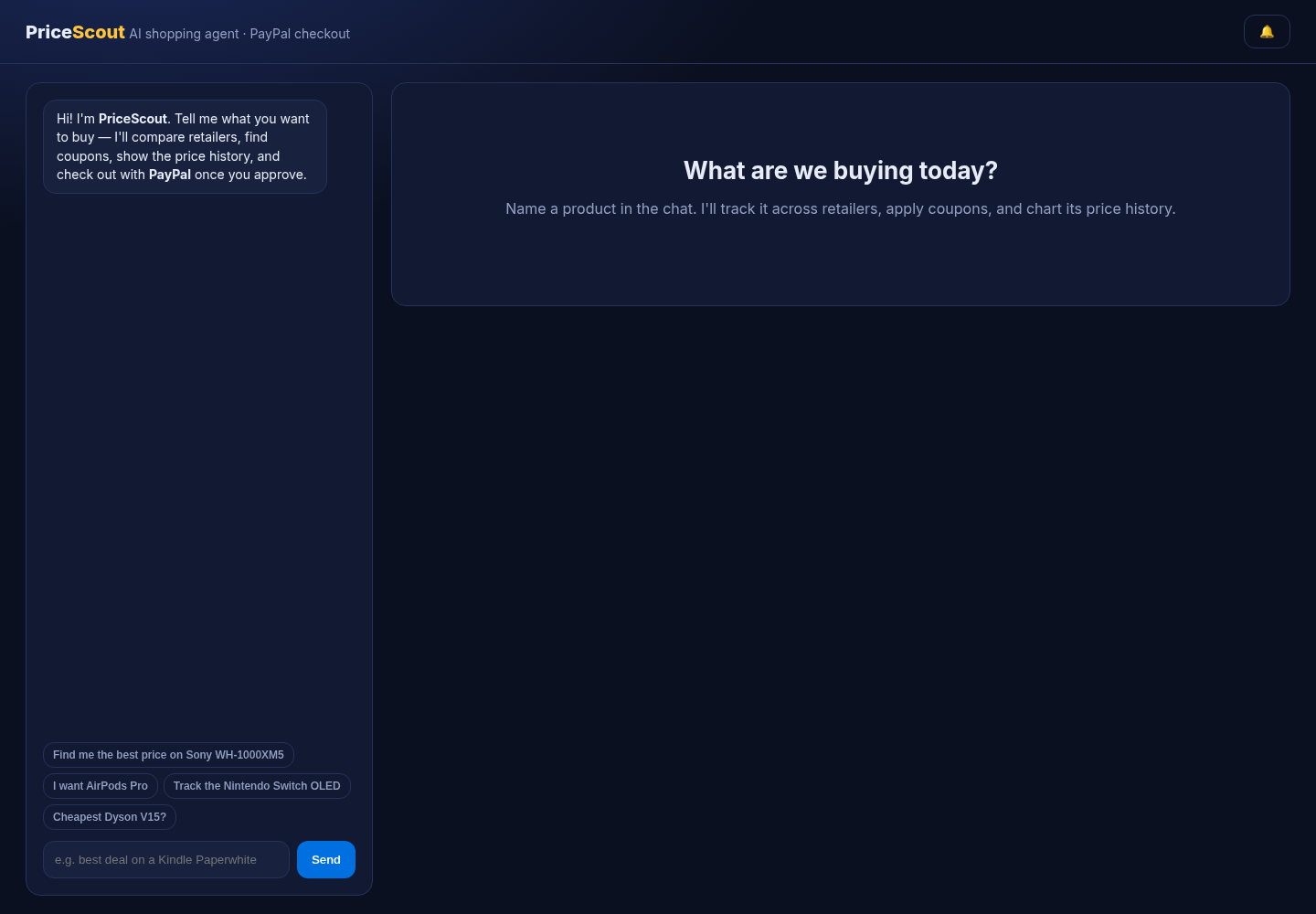
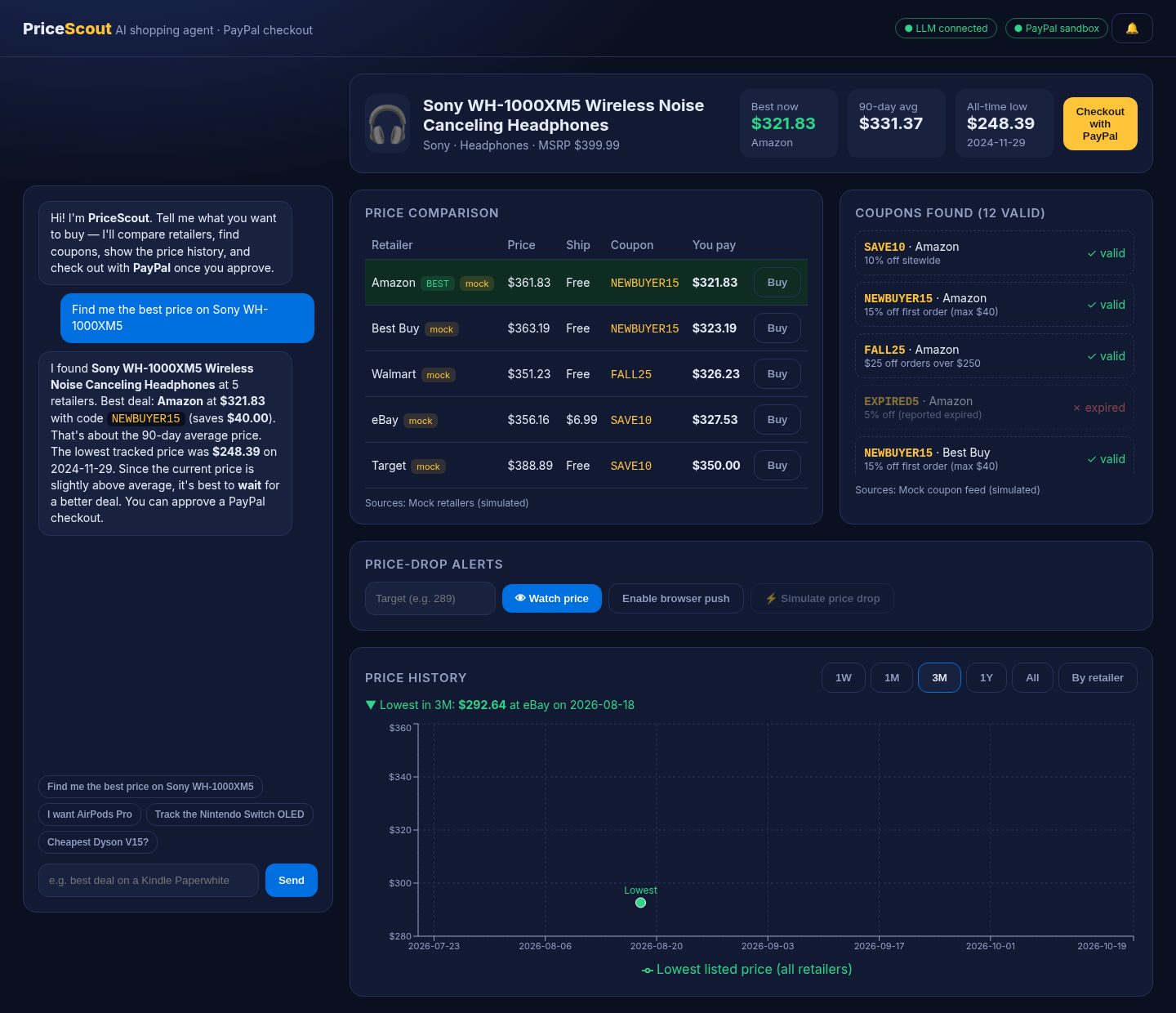
You chat with PriceScout the way you'd talk to a friend who's good at finding deals: "Find me the best price on Sony XM5s" or "Cheapest Dyson V15?"
- Identifies the product. An LLM maps free-form requests (nicknames, partial names, typos) to a specific product in the catalog.
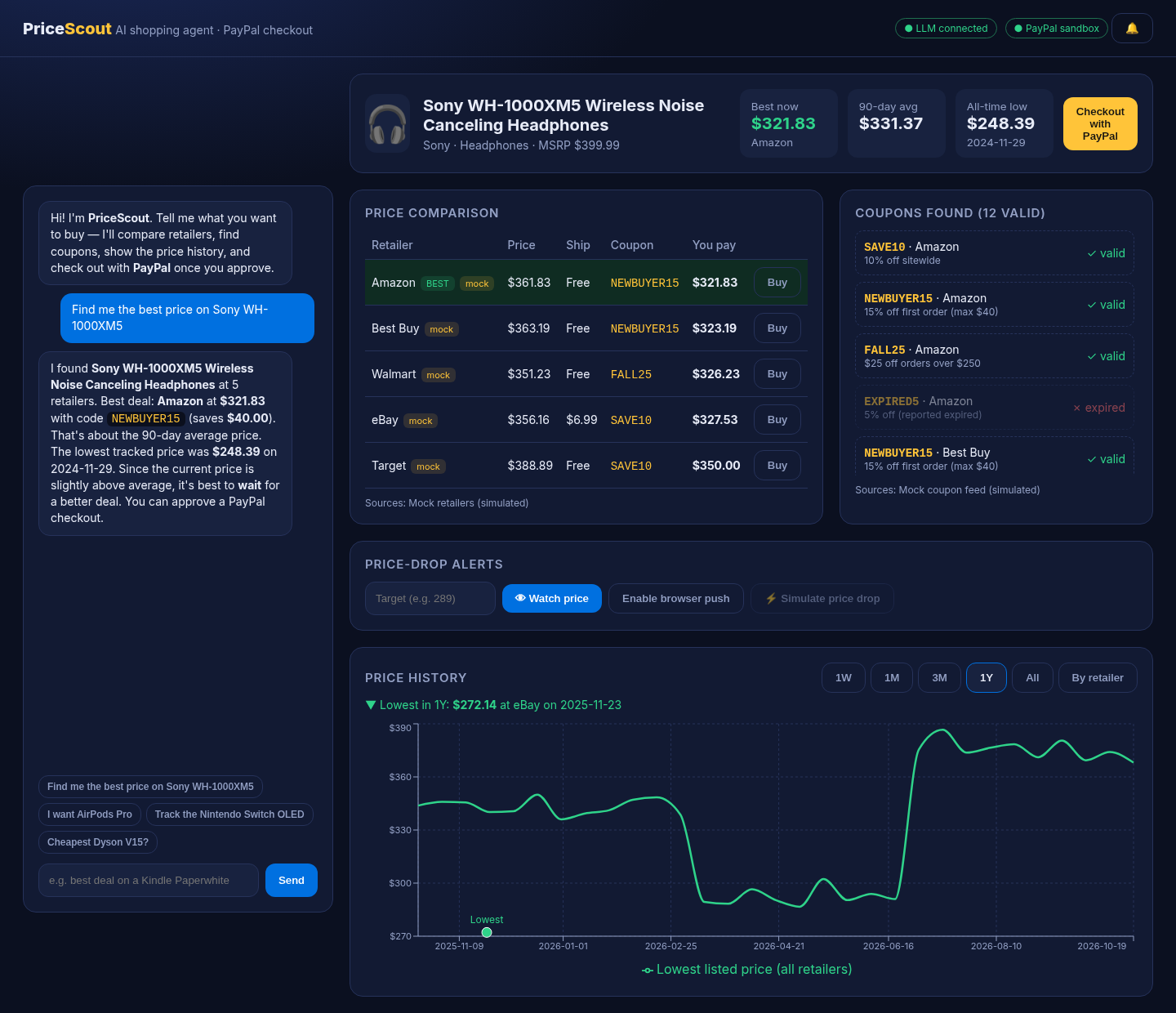
- Compares retailers. It pulls offers from multiple retailers (Amazon, Best Buy, Walmart, Target, eBay in the demo) and ranks them by effective price: item price + shipping − best valid coupon, with in-stock offers first.
- Finds and validates coupons. It applies each retailer's coupon codes against real rules (minimum spend, percentage caps, free-shipping codes) and flags expired ones, so you see the price you'll actually pay, not the sticker price.
- Shows price history. An interactive line chart with 1W / 1M / 3M / 1Y / All ranges plots the best price over time (or every retailer's price via a "By retailer" toggle) and marks the lowest price in the selected range, with its date and retailer.
- Gives a buy-or-wait recommendation. The agent compares today's best price with the 90-day average and the all-time low, then gives a short verdict: buy now, or wait because it's been cheaper before.
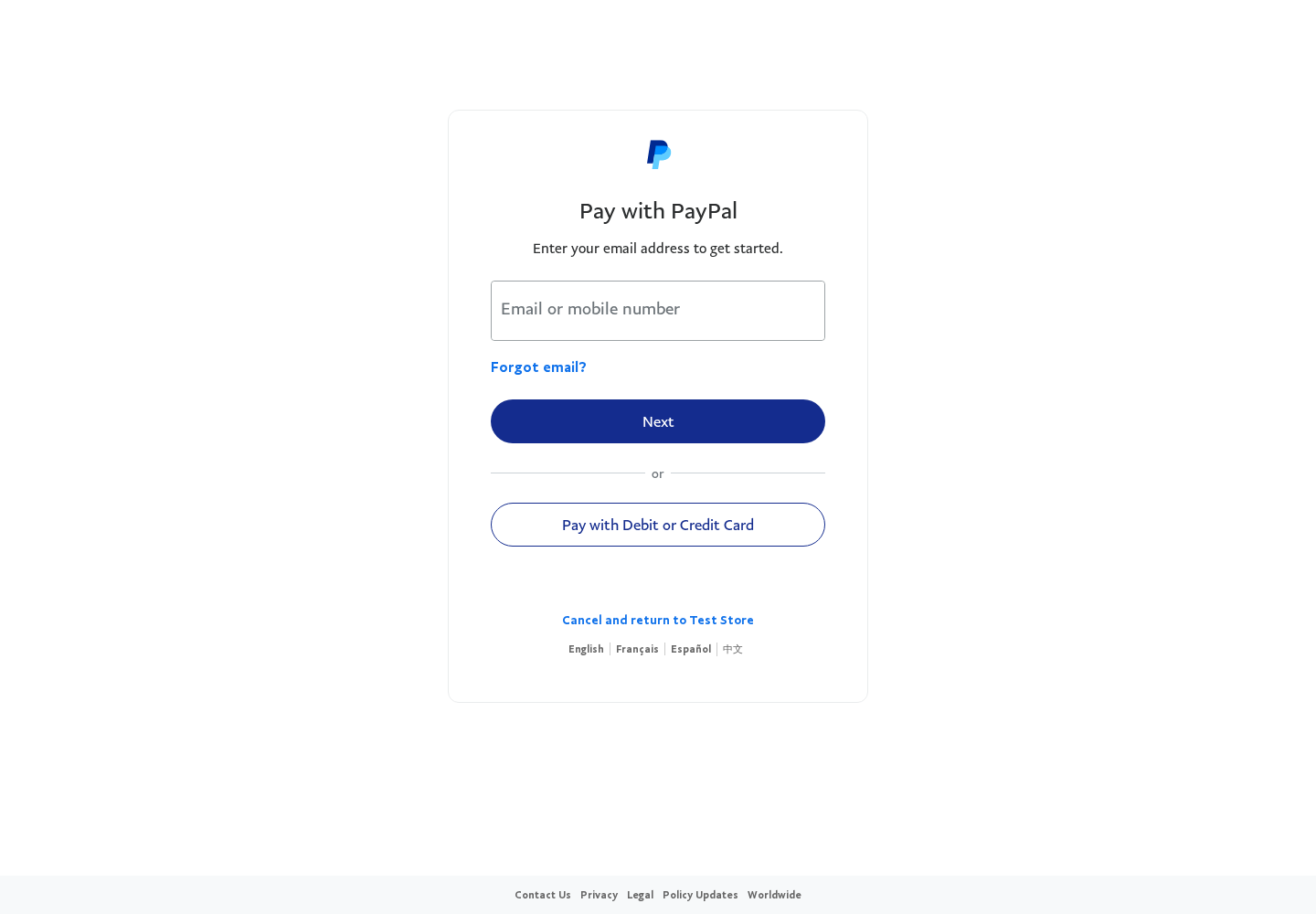
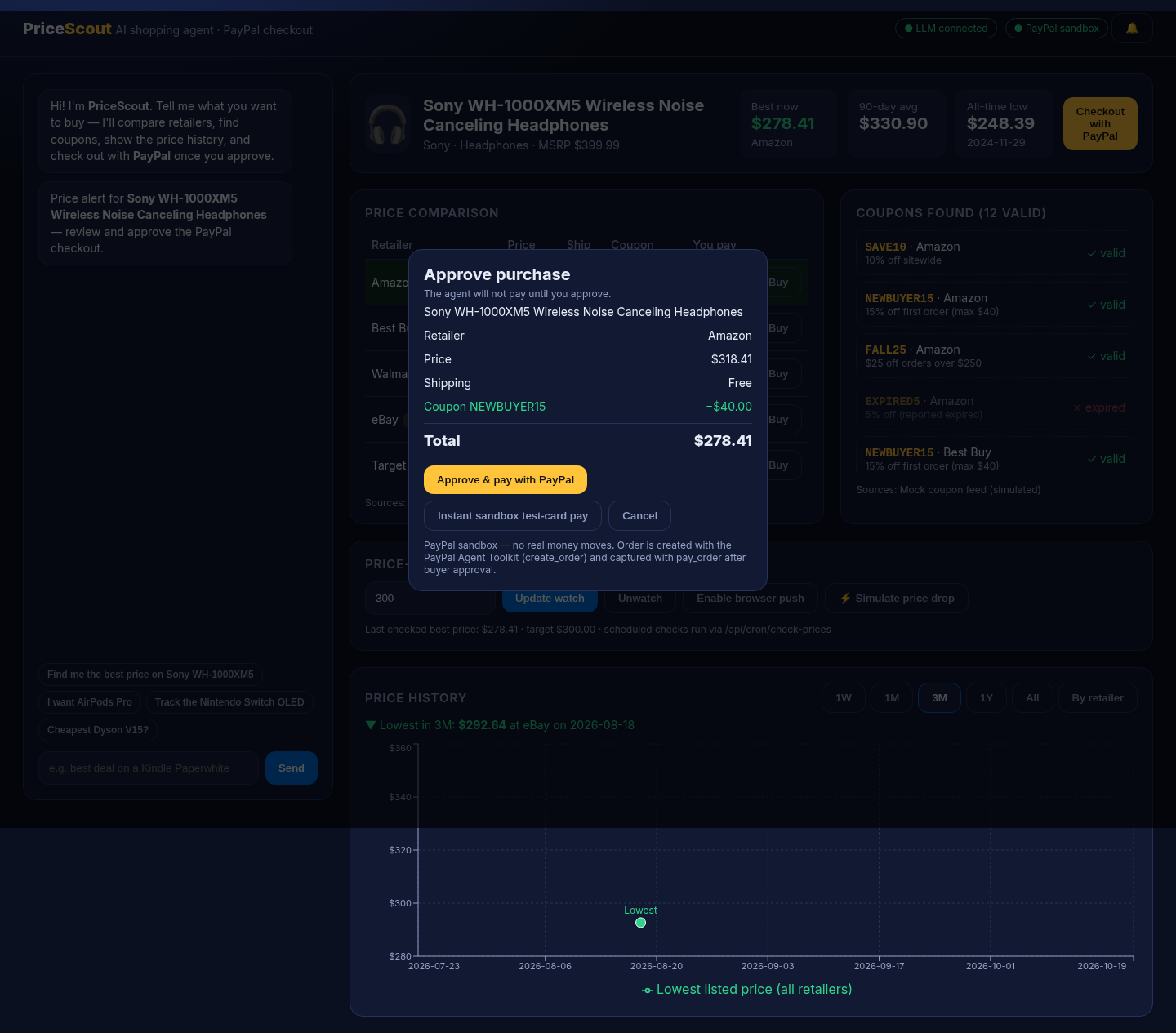
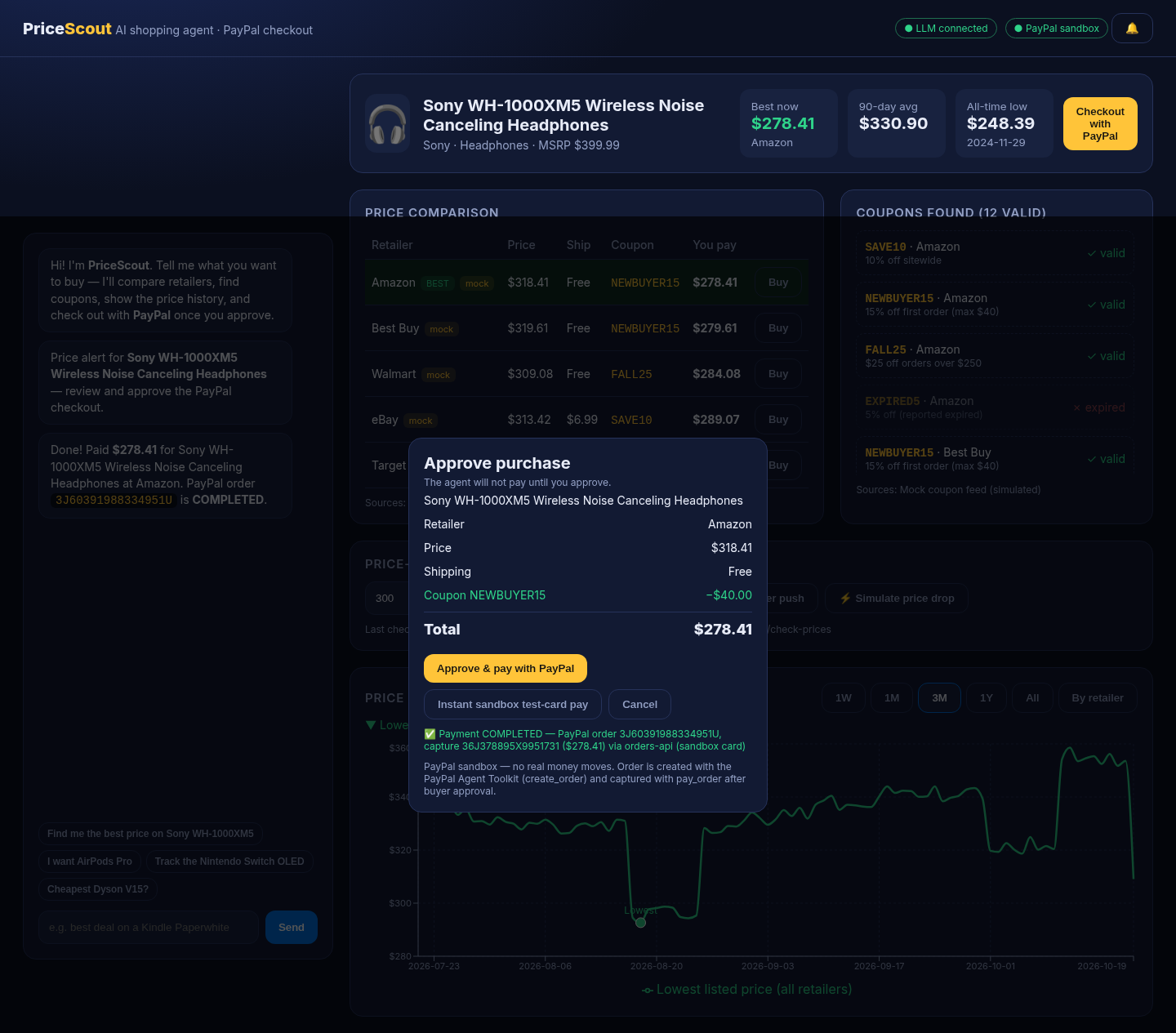
- Checks out with PayPal only after you approve. Say "buy it" or press Checkout with PayPal. PriceScout shows an itemized approval card (price, shipping, coupon discount, total). Nothing is charged until you press Approve & pay with PayPal. You're sent to PayPal to approve, then the order is captured and the confirmation shows the PayPal order ID and capture ID.
Built-in safeguards
- Explicit approval is enforced on the server, not just in the UI. Checkout endpoints reject any request without
approved: true(HTTP 403). - Server-side re-pricing. The client sends only a product ID and retailer. The server recomputes price, shipping and discount before creating the PayPal order, so amounts can't be tampered with in the browser.
- The AI can't invent prices. The LLM only writes the recommendation from data the app passes it, and is told to use only that data. Every number on screen comes from the deal engine, not the model.
- Sandbox only. No real money moves.
Price-drop alerts
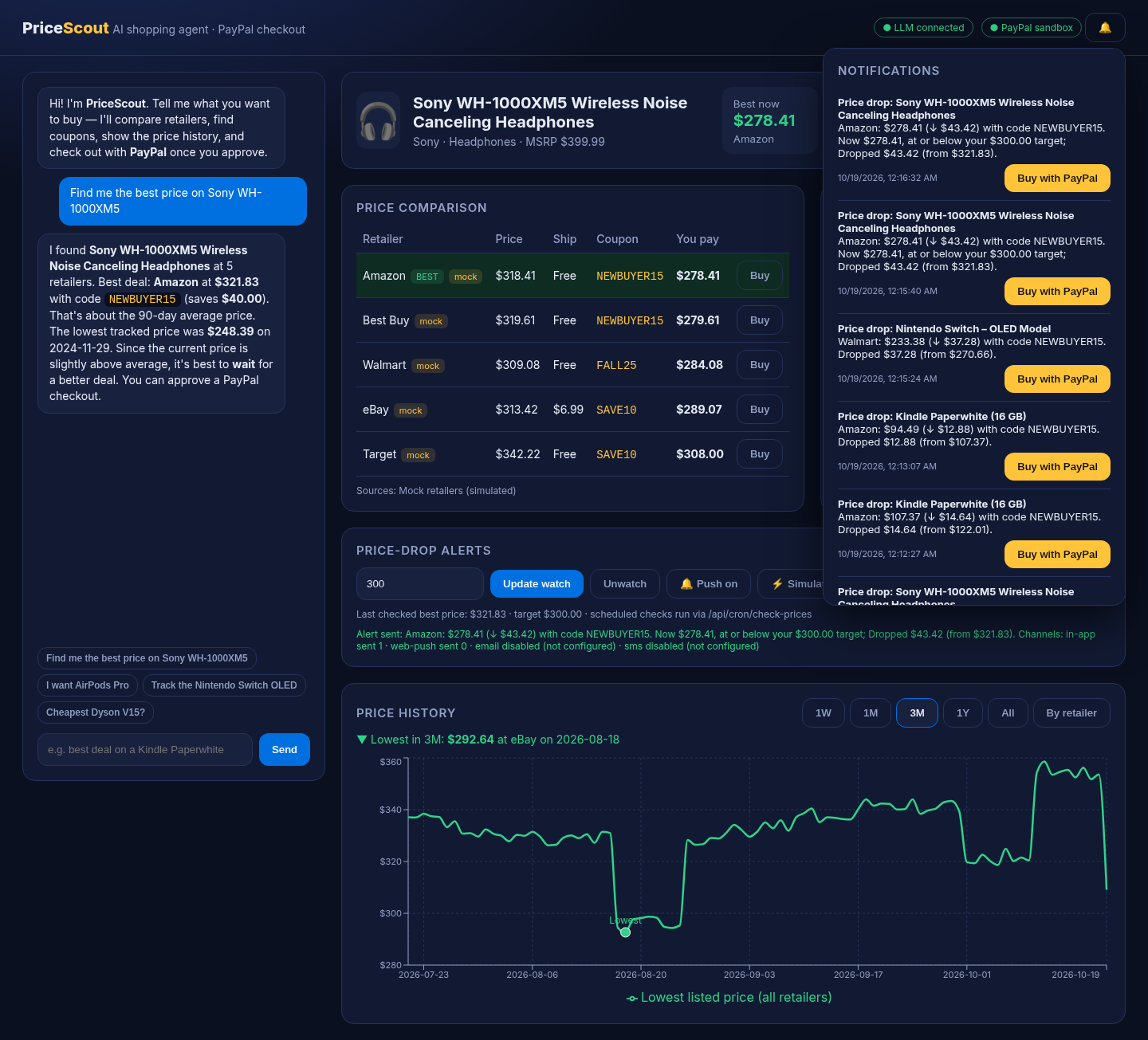
Set a target price on any tracked product and PriceScout watches it for you. When the effective price drops below your target, it alerts you on every channel you've enabled:
- Email through Resend
- Browser push through Web Push (VAPID), even when the tab is closed
- SMS through Twilio (optional; turns on when Twilio credentials are set)
- In-app notification center with a history of every alert
Price checks run when you call POST /api/cron/check-prices with a bearer secret, so any external scheduler can trigger them. The app also has a "Simulate price drop" button for demos.
More features (live now)
These are built and tested (58 unit tests, production build passing), merged into master, and running on the live demo.
- Postgres storage (#3): set
DATABASE_URLfor history that survives restarts. - Auto-buy at your target price (#4): one-shot, with a monthly cap. By default it asks you to approve through PayPal. A fully automatic mode exists for the sandbox only.
- PayPal Pay Later messaging (#5): Pay in 4 and monthly estimates next to the deal.
- Price protection (#6): after you buy, PriceScout keeps watching. If the price drops within the protection window, it alerts you and drafts a price-adjustment request for you to copy. It never sends the request itself.
- Paste a link or photo (#7): drop in a retailer URL or a product photo to start tracking. Photos use a vision model when a key is set, with a filename fallback otherwise.
- AI review summaries (#8): pros, cons and common complaints next to the deal score. These are built from mock reviews.
- Monthly spending limit (#9): BUY verdicts turn to WAIT when a deal would go over your budget. Chat answers "how much have I spent?", and auto-buy never goes over the limit.
- Gift / wishlist sharing (#10): share a read-only wishlist link at
/w/<token>. A friend pays with PayPal sandbox and the item shows as gifted. - Scheduled checks: a GitHub Actions workflow calls the cron endpoint every hour, and any other external scheduler works too.
Every AI feature also works without an OpenAI key by falling back to rule-based logic.
Honest scope: what's real vs. demo data
| Component | Status |
|---|---|
| PayPal checkout (create order → buyer approval → capture) | Real, against the PayPal sandbox |
| AI product identification and recommendations | Real OpenAI calls (when an API key is configured) |
| Deal ranking, coupon rules, effective-price math | Real logic, unit-tested |
| Price-history storage, range queries, lowest-price detection | Real (SQLite) |
| Retailer prices and stock | Simulated. A deterministic mock provider generates realistic price curves (drift, flash sales, seasonal sale windows) |
| Coupon codes | Simulated. A deterministic mock coupon feed |
| Product reviews (for AI summaries) | Simulated. Mock reviews, labeled in the UI (merged, #8) |
| Product catalog | Demo catalog of 8 popular products |
| Price history | Seeded with ~2 years of simulated daily prices, then a new snapshot is stored on each lookup |
Retailer and coupon data sit behind a PriceProvider / CouponProvider interface, so live sources (e.g. retailer affiliate or product APIs) can be added without touching the agent, chart or checkout code. The UI labels mock offers and lists the data source under each table.
How we built it
Stack: Next.js 14 (App Router) + TypeScript + React 18, Recharts for the price chart, SQLite via sql.js for price snapshots and orders, Zod, Vitest for tests. Designed to deploy as a single web service on Render.
PayPal
- PayPal Agent Toolkit (
@paypal/agent-toolkit) is the main payment integration. The server sets up the toolkit with only the Orders actions it needs (create, get, capture) in sandbox mode, then calls itscreate_orderandpay_ordertools. The order carries the item, shipping cost and coupon discount as separate line-level fields, so the PayPal order matches the breakdown the user approved. - PayPal Orders API v2 (sandbox) is the fallback. If a toolkit call fails, PriceScout falls back to
POST /v2/checkout/orders(intentCAPTURE,user_action: PAY_NOW) andPOST /v2/checkout/orders/{id}/capture, with OAuth client-credentials auth and a uniquePayPal-Request-Idon each call. - Buyer approval flow: the app redirects to PayPal's approval link. On return, a
/checkout/returnpage captures the order and shows the status, order ID and capture ID. - Instant sandbox test-card pay (for judges): an optional sandbox-only path pays with PayPal's public sandbox test card, so the whole create + capture flow can be shown without a sandbox buyer login. It refuses to run in live mode.
- Graceful degradation: without PayPal credentials, checkout runs in a clearly labeled simulated mode, so anyone can clone and run the app.
- Every order (ID, product, retailer, amount, status) is recorded in the local database.
AI tools used
- OpenAI Chat Completions via the official
openaiSDK (default modelgpt-4o-mini, configurable viaOPENAI_MODEL; any OpenAI-compatible endpoint works viaOPENAI_BASE_URL). The model does two jobs:- Product identification: temperature 0, JSON-mode output. It maps free-text requests to a catalog product ID (or null).
- Deal advice: a short markdown recommendation (≤ 90 words) built only from the computed deals and price-history stats (90-day average, lowest price and date). It says whether to buy now or wait, and reminds the user that payment needs their approval.
- Deterministic fallback: if no API key is set or a call fails, PriceScout uses a fuzzy matcher and a rule-based advisor, so the demo always works. The header shows which mode is active ("LLM connected" vs. "Rule-based AI") and whether PayPal is in sandbox or simulated mode.
- Purchase intent detection: "buy it", "check out" and similar phrases move the agent from analysis to the approval step.
- AI coding assistance: Cursor (cloud agents for feature branches and reviews) and Grok Bot (local iteration, write-up, and deploy help)
Architecture (high level)
Chat UI ──► /api/chat ──► OpenAI (identify) ──► Deal service
                                                 ├─ Price providers (mock, pluggable)
                                                 ├─ Coupon providers (mock, pluggable)
                                                 ├─ Deal engine (effective price, coupon rules)
                                                 └─ SQLite price history (snapshots, 90-day avg, all-time low)
                          ◄── OpenAI (advise, grounded in computed data)
Price chart ──► /api/history?range=1W|1M|3M|1Y|All
Approve card ──► /api/checkout/create (approved:true, server re-prices)
                  └─► PayPal Agent Toolkit create_order  (fallback: Orders API v2)
             ──► PayPal approval ──► /checkout/return ──► /api/checkout/capture
                  └─► PayPal Agent Toolkit pay_order     (fallback: Orders API v2 capture)
Challenges we ran into
- Keeping the AI honest about money. LLMs are good at sounding confident about prices. We split the work: deterministic code computes every number, and the model only explains and recommends from that data. A rule-based fallback covers the case where the model is unavailable.
- Making the agent autonomous but not too autonomous. The agent does the research on its own, but payment is gated by an explicit approval that the server enforces. The order total is recomputed server-side rather than trusted from the client.
- Matching PayPal's order to the user's breakdown. Getting item cost, shipping and discount to line up with what the user approved, and keeping a fallback path through the raw Orders API when the toolkit call fails.
- A demo judges can run end to end. PayPal's buyer-approval redirect needs a sandbox buyer account. We added a sandbox-only test-card path and fully simulated modes so the app works with or without credentials.
- Realistic demo data without real scraping. We built a deterministic price simulator with sale events and flash deals, so the history chart and "lowest price" highlight behave like real data and come out the same on every run.
Accomplishments that we're proud of
- A complete agentic commerce loop: natural-language request → product identification → multi-retailer comparison → coupon application → price-history analysis → buy/wait advice → approved PayPal checkout → captured payment with a confirmation ID.
- Human-in-the-loop payment enforced on the server, with server-side re-pricing. Safety is part of the architecture, not only the UI.
- The PayPal Agent Toolkit as the payment layer, with a robust Orders v2 fallback.
- A price chart that answers "is this a good price?" at a glance, with the lowest price, its date and the retailer highlighted for any range.
- The app runs anywhere: with or without OpenAI and PayPal credentials, and the UI always shows which mode it's in.
- Core logic (product matching, coupon rules, deal ranking, history ranges, persistence, simulated checkout) is covered by unit tests.
What we learned
- Agentic commerce is mostly a trust problem. Users accept an agent that spends money when every number is traceable and the final "yes" is theirs.
- The PayPal Orders model (create → approve → capture) fits human-in-the-loop agents naturally: the approval step is the consent step.
- Grounding the LLM in computed data, and keeping math out of the model, makes the AI feature more reliable and easier to evaluate.
- Fallbacks are a product feature. Designing for "no key / no network" made the app easier to demo, test and judge.
What's next for PriceScout
- Live data providers: plug real retailer and coupon sources into the existing provider interfaces, and open the catalog to any product.
- One-tap auto-buy approvals: auto-buy is live (#4). Next is PayPal vaulting / saved payment methods, so approving takes one tap.
- Full LLM tool-calling: expose the PayPal Agent Toolkit tools (and the deal tools) directly to the model through function calling, with the same server-side approval gate.
- Post-purchase care: price protection is live (#6). Next: order tracking and PayPal Purchase Protection details.
- Multi-item carts (monthly budgets are live in #9), plus a richer history UI for comparing retailers.
- Move from sandbox to a live pilot.
Built with
nextjs · react · typescript · node.js · paypal · paypal-agent-toolkit · paypal-orders-api · openai · gpt-4o-mini · recharts · sqlite · sql.js · zod · vitest · render
Try it
- Hosted demo: https://pricescout-xret.onrender.com
- Run locally: clone https://github.com/Jan-Ponti/pricescout, run
npm install, then setOPENAI_API_KEY,PAYPAL_CLIENT_ID,PAYPAL_CLIENT_SECRETandPAYPAL_ENV=sandbox(all optional, since the app falls back to rule-based AI and simulated checkout). Then runnpm run devand openhttp://localhost:3000. Tests:npm test. - Sandbox buyer for judges: Use Instant sandbox test-card pay in the app (same PayPal sandbox create + capture flow with PayPal's test card). Optional: a PayPal sandbox buyer account speeds up the redirect approval path in the demo video.
- License: MIT
Built With
- gpt-4o-mini
- nextjs
- node.js
- openai
- paypal
- paypal-agent-toolkit
- paypal-orders-api
- react
- recharts
- render
- sql.js
- sqlite
- typescript
- vitest
- zod

