-
-
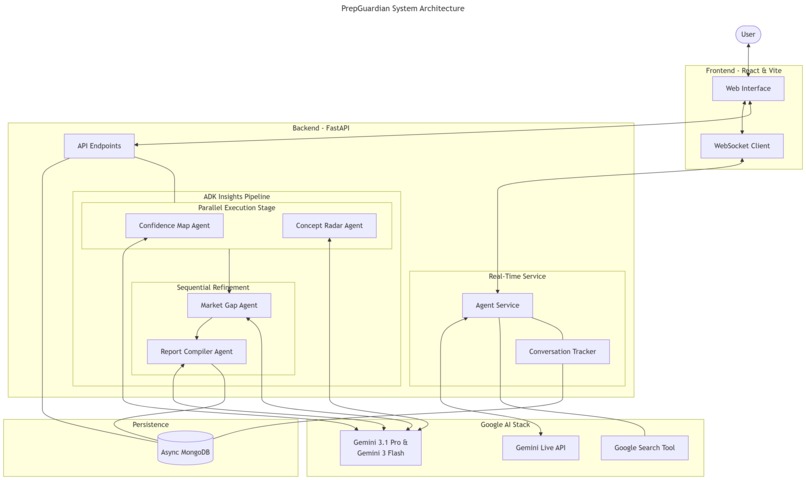
PrepGuardian end-to-end architecture diagram
-
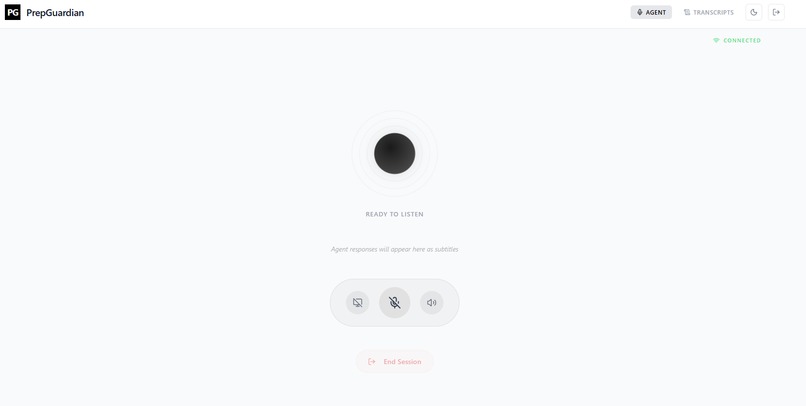
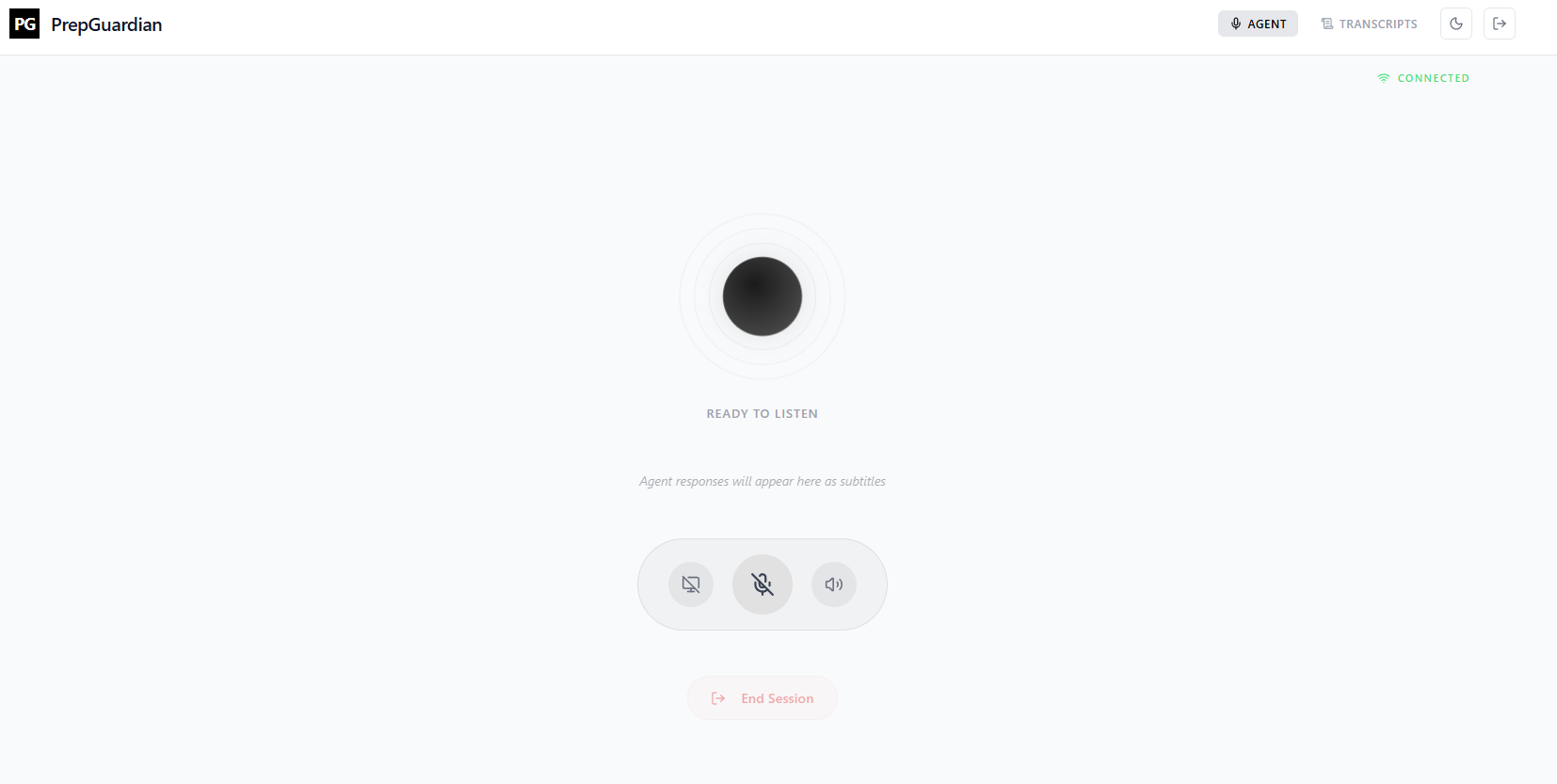
Agent screen where live conversations take place
-
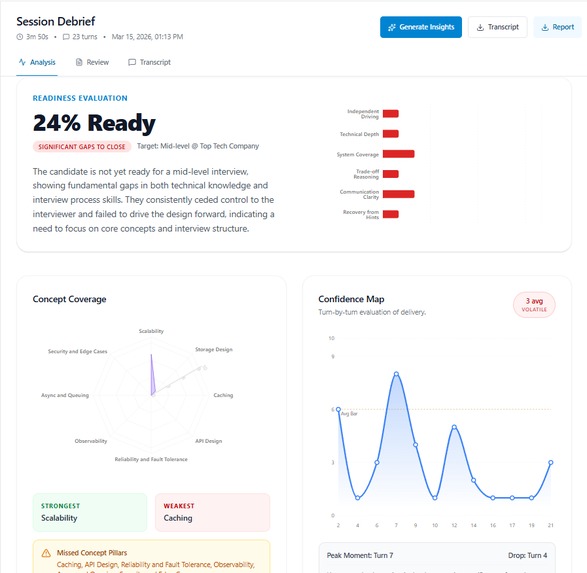
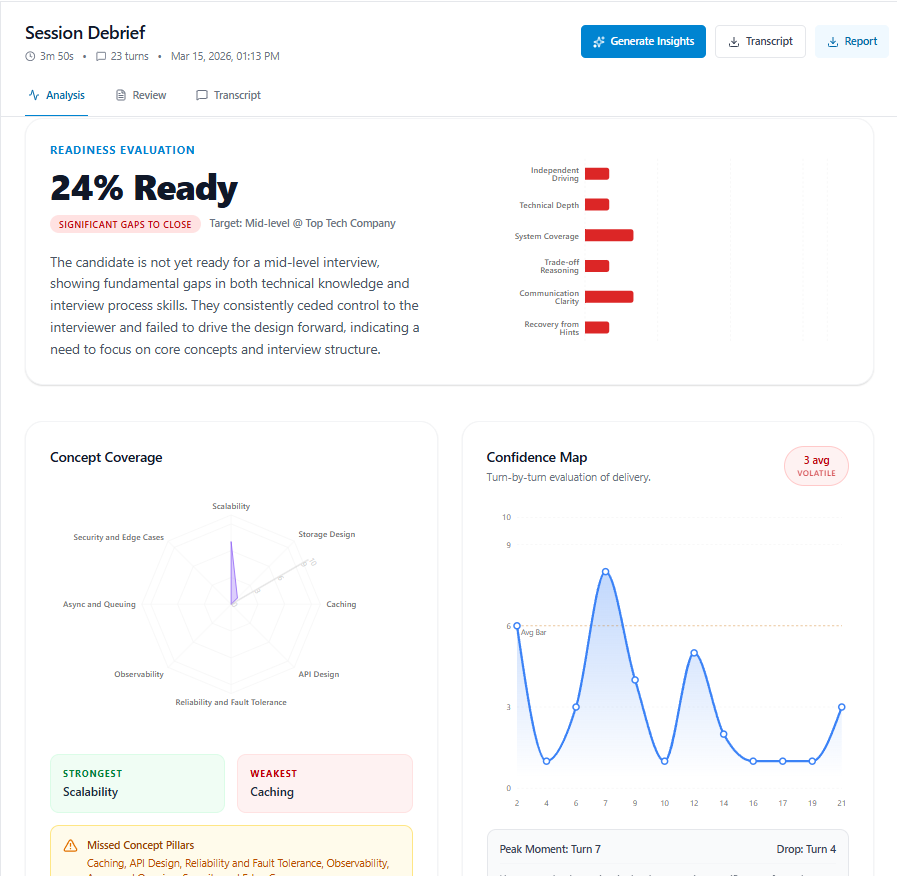
Post session analysis & insights screen generated on demand per session
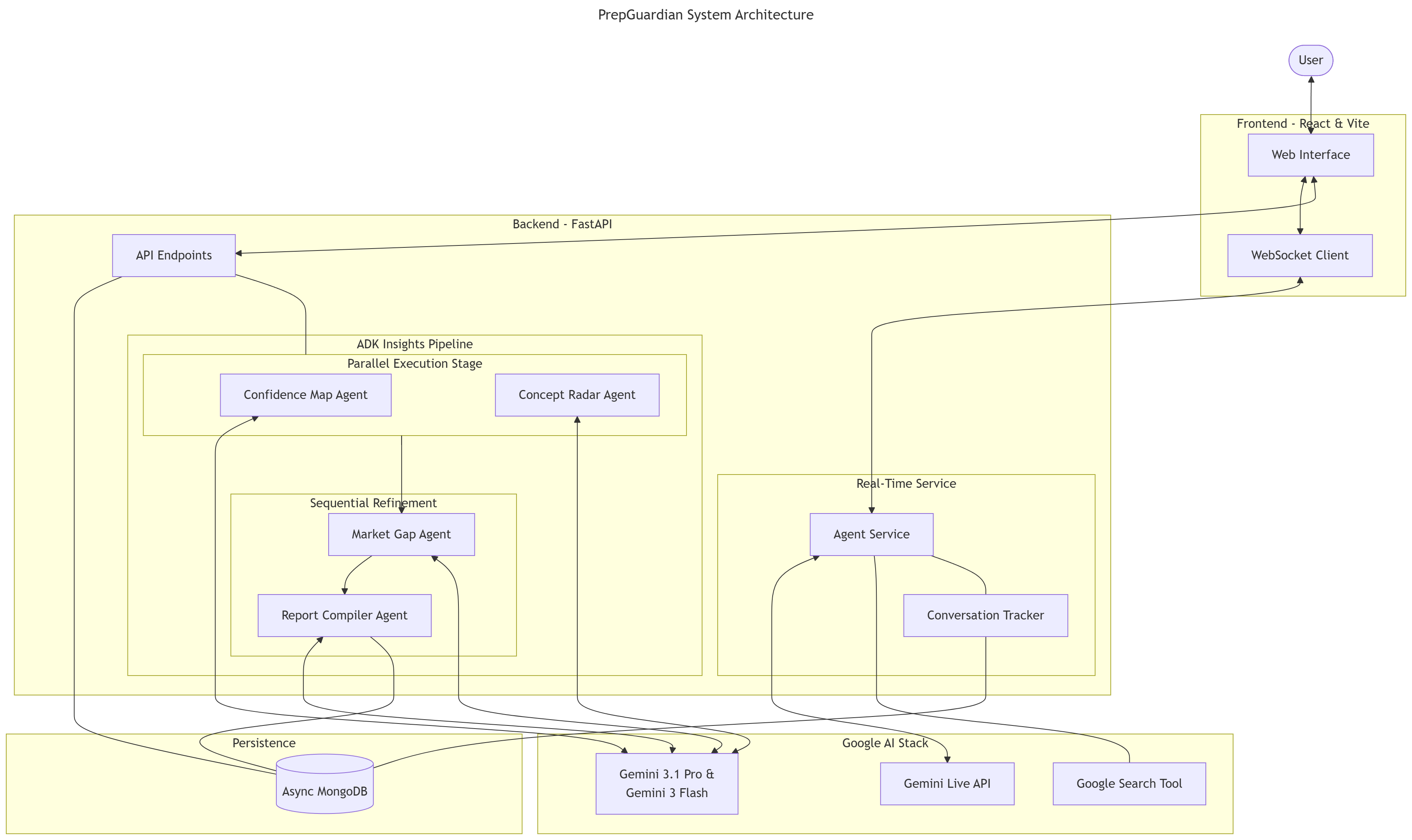
PrepGuardian
What It Is
PrepGuardian is a live AI interview coach and system design mentor. A real system design interview is conversational and interactive. PrepGuardian puts you in a real-time voice conversation with an agent that knows you, can hear you and see your screen, analyzing your approaches and giving feedback the way a human mentor would. Built entirely in the Antigravity IDE on Google's Generative AI stack. Each session can be analyzed on demand for deeper insights and comparing the bar with the current technology market standards.
Why did I choose to build this
With the rapid advancements in AI an its ability to write code, the emphasis lies on architecting and building systems that can be efficiently scaled and solve real world problems. I have always been skeptical about the unpredictable nature of system design interviews. There is always an anxiety of not meeting the conversational an technical bar. PrepGuardian aims to bridge that gap by providing a safe and interactive environment to practice and build confidence. With each actionable insight I actually felt my ability to approach a problem improved.
Features
Live Voice Interaction
- Real-time audio with natural interruption handling. You can cut in mid-sentence, ask follow-up questions or clarifications anytime - just like a real conversation.
- The conversation can be done in any language of your preferrence. I have tested it for English and Hindi and it works well.
- The conversation is grounded with google search. Everything discussed is backed by real time information from the web & from credible sources.
- The Agent is context aware and has pre-set guardrails to not go off-topic and defy its purpose.
Screen Sharing
- The agent sees your screen while you talk. Useful for system design sessions where it can follow your diagram and ask questions about your decisions as you make them.
- Allows for effective white-boarding and collaborative problem solving using diagrams or flow documentation.
Personalized Context
- Candidates are onboarded first to understand their background, target role, and focus areas. It is entirely customized according to their personal preferrence.
- Candidate background, target role, and focus areas are provided to the agent at session start. The agent calibrates its questions accordingly rather than defaulting to generic prompts.
- This ensures that the agent asks relevant questions, steers the conversation according to the difficulty level based on seniority and provides relevant feedback.
Transcript Storage and Post-Session Insights
- Each session is saved with a complete transcript that can be exported by the user for their own purposes.
- A separate analysis pipeline can be triggered on-demand to generate structured insights from the transcript, such as how your answer quality and confidence changed over the course of the interview.
- Each session provides a detailed insight dashboard, a performance report & transcript of the conversation. Reports can be exported in Markdown for personal analysis as well.
Tech Stack
AI
- Google ADK for live agent implementation & tool handling
- Google Live API with Gemini 2.5 Flash native audio for real-time multi-modal reasoning
- Gemini 3.1 Pro and Gemini 3 Flash for post-session analysis
- Google's in-built web-search tool for grounding
Backend
- FastAPI + Python 3.14
- UV for dependency management
- MongoDB with Motor (async)
Frontend
- React + Vite
- TanStack Query
- Tailwind CSS v4
Data Sources
The agent draws on Gemini's base knowledge for software engineering and system design concepts. Everything else comes from the user: their profile, their voice during sessions, and their accumulated transcripts over time. Web source referred for refining the Agent & some practice problems
Findings and Learnings
All the prompts I wrote/spoke are in a file called
prompts_written_to_build_this.txt. This is how I iteratively improved my prompts to get the best out of the agent with minimal regression.
The Live API makes a real difference. Native audio removes the latency and awkwardness of a conversation. The more I talk to it, the better I am able to articulate my thoughts on paper and come up with a viable solution in real-time.
The ADK support for extending the context of a live conversation from 10 mins hard-stop to nearly infinite time was a game changer. The context compression technique was a standout and improves efficiency drastically.
The toughest part of the build was not the AI, it was the session lifecycle. Injecting context cleanly at session start, making the agent ask the right questions, ability for it to steer the conversation and handle guardrails effectively and handling termination gracefully took more effort than the model integration itself.
Insight generation pipeline made me create my own skill
/skills/insight_generation. This helped me from keeping the prompt light and giving just the perfect context to the model.UV is a genuine upgrade over pip. Worth adopting for any Python project, especially one where you're setting up environments repeatedly.
Tanstack is something that I always wanted to use but never did. This project proved why it is superior. Such impressive state handling and server side data rendering capabilities.
Built With
- ai
- antigravity
- data-analysis
- fastapi
- google-adk
- google-cloud
- google-gemini
- mongodb
- python
- react
- tanstack
- vite
- websockets

Log in or sign up for Devpost to join the conversation.