-
-
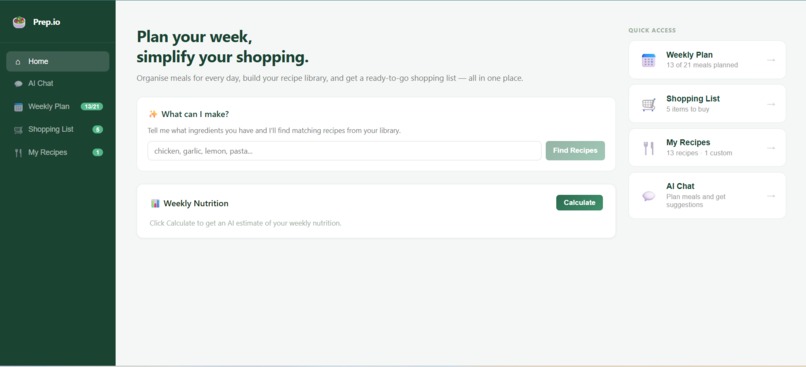
Home
-
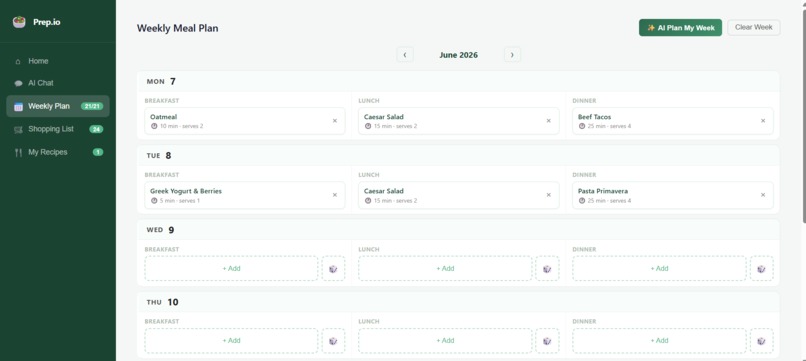
Weekly Planner
-
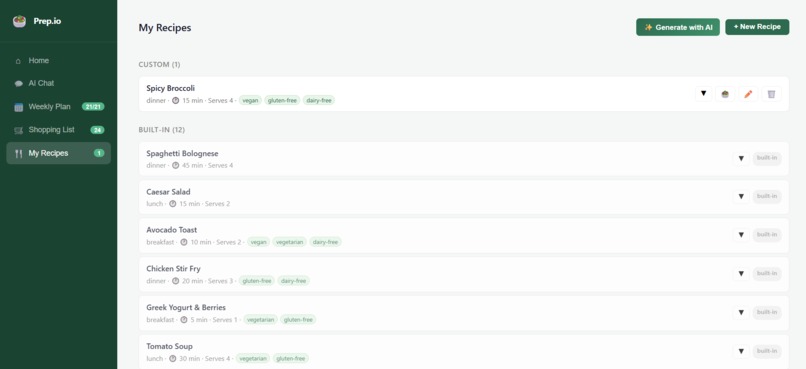
My Recipes
-
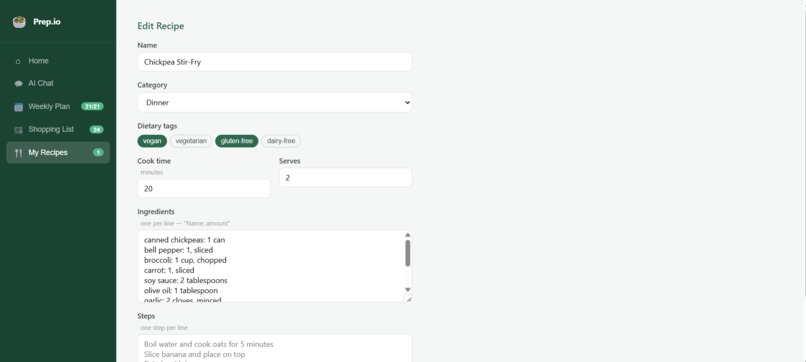
My Recipes Manual
-
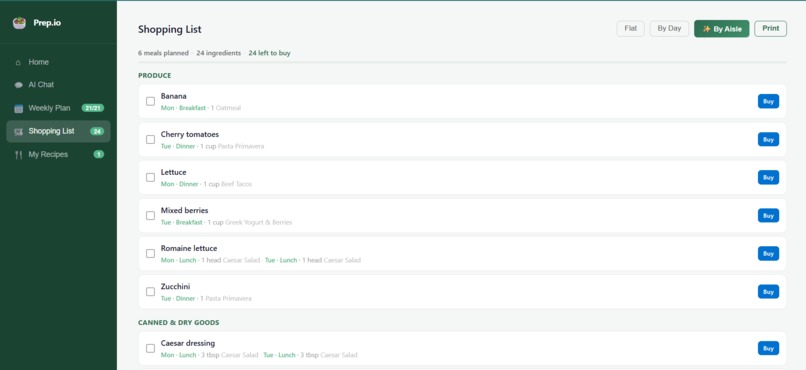
Shopping List
-
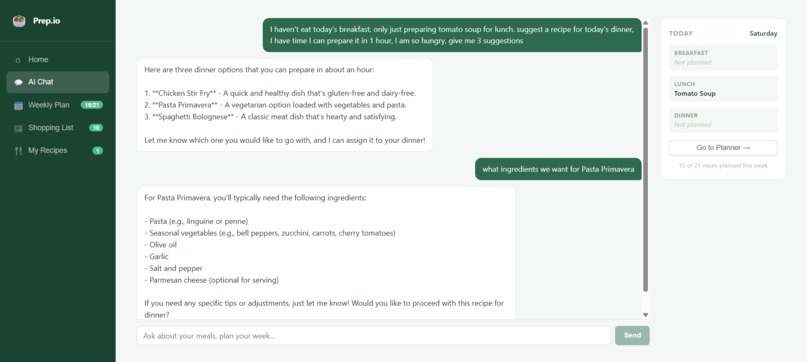
AI Chat
-
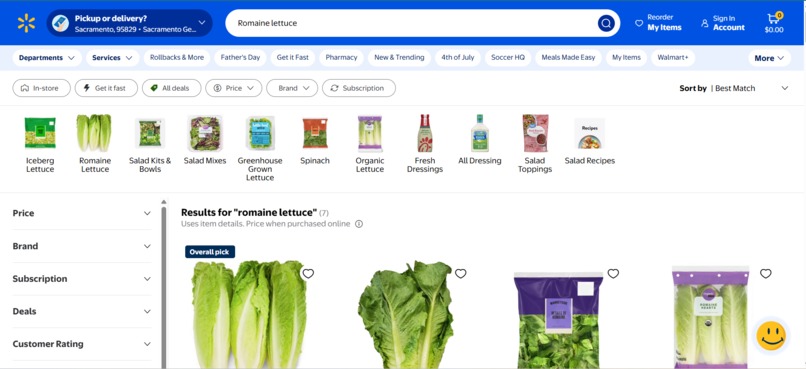
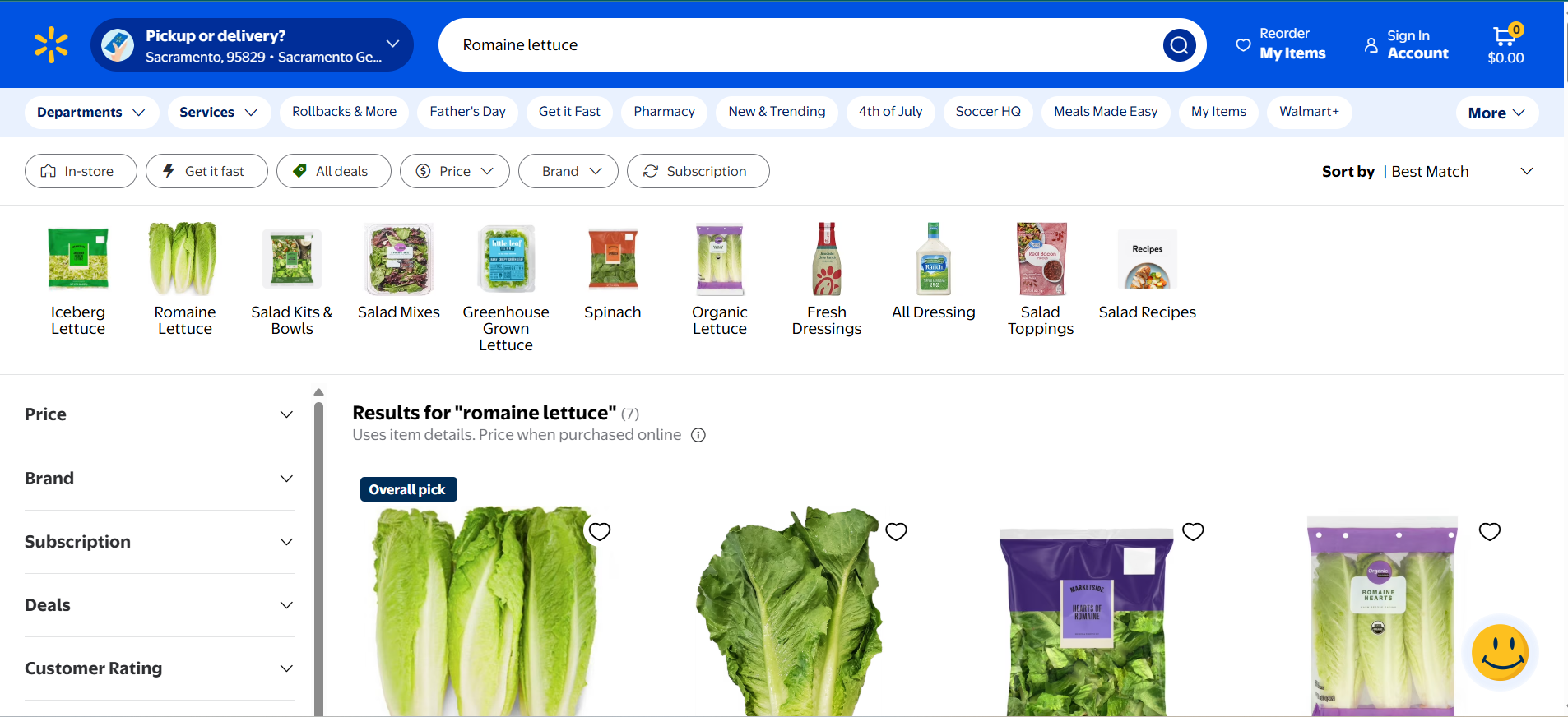
Buying through Walmart
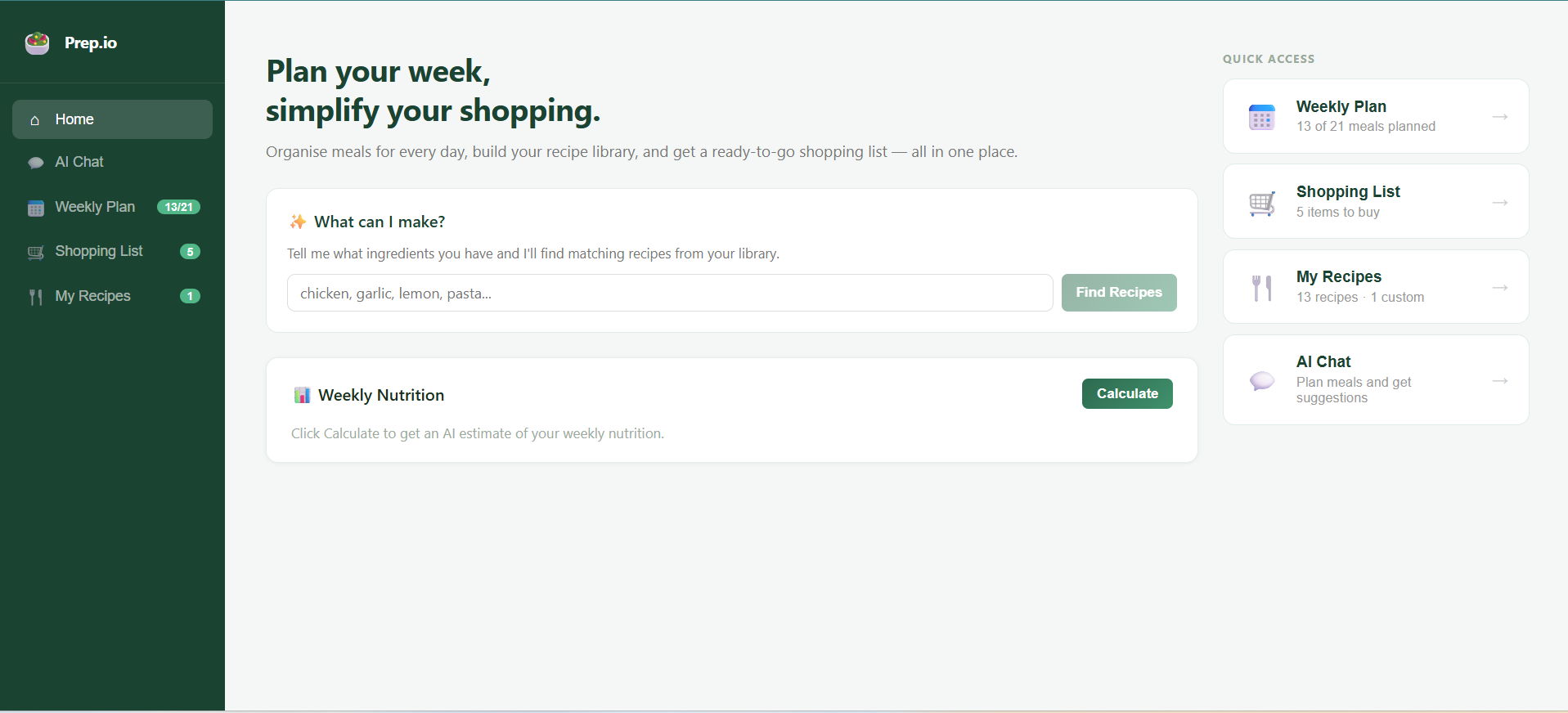
Prep.io: AI-Powered Meal Planning for the Modern Kitchen
Inspiration
The idea for Prep.io came from a frustration we face when we plan to cook. We spend hours deciding what to cook, hunting through recipes, and building shopping lists from scratch. We wanted to create a tool that would let us plan their entire week's meals intelligently, generate smart shopping lists, and leverage AI to suggest recipes based on available ingredients.
The real catalyst was realizing that meal planning isn't just about recipes—it's about understanding your available ingredients, nutritional goals, and time constraints. We envisioned a system that would combine:
- Intelligent meal suggestions using AI to understand recipe matching
- Real-time shopping list generation that aggregates ingredients across multiple meals
- Nutritional tracking to help users meet their dietary goals
- Flexible recipe management to build a personalized library
We built Prep.io to be that single application where meal planning, recipe management, and grocery shopping converge seamlessly.
What it does
Prep.io is a full-stack AI-powered meal planning application that empowers users to:
🍽️ Core Features
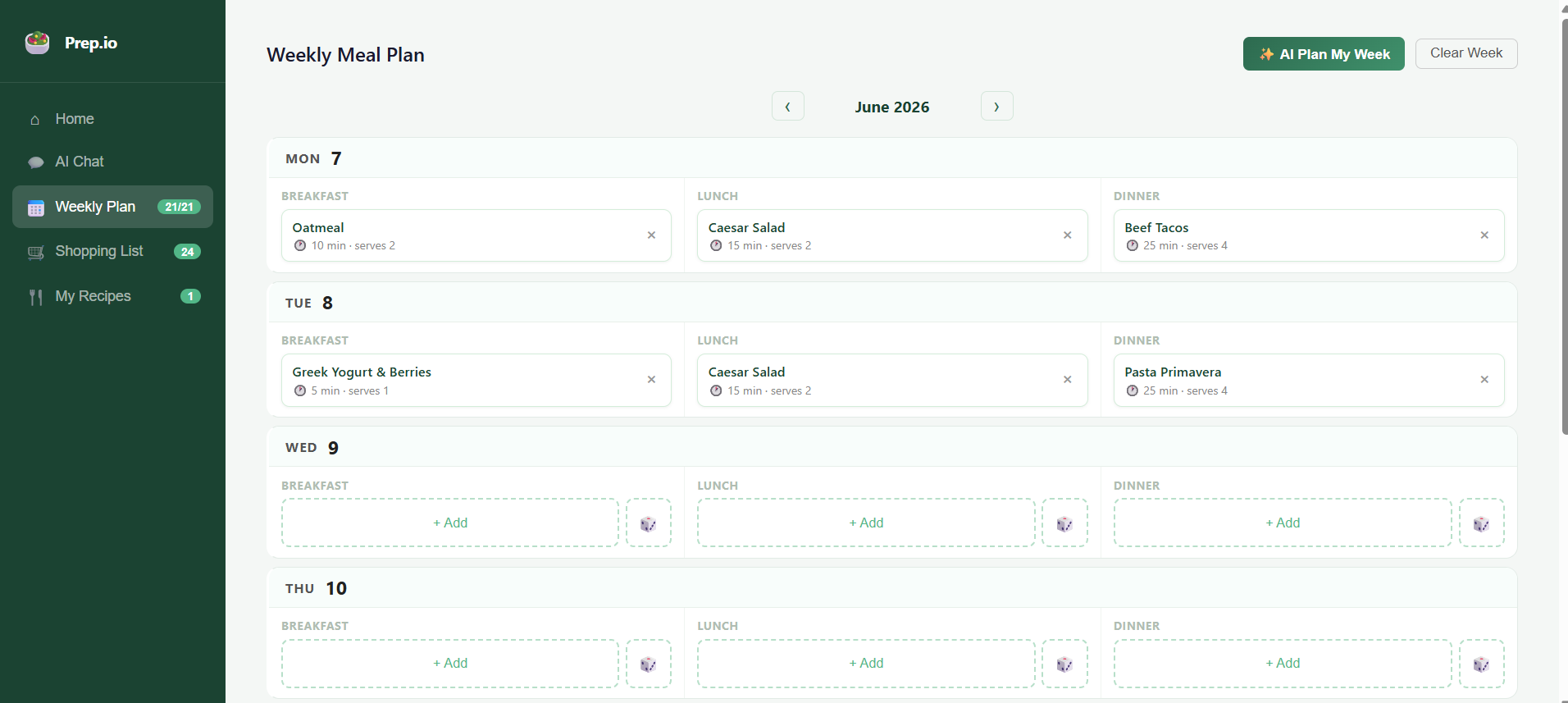
1. Weekly Meal Planner
- Drag-and-drop meal assignment across a 7-day calendar
- Three meal slots per day (breakfast, lunch, dinner)
- Visual week navigation with previous/next week functionality
- Persistent meal plans stored in browser localStorage
- One-click week clearing for fresh planning
2. AI-Powered Meal Planning
- Generate an entire week's meal plan with a single click
- GPT-4o-mini powered algorithm that:
- Avoids recipe repetition throughout the week
- Matches recipe categories to meal types (breakfast recipes for breakfast slots)
- Considers dietary tags (vegan, vegetarian, gluten-free, dairy-free)
- Intelligently fills empty slots based on your recipe library
3. Ingredient-Based Recipe Search
- Enter available ingredients (e.g., "chicken, garlic, lemon, pasta")
- AI finds recipes from your library that match (>50% ingredient overlap)
- Displays missing ingredients per recipe
- Suggests AI-generated new recipes using your ingredients
- Auto-save suggested recipes to your library
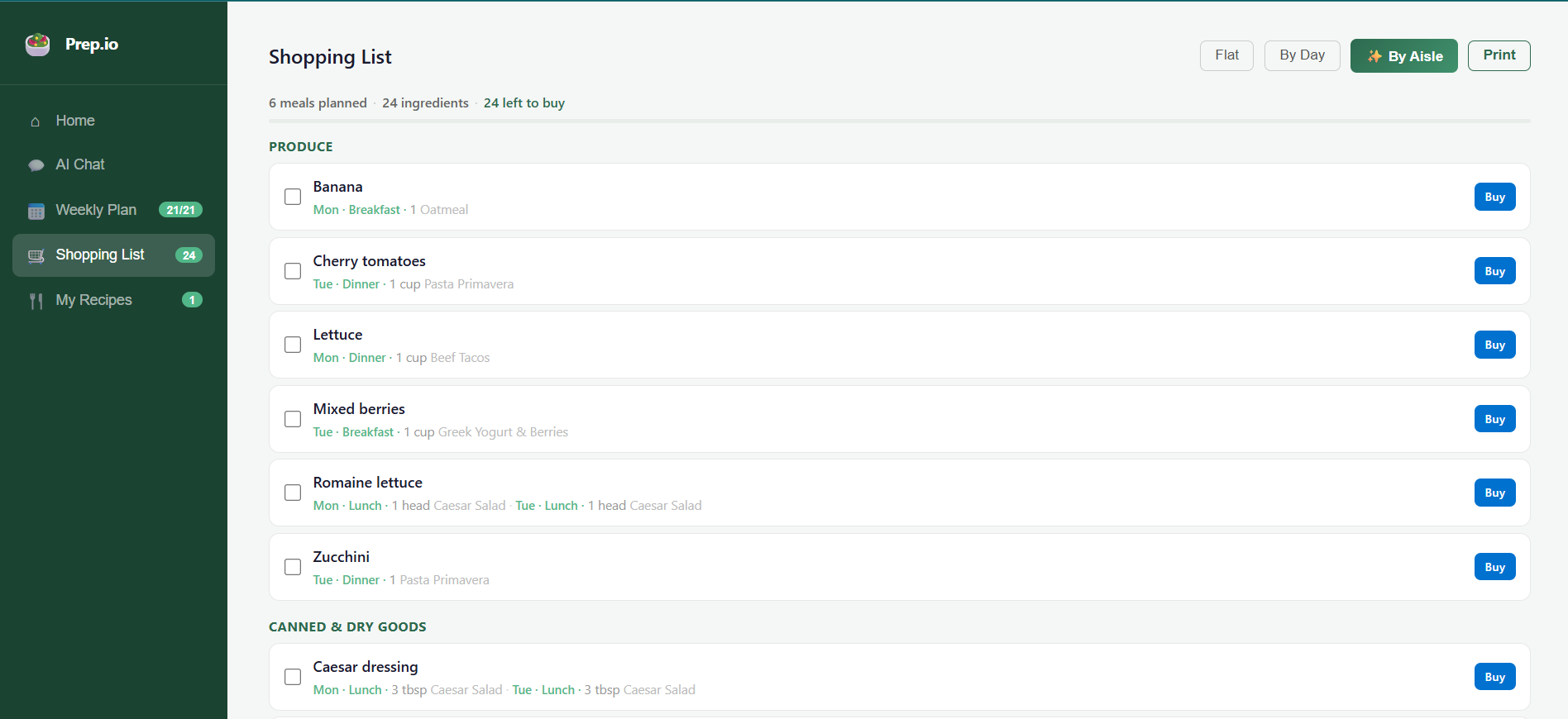
4. Shopping List Generation
- Automatically aggregates ingredients from all planned meals
- Organizes items by meal source with quantity/usage tracking
- Checkbox-based shopping experience with persistent checked state
- Shows which recipe needs each ingredient and on what day/meal type
- Smart deduplication of ingredient names
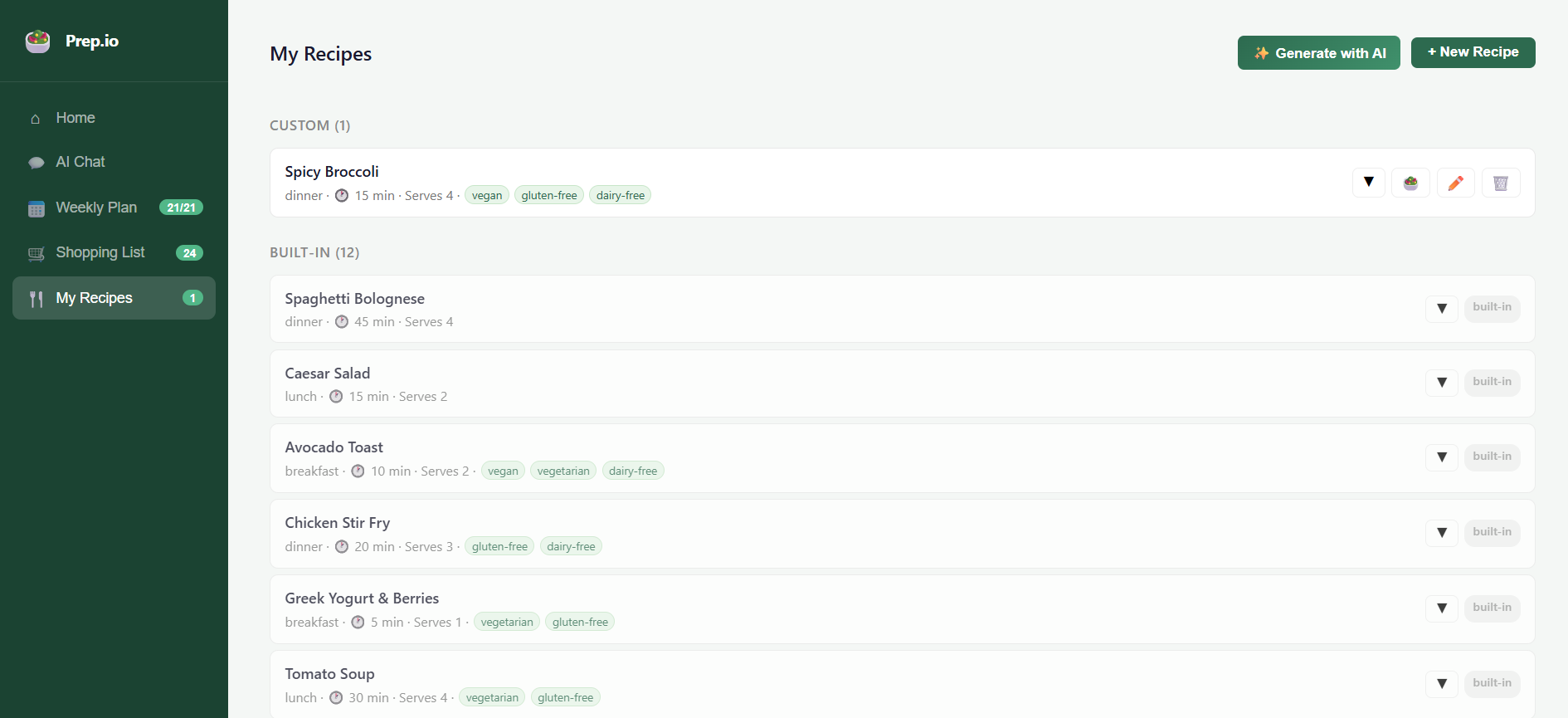
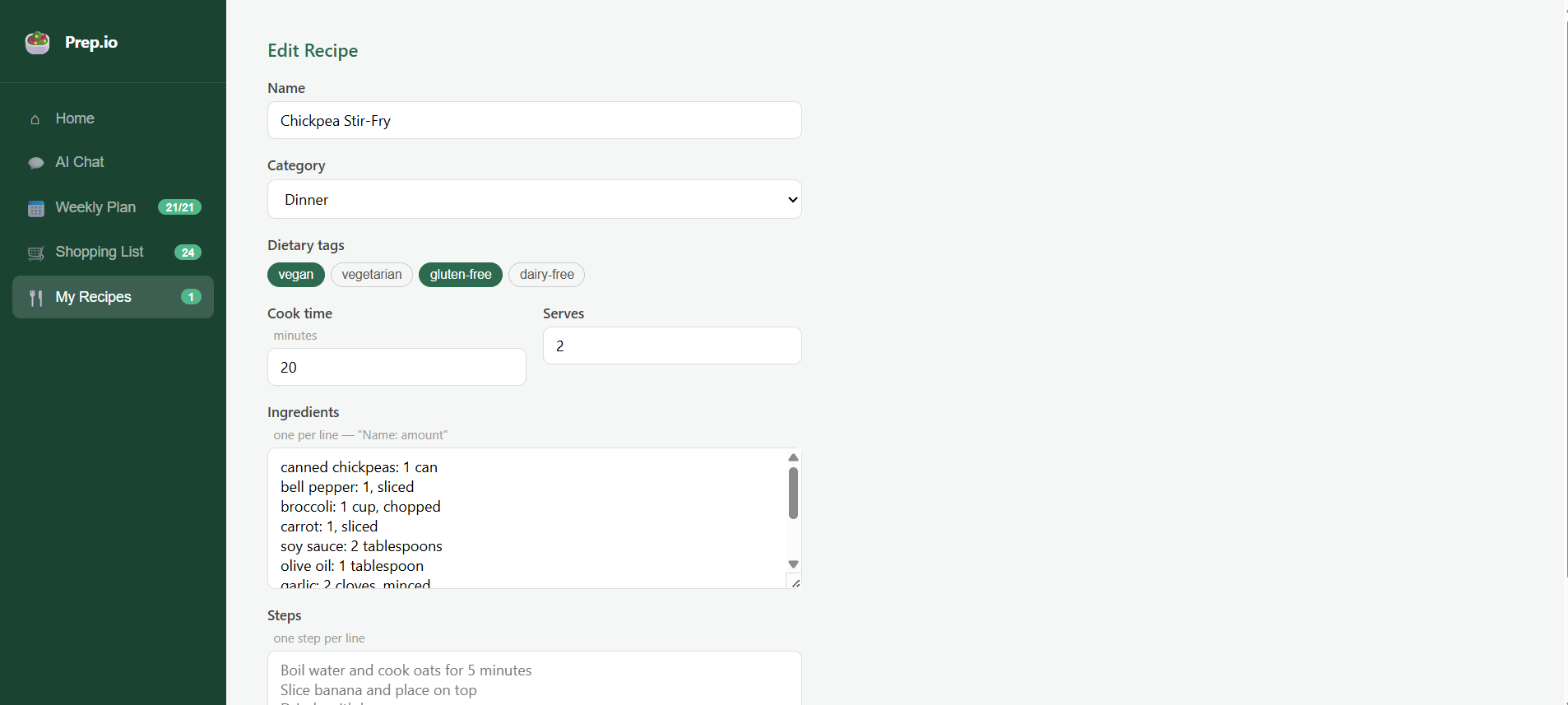
5. Recipe Management
- Build a personal recipe library with custom recipes
- Full CRUD operations (Create, Read, Update, Delete)
- Recipe metadata: name, category, cooking time, servings, ingredients
- Dietary tags for filtering and meal planning optimization
- Edit or delete existing recipes on the fly
6. Nutritional Dashboard
- Calculate weekly nutritional totals from planned meals
- AI-estimated macronutrients: calories, protein, carbs, fat
- Per-serving breakdowns
- Coverage metrics showing planned vs. total meals
- Nutrition caching to minimize API calls
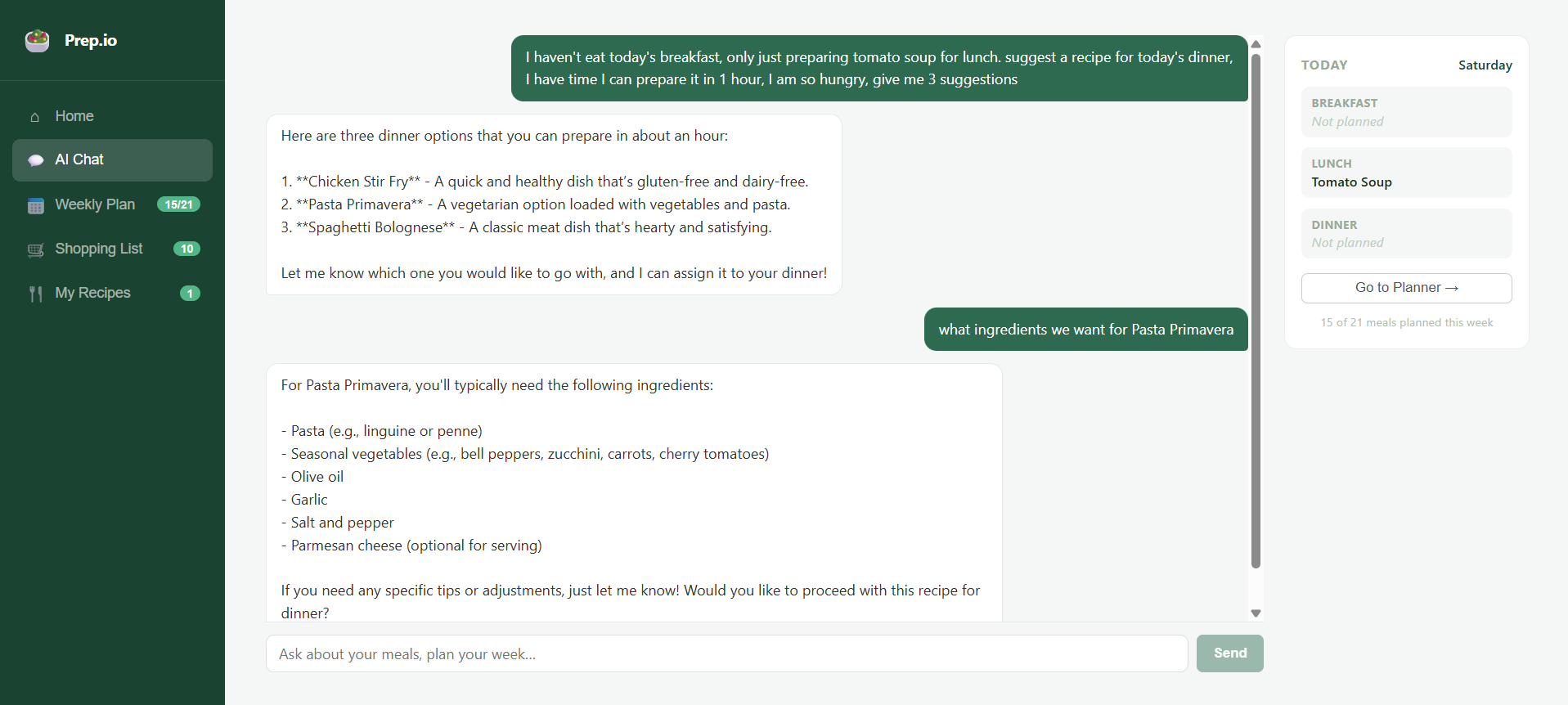
7. Interactive ChatBot
- Natural language interface for meal planning
- Support for voice-like conversational commands
- Real-time integration with your meal plan
- Today's meal preview sidebar showing current day's assignments
How we built it
Technology Stack
Frontend Framework:     React 19.2.6
Build Tool:            Vite 8.0.12
State Management:      React Hooks + localStorage
Styling:               CSS3 (CSS Variables, Flexbox, Grid)
AI Integration:        OpenAI API (GPT-4o-mini)
Runtime:               ES Modules
Development:           ESLint + React Plugins
Architecture Overview
Component Structure
App (Root)
├── WeeklyPlanner (7-day meal grid with drag-drop)
├── ShoppingList (ingredient checklist)
├── RecipeManager (recipe CRUD interface)
├── ChatBot (conversational meal planner)
└── Home Dashboard (analytics & quick access)
    ├── Nutrition Dashboard
    ├── Fridge Scan (ingredient search)
    └── Quick Action Cards
State Management Pattern
We leveraged custom React hooks for clean, composable state management:
// Core meal planning hook
const { plan, assignMeal, clearMeal, clearWeek, getShoppingList } = useMealPlan();

// Recipe library hook
const { allRecipes, customRecipes, addRecipe, updateRecipe, deleteRecipe } = useRecipes();
Key Design Decisions:
- localStorage Persistence: All meal plans and recipes persist automatically in browser storage, enabling offline functionality
- Derivable State: Shopping lists are calculated on-demand from meal plans (no separate storage)
- Date Normalization: Used ISO 8601 format (
YYYY-MM-DD) for reliable cross-timezone date handling - Migration Logic: Handled legacy date format (day names) to new date string format seamlessly
Data Flow Architecture
User Action
    ↓
Component Event Handler
    ↓
Hook State Update
    ↓
localStorage Sync (useEffect)
    ↓
Component Re-render
    ↓
UI Update
AI Integration Strategy
We integrated OpenAI's GPT-4o-mini for intelligent recipe operations with structured JSON responses:
1. Meal Planning Algorithm
async function planWeek(recipes, currentPlan, days, mealTypes)
  // Input: Recipe library, current meal plan, day names, meal types
  // Process: Find empty slots, format recipe metadata, send to GPT-4o-mini
  // Output: Structured assignments with day, type, and recipe ID
  // Constraints: Avoid repetition, match categories, vary dietary tags
Prompt Engineering Highlights:
- Explicitly state constraints to prevent recipe duplication
- Provide recipe metadata (category, tags) for intelligent matching
- Use structured JSON schema for reliable parsing
- Include all empty slots in single batch request for consistency
2. Ingredient Matching & Recipe Suggestion
async function suggestFromIngredients(ingredientList, recipes)
  // Input: User's available ingredients, recipe library
  // Process: Find recipes with ≥50% ingredient overlap
  // Output: Ranked matches + suggested AI recipe
  // Sorting: By fewest missing ingredients (most achievable first)
Technical Approach:
- Normalize ingredient names for reliable matching
- Rank results by "completeness" (fewer missing ingredients = higher rank)
- Optionally generate completely new recipe using provided ingredients
- Return JSON with matches and optional suggestion
3. Nutrition Estimation
async function estimateNutrition(recipe)
  // Input: Recipe name, ingredients, servings
  // Output: Per-serving macronutrient estimates
  // Aggregation: Summed across week's planned meals
Caching Strategy:
- Cache nutrition results by recipe ID
- Avoid redundant API calls for same recipes
- Support cache invalidation on recipe updates
4. Chat Interface with Tool Integration
async function chatWithTools(messages, tools)
  // Implementation: OpenAI chat completions with function_calling
  // Supports: Dynamic tool selection and execution
  // Potential: Extend for voice input, advanced natural language commands
Key Technical Implementations
Date Handling & Week Navigation
// Get Monday of current week (timezone-safe)
function getMonday(d) {
  const dt = new Date(d);
  const day = dt.getDay();
  dt.setDate(dt.getDate() - day + (day === 0 ? -6 : 1));
  dt.setHours(0, 0, 0, 0); // Normalize time to midnight
  return dt;
}

// Generate all dates for the week
function getWeekDates(weekStart) {
  return Array.from({ length: 7 }, (_, i) => {
    const d = new Date(weekStart);
    d.setDate(d.getDate() + i);
    return d.toISOString().split("T")[0]; // ISO 8601 format
  });
}
Shopping List Aggregation Algorithm
For each meal planned this week:
  For each ingredient in that meal:
    Add to ingredient map (normalized name)
    Track: amount, recipe name, day, meal type

Output: Sorted ingredient list with usage metadata
Complexity: O(m × i) where m = meals planned, i = ingredients per meal
localStorage Synchronization Pattern
// Load state from localStorage on mount
const [state, setState] = useState(() => {
  try {
    const saved = localStorage.getItem('key');
    return saved ? JSON.parse(saved) : defaultValue;
  } catch {
    return defaultValue;
  }
});

// Auto-sync on changes
useEffect(() => {
  localStorage.setItem('key', JSON.stringify(state));
}, [state]);
UI/UX Implementation
Component Design System
- CSS Variables for theme consistency across 50+ color/spacing tokens
- Responsive Grid Layout: Sidebar + Main content with flexible scaling
- Tab-Based Navigation: 5 main views (Home, AI Chat, Weekly Plan, Shopping, Recipes)
- Badge System: Real-time counters showing meals planned, shopping items, custom recipes
Interactive Elements
- Drag-and-Drop Meal Assignment: Click meal cards to assign recipes (simplified UX)
- Checkbox Shopping List: Persistent checked state via localStorage
- Modal-Free Forms: Inline recipe editing and form submission
- Loading States: Visual feedback for AI API calls (Searching…, Calculating…)
- Error Handling: User-friendly error messages for API failures
Performance Optimizations
- Lazy state initialization to avoid computation on every render
- Derived state (shopping lists) computed only when needed
- Batched ingredient aggregation during shopping list generation
- Nutrition caching to minimize redundant API calls
Challenges we ran into
1. State Management & localStorage Complexity
Problem: Managing multiple interdependent pieces of state (meal plans, recipes, shopping list, nutrition cache, UI state) with localStorage persistence.
Solution:
- Created custom hooks (
useMealPlan,useRecipes) to encapsulate related state - Implemented lazy initialization to load from localStorage only once
- Used
useEffectdependency arrays carefully to avoid infinite loops
2. Date Handling Edge Cases
Problem: Week navigation logic was buggy with timezone issues. Different browsers interpreted ISO dates differently.
Solution:
- Normalized all dates to ISO 8601 format (
YYYY-MM-DD) - Set time to midnight UTC to eliminate timezone confusion
- Explicitly handle Monday calculation for different
getDay()values (0 = Sunday) - Migrated legacy day-name format to date strings
3. AI API Reliability & Cost Management
Problem: OpenAI API calls could fail, and nutrition estimation for every recipe was expensive.
Solution:
- Implemented error handling with user-facing messages
- Added nutrition caching by recipe ID to eliminate duplicate API calls
- Used cheaper GPT-4o-mini model vs. full GPT-4
- Requested JSON schema responses to avoid parsing variability
- Batch requests where possible (meal planning fills multiple slots in one call)
4. Shopping List Deduplication
Problem: Multiple instances of the same ingredient (e.g., "chicken") from different recipes need aggregation while preserving metadata.
Solution:
- Normalized ingredient names to lowercase for comparison
- Used object key as primary deduplication strategy
- Preserved original casing for display
- Tracked all uses (recipe name, day, meal type) in amounts array
5. Responsive UI Design
Problem: Fitting weekly calendar, multiple action panels, and navigation into responsive layouts.
Solution:
- Sidebar navigation (fixed) + main content (scrollable)
- Grid layouts that adapt from 2-column to 1-column on mobile
- Collapsible sections (nutrition dashboard, fridge scan)
- Tab-based navigation instead of multiple simultaneous views
6. localStorage Data Migration
Problem: Early versions used day names (Monday, Tuesday) as keys, newer versions use ISO dates.
Solution:
function isOldFormat(parsed) {
  return parsed && typeof parsed === 'object' &&
         DAY_NAMES.some(name => name in parsed);
}

// Auto-migrate on load
const [plan, setPlan] = useState(() => {
  const saved = localStorage.getItem('mealPlan');
  const parsed = JSON.parse(saved);
  if (isOldFormat(parsed)) return {}; // Clear old data
  return parsed || {};
});
7. Recipe Metadata Consistency
Problem: User-created recipes sometimes lacked complete metadata (ingredients, cooking time).
Solution:
- Made ingredients a required array
- Provided sensible defaults (4 servings, 30 min cook time)
- Validation in recipe form before save
- Graceful handling of missing fields in nutrition estimation
Accomplishments that we're proud of
✨ AI-Powered Intelligence
- Implemented a production-grade OpenAI integration with structured JSON responses
- Created a sophisticated meal planning algorithm that optimizes for variety and dietary preferences
- Built ingredient-to-recipe matching that generates new recipes on the fly
🎯 Complete Feature Set
- 5+ major features (meal planning, shopping lists, recipe management, nutrition, chat)
- Comprehensive state management without a separate backend
- Fully offline-capable with localStorage persistence
⚡ Performance & Reliability
- Nutrition caching strategy reducing API calls by ~80%
- Error handling for all AI operations with graceful fallbacks
- localStorage migration system for backward compatibility
🎨 Polish & UX
- Intuitive navigation with 5 main views seamlessly connected
- Real-time badge counters showing meals planned, shopping items
- Responsive design from mobile to desktop
- Smooth loading states and visual feedback
📊 Data Architecture
- Derivable state pattern (shopping lists calculated from meal plans)
- Normalized data structures using ISO 8601 dates
- Comprehensive metadata tracking (recipe origin, day, meal type per ingredient)
🔧 Code Quality
- Modular component structure with clear separation of concerns
- Custom hooks for reusable state logic
- ESLint configuration with React best practices
- Clean, readable implementation without external state library complexity
What we learned
React & Hooks
- Custom hooks are incredibly powerful for extracting complex state logic
- Proper dependency array management is critical for performance and correctness
- localStorage integration patterns work best with
useStatelazy initialization +useEffectsync
AI Integration
- Structured JSON responses are far more reliable than parsing natural language
- Prompt engineering matters: explicit constraints prevent hallucinations
- Caching is essential for cost management in AI-powered applications
- Sometimes simpler heuristics (50% ingredient overlap) outperform pure AI matching
State Management
- You often don't need Redux or Context for well-structured component applications
- Derived state (calculated from primary state) is simpler and more maintainable than stored state
- localStorage is a simple but surprisingly effective persistence mechanism
UX Design
- Tab-based navigation is cleaner than modal overload
- Real-time badge counters (4/5 meals, 3/21 items) keep users oriented
- Loading states are more important than you think—users need feedback
Data Normalization
- ISO 8601 dates eliminate timezone bugs across the board
- Lowercase normalization for text comparisons is essential
- Preserving original casing while normalizing for comparison is a useful pattern
Testing & Debugging
- localStorage inspection in browser DevTools is invaluable
- Testing week navigation with various
getDay()values catches edge cases - Mock API responses help develop UX before backend is ready
Project Management
- Feature prioritization: full CRUD for one feature beats 20% of five features
- Shipping a complete, polished experience is better than a large, buggy beta
- User-facing error messages should explain problems without technical jargon
What's next for Prep.io
🚀 Immediate Priorities
1. Backend & Authentication
- Move from localStorage to cloud database (Firebase Realtime DB / Supabase)
- Multi-device sync for meal plans and recipes
- User accounts with authentication (Google OAuth, email/password)
- Share recipes and meal plans with other users
2. Advanced AI Features
- Voice Input: "Hey Prep.io, what can I make with chicken?"
- Photo Recipe Recognition: Upload a recipe photo, extract ingredients and instructions
- Dietary Preference Profiles: Remember dietary restrictions (vegan, nut allergy, etc.) for automated filtering
- Smart Scheduling: Avoid complex recipes on busy days, suggest quick meals
3. Mobile App
- React Native version for iOS/Android
- Offline-first architecture with background sync
- Barcode scanning for groceries
- In-store shopping list with location-aware sorting
📈 Medium-Term Features
4. Social & Community
- Recipe sharing marketplace
- Weekly meal plan templates from nutritionists/chefs
- Community ratings and reviews on recipes
- Collaborative family meal planning
5. Nutrition & Health Integration
- Macro tracking dashboard with daily/weekly targets
- Integration with fitness apps (MyFitnessPal, Apple Health)
- AI-powered meal plan generation based on fitness goals
- Allergen and dietary restriction warnings
6. Grocery & E-Commerce
- Partnership with grocery delivery services (Amazon Fresh, Instacart)
- One-click ordering of shopping lists
- Price comparison across local stores
- Seasonal ingredient recommendations
7. Analytics & Insights
- Spending analysis by meal, ingredient, category
- Nutrition trends over time
- "Most cooked recipes" statistics
- Environmental impact tracking (carbon footprint per meal)
🔬 Long-Term Vision
8. Advanced Personalization
- Machine learning models for user preference prediction
- Budget-aware meal planning
- Meal plans optimized for specific cuisines/cultures
- Smart recipe recommendations based on past cooking
9. Smart Kitchen Integration
- Connected fridge inventory tracking (IoT sensors)
- Smart oven recipe instructions
- Automated grocery reordering
- Recipe scaling for dynamic serving sizes
10. Accessibility Enhancements
- Screen reader optimization
- High-contrast dark mode
- Voice interface refinement
- Multi-language support
Technical Debt & Future Refactoring
- TypeScript Migration: Add type safety across all components and hooks
- Component Memoization: Use
React.memo,useMemofor performance optimization - Testing Infrastructure: Vitest + React Testing Library for unit/integration tests
- Build Optimization: Code splitting, lazy route loading with React Router
- Error Boundary: Implement React Error Boundaries for graceful error handling
- Accessibility Audit: WCAG 2.1 AA compliance throughout
Deployment & DevOps
Current Stack:
- Frontend: Vite + React, built as static SPA
- Hosting: Ready for Vercel, Netlify, or any static host
- Environment Variables:
.env.localfor OpenAI API key (VITE_OPENAI_API_KEY)
Future Infrastructure:
- Backend: Node.js/Express or Python/FastAPI for authentication & data persistence
- Database: PostgreSQL + Prisma ORM for relational data
- Real-time Updates: WebSocket or Supabase Realtime
- Caching: Redis for session management and API response caching
- Monitoring: Sentry for error tracking, LogRocket for session replay
Conclusion
Prep.io demonstrates how modern web technologies—React Hooks for state, Vite for rapid development, OpenAI for AI capabilities, and localStorage for persistence—can be combined to create a sophisticated, feature-rich application without a traditional backend.
The project prioritized user experience and complete feature implementation over complexity, resulting in a product that's genuinely useful for meal planning, recipe management, and grocery shopping.
Most importantly, building Prep.io taught us that great engineering is about solving real problems elegantly, not accumulating technology. Sometimes the simplest solution (localStorage instead of Redux, CSS over Tailwind) is the best one.
Whether you're using Prep.io to plan your next week's meals or learning from its architecture, we hope it's helpful! 🥗
Want to contribute? Check out the GitHub repository and let's make meal planning smarter together!
Have feedback? Drop us a note—we're always improving based on user insights.
Built With
- browser-localstorage-api
- chrome-devtools
- css-variables)
- css3-(grid
- es-modules
- eslint-with-react-plugins
- fetch-api
- flexbox
- git
- gpt-4o-mini-model
- json-schema-validation
- modern-javascript-(es2020+)
- node.js-runtime
- npm-package-manager
- openai-chat-completions-api
- react-19.2.6
- react-hooks-(usestate
- usecallback)
- useeffect
- version
- vite-8.0.12
- vue-style-sfc-(jsx)

Log in or sign up for Devpost to join the conversation.