-
-

Import boto3 to connect Amazon Comprehend Medical
-
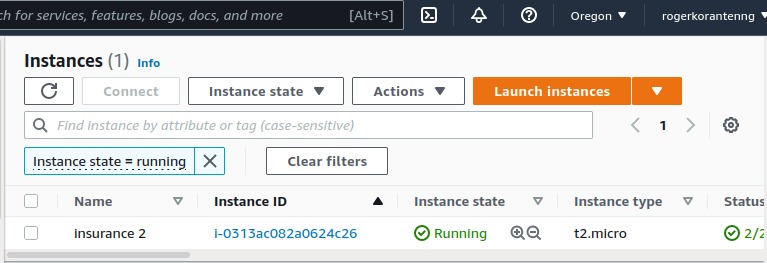
Deployed App running on EC2 instance
-
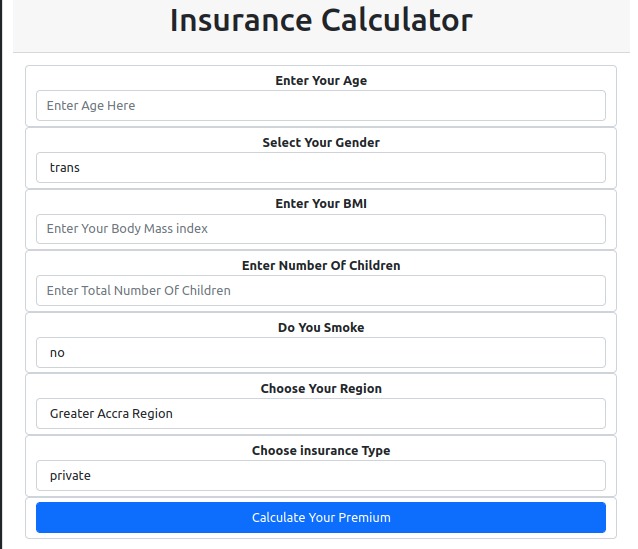
Insurance Calculator App
-
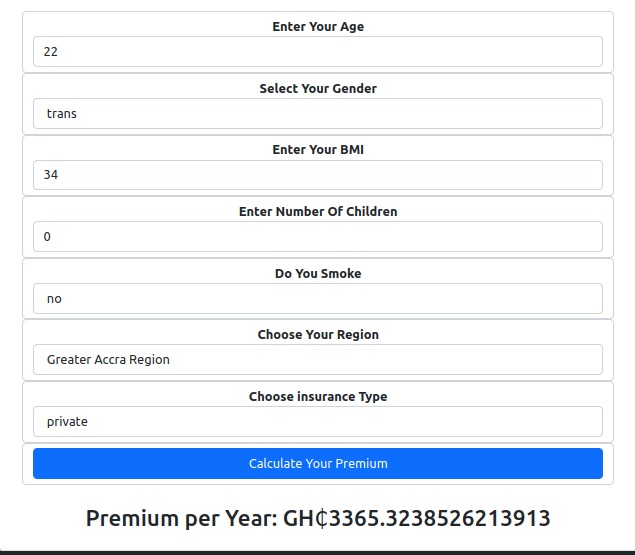
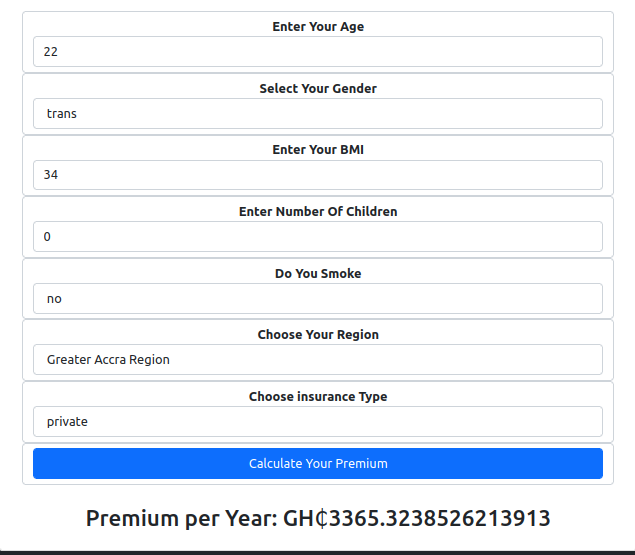
Calculating Premium Per Year in Ghana Cedis

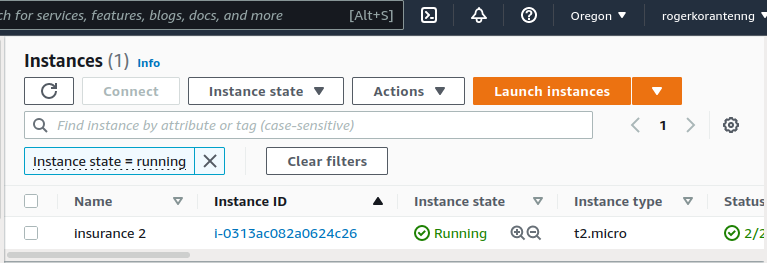
Presented by Roger Obeng Koranteng & Percy Obeng Akrofi
Inspiration
In the post-pandemic age, inflation is a cause of concern for the insurance industry. Carriers will have to go the extra mile to keep costs under control. At the same time, they will have to remain competitive to stay afloat. Two of the primary cost drivers in the industry are compliance with regulatory requirements and products marketing. For instance, to stay ahead, insurance companies need to come up with more products and therefore expand more. Cutting down on product lines will lead to diminishing margins. One way companies can absorb the current hikes is to forecast insurance in order to make future preparations.
What it does
The Health-AI.ipynb contains notebook extracted from Amazon Sagemaker Studio, which connects to AWS using its Secret Key and Access Keys. After which we use boto3, a python SDK for AWS to connect to Amazon Comprehend Medical and make meaning from insurance notes. The output is returned in Json.
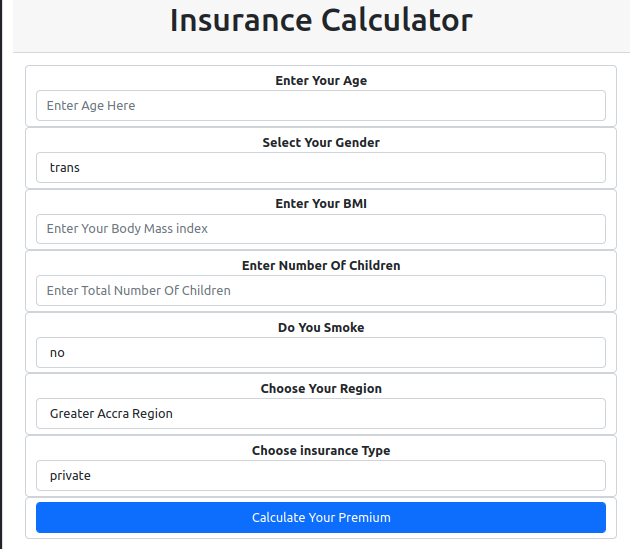
Insurance App Calculator
This app has been built to predict Insurance cost in Ghana Cedis (Local currency in Ghana) using the Age, Gender, Body Mass Index, Type of Insurance (private, government sponsored) , Smoking Habit and Region. The Gender contains three options male, female and trans. The type of insurance represents the type of job in which the insurance is been paid for. The app contains two options to choose from
Using Amazon Comprehend Api
Using boto3(an AWS Software Development Kit, SDK) to access Amazon Comprehend Medical to get meaningful insight from insurance data.
The first five lines is used to configure our AWS secret key and access key, also we will import boto3 and json for our output
Next, we will call Amazon comprehend medical and set the variable name as comprehend
After setting our service name to Comprehend Medical, we will set a new variable called text to receive our text input
Lastly, we make a new variable name called output to print out our results in a json format
import os
AWS_ACCESS_KEY = os.environ.get("")
AWS_SECRET_KEY = os.environ.get("")
import boto3
import json

comprehend = boto3.client(service_name='comprehendmedical')

text = ""

output = print(json.dumps(comprehend.detect_sentinent(Text=text, LanguageCode='en'), sort_keys=True, indent=4))
How we built it
The app was trained using Gradiant Boosting Regressor (Gradient boost is a machine learning algorithm which works on the ensemble technique called Boosting , similar to Linear Regression the Gradiant Boost finds the best line fit). The model trained was integrated with python Flask app. The Flask app uses Jinja 2(renders template), click, lazy loading, pandas and other python libraries.
The app contains static and templates folders, the static folder has the style.css which contains the main CSS file to style up the app.
The template folder contains an index.html file which serves as the main template for the app
Code Details
We import flask and other python libraries needed for the app to work
from flask import Flask, request, render_template
import pandas as pd
import pickle
app = Flask(__name__)
We load our trained model and load our csv file using pandas
file = open("./model.pkl", 'rb')
model = pickle.load(file)
data = pd.read_csv('./data.csv')
data.head()
We will instantiate our app function to set our categories which contains sex(male, female & trans) , smoker(yes & no), region(Greater Accra Region, Ashanti Region, Central Region, Northern region) and insurance_type(private & government based)
@app.route('/')
def index():
sex = sorted(data['sex'].unique())
smoker = sorted(data['smoker'].unique())
region = sorted(data['region'].unique())
insurance_type = sorted(data['insurance_type'].unique())
return render_template('index.html', sex= sex, smoker= smoker, region= region, insurance_type= insurance_type)
To get predictions, we will set our route to take in inputs(age, sex, bmi, children, smoker, region, insurance_type)
@app.route('/predict', methods=['POST'])
def predict():
age = int(request.form.get('age'))
sex = request.form.get('sex')
bmi = float(request.form.get('bmi'))
children = int(request.form.get('children'))
smoker = request.form.get('smoker')
region = request.form.get('region')
insurance_type = request.form.get('insurance_type')
Use pandas to string together age, sex, bmi, children, smoker, region, insurance_type* and make predictions
prediction = model.predict(pd.DataFrame([[age, sex, bmi, children, smoker, region, insurance_type]],
            columns=['age', 'sex', 'bmi', 'children', 'smoker', 'region', 'insurance_type']))
            return str(prediction[0])
We finally run our app, specify our host to take the ip address of our machine and indicate our port to 80
if __name__=="__main__":
app.run(debug=False, host='0.0.0.0', port=80)
Therefore the full code becomes
from flask import Flask, request, render_template
import pandas as pd
import pickle
app = Flask(__name__)
file = open("./model.pkl", 'rb')
model = pickle.load(file)
data = pd.read_csv('./new_data.csv')
data.head()
@app.route('/')
def index():
sex = sorted(data['sex'].unique())
smoker = sorted(data['smoker'].unique())
region = sorted(data['region'].unique())
insurance_type = sorted(data['insurance_type'].unique())
return render_template('index.html', sex= sex, smoker= smoker, region= region, insurance_type= insurance_type)
@app.route('/predict', methods=['POST'])
def predict():
age = int(request.form.get('age'))
sex = request.form.get('sex')
bmi = float(request.form.get('bmi'))
children = int(request.form.get('children'))
smoker = request.form.get('smoker')
region = request.form.get('region')
insurance_type = request.form.get('insurance_type')
prediction = model.predict(pd.DataFrame([[age, sex, bmi, children, smoker, region, insurance_type]],
            columns=['age', 'sex', 'bmi', 'children', 'smoker', 'region', 'insurance_type']))
return str(prediction[0])
if __name__=="__main__":
app.run(debug=False, host='0.0.0.0', port=80)
Machine Learning Models Used For Training and Testing
Decision Tree
We used decision Tree to train our model and had the following as our Mean Squared, Root Mean and r2_score;
The Mean Squared Error using Decision Tree Regressor : 21076774.27116283
The Root Mean Squared Error using Decision Tree Regressor : 4590.94481247192
The r2_score using Decision Tree Regressor : 0.864238671935167
Gradient Boosting Regression
Gradient boosting is a type of supervised machine learning technique used in regression and classification tasks, among others. It gives a prediction model in the form of an ensemble of weak prediction models, which are typically decision trees.
We also used Gradient Boosting Regressor to train our model and obtained the following;
The Mean Squared Error using Gradient Boosting Regressor : 18894906.817998987
The Root Mean Squared Error using Gradient Boosting Regressor : 4346.827212806944
The r2_sccore using Gradient Boosting Regressor : 0.8782926832033067
Challenges we ran into
One of the challenges was getting enough data to train our model as we had to put together data from other different sources. Insurance in Ghana is not quite embraced among the low to middle income class since people can't afford to pay for expensive health cover. Also, most companies try to avoid the burden of paying insurance for their workers, so they turn to use the National Health Insurance Scheme(a scheme provided by the Government Of Ghana, but this particular scheme covers a little of primary health care such as inpatient and outpatient care, comprehensive maternity care, diagnostic testing, generic medicines and other common diseases).
Accomplishments that we're proud of
At the end of training we had an accuracy of 84.2 using Gradiant Boosting Regressor. We used this model in our inference stage and successfully deployed it to AWS EC2 instance. Which can be accessed via Click To Access Insurance App
What we learned
We learned how to build python flask app to make predictions from our trained model.
What's next for Predicting whether a person will pay Insurance
Integrating the app with Amazon Comprehend and Amazon Textract API to extract meaningful entities
Built With
- boto3
- comprehend
- medical
- sagemaker


Log in or sign up for Devpost to join the conversation.