-
-
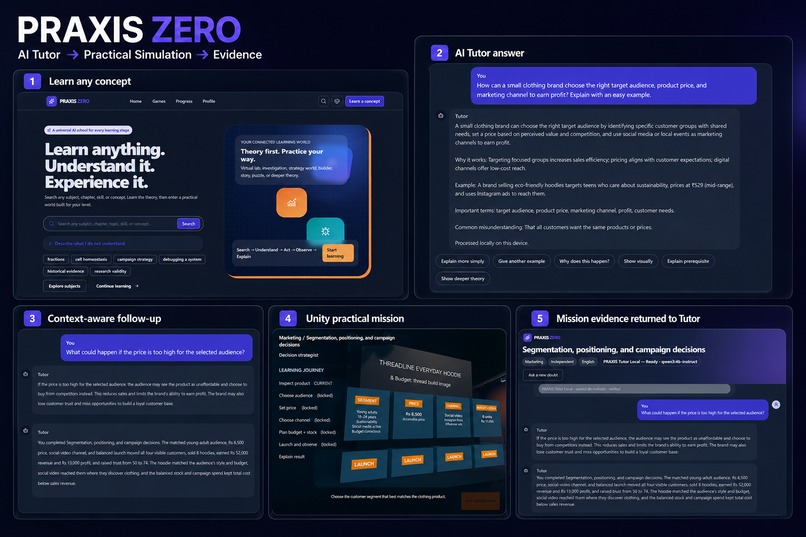
From Tutor to Practical World: learners understand concepts, enter guided simulations, practice, and return with evidence.
-
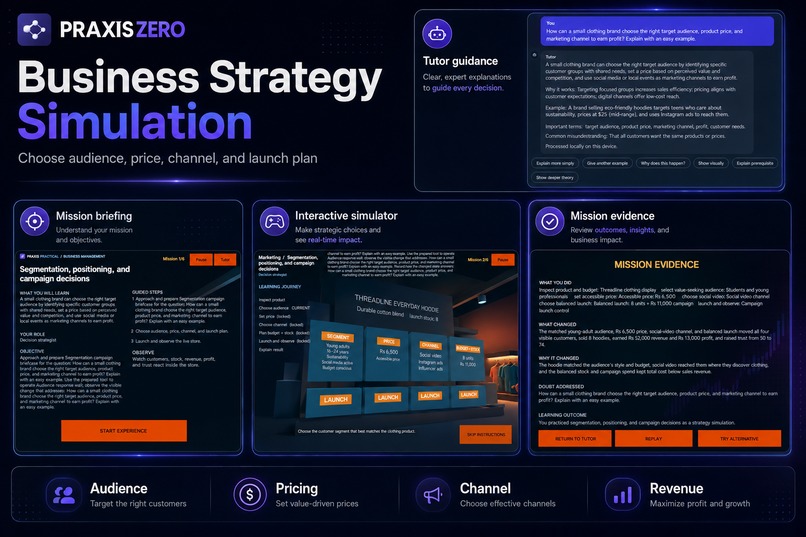
PRAXIS ZERO: AI Tutor, subject detection, contextual follow-ups, and verified learning support in one connected flow.
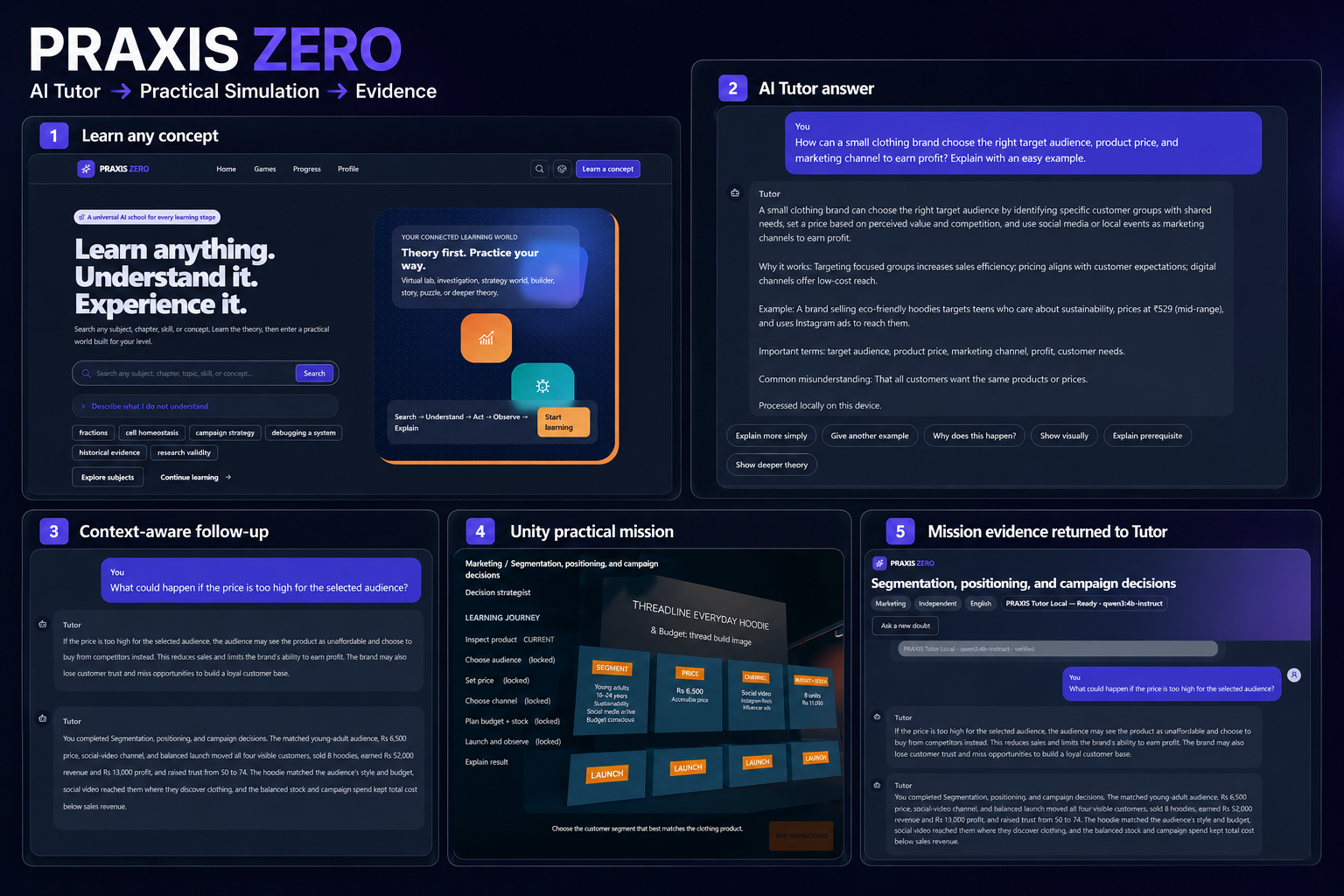
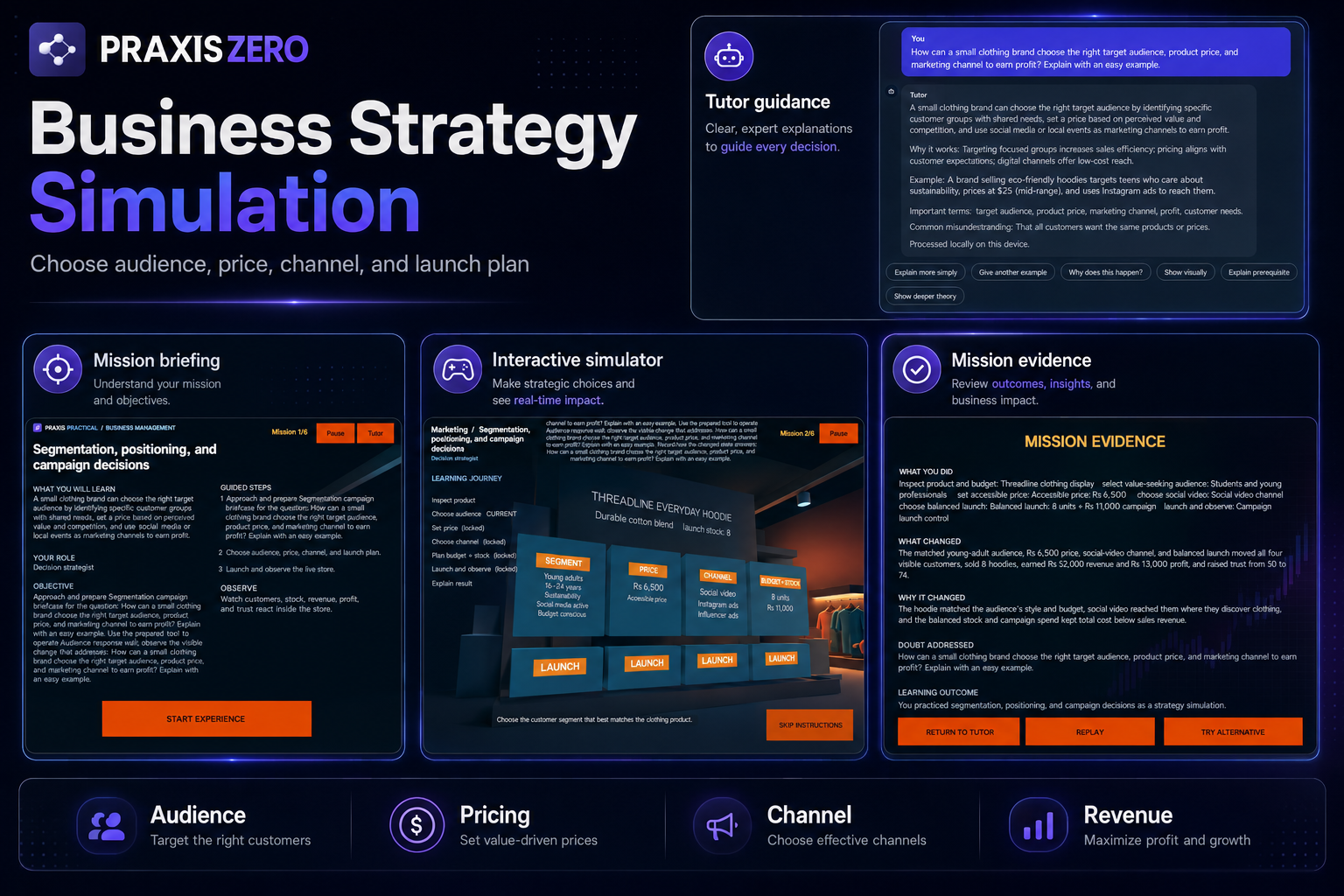
Inspiration
I started PRAXIS ZERO because I felt that most learning platforms stop too early.
They explain a concept, show a video, give notes, or ask a quiz question. But even after understanding the definition, many learners still do not know how that concept works in a real situation.
I wanted to build a learning experience where a student could ask a question in their own words, understand the idea through a Tutor, and then actually apply it inside an interactive environment.
The goal was not to create another chatbot or another quiz platform. I wanted learners to make decisions, see consequences, learn from mistakes, retry, and then discuss the result with the same Tutor.
That idea became PRAXIS ZERO.
What it does
PRAXIS ZERO is an AI-powered learning and practical-simulation platform.
A learner can begin by asking a question naturally. They do not have to manually choose a subject before asking.
The Tutor identifies the subject, topic, concept, question intent, and suitable explanation level. It then gives a learner-friendly answer and keeps the context available for follow-up questions.
The learner can:
- Ask a question in natural language
- Receive a clear explanation
- Ask follow-up questions without repeating the entire context
- Save the lesson
- Continue learning through an optional practical experience
- Enter a playable Unity WebGL simulator
- Make decisions and observe the results
- Return the gameplay evidence to the original Tutor conversation
PRAXIS ZERO is designed as a universal learning platform that can eventually support areas such as:
- Mathematics
- Physics, Chemistry, and Biology
- Technology and Coding
- Business and Management
- Research and Investigation
- History and Humanities
- Professional and independent learning
However, this submission does not claim that every subject already has a completed Unity simulator.
For this Build Week submission, I focused on completing and verifying one full end-to-end experience:
Business and Marketing Storefront Simulator
The learner is placed in charge of a small clothing-brand campaign.
The mission requires the learner to:
- Inspect the product and available resources
- Select a suitable target audience
- Set the product price
- Choose a marketing channel
- Decide how to use stock and campaign spending
- Launch the campaign and observe the outcome
The Unity simulator visibly updates:
- Customer response
- Units sold
- Remaining stock
- Revenue
- Profit
- Brand trust
- Mission progress
The learner is not simply answering a quiz. Their decisions directly affect the result.
A weak strategy can lead to poor performance. The learner can understand what went wrong, retry the mission, and test a better approach.
In the final verified play-through, the learner selected:
- Students and young professionals as the audience
- PKR 6,500 as the product price
- Social video as the marketing channel
- A balanced stock and campaign-spending strategy
The simulation produced:
- 8 hoodies sold
- PKR 52,000 in revenue
- PKR 13,000 in profit
- Brand trust increased from 50 to 74
After completing the mission, the learner’s exact choices and results were returned to the original Tutor lesson.
The learner could then continue the conversation and ask why the selected audience, price, channel, and spending strategy produced that result.
This completes the working journey:
Question → Tutor explanation → Practical experience → Unity gameplay → Learning evidence → Same Tutor conversation
How we built it
I built PRAXIS ZERO as a connected learning system rather than a collection of separate pages.
The main learning platform uses:
- Next.js
- React
- TypeScript
- JavaScript
- HTML
- CSS
- Browser local storage
The practical simulator uses:
- Unity 6.3 LTS
- Unity WebGL
- C#
The local Tutor uses:
- Ollama
- qwen3:4b-instruct
The runtime Tutor works locally through Ollama. It does not use GPT-5.6 as the live Tutor model.
The Tutor pipeline handles:
- New lesson creation
- Automatic subject and concept detection
- Prompt construction
- Local-model responses
- Follow-up conversation context
- Answer validation
- Lesson storage
- Practical-experience eligibility
- Gameplay evidence returned from Unity
Only a validated lesson can continue into the practical-learning stage.
A controlled data bridge connects the Next.js application with Unity.
PRAXIS sends structured lesson information to Unity, including:
- Lesson and session identifiers
- Original learner question
- Detected subject and concept
- Learner context
- Verified Tutor explanation
- Practical-learning objective
Unity returns structured gameplay evidence, including:
- Audience choice
- Product price
- Marketing channel
- Stock and campaign decisions
- Customer response
- Units sold
- Revenue
- Profit
- Brand trust
- Mistakes and retries
- Mission completion
The system does not generate and execute arbitrary C#, JavaScript, shaders, or other executable game code.
AI helps understand the lesson and prepare structured educational context, while trusted application and Unity systems control the gameplay, calculations, and results.
How I used GPT-5.6
I used GPT-5.6 through my development workflow for high-level reasoning, technical planning, and problem-solving.
GPT-5.6 helped me:
- Turn the original idea into a complete product architecture
- Define PRAXIS ZERO as a universal learning platform instead of one fixed game
- Design the full Tutor-to-simulation learning journey
- Separate theory learning from optional practical experience
- Plan the structured communication between Next.js and Unity
- Analyze problems across TypeScript, Ollama, Unity, WebGL, storage, and session state
- Define acceptance criteria for Tutor quality, gameplay, integration, and testing
- Decide which features were essential for a complete submission
- Reduce unnecessary scope and focus on one working vertical slice
- Plan debugging and release steps
GPT-5.6 supported the reasoning, architecture, validation strategy, and engineering direction behind the project.
It is important to clarify that GPT-5.6 is not presented as the live runtime Tutor. The application uses the local qwen3:4b-instruct model through Ollama for Tutor responses.
How I used Codex
Codex acted as the engineering agent working inside the actual PRAXIS ZERO repository.
I used Codex to:
- Inspect and understand the growing project codebase
- Implement and improve the Next.js and TypeScript application
- Build and repair the local Ollama Tutor pipeline
- Configure qwen3:4b-instruct for local tutoring
- Fix fresh-session behavior
- Improve automatic subject and concept detection
- Repair structured prompt serialization
- Prevent invalid values such as
[object Object] - Improve response parsing and validation
- Preserve context across follow-up questions
- Ensure that only verified lessons could launch practical experiences
- Design and implement the Tutor-to-Unity data contract
- Build the Business and Marketing Storefront Simulator
- Implement audience, pricing, marketing-channel, budget, and stock decisions
- Implement customer, sales, inventory, revenue, profit, and trust outcomes
- Create the guided six-stage mission
- Add weak-result, retry, replay, and completion paths
- Build Unity for WebGL
- Integrate the WebGL build into the PRAXIS application
- Add Unity loading progress, readable failure information, and retry behavior
- Return gameplay evidence to the original Tutor lesson
- Run automated tests, lint checks, TypeScript checks, and production builds
- Prepare project documentation, testing instructions, evidence, limitations, and submission material
I personally directed the educational concept, Tutor requirements, simulator behavior, learner journey, visual direction, and final priorities.
I reviewed each major stage through the real application, browser testing, screenshots, and Unity gameplay.
As the deadline approached, I kept reducing unnecessary scope until one complete Business and Marketing journey worked from the learner’s original question to the final simulation evidence.
Challenges we ran into
One of the biggest challenges was making PRAXIS ZERO feel like one connected learning journey.
The Tutor, lesson validation, Unity simulator, gameplay result, and Return-to-Tutor flow could not behave like separate applications.
They all had to remain connected to the learner’s original question.
Local Tutor reliability
The local Tutor initially had several problems.
Previous subject context could sometimes carry into a new lesson. Valid answers could be rejected by strict validation. Structured prompt values did not always reach the model correctly, and some follow-up questions lost the intended context.
Local inference was also slower than a cloud-based response because the model was running on local hardware.
I improved:
- Fresh-session reset
- Automatic subject detection
- Prompt construction
- Structured-value handling
- Response parsing
- Answer validation
- Retry behavior
- Follow-up context
The final Tutor flow worked correctly during testing, although local response speed remains an area for future improvement.
Connecting the Tutor with Unity
The Tutor and simulator had to share the same lesson identity and context.
The system needed to preserve:
- The learner’s original question
- The detected subject and concept
- The verified explanation
- The practical objective
- The learner’s Unity decisions
- The simulation results
- The context required for later follow-up questions
I addressed this through a validated structured-data bridge between the Next.js application and Unity.
Only an eligible lesson can launch the simulator, and Unity returns structured evidence to the same lesson after completion.
Unity WebGL loading failure
One of the most difficult technical issues appeared after the Unity WebGL build was integrated.
The Unity splash screen loaded successfully, but the simulator failed before the main experience became visible.
The problem involved required runtime shader and procedural-collider components not being preserved correctly in the WebGL build.
The repair process included:
- Preserving the required runtime components
- Adding a safe shader fallback
- Rebuilding the WebGL output
- Checking build and loading paths
- Adding visible loading progress
- Adding a readable failure state
- Adding a Retry action
- Repeating tests after hard refreshes
After these changes, the storefront mission loaded and completed successfully during manual testing.
Making the gameplay meaningful
Another challenge was avoiding a quiz disguised as a game.
The practical experience needed to give the learner real decisions with visible and understandable consequences.
I connected the learner’s choices to:
- Customer response
- Units sold
- Remaining inventory
- Revenue
- Profit
- Brand trust
- Mission success or failure
This made the simulator useful for practical learning rather than only decorative.
Managing the scope
The larger vision of PRAXIS ZERO includes multiple subjects and simulator families.
Trying to complete every planned environment during Build Week would have resulted in several unfinished demos.
I decided to focus on one complete and testable Business and Marketing vertical slice.
That decision allowed me to verify the full:
Question → Tutor → Unity simulator → Gameplay evidence → Same Tutor conversation
journey.
Accomplishments that we're proud of
I am proud that PRAXIS ZERO became more than a concept, static interface, or scripted demonstration.
The final submission includes:
- A working local AI Tutor
- Automatic subject and concept detection
- Contextual follow-up questions
- Verified lesson-to-practice gating
- A real Unity WebGL simulator
- A six-stage Business and Marketing mission
- Target-audience, pricing, channel, stock, and campaign decisions
- Visible customer, inventory, revenue, profit, and trust outcomes
- Weak-result, retry, replay, and completion paths
- Gameplay evidence returned to the original Tutor conversation
- A complete Tutor-to-Unity-to-Tutor learning journey
- 66 passing automated tests
- Successful ESLint checks
- Successful strict TypeScript checking
- Successful Next.js production build
- Successful Unity WebGL build
The part I am most proud of is that the learner’s choices actually matter.
The learner can make a decision, see a calculated outcome, complete the mission, return to the Tutor, and continue learning from the evidence.
What we learned
I learned that practical AI education should not generate and execute arbitrary game code for every learner question.
A safer and more scalable approach is to:
- Understand the learner’s question
- Explain and validate the theory
- Create a structured practical-learning objective
- Select a trusted simulator family
- Configure its mission and educational content
- Let Unity control gameplay and calculations
- Return structured evidence to the Tutor
I also learned that one complete vertical slice is more valuable than several incomplete prototypes.
Finishing one real Tutor-to-Unity journey helped me test the architecture, discover integration problems, verify the learning evidence, and create a clear foundation for future expansion.
What's next for PRAXIS ZERO
The current submission proves the core architecture through one working Business and Marketing Unity simulator.
The next phase is to build dedicated simulator families for:
- Science and virtual laboratories
- Mathematics and interactive visual models
- Technology and debugging environments
- Research and investigation
- History and humanities role-play
- Additional business and management scenarios
Each simulator family will have its own:
- Environment
- Camera perspective
- Characters
- Tools and equipment
- Mission structure
- Decisions
- Failure conditions
- Visible consequences
- Learning evidence
I also plan to improve:
- Tutor response speed
- Unity interface polish
- Accessibility
- Mobile and touch controls
- Teacher-created practical activities
- Multi-language learning
- Cloud synchronization
- Learner progress analytics
PRAXIS ZERO began with one question: what if learners could experience a concept instead of only reading about it?
This submission is the first complete working step toward that vision.
Built With
- browser
- c#
- codex
- css
- gpt-5.6
- html
- javascript
- local
- next.js
- ollama
- openai
- qwen3:4b-instruct
- react
- typescript
- unity
- webgl

Log in or sign up for Devpost to join the conversation.