
Inspiration
Nobody trains you for the first hard conversation you have as a manager. The report who has missed three deadlines and keeps saying "almost done." The one who messages you at 11pm and now expects a reply. The peer who wants to borrow your engineer for a month. Most of us learn by doing it badly, on a real person.
You can plan your opening line in advance. What you can't plan on your own is the reply: the excuse you didn't see coming, or the question you have no answer for. We wanted somewhere to hear that reply first.
We're two developers who had never shipped a mobile app.
What it does
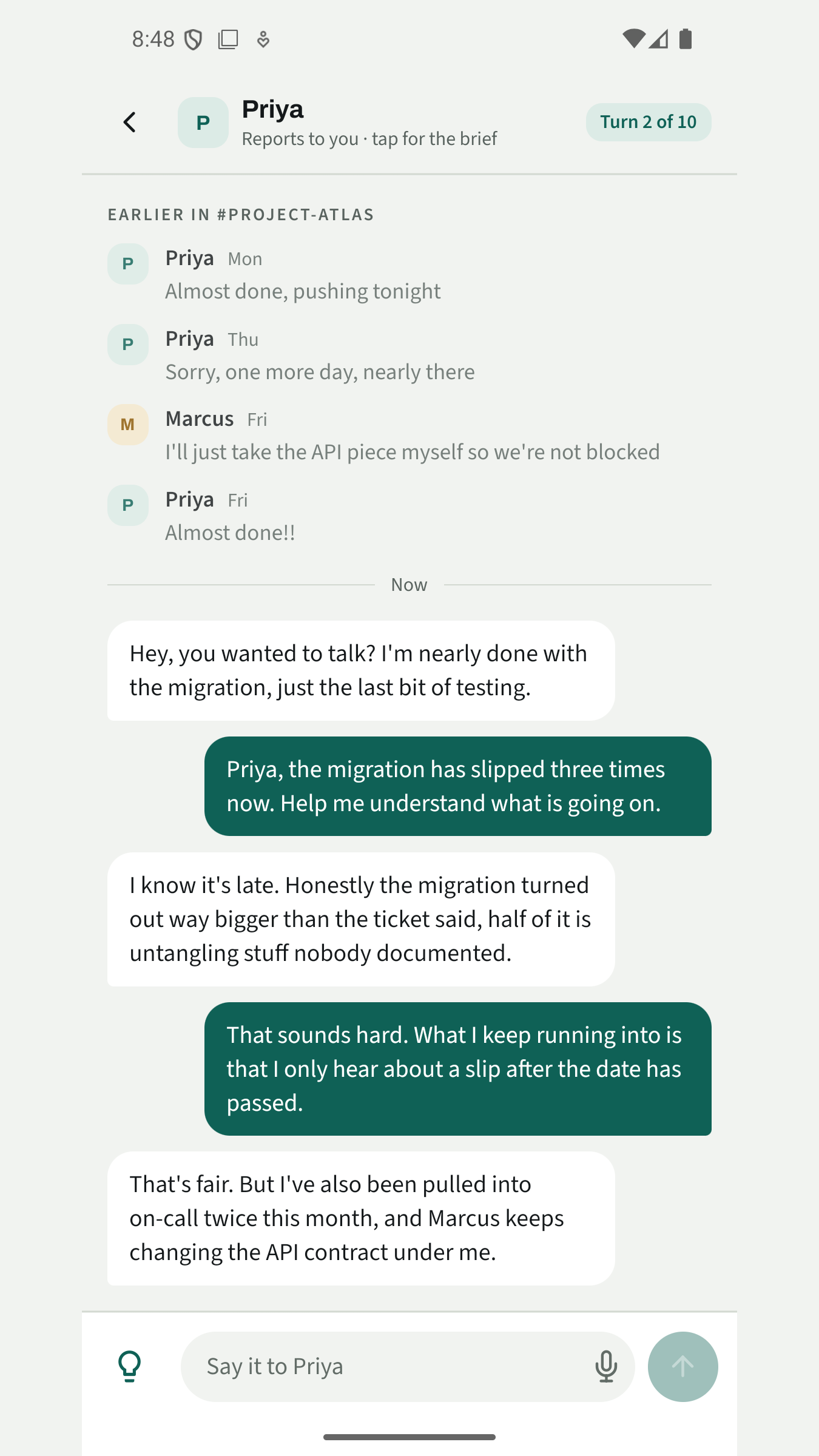
You pick one of twenty-two situations, grouped into giving feedback, setting a boundary and saying no. The brief shows the Slack thread that got you here, like the three "almost done" messages, so you go in knowing what has already been said.
Then you message the other person, typing or dictating. Claude plays them from a brief you never see, which covers how they tend to resist and what would move them. Some argue. Others deflect, go quiet, or agree too quickly and change nothing. They stay in character for up to ten turns and never coach you.
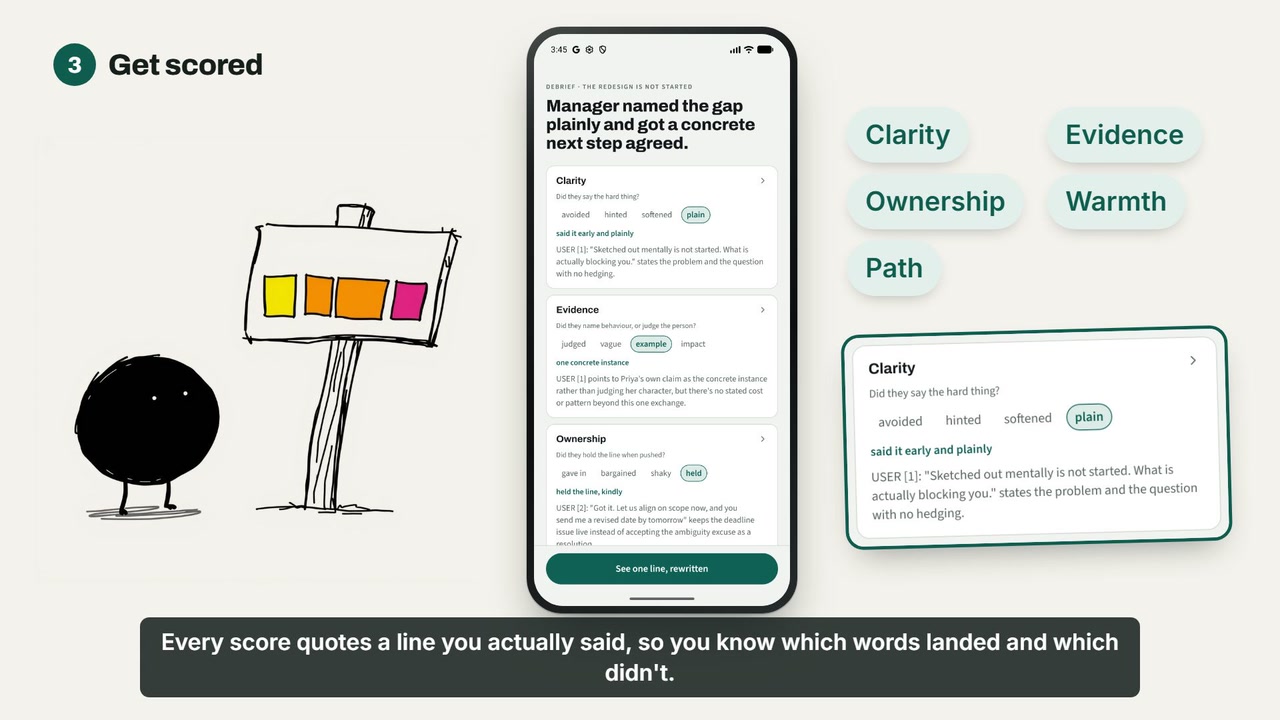
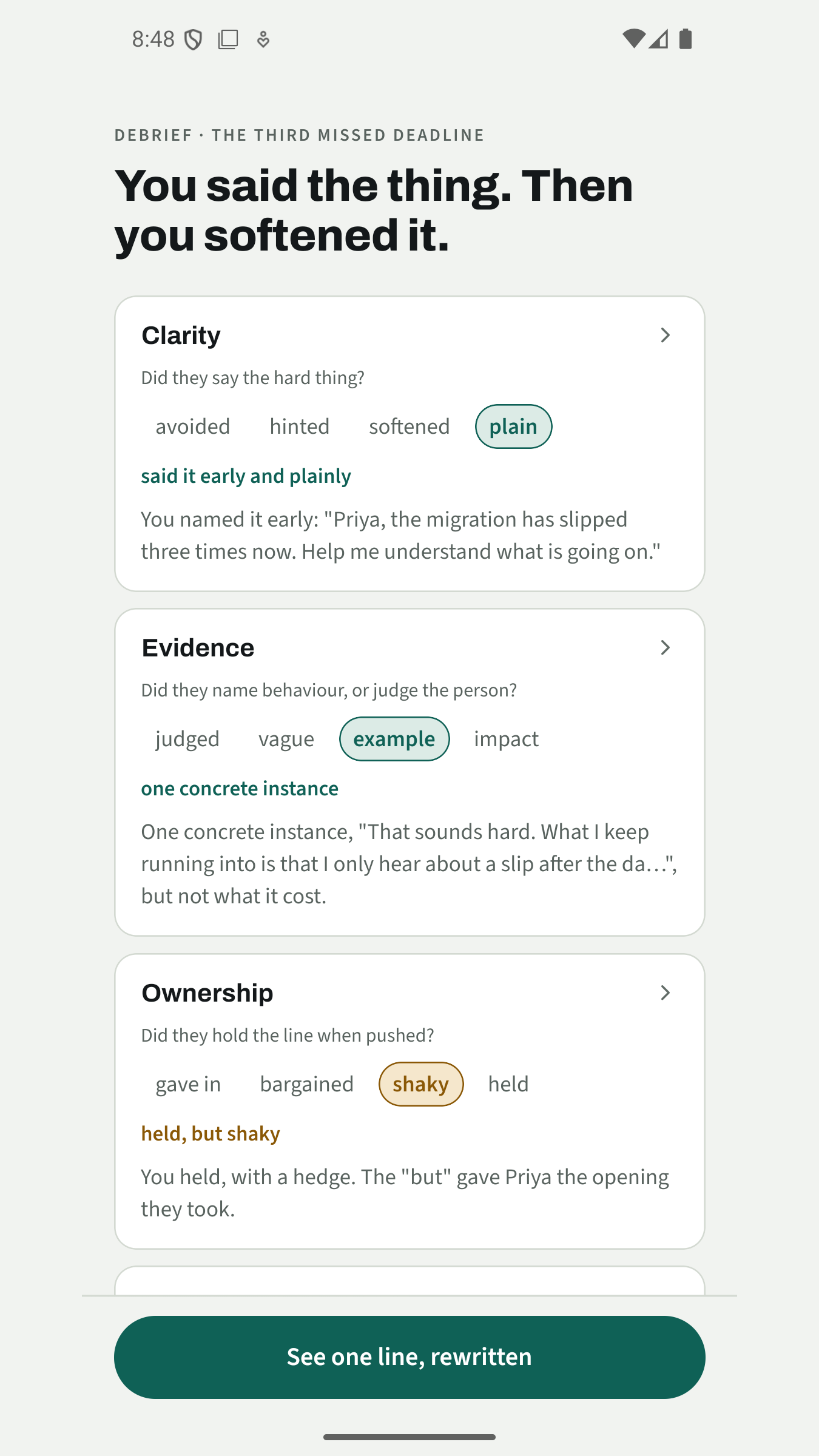
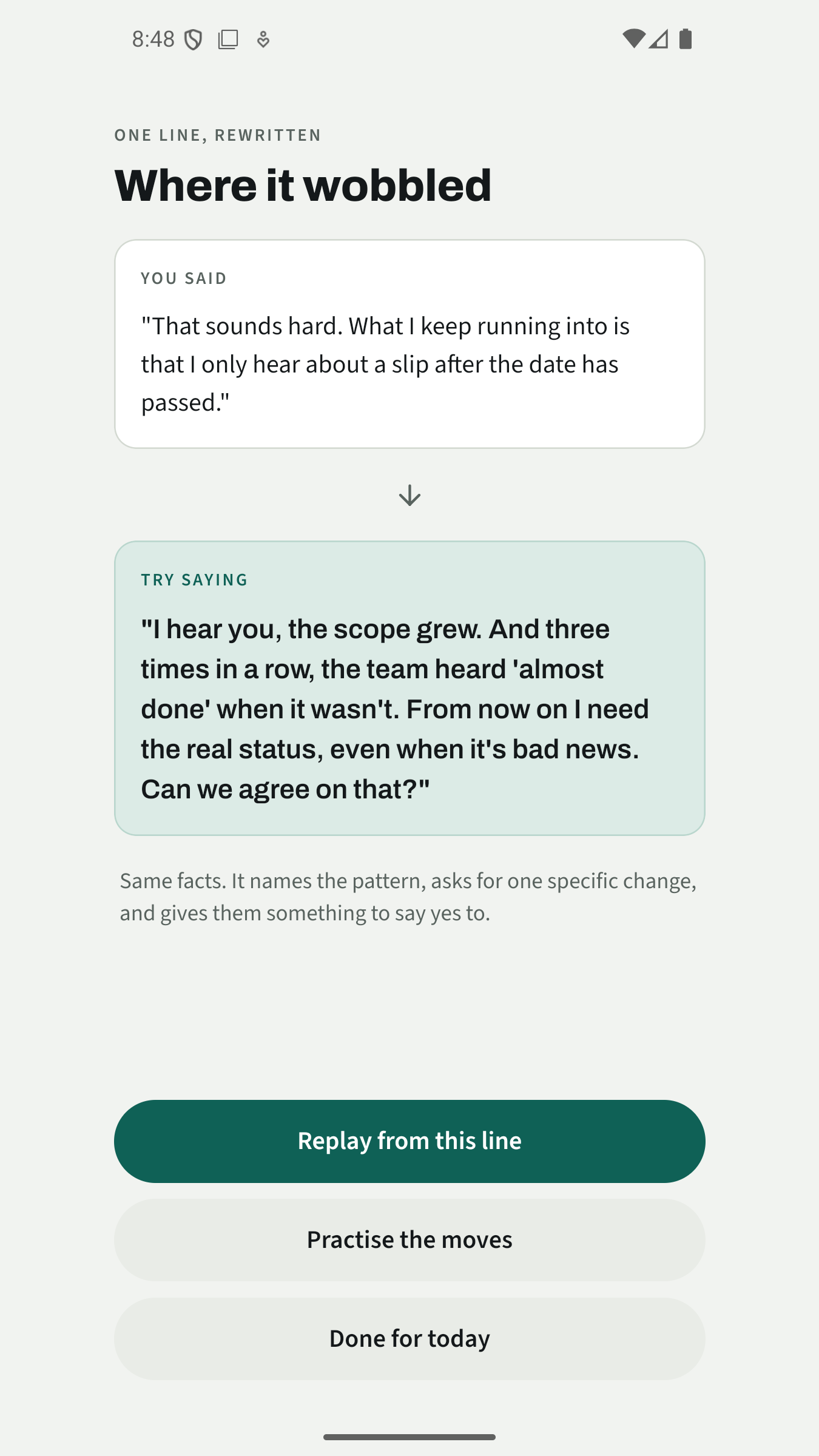
After that comes the debrief. You're scored on Clarity, Evidence, Ownership, Warmth and Path, each with a named level and a quote from something you wrote. Path is about whether a next step actually landed, so holding a boundary or giving a clear no with the reason gets full marks even if the other person is still unhappy. One of your lines gets rewritten with a note on why the new version works, and you can replay the conversation from there. After the debrief, Practise the moves is a short spoken drill where you say the better version out loud until it sounds like you.
You can also bring your own conversation. Describe it in a line or paste the real chat, pick how the other person tends to react, and the app builds the scenario around it.
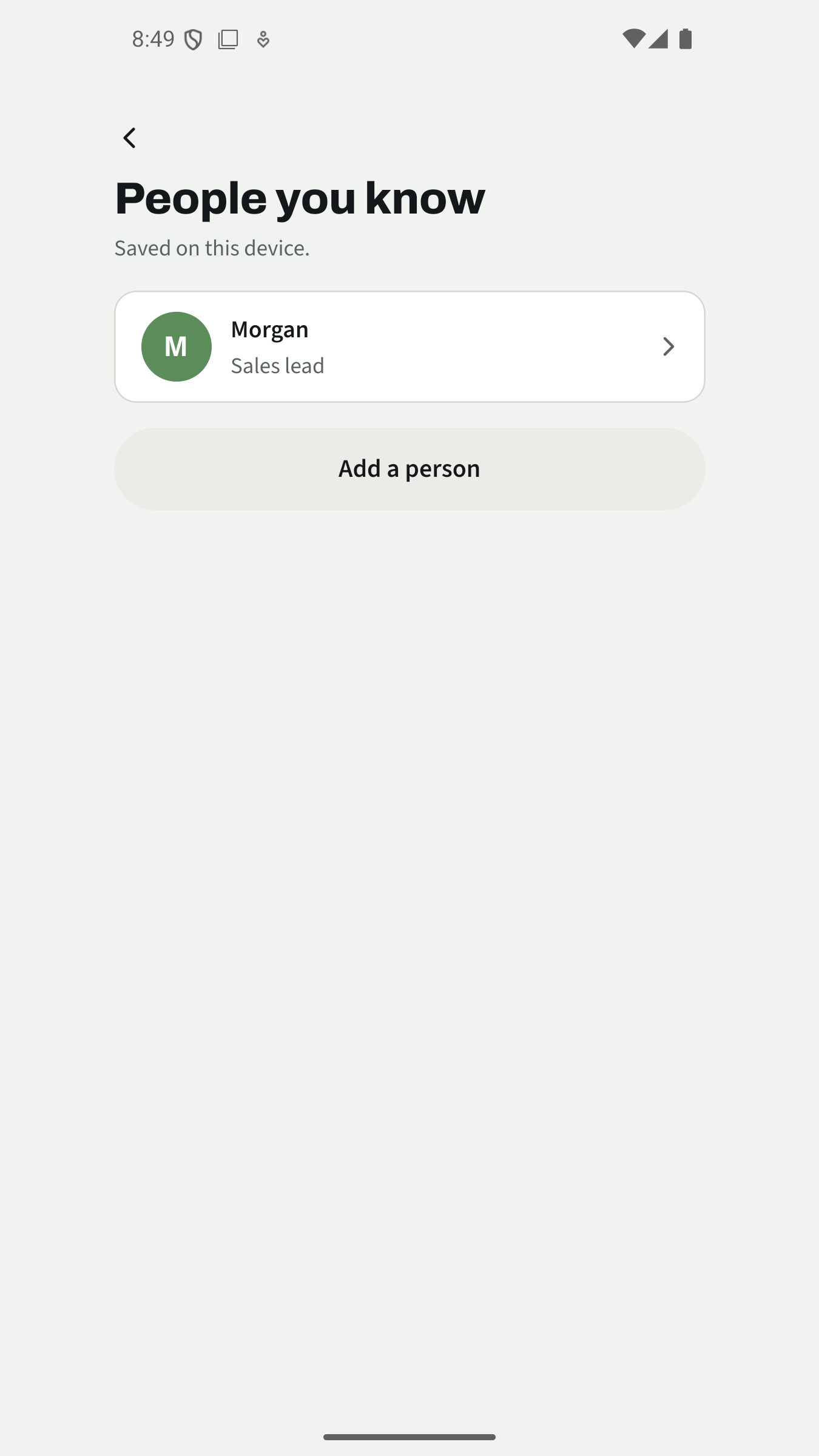
Five sessions are free, each with its debrief and two edits. Practice Room Plus adds unlimited sessions and People you know, where you set up a mock colleague (name, role, how they react) and practise with them.
How we built it
- App: Expo + React Native + TypeScript with Expo Router. We both knew TypeScript and neither of us knew Kotlin or Flutter, and four weeks wasn't long enough to learn a new language as well as mobile. We mocked up every screen before building it.
- Server: Hono on Cloudflare Workers, with D1 for accounts. We needed a server because an API key can't be kept safe inside an app anyone can download, and Workers let us run one without managing a machine. The Claude key and each scenario's hidden brief live only here, and the server strips the private fields before anything is sent to the phone.
- Models: Claude Haiku plays the other person, because it's fast enough to stream replies like a real chat and cheap enough to run for ten turns. Claude Sonnet writes the debrief, where getting the score and the quote right matters more than speed. It returns structured output, and the server checks each quote against what the user actually wrote before the app shows it.
- Content: each scenario is a JSON file with the situation, the chat history, the other person's temperament, how they resist and what a good outcome looks like. Changes to how a character behaves get reviewed in a pull request, like code.
- Billing: RevenueCat on Google Play billing, gating the sixth session and People you know.
- Retention: OneSignal with four tags (sessions used, Plus, weakest dimension, last debrief), so a reminder can name what to work on without any conversation text reaching OneSignal.
- Testing: Maestro end-to-end flows on the Android emulator, plus unit tests on the app and server. As first-time mobile developers, we didn't trust a screen until a script had tapped through it.
Challenges we ran into
We only have Windows machines, so iOS was never an option. Google Play requires new personal accounts to keep 12 testers opted in for 14 days in a row before you can even apply for production. We found 13 through friends and the Shipaton Discord and spent those two weeks shipping to them, knowing that if one person dropped out the count would start again. Production access came through on 18 September, and then the release sat in Google's review queue for almost two weeks. It went live at the very end of the hackathon. If you'd rather not install anything, the browser version at practice-room.pages.dev works too.
Our first testers told us the replies felt long and robotic. They were right. The counterpart was answering in tidy paragraphs, and people at work send one line. We shortened the replies that day to match the length of the chat history, and the next day took out the em dashes and colons, which the model uses a lot and people rarely type in Slack.
A few days later another tester pasted in a real exchange from work, and the person the app built was far more hostile than the real one. Every counterpart was pushing back, because our instructions told it to. Now the tone follows the messages you paste in, and you can pick from four tones or describe your own.
Neither of us had built a mobile app before. We used AI to help write a lot of the code, and the hard part was understanding it well enough to spot when it was wrong. We tested every screen on the emulator and on an Oppo phone before we trusted it.
Accomplishments that we're proud of
- The full loop runs on a real phone: pick, brief, talk, debrief, rewrite, replay, drill.
- You can check the debrief. Each score quotes a line you wrote, and the server rejects quotes that don't match.
- Nothing secret is in the app. The key and the hidden briefs stay on the server.
- We got through Google's tester requirement with 13 people and nobody dropped out.
What we learned
One of us rehearsed a real conversation in the app first, with someone on their team who avoids conflict. In the app it was easy. He agreed and moved straight on. In the real conversation he asked how long they thought it would take him to get up to speed, and there was no answer ready, because in the app he had never asked anything back.
The counterparts only ever reacted to what the user said, and real people ask you things. Now the other person asks a real question of their own early in the conversation, unless the user has already covered it, and the user has to answer on the spot. It was a small change, and it brought practice closer to the real conversation than anything else we tried.
What's next for Practice Room
Pointers for a meeting is already built and comes in the first update: you describe the conversation you're about to have and get a short list of steps written from your description. Since every scenario, character and rubric is a text file, a company could also load its own situations and its own feedback framework.
Built With
- android
- claude
- cloudflare
- cloudflare-workers
- expo.io
- hono
- onesignal
- react-native
- revenuecat
- typescript


Log in or sign up for Devpost to join the conversation.