-
-
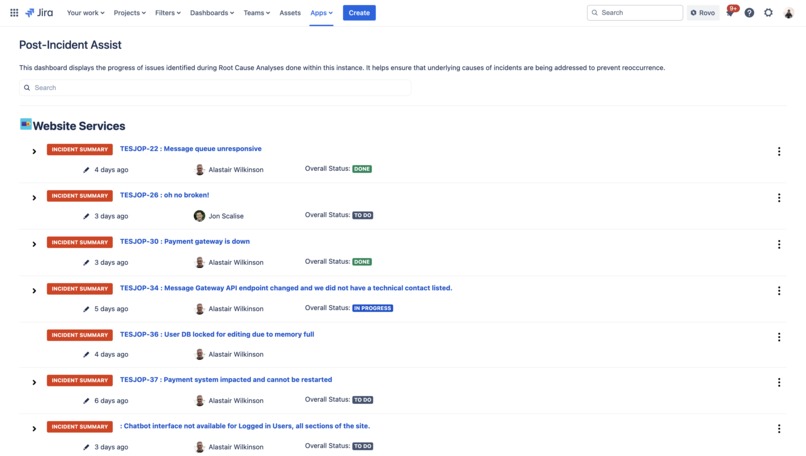
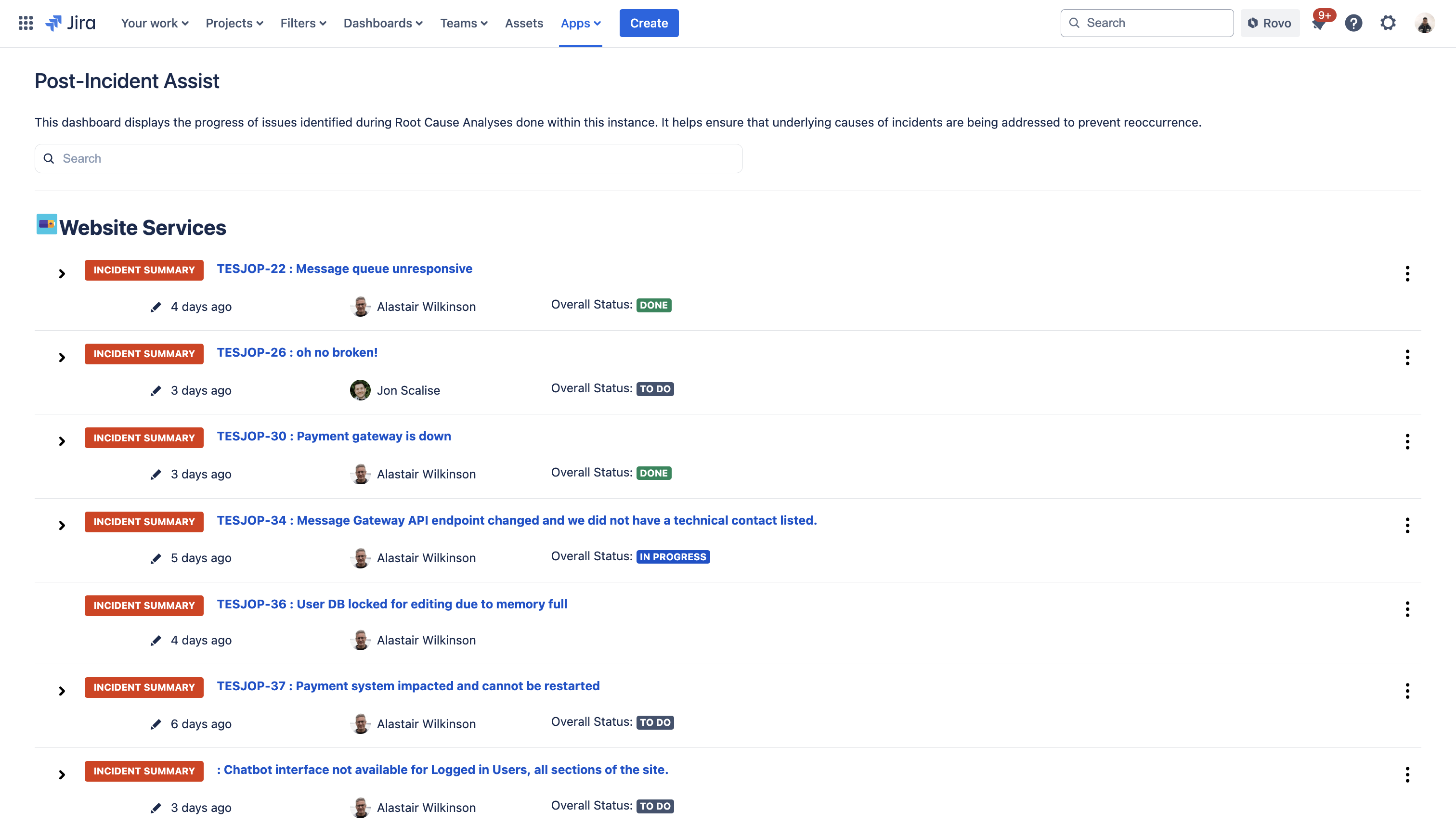
Post-Incident Assist Remediation Dashboard
-
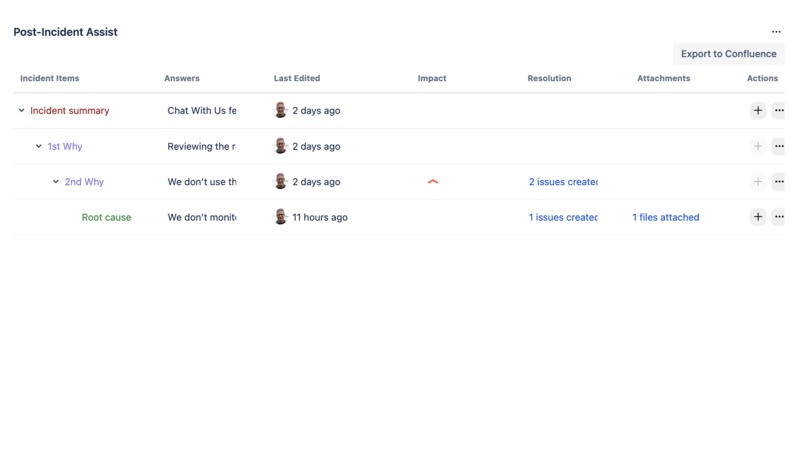
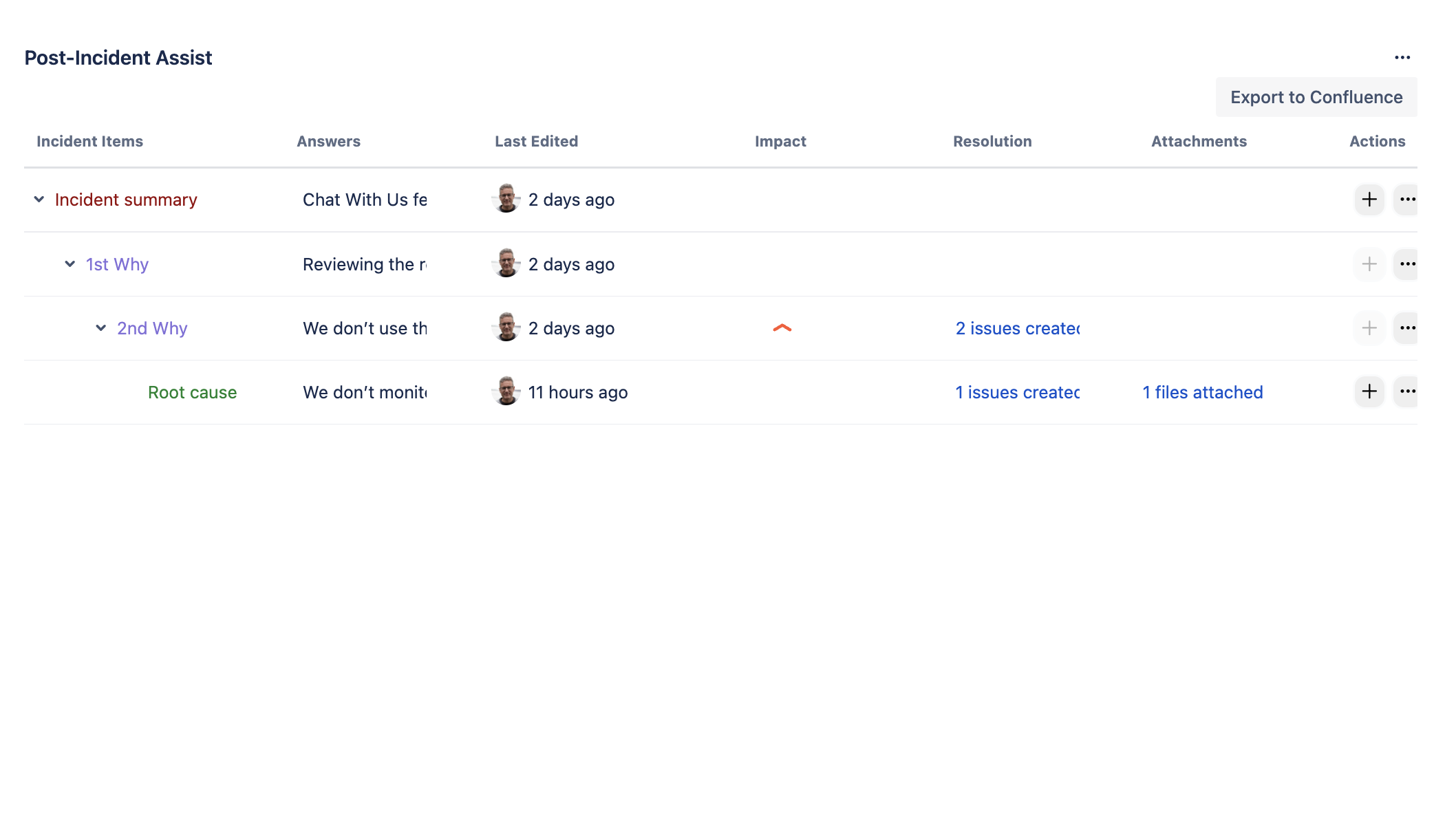
Post-Incident Assist Root Cause Analysis Issue Panel
-
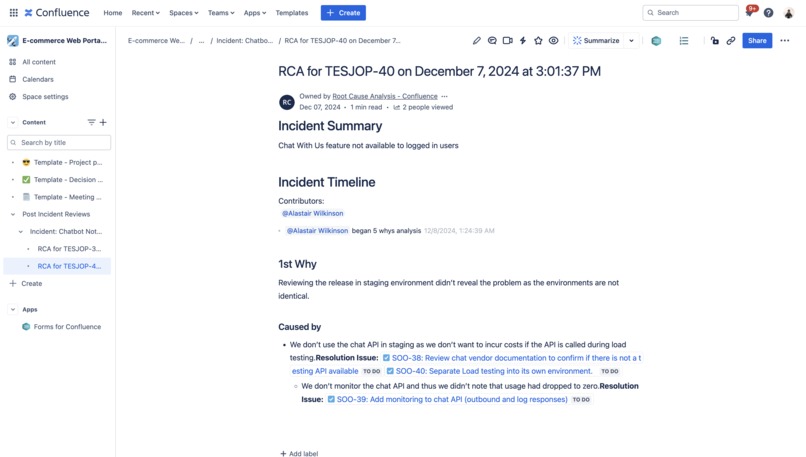
Post-Incident Assist Confluence export
-
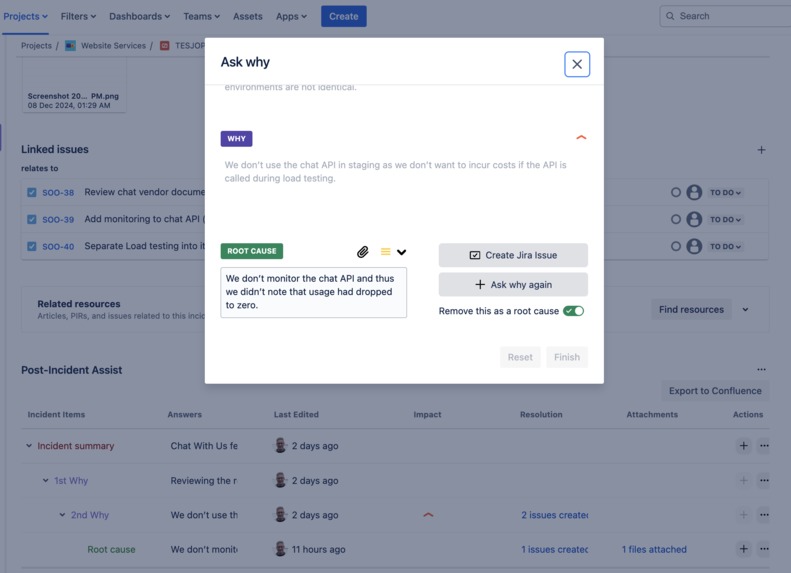
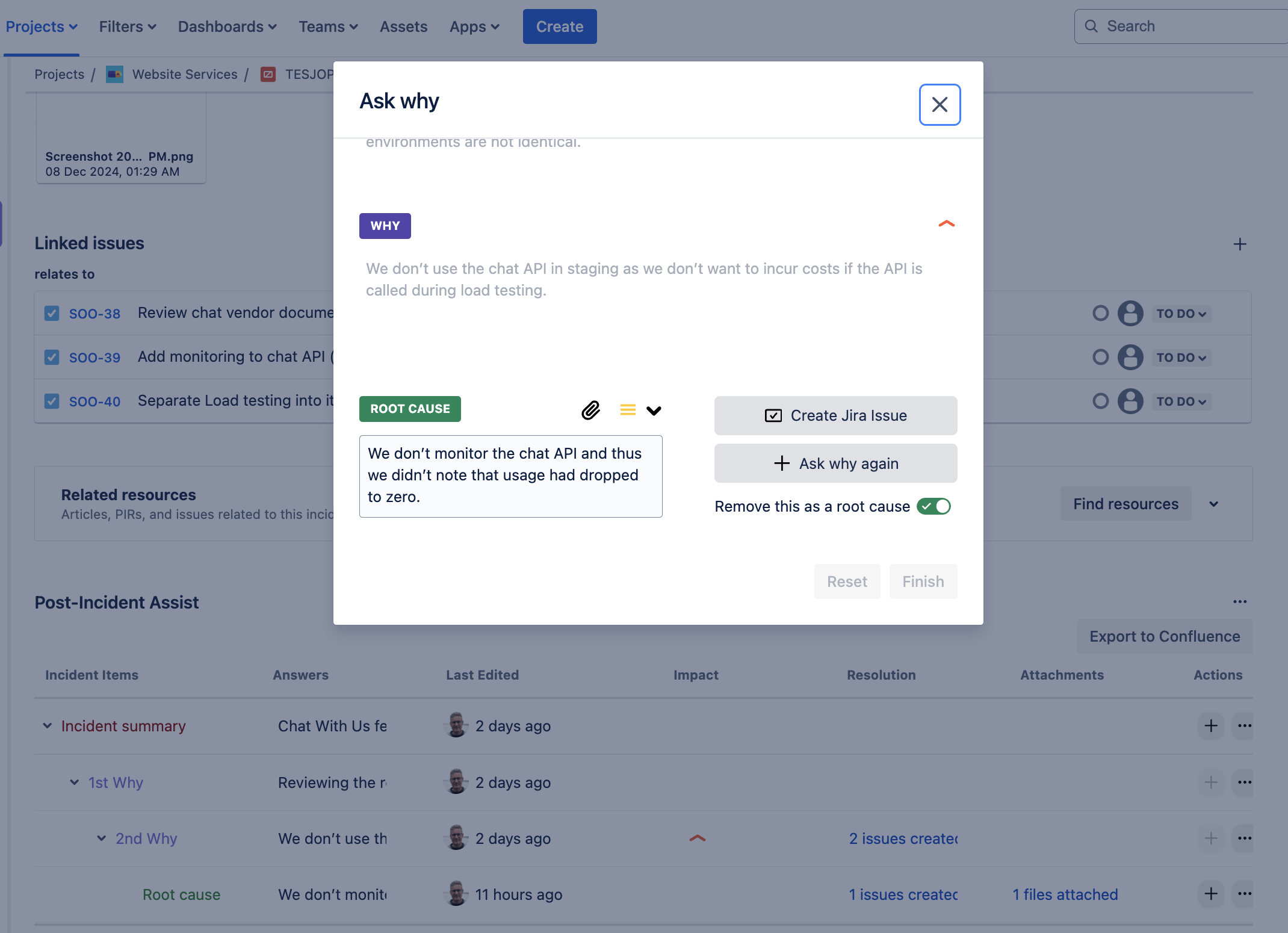
Post-Incident Assist 5 whys modal

Inspiration
We understand the time pressure that IT teams are under when it comes to documenting the causes of incidents. Service has been resumed and now the expectation is to run and maintain it, but the post-incident process must still be followed. We wanted to build an app that would make it easier and faster to:
- Document the underlying causes of an incident, and
- Create and track any work needed to make sure that the incident doesn’t happen again.
Post-Incident Assist is designed to improve collaboration between all incident stakeholders so that post incident learnings lead to improved overall service levels.
What it does
Post-Incident Assist supports your team through every step of the post-incident process. The app:
- Provides an auditable, structured approach to doing a root cause analysis using the 5 whys method, guiding your team to dive deeper into the underlying reason for an incident.
- Makes it easy to create and link related Jira work items that need to be implemented to prevent future incidents from recurring. Also supports adding attachments that help to clarify why something occurred.
- Our tracking dashboards make it easy for stakeholders to monitor remediation progress.
- Exports the analysis to Confluence, including all attachments and work items, so it’s easier for your team to collaborate on the post-incident review.
How we built it
Jira Forge App
Our solution helps any team that has to identify, resolve, and follow up on incidents. This made it a prime candidate for being a Jira app running on Forge, being flexible in that teams in both Jira software and Jira Service Management projects will be able to take advantage of it's features.
We utilized and built several Forge modules in order to support the desired feature set:
- We used a Forge issue-panel module to facilitate the 5 whys root cause analysis, which is triggered by a button at the top of every work item. It showcases a summary table of each analysis, and enables Jira issue creation and managing attachments.
- We wanted to show users a complete history of their root cause analysis process for audit purposes and for better collaboration, so we utilized a Jira issueActivity module to display a rich history view, with clickable links to individual history views for each "why" item.
- We used a Jira project-page module to build a dashboard that provides managers project level insights for each root cause analyses done within the current project.
- We used a Jira global-page module to build a higher level dashboard that provides general stakeholder level insights for each root cause analyses done within the current customer site.
For an improved user experience, we also took advantage of Forge Bridge modals in our issue panel module which allows us to open proper modals for specific tasks like Jira issue creation, attachment uploading and viewing, as well as adding and editing incident causes as a part of the 5 whys analysis.
Confluence Companion Forge App
After talking with a number of people, it was identified that being able to export the root cause analysis and incorporating it into a general post incident review process was very valuable, so we naturally wanted to be able to export to confluence as well. Unfortunately the Forge platform does not fully support cross-product apps on the marketplace yet so, following Atlassian guidance, we looked into and built a companion Confluence Forge app as well to enable us to call the Confluence APIs as well as Jira ones.
To enable the cross-product API calls, we needed to build a proxy service:
- When a user wants to export to Confluence, the app prompts them to install the companion Confluence app if they have not done so.
- Once each app is installed, we subscribe to the Forge install lifecycle event to get a Forge web trigger URL which is sent out of the Forge app and stored in a remote proxy service we have built on AWS Lambda/API Gateway/DynamoDb. The web trigger URL is the only thing that this service stores, with data being encrypted both in transit and at rest.
- When our Jira app wants to call a Confluence API (to create a page) it calls our proxy service which, via the stored web trigger URL, will call our Confluence app to make the call and return the result!
To enable a richer user experience in exported root cause analysis pages, we also utilized a Forge Confluence macro module as well. We built a custom macro that allows for root cause analysis timeline data to be rendered in the exported Confluence page in a nice, easy to read way.
Data Storage
- All customer data is stored within the Jira Forge app Key-Value Store. This includes all root cause analysis data and any attachment and jira issue metadata.
- We wanted to natively store and host all attachment files in our app but didn't want to store these files outside of the Forge platform as, from a security perspective, this is more appealing to the end user. Since Forge Object Storage isn't a released feature yet, we ended up utilizing the Jira API to store the attachment data directly on the work item itself.
Design
We wanted it to feel like a seamless native experience within Jira and Confluence that complemented Atlassian's own features in this area, while still being flexible enough to be give users a nice experience for some more demanding UI feature requirements. For these reasons we chose to use Forge custom UI with Atlaskit and Atlassian Design System components with a React front-end.
Challenges we ran into
The value that we wanted to deliver for the end user resulted in a number of challenges:
Cross product
As described in the "How We Build It" section, we wanted to be able to do both Jira and Confluence API calls in the same app that we intended to eventually distribute on the marketplace. Atlassian states this isn't supported yet. The information available in the Atlassian docs for this problem is very sparse, and the info from the Atlassian community and community posts is outdated and in some cases just not valid anymore. We engaged with Atlassian directly to figure out an ideal path forward which resulted in an Atlassian recommend approach of having a separate Forge app for each product we wanted to work in with a proxy service facilitating communication between them via Forge Web Triggers. This whole journey into having a feature set we wanted to deliver, to figuring out a way forward that Atlassian approved of, then designing and implementing a functioning solution was indeed challenging!
File storage
It would have been ideal to store our attachment files within the Forge platform itself, however the key-value store doesn't support larger files. After consulting with Atlassian we learned of the Forge Object Store that is being considered but is not available yet. So we had the challenge of either hosting the images ourselves outside of Forge/Atlassian or utilizing the Jira API to store the files directly on the work item where the root cause analysis was being done. Even though it might not be ideal to of have files appearing on a Jira issue that aren't being attached directly via the issue itself, but rather an app that lives in the issue panel, we thought this was still an ideal approach vs hosting the files ourselves in AWS to ensure all customer data stays within the Atlassian ecosystem.
Modals
We wanted to ensure we were using the Atlassian Design System for all our frontend components but when using the Modal component it seemed that due to Forge security limitations and the issue panel being limited to it's own iframe, we could only render the modal component within the iframe itself. This resulted in a very subpar user experience. After looking into it further we realized we could take advantage of Forge Bridge and, in conjunction with the Design System modal components, we were able to display normal modals outside of the issue panel!
Macros
We wanted to include the root cause analysis history as a part of content that is exported to Confluence. In order to display it nicely, it resulted in us requiring a custom macro. It was a challenge as it was unclear how we could go about doing that since there is no documentation on how to render a macro with the Atlassian Document Format (ADF). We had to reverse engineer the existing Jira issue timeline macro by inserting the macro with a slash command in a pre-existing confluence doc, making an api call to fetch the Confluence page content in ADF, and then finally figuring out what all of the parameters were in the extension block for our specific macro.
Accomplishments that we're proud of
Our small team was brand new to Forge development when starting this journey, so we are really proud of the fact that we were able to build a valuable, functioning app before the Codegeist deadline!
The aforementioned challenges provided numerous development roadblocks but we put our heads together and figured out a way forward with each obstacle. Because of our problem solving around cross-product apps, we were able to have features built on both Jira and Confluence APIs which was a big achievement for us. We are also proud that we were able to figure out the custom Confluence macro for a very specific use case whilst not having much documentation to go off of. After iterating on table designs and the user experience around the 5 whys process, we are also really happy with the final design in our issue panel, which makes use of all the things we learned about Forge Bridge and the Atlassian Design System.
Our solution helps both incident teams as well as stakeholders and we are very pleased that we were able to finish enough features given the time constraints that there is now value for both groups. With how flexible the app is in helping with post-incident processes, we hope it will benefit both small and large teams alike!
What we learned
As alluded to earlier, being new to Forge development we have learned a TONNE about Forge apps:
- Building a solution spanning multiple Forge modules.
- Storage in Forge and when to use Key-Value store vs entities.
- Forge Remotes/FIT tokens/Security considerations.
- The benefits of UI Kit vs Custom UI and learning all about Atlaskit and the Atlassian Design System.
- How to build cross-product apps and how teams are currently solving this limitation, including Atlassian recommended best practices.
- How to use Forge bridge for opening external URLs and displaying modals properly.
We also identified users in the Atlassian community seeking to enhance their post-incident processes, conducting several in-depth interviews to understand their challenges and objectives. Through these conversations, we discovered that users were primarily focused on three key areas: streamlining post-incident analysis, significantly reducing time spent on documentation, and ultimately improving their overall service quality by preventing recurring incidents. These valuable insights directly shaped our approach to developing a solution that addresses these critical needs, ensuring we deliver tangible value to users in their quest for more efficient and effective post-incident management.
As a part of the whole process, from conducting interviews, to talking with users, to diving deep into Atlassian best practices, we also learned a lot about incident management and ITSM practices as well.
What's next for Post-Incident Assist?
- Support the creation of a full PIR template that includes the root cause analysis
- The creation of of an incident time line based on the status transitions of the parent issue (the issue that holds the Root Cause Analysis)
- Admin support to limit where Post Incident Assist is available (Project/Issue types)
- Project admin support to determine the format of the PIR so it meets your team’s needs.
- Exporting attachments with the analysis
- Support cutting/pasting of the analysis into different document platforms (Word, Google docs, Notion etc.)
- Potential Slack app that would automate the collection of incident causes/steps
Built With
- amazon-web-services
- confluence
- dynamodb
- forge
- forge-web-triggers
- jira
- lambda
- react
- typescript


Log in or sign up for Devpost to join the conversation.