-
-
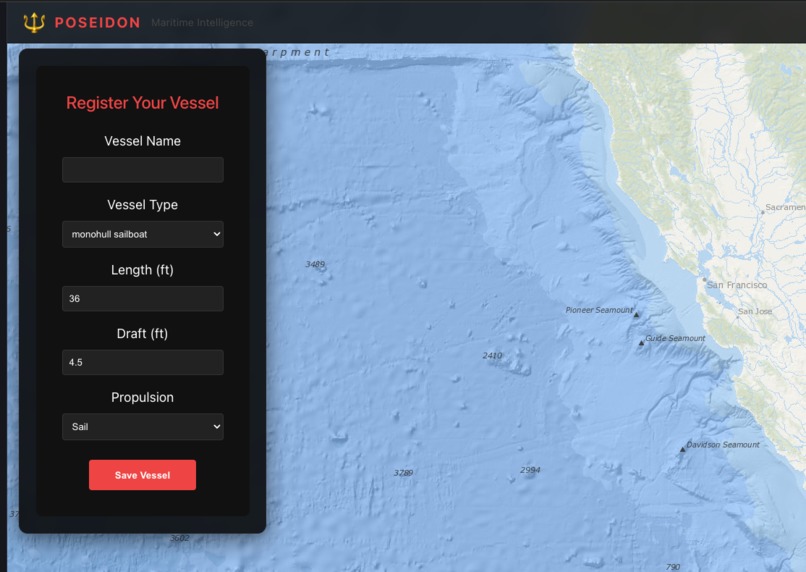
Vessel information
-
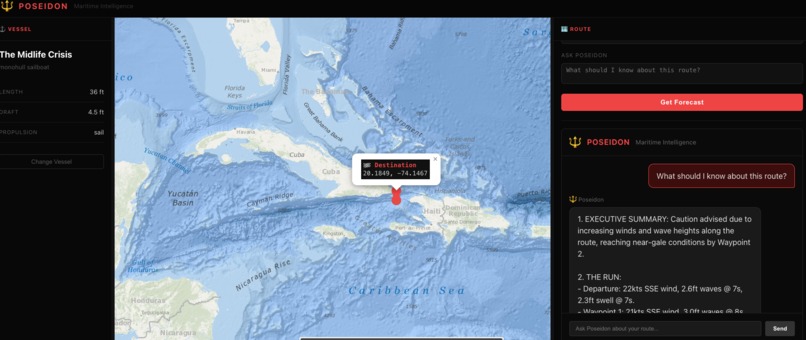
Routing information with the exact warnings.
Inspiration
Most weather apps weren't built for sailors. They'll tell you the wind speed at noon. They won't tell you whether a 35-foot sloop should leave the harbor or stay tied up — and why.
Real passage planning requires reading a matrix of data: wind speed and direction, wave height and period, swell direction, fetch, departure timing, what the conditions will look like when you reach the far end of the route — not just when you leave. An experienced offshore sailor sees all of that and synthesizes a judgment call. Casual sailors and weekend cruisers usually just squint at a weather app and hope for the best.
Poseidon exists to give every sailor access to the kind of thinking that used to require either years of offshore experience or a very expensive weather router.
What It Does
Poseidon is a maritime weather intelligence tool. You set up your vessel, click your origin and destination on the map, pick a departure time, and ask your question. Poseidon samples weather conditions along your route from the Open-Meteo Marine API, then delivers a structured briefing — in character — calibrated to your specific vessel.
The interface is built like a nautical chart come to life: a full-screen Esri Ocean basemap with bathymetric depth shading, OpenSeaMap nautical overlays, and color-coded waypoints showing wind intensity along the route. No form to fill out with lat/lon coordinates — you just click the map.
Poseidon's briefing follows a fixed 4-part structure every time:
- Executive Summary — one sentence: Go / No-Go / Caution and why
- The Run — leg-by-leg breakdown of conditions at each waypoint: wind speed and direction, wave height and period, swell
- Tactical Advice — specific actions: reef points, departure windows, hazards, fetch considerations, square seas warnings
- Final Word — a short, character-driven closing statement
The response is vessel-aware. A 28-foot sloop advice is different from a 50-foot motor yacht advice. Draft, length, and propulsion type all inform the briefing.
After the initial forecast, you can ask follow-up questions in the chat panel — departure timing, alternatives, what to watch for at a specific waypoint.
How We Built It
Backend: Python + FastAPI. The /api/forecast and /api/chat endpoints handle route sampling and inference. We use Open-Meteo's Marine Forecast API to pull wave height, wave period, wave direction, swell height, swell period, wind speed, and wind direction at each sampled waypoint along the route. The route is sampled at 5 evenly-spaced points between origin and destination, with ETAs calculated based on a vessel-appropriate speed estimate. Coordinates are converted from metric to nautical units before they reach the prompt.
LLM Inference: DigitalOcean Gradient hosts the inference endpoint. The Poseidon system prompt is injected with vessel context — type, length in feet, draft, and propulsion — so every response is calibrated to the actual boat. The weather data is formatted as a human-readable summary and appended to each user message before inference.
Frontend: React 18 + TypeScript + Vite. The map fills the full viewport. A glass-panel overlay on the left holds vessel setup and route controls. We use react-leaflet for the map and integrated three tile layers: Esri Ocean Base (depth shading), Esri Ocean Reference (labels and coastal features), and OpenSeaMap (nautical marks, buoys, hazards). Route pins are set by clicking the map directly — origin first, then destination — with a red instruction banner guiding the interaction. Weather waypoints are color-coded: green (< 10 kts), yellow (10–20 kts), red (> 20 kts). Clicking any waypoint pops up wind, wave, and swell data.
Challenges
Swell period vs. wave height. The most dangerous sea conditions for small vessels often aren't the ones with the highest waves — they're the ones with short swell periods and square seas from crossing wave trains. Getting the prompt to consistently call this out required explicit rules in the system prompt rather than leaving it to the model's general maritime knowledge.
Route sampling with meaningful ETAs. A straight-line interpolation across five waypoints sounds simple until you realize the ETA at each point depends on vessel speed, which depends on vessel type, which the user inputs. We had to derive a speed estimate from vessel type and length, then propagate that through the route to generate ETAs that actually match the departure time.
Map interaction UX. Standard map interfaces make you type coordinates. We wanted click-to-pin. The challenge was managing the click state — you're in "set origin" mode, then "set destination" mode, then back to normal pan/zoom — without the map interaction feeling broken or confusing. The instruction banner approach (red pill at the top of the map) solved it cleanly.
Esri Ocean tile attribution. The Esri Ocean basemap pulls from GEBCO, NOAA, NGA, and NHD. Getting the attribution right matters — and the Esri tile server has a strict maxZoom of 13, which means deep zoom into marinas and inlets degrades. We layer OpenSeaMap on top to keep nautical detail at closer zoom levels.
Accomplishments
- Full route-to-briefing pipeline working end to end: map click → weather fetch → LLM inference → structured 4-part response
- Vessel-aware system prompt that produces meaningfully different advice for different boat types
- Nautical-grade map interface with depth shading, OpenSeaMap overlays, and click-to-pin routing
- Color-coded weather waypoints with inline wind/wave/swell popups
- Chat panel for follow-up questions without re-fetching weather (route context stays in scope)
What We Learned
The framing of the prompt matters more than the data. We had weather data from Open-Meteo early on. What took time was teaching Poseidon to read it the way an experienced mariner would — prioritizing swell period, calling out square seas, giving a clear Go/No-Go up front instead of hedging everything. The character voice came first and pulled the structure along with it.
DigitalOcean Gradient made the inference setup fast. No model hosting to manage, no GPU provisioning — just an endpoint and an API key. That meant we could spend time on the actual problem instead of infrastructure.
What's Next
- Departure window optimizer — given a route and a vessel, find the best 6-hour window in the next 5 days
- OpenCPN integration — export the route to standard GPX format for use in navigation software
- Multi-leg routes — click more than two pins, plan a full coastal passage
- Tide and current data — tidal windows matter as much as weather for many routes
Built With
- DigitalOcean Gradient (LLM inference)
- Open-Meteo Marine Forecast API
- React 18 + TypeScript + Vite
- Python 3.9 + FastAPI + httpx
- react-leaflet + Leaflet
- Esri Ocean basemap tiles (GEBCO / NOAA / NGA / NHD)
- OpenSeaMap nautical overlay
Try It Out
- Backend: FastAPI server — requires
GRADIENT_API_KEYandGRADIENT_MODELenv vars - Frontend: Vite dev server — proxies
/apito backend - Local setup:
cd backend && uvicorn main:app --reload+cd frontend && npm run dev
Built With
- digitalocean
- esriocean
- fastapi
- open-meteo-forecast
- openseamap
- python
- react
- typescript
- vite


Log in or sign up for Devpost to join the conversation.