Inspiration
AI coding agents are becoming more capable, but most people cannot easily see what those agents are sending, where the information is going, or whether sensitive data is involved.
A developer may recognize that a command is uploading files or sending a prompt to an external provider. A doctor, lawyer, financial professional, or small-business owner may not. Privacy protection should not require reading raw logs or understanding command-line tools.
PonoLens began with a simple question:
What if AI agent activity were understandable to everyone?
That became the product’s guiding principle:
Agent activity → Destination → Privacy risk → Plain-language explanation
The name combines pono, a Hawaiian concept associated with integrity, balance, and doing what is right, with lens. PonoLens provides a clearer lens into how AI agents handle information.
What it does
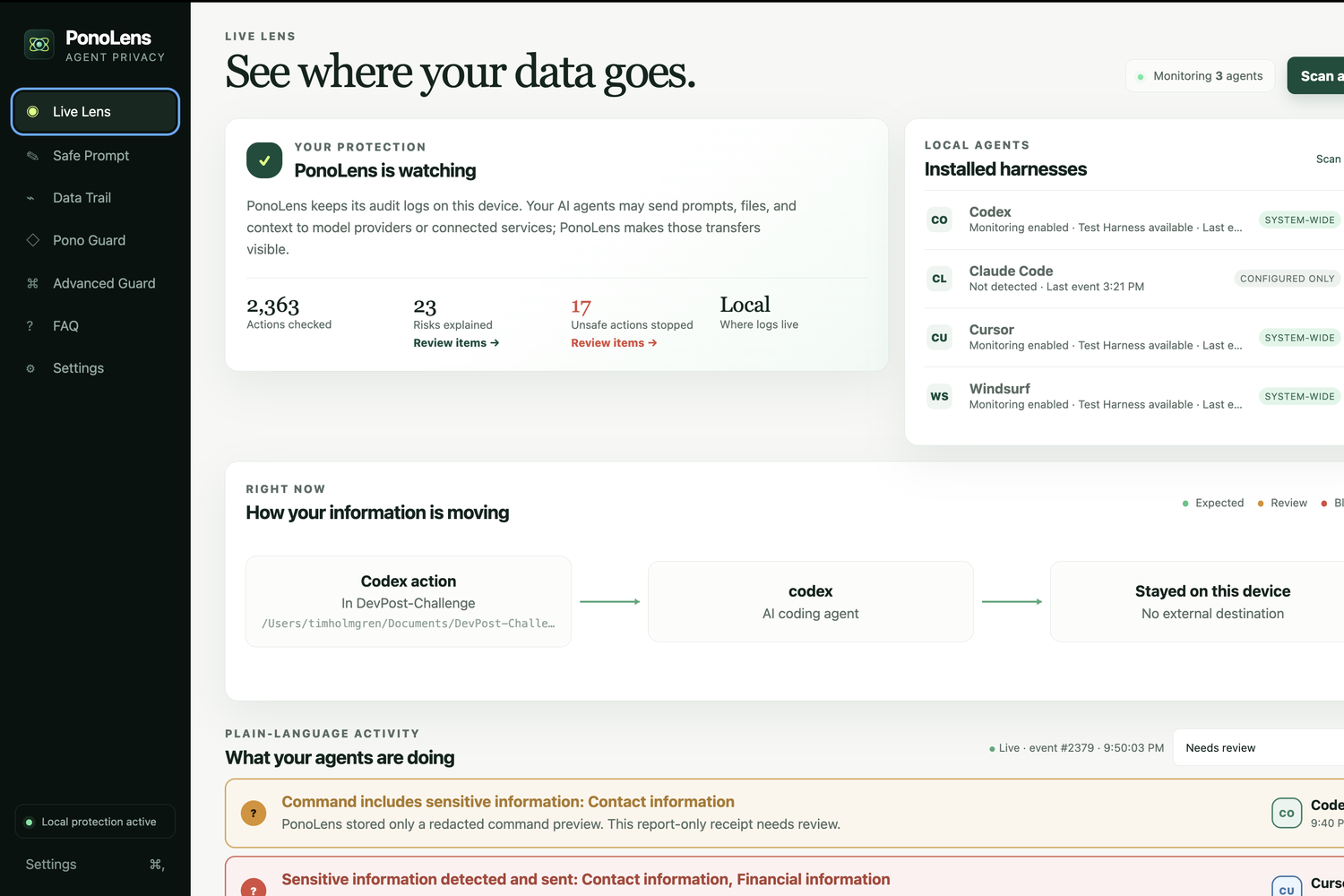
PonoLens is a local-first privacy monitor for AI coding agents. It makes agent activity easy to understand by showing what data is shared, where it goes, and when privacy risks need attention.
PonoLens currently supports Codex, Claude Code CLI, Cursor, and Windsurf/Devin Desktop. Because every harness exposes different capabilities, the dashboard separately shows whether each harness is installed, configured, reachable, and actively reporting. It also explains prompt coverage, Report/Redact/Block capabilities, known limitations, and the last event received.
Pono Trail
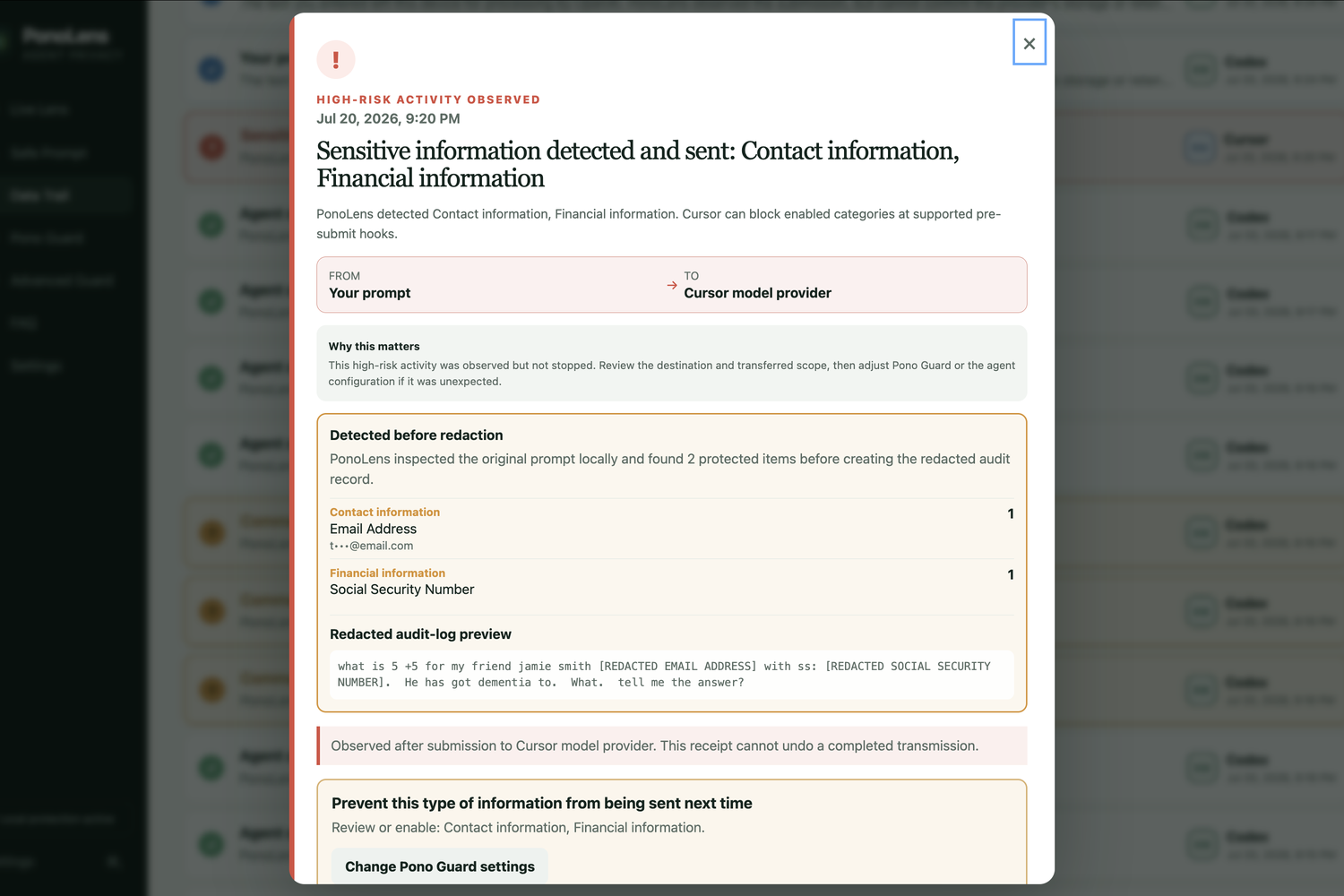
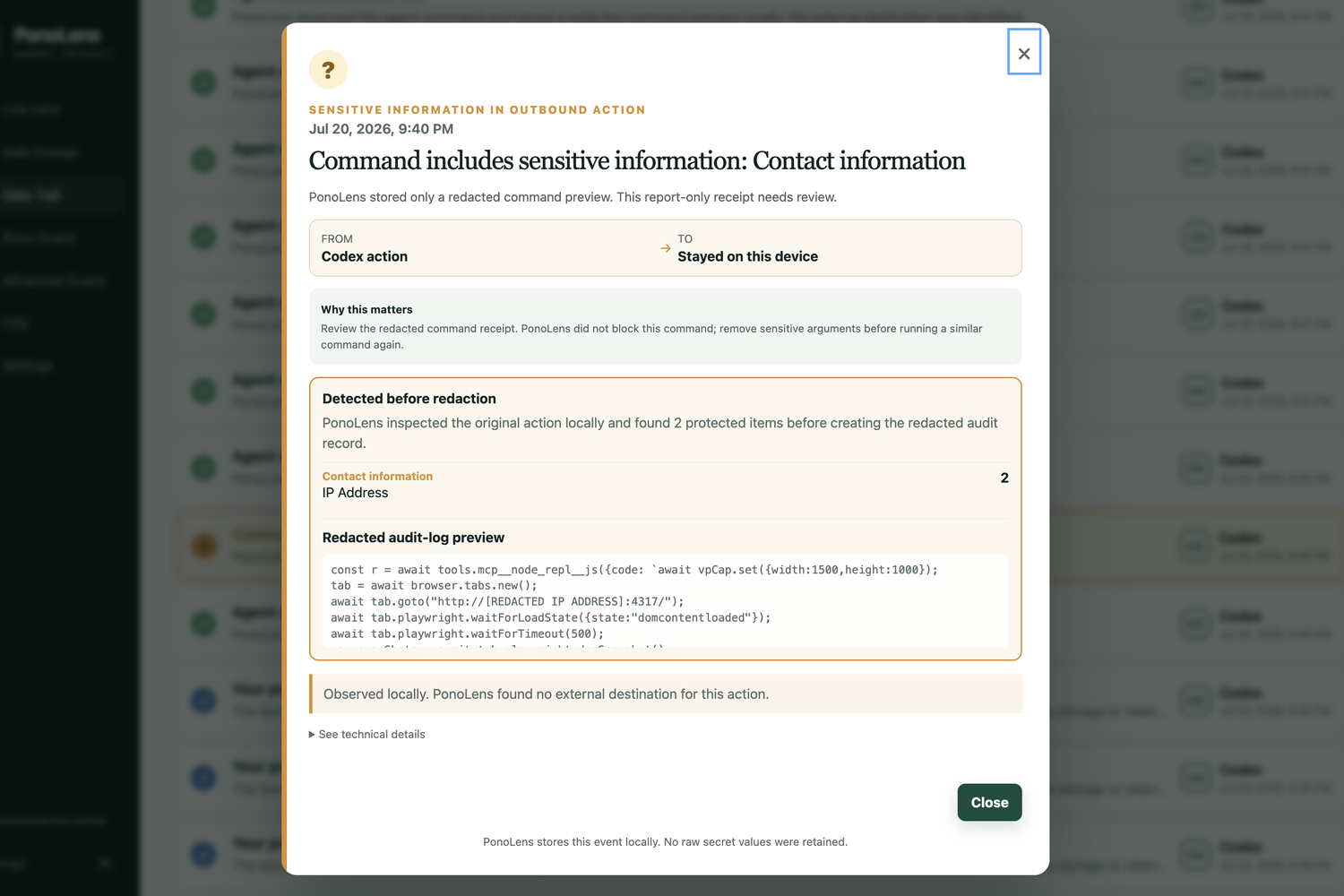
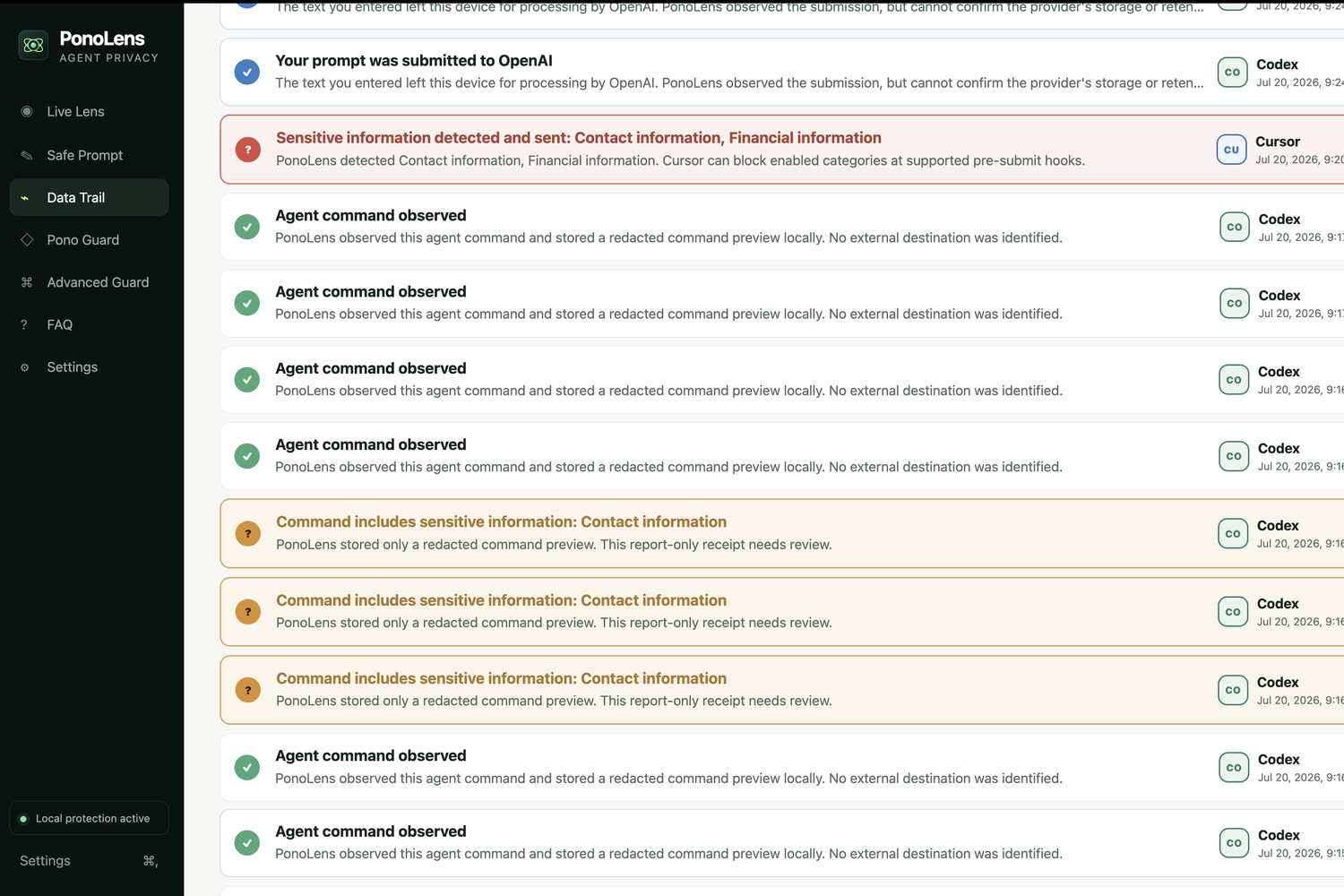
PonoLens converts supported agent activity into plain-language privacy receipts. Each receipt can include:
- Date and time
- AI harness
- Working folder
- Source and destination
- Trusted-destination status
- Risk level and decision
- Detected privacy categories
- Redacted event preview
- Recommended next action
- Optional technical details
The interface uses a consistent visual system:
- Green for normal activity
- Orange for sensitive information, untrusted destinations, or activity requiring review
- Red for high-risk activity or actions PonoLens actually blocked
PonoLens does not label an action blocked unless a compatible pre-submit integration confirms that it was stopped.
Sensitive-data detection
PonoLens checks supported activity locally for:
- Patient/Client names and addresses
- Email addresses and phone numbers
- Dates of birth
- Social Security numbers
- Passport and driver-license numbers
- Bank accounts and routing numbers
- Checksum-validated payment cards
- IP addresses and device identifiers
- Patient, insurance, provider, and medical-device identifiers
- Diagnoses, medications, treatments, and health conditions
- Legal matter numbers and privilege markers
- International identifiers
- API keys, credentials, and high-entropy secrets
- Organization-defined dictionaries and custom patterns
Detected values are redacted before event previews are written to the local audit database.
Pono Guard
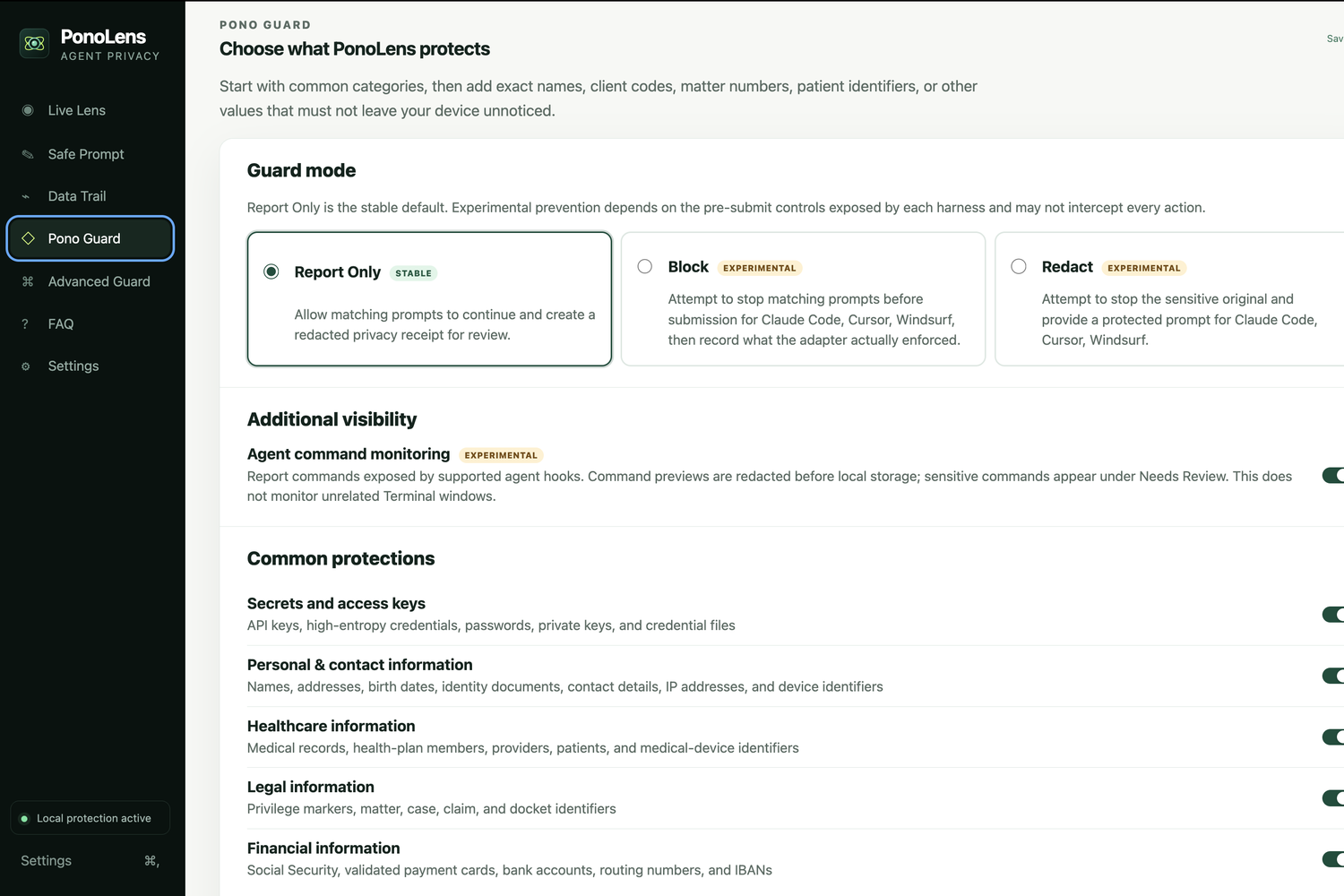
Pono Guard lets users select how protected categories should be handled:
- Report Only: Records and explains the event without interrupting it
- Block · Experimental: Attempts to stop matching prompts at compatible pre-submit hooks
- Redact · Experimental: Stops a supported sensitive prompt and provides a protected version
- Custom · Advanced: Applies different actions by category
Report Only is the stable default. Block and Redact are labeled experimental because third-party harnesses expose different interception capabilities.
Advanced Guard also supports trusted destinations, risk thresholds, per-category actions, exact-value dictionaries, and restricted custom regular-expression rules.
Safe Prompt
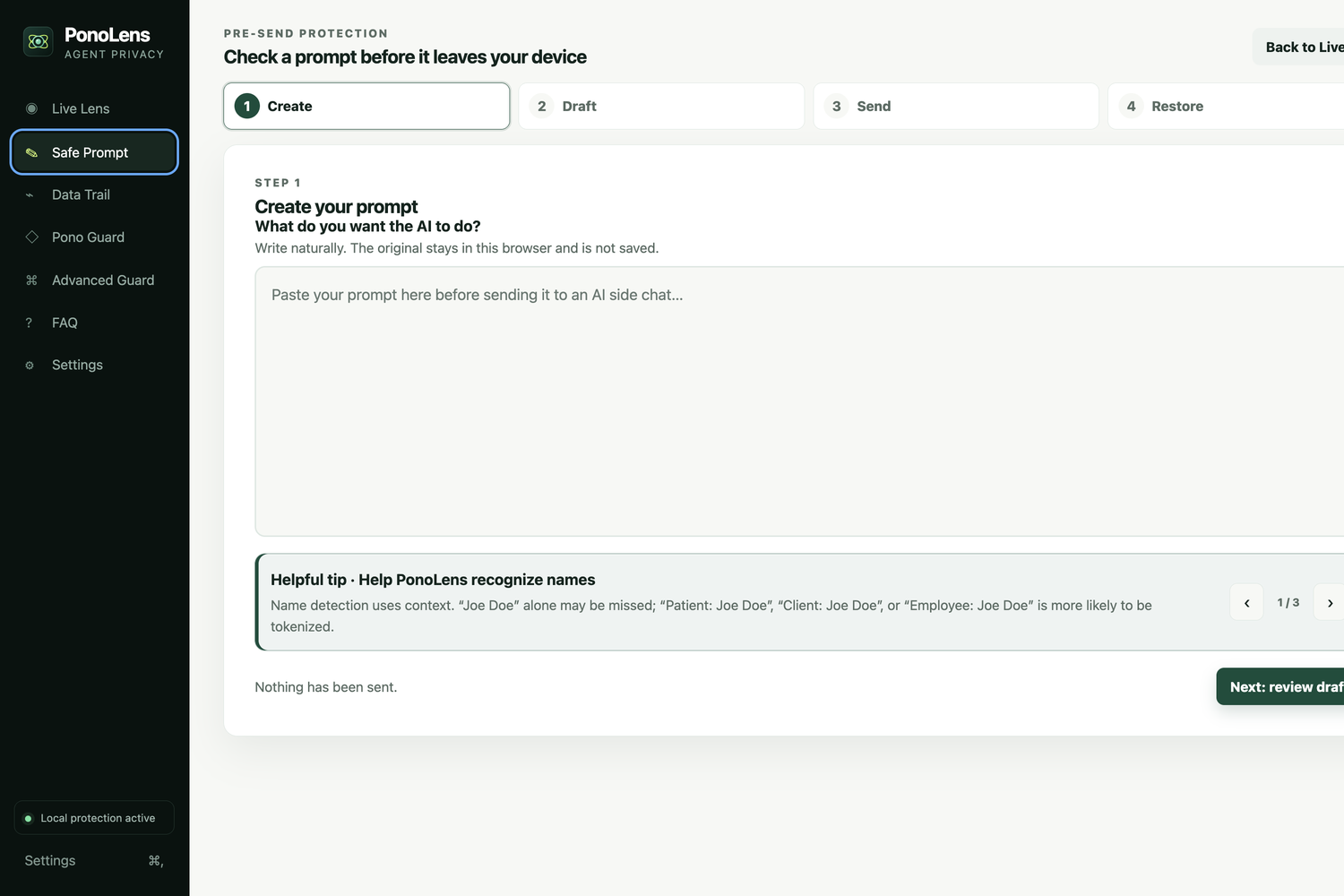
Safe Prompt provides a controlled workflow for professionals handling sensitive information.
The original prompt is scanned locally in the browser. Direct identifiers are replaced with local tokens, while relevant subject matter can remain when removing it would destroy the purpose of the prompt.
The Safe Prompt workflow is:
- Create the original prompt.
- Review and edit the safer draft.
- Generate the tokenized version.
- Copy it or send it through the selected provider workflow.
- Receive or paste the model’s reply.
- Restore the protected values locally.
The token map and original identifiers are not sent to the model through this workflow.
Safe Prompt can support privacy and compliance programs, but it does not independently establish HIPAA, legal, financial, SEC, or regulatory compliance.
Data Trail and reporting
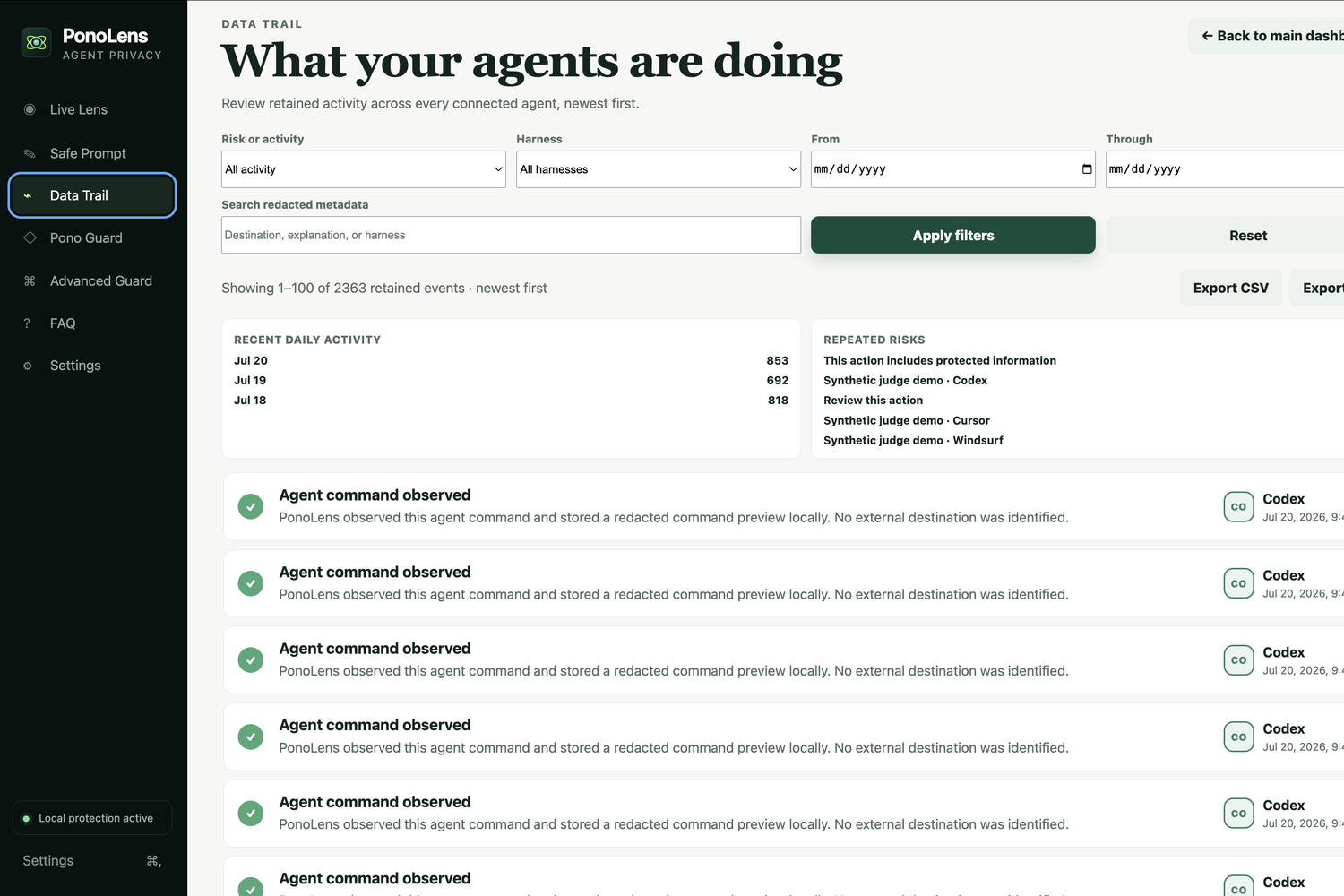
The complete Data Trail supports:
- Date-range filtering
- Harness and risk filtering
- Combined filters
- Search across redacted metadata
- Database-backed pagination
- Daily activity summaries
- Repeated-risk grouping
- Redacted CSV and PDF incident reports
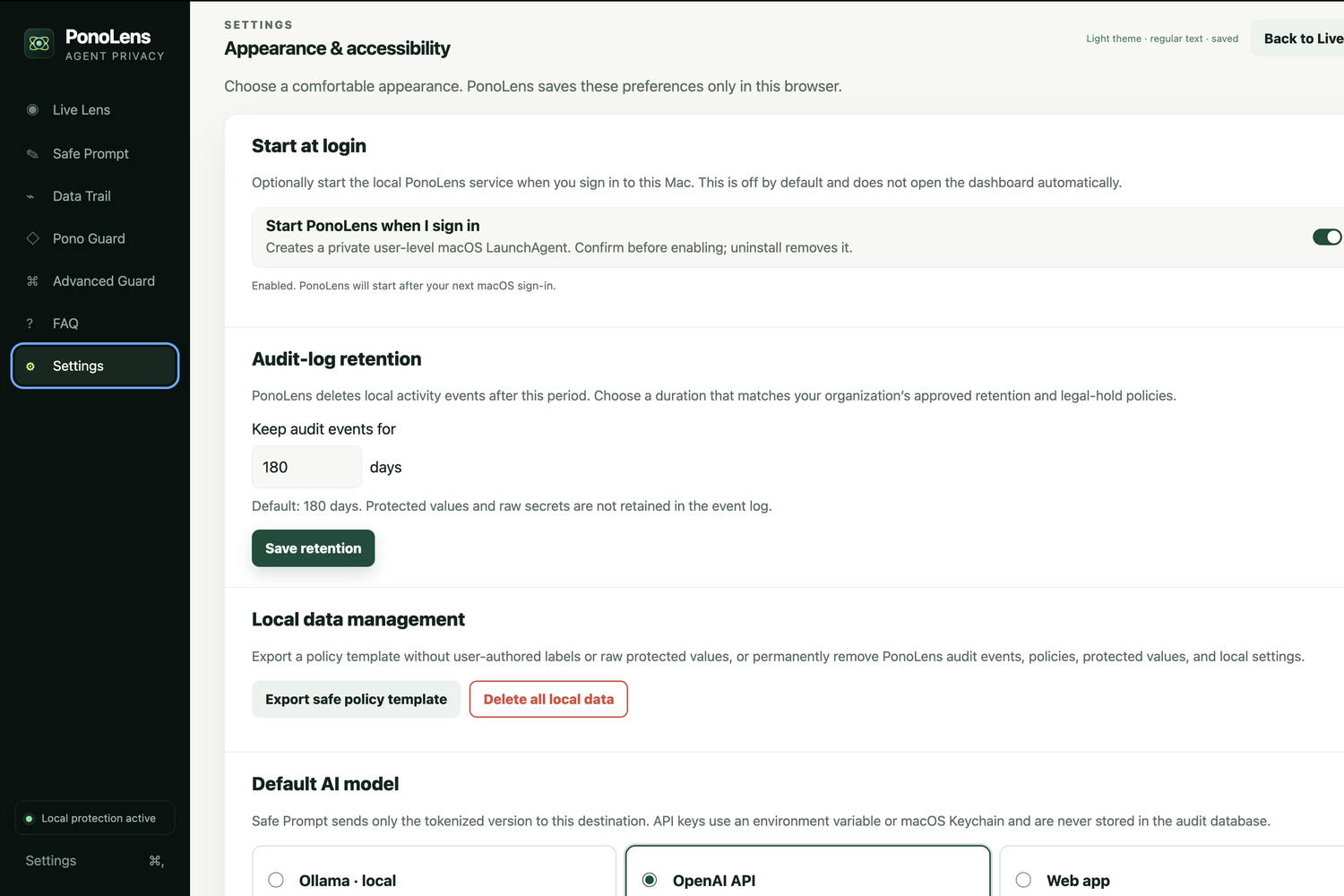
- Configurable retention
- Confirmed deletion of all local data
How I built it
PonoLens is a macOS-first JavaScript application built with:
- Node.js
- Native Node HTTP APIs
- Native SQLite
- Browser-based HTML, CSS, and JavaScript
- Harness-specific hooks and local session observation
- macOS Keychain for supported API-key storage
- A shared deterministic sensitive-data detector catalog
- A local token vault for Safe Prompt restoration
- Node’s built-in test runner
The current beta has no third-party runtime packages.
The local processing flow is:
Supported harness event → Normalize event → Resolve destination → Inspect locally → Apply policy → Redact protected values → Store local receipt → Explain in plain language
Pono Guard, command monitoring, server-side event analysis, and Safe Prompt use the same detector definitions. Centralizing the catalog reduces the chance that one part of PonoLens detects information another part misses.
For outbound commands, PonoLens attempts to resolve the real destination instead of displaying a generic external site. For example, when it observes git push origin main, it reads the project’s configured Git remote and extracts the hostname, such as GitHub, GitLab, Bitbucket, or a private Git server.
Destination detection also covers explicit URLs, GitHub API commands, npm publishing, SCP, rsync, netcat, and explicit host arguments. If a destination cannot be resolved, PonoLens displays Unresolved external destination and marks the event for review instead of treating it as normal.
PonoLens stores its local data in an owner-restricted SQLite database at:
~/.ponolens/ponolens.db
Stored event previews are redacted. PonoLens does not create a cloud audit account or synchronize the database.
The local service binds only to 127.0.0.1 and includes request protection, body-size limits, restrictive browser security headers, static-file containment, owner-only database permissions, integrity checks, and bounded Safe Prompt token storage.
The macOS beta can be installed with one command:
curl -fsSL https://raw.githubusercontent.com/tholmgren/ponolens-agent-monitor-personal-edition/main/install.sh | sh
The installer downloads the application, starts the local service, opens the dashboard, and creates a PonoLens launcher under ~/Applications.
How GPT-5.6 and Codex accelerated development
GPT-5.6 through Codex was the primary development collaborator for this competition build.
Codex helped me:
- Inspect and modify the repository
- Compare real event formats from multiple AI harnesses
- Implement Codex, Claude Code, Cursor, and Windsurf adapters
- Diagnose live monitoring and stale-service problems
- Analyze screenshots and usability feedback
- Build the shared sensitive-data detector catalog
- Improve responsive and accessible UI behavior
- Harden local HTTP and SQLite boundaries
- Write and run regression tests
- Maintain the installer, FAQ, and documentation
- Prepare the open-source release
Codex significantly shortened the feedback loop between a real-world test, a screenshot of the problem, the underlying diagnosis, and a verified correction.
Important product decisions made during development included:
- Keep monitoring and audit storage local.
- Make Report Only the stable default.
- Describe every harness’s actual capabilities and limitations.
- Never confuse observation with blocking.
- Use Safe Prompt as the controlled path for sensitive prompts.
- Share one detector catalog across the product.
- Avoid creating a raw prompt archive.
- Test deeply on macOS before expanding platforms.
- Distinguish an observed command from a verified completed command.
- Explain privacy risks in language nontechnical users can understand.
GPT-5.6 and Codex were used to build PonoLens. PonoLens does not secretly send its local audit logs or protected values to GPT-5.6 at runtime.
Challenges I ran into
Different harnesses expose different information
There is no universal event format for AI coding agents.
Codex, Claude Code, Cursor, and Windsurf expose different hooks, command structures, prompt timing, and configuration mechanisms. Some provide pre-submit prompt controls, while others expose activity only after it happens.
I created a shared normalized event model while preserving each harness’s actual limitations.
Distinguishing observation from prevention
“Observed,” “sent,” “blocked,” and “redacted” are not interchangeable.
A command appearing in a hook does not always prove that it completed. A post-submission receipt cannot undo a transmission. Selecting Block does not guarantee that every harness surface can be intercepted.
PonoLens communicates these differences directly in its activity cards, detailed receipts, capability panels, documentation, and color system.
Resolving real destinations
Commands frequently use aliases instead of explicit hostnames. For example, git push origin main contains no visible reference to GitHub.
PonoLens must inspect the project’s Git configuration, resolve the remote, extract the hostname, and compare it with the user’s Trusted Destinations policy.
When resolution is impossible, PonoLens reports the destination as unresolved and marks the action for review instead of inventing an answer.
Avoiding misleading transfer claims
A repository may contain hundreds of tracked files, but observing a repository-related command does not prove every file was transmitted.
An early implementation could confuse the number of tracked files with the number transferred. I replaced that assumption with conservative language. PonoLens reports verified file counts when available and explicitly says when the transferred scope cannot be confirmed.
Redacting before persistence
An audit product can become another privacy problem if it stores the sensitive information it is supposed to detect.
PonoLens recursively redacts event content, command previews, serialized tool input, personal identifiers, regulated information, and secrets before writing receipts to SQLite. It does not store command output.
Making privacy understandable
PonoLens must work for both technical and nontechnical users.
The interface includes plain-language titles, human-readable explanations, consistent severity colors, harness identity labels, accessible font sizing, light and dark modes, responsive layouts, and optional technical details.
Accomplishments that I'm proud of
I am proud that PonoLens is more than a static dashboard or simulated demo. It monitors supported AI harness activity on a real Mac and creates live, locally stored privacy receipts.
Key accomplishments include:
- Live support for Codex, Claude Code CLI, Cursor, and Windsurf/Devin
- Local sensitive-data detection across professional privacy categories
- Redaction before SQLite persistence
- Plain-language source and destination reporting
- Trusted-destination policies
- Honest distinction between observed, reviewed, and blocked activity
- A Safe Prompt workflow with local tokenization and restoration
- Advanced dictionaries and constrained custom patterns
- Full-history filtering and database-backed pagination
- Redacted CSV and PDF incident reports
- Responsive, accessible light and dark interfaces
- A one-line macOS installer and local launcher
- Visible harness connection and synthetic event tests for judges
- A local-first architecture with no cloud audit account
- An automated suite with 57 passing tests
I am especially proud that PonoLens does not present experimental prevention as a universal guarantee. Each harness shows its actual coverage and limitations so users can make informed decisions.
What I learned
The biggest lesson was that trustworthy monitoring depends on accurate boundaries and honest language.
A privacy product should never imply that it blocked an action when it only observed it. It should not claim that a command completed when it only saw the command begin. It should not present an unresolved destination as safe.
I also learned that local-first architecture is valuable for privacy tools, but local storage alone does not make a system safe. Redaction must happen before persistence, local APIs still need protection, and users need clear retention and deletion controls.
Another lesson was that deterministic detection and AI assistance serve different purposes. PonoLens uses local deterministic rules for privacy decisions because the original sensitive content should not need to leave the device just to determine whether it is sensitive.
Finally, privacy tools must be understandable outside the security community. A strong detector is not useful if a doctor, lawyer, banker, consultant, or small-business owner cannot understand the warning or know what to do next.
What's next for Ponolens
The next phase will focus on:
- A signed native macOS Personal Edition
- Windows support targeted for August 2026
- Broader destination and MCP coverage
- Improved PII-leak and prompt-injection detection
- Cost and token metadata without retaining prompt content
- Additional OpenClaw and Hermes research
- Stronger production-grade Block and Redact workflows
- Expanded testing across harness updates
- PonoLens Pro for professional users
- PonoLens Enterprise for organization-wide policies, fleet visibility, optimization, and reporting
The long-term goal is simple:
Make AI agent activity easy to understand through local monitoring that shows what data is shared, where it goes, and when privacy risks need attention.
Built With
- codex
- css3
- gpt-5.6
- html5
- javascript
- macos
- node.js
- ollama
- openai
- rest
- sqlite

