Inspiration
We all knew the Pomodoro method, and we all ignored it. A timer on your phone is one tap away from Instagram, and a countdown you can see just becomes something else to watch.
So we started with a simple idea — a study companion that reacts to your focus level — and kept improving it until it became a pet that grows as you study. But the thing we kept coming back to is this: most Pomodoro timers and study apps are built on reason. They hand you a schedule, a structure, a graph, and it never quite lands. Emotion is far more powerful than reason, and none of them were built to make you feel anything. Pomo is. It's not a rational system — it's a little clockwork companion you bond with. It reacts to you, grows with you, and nudges you back when you slip. So you focus not because an app told you to, but because you don't want to let your buddy down.
What it does
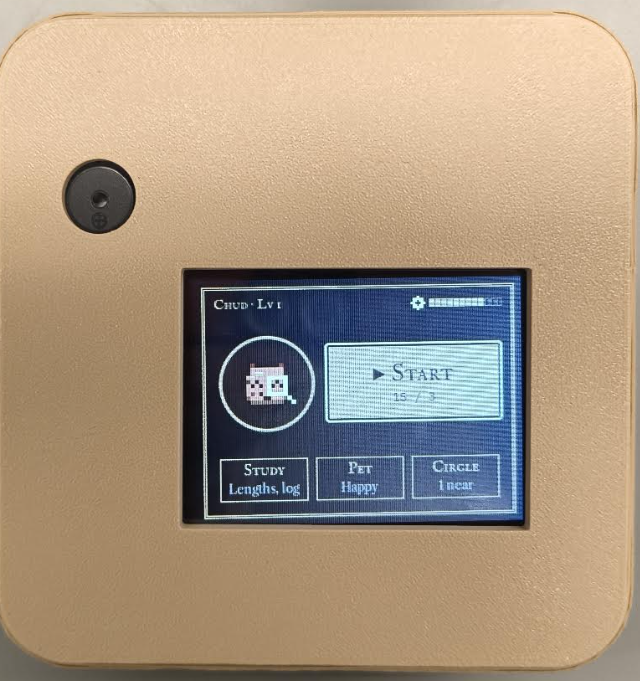
Pomo is a compact ESP32 desk device — a 2.8" touchscreen, a buzzer for haptic and audio feedback, and a lithium-ion battery so it can live anywhere on a desk. Set a study length (15–90 minutes), press Begin, and Pomo takes over the session.
- The clock stays dark. The nixie-tube timer is hidden by default so you stop clock-watching; peek for five seconds and a chime marks the break.
- The pet reacts to your focus. Open YouTube, Reddit, or TikTok — or go idle — and the device sounds an alarm and the pet's mood drops. A tiny Chrome extension tells the dashboard which site you're on. With the camera on — optional — looking away, slouching, or leaving your desk counts too, processed on the laptop with MediaPipe. Stay focused and it's locked in.
- XP you have to earn. The device owns the timer and the XP, so you can't game it from the laptop. Focused minutes earn XP, a bad session costs XP, and the pet levels up every 500 XP.
- Play with it. Between sessions you can visit the Playground to interact with your pet.
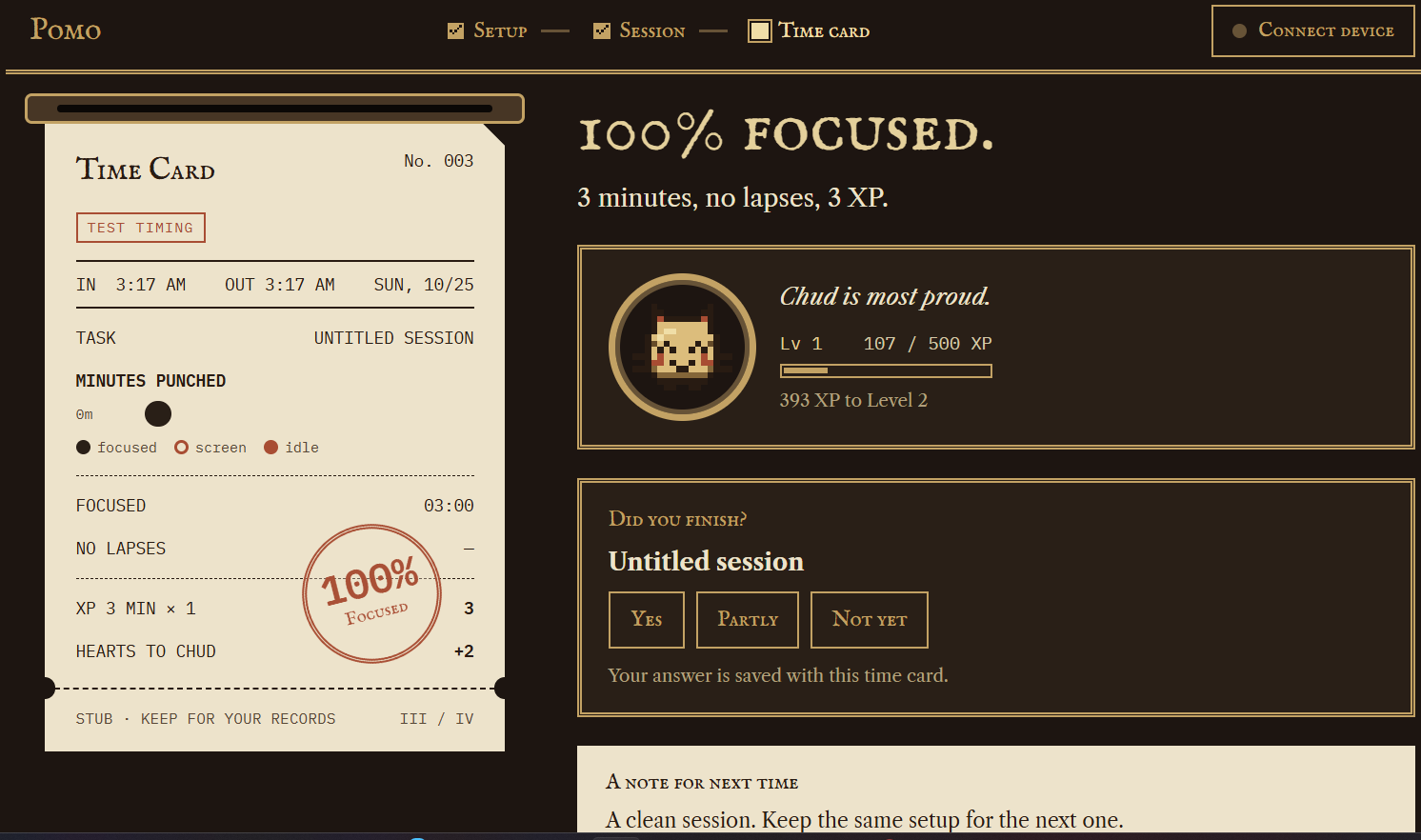
- A time card for every session. When it ends, the dashboard prints a punched card — each minute marked focused, screen drift, or idle, the lapse that cost you the most, and whether you finished the task — stamped with a %-focused seal.
- Study circle. Friends with their own Pomo join the set for a 2× XP bonus — but it holds only while everyone stays focused.
- Built for the real world. Works over USB or Bluetooth. If you pull the cable (or lose signal), it shows a "device disconnected" screen with a sad pet and reconnects on its own.
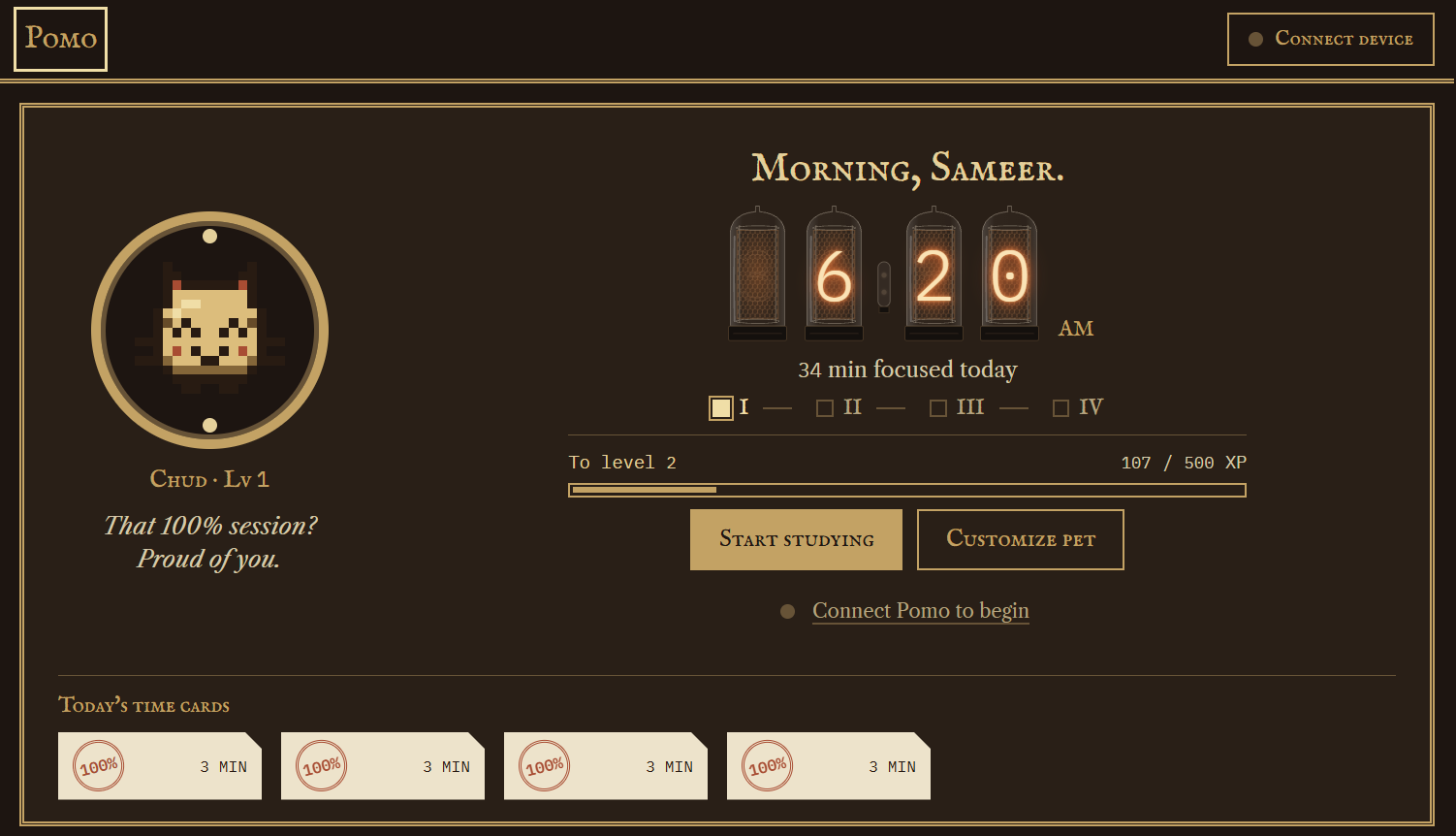
- A home panel that feels like an instrument. The dashboard opens on a nixie-tube clock, your pet and its level, today's four-session cycle, and a shelf of today's time cards. The pet reacts to the time, your last session, and who's nearby — and first-time users get a welcome instead of empty stats.
How we built it
Hardware. The design began as a proof of concept that spread across three full-size breadboards. To get the real product into a palm-sized handheld, we re-routed everything onto two mini-breadboards stuck back-to-back — with incredibly tight wire routing — and even added a lithium-polymer battery with a charging circuit, despite having to sacrifice the rotary encoder to make it fit. The compact product board runs on that battery; the larger proof-of-concept boards run on USB power. Every board carries the 2.8" ILI9341 touchscreen (320×240, resistive touch) and a buzzer.
Firmware. ESP-IDF v6.0.2 with LVGL for the screens. The device is the source of truth: it owns the countdown, the session phases (study, break, long rest, ready) and the XP, so the laptop can't fake progress. State persists to flash.
The link. One JSON message per line over USB serial at 115200 baud, or Bluetooth Classic SPP. We wrote a JSON schema for every message (each under 256 bytes) and both sides follow it. The laptop sends start, drift, peek, end, and a ping heartbeat every two seconds; the device streams state and an end summary back.
Site detection. A Chrome extension reports the active tab to the local server, which passes it to the dashboard. Sites are matched by hostname, so a page titled "Reddit API docs" doesn't count as Reddit.
Dashboard. A single Python server serves a plain HTML/CSS/JavaScript dashboard on localhost with a WebSocket feed for focus events. No framework: the nixie tubes are SVG, the pet is pixel art on a canvas, and the fonts are bundled so venue Wi-Fi can't break the look.
Design. We went steampunk on purpose — brass, walnut, nixie tubes, a punched time card — so it feels like an object on your desk, not another productivity app.
Challenges we ran into
Who owns the truth. At first both the laptop and the device kept their own clock and XP, and they drifted apart. We moved the countdown and XP onto the device and made the dashboard a view of it.
Keeping two codebases in sync. The firmware and the dashboard were written by different people at the same time. A shared JSON schema with strict field rules caught mismatches before they reached hardware.
Unplugged cables. With no battery, pulling USB shuts down the device mid-session. We added a heartbeat, a disconnect screen, auto-reconnect, and detection of a restarted device so a session never silently breaks.
Two devices, one knob. Only one unit has a rotary encoder, so every action also had to work from touch and from the laptop.
Windows vs. Linux. Camera backends, serial-port permissions (dialout) and line endings all behaved differently across our laptops.
Scope. We kept the camera optional so the core loop works without it, and it only worked on Windows after a camera backend fix.
Accomplishments that we're proud of
A full study loop, end to end, on real hardware. Setup, session, drift alerts, break, time card, level-up — it all runs for real, not in a simulator.
From a massive prototype to a palm-sized handheld. We condensed a build that spanned three full-size breadboards into a device that fits in your hand. We optimized our available space so well, we even added a lithium-polymer battery for portability.
A device that survives being unplugged (or losing signal). It detects the drop, shows you, and picks the session back up where it left off.
A dashboard with a look of its own. Hand-drawn nixie tubes, a punched time card with a rubber stamp, and a pixel pet you can pet.
A clean protocol between hardware and software. Two teams built against the same JSON contract in parallel — and it held up the moment the two finally met on a board.
Two real boards studying together over ESP-NOW. And a dashboard that works over both USB and Bluetooth.
We made studying fun. Now there's a real reason to sit down and start the next session — a little buddy that's waiting to be fed. Finish the session, you get food to feed it, and it grows
What we learned
Decide early who owns the data. Moving the clock and XP onto the device saved us from a whole class of sync bugs.
Write the protocol first. A schema both sides could test against was worth more than any meeting.
Real hardware fails in boring ways. Cables, ports, power — handling those well is what makes a demo feel finished.
A physical object beats an app. You can ignore a notification, but you can't ignore a little clockwork buddy that gets annoyed at you.
Lean into the theme. Going all-in on steel-and-steam made the project memorable.
What's next for Pomo - a steampunk pet that grows when you study
Bigger study circles. More boards, longer range — today two Pomos link over ESP-NOW and share a live XP bonus.
Smarter sessions. Plans that suggest a study length from your past time cards.
Smarter camera tracking that adapts to each person's posture and lighting.
Built With
- bluetooth
- c++
- css3
- esp32
- html5
- javascript
- json
- mediapipe
- python
- websockets
- wifi

Log in or sign up for Devpost to join the conversation.