-
-
Picture DEMO
Inspiration
Learning languages online is broken. You're reading a French article, hit a word you don't know, open Google Translate in a new tab, paste the word, read the translation, switch back to the article, and... where were you again? Repeat this 47 times per page and you've learned nothing except how frustrating context-switching is.
I realized Chrome's new built-in AI APIs could fix this. What if everything you needed for language learning happened right where you're reading? No new tabs, no copy-pasting, no breaking your flow. Just highlight text and get instant translations, vocabulary breakdowns, grammar explanations—all powered by AI running locally in your browser.
The inspiration was simple: make language learning feel natural instead of painful.
What it does
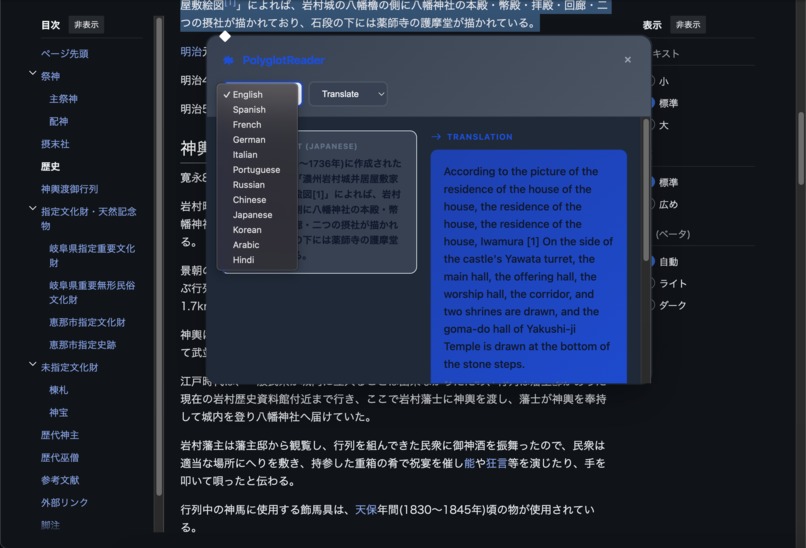
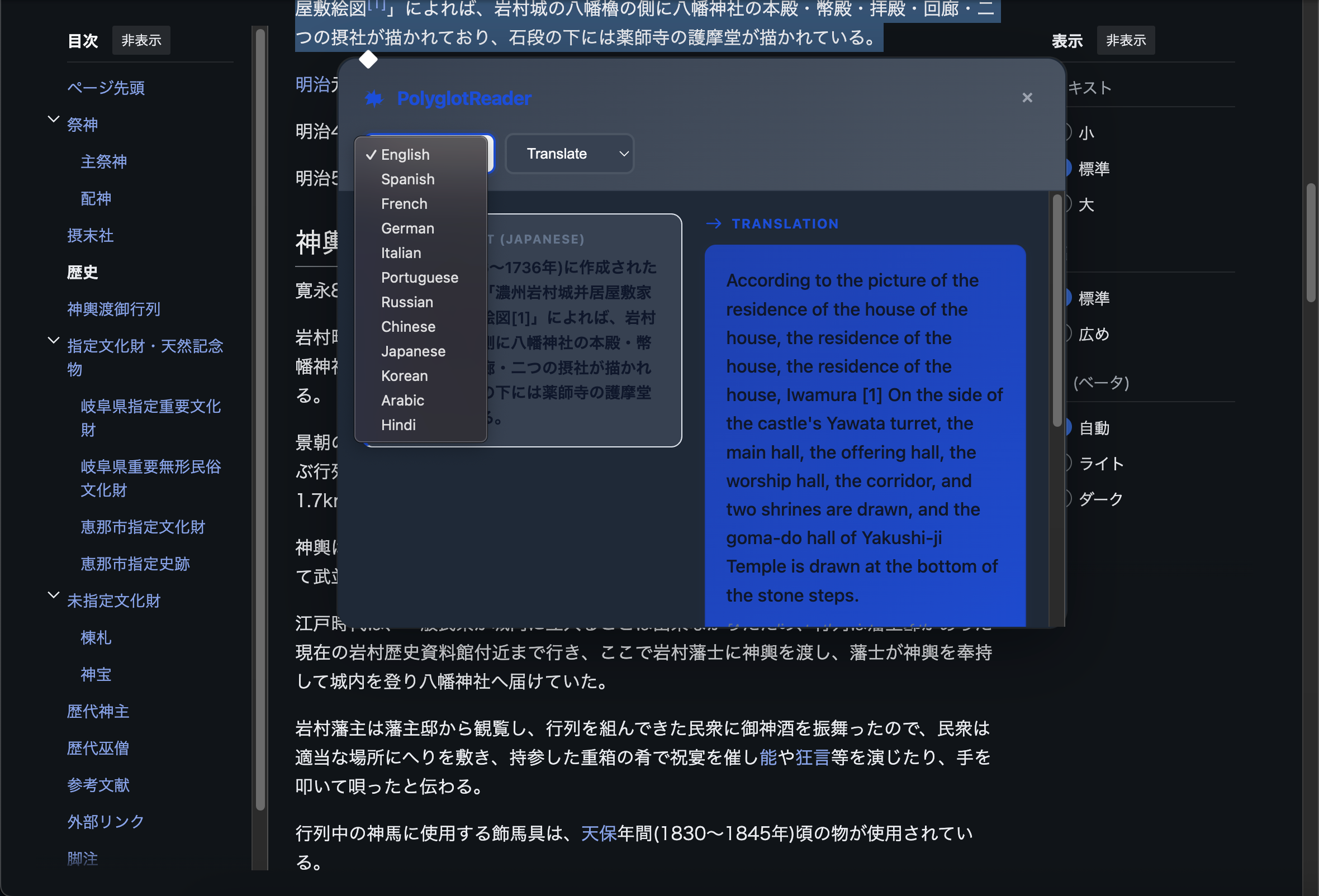
PolyglotReader transforms any webpage into an interactive language learning environment. Highlight any text in 12 supported languages and instantly get:
Translation Mode - Fast, accurate translations with optional pronunciation guides. Longer text streams in real-time so you can watch the translation appear.
Vocabulary Mode - Deep analysis of words including definitions, example sentences, synonyms, difficulty ratings, etymology, and cultural context. For non-Latin scripts like Japanese, everything gets both translation and transliteration (romaji, pinyin, etc.).
Grammar Mode - Sentence structure breakdowns explaining subjects, verbs, objects, clause types, tenses, and the grammatical rules at play.
Verbs Mode - Full conjugation tables, tense explanations, and usage examples for those languages that make verbs unnecessarily complicated.
Everything runs locally on-device using Chrome's AI APIs. No internet needed after setup, no tracking, completely private.
How we built it
I built PolyglotReader as a Chrome extension using four production-ready AI APIs working together:
Architecture - The extension consists of a content script (2000+ lines) handling text selection and UI, AI utilities managing session lifecycle, enhanced AI logic with smart caching, language detection using pattern matching, and vocabulary formatters that structure data into clean HTML cards.
API Integration - I use LanguageModel (Gemini Nano) for vocabulary analysis and grammar breakdowns, Translator API for fast translations with streaming support, Summarizer API for bullet-point summaries, and LanguageDetector for automatic language identification.
Optimization Journey - Early versions made 4-6 API calls per vocabulary word, which was painfully slow. I discovered that combining multiple requests into a single well-crafted LanguageModel prompt was 3x faster. The final architecture makes just 1-2 API calls per word.
Smart Features - I implemented a 30-item LRU cache so repeated selections return instantly. For summaries, I use a dual-API approach: Summarizer generates points in the source language, then Translator converts each point individually to the target language for better accuracy.
Field-Level Translation - When analyzing Japanese vocabulary, I translate AND transliterate every field—definitions, synonyms, collocations, etymology, cultural notes. Users learning from non-Latin scripts need romanization for everything, not just the word itself.
The tech stack is vanilla JavaScript with careful API orchestration. No frameworks, no bloat, just efficient code that respects user resources.
Challenges we ran into
he Performance Problem - Initial versions took 4-6 seconds per vocabulary word because I made separate API calls for examples, definitions, transliterations, and translations. Users hated waiting. I solved this by combining prompts into single API calls and implementing aggressive caching. Final performance: 1-2 seconds average, instant on cache hits.
API Reliability Issues - The The experimental APIs (Writer, Rewriter, Proofreader, Summarizer) were too unreliable for production. They'd work one day and vanish the next, or only support English. I learned to build core functionality on stable APIs and treat experimental ones as bonuses. And the API calls are very slow.
The Summarizer Mystery - Documentation said Summarizer outputs in English. It doesn't—it always outputs in the source language. I spent hours debugging "broken English summaries" that were actually working Japanese summaries. Once I understood this, I embraced it: use Summarizer for source language points, then translate each individually.
The 22GB Problem - Users need 22GB+ free disk space for Chrome's model management, plus 1.7GB for Gemini Nano. This is a massive barrier I can't fix. I addressed it with clear warnings and detailed setup instructions with troubleshooting steps.
Multi-Language Complexity - Supporting 12 languages meant handling wildly different requirements. Japanese needs romaji for everything, Chinese needs pinyin with tone marks, Arabic needs right-to-left handling, Russian uses different romanization than other Cyrillic scripts. I built flexible language-specific handlers that adapt based on detected script systems.
Accomplishments that we're proud of
I reduced vocabulary enrichment from 6 API calls to 2 through smart prompt engineering and strategic API selection. This transformed the user experience from sluggish to less sluggish.
Complete Translation Coverage - I'm proud that every single vocabulary field gets translated AND transliterated for non-Latin scripts. Definitions, synonyms, antonyms, collocations, etymology, cultural context—everything. Most tools only translate the main word, but I go deeper.
Graceful Degradation - The extension always finds a way. Experimental API not available? Fall back to LanguageModel. Language pair not supported? Route through an intermediate language. Network down? Most features still work offline.
Privacy-First Architecture - Everything runs on-device. I couldn't track users even if I wanted to (I don't). Your manga reading habits are safe with me.
Many DIFFERENT Languages, 4 Modes - Supporting English, Spanish, French, German, Italian, Portuguese, Russian, Chinese, Japanese, Korean, Arabic, and Hindi across four distinct learning modes (translate, vocabulary, grammar, verbs) required significant architectural flexibility.
Real-World Testing - I tested on some truly cursed HTML and made sure the tooltip doesn't break page layouts. It works on modern SPAs, old-school websites, and everything in between.
What we learned
Technical Insights - Single well-crafted prompts beat multiple sequential API calls every time. Caching is absolutely critical for perceived performance. Experimental APIs aren't reliable enough for core functionality. Different languages need different handling strategies—one-size-fits-all doesn't work.
API Quirks - Summarizer ignores outputLanguage config and always returns source language. Translation streaming doesn't work for all language pairs. Language detection struggles with mixed-language text. You need confidence thresholds everywhere.
User Experience - Users want comprehensive transliteration for non-Latin scripts, not just the main word. Separating "Original" and "Translated" summaries prevents confusion. Instant feedback (even partial results) beats waiting for perfect results. Clear error messages with setup instructions reduce support burden.
AI API Reality - Documentation doesn't always match implementation. Always test API behavior yourself. Build fallbacks for everything. The experimental APIs will break when you least expect it. Measure performance obsessively.
What's next for PolyglotReader - Your Browser's Language Learning Superpower
Spaced Repetition System - Track words users look up and remind them to review before forgetting. This would transform PolyglotReader from a lookup tool into an active learning system.
Audio Pronunciation - Add text-to-speech using Chrome's speech synthesis API so users can hear how words are actually pronounced.
Learning Statistics - Track progress over time, show most-looked-up words, identify weak areas, and celebrate milestones.
Export Functionality - Let users download their vocabulary lists as CSV or Anki deck format for studying outside the browser.
Community Word Lists - Share commonly looked-up words for specific content types like technical German documentation, anime Japanese dialogue, or medical Spanish terminology.
Custom Themes - Dark mode, light mode, high contrast mode, and that special "3am studying" mode with reduced eye strain.
Mobile Support - When Chrome on mobile gets these AI APIs, I'll be ready to port the extension.
More Language Pairs - Expand beyond the current 12 languages as Chrome's APIs add support for more language combinations.
Cultural Context Expansion - Add more detailed cultural explanations, idiom breakdowns, regional variations, and appropriate usage guidance.
Integration with Learning Apps - Sync vocabulary lists with Anki, Duolingo, or other popular language learning platforms.
The foundation is solid. Now I can build features that turn PolyglotReader into a comprehensive language learning companion that fits seamlessly into your browsing experience.

Log in or sign up for Devpost to join the conversation.