-
-
Architecture Overview
-
System Overview
-
Deployment Architecture
Inspiration
I kept hitting the same friction: watching a tutorial, reading documentation, or debugging code — and wanting to ask a question about what's on my screen. The workflow was always screenshot → paste into a chatbot → type context → wait for text. It completely breaks flow.
I wanted something that could just see my screen and talk to me about it. Like having a colleague looking over my shoulder who speaks every language. When I saw Gemini's Live API with native audio streaming and multimodal input, I knew this was finally possible to build properly — real-time, not turn-based.
What it does
Polyglot is a live screen companion. Share your screen, turn on your mic, and start talking. It sees what you see and responds with natural voice.
- Full-duplex voice conversation — Talk naturally, interrupt mid-sentence, ask follow-ups. Gemini's server-side VAD handles turn-taking.
- Smart screen understanding — Automatically detects when your screen content changes (tab switches, scrolling, video playback) and sends frames to Gemini. No manual screenshots needed.
- 8 languages — English, Hindi, Spanish, Japanese, German, French, Portuguese, Korean. Speak in one language while looking at content in another.
- Real-time transcription — Live transcript of both your speech and Polyglot's responses in a conversation panel.
Use cases: ask about code on screen, get a foreign page translated live, have a YouTube video explained while it plays, get help with homework by pointing your camera at it.
How we built it
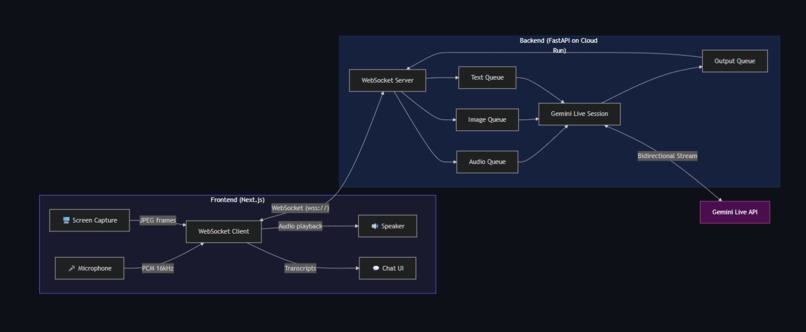
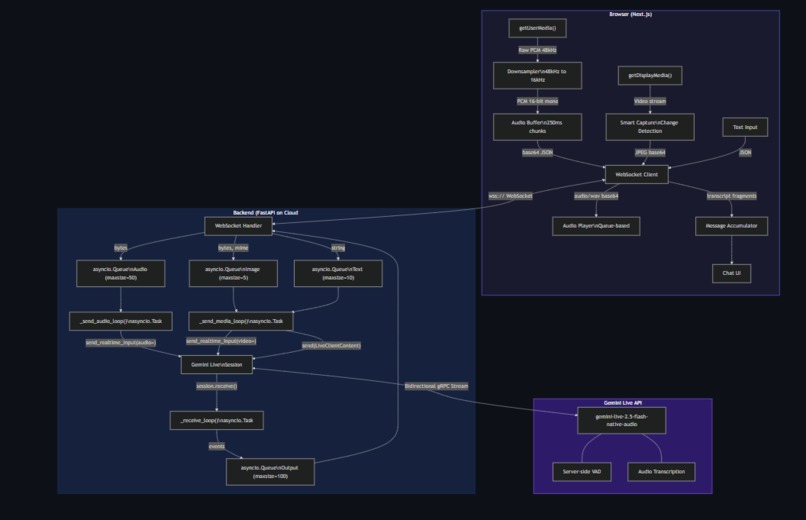
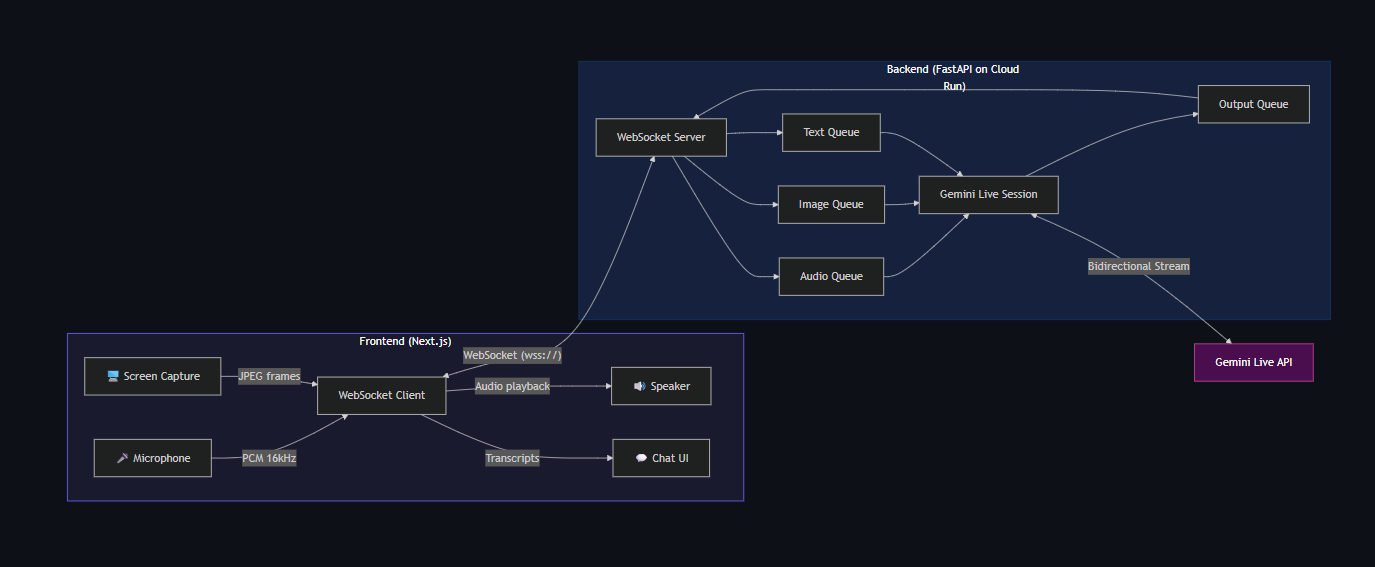
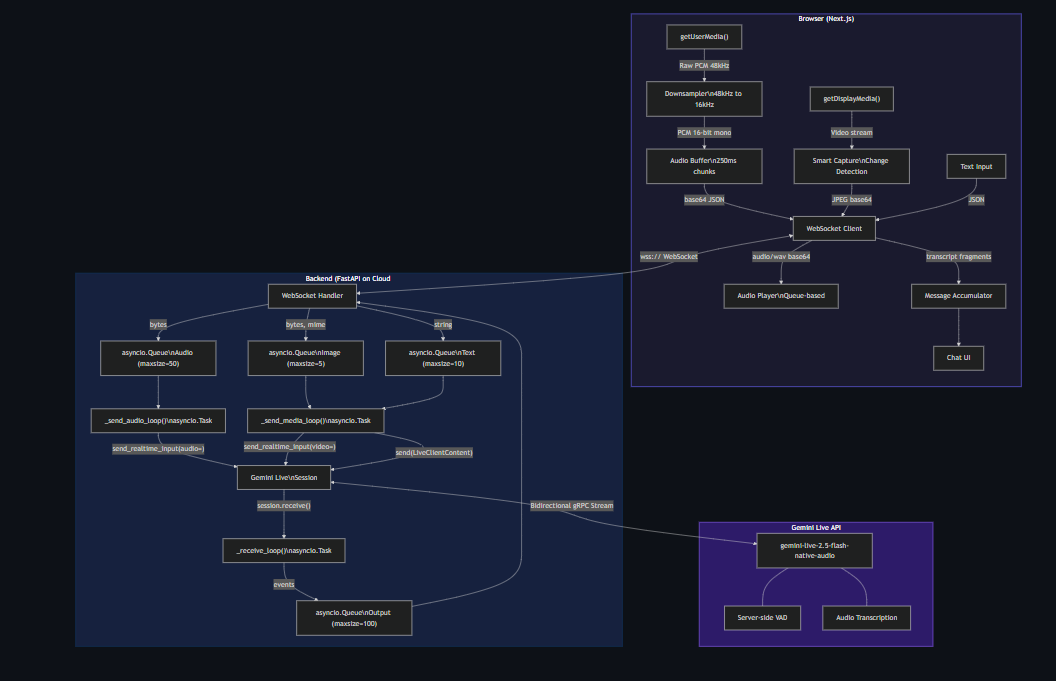
Frontend (Next.js + Tailwind CSS v4): Captures microphone audio via getUserMedia(), downsamples from the browser's native 48kHz to 16kHz PCM (Gemini's expected input format), and streams it over WebSocket. Screen capture uses getDisplayMedia() with a smart change detection system — a 64×64 pixel thumbnail is sampled every 2 seconds and compared against the previous frame. Frames only get sent when content actually changes, plus a 10-second heartbeat.
Backend (FastAPI on Cloud Run): Receives audio, images, and text from the frontend via WebSocket. Uses asyncio queues with bounded sizes for backpressure — audio queue (50), image queue (5), text queue (10), output queue (100). Four concurrent asyncio tasks per session handle sending audio, sending media, receiving from Gemini, and draining output to the frontend. Audio goes to Gemini via send_realtime_input(audio=...), images via send_realtime_input(video=...).
Gemini Live API: Using gemini-live-2.5-flash-native-audio with the Google GenAI SDK v1.67+. The session is configured with input/output audio transcription, voice selection (Aoede), and a system instruction that adapts to the user's language.
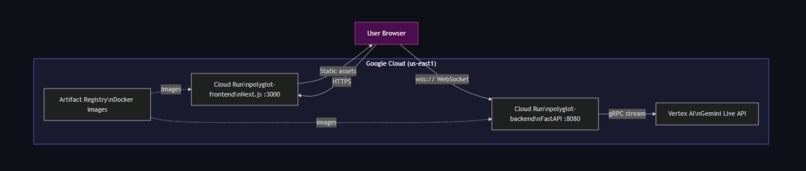
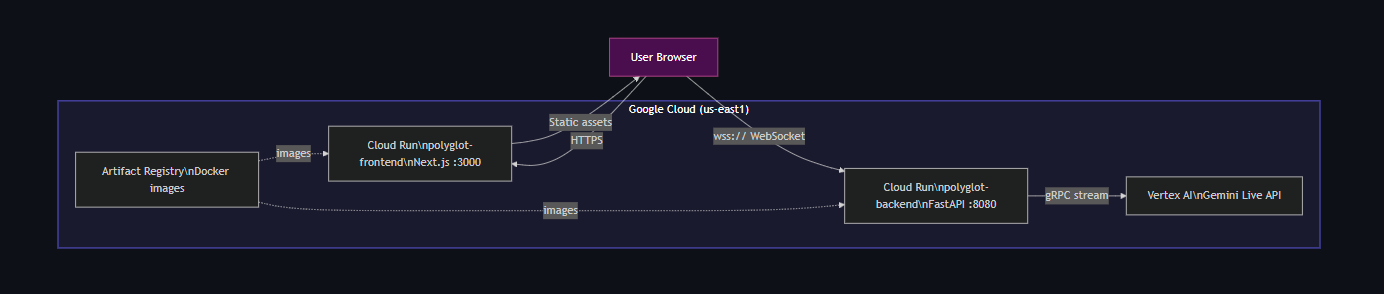
Deployment: Both services containerized with Docker and deployed to Cloud Run in us-east1. Automated deployment via a single deploy.sh script that handles Artifact Registry, Docker builds, and Cloud Run configuration.
Challenges we ran into
The receive loop dying after one turn. session.receive() is an async iterator that yields messages for ONE turn only. When Gemini finishes speaking, the iterator ends. Without wrapping it in while True, the receive loop exits after the first response and multi-turn conversation is impossible. This is documented in Google's demo code but easy to miss.
Browser audio sample rate lies. We requested 16kHz from AudioContext. Chrome said "sure" and gave us 48kHz anyway. The audio reaching Gemini was garbled. Fix: accept the native rate and downsample manually with linear interpolation in JavaScript.
WebSocket flooding. Without backpressure, mic audio floods the Gemini connection faster than it can process, causing ConnectionClosedError. Bounded asyncio queues with drop-oldest policy solved this.
Transcript fragmentation. Gemini sends transcription fragments word-by-word. Without accumulation, each fragment creates a new chat bubble, making the UI jump constantly. We accumulate fragments into single messages and update in-place.
Accomplishments that we're proud of
- It actually feels live. The conversation flows naturally — you can interrupt Polyglot mid-sentence and it stops gracefully, just like talking to a real person.
- Smart screen capture works. Switching tabs, scrolling, watching a video — Polyglot catches changes within 2 seconds without wasting bandwidth on static screens.
- The multilingual angle is real. You can speak Hindi while looking at an English codebase, or ask in English about a Japanese article. It just works.
- Single-command deployment. ./deploy.sh handles everything — Docker builds, registry push, Cloud Run config, URL wiring between services.
What we learned
- Gemini's
session.receive()is per-turn, not per-session — you must wrap it in a loop for multi-turn conversations - Browsers ignore
AudioContextsample rate requests — always downsample manually - Asyncio queues with bounded sizes are essential for real-time streaming stability
- The Google GenAI SDK version matters enormously — methods like
send_realtime_input()only exist in recent versions - Server-side VAD (letting Gemini detect speech boundaries) is far more reliable than client-side voice activity detection
What's next for Polyglot — Live Screen Companion
- WebRTC transport — Replace WebSocket with WebRTC for lower audio latency
- AudioWorklet — Migrate from deprecated
ScriptProcessorNodeto modernAudioWorkletAPI - Conversation memory — Persist context across sessions so Polyglot remembers previous conversations
- Mobile support — Camera-based input for phone/tablet so you can point at physical objects
- Tool use — Let Polyglot take actions (open links, run code, search) based on what it sees on screen
Built With
- cloud-run
- fastapi
- gemini-live-api
- google-genai-sdk
- next.js-16
- tailwind-css-v4

Log in or sign up for Devpost to join the conversation.