-
-
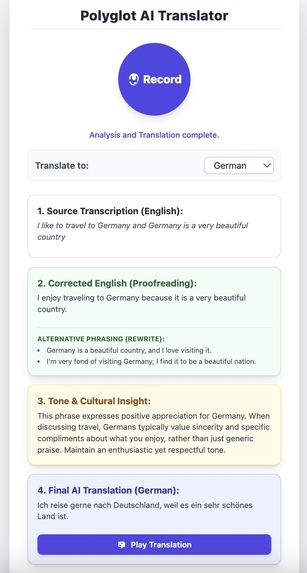
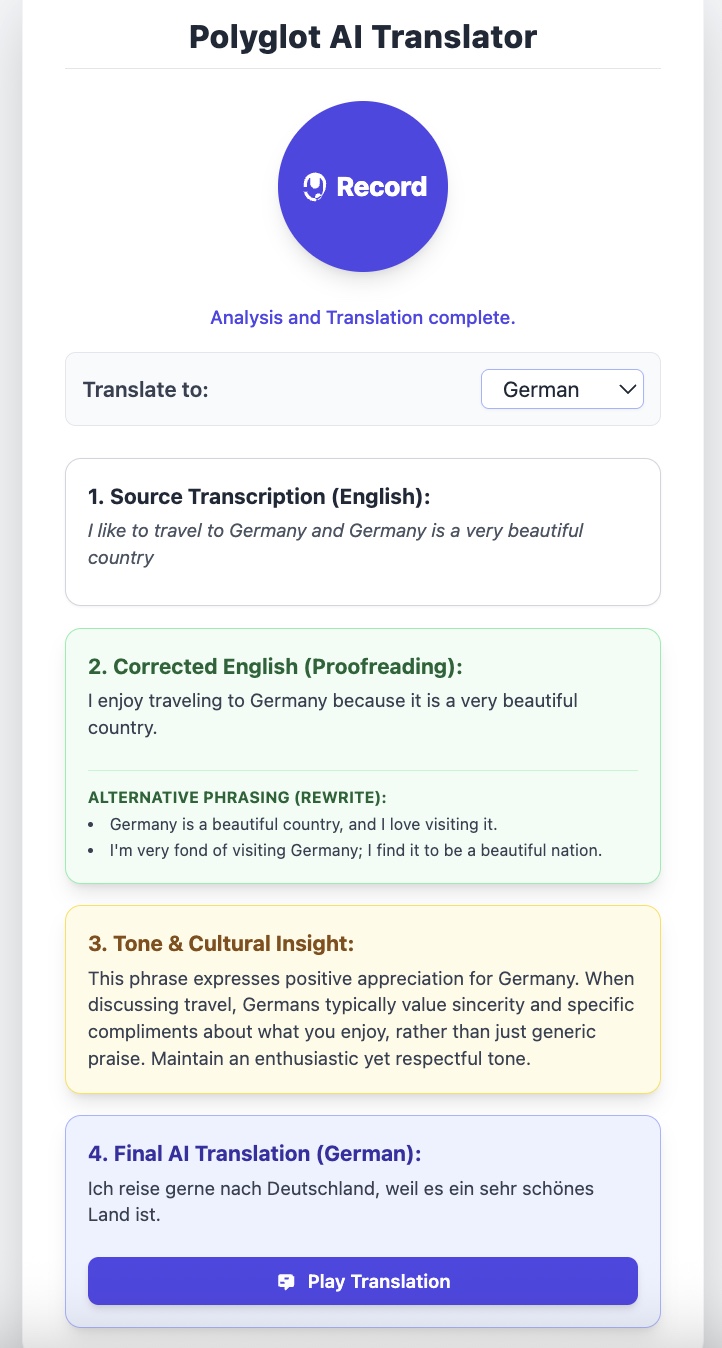
Main interface displaying all key features of the application.
Inspiration
I have always been interested in learning new spoken languages—not necessarily to achieve fluency, but to understand the basics and connect with different cultures. However, after trying numerous paid and free language-learning applications, I often found them ineffective or not engaging enough.
When I discovered the Google Chrome Built-in AI Challenge, it sparked an idea to transform this personal experience into a practical AI-driven solution. The concept is to develop a single-page web application where users can record or upload an audio clip. The system will automatically detect the spoken language, translate it into the user’s preferred language, and enhance the translation with cultural tone and contextual insights before playing back the result.
This project aims to bridge linguistic and cultural gaps, enabling smoother and more meaningful global communication through AI-powered interaction.
What it does
A web app that helps users speak better across languages — by taking audio input (your voice), transcribing it, correcting grammar and phrasing, and then suggesting culturally appropriate alternatives (formal/informal).
How we built it
When I began building this app, I started with the basics—writing down the key features and mapping them to the right technologies. Since this was my first time working with Google Chrome’s built-in AI, I spent some time exploring its capabilities, including write, prompt, and translator AI features.
I chose React as the framework for developing the single-page application. However, since Chrome’s built-in AI doesn’t currently support multimodal inputs, I integrated the Web Speech API to handle voice input and recognition.
Throughout the process, I carefully went through the official Google Chrome AI documentation to understand the best practices and limitations. I also used Gemini to assist with designing and refining the UI.
Overall, this project was a great learning experience—it helped me understand how to combine different AI and web technologies to build an interactive, intelligent, and user-friendly application.
Challenges we ran into
First-time with React: This was my first project using React. Building the initial wireframe and styling was a learning curve. I discovered Tailwind CSS, which helped speed up the UI design process.
UI Optimization: I wrote the base UI myself and used Gemini to refine it for a more intuitive and user-friendly experience.
AI Integration Issues: While integrating Chrome’s built-in AI was straightforward initially, the app later failed record user voice properly. After that i faced issues related to recognize the language model and using the Gemini API.
Debugging Chrome Configurations: Resolved issues by exploring and tuning chrome://flags, chrome://components/, and chrome://on-device-internals/ to optimize AI behavior.
Prompt Fine-Tuning: Adjusted prompts and leveraged the Gemini Developer API for better translation accuracy and performance.
Accomplishments that we're proud of
Built Our First AI-Powered Web App: Successfully developed a React-based single-page application integrating Google Chrome’s built-in AI and the Web Speech API for real-time voice interaction. Overcame Technical Hurdles with Chrome AI: Diagnosed and resolved complex issues related to language model loading and recognition using Chrome configurations and the Gemini Developer API. Delivered Smarter, Culturally Aware Translations: Implemented translation features that go beyond word conversion—adding cultural tone and context for more natural and meaningful communication.
What we learned
Exploring New Tech Stacks: Gained hands-on experience with React and Tailwind CSS, learning how to quickly prototype and style modern web applications. Integrating AI into the Web Ecosystem: Understood how to effectively combine Chrome’s built-in AI capabilities, the Web Speech API, and Gemini Developer API to build a seamless, intelligent user experience.
Technical Stack:
Frameworks & Languages React (JSX/JavaScript) Styling: Tailwind CSS (used via class names within the JSX) Core Language: JavaScript (ES6+)
APIs & Browser Technologies Generative AI API: Google Gemini API (https://generativelanguage.googleapis.com/v1beta/models/gemini-2.5-flash-preview-09-2025:generateContent)
Purpose: This API is used to handle the advanced natural language processing tasks: correcting English grammar, providing alternative phrasings, generating cultural notes, and performing the final translation into the target language.
Web Speech API (Transcription): SpeechRecognition (window.SpeechRecognition or window.webkitSpeechRecognition) Purpose: This browser API handles the real-time transcription of the user's spoken audio into text (transcript). This is a native feature available in most modern browsers.
Web Speech API (Text-to-Speech): SpeechSynthesisUtterance and window.speechSynthesis.speak() Purpose: This browser API is used to convert the final translated text back into speech, allowing the user to hear the foreign language pronunciation.
The application combines native browser capabilities (voice input/output) with the powerful language processing capabilities of the Gemini model.
What's next for Polyglot AI Translator
Strengthen App Robustness: Optimize system performance, error handling, and scalability to make the app more stable and reliable across devices and browsers. Expand Language & Cultural Coverage: Broaden the range of supported languages and integrate deeper cultural context models for richer, more natural translations. Enhance Long Audio Support: Improve handling and processing of longer audio inputs to ensure smoother transcription, translation, and playback without performance drops.
Built With
- chromeai
- geminideveloperai
- react
- tailwind

Log in or sign up for Devpost to join the conversation.