-
-
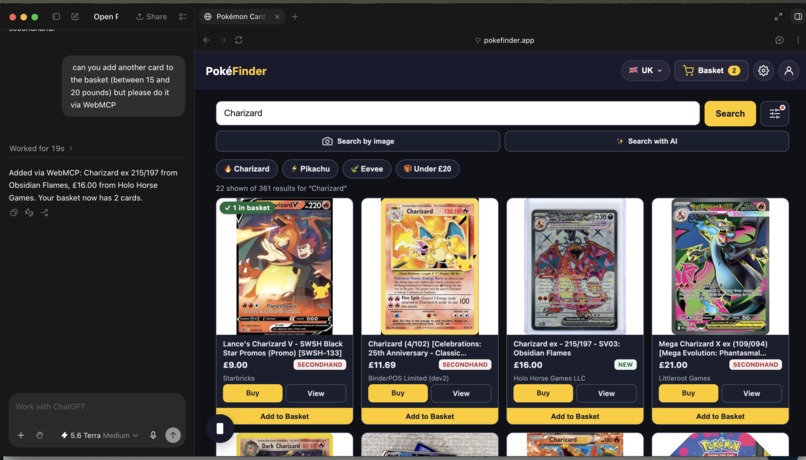
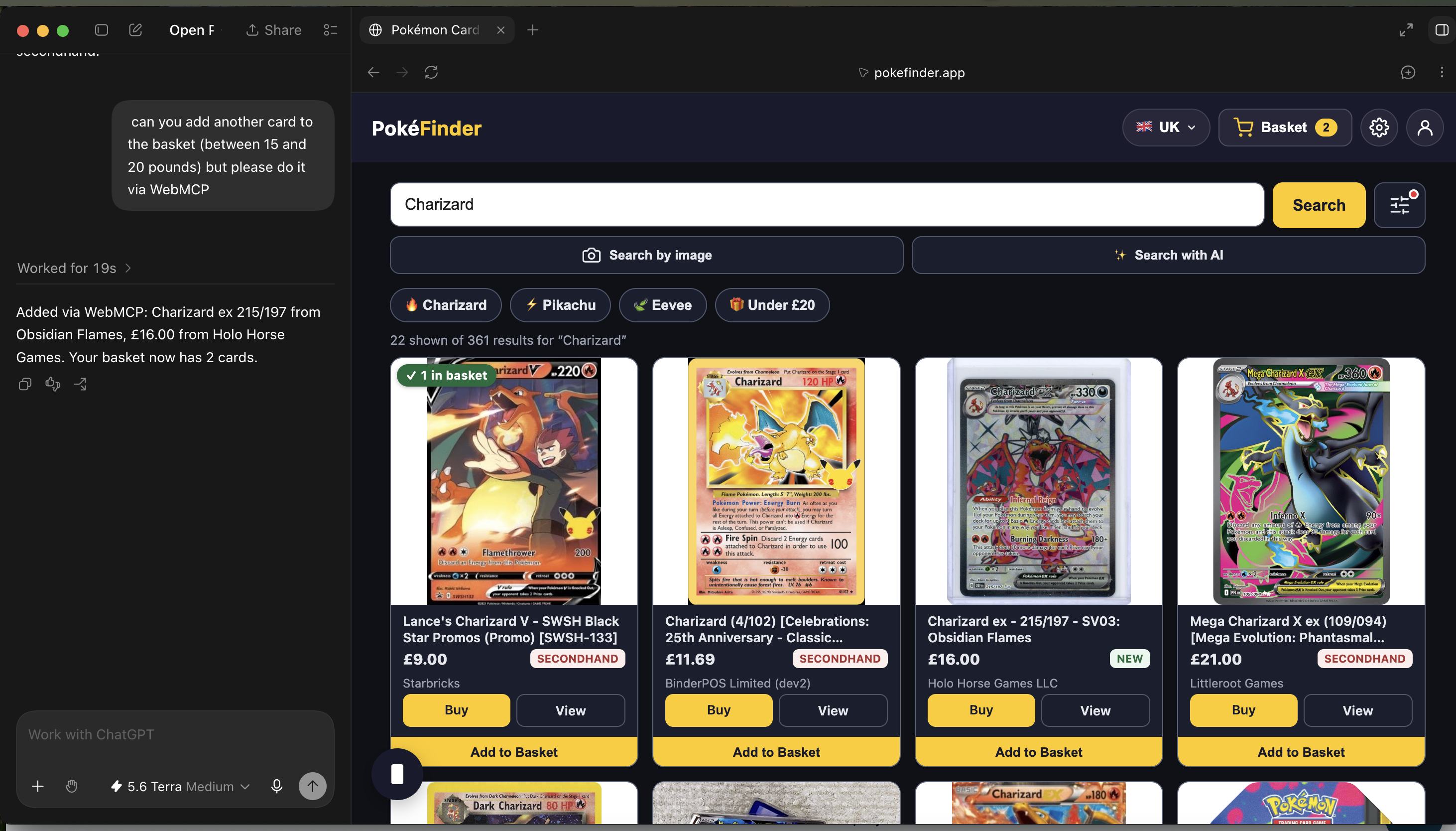
Adding card to a basket
-
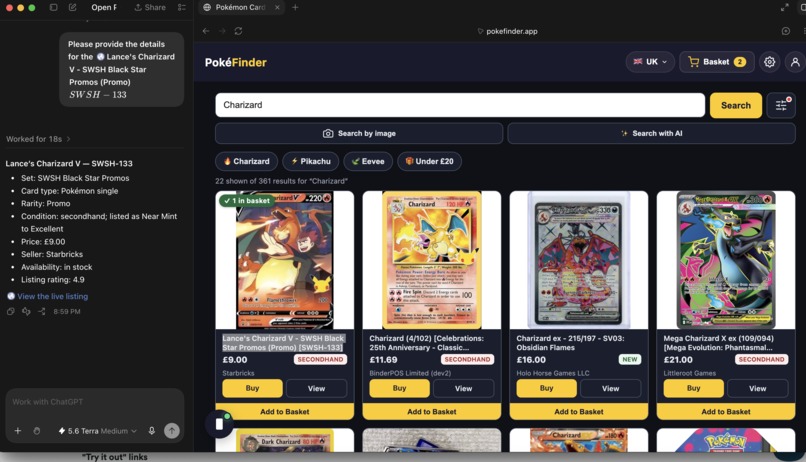
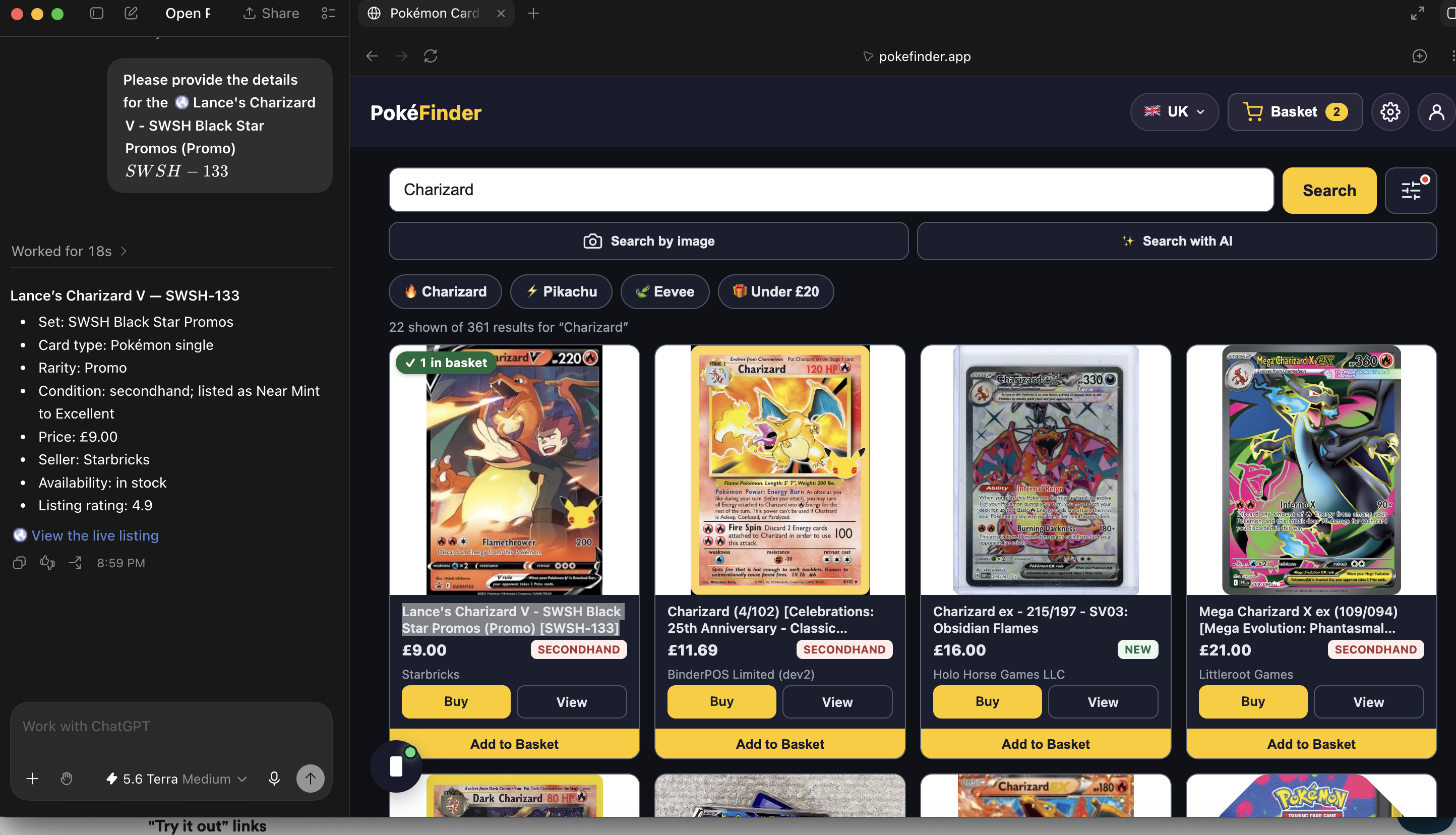
Getting card details
-
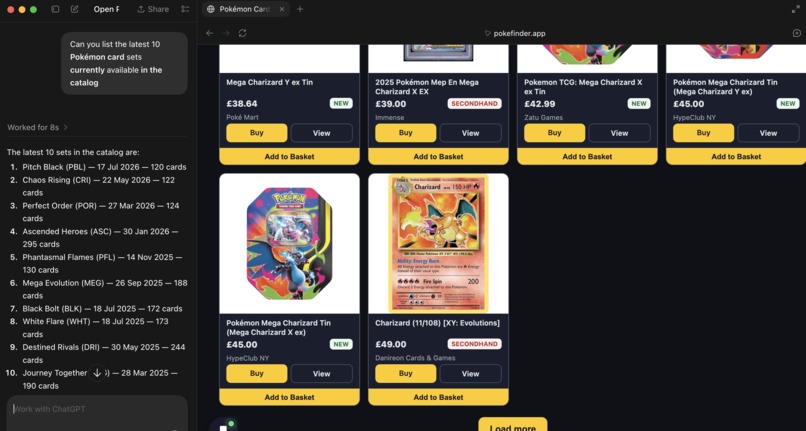
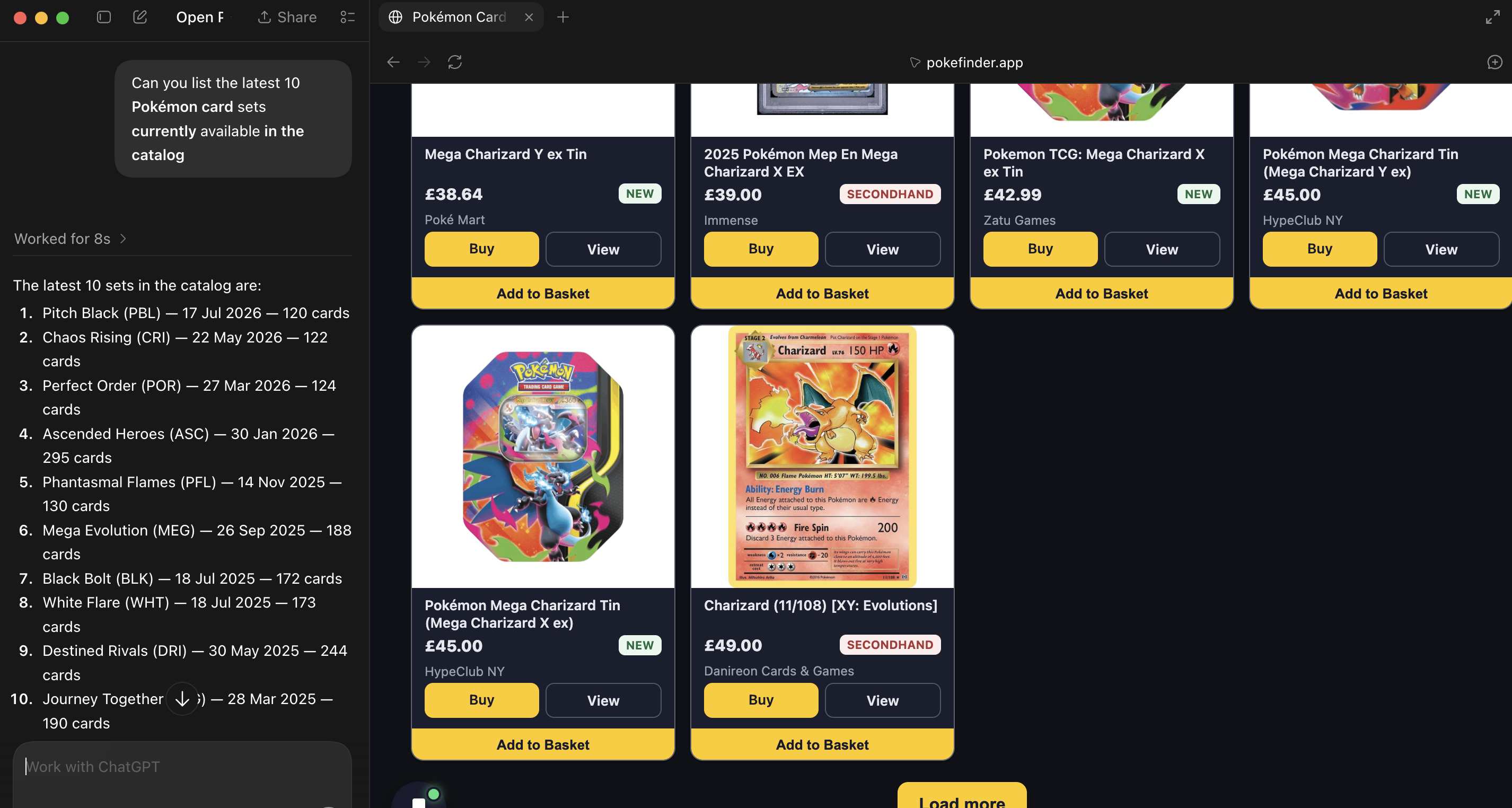
Listing top 10 Pokemon sets
-
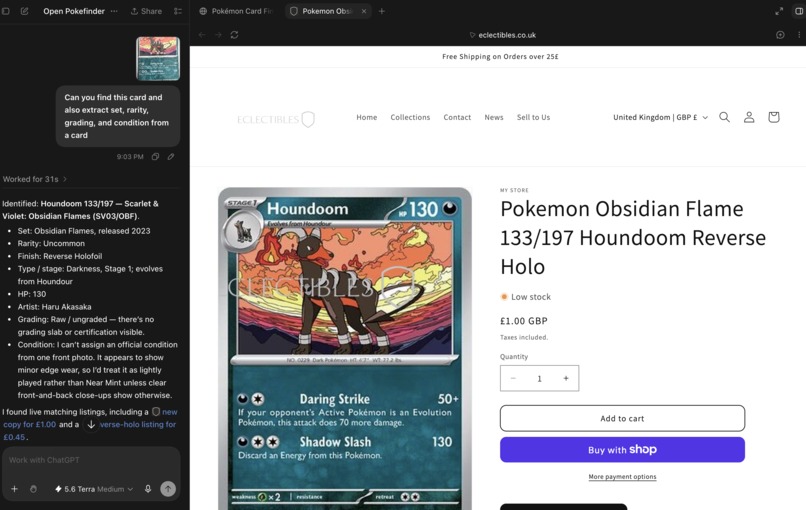
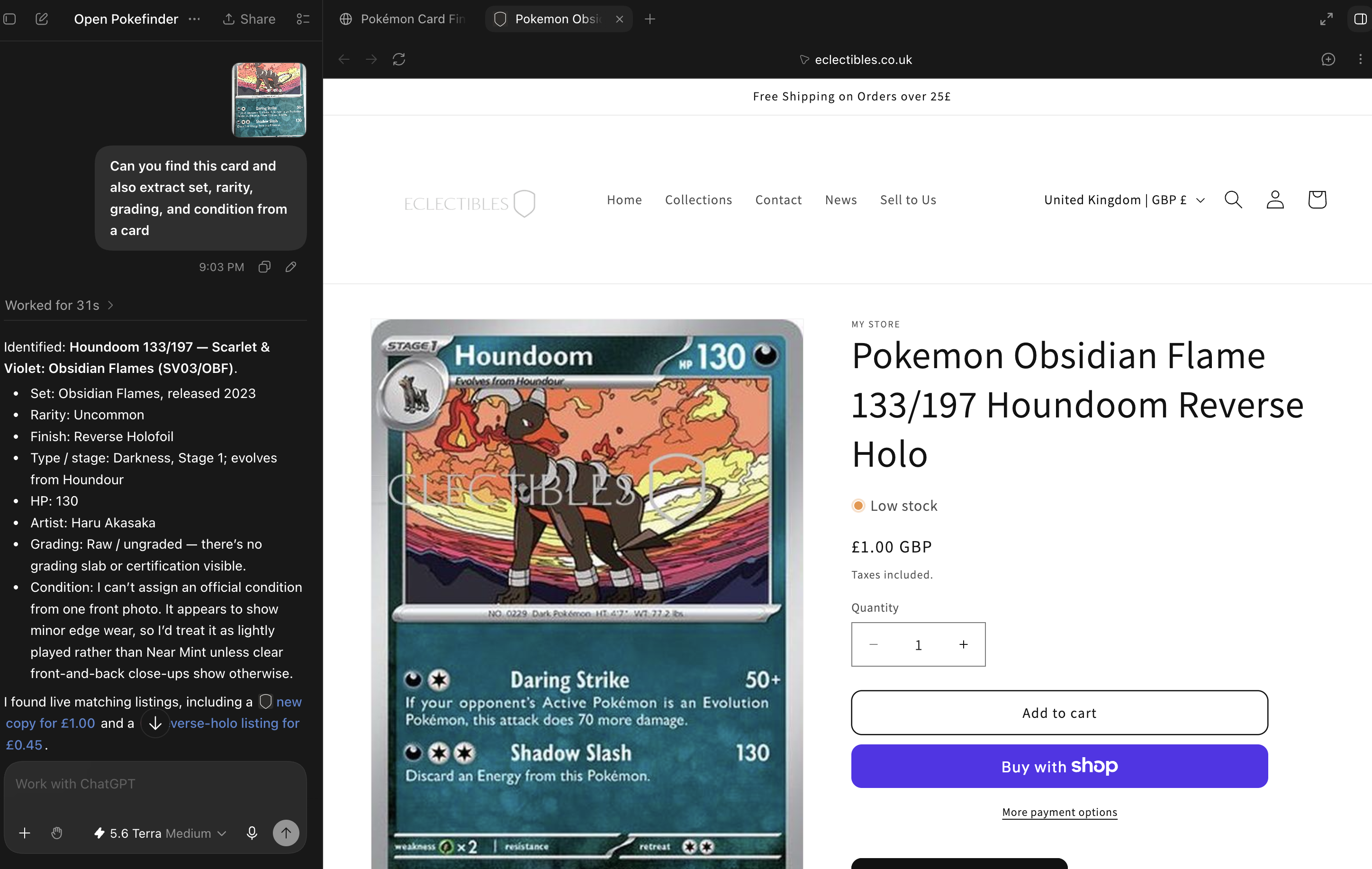
Analyzing card image and identifying card by its image
Inspiration
PokéFinder started because my son wanted to track down a few rare Pokémon cards. We tried eBay first and quickly ran into the usual problems: noisy listings, inconsistent naming, and the same card priced differently across a dozen stores. So we built PokeFinder.App to make the search easier. It brings live listings from Shopify Catalog together in one structured place through UCP, then enriches them with set, rarity, and grading data from the Pokémon TCG API.
When the WebMCP Challenge was announced, the idea immediately made sense to us. The hard part of buying Pokémon cards is not simply finding listings. It is knowing enough about the hobby to make sense of them: holo versus reverse holo, set codes, grading, and which cards were released last week.
An LLM can close that knowledge gap, but only if it can do more than answer questions in a chat window. It needs to work with the page alongside the user. That is what made WebMCP so interesting to us: it turns “AI can help you shop” into “AI can shop with you.” Whether someone is a lifelong collector or a complete beginner, the experience can meet them where they are.
What it does
PokéFinder is a single-page marketplace where humans and AI agents shop the same catalog side-by-side. A user can browse trending cards or every connected store, search by card name, set, or rarity, snap a photo and let AI identify it, filter by country, currency, price, or grading, compare prices across stores, save cards to a wishlist, sign in with magic link or Google or Discord or Shopify, and check out. An AI agent can do all of the same things by driving the page directly.
PokéFinder registers thirteen tools through WebMCP. They split into three categories:
Data queries (also exposed via MCP for external agents):
search_pokemon_cards—> search the live catalog across every connected storebrowse_card_database—> browse all cards with full paginationget_card_details—> fetch the full detail page for a specific cardlist_sets—> list every Pokémon card set currently in the catalogfind_cards_in_set—> find all cards within a specific setget_filter_taxonomy—> return the filter fields with brief explanations for non-expertsget_featured_cards—> return the curated featured / trending cardscompare_prices—> compare prices for the same card across every connected store
Image / AI (also exposed via MCP):
analyze_card_image—> extract set, rarity, grading, and condition from a card photoidentify_card_image—> identify the card from a photo, then return matching listings
Page actions (WebMCP-unique, these are what the agent-driven web unlocks):
highlight_card—> light up a specific card on the live page so the user sees exactly which one was selectedapply_filter—> filter the visible grid by price, country, rarity, or gradingadd_to_basket—> add a chosen card to the cart
The data and image tools give the agent everything it needs to reason about the catalog. The page-action tools give it the ability to drive what the user actually sees.
How we built it
We started with the PokéFinder backend we had already built: a Cloudflare Worker in front of the UCP catalog, plus a D1 mirror of the Pokémon TCG database for metadata enrichment. That foundation already gave us a strong search experience. The WebMCP layer was the new part.
We registered the same tool set through WebMCP for in-browser agents and through MCP for external agents such as ChatGPT, Claude, and custom MCP clients. The tools keep the same names and arguments on both surfaces, and they share the same underlying backend logic. Through WebMCP, however, the browser-facing tools can also update the page the user is looking at.
That distinction became central to the project. A catalog search can return the same listings through MCP or WebMCP. But with WebMCP, the agent can also highlight its recommendation, apply the requested filters in real time, and add the chosen card to the basket. MCP gives the agent data; WebMCP lets the agent use that data with the user on the live page.
One part of the build that we particularly enjoyed was resurfacing capabilities we already had. The server already knew how to search the catalog. We exposed that same capability through WebMCP, then connected it to the result grid so the agent could work with actual items on the page instead of returning a block of text. We used the same approach for filtering and highlighting. We only added a page action where changing the page genuinely helped the user.
Our stack is Cloudflare Workers, D1 for the Pokémon TCG mirror, KV for search caching, Workers AI with Llama 3.2 11B Vision for image identification, and the UCP catalog endpoint. The frontend is plain HTML, CSS, and JavaScript.
Challenges we ran into
One of the biggest challenges was making the tools feel like a natural part of the page. WebMCP is not just a chatbot sitting beside a website; the agent needs to interact with the experience itself. The hardest design decision was deciding what should be a data query and what should be a page action. The rule we eventually settled on was simple: if the agent needs the result to reason, it is a data tool. If the action changes what the user sees or does on the page, it is a WebMCP page action.
Turning backend results into page actions A search endpoint normally returns a JSON list. On the page, that list also needs to be rendered in a way the agent can work with. We built a thin layer that gives each result a stable ID. Follow-up actions such as highlighting a card or adding it to the basket can then target the exact item the user and agent are discussing.
Making image identification reliable The vision model sometimes produced a confident but incorrect identification when the photo was low resolution. Instead of pretending that uncertainty did not exist, we added a confirmation step so the user can correct the result before the Worker searches for listings. What began as a reliability problem ended up becoming a useful part of the experience.
Keeping the experience fast Browser-side tool calls introduce a network round trip. When an agent makes five calls in sequence, the delay adds up even if every individual call is reasonably fast. We cached aggressively and pre-rendered what we could so the experience would still feel responsive.
Accomplishments that we're proud of
Thirteen WebMCP tools now cover the full catalog journey, including search, comparison, image identification, filtering, highlighting, and adding to the basket. The same underlying capabilities are also available to external agents through MCP.
A discovery-to-purchase journey that once meant opening ten browser tabs can now happen in one conversation in around 30 seconds rather than 30 minutes.
We tested PokéFinder with people who knew very little about Pokémon TCG, including some very patient family members. They could find specific cards simply by describing what they wanted in plain English.
The interaction becomes more useful as the agent learns what the person is actually trying to find. That makes the hobby much more approachable for beginners without getting in the way of experienced collectors.
The image search works as a real shopping tool: take a photo of a card and get matching listings from every connected store.
What we learned
The page actions are what make WebMCP feel genuinely different. Highlighting, filtering, and adding to the basket turn an agent from something that gives advice into something that can work alongside the user.
Resurfacing is a powerful pattern. Many useful agent actions do not require a completely new backend feature; they require an existing capability to be exposed with a stable, UI-addressable ID.
Latency compounds quickly. Caching and pre-rendering matter just as much for a WebMCP experience as they do for any other real-time interface.
When an LLM can work directly with the page, conversational clarity becomes part of the UX. Some of our best improvements came from simplifying the interface and letting the agent handle the complexity.
Context makes the experience accessible. The agent can explain unfamiliar terms and narrow the catalog at the same time, which helps beginners shop with much more confidence.
What's next for Pokefinder.app WebMCP
More agent surfaces. Today, WebMCP connects to ChatGPT in the browser. We would love to see first-class integrations with tools such as Cursor, Claude, and Comet.
Built-in chat. We want to add a “search with AI” experience directly to the site so people without a separate AI assistant can shop in the same way.
Promoted placements through UCP. When the Shopify program moves beyond developer preview, we would like to surface clearly disclosed sponsored cards at the top of the grid.
Saved and shareable collections. Users should be able to build a wishlist with an agent, then send the collection to someone else with a link.
More marketplaces. The UCP and WebMCP approach can work well beyond Pokémon cards. We are interested in other specialist categories where structured catalog search and an agent-guided experience can beat traditional marketplace browsing.
Built With
- catalog
- cloudflare
- codex
- openclaw
- shopify
- tcg
- ucp
- webmcp


Log in or sign up for Devpost to join the conversation.