💡 Inspiration & Problem Statement
In spatial engineering, BIM modeling, GIS land surveying, utility audits, and civil structural analysis, inspecting massive 3D point cloud scans traditionally requires human technicians to manually tweak dozens of sliders, clipping planes, camera views, and classification filters.
Until now, AI web agents had no standard mechanism to understand or control complex 3D WebGL spatial canvases directly inside the browser tab. They were either restricted to 2D screenshot vision models or dependent on external backend servers and custom plugins.
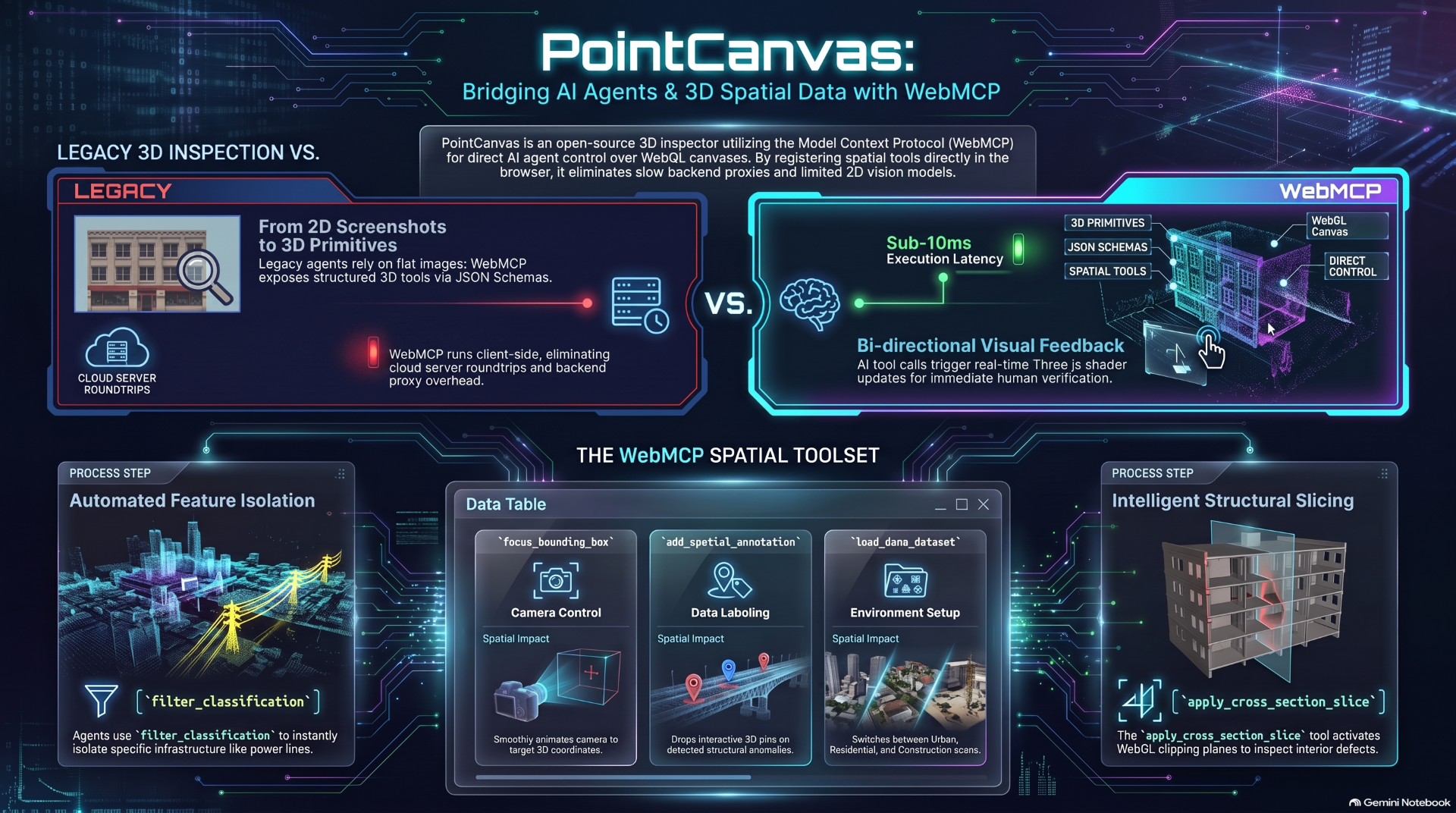
PointCanvas changes this completely by leveraging WebMCP — registering native client-side spatial inspection tools directly to document.modelContext.
🛰️ What It Does
PointCanvas is a high-performance, browser-based collaborative 3D point cloud inspection workspace where humans and AI agents work together in real-time.
- Client-Side WebMCP Tool Registration: Registers 5 specialized spatial primitives (
load_demo_dataset,filter_classification,focus_bounding_box,apply_cross_section_slice,add_spatial_annotation) using standard JSON Schemas directly ondocument.modelContext. - Zero-Latency In-Browser Execution: Tool calls execute client-side inside the browser tab in under 10ms with zero backend API roundtrip latency.
- Bi-Directional 3D Visual Feedback: As the AI agent executes WebMCP tools, custom Three.js shaders isolate ASPRS point classes (Ground, Vegetation, Buildings, Poles & Power Wires), WebGL clipping planes slice structural cross-sections, and camera controls smoothly animate to focus coordinates.
- Collaborative Spatial Pins: AI agents can detect structural defects or wire sags and drop interactive 3D billboard pins right onto target coordinates for human review.
- Real-time Telemetry Drawer: Includes a live WebMCP execution activity feed drawer displaying tool calls, raw JSON parameters, and execution state.
🛠️ How We Built It
PointCanvas is built from the ground up as a modern, single-page WebGL application:
- Core Framework: React 18 + Vite + TypeScript + Tailwind CSS
- 3D Graphics Engine: Three.js + React Three Fiber (
@react-three/fiber) +@react-three/drei - Data Loaders: Custom PCD (Point Cloud Data) ASCII/Binary & PLY mesh parsers supporting ASPRS feature classifications and RGB channels.
- State Management: Zustand store (
usePointCanvasStore) tracking active datasets, shader modes, clipping planes, annotations, and WebMCP call logs. - WebMCP Integration: Native
document.modelContext.registerTool(...)registration module (src/lib/webmcp.ts) connected directly to client-side store actions. - Open Source: Licensed under the OSI-approved MIT License.
🚧 Challenges We Ran Into
- High-Dimensional 3D Primitives in JSON Schema: Designing clean, serializable JSON schemas for 3D camera matrices, ASPRS classification arrays, and WebGL clipping plane vectors that LLM agents can reliably invoke.
- Sub-10ms WebGL Shader Updates: Ensuring custom Three.js
ShaderMaterialuniforms re-render dynamically as classification filters or elevation range windows change without dropping below 60 FPS. - Simulated vs Native WebMCP Bridge: Providing an interactive WebMCP Agent Execution Feed and simulator playground so judges can test and observe real-time tool calls in any browser environment.
🏆 Accomplishments We're Proud Of
- Successfully implementing native client-side
document.modelContext.registerToolfor complex 3D WebGL graphics in the browser. - Achieving sub-10ms tool execution latency by running all spatial primitives client-side.
- Creating a fully functional 3D inspector with custom PCD/PLY data generators, cross-section slicing, ASPRS point classification, and 3D billboard callout pins.
- Producing a complete narrated demo video using
ndemowith title cards, automated browser actions, and synchronized audio.
🎓 What We Learned
- How WebMCP bridges the gap between LLM web agents and complex web graphics, turning static browser canvases into interactive, agentic workspaces.
- Best practices for designing intuitive JSON Schema interfaces for spatial domain tools.
🔮 What's Next for PointCanvas
- Multi-User WebSockets: Real-time multi-agent and multi-human collaborative sessions.
- Large-Scale EPT / Entwine Point Tile Loading: Support for multi-gigabyte LiDAR datasets via octree streaming.
- Automated WebMCP Defect Detection: Training agent prompts to run automated structural health assessments on civil infrastructure.
Built With
- pcd
- ply
- react
- tailwindcss
- three.js
- typescript
- vite
- webgl
- webmcp
- zustand


Log in or sign up for Devpost to join the conversation.