Inspiration
As a kid with overbearing asian parents, I used to constantly hear the same thing, “When are you going to start playing the piano?” At the time, it didn’t seem like playing an actual piano was a viable option, not only are they expensive, but they take up lots of space and require regular maintenance. And while there are existing solutions such as digital keyboards, something about them feels off, the size, feeling, sound, it doesn’t truly feel like you are experiencing the piano.
What it does
Additionally, while other piano gloves have been created, unlike ours, they assign a specific key to each finger, limiting the versatility of how you play. Usually, with other alternatives, you can either only play 10 notes with the glove and not know where the notes are, or have inaccurate playing with only camera tracking. By combining the pros of both, we created PocketPiano
An AR piano that allows users to truly experience playing the piano, following the proper scale and tuning. It is portable, cheap, and straightforward, also providing piano tutorials that are easy to follow.
How we built it
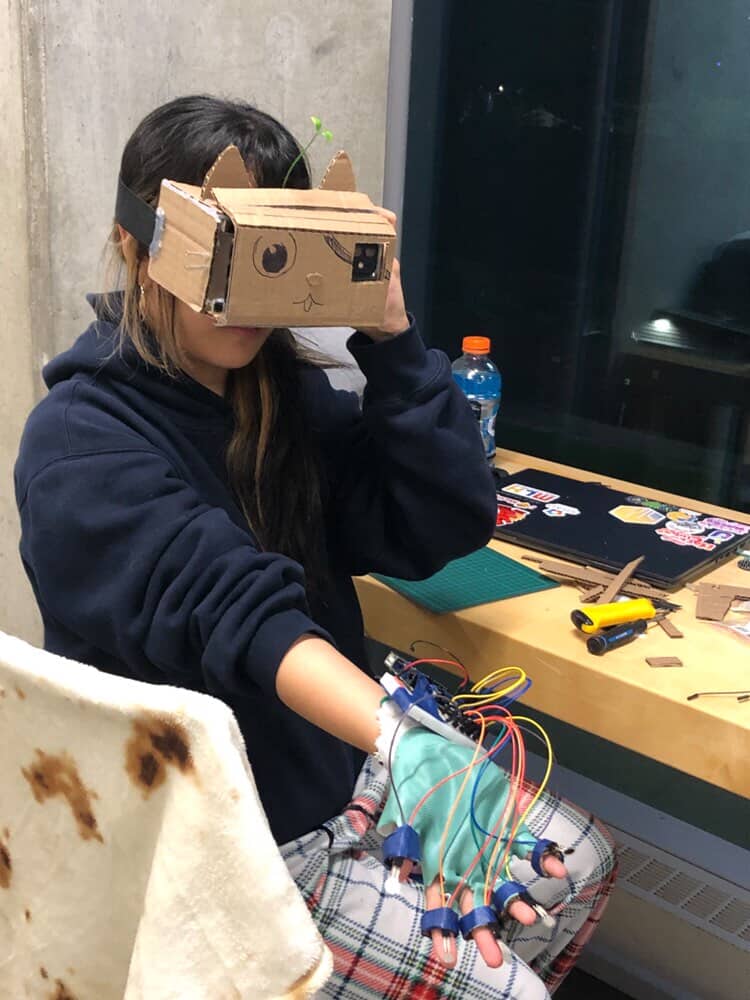
We first created an AR headset out of cardboard and biconvex lenses, in which a phone is placed inside. The phone displays a split screen of the piano, with all 88 keys. The keys can be tapped using gloves that have sensors attached to each fingertip, without covering finger joints to allow for camera tracking. This is wired into an Arduino UNO, where the serial outputs are sent to a Python server via USB data cable
The AR Piano is a markerless tutorial-and-performance system that turns any flat surface into a playable piano viewed through a worn-phone stereo headset. react-webcam feed streams JPEG frames over a WebSocket to a FastAPI server, where OpenCV ArUco detection (DICT_4X4_50 + solvePnP) and a MediaPipe HandLandmarker run concurrently on separate thread executors to gather finger data On the client, a Heckbert unit-square-to-quad homography built from the marker corners maps the tag plane to image space, letting the keyboard, falling notes, and hit detection all live in stable (u,v) coordinates that move with the marker, rendered into a split-screen stereo canvas with the hand skeleton overlaid on top. Interactive “falling notes” style tutorial for immersive learning, coordinating with FSR and key detection Sound comes from a dependency-free WebAudio triangle-wave synth.
Challenges we ran into
Hardware: When building the AR, it was difficult to determine the exact focal length between the lenses and the phone screen. Originally, we set the focal length to 3.7 cm, but when we tested it, the image was blurry. As a result, we had to do a lot of trial and error until we found a length that produced a clear image: 5.7 cm.
Software: Software challenges: Communication issues and latency, needing to compress images and optimize what information to send and receive Hand tracking with gloves was difficult, as Mediapipe tracks skin colour and joints AR projection onto the same plane as the table reliably and consistently enough for note detection to be accurate
Accomplishments that we're proud of
Even though this was a very ambitious project that required various components, we were still able to manage our time efficiently and effectively. We were able to get the phone and Python servers to connect, which was the most fundamental component, but also a major issue. After we got this working, we were able to build off it and add other components such as sound, falling notes, etc, which all came together to create the final project.
What we learned
Through building PocketPiano, we learned that integrating hardware, software, and user experience is often much more challenging than developing any individual component. While each subsystem worked independently, getting the AR display, hand tracking, glove sensors, audio generation, and networking to work together reliably required careful debugging and optimization. We also learned the importance of rapid prototyping and iterative testing. For example, our original headset design was based on the theoretical focal length of the lenses, but real-world testing showed that adjustments were needed to achieve a clear image.
On the software side, we gained experience working with real-time computer vision, WebSockets, FastAPI, MediaPipe, OpenCV, and low-latency communication between multiple devices. We learned how performance bottlenecks can arise from seemingly small decisions, such as image compression settings, serial communication speeds, and network architecture. Optimizing these systems taught us how to balance accuracy, responsiveness, and computational cost.
Most importantly, we learned that building a successful product requires focusing on the user experience rather than just the technology. Instead of creating another virtual piano, we identified limitations in existing solutions and combined AR visualization with wearable input to create something that feels intuitive, portable, and engaging. This project reinforced the value of interdisciplinary collaboration, creative problem-solving, and turning ambitious ideas into working prototypes within a limited timeframe.
What's next for PocketPiano
The current glove exposes its FSRs and wiring, which can snag during play. A future version would embed the sensors between fabric layers and route the wiring internally, so the hardware is hidden and the glove reads as a clean wearable rather than a breadboard on the hand.
End-to-end delay is currently dominated by the phone-over-network capture path and the 9600-baud serial FSR link. Faster hardware, a local or wired connection in place of ngrok, a higher-baud or wireless sensor link, and GPU-backed detection could close the gap.
and ofc Winning :)
Built With
- c++
- fastapi
- javascript
- ngrok
- python
- react
- tensorflow
- vite


Log in or sign up for Devpost to join the conversation.