-
-
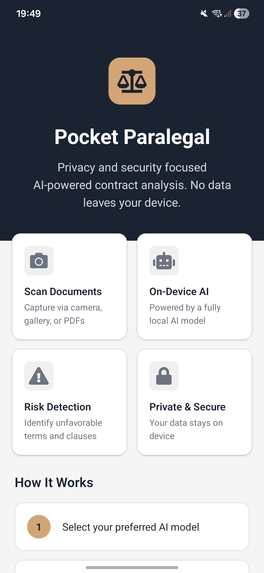
Home Page of app
-
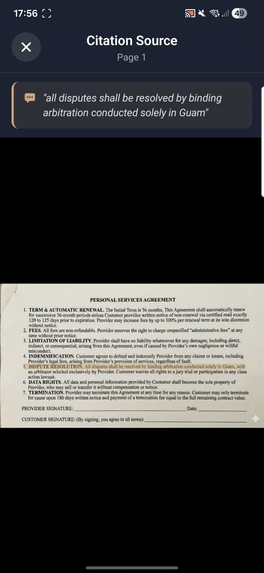
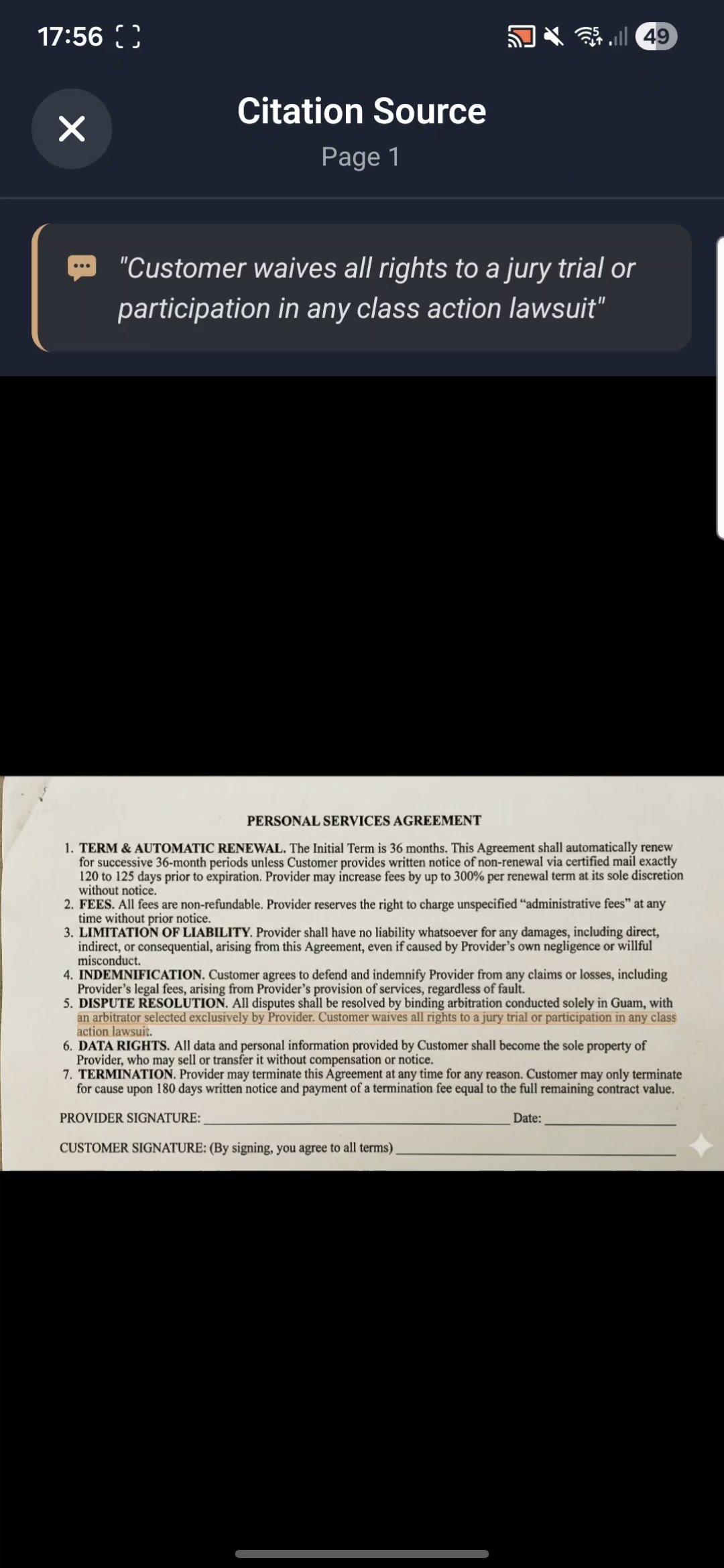
The 1st citacion that can be seen from the risks section, with the quoted text highlighted in the image
-
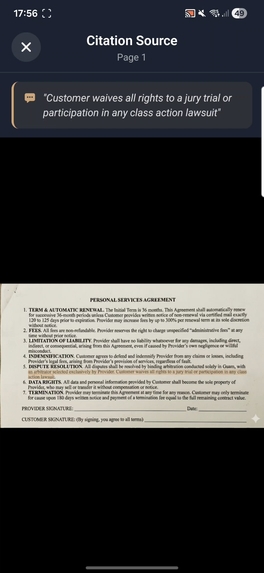
Second citacion, with the quoted text highlighted in the image
-
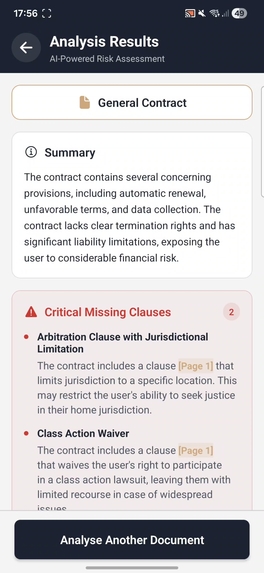
Summary of a scanned document, along with risks section



Inspiration
Legal contracts are usually dense, filled with complex terminology, and contain hidden clauses that can significantly impact individuals and small businesses. Many people sign contracts without fully understanding the risks because hiring a lawyer for every agreement is costly and time-consuming.
However, with the inclusion of cloud based LLM's, the biggest barrier has shifted from cost to privacy. You cannot paste a highly confidential NDA or employment contract into a cloud-based chatbot without violating confidentiality. This project solves this privacy problem by proving that modern Arm mobile processors are now powerful enough to run local legal analysis, ensuring that sensitive data never leaves the device.
The goal was to allow users to make better informed decisions about the contracts they sign, while maintaining complete privacy and security.
What it does
PocketParalegal is a mobile app that analyses contracts and legal documents to identify potential risks and unfavorable clauses. Users can:
- Scan documents via camera, select from gallery, or upload PDF files.
- Choose AI model to perform the task on their device (ranging from 1B to 3B parameters).
- Get instant analysis highlighting risky clauses such as hidden fees, unfavorable terms, data privacy concerns, etc.
- View citations with precise text highlighting that shows exactly where risks appear in the original document
- Maintain complete privacy as all processing happens locally using Arm-optimised models
How we built it
Tech Stack:
- React Native with Expo Router for easy cross-platform mobile development.
- ExecuTorch (PyTorch Mobile) uses XNNPACK delegate to accelerate inference operations directly on the Arm cpu, for on-device AI inference with Arm CPU optimisations.
- React Native MLKit OCR for text extraction from images and documents.
- Llama 3.2 models (1B and 3B variants) used quantized versions of Llama 3.2, allowing it to fit in the memory of a standard mobile device without significant accuracy loss.
Architecture:
- Document Processing Pipeline: Users capture/upload documents => MLKit OCR extracts text with bounding box coordinates => Text is stored with original image dimensions.
- AI Analysis: Combined document text is fed to the local LLM model with a specialised prompt => Model identifies risks and provides supporting quotes.
- Citation System: Quotes from the AI are matched against OCR data => Bounding boxes are mapped to screen coordinates for highlighting.
- Interactive UI: Users can tap citations to view the original document with highlighted text overlays.
Challenges we ran into
Model Deletion: The library that was used for on-device inference (ExecuTorch) had several functions to manipulate and delete models from device memory. However whether it is a problem to do with how I implemented it or a bug in the library, models wouldn't delete properly and would persist in the device memory even after deletion calls. This was a big problem during development, as larger models not being properly deleted would quickly fill up device RAM and cause crashes. Unfortunately, the only solution I found was to load a model once per app session, and force restart the app to load a different model. This preventes the app crashing, but is not a great user experience.
Coordinate System Mismatches: One of the biggest challenge was accurately highlighting cited text. OCR returns coordinates in the original image resolution (e.g., 1700x2200), but React Native's Image component displays downscaled versions (e.g., 850x1100). I didnt know the displayed version was downscaled, so at first the coordinates were very mismatched, and it was only after a long debugging session did the problem become clear. The solution was simple, I had to scale the coordinates for the new resolution and implement proper aspect-ratio-aware coordinate transformation to map OCR bounding boxes to screen positions.
PDF Processing: Unlike images, PDFs required rendering each page offscreen, capturing it as an image, then running OCR. We built a custom component that processes PDFs page-by-page without blocking the UI.
Citation Matching: AI models sometimes paraphrase or slightly modify quotes. The solution was to implement fuzzy string matching with normalization (removing punctuation, lowercase conversion) to reliably match AI quotes to OCR text.
Accomplishments that we're proud of
- Goal of project was accomplished: to create a fully functional mobile app that can analyse legal contracts on-device while maintaining user privacy.
- Arm Optimisation: Successfully leveraged ExecuTorch with Arm XNNPACK delegate for efficient on-device inference on mobile CPUs.
- Hallucination-Free Citations: Solved the "black box" problem of LLMs by building a fuzzy-matching citacion mapper. This translates the LLM's text output back to the original OCR bounding boxes in the image/pdf, allowing us to accurately highlight the exact pixels of the contract that are risky. Using this, users can visually see the exact sections that have been identified as problematic, greatly enhancing the app experience.
- Production Ready UX: Created a clear and polished interface with proper error handling, loading states, and user feedback.
- Multi-Format Support: App can handle camera captures, gallery images, and multi-page PDFs with an unified processing pipeline.
- Model Flexibility: System supports multiple LLM sizes so users can select based on their device capabilities.
What we learned
- Mobile AI is viable: With proper optimization (quantization, Arm delegates), running billion-parameter models on phones can be practical for real-world applications.
- Performance Tuning: Mobile devices have hard memory, thermal and battery limits, meaning profiling and optimisations are critical for good UX.
- User Experience: Proper communication of loading states, errors, and progress to users is an essential component of mobile app design.
What's next for PocketParalegal
Future Improvements
- Multi-Language Support: Expand the app to support multiple languages for both OCR and AI analysis to cater to a broader user base. The LLMs used already support multiple languages, so this would mainly involve changing the LLM prompt and ensuring OCR can handle different languages accurately.
- Document History: Save the analysed documents and their reports, and compare two contracts side-by-side to see what has changed. Could be used to track changes between contract versions.
- Export Analysis: Allow users to export the analysis reports in various formats (e.g., PDF, CSV) for sharing and record-keeping.
- Add More Models: Add support for more LLMs, including newer lightweight models that are more capable than those in the current version, to give a better and more consistent user experience across different device capabilities.
Built With
- executorch
- expo.io
- react
- react-native
- typescript

Log in or sign up for Devpost to join the conversation.