-
-
1024 px App Icon
-
App Screenshot Without Frame
Inspiration
As students building a startup, we know that ideas rarely arrive when a laptop is open. They show up on the way to class, during a late-night conversation with friends, between meetings, or in the small gaps of a busy day.
For us, creating something new has always been collaborative and mobile. We sketch ideas on our phones, share references in group chats, and talk through how to make a product feel exciting before we even have a laptop open. But turning those moments of momentum into real creative work often means waiting until we are back at a desk, with the right tools open.
We wanted to close that gap: to make the creative process feel as immediate as the idea itself. PocketFlow was created for people who are building on the go: students, founders, creators, and small teams who need a simple way to turn ideas into polished marketing content anytime, anywhere.
What it does
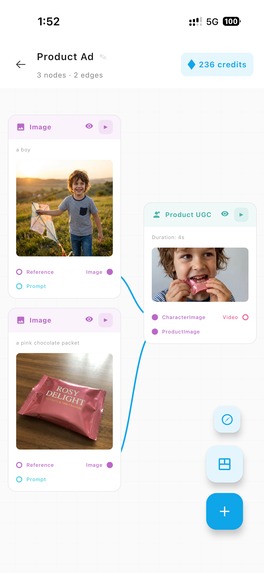
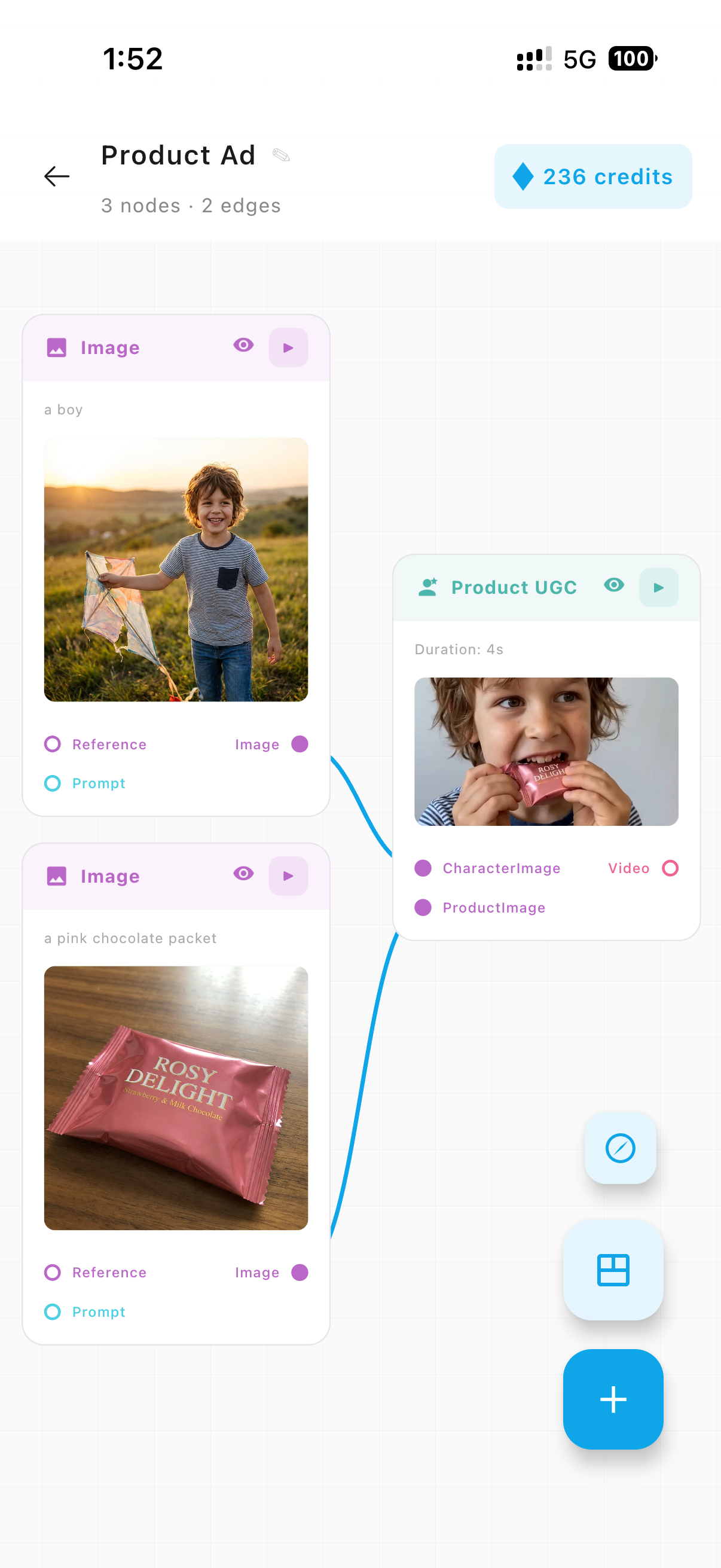
PocketFlow is a node-based visual AI workflow builder for mobile - think Figma meets n8n, but for AI generation - running natively on iOS and Android via a single Kotlin Multiplatform codebase.
🎨 The Canvas
At the heart of PocketFlow is an infinite canvas with pinch-to-zoom, drag-to-pan, and bezier curve connections between nodes - all built from scratch in Compose Multiplatform using Canvas APIs, with no web views. Every node is a draggable card that can be repositioned freely on the canvas. Nodes are connected via typed ports - an image output from one node can only connect to an image input on another, enforcing type safety visually.
🧩 Node Types
Users build workflows by combining nodes from a categorized node palette:
Source Nodes (no inputs):
- Text Prompt - a text box that feeds text into downstream nodes
- Local Image - upload any image from your device as a workflow input
Generation Nodes:
- Image Generation - generate images from a text prompt using Gemini Image 3 Pro or GPT Image 2, with support for 1K/2K/4K resolution, 16:9/9:16/1:1/4:3 aspect ratios, and optional reference images for style transfer
- Video (Image-to-Video / Text-to-Video) - animate an image or generate video purely from a text prompt using Veo 3.1, Veo 3.1 Fast, or Seedance 2; supports 4–8s clips (or 4–15s on Seedance 2), 16:9 or 9:16 aspect ratio, and native AI audio generation
- Speech (Text-to-Speech) - convert any text into speech using ElevenLabs voices via Runway ML, with voice presets including Maya, Nova, Atlas, Echo, Sage, Coral, Vale, and Storm Runway Recipes (Advanced Production Nodes):
- Localize - translate the text in any image ad into another language while preserving the visual layout and branding
- Marketing - generate 1–4 high-quality marketing stock photos from a prompt, optionally anchored to a reference image
- Product Ad - take up to 10 product images and optional style references and generate a polished video ad (5–10s, 720p or 1080p) with AI-authored visuals and audio
- Product Campaign - generate multiple marketing image variants from a single product photo and a direction prompt
- Product Swap - take an existing reference video and seamlessly swap out the product shown with a new one
- Multishot - generate a multi-scene video from a narrative prompt, optionally anchored to a first-frame image, with AI-determined shot transitions
- Product UGC - place a human character alongside a product and generate a realistic UGC-style short video
Utility Nodes:
- Notes - free-form sticky notes or to-do checklists that live on the canvas alongside generation nodes, useful for collaboration and workflow documentation
🔗 Data Flow & Dependency Resolution
Nodes are wired together with typed edges connecting output ports to input ports. The entire graph is a DAG (directed acyclic graph). When the workflow runs, the engine performs a topological sort and resolves inter-node dependencies: the image URL output by an Image Generation node is automatically injected as the image input of the downstream Video node - no copy-pasting, no manual URL handling.
☁️ Cloud Execution Engine
When the user taps Run, PocketFlow serializes the entire workflow graph and sends it to a Supabase Edge Function (execute-workflow) running on Deno. This server-side engine:
- Topologically sorts the nodes
- For each node in order, resolves its input parameters (substituting outputs from already-completed upstream nodes)
- Calls the appropriate Runway ML API endpoint (/text_to_image, /image_to_video, /text_to_video, /text_to_speech, /recipes/ad_localization, /recipes/product_ad, /recipes/multi_shot_video, /recipes/product_ugc, /recipes/product_swap, /recipes/marketing_stock_image, /recipes/product_campaign_image)
- Polls for task completion (up to 15 minutes per node)
- Writes the result URLs to Supabase Postgres and chains them into the next node's inputs
- Sends a push notification when the full workflow completes
This means the app can be fully closed mid-run. The cloud handles everything.
💳 Credit System
Each node type consumes credits based on its generation cost:
• Image Generation: 30 credits (1K), 30–60 credits (2K/4K), variable for GPT Image 2 by quality • Video: 22–60 credits/second depending on model and whether AI audio is enabled • Speech: tiered by word count (1–15 credits for 50–1000+ words) • Runway Recipes: 18–1,500+ credits depending on type, duration, and resolution
Credits are managed via the RevenueCat KMP SDK as a virtual currency. Users purchase credit bundles through the native App Store / Google Play in-app purchase flow. The balance updates in real time after each generation run, and a OneSignal In-App Message prompts a top-up when the balance falls below 50 credits.
👥 Collaboration
Any PocketFlow workflow can be shared with other users through a join code. When collaborators join a shared canvas, they can build workflows together in real time.
Supabase Realtime presence channels power live collaboration, including:
- Real-time cursor positions for every active collaborator
- Shared workflow nodes and connections
- Inline comments on individual nodes
- Free-form notes and to-do checklists
- Attribution for every note, task, and workflow action
🗂️ Assets Library
Every generated output- images, videos, audio clips- is stored in Supabase Storage and linked to the workflow in Postgres. Users can browse all generated assets from the Assets screen, play back videos inline, and view full-resolution images - all synced across devices.
🔔 Keeping Users Coming Back with OneSignal
PocketFlow uses OneSignal as its full-stack engagement layer - not just for generic push notifications, but for precision-targeted, event-driven messaging built directly into the product's collaboration and generation loops. Every notification is targeted by external_id (the user's Supabase user ID), so there are no broadcast blasts - only the right person gets pinged.
📱 iOS Live Activities (Lock Screen Engagement)
PocketFlow uses OneSignal Live Activities to keep users informed while a workflow runs, even when the app is no longer open. Each active workflow appears on the iPhone Lock Screen and in the Dynamic Island, turning a long-running AI generation into a clear, glanceable progress experience.
The Live Activity displays:
- The generation node currently running, with a color-coded node-type icon
- A step counter, such as “Step 2 of 4”
- A live progress bar for the overall workflow
- The current workflow status, including completion or failure
Workflow execution happens in the cloud through the execute-workflow Supabase Edge Function. As each node progresses or completes, the server sends an event: "update" request to OneSignal’s Live Activity API. This keeps the Lock Screen experience accurate without relying on the app remaining active in the foreground or background.
When the workflow completes or fails, the server sends an event: "end" request to close the Live Activity and delivers a final push notification. Users can see that their assets are ready at a glance, then return to PocketFlow to view, download, or share the result.
💬 Collaboration-Driven Re-engagement Pushes
Every social action inside a shared workflow fires a targeted push to the exact subset of members who care about it - resolved by matching Supabase user IDs against OneSignal's external_id alias:
| Trigger | Recipient | Notification |
|---|---|---|
| Member joins workflow via join code | All existing members & owner (excluding the joiner) | "JoinerName joined the workflow! 🚀" |
| Member leaves workflow | All remaining members & owner (excluding the leaver) | "LeaverName left the workflow." |
| New message on a node | All members & owner (excluding author) | "AuthorName: message text" on the node |
| @mention in a note | Only the mentioned user(s) | "AuthorName mentioned you in 'WorkflowName'" |
| Checklist item ticked / unticked | All members & owner (excluding actor) | "AuthorName completed 'Task Name' in 'WorkflowName'" |
| Task assigned to a member | Only the assignee | "You were assigned a task 📋" |
| Workflow Ping 🔔 | All members, or a single targeted member | "AuthorName pinged everyone in 'WorkflowName'!" |
| Collaborator generation completes | All members & owner (excluding the runner) | "AuthorName generated Video in 'WorkflowName'" |
| Workflow run completes (cloud) | The user who submitted the run | "Your workflow finished" (with deep-link to results) |
Each notification carries a deep-link payload (workflow_id, node_id, type) so tapping it navigates the user directly to the exact node that triggered it - not just the app home screen. PocketFlow registers each user's Supabase ID as an OneSignal external_id alias, then uses OneSignal's /notifications REST API to fire precision-targeted push notifications - not broadcasts - directly to the specific workflow members affected by each event, with a deep-link payload so tapping opens the exact node that triggered it.
📊 In-App Messages via Trigger + Tag System
PocketFlow uses OneSignal's In-App Messaging system with a custom trigger and tag architecture to show contextual upsell and re-engagement messages at the right moment:
- Credit balance tags (credits, credits_balance, credit_count, available_credits) are synced to OneSignal every time a generation completes or a purchase is made - enabling OneSignal IAMs and journeys to show personalized Liquid-syntax messages like "You have {{ credits | default: '0' }} credits left"
- Low credits trigger - after every node run, if the user's balance drops below 50, PocketFlow fires the triggers credits_less_than_50, low_credits, credits_low, and action=low_credits - pulsed three times (at 0ms, 600ms, and 1500ms) to ensure the IAM displays even with UI rendering delays
- Workflow created trigger - fires workflow_created and action=workflow_created when a user creates their first workflow, ideal for onboarding IAMs
- Tag has_low_credits - set to "true" / "false" to segment users in OneSignal journeys for re-engagement campaigns
This means PocketFlow doesn't just send notifications — it runs a behavioral engagement loop: user generates → credits deduct → balance synced to OneSignal → IAM fires at low balance → user tops up → balance tag updated → triggers cleared.
How I built it
Kotlin Multiplatform (KMP) is the foundation, sharing ~95% of business logic between iOS and Android via a single Kotlin codebase compiled to a native Swift-interoperable framework for iOS and standard Android bytecode.
- UI: Compose Multiplatform (Material 3) on both platforms with a fully custom infinite canvas, node editor, and connection system built from scratch using Canvas APIs.
- Backend: Supabase (Postgres for workflow/node state, Supabase Auth for user management, Supabase Storage for media assets, Supabase Edge Functions on Deno for the cloud execution engine).
- AI Generation: Runway ML API —
/text_to_image,/image_to_video,/text_to_video,/text_to_speech, and all Runway Recipes endpoints. - Live Activities & Push: OneSignal SDK for iOS Live Activities (Dynamic Island + Lock Screen widget) and push notifications. The
execute-workflowEdge Function sends remote Live Activity updates directly to OneSignal's API during each node's execution so updates continue even when the app is fully closed. - Payments: RevenueCat KMP SDK with entitlement-gated credit system for generation credits.
- Collaboration: Real-time presence and workflow sharing using Supabase Realtime channels with join codes.
Challenges I ran into
- iOS can stop long-running workflows when the app closes, so execution runs in a Supabase Edge Function.
- Live Activities need to remain accurate after the app closes, so the server sends OneSignal updates.
- Runway endpoints use different payload formats, requiring endpoint-specific validation and mapping.
Accomplishments that I’m proud of
- A cloud workflow engine that completes multi-step AI pipelines without keeping the phone awake.
- Live Activities that show generation progress on the Lock Screen and Dynamic Island.
- One Kotlin Multiplatform codebase powering native iOS and Android apps.
What I learned
- Kotlin Multiplatform works well when platform-specific features are properly isolated.
- Long-running mobile tasks are more reliable when execution happens in the cloud.
- OneSignal Live Activities make background generation progress visible and useful.
What’s next
- Android Live Updates and persistent progress notifications.
- More AI models for image, voice, music, and video generation.
- AI-generated workflow graphs and reusable workflow templates.
Built With
- kotlin

Log in or sign up for Devpost to join the conversation.